• Hey Guest. Check out your NeoGAF Wrapped 2025 results here!

Is there a fourth option besides Vsync, Screen Tearing or GSync?

nkarafo

Member
Besides GSync that is. Not everyone has that option, plus it's a pretty recent solution.

I'm wondering about this for some time now. In my 10+ years of PC gaming i never managed to play a single PC game with v-sync off without tearing the shit out of the screen. Even if i lock all games at, say, 60fps with RTSS on the 60hz TV, i still get constant screen tearing, despite said PC being able to handle those frame rates easily.

The new Nvidia drivers broke vsync in Serious Sam HD and Second Encounter HD as well. So i can't play those with vsync ON because that causes game breaking glitches. But i also can't avoid screen tearing either.

What i'm asking is, how do you people config your PC games all this time? I hear since forever that vsync is bad and it causes input lag. So i see many people claiming they play with vsync OFF. But doesn't that cause extreme screen tearing for you? Extreme is the right word because for me it's constant and very intense. It was always like that for me, through many PC builds and different monitors or TVs. So it's not just one bad system or configuration.

Am i missing something?
 
A 144hz monitor, but that might not be what you mean. If you use vsync, enable triple buffering as well.

Also, a 60 fps frame rate caps can work sometimes if you have good performance.
 
I always play with vsync turned on
What lag ?

With Vsync off your GPU is pumping out as many frames as fast as possible so there is no delay between frames, with Vsync on the GPU will display frames at the refresh rate of your monitor so sometimes you will be waiting on a frame to display when the GPU would have already moved onto the next with Vsync off, thus creating a less responsive experience. At least that's my understanding, I'm sure someone will come correct me if I'm wrong.
 
I got used to playing with v-sync off and dealing with the screen tearing. It's only a slight annoyance to me now and I think the extra frames and responsiveness are worth it.

Maybe someday I'll be elite enough to afford G-sync lol
 
You can get Windows to handle V sync by playing in borderless window mode. There are handy tools to force games that don't do it natively. That's how I config most of my games. I don't have a phobia of lag.
 
With Vsync off your GPU is pumping out as many frames as fast as possible so there is no delay between frames, with Vsync on the GPU will display frames at the refresh rate of your monitor so sometimes you will be waiting on a frame to display when the GPU would have already moved onto the next with Vsync off, thus creating a less responsive experience. At least that's my understanding, I'm sure someone will come correct me if I'm wrong.
1 frame lag ? Is that a thing now?
 
Also, a 60 fps frame rate caps can work sometimes if you have good performance.
Honestly, every time i try this, it never works. This time i tried with Serious Sam HD (since Nvidia broke vsync with it). My 1060 should be able to run this game at 200 fps or something. So i lock it at 60fps with RTSS since my TV is 60hz. And i get tearing. Not the minor type like in some console games. But the constant type, the one makes the screen look like there's a ripple effect applied at all times.
 
I don't use v-sync because of input lag. I've asked before but I'm not sure if g-sync even removes input lag?

What I do to reduce screen tearing when the game allows it is try and get it to around 90fps and then I get a lot less tearing on my 60hz monitor.

When games cap at 60 and v-sync is off, I get way more tearing. Eg Wolfenstein new order
 
Everyone plays their WOW or whatever with vsync off in borderless windowed mode and doesnt realize windows is just doing the vsync
 
I always play with vsync on, less hassle that way. There are a bunch of games that go crazy otherwise when the framerate is too high, mostly earlier Windows 3D games from the 90s like Indiana Jones and the Infernal Machine which won't even start with vsync off on a modern computer. Or maybe it reached the title screen, been a while since I played it.

Also, I feel no need for more than 60fps, at all.
 
I don't use v-sync because I can't play in butter smooth bullet-time with cheat engine.

I was slowing down RES Evil 7 to 50% playing with keyboard and mouse whilst still retaining dat butter smooth 60fps, head shots all day. Yea I'm pretty lame.
 
I played through SOMA recently and was surprised with how badly it performed. About halfway through the game I finally looked online and found the solution: disabling the in-game Vsync and enabling it in Nvidia control panel instead.

This got me thinking: is it better to just make it a global setting in the control panel? Is there any reason not to?
 
The thing I've never understood is if you cap your shit at 60fps and your game is running at that framerate perfectly, why is there still screen tearing (if VSync is off)?
 
I played through SOMA recently and was surprised with how badly it performed. About halfway through the game I finally looked online and found the solution: disabling the in-game Vsync and enabling it in Nvidia control panel instead.

This got me thinking: is it better to just make it a global setting in the control panel? Is there any reason not to?

On NVIDIA I think there isn't.

Driver VSync on, ingame VSync off, RTSS 60fps cap and exclusive fullscreen (as opposed to AMD) has been the most consistent combination for me.
 
The thing I've never understood is if you cap your shit at 60fps and your game is running at that framerate perfectly, why is there still screen tearing (if VSync is off)?
That's what gets me too.

I assume the 60fps cap and 60hz on the TV/monitor aren't 100% consistent with each other, even minor changes like the occasional 0.1 hz difference or something like that will cause tear.


Driver VSync on, ingame VSync off, RTSS 60fps cap and exclusive fullscreen (as opposed to AMD) has been the most consistent combination for me.
That's my default setup.
 
You can try adaptive V-sync. Maybe that's what "fastsync" is?


The thing I've never understood is if you cap your shit at 60fps and your game is running at that framerate perfectly, why is there still screen tearing (if VSync is off)?

Frame caps which aren't coded into the game, are not perfect. Doing it through the driver or via a game tool (like Afterburner/Rivaturner) is imprecise. Try capping a few FPS under 60 and see if you still get some tearing.
 
The thing I've never understood is if you cap your shit at 60fps and your game is running at that framerate perfectly, why is there still screen tearing (if VSync is off)?
Because the game doesn't know when the monitor changes the image, frame can be finished during the refresh. (With perfect 60fps, it can be constantly in middle of refresh.)
V-sync off tears always and with very high framerates you get multiple tear lines per refresh.

Only option beside V-sync that gives perfect images are freesync and G-sync.
In which computer tells monitor that it has just finished a new image and asks monitor to display it at right time.
 
Frame caps which aren't coded into the game, are not perfect. Doing it through the driver or via a game tool (like Afterburner/Rivaturner) is imprecise. Try capping a few FPS under 60 and see if you still get some tearing.
This gives me both tearing and stutters.
 
Run your games in windowed mode with the game's framerate uncapped and let the windows dwm handle the display of frames; this is a good form of triple-buffered v-sync.
I played through SOMA recently and was surprised with how badly it performed. About halfway through the game I finally looked online and found the solution: disabling the in-game Vsync and enabling it in Nvidia control panel instead.

This got me thinking: is it better to just make it a global setting in the control panel? Is there any reason not to?
According to this thread forcing v-sync through the driver panel causes better frame pacing.
 
I don't use v-sync because of input lag. I've asked before but I'm not sure if g-sync even removes input lag?

Yes it does.

It dynamically matches the refresh rate of your monitor to your framerate, eliminating tearing but still displaying every rendered frame.

I could never go back to a non-G-sync solution, it is truly incredible and totally worth the entry fee. The single best PC upgrade since the SSD.
 
Always play with vsync (or fastsync), never have problem with tearing or input lag (well, aside from Dosbox or ScummVM, where vsync don't work =( )
 
Yes it does.

It dynamically matches the refresh rate of your monitor to your framerate, eliminating tearing but still displaying every rendered frame.

I could never go back to a non-G-sync solution, it is truly incredible and totally worth the entry fee. The single best PC upgrade since the SSD.

Exactly this.
 
OP, try capping framerate at 30fps+ over your monitor refresh rate if the game lets you. So 90fps cap at 60hz. Make sure the game is actually rendering at or close to the cap too.

Yes it does.

It dynamically matches the refresh rate of your monitor to your framerate, eliminating tearing but still displaying every rendered frame.

I could never go back to a non-G-sync solution, it is truly incredible and totally worth the entry fee. The single best PC upgrade since the SSD.

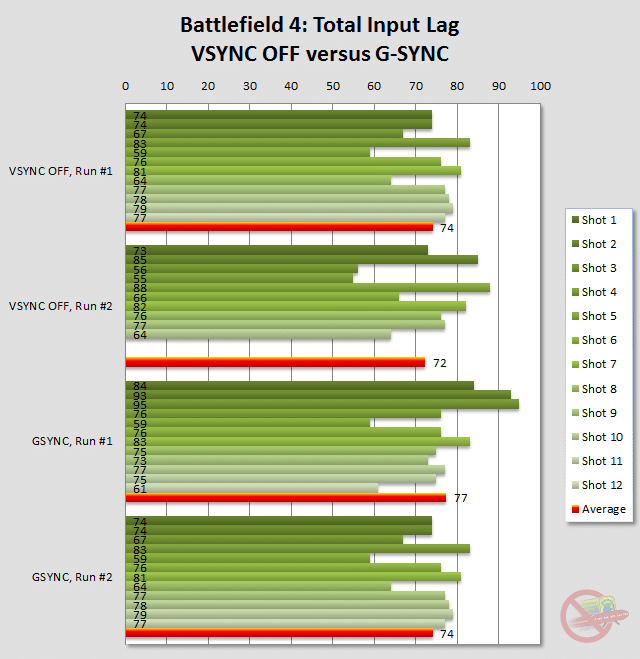
Ok nice, you're right, it has a lot less lag than v-sync.

http://www.blurbusters.com/gsync/preview2/

lag-bf4.png


Seems there's a difference between games but it still seems decent.

welp, time to invest.
 
I've started to use Fast Sync for the games which I can run over 60 fps, I used to use Vsync and RTSS (Rivatuner Statistics Server) with triple buffering for GTA V but now I just use Fast Sync and RTSS and it works really well, I also use it for Overwatch too and I don't have any tearing.

EDIT: Although I've noticed that if you cap the frame-rate to 60 using RTSS while using Fast Sync there can be some slight stutters that distract from the smoothness, I think it might be a frame pacing issue but I'm not entirely sure so I prefer to just use Vsync with triple buffering for GTA V. I haven't encountered this with Overwatch but I run that at 100 fps in a borderless window.
 
I am in the same boat with you OP. I get quite bad screen tearing even with games running at high FPS and I can't stand it. Vysnc is always on for me.
 
All I can say is that I have not enabled vsync once since I got a 144Hz monitor. It's extremely rare that I see any noticable tearing. It doesn't go away completely, but it's not noticable at all to me unless I really look for it.

And I'm someone who can't stand tearing.
 
In my 10+ years of PC gaming i never managed to play a single PC game with v-sync off without tearing the shit out of the screen. Even if i lock all games at, say, 60fps with RTSS on the 60hz TV, i still get constant screen tearing, despite said PC being able to handle those frame rates easily.
If you're disabling the thing which synchronizes frames to the display's refresh rate, the result is screen tearing and judder.

Variable Refresh Rate displays (G-Sync, Adaptive-Sync/FreeSync, HDMI 2.1 Game VRR) are the solution to screen tearing without input lag, since they synchronize the refresh rate to the framerate instead.

If you disable all forms of synchronization, the result is minimal input lag, but screen tearing.
Some people just don't seem to care about screen tearing or smoothness.

Driver VSync on, ingame VSync off, RTSS 60fps cap and exclusive fullscreen (as opposed to AMD) has been the most consistent combination for me.
You shouldn't be using a framerate limiter in conjunction with V-Sync.
At best, it's not going to do anything, at worst it's going to add input lag and cause the game to stutter.

What you need is a Fast Sync. Enable it in the NV CP.
Fast Sync is just a form of triple-buffered V-Sync.
It improves latency when the framerate is >2x the refresh rate, but often causes stuttering issues.
It doesn't always do this, if the framerate holds steady, but in the majority of games I've used it with - even old games - it isn't nearly as smooth as double-buffered V-Sync.

It does seem to fix this bug with Serious Sam HD though.

You can try adaptive V-sync. Maybe that's what "fastsync" is?
Adaptive V-Sync acts like standard V-Sync when your framerate is equal to or higher than your refresh rate, but switches itself off when the framerate drops below it.
This allows the game to maybe drop to only 50 FPS and tear, instead of dropping to 30 FPS to avoid tearing with double-buffered V-Sync, or having an extra frame of latency and stuttering with triple-buffered V-Sync.

Frame caps which aren't coded into the game, are not perfect. Doing it through the driver or via a game tool (like Afterburner/Rivaturner) is imprecise. Try capping a few FPS under 60 and see if you still get some tearing.
RTSS is actually one of the best framerate limiters around, since using it can result in very consistent frametimes, while adding minimal latency.
It's generally better than most in-game framerate limiters.

NVIDIA just secretly put out an update to their framerate limiter which makes it synchronous.
If you are using the latest drivers and disable V-Sync, then set the framerate limiter in the game's profile to match your refresh rate (via NVIDIA Profile Inspector) it now tries to lock the tear line to the bottom of your screen whenever possible.
This gives you an almost tear-free image, theoretically without the latency of using V-Sync.
NVIDIA's framerate limiter has not been the best with regard to latency though, so it may not be saving much/any latency at all if that hasn't been improved. I don't think anyone has measured this yet.
 
You shouldn't be using a framerate limiter in conjunction with V-Sync.
At best, it's not going to do anything, at worst it's going to add input lag and cause the game to stutter.

It's odd because with Final Fantasy XIV, just using Borderless Windowed isn't enough. For the clearest motion, setting the cap in-game to your current monitor's refresh rate and with Borderless Windowed mode causes perfect smoothness in motion.

When the cap is off and the game is rendering like 120+ FPS and using Borderless Windowed, I get some odd motion artifacts or screen tearing.
 
NVIDIA just secretly put out an update to their framerate limiter which makes it synchronous.
If you are using the latest drivers and disable V-Sync, then set the framerate limiter in the game's profile to match your refresh rate (via NVIDIA Profile Inspector) it now tries to lock the tear line to the bottom of your screen whenever possible.
This gives you an almost tear-free image, theoretically without the latency of using V-Sync.
NVIDIA's framerate limiter has not been the best with regard to latency though, so it may not be saving much/any latency at all if that hasn't been improved. I don't think anyone has measured this yet.
This guy measured the latency with Nvidia's v2 framerate limiter and it's just as bad as v-sync. https://www.youtube.com/watch?v=rs0PYCpBJjc
 
OP, try capping framerate at 30fps+ over your monitor refresh rate if the game lets you. So 90fps cap at 60hz. Make sure the game is actually rendering at or close to the cap too.
This didn't work with Serious Sam HD. Still getting massive amounts of tearing.

The Nvidia frame limiter also breaks the game in the same way vsync does.

The only way to play the game is using fast sync and a 60fps cap with RTSS. And even then it has some stutter and frame pacing problems.

Thanks Nvidia.
 
Yes, depending on the game, fiddle with the framerate cap if it's 60hz, try capping at 59fps for example.

I'm struggling to remember if this is correct, because my personal solution was to stop thinking about this crap and move to PlayStation many years ago.
 
Yes, depending on the game, fiddle with the framerate cap if it's 60hz, try capping at 59fps for example.

I'm struggling to remember if this is correct, because my personal solution was to stop thinking about this crap and move to PlayStation many years ago.

I'm playing Ninja Gaiden Sigma 2 now on PS3, holy crap - it has tons of tearing.
 
Yes, depending on the game, fiddle with the framerate cap if it's 60hz, try capping at 59fps for example.

I'm struggling to remember if this is correct, because my personal solution was to stop thinking about this crap and move to PlayStation many years ago.

But then when there's screen tearing there's nothing you can do about it! :O

Unless there's another mode with no tearing or Boost mode eliminates them.
 
If you have a 144hz monitor and are getting at least 90fps or so out of a game you can leave vsync disabled without visible tearing. At those high framerates and refresh rates the tears are so tiny and brief that you most likely won't ever see them. You get a silky smooth image with no input lag.

It's no Freesync/G-sync, but it's the next best thing.
 
The theoretical input lag is so extremely small that I do not see any reason to disable Vsync. For the last 15 years, I always have it forced ON in the GPU driver with no exceptions. Screen tearing without vsync is so ugly that it hurts and I see no input lag difference at all.
 
Borderless window sounds like what you need. It gives you proper triple-buffered VSync (as opposed to most in-game solutions that are an utter mess). It technically still has input lag, but it always seems to be much less than what enabling VSync in fullscreen does in most games (to the point I rarely even notice it). It can be awkward to use on some older games that have issues with windowing though.

Edit:
I always play with vsync turned on
What lag ?

The theoretical input lag is so extremely small that I do not see any reason to disable Vsync. For the last 15 years, I always have it forced ON in the GPU driver with no exceptions. Screen tearing without vsync is so ugly that it hurts and I see no input lag difference at all.

Implementations seem to be all over the place so the input lag on VSync varies a lot from game to game. In some I barely notice it and in others it's like wading through sludge and makes the game pretty much unplayable to me with it on. That also goes for screen tearing, which is awful in some games and in others I've never seen it despite playing fullscreen and never turning VSync on.
 
Top Bottom