• Hey Guest. Check out your NeoGAF Wrapped 2025 results here!

Issues with two PS4s running on the same network

its weird....because we run 4 PS4's on the weekend for raid activities in Destiny with 2 online players and have never had an issue with party chat....I don't get it.

That is because your router is handling UPNP as it should. Basically, it gets a list of requests to listen and send messages through specific ports. UPNP would handle the ordering of those requests without mixing up who sent/ receives them and also not denying access to a port for any of the systems. When it doesn't work well or is turned off, it's turns into a crap shoot as one system may request access to a port but it's use by the other system and thus fails. This is what causes issues with party chat, or joining a party or even playing at the same time as both systems are trying to use the same resources.
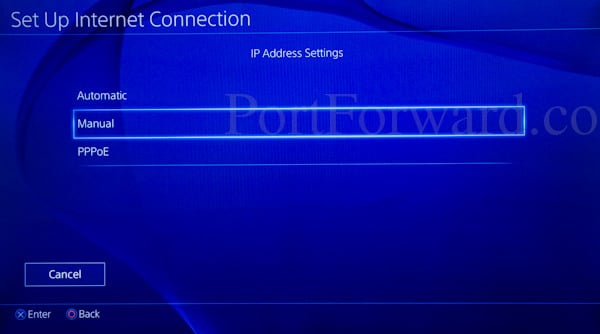
 
I specifically remember not allowing UPNP on my PS4...Maybe it was my PS3.

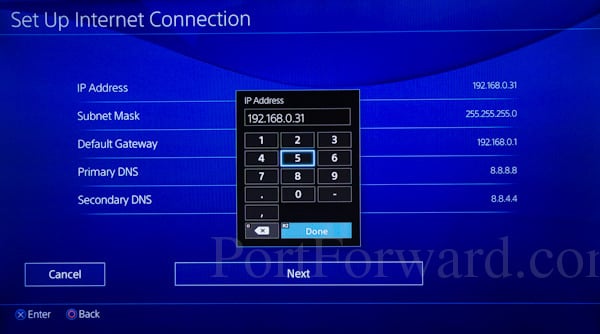
ps4-ip-address-manual.jpg

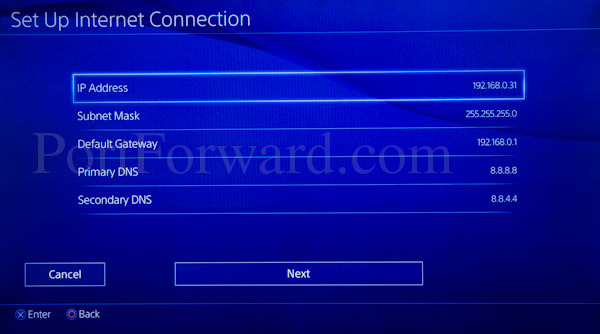
ps4-ip-address.jpg

ps4-ip-address-numpad.jpg

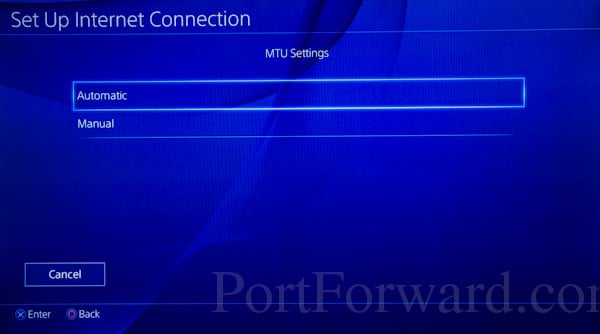
ps4-mtu-automatic.jpg

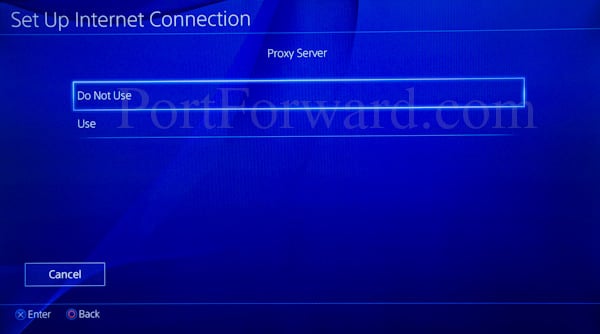
ps4-proxy-server-do-not-use.jpg

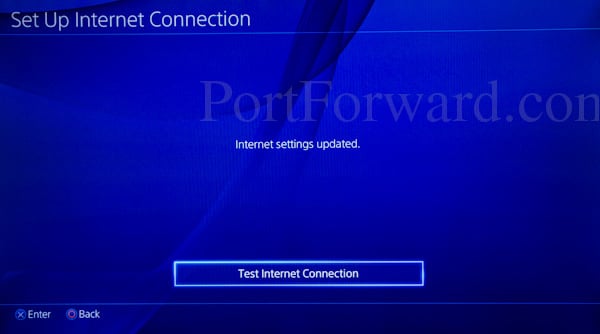
ps4-test-internet-connection.jpg


Looking at the PS3, it does look like this was a setting in the advance network configuration. Again, this is odd because it's not something the system handles. It's something the router handles. Maybe it tells the router not to use upnp with this system if possible.
 
PS4 doesn't have UPnP, the router does. It's a process the router uses to allow multiple devices to use the same ports. Exactly what is happening here. If the router didn't have it, or uses it poorly, you get issues like what OP is having. Sony has nothing to do with this, unless they make the router. PSN uses specific ports, same as XBL, and Nintendo. You can manually port forward those ports to a specific device to insure that it will have access but if without solid upnp, a second system will struggle to get it's data from those ports as sometimes it just wont have access.
I don't think you know what you're talking about.

The router has a UPnP server and the PS4 has a UPnP client. How the hell do you think the console makes UPnP requests? Via telepathy?

Just because you don't see it (UPnP console setting), it doesn't mean that it doesn't exist.

Sony has dumbed down the PS4 OS/GUI compared to the PS3 one. I cannot even enable 7.1 LPCM audio, even though I'm able to do that on my PS3.

I repeat: I can reboot both my router and my PS4 and guess what? The PS4 will still request 3-4 ports via UPnP, even though it only needs one.

Stop blaming routers. I know for a fact that aftermarket routers are more customizable/tech-oriented, but it's not like the PS4 offers too much customization/settings either. So, why not blame Sony for making a half-assed OS*? I wish the PS4 OS was as customizable as Tomato firmware, but it's not.

* It's 2015 and they still don't support IPv6! Care to explain this one? My ancient Windows XP PC supported IPv6 14 years ago. Should I blame my IPv6-ready router for Sony's incompetence?
 
I don't think you know what you're talking about.

The router has a UPnP server and the PS4 has a UPnP client. How the hell do you think the console makes UPnP requests? Via telepathy?

Just because you don't see it (UPnP console setting), it doesn't mean that it doesn't exist.

Sony has dumbed down the PS4 OS/GUI compared to the PS3 one. I cannot even enable 7.1 LPCM audio, even though I'm able to do that on my PS3.

I repeat: I can reboot both my router and my PS4 and guess what? The PS4 will still request 3-4 ports via UPnP, even though it only needs one.

Stop blaming routers. I know for a fact that aftermarket routers are more customizable/tech-oriented, but it's not like the PS4 offers too much customization/settings either. So, why not blame Sony for making a half-assed OS*? I wish the PS4 OS was as customizable as Tomato firmware, but it's not.

* It's 2015 and they still don't support IPv6! Care to explain this one? My ancient Windows XP PC supported IPv6 14 years ago. Should I blame my IPv6-ready router for Sony's incompetence?

Ouch man. I'm not trying to defend the PS4 here. I gave an explanation to the best of my knowledge on how UPNP worked. Yes the PS4 makes requests. I stated that much in my explanation. I didn't refer to it as a UPNP client. Sorry about that. The PS4 os is way stripped down from what was on PS3 (options and features). I'm not defending that.

Yes, the PS4 SHOULD support ipv6 and would make this a non-issue.

Looking at your initial post, you state that the PS4 UPNP assigns all ports to one console and leaves none for the others. This just isn't true and mainly what I was responding to. The PS4 requests use of those ports from the router. The router makes the association between those ports and the PS4/ What the router should be doing is also associating the other PS4 systems requests with the same ports and keeping track of which system is sending requests/ reply's using those ports so that the right responses are being sent to the right system.

In a lot of cases where people have issues like OPs, it's because the router isn't handling those requests correctly (either due to fault of the router or misconfiguration from the user). To simply label this as an issue with the PS4 is just not true as other systems have this issue too, even the Nintendo (as you stated) and Xbone (when not configured to use IPv6).


Edit: just realized you didn't quote the post I thought you did. Here is my post where I explained upnp (again, to the best of my knowledge) referencing PS4 making requests and upnp sysetm on the router managing those requests.

That is because your router is handling UPNP as it should. Basically, it gets a list of requests to listen and send messages through specific ports. UPNP would handle the ordering of those requests without mixing up who sent/ receives them and also not denying access to a port for any of the systems. When it doesn't work well or is turned off, it's turns into a crap shoot as one system may request access to a port but it's use by the other system and thus fails. This is what causes issues with party chat, or joining a party or even playing at the same time as both systems are trying to use the same resources.
 
Nope, the PS4 shouldn't request more than one port. That's exactly how the PS3 works (UDP 3658). It doesn't request 3-4 ports, so no, it's not the router's fault. 2 different consoles from the same manufacturer and they exhibit different behavior on the same router.

Also: http://arstechnica.com/business/201...-of-ipv4-addresses-for-really-real-this-time/

Xbone:
http://support.xbox.com/en-US/xbox-one/networking/network-ports-used-xbox-live
Xbox Live requires the following ports to be open:

Port 88 (UDP)
Port 3074 (UDP and TCP)
Port 53 (UDP and TCP)
Port 80 (TCP)
Port 500 (UDP)
Port 3544 (UDP)
Port 4500 (UDP)

Sony (PS3)
http://manuals.playstation.net/document/en/ps3/current/settings/connecttest.html
The port numbers for PSNSM servers used for this are TCP: 80, 443, 3478, 3479, 3480, 5223, 8080 and UDP: 3478, 3479.
For voice / video chat and online game play, direct communication with other PS3™ systems is used for data transmission during voice / video chat and online gaming. The port number used for this is UDP: 3658.

Nintendo:
http://en-americas-support.nintendo.../13291/~/nat-related-troubleshooting-on-wii-u

For titles published by Nintendo, you will need to forward UDP ports 1 through 65535.

Nintendos requirements seem pretty extreme but that is what they list.

So we have three examples above of how the PS3, Xbone, and WiiU all require multiple ports for your system to work as expected, just like the PS4. Unless, I'm missing something about your complaint, I don't see how what PS4 is doing is anything different than any of the other systems.

Nope, the PS4 shouldn't request more than one port. That's exactly how the PS3 works (UDP 3658). It doesn't request 3-4 ports, so no, it's not the router's fault. 2 different consoles from the same manufacturer and they exhibit different behavior on the same router.

Also: http://arstechnica.com/business/201...-of-ipv4-addresses-for-really-real-this-time/

Really hope that puts enough pressure on Sony and Nintendo to get IPv6 into their systems. As you've pointed out, this would solve so much headache.
 
Those links are BS and you know it. Especially the Nintendo one.

I use the following program to see which ports are opened:

LP0AzVY.png


Why should one application (video game) need more than 1 incoming port? How is TLOU MP different from uTorrent or Skype (p2p apps)?
 
This is constant issue for my girlfriend and I. Party chat has been a headache if we try to join our friends to chat as only one of us can be heard or talk. In-game chat normally always works, though.
 
What router do you have?

Have had two ps4s since launch and we play co-op together all the time no problems. Though have a fairly expensive router, Netgear Nighthawk.
 
Destiny is the only game I've had issues with. My controls get laggy as soon as someone starts streaming Hulu/Netflix.

Had Party Chat also kick Hulu from working one night as well.

I'm hardwired in on a Asus RT-N56U with 100/10. Was going to try static IPs to see if that solved the issue.
 
This is not a PS4 issue, despite what some are saying. I use 2 PS4's on the same network with no port forwarding, DMZ's or assigning ports. They work just fine all the time.

And I have a shitty BT Homehub4. No issues.
 
Yeah I haven't ran to any problems yet. I have a launch PS4 while my brother bought his I think early this year so it could just come down to your ISP or router.

Same here, I have Two ps4's and don't have any problems at all. As you suggest I would think it's a router or ISP problem for the op.
 
Those links are BS and you know it. Especially the Nintendo one.

I use the following program to see which ports are opened:

LP0AzVY.png


Why should one application (video game) need more than 1 incoming port? How is TLOU MP different from uTorrent or Skype (p2p apps)?

So what do you see when you connect to live with your xbox or Nintendo system?
 
This is simply a router problem because with my network and a tp-link router i've been able to play with the same network with two ps4 using party chat and online play with destiny.

So i don't think that this is a ISP or OS problem is only a case of shitty router.

Edit: forgot to say that neither of the two consoles where in dmz only with upnp
 
I wonder if setting one PS4 on a guest network would do anything? I have no idea how routers handle guest networks and UPNP but I do know they usually create different subnets that don't interact with each other.
 
I have trouble now and again with NAT changing randomly, although I put it down to my shittyhub from virgin.

Both have fixed IP outside of DHCP to avoid any possibility of conflict, yet NAT type will be random.

Morning I'll boot up PS4 upstairs and it'll be fine, I'll wake up in the afternoon and turn it on, bam, NAT3.

I'll play the one downstairs in the evening and it'll say NAT3, Play it the following morning NAT2.

I can always get either to goto NAT2 any time they're NAT3 by rebooting the superhub, so just assumed it's the shittyhub causing the problem.
 
With my house the living room PS4 and gaming room PS4 can communicate fine. The issue really is down to which ports are forwarded, which the PS4 can handle as it will check if any of the 4 ports are open and use the first it finds.

You can do one of three things:

1) have a newer router with plenty of memory and a decent CPU (ASUS RT-N66U, anyone?) and a new enough version of UPnP that it's no longer a major security hole and use UPnP. The PS4s will work out which ports they need and request them. Seriously.

2) do the above regardless of the router having a decent CPU and RAM, check which ports were assigned and assign each PS4 a static IP and then forward the ports they requested. This is still a preferable option to using UPnP as a whole.

3) just assign static IPs to each PS4 and assign one port to one and the other port to the other. More or less the same thing #2 does except you're just assigning and hoping it works.


I highly, highly, HIGHLY recommend setting up the static IPs in your router and letting the PS4 use DHCP to grab the IP, as it's bad practice to have the client specify its IP address. You should, at this point, see NAT Type 2 on both systems. The connection type doesn't really matter.


BONUS: if you're using an ASUS RT-N66U or the newer RT-AC66U, install Shibby's Tomato firmware fork. It's fantastic.


Believe it or not, that's your router not giving up the port and basically telling the PS4 it's been taken since it was last used. If you turn off your PS4 and flush the UPnP assignments it should only take one port, again.

+1.

We have two PS4s and two X1s and our RT-N66U's UPnP takes care of our port forwarding on the fly. Rarely have issues but every blue moon party chat on the PS4 would spaz out. Rare but it does happen and I've been too lazy to troubleshoot. We have a DHCP setup with reserved IPs against MAC addresses for all the consoles and usual systems.
 
Why should one application (video game) need more than 1 incoming port? How is TLOU MP different from uTorrent or Skype (p2p apps)?
Because some games require different ports for different duties. Simple as that!
There's not much your router can do by itself when dealing with incoming stateless (UDP) connections, but mapping *one* port from its WAN interface to *one* device on your local network. Forget about being able to share a port between several devices, that's just not possible in a stateless configuration.
 
So what do you see when you connect to live with your xbox or Nintendo system?
1) XBOX? I don't have one.

2) Nintendo consoles? Unfortunately they do not support UPnP. :(
(Nintendo says otherwise, but they're wrong. I don't see any ports on UPnP wizard).

Either way, Sony has acknowledged this issue:

http://community.us.playstation.com...WORK-NEEDS-FIXED-ASAP-Confirmed/td-p/44774137

Not everyone has this problem, because not everyone has the same needs.

For example, if you have 2 consoles and you play Co-op with a real-life buddy, then communication is performed through your LAN (e.g. 192.168.1.2 <-> 192.168.1.3) without NAT! You don't need NAT, unless packets have to travel from the internet back to your console (hence the need for an open incoming port).
 
Because some games require different ports for different duties. Simple as that!
There's not much your router can do by itself when dealing with incoming stateless (UDP) connections, but mapping *one* port from its WAN interface to *one* device on your local network. Forget about being able to share a port between several devices, that's just not possible in a stateless configuration.
I never said that I should share the same port between different devices. I know how TCP/IP works.

What I'm saying is that one p2p application (online video game, Skype, uTorrent) should use one port and they should tell you WHICH port that is!

For example, I can see that port on Skype and uTorrent settings, but I cannot see it in most video games.

Preferably, that port should be OS-defined (just like button mappings on the PS4 <-- pretty cool feature IMHO) and the game should read that port value via an API call.

Is that too much to ask for? We need more transparency for easier troubleshooting. That's all I'm saying.

TL;DR: games and/or the OS should be more customizable/transparent.
 
You'll have this issue with any duplicate systems btw, not just ps4. I struggled hard with my 360s last gen.

I have owned two XBOX 360's since launch and two XBOX One consoles since launch.....never a problem using both at the same time that I can recall. What kind of problems did you have?
 
I never said that I should share the same port between different devices. I know how TCP/IP works.
You seem to do, I just said that to enlighten the people who don't.

What I'm saying is that one p2p application (online video game, Skype, uTorrent) should use one port and they should tell you WHICH port that is!
There are many valid reasons why you don't want to restrict all your game/app incoming traffic to a single port, though. Latency is a problem when dealing with a game's MP code for example, so you won't want lower priority stuff like chat audio coming through it and possibly increasing response times.
 
You seem to do, I just said that to enlighten the people who don't.
Then you probably don't read my posts carefully. I never said that.

I know exactly what NAT is and how it works.

There are many valid reasons why you don't want to restrict all your game/app incoming traffic to a single port, though. Latency is a problem when dealing with a game's MP code for example, so you won't want lower priority stuff like chat audio coming through it and possibly increasing response times.
Uhm, nope. Skype/uTorrent need exactly one port (per app obviously) and they don't have latency issues.

Are you sure that you understand how TCP/IP works? Receiving incoming packets won't cause lag, as long as your download speed is adequate.

p2p games use one port both for gameplay data and VoIP packets as well. For example, the PS3 uses UDP 3658.

Perhaps you should read some RFCs to enlighten yourself first... just sayin'.

To sum it up, I'm suggesting some ideas to make IPv4/NAT (horrible protocols by modern standards) more tolerable until IPv6 becomes more widespread. On the other hand, CGNAT ISP customers cannot even use port forwarding/UPnP as it stands. It's a mess.
 
Then you probably don't read my posts carefully. I never said that.
You didn't, but somebody else did earlier in this thread.
I should have added a carriage return in my answer.

Are you sure that you understand how TCP/IP works? Receiving incoming packets won't cause lag, as long as your download speed is adequate.
Yup, I've done some networking code in my youth, thanks.
If all your incoming data comes through one socket (= one port), you can only read one incoming packet at a time.
Having several sockets (= several ports) open allows you to process several incoming packets simultaneously (when using multiple threads).
Faster processing = lower latency. It's not rocket science.
 
You didn't, but somebody else did earlier in this thread.
I should have added a carriage return in my answer.


Yup, I've done some networking code in my youth, thanks.
If all your incoming data comes through one socket (= one port), you can only read one incoming packet at a time.
Having several sockets (= several ports) open allows you to process several incoming packets simultaneously (when using multiple threads).
Faster processing = lower latency. It's not rocket science.
Multiple applications can't use the same ports. Ports are single use. Even when you send/receive they use different ports.

Unfortunately, using two of the same devices which are heavy P2P will cause problems on an IPv4 network.

If your router is using UPnP and it's enabled, then there's nothing else you can do really. The joys of heavy P2P on IPv4. If they've coded some things wonky, then unfortunately there's nothing much you can do. Even with UPnP the internal device has to send a request to the router, if that hasn't happened and an incoming packet comes in, then you'll still see packets being dropped as it doesn't know where to send them.

CGNAT shouldn't be that much of an issue due to them using DNAT and splitting IP's to ports on an external IP. It'll show as moderate/Type 2, but all your packets would filter through.

ISPs are to cheap to start rolling out IPv6 fully to end-users, even though IPv4 got exhausted around 2011.
 
Couldn't you assign both of the PS4s an IP, manually open ports for one and put the other into DMZ?
Doesn't work like that unfortunately. Either the router won't let you forward the ports or one wouldn't receive anything.
 
CGNAT shouldn't be that much of an issue due to them using DNAT and splitting IP's to ports on an external IP. It'll show as moderate/Type 2, but all your packets would filter through.
Then why do CGNAT customers have NAT Type 3?

There are some ISPs in Germany that are notorious for causing problems in p2p games...

It's impossible for a customer to tackle double NAT (192.168.x.x <-> 10.x.x.x <-> public IPv4 address). How are you going to port forward in that scenario?

ISPs are to cheap to start rolling out IPv6 fully to end-users, even though IPv4 got exhausted around 2011.
That's ironic, considering the fact that deploying CGNAT and/or buying IPv4 blocks also cost a lot of money. An IPv4 address costs as much as $17 and they're very scarce. It's an expensive short-term bandaid.

IPv6 exists since 1998. There's no excuse. Even x86-64 took less than a decade to adopt.

Governments should pressure ISPs to upgrade their infrastructure. Perhaps central banks could print money (QE) as an incentive for quick adopters.

Emerging markets (BRICs) need IPv6 due to their immense population. Huge western countries (like USA, UK, Germany) need it too.

ps: Does anyone think that a petition/Twitter movement could pressure Sony to implement it?
 
Top Bottom