• Hey Guest. Check out your NeoGAF Wrapped 2025 results here!

Lez talk mechanical keyboards

Oh my god, this looks sick: https://www.youtube.com/watch?v=KKTwoW51AkI

What a crazy fucking thing that is. It's too crazy for me. I need a big EU layout Enter key and a long space key, and I'm a sucker for LEDs, but look. That... that is really awesome.
Massdrop seems like a good idea. I wonder if something like that will be introduced in the european territories!
H
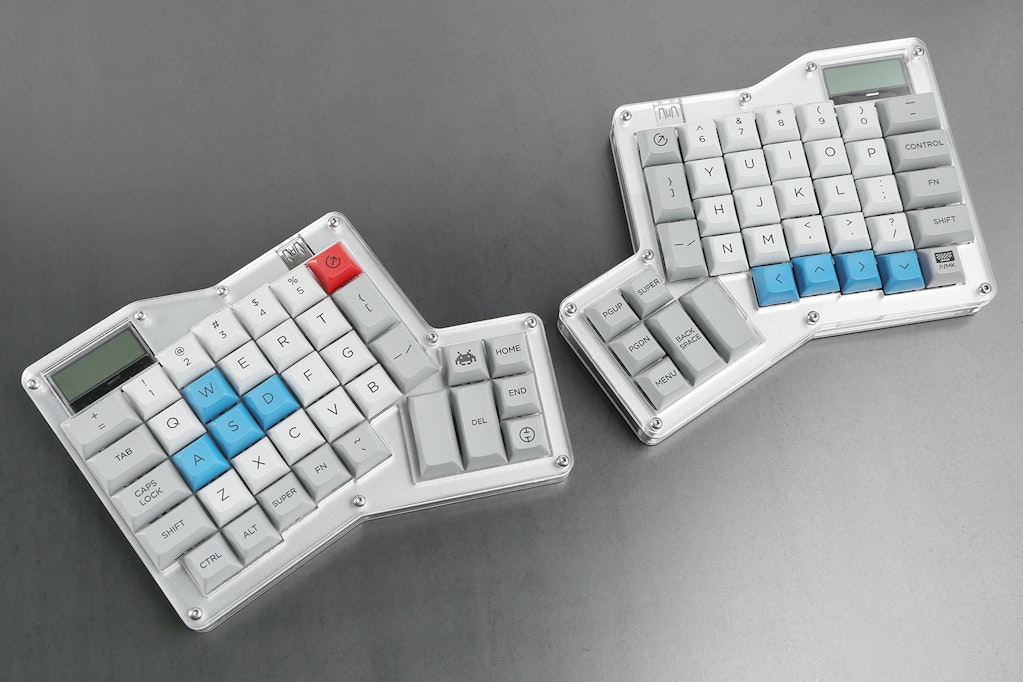
i have a plank! It's really neat! I installed some lock switches when I assembled. Lock switches stay held down until pressed a second time, so when each lock switch is enabled the keyboard effectively turns into a different keyboard.

It's really neat, I went with the grid layout instead of the mit so it's all single unit keys.. I have two space bars that I used green switches for (rest are blue) so those two keys feel a little different to.


It's a great board, but not ideal for your main board.
k2GJZnf.jpg
 
I'm not a fan of compacts either, I've owned some really amazing boards that I ultimately wore thin on just due to randomly missing keys.

Gargantuanly disagree with anyone who says Razer's knockoff switches are as good as the Cherry ones. They're way more flimsy and never feel as nice.
 
I got a lil WASD MX switch tester and I'm leaning more towards the MX Clears.
Anyone have any good experience with them? Its hard to tell how they are going to feel on a full keyboard when you're only messing with a test pad.
 
Gargantuanly disagree with anyone who says Razer's knockoff switches are as good as the Cherry ones. They're way more flimsy and never feel as nice.
All I can say on that front is that the MX Browns I'm using still feel as clean and crisp as the day I bought them (WASD V1), and it's been a few years now.

Acrylic: It depends on what sort of feel you're after. I use the Browns, and they feel great without being too heavy, but still heavy enough that it requires a definite effort to trigger them. I like the feel of them, but I'm not sure I'd like it if they were stiffer. How does the Brown feel to you? I think they're generally more popular.
 
So I am looking for a white, reasonably priced, mechanical keyboard. 10 keys or not. Doesn't matter.

I have looked around but I can't find anything. And can you change/take the LEDs out of most of these?

I'm using this mainly for gaming and writing stuff. Any suggestions would be appreciated.
 
Well, I came really close to pulling the trigger on a Realforce, but ended up getting a Filco Majestouch TKL (cherry brown switches) instead and saving $40. Here's a mini-review/first-impressions:

-It feels REALLY sturdy and well made. No pinging, zero flex in the keyboard, it weighs a ton despite it's size.
-The font is really nice. Minor detail, but it kicks it up a notch for me.
-The keycaps are ABS but feel high quality. There have this really nice powdery smooth feeling to them that just makes them nice to touch. Hopefully it doesn't rub totally smooth too soon.
-Now the controversial one... honestly it isn't THAT vastly of a better experience than typing on my shitty $10 rubber dome logitech. I'm still figuring out how to type without bottoming out on every stroke though, and the keyboard probably needs to be broken in a bit, but I'm slightly regretting not going for the topre instead. I'll probably end up getting both at some point.

Overall I'd say that I'm happy with my purchase, but not totally blown away by the feel immediately.
 
I got a lil WASD MX switch tester and I'm leaning more towards the MX Clears.
Anyone have any good experience with them? Its hard to tell how they are going to feel on a full keyboard when you're only messing with a test pad.

I think individually clears feel really good but I get finger fatigue when using it for a prolonged amount of time. Can't really explain it just gets tiring after a while. YMMV though.
 
I'm not a fan of compacts either, I've owned some really amazing boards that I ultimately wore thin on just due to randomly missing keys.

Gargantuanly disagree with anyone who says Razer's knockoff switches are as good as the Cherry ones. They're way more flimsy and never feel as nice.

Yeah, just looking at razor trying to PR the different tolerances as "for the gamers, leet/faster reaction TIMES!!!!" indicates that the differences between Cherry switch and whatever Razer is sourcing(Kailua) are a bit more "nearly identical".

edit, seems the Kailua cherry knock offs lack the goldcrosspoint contact that Cherry initial touted as a "Cherry First", guess it's just a line contact?

https://deskthority.net/wiki/Kaihua_PG1511_series
 
any recommendations for a board with Clear switches?

What size keyboard would you like?

For fullsize keyboards there's Ducky Shine 4 and WASD Code.
Ducky Shine 4 with MX Clears might be hard to find, as it has been replaced by the newer Shine 5 which doesn't have the Clear switch as an option as Cherry have not produced a RGB variant of the switch.
For tenkeyless there's KBParadise V80 and WASD Code TKL.
For 60% there are more choices: Vortex Pok3r, KBP V60, Tex Beetle and Ducky Mini (again, the Ducky might be hard to find).
 
What size keyboard would you like?

For fullsize keyboards there's Ducky Shine 4 and WASD Code.
Ducky Shine 4 with MX Clears might be hard to find, as it has been replaced by the newer Shine 5 which doesn't have the Clear switch as an option as Cherry have not produced a RGB variant of the switch.
For tenkeyless there's KBParadise V80 and WASD Code TKL.
For 60% there are more choices: Vortex Pok3r, KBP V60, Tex Beetle and Ducky Mini (again, the Ducky might be hard to find).

a full keyboard. I like my number pad.
But I would like my main keys closer to my mouse. So I'm not opposed to getting a smaller one.
 
Hey guys, does anyone have keyboard recommendations? I have never used a mechanical keyboard so I am not sure if its worth upgrading to one (or what type I would want/like if so)? I use my PC for work and gaming, so it gets some significant use. I prefer wired.
 
Hey guys, does anyone have keyboard recommendations? I have never used a mechanical keyboard so I am not sure if its worth upgrading to one (or what type I would want/like if so)? I use my PC for work and gaming, so it gets some significant use. I prefer wired.

If you get a mechanical keyboard, 99.99999% chance it's wired.

First thing I would do is get a key tester, like this
http://www.amazon.com/dp/B00AZQKCD4/?tag=neogaf0e-20

This will let you get a feel for the different key types, so you'll be able to pick what key to start with.

From there, you'll want to decide if you want a full keyboard, a tenkeyless, or a 60% board. You'll probably fall either on the full or tenkeyless side to start. Ten keyless is just as it sounds -- there's no numpad, and it makes the keyboard a lot smaller without shrinking actual key sizes. Gives you more room to move your mouse etc.

After you've decided on your key switches and your format, at that point you'll start picking actual keyboards. There's a lot of "other" features like media keys, Fn functions, RGB lighting, lots of stuff. There's a lot out there, so it's hard to make a specific recommendation until we know more about what you want out of it. :D

Also, there are "Gateron" or "Kailh" switches out there. They aren't quite the top of the line, but they are a LOT cheaper (You'll see boards that are $40 instead of $80), and are 99% of what makes mech keyboards great. I think the only concerns with the "3rd party" keys is longevity and consistency between keys over time. But those are mainly concerns for full on mech keyboard converts.
 
If you get a mechanical keyboard, 99.99999% chance it's wired.

First thing I would do is get a key tester, like this
http://www.amazon.com/dp/B00AZQKCD4/?tag=neogaf0e-20

This will let you get a feel for the different key types, so you'll be able to pick what key to start with.

From there, you'll want to decide if you want a full keyboard, a tenkeyless, or a 60% board. You'll probably fall either on the full or tenkeyless side to start. Ten keyless is just as it sounds -- there's no numpad, and it makes the keyboard a lot smaller without shrinking actual key sizes. Gives you more room to move your mouse etc.

After you've decided on your key switches and your format, at that point you'll start picking actual keyboards. There's a lot of "other" features like media keys, Fn functions, RGB lighting, lots of stuff. There's a lot out there, so it's hard to make a specific recommendation until we know more about what you want out of it. :D

Also, there are "Gateron" or "Kailh" switches out there. They aren't quite the top of the line, but they are a LOT cheaper (You'll see boards that are $40 instead of $80), and are 99% of what makes mech keyboards great. I think the only concerns with the "3rd party" keys is longevity and consistency between keys over time. But those are mainly concerns for full on mech keyboard converts.

Thanks, I appreciate it!
 
Please can someone help me find a mechanical keyboard from the UK that's wireless? I need about 8ft range.

I've seen this filco Majestouch MINILA Air 67, but I don't know where to buy it from :S

Also how heavy are these compared to your standard el cheapo keyboards? I plan to use it on my lap.

I've found that Varmilo keyboard above here
https://www.ebay.co.uk/itm/272150622658 for £98
 
So why is the K70 RGB Lux $20 cheaper than the regular RGB version? They look to be exactly the same.

Also did anyone spot any sales on these keyboards?
 
So my buddy let me try out his mechanical keyboards last night. Had a Razer Blackwidow Stealth (2013?) and a 2014 Razer Blackwidow tournament. That was my first time using a mechanical keyboard, the difference was pretty crazy, definitely want to get one now haha. I liked that the Stealth was somewhat quieter but I think I actually liked the... clickyness? of the 2014 tournament more. Might just get that, not sure if there are some other keyboards you guys would recommend?
 
So my buddy let me try out his mechanical keyboards last night. Had a Razer Blackwidow Stealth (2013?) and a 2014 Razer Blackwidow tournament. That was my first time using a mechanical keyboard, the difference was pretty crazy, definitely want to get one now haha. I liked that the Stealth was somewhat quieter but I think I actually liked the... clickyness? of the 2014 tournament more. Might just get that, not sure if there are some other keyboards you guys would recommend?

Essentially you're talking about the difference between Cherry Brown and Cherry Blue. They (and green now) are the two "tactile" keys that you can feel when you actuate them. There are quite a few different switches, I'd recommend getting a key tester. But if you liked the blues more than the browns, I wouldn't think you'll end up getting, for example, reds (Which have no bump or click at all).

That being said, there are LOTS of other mech keyboards aside from the Razer ones. Most people actually agree that the Razer keyboards are kinda shoddy for the price. >_>*
What sorts of things would you like on your keyboard? Numpad/no numpad (known as tenkeyless)? Wireless? Ergonomic? Macros out the wazoo?
 
Essentially you're talking about the difference between Cherry Brown and Cherry Blue. They (and green now) are the two "tactile" keys that you can feel when you actuate them. There are quite a few different switches, I'd recommend getting a key tester. But if you liked the blues more than the browns, I wouldn't think you'll end up getting, for example, reds (Which have no bump or click at all).

That being said, there are LOTS of other mech keyboards aside from the Razer ones. Most people actually agree that the Razer keyboards are kinda shoddy for the price. >_>*
What sorts of things would you like on your keyboard? Numpad/no numpad (known as tenkeyless)? Wireless? Ergonomic? Macros out the wazoo?

Gotcha, how would you describe the difference between blue and green? Is one more tactile than the other? That is good to know about reds, thanks!

Oh wow, I did not know that, just starting to do some research haha. I don't really care about it having a numpad or ergonomics (most keyboards with wrist pads etc are worse for me honestly). I definitely want it to be wired and I don't really care about it lighting up or macros. I'll be using it for gaming, programming and general use.
 
Gotcha, how would you describe the difference between blue and green? Is one more tactile than the other? That is good to know about reds, thanks!

Oh wow, I did not know that, just starting to do some research haha. I don't really care about it having a numpad or ergonomics (most keyboards with wrist pads etc are worse for me honestly). I definitely want it to be wired and I don't really care about it lighting up or macros. I'll be using it for gaming, programming and general use.

Cherry MX Green are stiffer variant of the MX Blue, they require more force to push down.

You should get a switch tester. Or if a local store has mechanical keyboards on display, go try them out.
 
Got my new keyboard in today. It's a customized VP3 from WASD Keyboards (just a rebranded Pok3r). I didn't realize until after I got it in my hands that I had created sort of a Neogaf color scheme (especially if you use the dark theme). MX Clears. Just thought I'd share it with you guys.
Sorry about image quality, low light and my camera is horrible.

7IHQcEj.jpg
 
Gotcha, how would you describe the difference between blue and green? Is one more tactile than the other? That is good to know about reds, thanks!

Oh wow, I did not know that, just starting to do some research haha. I don't really care about it having a numpad or ergonomics (most keyboards with wrist pads etc are worse for me honestly). I definitely want it to be wired and I don't really care about it lighting up or macros. I'll be using it for gaming, programming and general use.

As mentioned, they are equally "tactile" (Both have the bump and the click), but the greens are a little bit heavier and require more force to press down. From what I've heard it's mainly for manly men with manly finger presses. Personally I'd only use it for a few keys if at all, couldn't imagine a whole keyboard like it.

Ergonomic doesn't just mean wrist pads! I just got in on a Massdrop for the Ergodox, which is a split keyboard that doesn't stagger the keys horizontally, but rather vertically (which works better for your left hand, which on regular keyboards has to be bending backwards if you keep your hands on the keyboard), and then there are keyboards where it's a straight grid for about the same feel. These options tend to be more niche, but noticing that my left hand hurts after home row typing, I'm excited to get mine.
That being said I'll have to wait till August to get mine, and I'll have to solder and build it myself.
MD-15095_20160117211323_1b9167b18b659554.jpg
 
I just got the Corsair K70, been using a G15 for years and thought I could do with an upgrade. I don't do a lot of typing and the reds are fine for gaming. It doesn't have rgb lighting, but I would have just made them all red anyway, as black and red is the colour scheme of my PC and everything else.

It has made Doom an even more pleasurable experience, even if it took a couple of hours to get used to the closer button placement.
 
Can anyone suggest a TKL keyboard with Blue switches?

I work in IT and travel for work, so something lightweight and small would be nice. I can't stand the boards that are smaller thank TKL, though. Backlit isn't necessary, but I would consider it, depending on the board. Sometimes I work in server rooms that are dimly lit, so backlit isn't completely off limits. However, I often work off of my laptop battery, so backlit could be undesirable, too. I'd prefer something that isn't just a standard black keyboard, either. I have found a few that are similar to what I want, but they're pure black. I could maybe do pure black if it's an RBG, like the Disco, but I'd prefer something else.

I just can't find a good keyboard that I like that has blue switches and is TKL.

An example of what I'd like is this, but I like blue switches (I use a K70 at home, so I like Cherry MX, but am open to other options) and I like the clickyness. Another example is the Pok3r, but it's not TKL and too small.

https://mechanicalkeyboards.com/shop/index.php?l=product_detail&p=1359

Any suggestions would be appreciated!
 
Can anyone suggest a TKL keyboard with Blue switches?

I work in IT and travel for work, so something lightweight and small would be nice. I can't stand the boards that are smaller thank TKL, though. Backlit isn't necessary, but I would consider it, depending on the board. Sometimes I work in server rooms that are dimly lit, so backlit isn't completely off limits. However, I often work off of my laptop battery, so backlit could be undesirable, too. I'd prefer something that isn't just a standard black keyboard, either. I have found a few that are similar to what I want, but they're pure black. I could maybe do pure black if it's an RBG, like the Disco, but I'd prefer something else.

I just can't find a good keyboard that I like that has blue switches and is TKL.

An example of what I'd like is this, but I like blue switches (I use a K70 at home, so I like Cherry MX, but am open to other options) and I like the clickyness. Another example is the Pok3r, but it's not TKL and too small.

https://mechanicalkeyboards.com/shop/index.php?l=product_detail&p=1359

Any suggestions would be appreciated!

Quickfire Rapid has been a long time go-to for a compact,no frills mech key with some solid build.
I believe these are the Cherry Blue versions.
http://amzn.to/1XS7BiN
 
Quickfire Rapid has been a long time go-to for a compact,no frills mech key with some solid build.
I believe these are the Cherry Blue versions.
http://amzn.to/1XS7BiN

I think I saw that when I was searching for one. It looks nice and the price is great, my only problem is that I would prefer one that isn't black/black. It's not a bad option, though. I'll keep it in mind!
 
Can anyone suggest a TKL keyboard with Blue switches?

I work in IT and travel for work, so something lightweight and small would be nice. I can't stand the boards that are smaller thank TKL, though. Backlit isn't necessary, but I would consider it, depending on the board. Sometimes I work in server rooms that are dimly lit, so backlit isn't completely off limits. However, I often work off of my laptop battery, so backlit could be undesirable, too. I'd prefer something that isn't just a standard black keyboard, either. I have found a few that are similar to what I want, but they're pure black. I could maybe do pure black if it's an RBG, like the Disco, but I'd prefer something else.

I just can't find a good keyboard that I like that has blue switches and is TKL.

An example of what I'd like is this, but I like blue switches (I use a K70 at home, so I like Cherry MX, but am open to other options) and I like the clickyness. Another example is the Pok3r, but it's not TKL and too small.

https://mechanicalkeyboards.com/shop/index.php?l=product_detail&p=1359

Any suggestions would be appreciated!

The Leopold FC750 is available in navy and white with blue switches. The Ducky One TKL is available in black with gray and blue keycaps and in white with white keycaps
 
I've been using a Corsair K70 with brown cherry mx switches for the past 2.5 years, still a great board. One of these days I need to get a 60% keyboard for the office.
 
I've been using a Corsair K70 with brown cherry mx switches for the past 2.5 years, still a great board. One of these days I need to get a 60% keyboard for the office.

That's what I have at home, the RGB version. It's a great keyboard. I love it.
 
Just got a Ducky Shine 5 with blues in the mail today. Effing love this thing, except the LED's kind of strobe in my periphery like those newer Christmas lights.

It's got a nice weight and stays put! It's my first mechanical, and I'm pretty pleased with it I must say.
 
Got my new keyboard in today. It's a customized VP3 from WASD Keyboards (just a rebranded Pok3r). I didn't realize until after I got it in my hands that I had created sort of a Neogaf color scheme (especially if you use the dark theme). MX Clears. Just thought I'd share it with you guys.
Sorry about image quality, low light and my camera is horrible.

7IHQcEj.jpg

How do you use the arrows with this?
 
Got the NKPC wrist rest off massdrop. TKL ugyen wood option. It matches perfectly with any standard tkl case, but my varmilo is slimmer and shorter than standard, so the rest is 1mm longer on each side.
Anyone looking at wood wrist rests, this is probably the best. Amazing finish and cut. Looks better than the royal glam options, but that royal glam 60% case + rest combined thingy is pretty cool too.
 
Asking again because I ended up at the bottom of the page, but how good a deal is the mechanical keyboard that comes included in the $250 model of Corsair's Lapdog?
 
Asking again because I ended up at the bottom of the page, but how good a deal is the mechanical keyboard that comes included in the $250 model of Corsair's Lapdog?

Well, the Lapdog itself seems somewhat expensive ($120 for a plastic shell to hold a keyboard in? Hrm.), but $250 would be $130 for the keyboard. Which taking a look, is a $0 discount.

Unless that mouse is free I guess, but I highly doubt that. More annoying is it looks like the shell of course only accommodate those two keyboards, which would be annoying if you already had a different keyboard.
 
Finally picked up my first mechanical keyboard. I got a KBParadise V60 Mini with red Cherry MX switches. This thing feels far nicer than I expected, but typing is going to take some getting used to. I've been using laptop style keyboards with low-profile keys for like 15 years, so using regular keys again feels odd. (This is the one I was using until today)

I'm sure some of the customization on this thing is semi-standard on better keyboards, but I've only ever used cheap ones and I'm really impressed. The number of remappable keys, which even came with alternate keycaps, was not something I was expecting.
 
Finally picked up my first mechanical keyboard. I got a KBParadise V60 Mini with red Cherry MX switches. This thing feels far nicer than I expected, but typing is going to take some getting used to. I've been using laptop style keyboards with low-profile keys for like 15 years, so using regular keys again feels odd. (This is the one I was using until today)

I'm sure some of the customization on this thing is semi-standard on better keyboards, but I've only ever used cheap ones and I'm really impressed. The number of remappable keys, which even came with alternate keycaps, was not something I was expecting.

Straight to a 60%? Good man! Reclaim your desktop space with confidence!

Though yeah typing takes a bit to get used to.
 
Top Bottom