
• Hey Guest. Check out your NeoGAF Wrapped 2025 results here!

Lez talk mechanical keyboards

So, which cherry mx switches produces the quietest tap? Thinking of picking up that code tenkeyless keyboard on Massdrop.

 
"In fact, it's just a keyboard, and it's actually more fatiguing to type on a mechanical rather than a rubber dome keyboard."


Not that I disagree with your entire post, but there are too many variables in key switches to make this kind of blanket statement.

Definitely, it can vary. But from what I've seen most cherry MX keycaps are quite a bit larger and require more pressure than any rubber dome. I could be wrong.
 
Trying the keyboard first is everything. Some you will simply not like, despite others loving it. It sure helped me a lot and I ended up with a mechanical keyboard, that wasn't really on my list.
 
Definitely, it can vary. But from what I've seen most cherry MX keycaps are quite a bit larger and require more pressure than any rubber dome. I could be wrong.
It definitively worth trying (although I'm not sure you can have a definitive feeling without hours of practice), but I wouldn't say the force is the only origin of tiring. It's even more obvious when you see people finding MX greens less tiring than blues...

The simple fact of not bottoming the keys can work wonders, but it require training.
 
So, which cherry mx switches produces the quietest tap? Thinking of picking up that code tenkeyless keyboard on Massdrop.
While reds are the quietest on paper because they're the quiet linear key, they're so loose and easy to bottom out that you're going to have the noise from the key hitting the keyboard without lots of practice. You would probably have better luck with black switches, as they need 1/3 more force (45g vs 60g) to press.

There's also the brown switches, which have a tactile bump. While I haven't used them for typing, I am guessing that being able to feel when the key has pressed will make a noticeable difference.

Regardless of your colour choice, you will want rubber o-rings. They help with noise (check YouTube videos. But truthfully, as you seem to be similar to myself, mechanical is louder than rubber. The keys might have less shake and rattle on a good mechanical, but rubber is probably the quietest you can get.
 
Maybe the inner surface. MX are apparently far better uf yo properly lube them.

Huh, so maybe the browns with more tactile feel are less lubed? Makes sense.

Have a small issue with my Ducky. The 0 on the numpad can get kind of caught if I press down on it at an angle. It's like the switch hits an edge or something. What can I do to fix that?
 
While reds are the quietest on paper because they're the quiet linear key, they're so loose and easy to bottom out that you're going to have the noise from the key hitting the keyboard without lots of practice. You would probably have better luck with black switches, as they need 1/3 more force (45g vs 60g) to press.

There's also the brown switches, which have a tactile bump. While I haven't used them for typing, I am guessing that being able to feel when the key has pressed will make a noticeable difference.

Regardless of your colour choice, you will want rubber o-rings. They help with noise (check YouTube videos. But truthfully, as you seem to be similar to myself, mechanical is louder than rubber. The keys might have less shake and rattle on a good mechanical, but rubber is probably the quietest you can get.

What about clears?
 
Huh, so maybe the browns with more tactile feel are less lubed? Makes sense.

They are not lubed from the factory to begin with but there can probably be some variance to the switches as well as wear over time. Lubing switches is mostly an enthusiast thing that requires disassembling the switch.

Gateron switches are generally smoother feeling than their Cherry counterparts but you won't find Gaterons in most of the mainstream keyboards on the market.
 
They are not lubed from the factory to begin with but there can probably be some variance to the switches as well as wear over time. Lubing switches is mostly an enthusiast thing that requires disassembling the switch.

Gateron switches are generally smoother feeling than their Cherry counterparts but you won't find Gaterons in most of the mainstream keyboards on the market.

Well then I just don't understand why mine feel so different from the Corsair and the CM Storm that I tried. Those have a distinct tactile feel and it's pretty nice while my Ducky is borderline linear with a smalllllll bump. Even when pressing my P vs Q I can feel a difference. Oh well, I'll get used to it.
 
POK3R RGB finally got in. 🏃

Love them clicky blues. Although I would have much rather preferred greens, but w/e.
 
oh nice! Didn't know they make a mx version
Yeah I'm workin on one!! I got a champagne gold aluminum chassis a while back but have yet to get the PCB. Gonna be so kewl.

It such an excellent board. Good choice!
 
Yeah I'm workin on one!! I got a champagne gold aluminum chassis a while back but have yet to get the PCB. Gonna be so kewl.

It such an excellent board. Good choice!

you rocking the topres or going with cherry? I might have to buy a stupid sampler thing to figure this out. I like my red poker board but I want the thing more idiot proof for the family.
 
The Cherry Version, not sure what switches I'm gonna use. I have blues in the board I'm using right now.

I've always meant to get one of those tester things but just haven't yet.
 
I have a feeling I'd love clears, and you probably would to. Blacks are quieter than reds at the same force so clears should be quieter than browns.

Clears are so weird. They're classified as tactile switches but with stock springs you rarely feel the tactile bump. Good switches if you want to avoid bottoming out, they cushion out nicely as you push down.

Ergo-clears with 62g springs are godly though.
 
Got my switch sampler in...narrowed it down to Clear/Brown/Red/Black. Kinda leaning towards Clear at the moment but I'm not sure yet.

Guess my choice might be limited by the keyboard I actually want. Looking for one with multi-colored LEDs, hopefully under $200.

Gonna check out Corsair and Ducky and go from there, unless there are other manufacturers I should check out.

Edit: After poking around, narrowed it down to these:

Ducky One TKL RGB (Red switches)
Razer Blackwidow Chroma (Orange switches)
Corsair Strafe RGB (Red switches)
Corsair K70 LUX RGB (Red switches)

Any thoughts on these?
 
Got my switch sampler in...narrowed it down to Clear/Brown/Red/Black. Kinda leaning towards Clear at the moment but I'm not sure yet.

Guess my choice might be limited by the keyboard I actually want. Looking for one with multi-colored LEDs, hopefully under $200.

Gonna check out Corsair and Ducky and go from there, unless there are other manufacturers I should check out.

Edit: After poking around, narrowed it down to these:

Ducky One TKL RGB (Red switches)
Razer Blackwidow Chroma (Orange switches)
Corsair Strafe RGB (Red switches)
Corsair K70 LUX RGB (Red switches)

Any thoughts on these?

I am using a Ducky One right now and love it. A little surprised by how not tactile the browns are but the keyboard itself is fantastic. It is just very simple looking. The Corsair is known for the way that the keys appear as if they're floating, which is nice if you like that kind of thing. The lights are a lot more pronounced in that.

Also keep in mind there's no software with the Ducky so you can't fully customize the LED lights like I think u can with corsair. Meaning, like wasd one color and the rest another etc. Also it's pretty complicated to create macros on the Ducky since no software.

Also you realllllllllllllly need to try typing on red before you decide. I had one for a bit and liked it the first day then I realized I couldn't type on it. It's really unique in how linear it is and how fast it makes u type. BestBuy sells the Logitech G610 in red. I recommend trying it and returning it there
 
I am using a Ducky One right now and love it. A little surprised by how not tactile the browns are but the keyboard itself is fantastic. It is just very simple looking. The Corsair is known for the way that the keys appear as if they're floating, which is nice if you like that kind of thing. The lights are a lot more pronounced in that.

Also keep in mind there's no software with the Ducky so you can't fully customize the LED lights like I think u can with corsair. Meaning, like wasd one color and the rest another etc. Also it's pretty complicated to create macros on the Ducky since no software.

Also you realllllllllllllly need to try typing on red before you decide. I had one for a bit and liked it the first day then I realized I couldn't type on it. It's really unique in how linear it is and how fast it makes u type. BestBuy sells the Logitech G610 in red. I recommend trying it and returning it there

Honestly, the vast majority of the typing I do on it is posting on GAF, so the overall typing experience isn't a huge deal to me as long as it isn't physically painful :P

It's far more important to me how it feels trying to mash a hotkey, and I'm happy with either Brown or Red for that based on my switch sampler.

I'll probably lean towards the Corsair after you mention that. The lights are obviously not the important part, but they're something that I wanted and I would like it to be fairly cool looking :P

I assume that means you have a board with Brown switches? Do you game on them? And if so, what games and how is it? If Browns don't have the issues with double/triple taps that Blues supposedly do, I might lean towards Brown switches.
 
Clears are so weird. They're classified as tactile switches but with stock springs you rarely feel the tactile bump. Good switches if you want to avoid bottoming out, they cushion out nicely as you push down.

Ergo-clears with 62g springs are godly though.
Oh great, more to research! I do wish this Brown sampler was more tactile though, so you're probably right
 
Honestly, the vast majority of the typing I do on it is posting on GAF, so the overall typing experience isn't a huge deal to me as long as it isn't physically painful :P

It's far more important to me how it feels trying to mash a hotkey, and I'm happy with either Brown or Red for that based on my switch sampler.

I'll probably lean towards the Corsair after you mention that. The lights are obviously not the important part, but they're something that I wanted and I would like it to be fairly cool looking :P

I assume that means you have a board with Brown switches? Do you game on them? And if so, what games and how is it? If Browns don't have the issues with double/triple taps that Blues supposedly do, I might lean towards Brown switches.

Ducky has nice lights too, don't get me wrong. But yea, just cant customize it.

I actually switched from blues to browns specifically because I was having trouble mashing on the key. I play mostly League of Legends and didn't like the feel when mashing on a key. It just felt too difficult. The browns I have now are great in that aspect. No issues whatsoever in mashing it, and the browns I had previously had the same effect. The tactile bump is barely noticeable when gaming
 
Ducky has nice lights too, don't get me wrong. But yea, just cant customize it.

I actually switched from blues to browns specifically because I was having trouble mashing on the key. I play mostly League of Legends and didn't like the feel when mashing on a key. It just felt too difficult. The browns I have now are great in that aspect. No issues whatsoever in mashing it, and the browns I had previously had the same effect. The tactile bump is barely noticeable when gaming
Awesome. I'll probably pick up a Corsair with Brown switches then. I'll be playing mostly DOTA and WOW so we're probably using the board fairly similarly.

Now I just need to decide between K95 and K70 :p
 
Also keep in mind there's no software with the Ducky so you can't fully customize the LED lights like I think u can with corsair. Meaning, like wasd one color and the rest another etc. Also it's pretty complicated to create macros on the Ducky since no software.

Shine 6 and Year of the Monkey will have software when they come out later this year.
 
Oh great, more to research! I do wish this Brown sampler was more tactile though, so you're probably right

Welcome to the world of mechanical keyboards :P I will say that as much as I enjoy Clears, they really are just mushy Browns.

If you want tactile and silent, Zealios are the king. Matias switches are really good too.
 
I'm actually looking for a 60% (or 61-key) mechanical keyboard to bring with me during my long travel.

Other than that I don't really have any specific requirements like LEDs or what kind of switch, seeing blue has always been available. It will be used for typing mostly, so I'd like a heavy switch.

When it comes to the price, I am aiming for 100 - 150 (euro's or dollars, as here in Europe the dollar sign simply gets replaced with the euro one anyway).

So any tips would be welcome.
 
Is there a go to website for ordering dampeners / o-rings which lets you select the durometer / thickness ... but without ripping you off with obscene prices / shipping costs?
 
Hi keyboard GAF. I'm wondering if a product like this exists...

I'm looking for a basic full keyboard, ideally clean in design, black, bonus points if the keys are black as well.

But, I work with a lot of programs (After Effects, Illustrator, Photoshop, whatever) and I'd want to be able to

1. assign macros to the keyboards
2. Assign different colors to the keys, depending on the program. For example, to move through a timeline in Premiere you use the J, K and L keys. I would want to assign those keys to be red or something.

So basically combining something like this
1466544921000_1239875.jpg
with this
but able to make it light up like
 
Hi keyboard GAF. I'm wondering if a product like this exists...

I'm looking for a basic full keyboard, ideally clean in design, black, bonus points if the keys are black as well.

But, I work with a lot of programs (After Effects, Illustrator, Photoshop, whatever) and I'd want to be able to

1. assign macros to the keyboards
2. Assign different colors to the keys, depending on the program. For example, to move through a timeline in Premiere you use the J, K and L keys. I would want to assign those keys to be red or something.

So basically combining something like this

with this

but able to make it light up like
You kind of missed the boat on pre-ordering the Das 5Q, but it's not set to release until next year.
It was a pretty clean design, from what I saw.

https://www.kickstarter.com/project...d-5q-the-cloud-connected-keyboard/description
 
So I have some pretty terrible luck with these things. My first keyboard, a TT-eSports thing, quickly developed bouncing issues where random letters would be repeated 2-3 times for a single keystroke. And now my current keyboard, a Das Keyboard of a 2014-ish vintage, has a totally dead K button after not using it for about 4 months. Now I need to either get another keyboard, or find a way to replace the dead Cherry Brown to make the Das usable again. (I'm used to modding arcade sticks and other game controllers, but keyboards are new to me.)
 
Just ordered a switch tester from Amazon so I can try all the different types. I already own a K70 RGB with cherry reds, but I'm looking into something portable. Maybe a 60 or 65%. I keep seeing keycaps, back plates, and other accessories on Massdrop, but I'm a little confused as to what keyboards all those add-on's are compatible with. I heard that Corsair used a keycap with different dimensions on the K70 than what is considered standard, so options are really limited as far as key cap customization.

Does anyone have any good small keyboard recommendations with aftermarket customizability, preferably with RGB illumination? (my K70 has got me addicted)
 
"So I have some pretty terrible luck with these things. My first keyboard, a TT-eSports thing, quickly developed bouncing issues where random letters would be repeated 2-3 times for a single keystroke. And now my current keyboard, a Das Keyboard of a 2014-ish vintage, has a totally dead K button after not using it for about 4 months. Now I need to either get another keyboard, or find a way to replace the dead Cherry Brown to make the Das usable again. (I'm used to modding arcade sticks and other game controllers, but keyboards are new to me.)"

If you have any soldering skills + tools, replacing a keyswitch is fairly trivial. There's just 2 contact points to desolder (2 more if the switch has an led), then you push in two small clips on the sides of the keyswitch to unfasten the switch from the plate and pull it out.
 
I'm trying to add WASD to the arrow keys as described on this review, but the instructions don't seem to work.

https://rhinofeed.com/vortex-pok3r-review/

1. Press Fn + Layer 2, 3, or 4. ☑
2. Press Fn + Right Ctrl to enter programming mode. ☑
3. Press Fn + W, or W if you do not want the arrow keys on the function layer. ☑
4. Press Fn + I (Where the arrow key is currently located on the keyboard) ☑ (But doesn't register?)
5. Press Pn ☑
6. Continue to program the rest of the keys, or press Fn + Right Ctrl to exit programming mode. ☑

When I use FN+W, it does an "m,l" Enter instead. 😶
 
Shine 6 and Year of the Monkey will have software when they come out later this year.

God dammit. Any chance my Ducky One would be compatible with said software?

Hi keyboard GAF. I'm wondering if a product like this exists...

I'm looking for a basic full keyboard, ideally clean in design, black, bonus points if the keys are black as well.

But, I work with a lot of programs (After Effects, Illustrator, Photoshop, whatever) and I'd want to be able to

1. assign macros to the keyboards
2. Assign different colors to the keys, depending on the program. For example, to move through a timeline in Premiere you use the J, K and L keys. I would want to assign those keys to be red or something.

So basically combining something like this

with this

but able to make it light up like

You can do that with the Logitech boards like the G810 and I imagine any other RGB boards with software like the Corsair. I know that people make custom lighting profiles per game so I don't see why you couldn't do the same for a standard program
 
Hey guys, I have a filco tenkeyless that has a non working down arrow key. This is pretty annoying to me as I tend to use it alot when I'm doing web development stuff as I'm too dumb for VIM.

Anyway, sometimes the key works and sometimes it doesn't. If I mash it it will tend to start working again pretty soon. Is there a way to fix the key not working? Should I jjust blast it with compressed air?
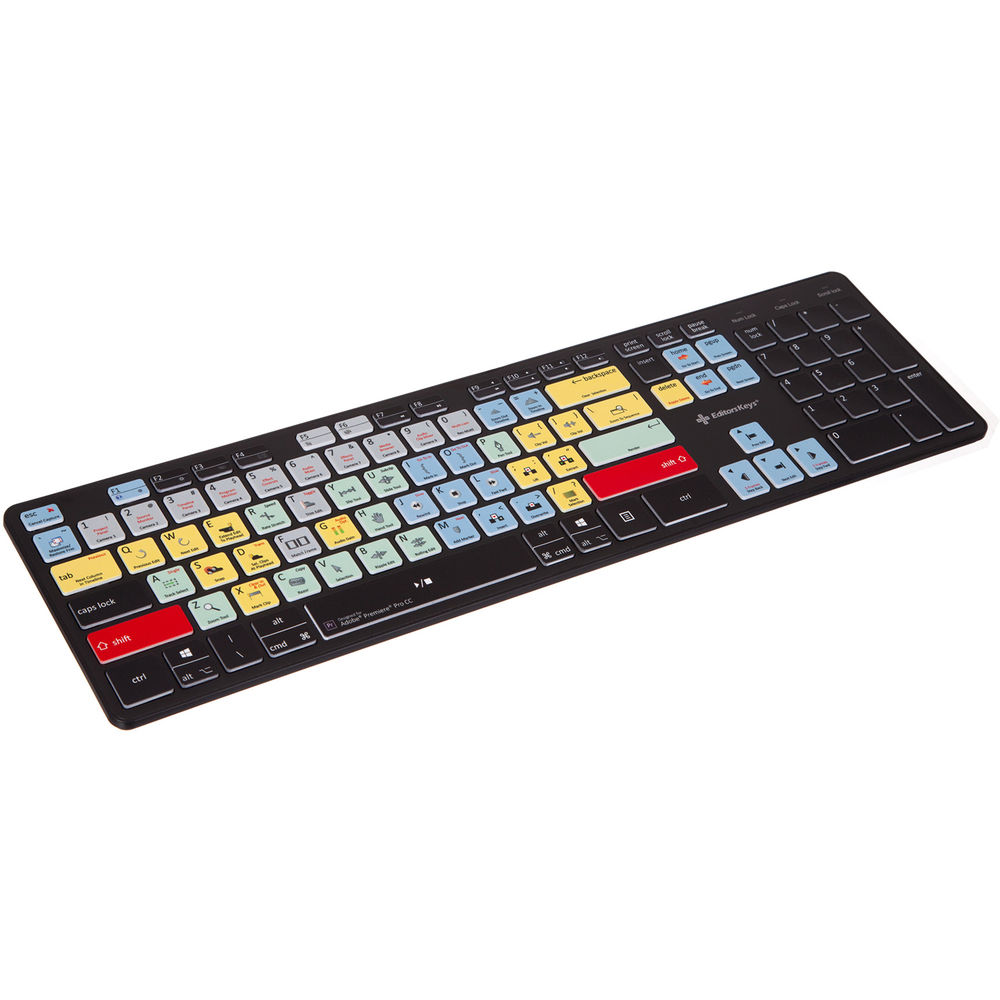
 
So what is a good mechanical keyboard?

I was looking at the ROCCAT RYOS MK PRO, but I see concerns on other forums about build quality, I can pick this up for £46 which seems quite a bargain compared to some other mechanical keyboards, I don't really want to spend silly money but if better options are available around my budget I would consider them.
 
i just ordered a vortex poker 3 mx red white backlight. i hab a ducky mini and likes it a lot but the fat plastic covering around the whole keyboard kind of annoyed me. will report back on the poker3 as soon as it arrives.
 
Is there any problem with kailh red switches? In thinking about buying a keyboard with those ones. They should be the best for gaming, right?

Also, I don't like the included spacebar, anyone knows if someone makes translucent ones?
 
So I'm on the verge of getting a Razer Blackwidow Chroma. Got a pretty good endorsement from Linus Tech Tips. Anyone here have/have used one that can affirm?

Otherwise there's one or two K70s that have Cherry MX Blue (which I'm pretty sure is the feel of switch I'd want after testing some out in a store - the Blackwidow has similar switches), but they're either more expensive or come with ugly red LED back-lighting. I could live with blue back lights, but not red.
 
Top Bottom