• Hey Guest. Check out your NeoGAF Wrapped 2025 results here!

Lez talk mechanical keyboards

I got my order of blank PBT keycaps today. I really like the understated look and the PBT feels much better than the ABS keycaps that were originally on the Magicforce68.

5p4u7dX.png
 
Keyboard noob here. How would I go about ordering this? This would be my first mechanical keyboard.

I got mine directly from taobao.
But I'm from the U.K. So massdrop isn't great for me.
Cost me like 85£ or there about after shipping via DHL and tax. Around 800 yuan, 18£ shipping, like £4 tax.
I heard that the lady who does international shipping left at Varmilo taobao shop front. And when I ordered the grey key caps a month after the keyboard, it was much harder to communicate. I ended up using dotdotbuy to purchase the Keycaps and do the shipping.

http://m.intl.taobao.com/detail/detail.html?id=531131953908

http://www.dotdotbuy.com

I just want to say, I highly recommend the keyboard. It feels super high quality, and lovely texture to the PBT key caps. The keys have a crisp feel to them. The wireless is impeccable, I've had 0 issues. The battery life is outstanding, I charged it once since buying a few months back.
 
A hundred bucks for key caps????
Hahaha, if you're new into this, I can understand the reaction, but yeah, pieces of custom plastics cost a LOT.

That's more or less the kind of price for a full keyset. You can find way cheaper keysets but they'll also be more basic.

Another thing is the profile of these keysets. DSA (supposedly cheaper) for the Dolch and SA for Penumbra, they're only done by Signature Plastic AFAIK (someone correct me if I'm wrong). Someone on GeekHack asked how much it'd cost to redo only 1 keyset of Penumbra, they answered something like $700.
 
"A hundred bucks for key caps????"

Yep. Keep in mind that 1) the volume that they're manufacturing these sets in is significantly smaller than a retail keyboard's stock keycaps. 2) They're double shot (more expensive to manufacture) and 3) They want to turn enough of a profit to justify this side of their business.


^^ The thing with that answer is that they're basically asking how much Signature Plastics would charge to make a one-off run. That price is basically factoring in the time for retooling their manufacturing plant to manufacture just that one single set of keycaps (when they could be manufacturing something else). That's why Group Buys are a thing: The price per set goes down dramatically as you produce more per run.
 
Thinking of getting a set of O-Rings for my Corsair K70 that has Cherry MX Blues.

Personally I don't mind the clackiness with general typing, but it is a bit louder than I expected, and though I can close the door to my room or whatever, I don't want to disturb other people when gaming and repeatedly pressing the same few keys very rapidly. Even if I didn't put O-Rings on the whole board and just put them on high-traffic gaming areas I think it could be good.

Anyone have experience with O-Rings? How much they cost, what a good brand (that would work with my K70) is, etc.?
 
Currently using a das keyboard 3 at work. Thinking of upgrading. I'd like blue keys and a full layout, no need for special features (but wouldn't mind them). Any recommendations ?
 
Going to borrow the thread for some advice too.
I've had Noppoo Choc Mini with Blue Cherry MX for 4-5 years now and feeling the urge to get a new one to replace this dirty beast. There's nothing exactly wrong with the Noppoo so I was thinking of getting keycaps for it, but as the keycaps for this are of unusual sizes it would be hard to replace them all.
Is there some good 60% cheap keyboard currently that's popular? I was looking at POK3R if it ever comes back to stock, would possibly try to get it with either Clears or Green switches.
 
Going to borrow the thread for some advice too.
I've had Noppoo Choc Mini with Blue Cherry MX for 4-5 years now and feeling the urge to get a new one to replace this dirty beast. There's nothing exactly wrong with the Noppoo so I was thinking of getting keycaps for it, but as the keycaps for this are of unusual sizes it would be hard to replace them all.
Is there some good 60% cheap keyboard currently that's popular? I was looking at POK3R if it ever comes back to stock, would possibly try to get it with either Clears or Green switches.

If you don't mind waiting, I know a lot of massdrop keycap sets are pretty good at providing for weird key layouts, so that might be worth a try.
 
If you don't mind waiting, I know a lot of massdrop keycap sets are pretty good at providing for weird key layouts, so that might be worth a try.

I've been checking Massdrop but haven't found one that would come with 5.5x spacebar. Keycaps would definitely be nice choice and would save me lot of money.
 
So I have these blue 0.4mm O-rings in my shopping list on Amazon right now. Not sure if I'd like the red 0.2 mm ones better though. I definitely feel like I need something to dampen at least some of the noise from my Cherry MX blue switches, but I don't know if the 0.4mm blue rings would be too much.

Anyone have experience with these? Need to buy some other stuff from Amazon this week, so I'd be ordering in the next day or two, if not tonight.
 
So I have these blue 0.4mm O-rings in my shopping list on Amazon right now. Not sure if I'd like the red 0.2 mm ones better though. I definitely feel like I need something to dampen at least some of the noise from my Cherry MX blue switches, but I don't know if the 0.4mm blue rings would be too much.

Anyone have experience with these? Need to buy some other stuff from Amazon this week, so I'd be ordering in the next day or two, if not tonight.
get the bigger ones if you want to reduce travel and/or you really slam your keys. If you slam too hard then the 0.2mm will probably still let you bottom out which means you'll get the same amount of noise basically, especially at only 40A hardness (squishyish)

fwiw you'll still get the click no matter what dampeners you have on, it's part of the blue switch design. O-rings only reduce/prevent the clack you get from bottoming out.
 
Urge to order tenkeyless Topre rising, was thinking of getting the 88UB version, which is same as 87 but nordic layout.
How's Topres for gaming? I have Cherry Blues currently, and the Topre would be 45g on all buttons.

EDIT: Just ordered Topre Realforce 88UB, the wait begins.
 
Currently using the Razor Ultimate w/ clicky greens. Love it. But, I have my eyes on this one w/ Blues...

http://www.corsair.com/~/media/corsair/product-images/keyboards/k70-lux-rgb/mx-red/na-layout/large/k70_lux_rgb_na_03.png

So that's what I just got this past week. Aside from the noise issue (that I'm going to try to deal with somewhat with these O-Rings here...) it's been great.


get the bigger ones if you want to reduce travel and/or you really slam your keys. If you slam too hard then the 0.2mm will probably still let you bottom out which means you'll get the same amount of noise basically, especially at only 40A hardness (squishyish)

fwiw you'll still get the click no matter what dampeners you have on, it's part of the blue switch design. O-rings only reduce/prevent the clack you get from bottoming out.

Blue rings it is then. I don't mind the clack, I just want it not quite as loud for the sake of other people (and listening to voice comms/game sounds/etc. - sometimes it's hard to hear over the keys). I do bottom out pretty much all the time when I type I find, so this may help. Playing games especially, even if I just put them on my most used keys around the WASD area. Cause I definitely bottom out when mashing buttons for my rotation in WoW and I'm sure other games.
 
You may find what you're looking at there:

https://www.reddit.com/r/MechanicalKeyboards/wiki/numpads

What are you after exactly?


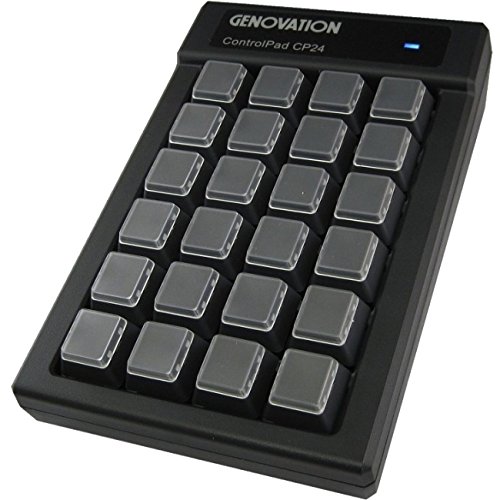
I want to take a keyboard like this (Planck or Preonic) and have it completely mapped with macros or keyboard shortcuts.

I deal with a lot of Adobe products (Illustrator, Photoshop, After Effects) and it's kind of annoying having the Pen tool be 3 different shortcut keys for each product. If I could have a pad just how I like it (with another keyboard attached)...that would be the dream.

I know there are some pads like this
But I just want to know if I can make a more elegant solution
 
I accidentally spilled some diet coke on my steelseries keyboard. the spill was minor(about a teaspoon maybe) and I put it upside down to drain most of the liquid, then removed keycaps and swabbed up anything I could see. should I be more worried about this? should I open the whole thing and clean it thoroughly?
 
I accidentally spilled some diet coke on my steelseries keyboard. the spill was minor(about a teaspoon maybe) and I put it upside down to drain most of the liquid, then removed keycaps and swabbed up anything I could see. should I be more worried about this? should I open the whole thing and clean it thoroughly?

Think you're ok, there's no sugar.
 
Picked up a K70 RGB a few days back and I am soooooooo happy with it!

The price was a bit of a punch in the gut but once I got over that it was all good. Big fan of the totally customisable lighting, I've got a few profiles set up already for different games. Sure, it's pretty gimmicky but I'd have only regretted not getting it at some point. I can colour match my future build to.

As for typing, lawd! It feels so so good to type on. It's hard to describe but when I get to work and type on the cheapo KB and then go home it's bliss. Really impressed.
 
Got my blue o-rings today. Put them on the left half or so of the keyboard on my most used keys for gaming. Definitely makes a differences. Goes from a quite loud clack when bottoming out to a much softer click (Cherry MX Blues). It's a bit jarring to be honest, but probably an improvement. Don't know when/if I'll convert the whole keyboard. Still like the loud clack somewhat, but the rings do make it more bearable overall.

Maybe the red o-rings would've been better for me? Not spending another $15 anytime soon though to find out.
 
Picked up a K70 RGB a few days back and I am soooooooo happy with it!

The price was a bit of a punch in the gut but once I got over that it was all good. Big fan of the totally customisable lighting, I've got a few profiles set up already for different games. Sure, it's pretty gimmicky but I'd have only regretted not getting it at some point. I can colour match my future build to.

As for typing, lawd! It feels so so good to type on. It's hard to describe but when I get to work and type on the cheapo KB and then go home it's bliss. Really impressed.

Which version did you buy?
 
Need a recommendation. Need a new mechanical for an iMac. Would like tenkeyless, sub-$100 and kind of a small profile (meaning not tall and chunky-looking like my WASD).
 
Need a recommendation. Need a new mechanical for an iMac. Would like tenkeyless, sub-$100 and kind of a small profile (meaning not tall and chunky-looking like my WASD).

Uh, well there aren't really any *thin* mechanical keyboards... the key switches kind of dictate a certain size.
 
Need a recommendation. Need a new mechanical for an iMac. Would like tenkeyless, sub-$100 and kind of a small profile (meaning not tall and chunky-looking like my WASD).

You think your WASD is chunky looking? I don't think they get much slimmer than that. Maybe if you dont even want F keys

So that's what I just got this past week. Aside from the noise issue (that I'm going to try to deal with somewhat with these O-Rings here...) it's been great.


Blue rings it is then. I don't mind the clack, I just want it not quite as loud for the sake of other people (and listening to voice comms/game sounds/etc. - sometimes it's hard to hear over the keys). I do bottom out pretty much all the time when I type I find, so this may help. Playing games especially, even if I just put them on my most used keys around the WASD area. Cause I definitely bottom out when mashing buttons for my rotation in WoW and I'm sure other games.

Honestly I found blues really loud even without bottoming out. I tested by just tapping on the key enough to activate the switch and it's pretty loud. YMMV
 
Need a recommendation. Need a new mechanical for an iMac. Would like tenkeyless, sub-$100 and kind of a small profile (meaning not tall and chunky-looking like my WASD).
Do you want exactly TKL or would a 60% do the trick?

tbh sub-$100 makes this a bit difficult. I know that there are good budget boards these days but there's some sort of compromise usually. A Ducky One TKL is a good choice at the exact $100 mark.

You could also reduce the profile by using a smaller profile of keycaps, but that gets expensive too.
 
Need a recommendation. Need a new mechanical for an iMac. Would like tenkeyless, sub-$100 and kind of a small profile (meaning not tall and chunky-looking like my WASD).

You could try to find a Cherry G84 series keyboard. You should be able to find them on ebay. They use Cherry ML switches which have shorter throw and actuation force similar to MX Brown. The keyboard does have an odd layout and the ML switches are not compatible with MX keycaps.
 
Thanks for the replies, everyone. I went with...

Do you want exactly TKL or would a 60% do the trick?

tbh sub-$100 makes this a bit difficult. I know that there are good budget boards these days but there's some sort of compromise usually. A Ducky One TKL is a good choice at the exact $100 mark.

You could also reduce the profile by using a smaller profile of keycaps, but that gets expensive too.

... the Ducky One, which is basically exactly what I was looking for.
 
OK, so I'm not really a mechanical keyboard enthusiast, however I found two old Apple keyboards, specifically the Apple Extended Keyboards I + II.
They were super dirty (especially the I) but I cleaned them decently and bought a Griffin iMate ADB to USB adapter off eBay. The (1995?) II works just fine, but I had to pop off the down arrow key to get it to work initially.
The older board, on the other hand, has a barely-working spacebar. What can I do to get it working? The switches seem to be Orange Alps.
 
I fail to understand Corsair's path lately with their mech keyboard lineup.

Why is the Strafe so expensive, when the previous K70 and 65 had brushed aluminum and in general just a higher quality build? The strafe is all plastic. The strafe RGB is like $160, that seems really high for an all plastic board.

I have a K70 with reds and don't see any reason to switch anytime soon, its fantastic. I can highly recommend it.

Has anyone used the newer Logitech G610s? I like that they look like regular keyboards pretty much.
 
Hey guys!

So I'm actually building my first desktop gaming pc, and so I finally ended up buying a seperate keyboard. I wasn't really looking for one for Gaming exactly (I tend to write more than I game) and I accidentally ended up cheaping out on my keyboard as a result. Or rather I might have.

As of now I'm using a coolermaster devastator 2 wired gaming keyboard (http://www.ncix.com/detail/cooler-master-devastator-2-cherry-45-128420.htm?affiliateid=7474144) . It's not a true mechanical keyboard (the marketing says "mem chanical"), and I've had it since June and I hate it. It's loud. It's hard to press on the keys and my typing is always awkward.

However I've been hearing a lot about true mechanical keyboards and I was wondering if there were any specific brands that had more quiet key presses and weren't as hard to press onto, while still giving a good amount of feedback. Does anyone have recommendations that are around 100$?
 
I deal with a lot of Adobe products (Illustrator, Photoshop, After Effects) and it's kind of annoying having the Pen tool be 3 different shortcut keys for each product. If I could have a pad just how I like it (with another keyboard attached)...that would be the dream.

Why not just spend the time to remap the shortcut keys in the applications themselves so they match or work as you want?
 
Hey guys!

So I'm actually building my first desktop gaming pc, and so I finally ended up buying a seperate keyboard. I wasn't really looking for one for Gaming exactly (I tend to write more than I game) and I accidentally ended up cheaping out on my keyboard as a result. Or rather I might have.

As of now I'm using a coolermaster devastator 2 wired gaming keyboard (http://www.ncix.com/detail/cooler-master-devastator-2-cherry-45-128420.htm?affiliateid=7474144) . It's not a true mechanical keyboard (the marketing says "mem chanical"), and I've had it since June and I hate it. It's loud. It's hard to press on the keys and my typing is always awkward.

However I've been hearing a lot about true mechanical keyboards and I was wondering if there were any specific brands that had more quiet key presses and weren't as hard to press onto, while still giving a good amount of feedback. Does anyone have recommendations that are around 100$?
Sounds like you want brown switches.

What size of keyboard do you need/want?
 
However I've been hearing a lot about true mechanical keyboards and I was wondering if there were any specific brands that had more quiet key presses and weren't as hard to press onto, while still giving a good amount of feedback. Does anyone have recommendations that are around 100$?

Mechanical keyboards tend to be loud too. You can use O-rings to silence them a bit but it also makes them have a slightly mushier feel and overall doesn't do a huge lot for noise. Any clicky switches like Cherry MX Blues or Greens are going to be the loudest, but at the same time the linear switches like MX Reds can also be loud because they take quite little force to press to the bottom. I'm guessing your current keyboard makes some sort of clicky noise with its weird switch so it's closer to Blues in sound.

Corsair does a keyboard with MX Silent switches but I doubt they are that much quieter in reality and the price is higher than your budget.

For 100 bucks you are quite limited in your options unless you buy used.
 
Top Bottom