• Hey Guest. Check out your NeoGAF Wrapped 2025 results here!

Lez talk mechanical keyboards

You don't need to drop 100 dollars on something you don't like. There is a very good mechanical keyboard with knock-off Cherry switches that costs at most 40$ on Amazon. It's called the Qisan Magicforce 68. There are also switch testers available on Massdrop for under 20$.

I dont want knock off though, I want the real deal*~~

It's kind of like buying shoes online. You wanna make sure they fit properly
 
a decent amount of cherry clones are considered to be higher quality than actual cherry switches fwiw

Magicforce has an option for Gateron switches, the clone held in highest regard by the mk enthusiast community.
 
I am thinking of getting a Das, but I can't decide between Blue and Brown switches. I am doing lots of typing, but also lots of gaming.

I am currently sporting a Logitech K120 (basest of the base keyboards).
 
It's a matter of preferences, you can game with blues... It may require a bit more motion for double tap, but beside that...
 
I am thinking of getting a Das, but I can't decide between Blue and Brown switches. I am doing lots of typing, but also lots of gaming.

I am currently sporting a Logitech K120 (basest of the base keyboards).

I started with blue and ultimately went to brown. Less noisy and satisfying to type on.
 
I wouldn't put *too* much stock into gaming vs typing on your mechanical switch choice. Ultimately, whatever you get used to is what you'll do best on, even if one switch is better "on paper" for certain tasks. Unless you plan on hitting pro level in SC2, any keyboard will do great.

People say that reds are inherently better for gaming and poor for typing, and blues are inherently better for typing but crap for gaming, but I find I type faster on reds than I do blues, and I enjoy the click of blues when gaming, so it's really whatever.
 
Thanks for the replies. I think the best thing I can do is go to a store and check whether I like Blue or Brown switches best, then decide. As of now, I am leaning towards Brown.
 
I decided to put one of Hasu's bluetooth controller boards in my Happy Hacking Pro.
See:

https://geekhack.org/index.php?topic=71517.0

I'm still awaiting my LiPo battery, but I was pleasantly surprised to find that even without a battery, my iPad is now able to power the keyboard over USB. Hasu's board must suck less power than the oroginal, and it is fully reprogrammable to boot.
Highly recommended to any Happy Hacking keyboard owners that want to use their keyboards with an iPad.
 
^thats hecka nice!

anyone interested in buying an anodized orange plank chassis from me?
http://olkb.com/planck/milled-bottom

its in nearly perfect condition, but i think im gonna get the purple one since the leopold fc660m chassis i got is more of an orangey gold rather than a pinkish gold like i was expecting. they look too similar.
 
So I caved, and picked up a Razer Blackwidow Ultimate 2016, because I had a gift card for best buy that was sort of eating a hole in my wallet, and it was on sale for $90. I compared it to a Logitech and ended up not caring for the feel of the Romer G switches.

The audio pass through is really a killer feature for me, but I've still got some weirdly formed trust issues around Razer products (I've never owned anything Razer before, but something about them just seemed a tad janky to me?).

I'm loving the feel of these green switches, I just hope they don't end up being crap lol. I kind of want a keyboard that's going to last me for a long time.
 
Pretty sure my cord on my Xarmor U9BL is dead, I've had it for about 6 years. I need to replace it. Anyone got suggestions?

Edit: I want a numpad for sure.
 
Pretty sure my cord on my Xarmor U9BL is dead, I've had it for about 6 years. I need to replace it. Anyone got suggestions?

Edit: I want a numpad for sure.

Do you have a preferred switch? How much is your budget?

If you want a board with the same features as the Xarmor U9BL, there are rebrands of the same keyboard such as Qpad MK-85, Max Keyboard Nighthawk X series and Rosewill Apollo RK 9100x series.
 
Note to self: don't half ass the soldering on your keyboard.

Had to resolder the right half of my ergodox's keys this morning before work because I was too lazy to solder that half correctly. Ah well, it's corrected now, and gave me a good chance to clean out the dust that ended up in between some of the acryllic plates.
 

The Filco Majestouch 2 has thin ABS keycaps, but that's not really an issue to most people. It's a very plain keyboard and some people think it is overpriced.

If you want a plain fullsize keyboard with MX Blue switches, take a look at the Leopold FC900R and the Ducky One as well.
 
719qrl3xrNL._SL1500_.jpg

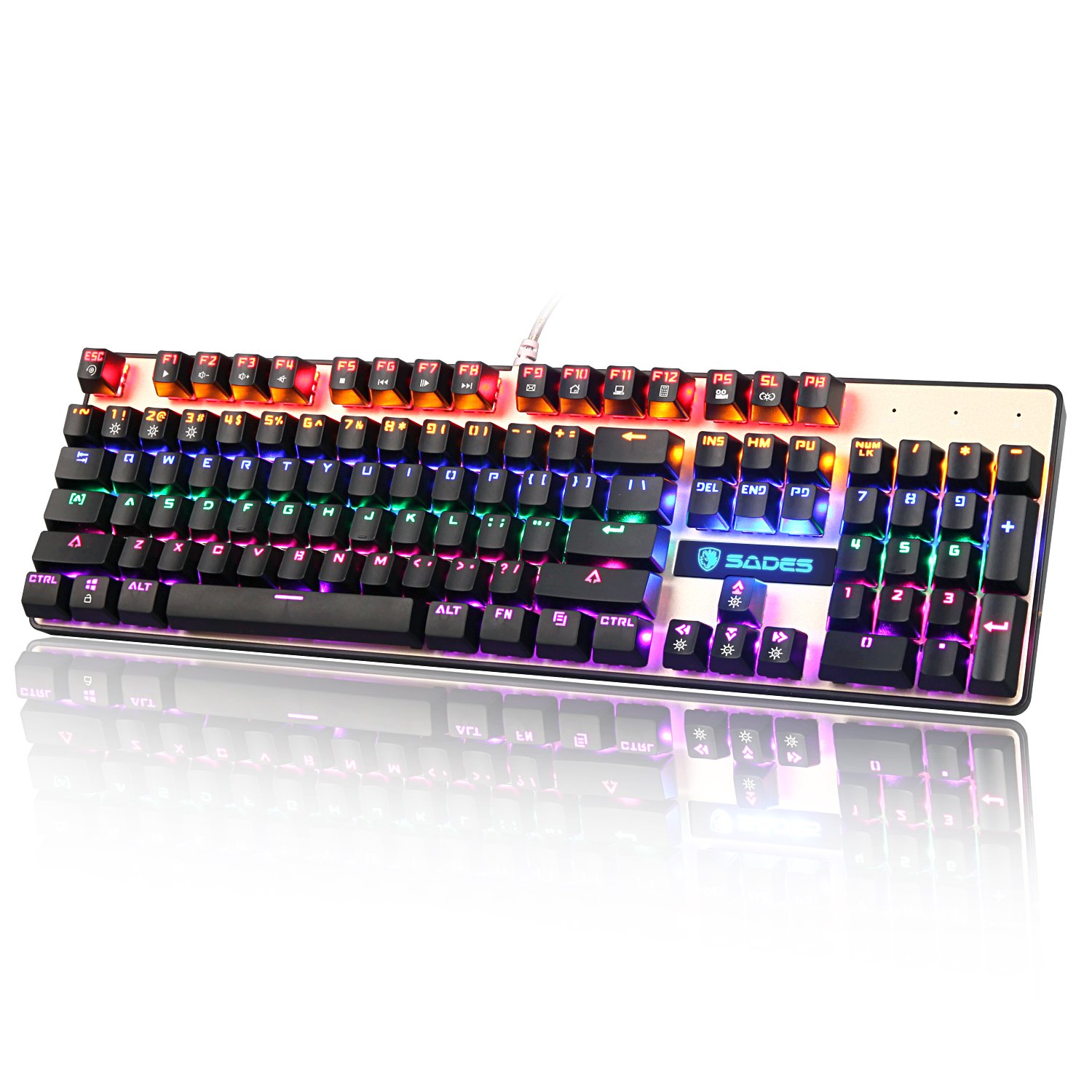
Was eyeing this one last night but didn't get it, but then today it was a lightning deal for $40: https://www.amazon.com/gp/product/B01DLL41D6/?tag=neogaf0e-20

So I snagged it. I have never owned a mechanical keyboard before, but my 7-year-old membrane keyboard is well past its last legs. The keys love to stick, and some simply don't register even when pressed down fully (or they're just flat out inconsistent sometimes). I figured that for my first mechanical piece I would go cheap and low risk just to get a feel for them. How did I do, GAF?
 
I just wanna chime in again and say that after using my Corsair K70 LUX RGB for more than a month now, there's pretty much no way I'd go back to sub-standard keyboard. O-Rings helped a little bit for the noise, but even without them on half the keyboard (or at all), the thing is still a dream to type and play on. Especially when I have to go to a certain computer lab for a class and the keyboards there are a mushy mess that don't always register key presses.

I never even really messed with the lighting features too much beyond making my Caps Lock key turn orange (when the keyboard is set to blue normally) when active. The effects can be very over the top and too much to be honest, but I like that I can turn it any color to fit my mood or what have you. I like that the options are there, even if I don't fully utilize them.

The only negative thing I have to say is that it does get fairly dirty, collecting stray hair and skin flakes/crumbs, but I don't suppose there's really any avoiding that with a mechanical keyboard as there always sort of has to be space under the keycaps. At the very least it's easy enough to clean with compressed air, and though I haven't yet (since the cables are routed through a desk) clean it out by turning it over a trash bin and blowing compressed air or taking a light vacuum to it.

Anyway that's it. If you were thinking about getting a K70, definitely has my seal of approval. This was with Cherry MX Blue switches by the way. If I had to pick again though, I might go for brown switches, as they should be a bit quieter out of the box while still retaining the tactile bump, without having to pay an extra $10-$15 or so for a package of O-Rings.
 
without having to pay an extra $10-$15 or so for a package of O-Rings.
I paid about 2€ for a bag of rings, to test... I like the feeling. They're probably of cheap quality, but I don't see how it can be dangerous for the keyboard. I'll just look if they wear quickly. Or should I buy more expensive ones?

At the same time, it's more a hassle than I expected, not all keycaps are identical underside on my Ergodox (even "identical" keycaps), usually 2 rings is nice, but some won't respond with 2, and some require 3...
 
Hello everyone! but this keyboard( corsair raPD FIRE)is out of control! every key I press is so sensitive! I come from a g15 (they keyboard with lcd thingy)If I keep using the mech keybpoard will I be able to type without hitting the caps lock key? or any other key? I'm a kid from the 80's but dropped out of high school as you tell from my grammar. I just want to know if this keyboard was waY out of my league?
 
While the twitchcon deal was going on with Amazon, I finally just jumped on a keyboard I initially found earlier this year, the Cooler Master Masterkeys Pro S (TKL RGB, with controls for the rgb on board not through software).

I gave up on finding one with audio in, and went with a usb adapter to resolve that.

Went with brown switches, and I'm really happy with them! It's a cool board, I think I'll only ever stick with monochrome color schemes but it's fun to play around with every once in a while.
 
Hello everyone! but this keyboard( corsair raPD FIRE)is out of control! every key I press is so sensitive! I come from a g15 (they keyboard with lcd thingy)If I keep using the mech keybpoard will I be able to type without hitting the caps lock key? or any other key? I'm a kid from the 80's but dropped out of high school as you tell from my grammar. I just want to know if this keyboard was waY out of my league?

I think you should try to return it and get your money back if possible. While with time you could get used to the light keys, there just as much of a chance of you getting stuck with a keyboard that you hate.
 
My E key is very slow/sticky all of a sudden on my new K70 RGB.

Is it easy to open up and clean? Anyone done it?

edit: didn't need to. I injected some water into the switch and cleaned it with compressed air. I let it dry and it works great now.
 
Gettin in on the mechanical game and want some input on the ones I've narrowed it down to.

First up is the Fnatic Rush. I couldn't care less about Fnatic and I know that it's just rebranded board from a company they bought, but this is mostly where I'm leaning at the moment. I like the understated design, no gamer-core font, the LEDs aren't blinding, two USB ports are a plus, and it comes with a wrist rest which is pretty nice at this price point from what I've seen. Only real complaints I've seen is that the finish smudges up easy. But it seems p good value-wise.

Next is the Corsair STRAFE. Mostly just considering this because Corsair seems to be one of the bread and butter brands of this world. Basically the same thing, no wrist rest, one less USB, looks a skosh more gaudy with that font, but it can also put on a laser light show I'll never look at. It's also slightly cheaper, but that's negligible.

Then the CM MasterKeys Pro M. Don't know why but I feel kinda lukewarm on this one. Again, basically same features, but no USB or wrist rest this time, it's also a 90% layout which I like and seems to be a bit less represented compared to full and TKL (ultimately it doesn't matter as I have a huge amount of desk space for a full size). Tbh I'm probably not so excited over this one just cause I already have a non-mechanical Coolmaster, so the sense of getting something new and exciting is a bit dampened by the fact that the one I have looks basically the same, but on the other side of that coin I'm familiar with the brand. I also know the Quickfire TK is pretty well regarded and this is basically the same exact thing as far as I can tell.

And finally I have the wild card I found right before typing this up which is the Glorious Gaming Mechanical Keyboard. Like the CM no extra stuff, just a basic ass keyboard, but this one's totally modular so you can just pop any Cherry-like switches in and out whenever you please. I saw it and thought "Damn they should make the slogan 'the last keyboard you'll ever need' that'd be tight" and shonuff I go on the site and that's the slogan, how serendipitous. It's a little eh in the looks department for me, like maybe a bit too minimalist (plus the LEDs look hella bright), but I really like the idea of being able to easily replace switches if they break (unlikely as it may be) or if I want to try another switch type without having to get a whole new keyboard. You know, cause spending money blows.

That's it. Just want to know what the thoughts are, like if any of these are actually stinkers, if any stand above the rest, or maybe if I missed anything super amazing around this price.

 
Gettin in on the mechanical game and want some input on the ones I've narrowed it down to.

First up is the Fnatic Rush. I couldn't care less about Fnatic and I know that it's just rebranded board from a company they bought, but this is mostly where I'm leaning at the moment. I like the understated design, no gamer-core font, the LEDs aren't blinding, two USB ports are a plus, and it comes with a wrist rest which is pretty nice at this price point from what I've seen. Only real complaints I've seen is that the finish smudges up easy. But it seems p good value-wise.

Next is the Corsair STRAFE. Mostly just considering this because Corsair seems to be one of the bread and butter brands of this world. Basically the same thing, no wrist rest, one less USB, looks a skosh more gaudy with that font, but it can also put on a laser light show I'll never look at. It's also slightly cheaper, but that's negligible.

Then the CM MasterKeys Pro M. Don't know why but I feel kinda lukewarm on this one. Again, basically same features, but no USB or wrist rest this time, it's also a 90% layout which I like and seems to be a bit less represented compared to full and TKL (ultimately it doesn't matter as I have a huge amount of desk space for a full size). Tbh I'm probably not so excited over this one just cause I already have a non-mechanical Coolmaster, so the sense of getting something new and exciting is a bit dampened by the fact that the one I have looks basically the same, but on the other side of that coin I'm familiar with the brand. I also know the Quickfire TK is pretty well regarded and this is basically the same exact thing as far as I can tell.

And finally I have the wild card I found right before typing this up which is the Glorious Gaming Mechanical Keyboard. Like the CM no extra stuff, just a basic ass keyboard, but this one's totally modular so you can just pop any Cherry-like switches in and out whenever you please. I saw it and thought "Damn they should make the slogan 'the last keyboard you'll ever need' that'd be tight" and shonuff I go on the site and that's the slogan, how serendipitous. It's a little eh in the looks department for me, like maybe a bit too minimalist (plus the LEDs look hella bright), but I really like the idea of being able to easily replace switches if they break (unlikely as it may be) or if I want to try another switch type without having to get a whole new keyboard. You know, cause spending money blows.

That's it. Just want to know what the thoughts are, like if any of these are actually stinkers, if any stand above the rest, or maybe if I missed anything super amazing around this price.

Do you only want to buy off Amazon or something? At that price I'd get a Ducky or Leopold, but you'd have to buy from their US distributor.
 
Do you only want to buy off Amazon or something? At that price I'd get a Ducky or Leopold, but you'd have to buy from their US distributor.
Doesn't need to be Amazon. The backlit options for both Leopold and Ducky are a fair bit more expensive, and the ones that aren't are sold out or marked up where I've looked. Only one that isn't is a Ducky One with that circa 2003 Madcatz transparent Gamecube controller aesthetic.
 
So my work uses mechanical keyboards for some old label printers. One keyboard with buckling springs + two other keyboards with ALPS switches. We officially retired the label printers earlier this year (my company likes to hold on to old machinery), so all these keyboards are "free" to take. However, they aren't in the greatest condition-- these were used in a food plant, so, lots of dust in the air. I never Googled up the model numbers until today and realized one of them is an IBM Model F.

http://i.imgur.com/Zuz8kZW.jpg

I actually hated typing on this one cause it felt mushier than the other keyboards with ALPS. Wondering if it's dirt that's causing that though. Anyways, I want to see if I can restore this IBM Model F or the other ones (and whether it's worth it). One of the knobs on the top corners is broken on the Model F, another keyboard is missing one of the feet, and all of them look dirty af.

Anyone have any experience in doing a restoration project with a mechanical keyboard? I've read a few guides on reddit, saying to take it apart and dip it in isopropyl alcohol/water+detergent to clean, then lube each buckling spring before putting it back together. Thinking about possibly repainting it too. Ah, hopefully I follow through with this DIY projects cuz I rarely do.
 
Anyone have any experience in doing a restoration project with a mechanical keyboard? I've read a few guides on reddit, saying to take it apart and dip it in isopropyl alcohol/water+detergent to clean, then lube each buckling spring before putting it back together. Thinking about possibly repainting it too. Ah, hopefully I follow through with this DIY projects cuz I rarely do.
I'd suggest you to visit geekhack (and possibly create an account to discuss your project), especially the DIY subforum, that's a great community, really helpful, and there has definitively been project about restoring buckling springs keyboards...

https://geekhack.org/index.php?board=117.0


Possibly deskthority, too...
 
ErgoDox is finally up on Massdrop again. I went for it.

Awesome! Just know that it is truly a keyboard for the patient... From the months long wait to get the parts, to the several hours wait while you assemble it, and then the weeks while you get used to it... It's worth it in the end though! Other keyboards are already really weird and cramped to me haha.
 
Awesome! Just know that it is truly a keyboard for the patient... From the months long wait to get the parts, to the several hours wait while you assemble it, and then the weeks while you get used to it... It's worth it in the end though! Other keyboards are already really weird and cramped to me haha.

I'm not worried about the split design, as I touch type and am used to split MS natural keyboards, but there programming the thing and deciding what keys go where, and then getting used to it all, that might be an issue. Especially since I'm Swedish and need my ÅÄÖ somewhere on this thing.

I've been thinking that it might be a good idea to switch to Colemak while I'm at it.
 
I'm not worried about the split design, as I touch type and am used to split MS natural keyboards, but there programming the thing and deciding what keys go where, and then getting used to it all, that might be an issue. Especially since I'm Swedish and need my ÅÄÖ somewhere on this thing.

I've been thinking that it might be a good idea to switch to Colemak while I'm at it.

Honestly, the bigger adjustment is having having the keys staggered vertically instead of horizontally. You can get a *pretty* standard layout on the keyboard, at least as far as alphanumerics go. A few of your special keys will need to be moved though.

And the programming thing is pretty easy. I just went on input.club (massdrop also has a layout editor, but it doesn't work with media keys).

Honestly just throw whatever layout on it, you'll decide pretty quickly where you want things, once you're able to hit the keys you want to reliably.
 
I didn't know this was a thread. I just repaired an old IBM M2, that I'm using now to write stuff on forums. How do you feel about it? I'd like to know how it compares to modern switches like in the OP. I do find it very stiff to type on, but I've been using low profile scissor switches for more than a decade, so maybe I'm just not used to it. The noise is also something else, especially the metallic echo of the key springing back in position.

Ultimately this keyboard is going to be used on an old PC for DOS games and stuff, so not much typing. But I have been pondering on getting a modern mechanical keyboard to type on, and tbh I don't see myself writing a thesis on it. What do you think?
 
Recently went from G710+ to corsair strafe red keys. I'd say it's a huge upgrade for me. Keys feel so much nicer to type on and the layout and design feel far nicer. My G710+ was literally falling apart to the point that I was gluing the keys back on. The strafe doesn't have as much media keys particularly the volume roller which I love using etc but in a way, the keyboard feels so much less cluttered and several times easier to clean.

Might stick with reds for a long time.
 
Is the Corsair STRAFE w/ Cherry MX Brown a good <$100 choice?

I need a keyboard that is illuminated with a number pad, and I would like it to be as quiet as possible.

I just want to make sure I'm not overlooking any other models, there's a lot to take in with mechanical keyboards and it can get pretty confusing.
 
Is the Corsair STRAFE w/ Cherry MX Brown a good <$100 choice?

I need a keyboard that is illuminated with a number pad, and I would like it to be as quiet as possible.

I just want to make sure I'm not overlooking any other models, there's a lot to take in with mechanical keyboards and it can get pretty confusing.
It's a great choice I think.

I will say, depending on what you're using right now, brown switches will still be fairly loud. It depends on how hard you type on the keys. They'll register with softer keystrokes to be quieter, but I make em clack like a mofo.
 
I'm not worried about the split design, as I touch type and am used to split MS natural keyboards, but there programming the thing and deciding what keys go where, and then getting used to it all, that might be an issue. Especially since I'm Swedish and need my ÅÄÖ somewhere on this thing.

I've been thinking that it might be a good idea to switch to Colemak while I'm at it.
I have my own software layout that allows easily typing äöå, but is 99.9% muscle memory compatible with standard US Colemak so you have no problem when you can't install the layout. Been using it for 5+ years and never tried to retain qwerty proficiency. The US layout is much superior in terms of special keys, programming etc. PM me if interested, I can give you Windows & MacOS installers and maybe the project data if I find it and you want to tweak/customize.
 
I picked up a Deck Hassium Pro with Cherry Blues and white backlighting recently from MK.com. The board is a dream to type on. It feels so soft, and I could type for hours on it. It's very responsive and feels good to game on too. It doesn't make a lot of noise, maybe even less than the CM Storm Trigger I upgraded from.

My only critcisms so far are the font of the board and the backlighting. The font just screams edgy, try hard gamer. A normal, professional font would be better. The lighting is good overall, but a few keys have spotty lighting. Need a little more QC there, but otherwise it looks fine.
 
Possible heretic posting possible repeat question...

I've had a Steelseries 6gv2 for years which I game on, and I believe it has MX Cherry Black switches.

I am looking for a mechanical keyboard for work (programming) and have been trying a colleague's CODE which has MX Cherry Clears.

I like the Clears, but they actually feel more laborious to type on than my Blacks - it lacks a certain fluidity that the Blacks have, in my opinion. Is this because of the tactile feedback / bump? The extra amount of force required to press a Clear seems negligible (60cN vs 65cN). Maybe I should try Browns, which have the feedback but a considerably lower force requirement (45cN)?
 
I have my own software layout that allows easily typing äöå, but is 99.9% muscle memory compatible with standard US Colemak so you have no problem when you can't install the layout. Been using it for 5+ years and never tried to retain qwerty proficiency. The US layout is much superior in terms of special keys, programming etc. PM me if interested, I can give you Windows & MacOS installers and maybe the project data if I find it and you want to tweak/customize.

It's good to know that others have had success. I probably have rather different needs than you though, as I need to essentially spare my right pinky from as much key pressing as possible. It can't take much action before the pain kicks in, unfortunately.

Plus, I'm on Linux.

But I'm not a total dummy with computers and I think I should be able to figure it all out. It'll be an adventure!
 
It's good to know that others have had success. I probably have rather different needs than you though, as I need to essentially spare my right pinky from as much key pressing as possible. It can't take much action before the pain kicks in, unfortunately.
That was one of the main reasons I developed my custom layout and switched to it. Reduced load on pinky fingers is one of Colemak's design criteria.
I'm sure you could easily build a custom layout for Linux if you're interested. (And if you happen to build one with my design, I'd like to get a copy in case I need to use a Linux desktop at some point!)
The key idea in it is that the period key (,) tends to only be used in very specific contexts, and is almost always followed by a space. So as long as the period-space key combination ", " is mapped to produce a period-space output, I can use period-(other key) combos for something else. I map åöä to the strongest fingers of the opposite hand so that ",r" produces å, ",s" produces ö and ",t" produces ä. I map ",," to produce a single period for the times when I need to type a period that is not followed by space, but you could also map every combination of ",(key that is not used for åöä)" to produce the same output so those cases automatically work exactly standard Colemak.
 
That was one of the main reasons I developed my custom layout and switched to it. Reduced load on pinky fingers is one of Colemak's design criteria.
I'm sure you could easily build a custom layout for Linux if you're interested. (And if you happen to build one with my design, I'd like to get a copy in case I need to use a Linux desktop at some point!)
The key idea in it is that the period key (,) tends to only be used in very specific contexts, and is almost always followed by a space. So as long as the period-space key combination ", " is mapped to produce a period-space output, I can use period-(other key) combos for something else. I map åöä to the strongest fingers of the opposite hand so that ",r" produces å, ",s" produces ö and ",t" produces ä. I map ",," to produce a single period for the times when I need to type a period that is not followed by space, but you could also map every combination of ",(key that is not used for åöä)" to produce the same output so those cases automatically work exactly standard Colemak.

Well in that case, PM sent to get those files.

Given the delivery times on these things, it's going to be quite a while before I know what, if anything, comes out of it.
 
It's a great choice I think.

I will say, depending on what you're using right now, brown switches will still be fairly loud. It depends on how hard you type on the keys. They'll register with softer keystrokes to be quieter, but I make em clack like a mofo.
Thanks for the post! I decided on the Logitech 610 Orion w/ Cherry MX brown switches because it's a little bit smaller than the Strafe and has dedicated media controls.

I've given in to the fact it'll be louder, I don't use heavy fingers when typing and the tradeoff for a better typing experience will probably be worth it anyway.

Does anyone have any experience with the Logitech 610?
 
I'd suggest you to visit geekhack (and possibly create an account to discuss your project), especially the DIY subforum, that's a great community, really helpful, and there has definitively been project about restoring buckling springs keyboards...

https://geekhack.org/index.php?board=117.0


Possibly deskthority, too...
Thanks, found a bunch of restoration guides. I don't know if I want to use this keyboard as a daily driver but I guess it would be fun to clean it up at least. I opened it and man, so much dust...

I found/took a WYSE terminal keyboard too. It has some vintage Cherry MX black switches. Pretty smooth. Not sure what I'm gonna do with this keyboard yet.

I also found out that Elitekeyboards' store front/showcase room is 10-15 minutes away from my work. Time to try out some Topre switches!
 
Anyone ever tried a Logitech G13 or an Orbweaver for programming purposes?
I'm thinking it might be useful to map the most usual shortcuts there to reduce the strain on my hands. For instance, ctrl+F3, or several combinations of ctrl and shift + F10 and F11.
Any opinions?
Any alternatives to those?
 
Top Bottom