
Shockwave_Fox
Member
Mattscreative did an Arch gaming setup video I found interesting


Yeah, that can give you issues too.That can cause issues as well? Good to know.
I usually nuke my previous install and start all over again when installing.
Aiming to not have to do that for a while now.
 github.com
 Durin
has shared it with me.
Durin
has shared it with me.yay -S ludusavi flathub.org
Durin
has shared with me you can like copy game icons and stuff from
flathub.org
Durin
has shared with me you can like copy game icons and stuff from
 www.steamgriddb.com

I always just throw it out there because I had a friend who tried to move games off his Window install, and just threw them in his Steam folder in linux...most of them just didn't work well. Hopefully that can improve your performance issues, because I've had very few issues in PikaOS with game performance, unless it's a game with bad compatibility on ProtonDB, or super old.Ah ok, I noticed it downloaded something when I tried to start it and thought that would be all good after I'd moved it lol
Yeah I tried that on Pika, like 3 of them before I have up lol
 BeardSpike
about Faugus Launcher, but I've had some fun experience recently using it on my Steam Deck. This video has a good summary of installing other game stores on it like Battle.net:
BeardSpike
about Faugus Launcher, but I've had some fun experience recently using it on my Steam Deck. This video has a good summary of installing other game stores on it like Battle.net: "Session Bus" toggle: leave OFF "System Bus" toggle: leave OFF
 Talk → org.freedesktop.Flatpak (this is the key fix)
Any experience with easy effects? It seems to keep needing me to switch from my normal inputs (inactive hdmi or analogue headphones input) to a different one then back again each time or I get no sound......

Soodanim
Dove pretty deep into setting up my PC today and I'm successfully running CachyOS w/ rEFInd for my boot manager, btrfs for my file system, and Plasma for my desktop environment.
Honestly everything's been surprisingly painless so far. Everything feels so zippy as well. I've got all the basics installed with no issues. Picked up my 4K display & 165hz refresh rate right out of the box. Sound/network/bluetooth/everything working with no issues as well. My Razer Wolverine V3 controller surprisingly just worked, no setup required.
Using Proton CachyOS for my default Proton compatibility tool. Played a bit of System Shock (2023) to test and I was able to inject DLSS 4.5 Preset M with no issues. I'm a tinkerer; I can already tell I'm going to love tooling around with this setup.
Haven't messed around too much with setting up HDR yet, but that's next. And then I want to figure out a good route for a controller friendly frontend ala Steam Big Picture or Playnite where I can bring in all of my games from different launchers as well as my emulated library of games into one UI. Looks like there's several options out there but none are really fully baked at the moment. I'll have to do some digging.
Will have to do some benchmarks as well. I know Linux is behind right now with Nvidia performance compared to windows, but I'd like to see how much I'm lagging behind at the moment. My approach for now is to play super demanding games on Windows if needed, and the rest I'll play on Linux.
I always just throw it out there because I had a friend who tried to move games off his Window install, and just threw them in his Steam folder in linux...most of them just didn't work well. Hopefully that can improve your performance issues, because I've had very few issues in PikaOS with game performance, unless it's a game with bad compatibility on ProtonDB, or super old.
I know you were asking
This video also helpful for installing GoG self-installers, like if you wanted to install games when you have no access to the internet...or my main use-case for old games that are delisted on every digital storefront due to licensing:
I used this a ton when installing older delisted racing games on my Steam Deck you can't legally buy anywhere, so there are abandonware/repack sites that have simplified windows installers for them. Like the previous video
If you see the "Steam" checkbox greyed out in Faugus for your added games in the list, that stops you from exporting these games to launch from Steam as non-steam games. If so, you likely have the Flatpak version of Faugus, and it needs a permission fix to see your Steam library.
- Open whatever is the setup.exe file to start the installer, and it will install the game to a "c drive" folder within the /home/faugus folder.
- Then in Faugus just add a game, pick "windows game" from the dropdown that it likely defaults to, give it a name, and on the path field set it to the path of the game.exe in its folder.
- I usually just set it to launch with Proton-GE.
In Flatseal → Faugus Launcher → Session Bus:
Yeah it's set to autostart but seems it needs to be in the taskbar for it to actually do that - that's with the in app setting.I only configured this once and forgot about it, I don't even open it anymore. Go to the settings and see if it's in service mode (so it runs in the background all the time) and if it has Autostart enabled, so it always starts with the system.
You can actually make scripts pretty easily so you can have programs autostart and then force minimize them after launching. You just make an autostart that calls the script, which opens the program and then mimimizes it.Yeah it's set to autostart but seems it needs to be in the taskbar for it to actually do that - that's with the in app setting.
I had it autostart using system settings but it kept opening maximised which annoyed me.
CheersYou can actually make scripts pretty easily so you can have programs autostart and then force minimize them after launching. You just make an autostart that calls the script, which opens the program and then mimimizes it.
Just ask an AI like chatgbt to make one. I forgot the commands right now. Stuff like Steam is a little harder, because it has that user login small window open first, and then the main application. So I had to find out the class of the different windows, and minimize both, but easy effects should be simple.
I'm just hoping at some point Nvidia ports their broadcast app to Linux, because that's always done the best job for me on Windows with their AI to eliminate echo and background noise on mics. My apartment home office setup doesn't let me do better acoustics physically, so anything helps.Cheers
I ended up uninstalling it in the end. I only tried it to improve my mic as my mate always moans about it, he said it sounded worse and then better without lol

Massive behemoth rewrite that is shippable. The full PR is here for testing purposes, but the actual landing will happen in half a million stages.
Hidden behind VKD3D_CONFIG=descriptor_heap since there are still several NVIDIA bugs left to resolve before this can be considered shippable as a default.
Compared to the previous PoC, this PR does not remove legacy code paths (hnnnnnnng), but the idea is that those old paths will eventually be removed once heap is solid everywhere and we can sunset support for ancient GPUs.
github.com
Yeah it's set to autostart but seems it needs to be in the taskbar for it to actually do that - that's with the in app setting.
I had it autostart using system settings but it kept opening maximised which annoyed me.

Space Marine 2 is one of those games that run fine before on par with Windows, then after they dropped some content updates it started to run like way worse on Linux than before.Also - For Space Marine 2 - the GE or CachyOS proton plus FSR4 upgrade makes a BIG difference on this one, so far for me at least.
Durin
knows this first hand, as I was on mic chat with him trying to like make it playable on Linux, and I just dual booted for that one game only to Windows to play PvE with
Durin
, lmao.Yeah ive read that a lot in my searching about it running well before and badly afterwards.Space Marine 2 is one of those games that run fine before on par with Windows, then after they dropped some content updates it started to run like way worse on Linux than before.
Multiple users noticed the game behaves weirdly comparted to Windows, like it isn't utilizing GPU as much on Linux at it is on Windows. Plus alt tabbing makes Space Marine 2 hang for me on Linux.
Honestly it's the only game that doesn't actually run good on Linux for me, regardless of environmental variables and launch parameters
Other online games play just fine on Linux, like ARC Raiders, Helldivers 2 and No Rest for The Wicked. But man, Space Marine 2 I just can't play it on Linux with that much performance loss, either Proton/Wine doesn't like translate all the heavy CPU stuff this game is doing or it is just coded in such a weird way.

This is a significant release since the 11 series of Wine supports ntsync over fsync and syscall user dispatch (Wine 11.5+). We likely won't see a significant performance boost, but we should theoretically see fewer bugs and more consistent frametimes.
So I like Faugus Launcher very much.It can like copy all my game saves to external HDD and then upload them to like Dropbox or Google Drive. Even the ones I have installed from like GOG offline setup exe files.
Or I've been trying lately https://github.com/Faugus/faugus-launcher
In tandem with it.
Install Faugus Launcher on Linux | Flathub
A simple and lightweight app for running games using UMU-Launcher
Durin
about it.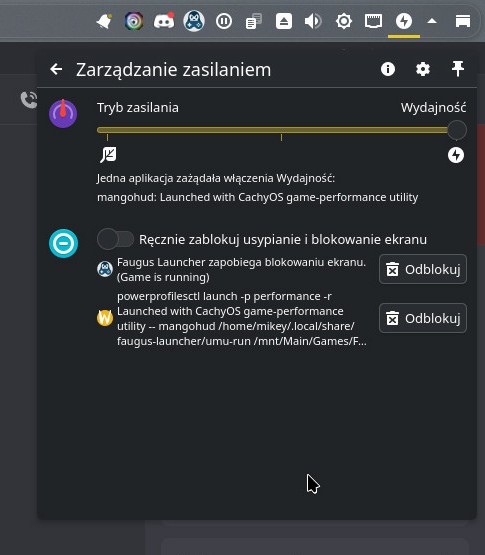
ENV1=Value ENV2=Value wrapperMANGOHUD=1 DXVK_ASYNC=1 gamemoderun /path/to/game_executableI messed up my variables across Steam and Heroic so badly when I first started haha nothing opened for me at allSo I like Faugus Launcher very much.
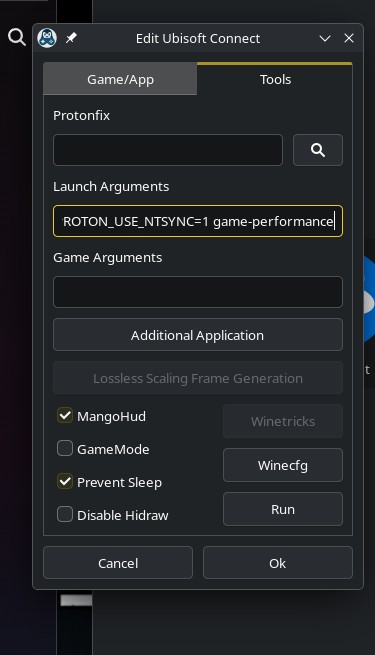
I also did try to like get a hold on how syntax of environment variables and wrappers should look like on it, since there isn't like any official guide for it and it seems I have nailed it, during our talks with
Or at least my power profile says so.
Also installing Ubisoft Connect and Battle.net went more smoothly than on Lutris - it had built-in scripts for those along with Rockstar Launcher, and they've all worked for me perfectly.
So it looks like the syntax for Launch Arguments in Faugus Launcher should be:
Code:ENV1=Value ENV2=Value wrapper
ChatGPT said it should be for example:
Code:MANGOHUD=1 DXVK_ASYNC=1 gamemoderun /path/to/game_executable
But this just made my apps not launch instead, lmao.
I've learned asking AI with launch commands (or anything with programming) to look up proper syntax when asking. It will vaguely get the right answer for you, but vaguely right in syntax means it still fails to workSo I like Faugus Launcher very much.
I also did try to like get a hold on how syntax of environment variables and wrappers should look like on it, since there isn't like any official guide for it and it seems I have nailed it, during our talks with
Or at least my power profile says so.
Also installing Ubisoft Connect and Battle.net went more smoothly than on Lutris - it had built-in scripts for those along with Rockstar Launcher, and they've all worked for me perfectly.
So it looks like the syntax for Launch Arguments in Faugus Launcher should be:
Code:ENV1=Value ENV2=Value wrapper
ChatGPT said it should be for example:
Code:MANGOHUD=1 DXVK_ASYNC=1 gamemoderun /path/to/game_executable
But this just made my apps not launch instead, lmao.

I knew it will get it vaguely right, and I did get to know other launchers syntax over a span of +2 years.I've learned asking AI with launch commands (or anything with programming) to look up proper syntax when asking. It will vaguely get the right answer for you, but vaguely right in syntax means it still fails to work
Faugus really does deserve more documentation and youtube videos talking about different use-cases for it.I knew it will get it vaguely right, and I did get to know other launchers syntax over a span of +2 years.
So after a second try it worked - I had a hunch syntax was right though, that it just added something which caused apps to like not launch at all. But it was just a hunch and a bit of common sense since I don't do much programming really.
But I did know that %command% thingie is pretty much used only in Steam so I didn't bother with it like at all.
Then it hit me, what if syntax is right it just like points to some exe now like two times or smth since Faugus could be doing something internally from the get-go.
Turns out I'm not such a dummy as I thought I was because it worked, lmao.
Hey, these delisted abandonware racers you mentioned - do you have Blur setup at all?I used this a ton when installing older delisted racing games on my Steam Deck you can't legally buy anywhere, so there are abandonware/repack sites that have simplified windows installers for them.

Hey, these delisted abandonware racers you mentioned - do you have Blur setup at all?
I see it's on abandonware site but not sure how safe it is and if it would actually work.
Cheers, not heard of El Amigos before - is there any difference between the 2 sites?MyAbandonware.com is a good resource, and they'll even take games off their site if there is a new legal way to buy them (or official remaster) so you can support the dev. Never had a problem with them, just search Blur there, and the ElAmigos repack (all their repacks have been good for me) is what I used myself to play it. Blur is awesome, shame it didn't sell better, but the repack way easier to install on Linux than trying do my physical PC copy.
Whatever you can't find there, look up what repacks are made for the game, check if the repack group is legit based on other users, and find their official site which is the safer way to go. Honestly though, benefit of Linux is even things with viruses will rarely work on the OS since they're made for Windows.
I don't know all the repack groups out there, just that ElAmigos and Fitgirl do work if you don't just download them from random places. MyAbandonware is good though.Cheers, not heard of El Amigos before - is there any difference between the 2 sites?
It seems like mounting the iso to get the .exe seems the easiest way to play - just add it to Heroic.
I don't know all the repack groups out there, just that ElAmigos and Fitgirl do work if you don't just download them from random places. MyAbandonware is good though.
Haven't installed any of these repacks with Heroic before, so not sure how that works. I just know with Faugus, you can extract the contents of the iso to get the exe installer, open the installer with Faugus, go through the install, should go to /home/Faugus/drive_c. Then in Faugus, just add a Windows game, name it, point the path to the game.exe file in "drive_c", pick your proton version, and then check to add to Steam.
If Heroic works though, share the steps because that would be neat to try. Tons of these older games have repacks for easier installs, and some include patches/mods that are needed to make some work out of the box than checking PCGamingWiki for the downloads.
Huh, didn't know you could do that either. I'll have to try.Another really easy way to do it is just add the setup.exe from the game install folder to steam as a non-steam game. Then just run it with Proton compatibility and it'll install just like a Windows program would. Then after it installs you just add the actual game executable to Steam as a non-steam game as well.
Many ways to do it. That's just personally how I've done it and it's been seamless for me.
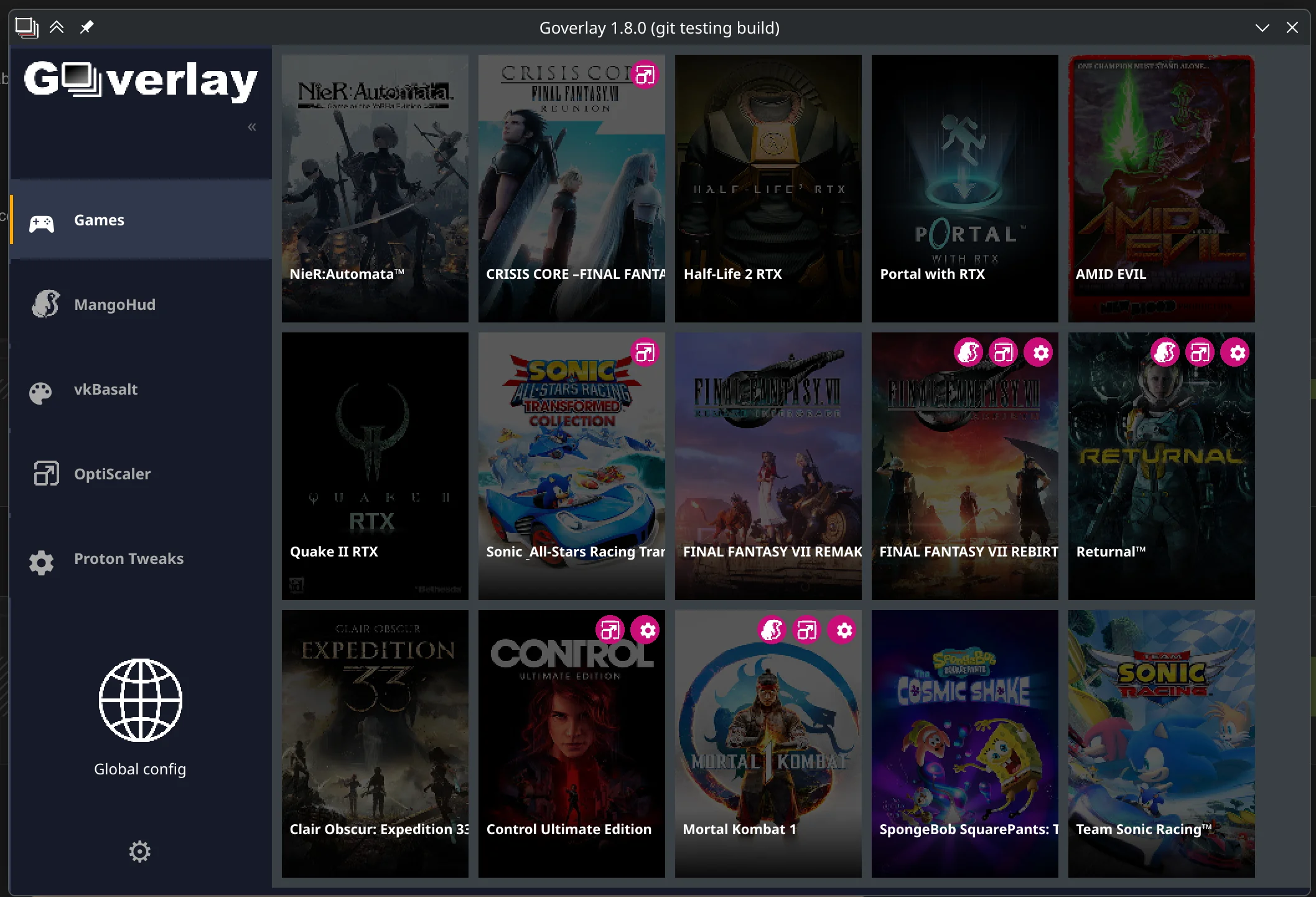
Hopefully it gets more stable over time then.I've had an issue with Goverly on Cachy.
If I use it in certain games, they stop working. I have to uninstall and delete all the files.

Are you using the Optiscaler part with Optipatcher enabled (defaults to on, I think)? I did that on Hogwarts and used a DLSS related setting that made the game not launch. Couldn't fix it so I ended up clearing out files and reinstalling. Either OptiPatcher's function persists without the launch parameters or the broke setting in my case did not revert on crash.I've had an issue with Goverly on Cachy.
If I use it in certain games, they stop working. I have to uninstall and delete all the files.

It sounds like that could be the cause of the issue I was havingAre you using the Optiscaler part with Optipatcher enabled (defaults to on, I think)? I did that on Hogwarts and used a DLSS related setting that made the game not launch. Couldn't fix it so I ended up clearing out files and reinstalling. Either OptiPatcher's function persists without the launch parameters or the broke setting in my case did not revert on crash.
OptiPatcher puts extra files in the game folders beyond the normal DLL set. It's supposed to be an even stronger form of OptiScaler but I guess it isn't perfect.
This worked exactly the same way in heroic installing blur.Another really easy way to do it is just add the setup.exe from the game install folder to steam as a non-steam game. Then just run it with Proton compatibility and it'll install just like a Windows program would. Then after it installs you just add the actual game executable to Steam as a non-steam game as well.
Many ways to do it. That's just personally how I've done it and it's been seamless for me.
I didn't saw any news outlets mention this like at all. Lmao.

 techcrunch.com

 www.theverge.com

 www.theregister.com

 www.zdnet.com

The latest version or want to run with (Experimental, Cachy latest, GE variant, etc) will probably be fine for most, then you can tweak individual games as and when it's needed. I've seen Proton 9 for example be mentioned a lot as a fall back for compatibility, but you wouldn't want to miss out on so many recent advancements by running as a default.Do you guys set a proton version in the overall settings or per game?
Cool I've left it as just experimental in the main global settings so good to hear that's ok.The latest version or want to run with (Experimental, Cachy latest, GE variant, etc) will probably be fine for most, then you can tweak individual games as and when it's needed. I've seen Proton 9 for example be mentioned a lot as a fall back for compatibility, but you wouldn't want to miss out on so many recent advancements by running as a default.
I set NTSYNC upn on my machine today - seems to have made a bit of a difference in Space Marine 2 - did get some weird lag on my controller but not sure if that was the cause.
Seems worth it so far.
Also have falcond up and running - its not the newest version and theres a bit of a bug with it but is working as far as I can tell.
EDIT - Proton Experimental has the new beta 11 added to it - I was using that for NTSYNC. I think cachy or ge has it as well.
