

-
Hey Guest. Check out your NeoGAF Wrapped 2025 results here!
You are using an out of date browser. It may not display this or other websites correctly.
You should upgrade or use an alternative browser.
You should upgrade or use an alternative browser.
List of PS5 Pro enhanced games
- Thread starter HeisenbergFX4
- Start date

Giallo Corsa
Gold Member
Man, where did King Dazzar go ? He was one of the nicest peeps on NeoGAF dammit...
Mate, if you're reading this, we missed ya !
Mate, if you're reading this, we missed ya !

jm89
Member
Completley nuked his account. I wonder what happened.Man, where did King Dazzar go ? He was one of the nicest peeps on NeoGAF dammit...
Mate, if you're reading this, we missed ya !
Yeah I definitely see it. Just choosing to ignore it. The game is that good. It's shocking that the bones of this game are more than 2 decades old.
I think the only way bloober can have a working version of pssr here is if they implement an RT denoiser of their own or upgrade to UE 5.5. I doubt either is happening. The improvement in denoising quality between 5.5 and earlier is staggering and it solves the exact problem that is exhibited here more efficiently, so that they can increase the lumen quality on the pro and then it plays well with pssr.
The sample above is on 5.3. I believe it was even worse with earlier versions. Brute forcing to epic quality is way too taxing at lower UE versions to be viable for console.
Unfortunately, I see no way they would make such a big jump without breaking a bunch of other things. Only viable fix is to disable pssr and have tsr clean up the messy input.
I'm guessing Sony would eventually come up with their own library (or train pssr to deal with it), that the devs can leverage, but pssr currently doesn't like noisy input, which other temporal solutions handle perfectly well. I don't think it's even rt related. Any noise or low quality input gets worse with pssr. Hence the shadow flickering for certain types of foliage in tlou 2, which has no RT. Completely my armchair hypothesis, of course.
The good news is, I think games built on UE 5.5 or up should play well out of the box with pssr, even with RT
There is no ray tracing specific or resolution specific issue with PSSR. Those were just bullshit guesses.
Just like the bullshit Battaglia from DF stated about PSSR not working well when resolution is less than 1440p

It's pretty much how you stated.
As Cerny explained current PSSR is just trained to sharpen and enhance everything, that is just the goal of the tool.
If your game has noisy/flickering effects PSSR won't do anything to hide them, actually it's going to enhance them thinking it's a fine detail.
The difference in UE5 versions with Lumen stability is probably the reason why in Wukong great results were achieved and in SH2 not.
In both cases developers didn't do much besides turning on the PSSR switch.
Things will get much better as developers learn how to use the tool, games are developed with Pro support in mind and we're not dealing with quick rushed retrofitted patches where PSSR is turned on without tweaking the graphical settings .

Luipadre
Member
Im loving some of these 40fps modes lately. If you have a pro a 120hz screen is a must imo. Alan Wake 2s new 40 fps mode with PSSR is the best way to play that game on console and im currently playing outlaws and it looks amazing in the favor quality 40 fps mode with FSR. Its the best looking and most stable modes out of all. It never drops a frame, 0 stuttering or anything. Same goes to the 40fps mode for AW2

rofif
Banned
yeah 40 feels great because it;s in 120hz containerIm loving some of these 40fps modes lately. If you have a pro a 120hz screen is a must imo. Alan Wake 2s new 40 fps mode with PSSR is the best way to play that game on console and im currently playing outlaws and it looks amazing in the favor quality 40 fps mode with FSR. Its the best looking and most stable modes out of all. It never drops a frame, 0 stuttering or anything. Same goes to the 40fps mode for AW2
Would feel just as good if sony fixed their VRR and it went lower than 40fps.
Or if sony would allow 30fps games to run in 120hz container

Kenji Kono
Neo Member
Are they going to add Boost Mode into PS5 Pro? I'd like to replay some older games which don't work in 60 fps.
Luipadre
Member
Are they going to add Boost Mode into PS5 Pro? I'd like to replay some older games which don't work in 60 fps.
There is a boost mode already. You wont get a mode where locked 30 fps games runs at 60 tho. Works with unlocked framerate only
Luipadre
Member
yeah 40 feels great because it;s in 120hz container
Would feel just as good if sony fixed their VRR and it went lower than 40fps.
Or if sony would allow 30fps games to run in 120hz container
Dunno man VRR doesnt do shit to me on console. I use gsync on PC and monitor and i see the smoothness there, but everytime a console game drops from 60 i can feel the fps drops and stuttering on my OLED tv with VRR on. Locked 40 tho... it feels so smooth compared to the unstable 60 modes

proandrad
Member
What game in particular because as long as it's inside the vrr window that shouldn't be the case.Dunno man VRR doesnt do shit to me on console. I use gsync on PC and monitor and i see the smoothness there, but everytime a console game drops from 60 i can feel the fps drops and stuttering on my OLED tv with VRR on. Locked 40 tho... it feels so smooth compared to the unstable 60 modes
Luipadre
Member
Every game that drops from 60 it stutters and i can feel it even if its just a few fps dropsWhat game in particular because as long as it's inside the vrr window that shouldn't be the case.

Forsete
Gold Member
I really wanted to give this a go, but when they force you to get an account they can fuck right off. Uninstalled.There's a free trial of Solar Crown. The game is nothing to write home about but it does have nice ray tracing especially on graphics mode and it's Pro enhanced. Worth a download to check out the ray traced reflections.
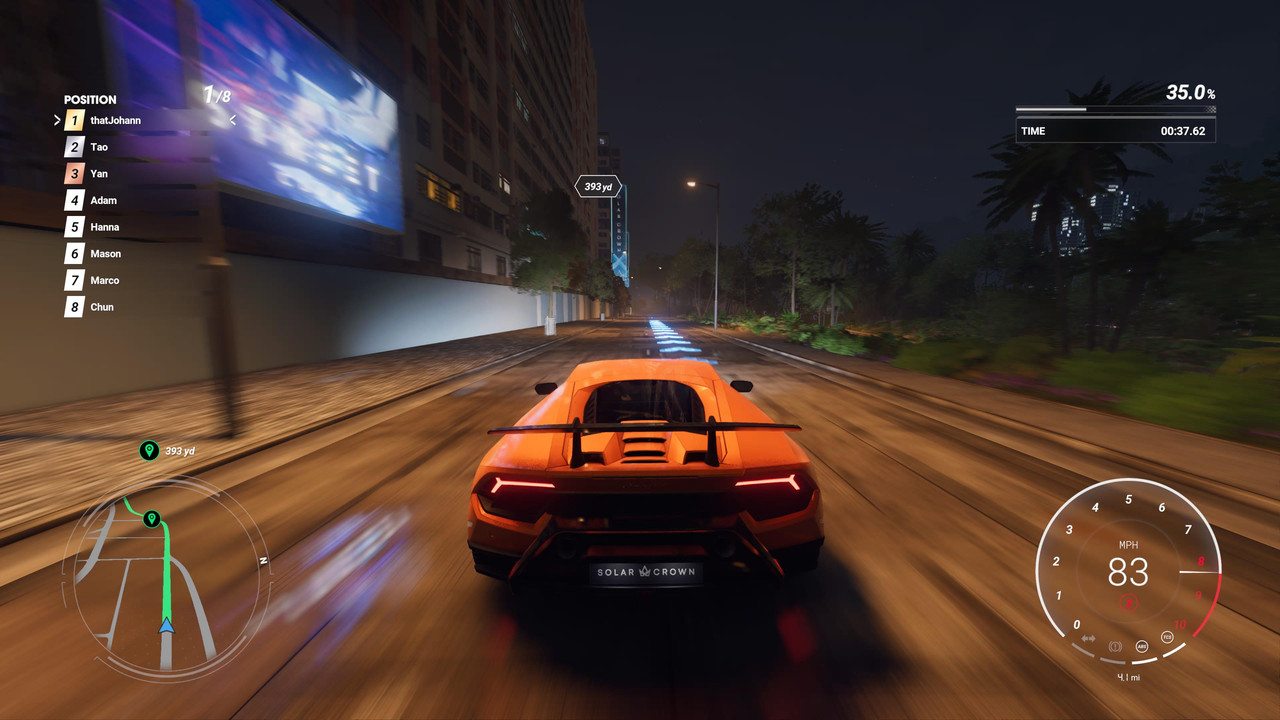
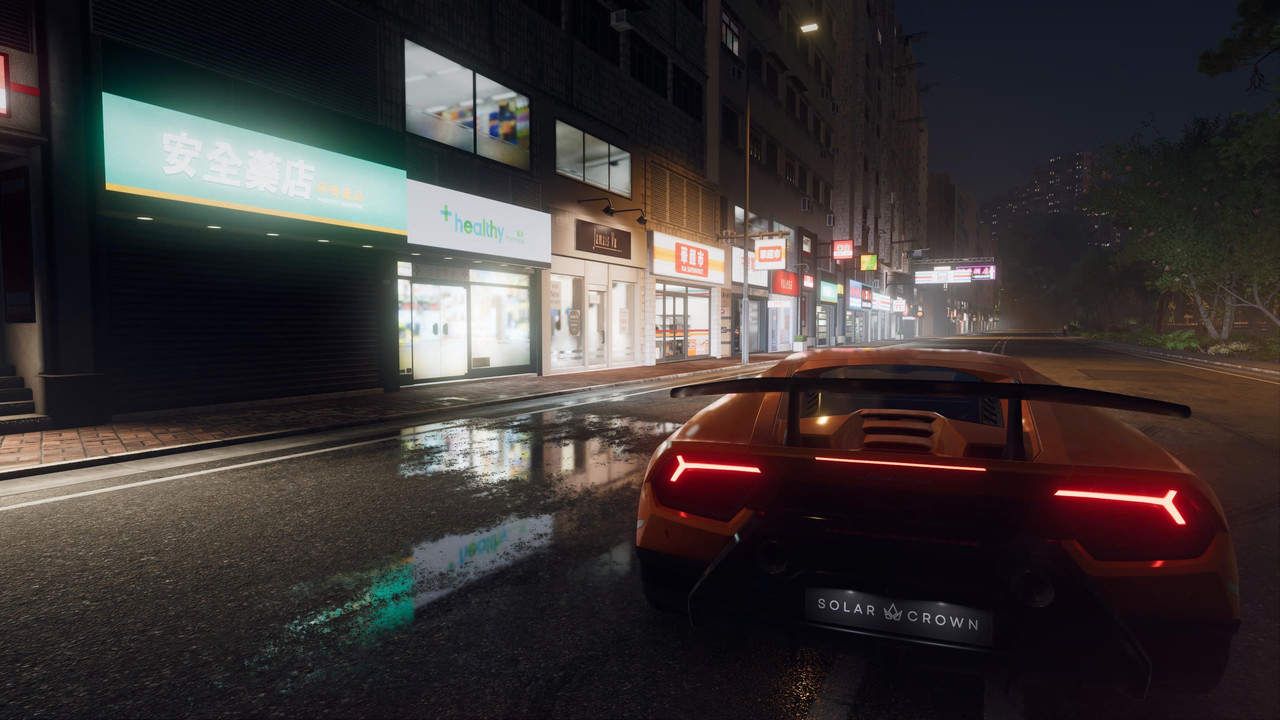
Game looks good from your pics though.

Last edited:

Inviusx
Member
There's a free trial of Solar Crown. The game is nothing to write home about but it does have nice ray tracing especially on graphics mode and it's Pro enhanced. Worth a download to check out the ray traced reflections.
I have to disagree here. I downloaded Solar Crown awhile back and I think it might be one of the worst looking racing games released this generation. Yes, you can manipulate still screenshots with reflective puddles to give the illusion that it has some technical chops but honestly, 99% of the time the game legitimately looks like it would fit right at home as a mid generation PS4 game. I think the game is kinda fun, the handling is nice for an arcade racer and it has a good sense of speed but it definitely isn't a looker.
Giallo Corsa
Gold Member
Double/cross posting from another thread but :
FF16, even without a pro patch, is miles, MILES better on the Pro, we're talking about a 15 to 20 FPS difference here in most scenarios AND with a better image quality/higher res even in performance mode, game is actually playable now without dropping to slideshow levels like on the base console.
Since the team has been disbanded It won't receive a pro patch (Plus, square enix isn't happy with its sales probably) and it's a shame, still, I'll take these gains over 0 gains.
It is what it is unfortunately, still, the differences are there and very visible so I guess it's a win for the Pro
FF16, even without a pro patch, is miles, MILES better on the Pro, we're talking about a 15 to 20 FPS difference here in most scenarios AND with a better image quality/higher res even in performance mode, game is actually playable now without dropping to slideshow levels like on the base console.
Since the team has been disbanded It won't receive a pro patch (Plus, square enix isn't happy with its sales probably) and it's a shame, still, I'll take these gains over 0 gains.
It is what it is unfortunately, still, the differences are there and very visible so I guess it's a win for the Pro
Feel Like I'm On 42
Member
I remember reading there was a major patch that released a few weeks after the game came out the improved the graphics and raised resolution ...I have to disagree here. I downloaded Solar Crown awhile back and I think it might be one of the worst looking racing games released this generation. Yes, you can manipulate still screenshots with reflective puddles to give the illusion that it has some technical chops but honestly, 99% of the time the game legitimately looks like it would fit right at home as a mid generation PS4 game. I think the game is kinda fun, the handling is nice for an arcade racer and it has a good sense of speed but it definitely isn't a looker.
Feel Like I'm On 42
Member
Man ...this would be so much better with a real Pro patch tho...these companies suck that is just pure lazinessDouble/cross posting from another thread but :
FF16, even without a pro patch, is miles, MILES better on the Pro, we're talking about a 15 to 20 FPS difference here in most scenarios AND with a better image quality/higher res even in performance mode, game is actually playable now without dropping to slideshow levels like on the base console.
Since the team has been disbanded It won't receive a pro patch (Plus, square enix isn't happy with its sales probably) and it's a shame, still, I'll take these gains over 0 gains.
It is what it is unfortunately, still, the differences are there and very visible so I guess it's a win for the Pro
Giallo Corsa
Gold Member
It would but it's in a very good state now man, sure, performance mode IQ isn't the sharpest one but it's still better compared to other games (say, AW2 and Space marine 2 on base consoles), besides, I'll take a game with a somewhat blurrier image but with good performance over a sharper image one with a worse performance/fps any day of the week.Man ...this would be so much better with a real Pro patch tho...these companies suck that is just pure laziness
I mean, this still looks sharper/less aliased/jaggied/better than - say - Metaphor ReFantazio which I found to be inexcusable image quality wise.
Sure, the cutscenes are locked to 30fps (they must have done this with a previous patch most probably) but, the performance mode is actually very enjoyable now with its 60fps 99% of the time AND with a better IQ.
I remember playing the demo 2 years ago and being disgusted both with the IQ quality and performance - maybe they released some patches, maybe it's just the Pro brute-forcing/boosting through the whole thing but, right now, the game plays beautifully on the Pro even in perf mode, I'm actually amazed with what I'm seeing and playing, I expected a super mediocre game tbh but I'm enjoying both the technical aspects and the gameplay, what a nice surprise !
Giallo Corsa
Gold Member
Regarding the Capcom games :
While the REs play beautifully at 60fps with RT on, DMC5 special edition unfortunately, doesn't:
With RT enabled it feels...weird, I can't quite describe it easily but it feels "slower" to the point it's messing up with my inputs, also, it can't hold 60fps 90% of the time and instead it feels like it's hovering around the high 40s/mid 50fps - something which can be felt even with VRR on...
Unfortunately, I had to revert to the usual 60fps mode with RT set to off, bummer
While the REs play beautifully at 60fps with RT on, DMC5 special edition unfortunately, doesn't:
With RT enabled it feels...weird, I can't quite describe it easily but it feels "slower" to the point it's messing up with my inputs, also, it can't hold 60fps 90% of the time and instead it feels like it's hovering around the high 40s/mid 50fps - something which can be felt even with VRR on...
Unfortunately, I had to revert to the usual 60fps mode with RT set to off, bummer

Vick
Member
Bummer indeed it's not equal to RE games, but "High 40s/mid 50fps" is basically regular PS5 performance. I have personally tried it briefly but what I've played was steady 60fps. John from DF also praised how the RT mode runs on Pro..Regarding the Capcom games :
While the REs play beautifully at 60fps with RT on, DMC5 special edition unfortunately, doesn't:
With RT enabled it feels...weird, I can't quite describe it easily but it feels "slower" to the point it's messing up with my inputs, also, it can't hold 60fps 90% of the time and instead it feels like it's hovering around the high 40s/mid 50fps - something which can be felt even with VRR on...
Unfortunately, I had to revert to the usual 60fps mode with RT set to off, bummer
It appears to be actually be 60fps most of the time, or at least fully within VRR window. Those considerable drops during specific moments I remember being always there.
I just finished the game in Pro. The game is only 60fps the first 2 hours. The game stutters (below 48fps VRR limit) pretty oftenIt would but it's in a very good state now man, sure, performance mode IQ isn't the sharpest one but it's still better compared to other games (say, AW2 and Space marine 2 on base consoles), besides, I'll take a game with a somewhat blurrier image but with good performance over a sharper image one with a worse performance/fps any day of the week.
I mean, this still looks sharper/less aliased/jaggied/better than - say - Metaphor ReFantazio which I found to be inexcusable image quality wise.
Sure, the cutscenes are locked to 30fps (they must have done this with a previous patch most probably) but, the performance mode is actually very enjoyable now with its 60fps 99% of the time AND with a better IQ.
I remember playing the demo 2 years ago and being disgusted both with the IQ quality and performance - maybe they released some patches, maybe it's just the Pro brute-forcing/boosting through the whole thing but, right now, the game plays beautifully on the Pro even in perf mode, I'm actually amazed with what I'm seeing and playing, I expected a super mediocre game tbh but I'm enjoying both the technical aspects and the gameplay, what a nice surprise !

HAYA8U5A
Member
I have to disagree here. I downloaded Solar Crown awhile back and I think it might be one of the worst looking racing games released this generation. Yes, you can manipulate still screenshots with reflective puddles to give the illusion that it has some technical chops but honestly, 99% of the time the game legitimately looks like it would fit right at home as a mid generation PS4 game. I think the game is kinda fun, the handling is nice for an arcade racer and it has a good sense of speed but it definitely isn't a looker.
Game was really rough visually at launch but even on the base PS5 has been improved since and the Pro patch is pretty good. Forza Horizon has just spoiled the genre visually that going from that to games with much smaller budgets makes them harder to appreciate all around for what they are. Solar Crown is also behind The Crew Motorfest visually but with the improvements and Pro support I wouldn't say it is a complete mess anymore. The new Ibiza map in particular has some nice visual moments. The many other issues with the game still make it a hard game to recommend playing though.

Chuck Berry
Gold Member
How is the re4 remake upgrade? Picking up a Pro soon and this is top on the list for replays if it's solid
rofif
Banned
Bummer indeed it's not equal to RE games, but "High 40s/mid 50fps" is basically regular PS5 performance. I have personally tried it briefly but what I've played was steady 60fps. John from DF also praised how the RT mode runs on Pro..
It appears to be actually be 60fps most of the time, or at least fully within VRR window. Those considerable drops during specific moments I remember being always there.
That game is on my shelf (the ps5 version)... I just need to actually play it.
I've tried on pc some years ago but hated the V.
But maybe 60fps rt will force me to give it a 2nd chance


Skifi28
Member
Quite good. You can play in quality mode + RT + the new hair and still stay at a locked 60 pretty much the entire game.How is the re4 remake upgrade? Picking up a Pro soon and this is top on the list for replays if it's solid

thtJhnn
Member
Looks stunning on the Pro. All settings enabled and runs pretty much locked at 60fps.How is the re4 remake upgrade? Picking up a Pro soon and this is top on the list for replays if it's solid

sachos
Member
Didnt this game have a PS4 Pro patch? I thought games with Pro patch rendering above 1080p did not work with this function. Or maybe it was a PS4 Pro patch but still rendered at 1080p and thats why it works.The "enhance PS4 games graphics" toggle can be very impressive. Deus Ex Mankind Divided looked quite blurry and grainy and ugly on PS5 using PS4 BC. Now it looks pin sharp on PS5 Pro.

rofif
Banned
in fact 70-90 fps most of time !Quite good. You can play in quality mode + RT + the new hair and still stay at a locked 60 pretty much the entire game.

Killer8
Member
I played the trial of Black Myth Wukong and was impressed enough with it that I ordered a physical copy. I already got the game free on PC with my 4070 Super and put a couple of hours into it on there, but I found the stutter to be so intrusive that I couldn't play any more. This stutter is documented in Digital Foundry's PC review but it is much worse than even Alex makes out in the video. The review suggests it's just an annoyance in an otherwise great experience. For me and many others though, it was so bad that the first run of boss battles essentially become a write-off as the game chugs every time a new attack happens on screen. The issue is that the developer used a version of UE5 pre-dating Epic mitigating the issue with PSO precaching. It's a real shame as with the added Nvidia RTX the PC version is head and shoulders above the PS5 release.
Enter the Pro-patched PS5 version. The 30fps quality mode frankly feels disgusting for this game, however the balanced mode operating at a locked 40fps on a 120hz display is in the goldilocks zone of responsiveness. Don't even bother with the 60fps 'performance' mode as it is just FSR3 frame-gen powered ass. Balanced mode uses PSSR so looks sharp but also manages to avoid the shimmering issues found in games like Silent Hill 2 and Judder Survivor. It just needs some tweaking to get better image quality. The out-of-the-box sharpening settings are set far too high. I recommend lowering it to a value of something like 1-3 (depending on your taste until the textures stop looking overly grainy) and then use your TV's built-in sharpening to get some additional edge enhancement if you want it. Most TVs nowadays do a pretty good job at that without nuking the whole image like Unreal's. But I also would not recommend completely disabling sharpening either, as even going from 1 to 0 causes the game to look too blurry.
Setting the game's motion blur setting to 'weak' helps to mitigate some of the ghosting artifacts around Wukong when the camera pans. I also set the brightness to a touch darker than the calibration screen suggests in order to improve the washed-out black levels (and the game has no HDR, insane for 2024). I think the fine tune dark areas setting on my TV may even do a better job than that. With all these settings dialled in, the result is a game which is sharp, responsive enough, still looks great thanks to flexing UE5's Lumen, but most importantly of all: DOES NOT STUTTER. It's funny that once all the technical issues melted away, I was able to just sit and enjoy the game. Before I knew it the trial had run out.
Enter the Pro-patched PS5 version. The 30fps quality mode frankly feels disgusting for this game, however the balanced mode operating at a locked 40fps on a 120hz display is in the goldilocks zone of responsiveness. Don't even bother with the 60fps 'performance' mode as it is just FSR3 frame-gen powered ass. Balanced mode uses PSSR so looks sharp but also manages to avoid the shimmering issues found in games like Silent Hill 2 and Judder Survivor. It just needs some tweaking to get better image quality. The out-of-the-box sharpening settings are set far too high. I recommend lowering it to a value of something like 1-3 (depending on your taste until the textures stop looking overly grainy) and then use your TV's built-in sharpening to get some additional edge enhancement if you want it. Most TVs nowadays do a pretty good job at that without nuking the whole image like Unreal's. But I also would not recommend completely disabling sharpening either, as even going from 1 to 0 causes the game to look too blurry.
Setting the game's motion blur setting to 'weak' helps to mitigate some of the ghosting artifacts around Wukong when the camera pans. I also set the brightness to a touch darker than the calibration screen suggests in order to improve the washed-out black levels (and the game has no HDR, insane for 2024). I think the fine tune dark areas setting on my TV may even do a better job than that. With all these settings dialled in, the result is a game which is sharp, responsive enough, still looks great thanks to flexing UE5's Lumen, but most importantly of all: DOES NOT STUTTER. It's funny that once all the technical issues melted away, I was able to just sit and enjoy the game. Before I knew it the trial had run out.
rofif
Banned
At this point, I don't get it why sony wouldn't let 30fps into 120hz containters.I played the trial of Black Myth Wukong and was impressed enough with it that I ordered a physical copy. I already got the game free on PC with my 4070 Super and put a couple of hours into it on there, but I found the stutter to be so intrusive that I couldn't play any more. This stutter is documented in Digital Foundry's PC review but it is much worse than even Alex makes out in the video. The review suggests it's just an annoyance in an otherwise great experience. For me and many others though, it was so bad that the first run of boss battles essentially become a write-off as the game chugs every time a new attack happens on screen. The issue is that the developer used a version of UE5 pre-dating Epic mitigating the issue with PSO precaching. It's a real shame as with the added Nvidia RTX the PC version is head and shoulders above the PS5 release.
Enter the Pro-patched PS5 version. The 30fps quality mode frankly feels disgusting for this game, however the balanced mode operating at a locked 40fps on a 120hz display is in the goldilocks zone of responsiveness. Don't even bother with the 60fps 'performance' mode as it is just FSR3 frame-gen powered ass. Balanced mode uses PSSR so looks sharp but also manages to avoid the shimmering issues found in games like Silent Hill 2 and Judder Survivor. It just needs some tweaking to get better image quality. The out-of-the-box sharpening settings are set far too high. I recommend lowering it to a value of something like 1-3 (depending on your taste until the textures stop looking overly grainy) and then use your TV's built-in sharpening to get some additional edge enhancement if you want it. Most TVs nowadays do a pretty good job at that without nuking the whole image like Unreal's. But I also would not recommend completely disabling sharpening either, as even going from 1 to 0 causes the game to look too blurry.
Setting the game's motion blur setting to 'weak' helps to mitigate some of the ghosting artifacts around Wukong when the camera pans. I also set the brightness to a touch darker than the calibration screen suggests in order to improve the washed-out black levels (and the game has no HDR, insane for 2024). I think the fine tune dark areas setting on my TV may even do a better job than that. With all these settings dialled in, the result is a game which is sharp, responsive enough, still looks great thanks to flexing UE5's Lumen, but most importantly of all: DOES NOT STUTTER. It's funny that once all the technical issues melted away, I was able to just sit and enjoy the game. Before I knew it the trial had run out.
And also devs half arse 30fps mode and it's more sluggish than it should be in a ton of games
anyway - your last sentence is why I play console games. I just finished Indy on pc and holy fuck was I reminded about pc gaming. Constant stutters, long 10 seconds freezes and 10 seconds freezes again when I take a screenshot with steam for some reason. Super annoying because low vram on my end... but I think game should do a better job than just keep freezing for 10 seconds
thtJhnn
Member
Can't find the PS5 Pro OT thread so posting here.
Ever since I got the PS5 Pro and hooked it up to my LG C1 OLED, every time I turn it on from rest mode, I get the "adjust display area" screen. Not sure why this is happening. Didn't happen with my base PS5. Anyone know how to fix?
This is the screen I get every time I turn it on:

Ever since I got the PS5 Pro and hooked it up to my LG C1 OLED, every time I turn it on from rest mode, I get the "adjust display area" screen. Not sure why this is happening. Didn't happen with my base PS5. Anyone know how to fix?
This is the screen I get every time I turn it on:
rofif
Banned
something is very wrong. Like... the ps5 does not remember the tv?Can't find the PS5 Pro OT thread so posting here.
Ever since I got the PS5 Pro and hooked it up to my LG C1 OLED, every time I turn it on from rest mode, I get the "adjust display area" screen. Not sure why this is happening. Didn't happen with my base PS5. Anyone know how to fix?
This is the screen I get every time I turn it on:
Does c1 reset it's settings too? try different hdmi on c1

PicoLordens
Member
I have this happening everytime I manually turn off all/vrr. Maybe that's the problem?Can't find the PS5 Pro OT thread so posting here.
Ever since I got the PS5 Pro and hooked it up to my LG C1 OLED, every time I turn it on from rest mode, I get the "adjust display area" screen. Not sure why this is happening. Didn't happen with my base PS5. Anyone know how to fix?
This is the screen I get every time I turn it on:
I'm on a Sony B7.
Last edited:

YOU PC BRO?!
Gold Member
Can't find the PS5 Pro OT thread so posting here.
Ever since I got the PS5 Pro and hooked it up to my LG C1 OLED, every time I turn it on from rest mode, I get the "adjust display area" screen. Not sure why this is happening. Didn't happen with my base PS5. Anyone know how to fix?
This is the screen I get every time I turn it on:
I have a Pro along with c1 and c4. Don't have that problem with the c4 and have just tested with the c1. Was able to shutdown and power off a couple of times without the display area adjust appearing… I never unplug my TVs or the ps5.
I'm using the out the box hdmi cable and have connected via soundbar on the c4 (Samsung q990d) and directly to the c1 via hdmi 1. Sorry I couldn't have been more help.

Complistic
Member
Try a different HDMI cable, might try resetting the TV too? If nothing changes could be something wrong with the pro? My new C4 does not do this.Can't find the PS5 Pro OT thread so posting here.
Ever since I got the PS5 Pro and hooked it up to my LG C1 OLED, every time I turn it on from rest mode, I get the "adjust display area" screen. Not sure why this is happening. Didn't happen with my base PS5. Anyone know how to fix?
This is the screen I get every time I turn it on:

JackMcGunns
Member
How much better is BMW on the Pro now?

Zuzu
Gold Member
How much better is BMW on the Pro now?
The game is very sharp in quality mode and 40fps balanced mode on Pro. It looks 4k like to me. But performance mode is pretty much unchanged from the base PS5 version. It still renders at 1080p with no upscaling and uses frame generation to reach 60fps (from a 30fps base frame rate). So yeah, performance mode is still bad on Pro. But in the other modes playing base PS5 is like playing the game at 1440p I think, while playing on Pro is like playing at 4k.
I'm not super far into the game but most of the time frame rate seems fine so far on Pro though I had a big frame rate drop for a very short period during a boss. I'm not sure if I've had any other significant drops, but someone else in this thread said there are more drops later on I think. If motion blur is set to high there is some noticeable artifacting around your character, but setting it to "minimum" reduces that a fair bit. However I think I prefer motion blur on high just to smoothen out the camera motion more. The black level and white exposure issues are still bad, but that's a problem on every platform (PC & Playstation).
Last edited:

Salz01
Member
So playing this on pro has a smoother quality experience, via boost mode? Or are the gains just in performance mode?Double/cross posting from another thread but :
FF16, even without a pro patch, is miles, MILES better on the Pro, we're talking about a 15 to 20 FPS difference here in most scenarios AND with a better image quality/higher res even in performance mode, game is actually playable now without dropping to slideshow levels like on the base console.
Since the team has been disbanded It won't receive a pro patch (Plus, square enix isn't happy with its sales probably) and it's a shame, still, I'll take these gains over 0 gains.
It is what it is unfortunately, still, the differences are there and very visible so I guess it's a win for the Pro

HeisenbergFX4
Gold Member
Added Black Desert as caught by ZXXII in his Reddit thread

Giallo Corsa
Gold Member
So playing this on pro has a smoother quality experience, via boost mode? Or are the gains just in performance mode?
It's gotta be the boost mode Salz since it hasn't received a Pro patch.
Another lad in here that finished it on the Pro said that later on there's some dips and stuff (and I believe him) but again, It runs much nicer on the Pro compared to the base console.
Digital foundry says that that there's an IQ boost (i.e, higher res) even in perf.mode (apparently the game uses dynamic resolution scaling).
PS: I cranked up the sharpness to 25 for this game on my OLED C2 and it also helps with the somewhat blurry picture in perf.mode


James Sawyer Ford
Banned
So… started playing silent hill 2 on quality mode. The opening parking lot has been the worst looking so far, with everything boiling like it's raining. After that, haven't seen much that's worth crying about. Some shimmering here and some indirect lighting or shadow flickering there, but nothing that detracts from the moment for me. Most puddles don't have the same issue later on and most other issues are only when you stand in one place and look for it. Sucks that bloober has left it unaddressed when all they would need to do is disable pssr and bump up the resolution a little with the freed up resources. Game is quite the looker though. Going to keep playing as I don't feel the visual problems are as bothersome as some of the other bad implementations. Not doing performance mode as some areas get too dark and the "mood" is gone at times when indirect lights are the only source. 30 fps is very smooth compared to Witcher 3, which I've been playing in parallel
James Sawyer Ford
Just started this as well.
Quality mode because the lighting is completely crushed on interiors for performance mode, it ruins it. [EDIT: it only seems to crush lighting in certain rooms, but not all…WEIRD….maybe I should change to performance???]
Artifacts in quality mode don't seem bad at all after the first area
Wish I could play this at 60 fps without the crushed lighting though, but it's a slow paced game so not as crucial
Last edited:
Zuzu
Gold Member
The upgrade to the performance mode in Rise of the Ronin has been a bit of a surprise to me. I was under the impression that the upgrade to this game was a poor one but the image quality enhancement, at least in the performance mode, is pretty significant. It's very sharp in performance mode now as compared to the base console and the artifacting/fizzling on your character on the base console is largely gone I think. There is some shimmering that I've noticed on the grass sometimes but it's not always noticeable.
Last edited:

viveks86
Member
Not sure if it's a case of crushed lighting or missing baked light sources in the absence of lumen in performance mode. The game wasn't built to run at such a low setting for lumen that it's often not even there for many interiors.Just started this as well.
Quality mode because the lighting is completely crushed on interiors for performance mode, it ruins it. [EDIT: it only seems to crush lighting in certain rooms, but not all…WEIRD….maybe I should change to performance???]
Artifacts in quality mode don't seem bad at all after the first area
Wish I could play this at 60 fps without the crushed lighting though, but it's a slow paced game so not as crucial
I'm 70% in and can confidently say that if you got past the first section, you will have no issues for the remainder of the game. Not giving bloober a pass, but this game should certainly not be skipped over these issues. It's a freaking gem and I'm a little embarrassed that I had never played it before!
James Sawyer Ford
Banned
Not sure if it's a case of crushed lighting or missing baked light sources in the absence of lumen in performance mode. The game wasn't built to run at such a low setting for lumen that it's often not even there for many interiors.
I'm 70% in and can confidently say that if you got past the first section, you will have no issues for the remainder of the game. Not giving bloober a pass, but this game should certainly not be skipped over these issues. It's a freaking gem and I'm a little embarrassed that I had never played it before!
Did you switch back to performance mode?
I'm having an extremely difficult time deciding, since I can't tell the higher resolution in quality mode (looks nearly the same)
60 fps helps remove the juddery 30fps look

bundylove
Banned
I gave up and start3d silent hill 2 on the pro.Just started this as well.
Quality mode because the lighting is completely crushed on interiors for performance mode, it ruins it. [EDIT: it only seems to crush lighting in certain rooms, but not all…WEIRD….maybe I should change to performance???]
Artifacts in quality mode don't seem bad at all after the first area
Wish I could play this at 60 fps without the crushed lighting though, but it's a slow paced game so not as crucial
I am using performance mode.
Its perfectly fine.
Only at the very beginning some interiors are blacked out but after that its fine.
Even the apaetments look fine inside.
Frame rate is solid and combat is much beyyer this way
Also visuals look more realistic in performance.
I am happy with it and will finish the game. Wont wait any longer for a new patch.
In quality the stutters are crazy and the shimmer so would never touch though i tried
bundylove
Banned
I ApproveNot sure if it's a case of crushed lighting or missing baked light sources in the absence of lumen in performance mode. The game wasn't built to run at such a low setting for lumen that it's often not even there for many interiors.
I'm 70% in and can confidently say that if you got past the first section, you will have no issues for the remainder of the game. Not giving bloober a pass, but this game should certainly not be skipped over these issues. It's a freaking gem and I'm a little embarrassed that I had never played it before!
James Sawyer Ford
Banned
I gave up and start3d silent hill 2 on the pro.
I am using performance mode.
Its perfectly fine.
Only at the very beginning some interiors are blacked out but after that its fine.
Even the apaetments look fine inside.
Frame rate is solid and combat is much beyyer this way
Also visuals look more realistic in performance.
I am happy with it and will finish the game. Wont wait any longer for a new patch.
In quality the stutters are crazy and the shimmer so would never touch though i tried
That's where I'm leaning too
Only one interior room I noticed was completely dark on performance, but the others look the same
I can't tell any fidelity difference either
Such a shame to have such weird issues with the game but whatever, it's good enough now
viveks86
Member
Nah I'm just sticking to quality. Do you have an oled? 30 fps felt smooth enough for me to be ok with it. Couldn't handle in it Witcher 3 though…Did you switch back to performance mode?
I'm having an extremely difficult time deciding, since I can't tell the higher resolution in quality mode (looks nearly the same)
60 fps helps remove the juddery 30fps look
James Sawyer Ford
Banned
Nah I'm just sticking to quality. Do you have an oled? 30 fps felt smooth enough for me to be ok with it. Couldn't handle in it Witcher 3 though…
No OLED
30 fps feels oddly jarring for me, and I can usually tolerate it well in games like this
I think the main reason is because usually I can notice a big increase in resolution that makes the tradeoff worth it but I just can't here
Last edited:
Luipadre
Member
Stick with quality in SH2. There are many scenes that looks completely different and much more atmospheric in quality mode. Lighting has a huge downgradeThat's where I'm leaning too
Only one interior room I noticed was completely dark on performance, but the others look the same
I can't tell any fidelity difference either
Such a shame to have such weird issues with the game but whatever, it's good enough now