

-
Hey Guest. Check out your NeoGAF Wrapped 2025 results here!
You are using an out of date browser. It may not display this or other websites correctly.
You should upgrade or use an alternative browser.
You should upgrade or use an alternative browser.
Mass Effect: Andromeda PC Performance Thread
- Thread starter MagicWithEarvin
- Start date
bananafactory
Banned
If I'm playing at 1080p, and my resolution scale is set to auto 1080p, is that the same as turning the scale off? Any difference?
So the game is CPU heavy? My CPU should probably manage at 1080p
That's the thing though, CPU usage isn't so much dependent on resolution, so if the game's CPU demanding and your CPU can't keep up you might get shit framerates no matter the resolution.
I've noticed this happen more and more on my 3570k especially in Open World games.
SirPinkyNose
Member
This game is CPU bound? Any laptop user can post performance from i7 7700hq?
KingpinZero
Member
2560*1080 all ultra, steady vsynced 75fps, gtx 1080 (yeah i know, it's a bit overkill).
arts&crafts
Member
Not sure if this the thread for it, but is there any cheaper place to get the PC version than CDKeys? $61CAD ($46 USD) damn Canada sucks now for gaming.
Haven't even tried to OC my CPU. 3820k runs at 3.7 stock. By very little difference I was only speaking to framerate, which barely takes a hit between 1080 and 1527.
For sure, I understood you we're talking about framerate difference. Seeing as you are getting around 55fps minimum @ 1080, a 10-15% overclock on your CPU may well take you to 60+.

cripterion
Member
Game looks great and tried playing on my samsung 4K tv. It's fine on 4K but playing it on 1440P gives me black bars around the screen and there's no adjusting it through the video settings.
Anyone in the same case?
Anyone in the same case?
What is the GPU utilization? My guess the cpu cant keep up and keeps the same framerate.
At 1527, GPU utilization floats around 75%, sometimes going into the 80's or even lox 90's. I'll also get a periodic spike in CPU utilization that hits 99%.
At 1080, GPU stays in to 30-40% range, while CPU baselines in the high 60's.
Galactico316
Neo Member
Game looks great and tried playing on my samsung 4K tv. It's fine on 4K but playing it on 1440P gives me black bars around the screen and there's no adjusting it through the video settings.
Anyone in the same case?
I have the same thing. Can't figure out why
Minimum graphics spec reporting in!
Intel 4770k
Radeon 7870 (2GB VRAM)
16 GB RAM
(all stock speeds)
ME:A maintains a framerate well above 30 FPS on default/auto settings (borderless 1080p, everything on medium with shaders on low). According to the ingame frame counter, exploration/combat is close to 60 FPS (but uneven) with auto scaling (900p), closer to 45 at native 1080p (40-60 on Nexus). Certainly playable and good enough to keep the preorder. LoD on the Nexus is terrible, though -- characters in the background are Dreamcast crowd quality.
Intel 4770k
Radeon 7870 (2GB VRAM)
16 GB RAM
(all stock speeds)
ME:A maintains a framerate well above 30 FPS on default/auto settings (borderless 1080p, everything on medium with shaders on low). According to the ingame frame counter, exploration/combat is close to 60 FPS (but uneven) with auto scaling (900p), closer to 45 at native 1080p (40-60 on Nexus). Certainly playable and good enough to keep the preorder. LoD on the Nexus is terrible, though -- characters in the background are Dreamcast crowd quality.
(At 900p scaling to 1080p)

I tweeted the lead designer a few days ago and he confirmed SLI support, but I'm guessing Nvidia still needs to add the profile in the 'Game Ready' drivers for launch next week(I assume there will be GR drivers). It doesn't look like there's an SLI profile with the 378.78 drivers, but changing the SLI compatibility bits in NV Inspector to "0x080116F5" for Battlefield 1, SW Battlefront etc gives me pretty good SLI scaling and performance, although it's not perfect. Both GPU's sit at 99% usage for the most part but there can be drops for seemingly no reason.
On a 6700K(stock), 980 Ti SLI, 16gb DDR4, at 4K and every setting on Ultra/Highest I get ~55-70fps in the starting area. Which is what I'd expect. The game isn't fully downloaded though, and I also want to see how the performance fares outdoors.
It looks better than I expected too. I guess it's the console versions that don't look so hot.
1440p
4K downsampled to 1440p
My friend can't get sli to work. She said inspector doesn't have andromeda in the drop down. She added the mass effect exe to battlefields one profile which has the sli bits you listed. Still shows gpu 1: 99% gpu 2: 1% and she's getting 29 fps at the main menu and 16 fps at the character creator.
Is she missing something here?
She has gtx 1080sli and is doing 4k
edit: Fixed apparently she forgot to add the trial exe
For sure, I understood you we're talking about framerate difference. Seeing as you are getting around 55fps minimum @ 1080, a 10-15% overclock on your CPU may well take you to 60+.
OC'd to 4.1 and I'll get the very rare drop to 56 FPS on 1527.
I'm at work so I can't go through all the pages (I read through this whole page and didn't see anything about it). Can anyone tell me what to expect out of a 3770K and a 1080 at 1440p. I read some people asking about the game being CPU limited. Is that the case? Does it run smooth? thanks.

exmachina64
Banned
Wait, so the game requires 75 gb of space on Steam? My ssd is hurting ...
Mass Effect: Andromeda isn't on Steam.
CF working in this game? Need my R9 390 X2 to get some work.. I have to add profile to Crimson and after there is a profile for CF. I can't get it to work though only 1 GPU says it's being used.
Apart from that running good on R9 390 OC 1080 , I5 4690k 4.7ghz, 20 gig ram
https://www.youtube.com/watch?v=HLrLpCG_9tQ
Apart from that running good on R9 390 OC 1080 , I5 4690k 4.7ghz, 20 gig ram
https://www.youtube.com/watch?v=HLrLpCG_9tQ
Relentless 757
Member
System Specs:
GTX 1070
Intel i5-3570k @3.6Ghz(stock)
8GB RAM
So, I'm running on high settings @900p(lol) and this game refuses to stay at 60 fps. It constantly drops down(lowest was 8), which causes my game to freeze for a few seconds(sometimes less than a second). Temps were fine, CPU/GPU usage never hit 100%(that means no bottlenecks right?), but I've noticed my GPU clock speed was less than 1000 MHz most of the time(idk if this is a problem or not, sometimes it hit 1800 though). I'm hoping Nvidia releases a new driver that hopefully fixes this(and hopefully day 1 patch addresses some issues too).
Unrelated to the game's performance, is there anyway to OC my CPU on a motherboard that doesn't allow it?

crazepharmacist
Member
There isn't a dx 12 option in the settings like there is in BF. Do we know if this game even supports dx12 or just dx11?

SliChillax
Member
Could you guys advice on what graphical settings I should put to make the game run smoothly? I have a 5820k 4.3ghz, 16gb ram and 980ti oc'd. Performance is not good at 1440p.
I've got a 980ti and I get a hard crash at the tram.
I skipped that scene, and then it ran for a little and gave me another hard crash.
Computer completely shutting down.
Not even sure what to do at this point.
Edit: Apparently other people with the HP 980ti are having this same exact problem? This sucks.
I skipped that scene, and then it ran for a little and gave me another hard crash.
Computer completely shutting down.
Not even sure what to do at this point.
Edit: Apparently other people with the HP 980ti are having this same exact problem? This sucks.
There isn't a dx 12 option in the settings like there is in BF. Do we know if this game even supports dx12 or just dx11?
The engine does. But I'd say Bioware probably hasn't done the requisite legwork to get it working
KINGofCRA5H
Member
Can't believe uninstalling the Corsair Utility Engine made the game launch for me.
Can I reinstall it and still have the game launch or no?
Can I reinstall it and still have the game launch or no?
OC'd to 4.1 and I'll get the very rare drop to 56 FPS on 1527.
Yeah, I kinda expected little improvement at 1527. Rather, I was expecting the performance difference between 1080->1527 to increase. Are you still only getting 55-56 minimum fps at 1080p with your 4.1 OC? If that hasn't changed, then clearly your CPU is not the problem.
Tovarisc posted a screenie a few posts back showing the game dropping frames to below 60 even though his CPU and GPU usage are at 63% and 77% respectively. That looks like bad optimisation to me.
I run a GTX 760 with an i7 4770 and 16GB DDR3 and it runs like trash.
Thanks for the heads up. I guess I'll wait until I get a new set up to play this. It's for the best, waiting for the inevitable GOTY edition seems to be ideal these days...

LordOcidax
Member
GTX 1060, 4790k and 16Gb ram... Somebody please?
Could you guys advice on what graphical settings I should put to make the game run smoothly? I have a 5820k 4.3ghz, 16gb ram and 980ti oc'd. Performance is not good at 1440p.
Shadows are usually a big performance hog.


Game looks great and tried playing on my samsung 4K tv. It's fine on 4K but playing it on 1440P gives me black bars around the screen and there's no adjusting it through the video settings.
Anyone in the same case?
Try adjusting your scaling settings in nvidia control panel.

NoPiece
Member
I've got a 980ti and I get a hard crash at the tram.
I skipped that scene, and then it ran for a little and gave me another hard crash.
Computer completely shutting down.
Not even sure what to do at this point.
Edit: Apparently other people with the HP 980ti are having this same exact problem? This sucks.
Is your video card factory overclocked? I've periodically run into games that crash at the factory overclock, but will work fine if I bring the clock down to the nvidia spec for the chip.
Is your video card factory overclocked? I've periodically run into games that crash at the factory overclock, but will work fine if I bring the clock down to the nvidia spec for the chip.
I don't think so? I'm not even sure how to do that.
KINGofCRA5H
Member
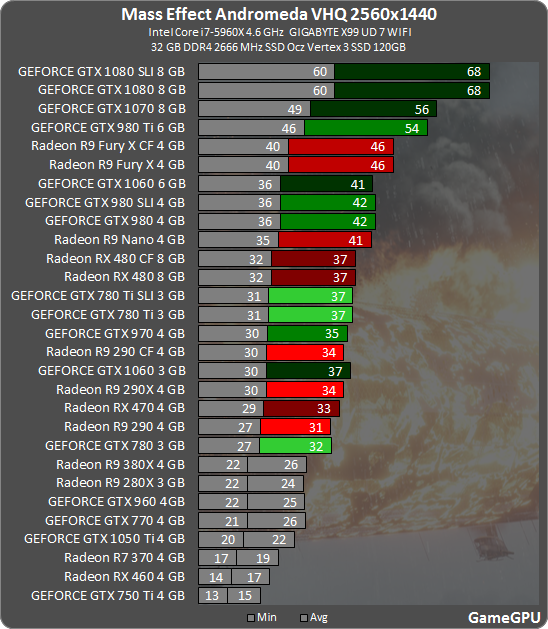
1080 in SLI for 1440p 60fps? holy shit.
RIP my 980ftw
Man this DoF is irritating as fuck. Nothing destroys IQ as bad as a DoF that keeps making edges jagged as fuck. At ultra post processing the DoF really should be full resolution or close to it, and even of it isn't the blending needs to make sure that the jagged edges are not so clearly apparent (see Doom).
Which is why I feel like this is a bug.
Which is why I feel like this is a bug.
1080 in SLI for 1440p 60fps? holy shit.
RIP my 980ftw
Maybe drivers night help a little bit
1080 in SLI for 1440p 60fps? holy shit.
RIP my 980ftw
If you notice, SLI is not working in any of those results.
Looks pretty decent performance-wise, do we know the resolution on consoles? (I know it's 30 FPS)
Cjdamon042
Member
Game looks great and tried playing on my samsung 4K tv. It's fine on 4K but playing it on 1440P gives me black bars around the screen and there's no adjusting it through the video settings.
Anyone in the same case?
I have the same thing. Can't figure out why
Me too. I ended up just playing it at 4K but using the custom scaling resolution option below 1.00 to mimic 1440p. No idea what number would actually represent 1440p, I sort of just went for like 0.70.
Fiddling with the scaling options in the Nvidia control panel didn't help me.

icecold1983
Member
KINGofCRA5H
Member
If you notice, SLI is not working in any of those results.
ohhhh it's the same as just a single 1080. Got it.
Phew.

SargerusBR
I love Pokken!
Nice, looks like the 1060 is safe then. Will buy it.
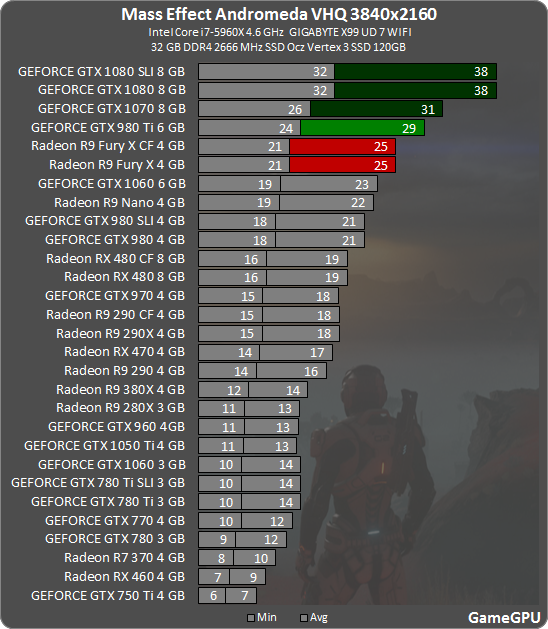
That's brutal, 1080 can't even manage 4k 30. Maybe the launch drivers will help?
Nice, looks like the 1060 is safe then. Will buy it.
Me too. Been watching this thread and am convinced my 1060 will be fine.
Saw this video on youtube:-
https://www.youtube.com/watch?v=dQ-4iXQB7y4&t=125s
Dude is using the high preset which the 1060 seems to be able to handle comfortably in the sections he recorded. Ultra@60fps will almost certainly be well out of our reach. I might consider playing at 720p if the differences between ultra and high are delicious enough.
For Xbox One it's 1564x880 during gameplay and during cutscenes it's either 1344x756 or approximately 1564x880 depending on the scene. Framerate also drops often in cutscene, during gameplay it's pretty stable but at times you can get stretches of 25FPS. I would imagine base PS4 is the same but is closer to 1080P and might perform better..Or it might not.Looks pretty decent performance-wise, do we know the resolution on consoles? (I know it's 30 FPS)
PS Pro is suppose to be either 1800P at PS4 settings or 1080P at higher settings. Don't know about framerate but this version has the best chance of being the most stable of all.
I am definitely buying this game on PC now, and getting a GTX 1080 next week.
GameAddict411
Member
This game is CPU bound? Any laptop user can post performance from i7 7700hq?
People posted positive results on configuration with 6700HQ and 7700HQ combined with a GTX 1060.
Slackbladder
Member
So with a 1080, 4790k@4.2ghz, 16GB DDR3@2133mhz and SSD. At first tried 4K and Ultra but fps around 35fps and led to a crash with a Direct X error (out of vram). This meant I lost the display and I had to do a restart. I was still downloading and may have led to a problem as I couldn't start the game again. Just got a black screen. So I uninstalled and re-installed.
When working I changed resolution from 4K to 1440p but it gave me a border around the game display (the game was 1440p but the display was still 4K). So I changed back to 4K and used the scaler to set it to .75 (around 1500p). Everything at Ultra except shadows and post process.
My preferred frame rate is 50fps and the game hit it fine 99% of the time. Frametime was good with no judder or stutter. So, smooth at all times including battles.
Only issue is with DoF which creates jaggies and a little pop in with vegetation. Generally though good performance.
When working I changed resolution from 4K to 1440p but it gave me a border around the game display (the game was 1440p but the display was still 4K). So I changed back to 4K and used the scaler to set it to .75 (around 1500p). Everything at Ultra except shadows and post process.
My preferred frame rate is 50fps and the game hit it fine 99% of the time. Frametime was good with no judder or stutter. So, smooth at all times including battles.
Only issue is with DoF which creates jaggies and a little pop in with vegetation. Generally though good performance.