
Honestly this seems to be something that's common in a lot of games released in recent years. I turn a setting down and may or may not see a 1-2FPS difference and even when I do notice it I don't really know if it's because of the change in setting or just something else like poping out of the menu.I think my main problem I have with the performance is that it barely scales at all with the different settings for me.
If I turn everything down to low, I still only get 80-100fps at 1440p with a 1080.

-
Hey Guest. Check out your NeoGAF Wrapped 2025 results here!
You are using an out of date browser. It may not display this or other websites correctly.
You should upgrade or use an alternative browser.
You should upgrade or use an alternative browser.
Mass Effect: Andromeda PC Performance Thread
- Thread starter MagicWithEarvin
- Start date

dgrdsv
Member
Last hope, eh?
That's brutal, 1080 can't even manage 4k 30. Maybe the launch drivers will help?
Why would 1080 manage 4K30 maxed out in a 2017 AAA title? 1080 is not a 4K card, never was.
Honestly this seems to be something that's common in a lot of games released in recent years. I turn a setting down and may or may not see a 1-2FPS difference and even when I do notice it I don't really know if it's because of the change in setting or just something else like poping out of the menu.
I think games have been leaning far more heavily on the CPU in recent years. The vast majority of graphic options are tied to GPU performance, so lowing them rarely does anything if the CPU is struggling.
I highly suggest going into Nvidia Profile Inspector and removing the apps from Andromeda profile, and adding them to Battlefield 1 profile.
What effect does that yield, apart from the SLI profiles?
Last hope, eh?
Why would 1080 manage 4K30 maxed out in a 2017 AAA title? 1080 is not a 4K card, never was.
Uhhh for 30 fps it should be able to.....

Darktalon
Member
What effect does that yield, apart from the SLI profiles?
There are many custom bits in the unknown section of the Battlefield 1 profile, that pertain to the Frostbite engine.

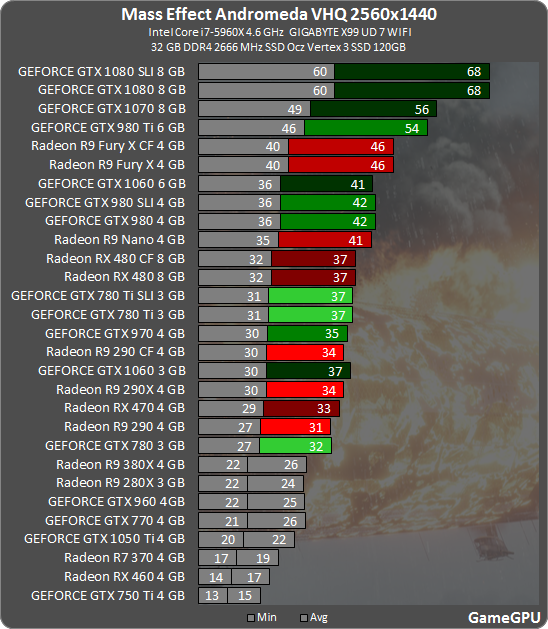
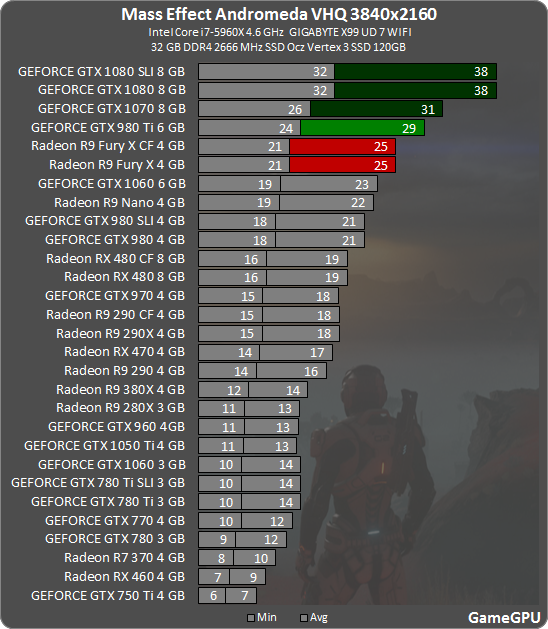
Guess I'm not getting 3440x1440 on my single 1080

I think games have been leaning far more heavily on the CPU in recent years. The vast majority of graphic options are tied to GPU performance, so lowing them rarely does anything if the CPU is struggling.
I have a i7 6700K though, so I doubt I am CPU bound in anything. Unless the game itself isn't utilising CPU properly.

GavinUK86
Member
really having trouble with a 970 at 1080p. on ultra it's a 30fps game, high and medium still gives me drops to 40. the game is, obviously, ugly as shit on low but even then i'm noticing a couple drops here and there. i hope the day one patch and a new nvidia driver can iron these hiccups out. i also keep having a weird bug where cpu usage jumps to 100%, alt tabbing out and back again fixes it.
Guess I'm not getting 3440x1440 on my single 1080
The very picture you quoted shows that a single 1080 gets around 38FPS on avg with minimum drop to 32 at 3840*2160..why wouldn't it do 30FPS at 3440*1440 ?
I think games have been leaning far more heavily on the CPU in recent years. The vast majority of graphic options are tied to GPU performance, so lowing them rarely does anything if the CPU is struggling.
I'm on the 5820K@4.4GHz, so I got what I need in that department.
If I turn everything down to low in BF1 it at least goes right up to 200fps for the most part.
dgrdsv
Member
Uhhh for 30 fps it should be able to.....
Lower some settings and it will, as usual.

Because I'm aiming for 60The very picture you quoted shows that a single 1080 gets around 38FPS on avg with minimum drop to 32 at 3840*2160..why wouldn't it do 30FPS at 3440*1440 ?
SirMossyBloke
Member
really having trouble with a 970 at 1080p. on ultra it's a 30fps game, high and medium still gives me drops to 40. the game is, obviously, ugly as shit on low but even then i'm noticing a couple drops here and there. i hope the day one patch and a new nvidia driver can iron these hiccups out. i also keep having a weird bug where cpu usage jumps to 100%, alt tabbing out and back again fixes it.
I have the same card and run basically everything on high at 60fps. What's your cpu? I have a 4690k @ 4.2ghz.
Anyone care to explain the framebuffer option please
I don't know what it does, but I get 3-4 FPS more using the 32-bit option.
My setup:
i5-3570K, standard clock
Asus GTX 660 Ti 2GB OC, very slightly overclocked
8 gigs of RAM
Impressions:
At 1080p, very uneven performance. Aliasing is very noticeable when AA is off or on FXAA. Texture pop in is noticeable at some points, and there's some flickering and edge distortion on many scenes. Framerate varies a lot: it's anywhere between 15 and 80-90 on both medium and high settings and even in cutscenes (conversations) it went from sub 20s to something like 250. Average frames on the second planet on High/900p were about 30-40fps.
I also tried 900p resolution scaling, which seemed to work quite well and improved the performance somewhat. Motion blur helped dealing with low framerates a bit but I'd rather turn that off (didn't find the option, the menus are a mess). Loading times are ok even with my old hard drive (not SSD).
In the end the graphics are quite disappointing. I wasn't expecting much with my setup, but still the game manages to look worse than five-year-old ME3 at some points and that's just unacceptable. But the worst thing is the unfinished nature of the performance. Some spots even on the open planets the game runs really well, and then in some small rooms in the spaceships it runs like shit.
i5-3570K, standard clock
Asus GTX 660 Ti 2GB OC, very slightly overclocked
8 gigs of RAM
Impressions:
At 1080p, very uneven performance. Aliasing is very noticeable when AA is off or on FXAA. Texture pop in is noticeable at some points, and there's some flickering and edge distortion on many scenes. Framerate varies a lot: it's anywhere between 15 and 80-90 on both medium and high settings and even in cutscenes (conversations) it went from sub 20s to something like 250. Average frames on the second planet on High/900p were about 30-40fps.
I also tried 900p resolution scaling, which seemed to work quite well and improved the performance somewhat. Motion blur helped dealing with low framerates a bit but I'd rather turn that off (didn't find the option, the menus are a mess). Loading times are ok even with my old hard drive (not SSD).
In the end the graphics are quite disappointing. I wasn't expecting much with my setup, but still the game manages to look worse than five-year-old ME3 at some points and that's just unacceptable. But the worst thing is the unfinished nature of the performance. Some spots even on the open planets the game runs really well, and then in some small rooms in the spaceships it runs like shit.
People posted positive results on configuration with 6700HQ and 7700HQ combined with a GTX 1060.
Come on guys, Intel 6700HQ and 7700HQ are basically top of the line cpus.
GavinUK86
Member
I have the same card and run basically everything on high at 60fps. What's your cpu? I have a 4690k @ 4.2ghz.
4ghz 2600k. the game's barely using 30% of my cpu so it isn't that. is your 970 overclocked or anything? are you using an ssd? i'm not fyi.
Slackbladder
Member
I had this problem after a Direct X error and crash. Had to uninstall and re-install. Others have reported Direct X crashes too.Won't load for me. Just that windowed black screen and that's it...
Barrow Roll
Member
Thank you, that video is exactly what I wanted to see. My OC isn't quite as high as theirs, but I still only have 8GB of 1600 DDR3 like their rig. Hopefully my 2550k@4.5 won't bottleneck me too hard. If I can bump up the textures to Ultra then I'm fine with everything else on High.Me too. Been watching this thread and am convinced my 1060 will be fine.
Saw this video on youtube:-
https://www.youtube.com/watch?v=dQ-4iXQB7y4&t=125s
Dude is using the high preset which the 1060 seems to be able to handle comfortably in the sections he recorded. Ultra@60fps will almost certainly be well out of our reach. I might consider playing at 720p if the differences between ultra and high are delicious enough.

DarkestHour
Banned
My only question is regarding the DoF artifacts.
Do all of you guys see it? Since I've seen only few people mention it.
Yes. It is awful.
I have a i7 6700K though, so I doubt I am CPU bound in anything. Unless the game itself isn't utilising CPU properly.
For sure. Ive had several games I struggled to hit 60fps, where the CPU is barely working over 60%, which gives the impression there's no problem with the CPU. And yet, when I upgraded my CPU and tried the same games, many of them improved. In some cases it was quite considerable.
One of the worst offenders was Fallout 4. My CPU never went above 70% usage. I could not manage to get it above 40fps in heavy areas regardless of settings. Stupidly I thought upgrading my GPU would help, so I went from a 960 to a 1060. I gained all of around 3fps. When I upgraded my CPU the performance shot up to 60+.
Even in this very thread, theres this post:-
http://www.neogaf.com/forum/showpost.php?p=232185042&postcount=396
Both his CPU and GPU have plenty of power to spare, and yet it wont hit 60fps.
Games not utilising the CPU properly is far too common unfortunately.
Won't load for me. Just that windowed black screen and that's it...
Are you running the Corsair Utility Engine by any chance? If you are, uninstall it and run the the game. It fixed the problem for me. I love Corsair peripherals but their software is terrible. Not the first conflict I've had with the CUE.
Is this on Ultra?
Yeah, I kinda expected little improvement at 1527. Rather, I was expecting the performance difference between 1080->1527 to increase. Are you still only getting 55-56 minimum fps at 1080p with your 4.1 OC? If that hasn't changed, then clearly your CPU is not the problem.
Tovarisc posted a screenie a few posts back showing the game dropping frames to below 60 even though his CPU and GPU usage are at 63% and 77% respectively. That looks like bad optimisation to me.
59-64 FPS at 1080. Almost always at 60-61 though.
My only question is regarding the DoF artifacts.
Do all of you guys see it? Since I've seen only few people mention it.
I see it. It's really distracting. fwiw I have a 1070 and a 3570K
dgrdsv
Member
Is this on Ultra?
The test says that it is:
And this is their benchmark run: https://www.youtube.com/watch?v=Y3iZ6U8ehzgOur graphics cards were tested at resolutions of 1920x1080, 2560x1600 and 3840h2160 at maximum graphics quality settings (default ultra for the game)
No 1080ti numbers floating around?
Only this video so far: https://www.youtube.com/watch?v=JQMVq389xXQ
Seems to hold around 75 fps most of the time.

Md Ray
Member
For those playing on PC, is the dualshock 4 plug and play compatible? If so, are there also ps4 button prompts?
I would also like to know this.
EDIT: Titanfall 2 has native DS4 support with DS4 button prompts, so I hope this one does too.
Our graphics cards were tested at resolutions of 1920x1080, 2560x1600 and 3840h2160 at maximum graphics quality settings (default ultra for the game)
So they claimed it was at maximum quality, when in fact ultra runs HBAO instead of HBAO Full, and a couple of other settings at high instead of ultra.
The other settings are fairly minor hits, but HBAO Full seems to incur a fairly consistent 8-10 FPS penalty.
RenegadeXV8
Banned
So disable Tessellation for a big performance boost and no IQ loss?
Is the setting bugged?
KINGofCRA5H
Member
Hopefully there will be a Geforce guide with all the different settings and what not. Those are usually pretty good for determining what settings affect performance the most.

Skyr
Member
So I get pretty decent framerates in the range of 50-65fps with my GTX1070 @1440p
I have a g-sync monitor so the fluctuation should be barely noticeable which I experienced in other games.
The problem is that I get weird stuttering when i pan the camera around a bit faster.
It almost seems like some kind of frame pacing issues.
Anyone else experiencing this?
I have a g-sync monitor so the fluctuation should be barely noticeable which I experienced in other games.
The problem is that I get weird stuttering when i pan the camera around a bit faster.
It almost seems like some kind of frame pacing issues.
Anyone else experiencing this?
I think my main problem I have with the performance is that it barely scales at all with the different settings for me.
If I turn everything down to low, I still only get 80-100fps at 1440p with a 1080.
Probably means that it's largely CPU limited.
So I get pretty decent framerates in the range of 50-65fps with my GTX1070 @1440p
I have a g-sync monitor so the fluctuation should be barely noticeable which I experienced in other games.
The problem is that I get weird stuttering when i pan the camera around a bit faster.
It almost seems like some kind of frame pacing issues.
Anyone else experiencing this?
Do you have aim assist on or off? I noticed with it on it tends to very briefly 'stick' to certain items and characters when panning, giving the illusion of stutter.

Lister
Banned
Guess I'm not getting 3440x1440 on my single 1080
That's what I got 21:9 ultra wide 3440x1440p with a single GTX 1080 running an i5 6600k @ 4.7 Ghz.
Everything on Ultra except HBAO set to HBAO (not HBAO full) and I get a steady 60 FPS in most areas, some areas of the ship I get as low as 50 and some conversations as low as 40. But 90% of gameplay I'm at 60.
Wish there was a settings guide/comparison, so I cna make smarter decisions about what to turn down, instead of just going ultra on everything.
Hopefully there will be a Geforce guide with all the different settings and what not. Those are usually pretty good for determining what settings affect performance the most.
Yeah I am going to wait for that before I decide to buy, I'm struggling to get a stable 30 fps on my GTX 760. I will have to see if drivers and graphics tweaks can fix that, otherwise I'll wait to buy it until I have a new GPU.
Relentless 757
Member
I see it. It's really distracting. fwiw I have a 1070 and a 3570K
How much RAM do you have and what settings are you playing at? Also how's your fps? Just wondering because I have a 3570k and 1070 and it seems no matter what I do, this game doesn't want to run at a stable frame rate unless I put the game on low-medium settings.
How much RAM do you have and what settings are you playing at? Also how's your fps? Just wondering because I have a 3570k and 1070 and it seems no matter what I do, this game doesn't want to run at a stable frame rate unless I put the game on low-medium settings.
16GB DDR3 and playing at 1080P currently at 60FPS. It does drop to 57, but in cutscenes Textures at ultra everything else high except shadows which are low
No 1080ti numbers floating around?
I've been consistently around the 92-94fps range @ 1440p and everything maxed/Ultra.

Pjsprojects
Member
This machine crushes the Xbox One, the game looks pretty tough to run so you may have to use a combination of medium to high at that resolution. The Xbox One also runs this game at a sub 900p resolution.
Hopefully we can get some performance impressions from people with 7950 and 7970 GPUs, as-well as their R9 200 series refreshes.
Just uploaded a vid that might be of help to AMD users,most 290/390/480 cards seem to run games about the same so my vid shows as much as possible with my 290X.
https://youtu.be/cFDFlkjPLhc