
To be fair, he also mentioned FXAA 😃No way.

-
Hey Guest. Check out your NeoGAF Wrapped 2025 results here!
You are using an out of date browser. It may not display this or other websites correctly.
You should upgrade or use an alternative browser.
You should upgrade or use an alternative browser.
Mass Effect: Andromeda PC Performance Thread
- Thread starter MagicWithEarvin
- Start date
Slackbladder
Member
Does it come up as a Direct X error and suggesting you need a card with a minimum of 512MB? I had that when trying to play at 4K and Ultra (just to gauge performance) and I have a 1080 and 16GB of DDR3.I'm getting crashes due to low system memory. Anyone else getting the same? I have 16 GB of RAM, which meets their recommended system requirements, so I'm strongly suspecting some kind of memory leak. Which would explain why I sometimes get super long load times. And it wouldn't be a Bioware PC game without a memory leak issue.
(separately I had a low memory crash with Ghost Recon Wildlands which was specifically a Low Memory Warning. Again playing at 4K at the time.)
I now play ME:A at 4K but scaled to 0.75 and shadows at High and it's okay.
It looks like more and more games are going over 8GB RAM now.Is it me or this game is really dark ? The in-game slider doesn't help much.
So anyone have a system similar to this and have the game?
AMD FX-8320 3.5ghz
GTX 960 2GB
8GB Ram
I expect or hope I'd be mainly playing on medium settings with some things on the low settings. Would hopefully be at 1080p and happy with at least 30fps if possible.
Possible?
I'm not looking to upgrade my system at the moment after buying a Switch and doing work on my car. The last EA game I bought was Battlefield 1 and I'm pretty much running everything on medium in that game at 1080p and performance is pretty good. Not sure if it's at 60fps or not but it's smooth. Some stuttering here and there when things get crazy in multiplayer but overall I'm happy with it there and single player. If that's anything to go by when it comes to comparing.
AMD FX-8320 3.5ghz
GTX 960 2GB
8GB Ram
I expect or hope I'd be mainly playing on medium settings with some things on the low settings. Would hopefully be at 1080p and happy with at least 30fps if possible.
Possible?
I'm not looking to upgrade my system at the moment after buying a Switch and doing work on my car. The last EA game I bought was Battlefield 1 and I'm pretty much running everything on medium in that game at 1080p and performance is pretty good. Not sure if it's at 60fps or not but it's smooth. Some stuttering here and there when things get crazy in multiplayer but overall I'm happy with it there and single player. If that's anything to go by when it comes to comparing.
Any way to fix the black screen problem ? I downloaded corsair how the FAQ said and nothing :/
Hmm?
You're supposed to uninstall Corsair software, specifically CUE, if you have it on your machine.
Dammit Gameworks 😓thanks for posting the pcgh link, i turned off tesselation in the amd driver and get more performance now with my r9 390
Tessellation is a standard feature of Frostbite, it uses it for detail features around the player. It just happens that there is no slider to adjust the level of Tessellation like other FB games.Dammit Gameworks 😓
EatChildren
Currently polling second in Australia's federal election (first in the Gold Coast), this feral may one day be your Bogan King.
Frostbite aliasing without AA is bad, full stop, regardless of resolution. The engine's cheap variation of various shaders result in terribly prominent shader aliasing, particularly on highlights, specular, and rim shading. Given Mass Effect's art direction warrants a lot of shiny metallic surfaces and neon lights, the aliasing really stands out.
TAA is a solid solution, minus the introduced sharpening to counter the blur. Resolution scaling is also great. It's just a shame Andromeda on Ultra is so demanding that the latter option comes at a massive performance cost. TAA is broken on certain shaders (see the scourge smudge/blur I mentioned in my last post). I'm playing 1440p Ultra with 1.15 resolution scaling and get regular drops into 40s.
TAA is a solid solution, minus the introduced sharpening to counter the blur. Resolution scaling is also great. It's just a shame Andromeda on Ultra is so demanding that the latter option comes at a massive performance cost. TAA is broken on certain shaders (see the scourge smudge/blur I mentioned in my last post). I'm playing 1440p Ultra with 1.15 resolution scaling and get regular drops into 40s.
OverdriveOtaku
Member
Apparently you can't use Nvidia Gamstream or Steam link with this. Dick move EA. Dick move.
Where is it confirmed that this would not work with Steam Link? This not working on my Steam Link would make me hesitate to purchase the full game, currently used 5/10 hours of the trial.

ItsTheNew
I believe any game made before 1997 is "essentially cave man art."
Playing with HDR ON ks8000
Win 10 64 bit
i7-3770k
GTX 1070
16GB Ram
running off SSHD
4k at resolution scaling of .7
Mix of ultra/high, runs around 50-60 using nvidia panel to enable Fast Vsync and prefer maximum performance.
Issue though, same thing happened with resident evil. Why doesn't the screen fill up with even with gpu scaling on and clicking the option to fill the screen?

Win 10 64 bit
i7-3770k
GTX 1070
16GB Ram
running off SSHD
4k at resolution scaling of .7
Mix of ultra/high, runs around 50-60 using nvidia panel to enable Fast Vsync and prefer maximum performance.
Issue though, same thing happened with resident evil. Why doesn't the screen fill up with even with gpu scaling on and clicking the option to fill the screen?
TXAA or TAA?Frostbite aliasing without AA is bad, full stop, regardless of resolution. The engine's cheap variation of various shaders result in terribly prominent shader aliasing, particularly on highlights, specular, and rim shading. Given Mass Effect's art direction warrants a lot of shiny metallic surfaces and neon lights, the aliasing really stands out.
TXAA is a solid solution, minus the introduced sharpening to counter the blur. Resolution scaling is also great. It's just a shame Andromeda on Ultra is so demanding that the latter option comes at a massive performance cost. TXAA is broken on certain shaders (see the scourge smudge/blur I mentioned in my last post). I'm playing 1440p Ultra with 1.15 resolution scaling and get regular drops into 40s.
Because if you're forcing TXAA, then the MSAA component of that is extremely expensive.
It would appear that Frostbite doesn't do brightness/hotspot pre filtering on speculars (like better solutions do) and relies purely on the post effect AA to do that.
Johannsson
Member
Looking for overclocked 980Ti impressions!
EatChildren
Currently polling second in Australia's federal election (first in the Gold Coast), this feral may one day be your Bogan King.
TXAA or TAA?
Because if you're forcing TXAA, then the MSAA component of that is extremely expensive.
Whoops, TAA.
Win 10
Core i5 4570
MSI GTX 1070 (mild overclock - +60 Core, +300 Memory)
16GB Ram
Playing at 1080p with internal rendering res set to 1.2. Disabled in-game v-sync and use RTSS frame limiter and the Nvidia Ctrl Panel v-sync.
Most of my settings are at Ultra with a few on High. I've played for just over an hour on Habitat 7, been in a few battles and it's been between 55-60fps. After what I read, I'm pleasantly surprised at my performance.
Only issue is my CPU is a major bottleneck. It's almost constantly at 100% utilization.
Core i5 4570
MSI GTX 1070 (mild overclock - +60 Core, +300 Memory)
16GB Ram
Playing at 1080p with internal rendering res set to 1.2. Disabled in-game v-sync and use RTSS frame limiter and the Nvidia Ctrl Panel v-sync.
Most of my settings are at Ultra with a few on High. I've played for just over an hour on Habitat 7, been in a few battles and it's been between 55-60fps. After what I read, I'm pleasantly surprised at my performance.
Only issue is my CPU is a major bottleneck. It's almost constantly at 100% utilization.
Rodney McKay
Member
Hmm, maybe I just need to tweak my settings a bit more (or wait for a GeForce update).Huh. Wonder if it works better on old AMD cards than old NVIDIA cards, as I get 40-60 FPS at 1080p native (no scaling and all medium settings) or close to constant 60 FPS at mostly medium (with some low) settings and 900p scaling on my 7870, which is usually worse than a 660ti.
I'm getting oddly inconsistent framerates. Some conversations run at REALLY low fps, but most of the time it's OK, but I'd like it to be a lot smoother.
I've played with both settings and the compressed setting gives me slightly improved FPS (Maybe 5-10fps gain with my GTX1080 @ 3440x1440).
With my untrained eye, I can't tell any major difference in lighting/effects quality. I rather have the frames.
Good to hear. My trial ended but on the big planet my fps were always around 50-55 for some reason. But that may make it so I can have 60 without lowering anything
OverdriveOtaku
Member
Posting this just in case anyone is in a similar situation:
ME:A on PC via Origin works just fine with the Steam Link and a X360 or XB1 controller. Works pretty seamless to be honest.
My setup is a wired Xbox 360 controller plugged into my gaming tower, and a wireless Xbox One Bluetooth controller paired with my Steam Link.
All you have to do is add (on the Steam PC Client) the Origin.exe into your Steam Library as a Game, and when on your Steam Link, launch Origin, then launch ME:A from the Origin window. Just make sure Origin is not open before using your Steam Link.
You can close out Origin through the Steam Link simply by going to File>Exit on the top left of the Origin window after you quit ME:A, and it will bring you back to Steam's Big Picture mode.
ME:A on PC via Origin works just fine with the Steam Link and a X360 or XB1 controller. Works pretty seamless to be honest.
My setup is a wired Xbox 360 controller plugged into my gaming tower, and a wireless Xbox One Bluetooth controller paired with my Steam Link.
All you have to do is add (on the Steam PC Client) the Origin.exe into your Steam Library as a Game, and when on your Steam Link, launch Origin, then launch ME:A from the Origin window. Just make sure Origin is not open before using your Steam Link.
You can close out Origin through the Steam Link simply by going to File>Exit on the top left of the Origin window after you quit ME:A, and it will bring you back to Steam's Big Picture mode.

Md Ray
Member
From what I can guess it's the quality of the HDR lighting they are using in the game. I'm talking about the internal HDR lighting that is part of the rendering process (this is different from HDR for TV that every is talking about these days). This HDR lighting is then tonemapped to a display range so that the TV can display it (for normal TVs this range is 0-255 but for HDR TV it's higher and depends on whether the game is using Dolby HDR or HDR 10).
With compressed the game would use RGBA8 HDR while with 64 bit the game is using FP16 HDR. It's just a difference in precision, higher quality would mean you get less instances of banding and white/black crush but it also increases the framebuffer size and as such affects performance.
I've played with both settings and the compressed setting gives me slightly improved FPS (Maybe 5-10fps gain with my GTX1080 @ 3440x1440).
With my untrained eye, I can't tell any major difference in lighting/effects quality. I rather have the frames.
No, it's not related to FP32/FP16.
Compressed (32 bits) means that final frames have 32 bits of precision - 10 bits per component probably with a 2 bit "tail" which should fit nicely to HDR10 output.
Half16 (64 bits) means that final frames have 64 bits of precision - 16 bits per component probably which should be necessary for Dolby Vision and higher HDR formats.
No idea though if switching between these will result in any change in quality on a regular monitor - or even on a HDR one.
Makes sense. All clear now, thanks guys


daninthemix
Member
Posting this just in case anyone is in a similar situation:
ME:A on PC via Origin works just fine with the Steam Link and a X360 or XB1 controller. Works pretty seamless to be honest.
My setup is a wired Xbox 360 controller plugged into my gaming tower, and a wireless Xbox One Bluetooth controller paired with my Steam Link.
All you have to do is add (on the Steam PC Client) the Origin.exe into your Steam Library as a Game, and when on your Steam Link, launch Origin, then launch ME:A from the Origin window. Just make sure Origin is not open before using your Steam Link.
You can close out Origin through the Steam Link simply by going to File>Exit on the top left of the Origin window after you quit ME:A, and it will bring you back to Steam's Big Picture mode.
Thanks very much for this - the poster above who said it doesn't work on Steam Link had me worried.
Looks like the game's much more demanding than you'd think from the footage. Anyone tried playing with GTX970 @1440p? Stable 60fps with medium-high settings achievable? Also got a i7-6700k and 16GB of some DDR4 ram.
Wish I could start working full-time already. I want to upgrade my PC.
Wish I could start working full-time already. I want to upgrade my PC.
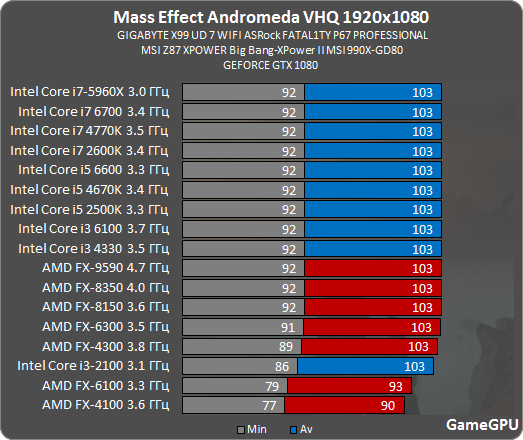
Thanks.6800k and a 1080 I'm getting around 90 fps average on the first planet all ultra except HBO full, I just have it at HBO. Game is definitely hard on the CPU more so than most games.
Looks like CPU and memory speed are important.
Are you running the Corsair Utility Engine by any chance? If you are, uninstall it and run the the game. It fixed the problem for me. I love Corsair peripherals but their software is terrible. Not the first conflict I've had with the CUE.
This game also messes with Logitech software, my mouse lights turn off in the game during gameplay and turn back on once I exit. This game is doing something on the driver level not sure what though.
I'm getting crashes due to low system memory. Anyone else getting the same? I have 16 GB of RAM, which meets their recommended system requirements, so I'm strongly suspecting some kind of memory leak. Which would explain why I sometimes get super long load times. And it wouldn't be a Bioware PC game without a memory leak issue.
How big is your pagefile size? According to Afterburner my pagefile usage with this game is around 20gb, and RAM usage is over 12gb...

dgrdsv
Member
Thanks.
Looks like CPU and memory speed are important.
Yeah, I don't think so...

cripterion
Member
Try adjusting your scaling settings in nvidia control panel.
I did that, nothing works. Game still displays in a tiny window on a 4K tv. Funny thing is they have a tool to scale the display area size to your screen in the game, but even that won't work.
I'm beginning to suspect GameGPU only tests in the least demanding scenario possible 😐Yeah, I don't think so...
EatChildren
Currently polling second in Australia's federal election (first in the Gold Coast), this feral may one day be your Bogan King.
Scratch my earlier post; there's still fucked shaders no matter if TAA is on or off. Top exterior reflection shaders on the Tempest are a blurry desynced shitfest just like my aforementioned Battlefield 1 woes.
Frostbite 3 fucking sucks. Tired of this shit. Fix your goddamn engine.
Frostbite 3 fucking sucks. Tired of this shit. Fix your goddamn engine.
alexanderftw
Banned
Got rid of the games terrible TAA and I'm just using sfx SMAA with the ingame FXAA. No more reduced particle effects and buggy omni tools and whatever else TAA was causing.
cripterion
Member
I would also like to know this.
EDIT: Titanfall 2 has native DS4 support with DS4 button prompts, so I hope this one does too.
PS4 gamepad didn't work for me. I don't think Origin even knows what's a PS4 pad.
Steam supports as well as Uplay. Origin behind times.
I'm playing with an Xbox One pad instead.
dgrdsv
Member
I'm beginning to suspect GameGPU only tests in the least demanding scenario possible 😐
That may be true but it is a 30 fps console game which means that its CPU requirements will be less than its GPU one. Even BF1 is not CPU limited in its campaign so why would MEA be?
No way.
Yeah. Countless other games have less aliasing with AA off, not to mention with performance friendly AA options.

Shrike Alvaron
Member
There any hope of me playing this on at least high at 1440p with a GTX 980 and i7-6700k? I can drop to 1080p if I absolutely have to, but haven't had to run at non-native resolution for years...
Man, I really want to upgrade to a 1080 TI later this year.
Man, I really want to upgrade to a 1080 TI later this year.
Playing with HDR ON ks8000
Win 10 64 bit
i7-3770k
GTX 1070
16GB Ram
running off SSHD
4k at resolution scaling of .7
Mix of ultra/high, runs around 50-60 using nvidia panel to enable Fast Vsync and prefer maximum performance.
Issue though, same thing happened with resident evil. Why doesn't the screen fill up with even with gpu scaling on and clicking the option to fill the screen?
How's the HDR on PC?
Galactico316
Neo Member
Me too. I ended up just playing it at 4K but using the custom scaling resolution option below 1.00 to mimic 1440p. No idea what number would actually represent 1440p, I sort of just went for like 0.70.
Fiddling with the scaling options in the Nvidia control panel didn't help me.
This worked for me! Thanks!
Oh man I hope you are right since in that case I can delay CPU upgrade to AugustThat may be true but it is a 30 fps console game which means that its CPU requirements will be less than its GPU one. Even BF1 is not CPU limited in its campaign so why would MEA be?

Elven_Star
Member
Yeah, I don't think so...
Thank god I didn't go for a more expensive CPU.
Nostremitus
Member
I installed the trial on my HTPC (7850k) paired with my 290X.
Was downloading a game on Steam in the background, CPU usage stayed slammed at a constant 100%. Stutters like crazy.
Gonna try it without the background workload and see how it does.
Was downloading a game on Steam in the background, CPU usage stayed slammed at a constant 100%. Stutters like crazy.
Gonna try it without the background workload and see how it does.
Yeah, I don't think so...
Not what I expected to see after the impressions in this thread.
That may be true but it is a 30 fps console game which means that its CPU requirements will be less than its GPU one. Even BF1 is not CPU limited in its campaign so why would MEA be?
Hm, Mafia 3 is a 30fps console game and it absolutely murders my CPU on PC...

The Janitor
Member
Scratch my earlier post; there's still fucked shaders no matter if TAA is on or off. Top exterior reflection shaders on the Tempest are a blurry desynced shitfest just like my aforementioned Battlefield 1 woes.
Frostbite 3 fucking sucks. Tired of this shit. Fix your goddamn engine.
There's a command in BF1 that makes reflections look slightly better, maybe it works in Andromeda?
PostProcess.ScreenSpaceRaytraceFullresenable 1
Yeah, I don't think so...
Is this really legit?
Because if so then that's... Very surprising.
Glad to see that my 3570k will somehow get the same performance as a 5960X lmao.
daninthemix
Member
Just bit the bullet and ordered a MSI Gaming 1080, so hoping for Ultra/60fps locked @ 1080p.
cripterion
Member
Curious how AMD seems to be beating out Nvidia in the recent driver release. Wildlands, now this. Are they sleeping on piles of 1080Ti cash at Nvidia or what?
dgrdsv
Member
Is this really legit?
Because if so then that's... Very surprising.
Glad to see that my 3570k will somehow get the same performance as a 5960X lmao.
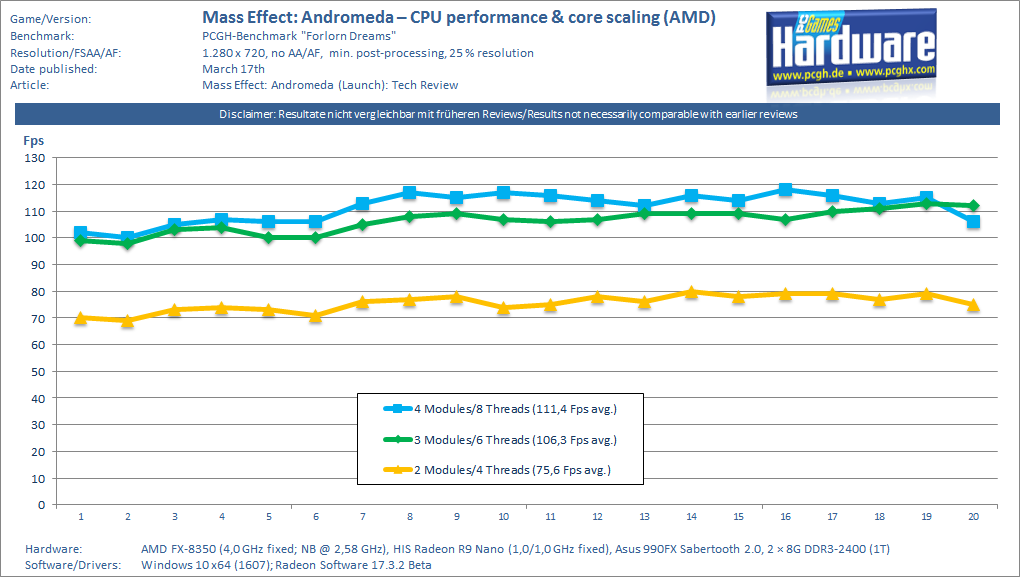
Well, there's this from PCGH:
Google Translation:
Mass Effect Andromeda is a very GPU-heavy game, the main processor is not a bottleneck. Even a two-modulator like the FX-4320 is able to display the game fluently. The engine converts further cores or threads tangibly into higher frame rates, in most cases - with "normal" screen resolutions as well as AA / AF / AO - this plus however falls under the graphics limit. The jump from 4 to 6 threads increases the fps by more than 40 percent; The eight threads of the FX-8350 bring only +5 percent.
Btw, they've added Titan XP to their results so if anyone's interested on how 1080Ti will perform in MEA you can take a look: http://www.pcgameshardware.de/Mass-...55712/Specials/Mass-Effect-Andromeda-1223325/
They're also saying that they've used the upcoming 378.90 game ready driver from NV for their testing.
Curious how AMD seems to be beating out Nvidia in the recent driver release. Wildlands, now this. Are they sleeping on piles of 1080Ti cash at Nvidia or what?
They are not? AMD's 17.3.2 performance improvements in MEA are coming from cheating in tessellation mostly.
cripterion
Member
Well, there's this from PCGH:
Google Translation:
Btw, they've added Titan XP to their results so if anyone's interested on how 1080Ti will perform in MEA you can take a look: http://www.pcgameshardware.de/Mass-...55712/Specials/Mass-Effect-Andromeda-1223325/
They're also saying that they've used the upcoming 378.90 game ready driver from NV for their testing.
They are not? AMD's 17.3.2 performance improvements in MEA are coming from cheating in tessellation mostly.
Simply saying how they had drivers out for both Nvidia sponsored games before the green team.