• Hey Guest. Check out your NeoGAF Wrapped 2025 results here!

Nvidia Geforce GTX 1070 Review Thread

was anyone able to get in on the asus strix 1070 on slickdeals over the weekend? got it for $383 with free shipping from jet.com, shipped today and should be here wednesday. SO EXCITED! will be my first nvidia card since the 6600gt. my 1440p 144hz gsync monitor also came in today and performance from my current r9 390 has me feeling great about what the 1070 will be able to do. on that note, since im going from amd to nvidia what do i need to do in terms of drivers? how do i uninstall all the amd stuff?
Yes, uninstall all of your amd drivers before the new card is put in.
 
Anyone got an MSI GTX 1070 Armor ? Just looking for any impressions really, as I'm thinking of getting one in a few weeks, as its not a bad price right now and the black & white fits my PC colour scheme much better than the Gaming X version.

Got the Armor OC Edition. This is a really quiet beast. The fans don't spin until it reaches 50C or something, so it's quiet during everyday tasks, and quite silent when pushing big games like DOOM or GTA5 maxed out (might be because of my Silencio case though).
 
Got the Armor OC Edition. This is a really quiet beast. The fans don't spin until it reaches 50C or something, so it's quiet during everyday tasks, and quite silent when pushing big games like DOOM or GTA5 maxed out (might be because of my Silencio case though).

Cool, yeah had the GTX 760 Twin Frozr for years now, they make great GPU coolers.

Did yours come with a backplate or is MSI just not shipping the 1070 Armor with one for whatever reason ?
 
was anyone able to get in on the asus strix 1070 on slickdeals over the weekend? got it for $383 with free shipping from jet.com, shipped today and should be here wednesday. SO EXCITED! will be my first nvidia card since the 6600gt. my 1440p 144hz gsync monitor also came in today and performance from my current r9 390 has me feeling great about what the 1070 will be able to do. on that note, since im going from amd to nvidia what do i need to do in terms of drivers? how do i uninstall all the amd stuff?

http://www.guru3d.com/files-details/display-driver-uninstaller-download.html

Use this handy program. Boot computer into safe mode, start DDU, pick the option to uninstall AMD drivers and shut down, unplug your cables and replace the card with your 1070, then boot up and install nvidia drivers. Done, no reboot needed. If you want to avoid browsing the internet with your on-board graphics, download the drivers beforehand.

To be honest, I have gone from nvidia to AMD in the past without bothering to even uninstall the old drivers, and the reverse would probably work alright, but the method above is recommended for best system stability.
 
Random question, when upgrading from one Nvidia GPU to the next, do you have to reinstall drivers for the new card to be properly recognized?

The Asus Strix 1070 looks like a nice option and it's at $429. I've been reading though that the price levels now are still centered around the Founders Edition price lievels and should fall closer to original MSRP relatively soon. You guys think AiBs will sell the 1070 for under $400 anytime soon?
 
Random question, when upgrading from one Nvidia GPU to the next, do you have to reinstall drivers for the new card to be properly recognized?

The Asus Strix 1070 looks like a nice option and it's at $429. I've been reading though that the price levels now are still centered around the Founders Edition price lievels and should fall closer to original MSRP relatively soon. You guys think AiBs will sell the 1070 for under $400 anytime soon?

I needed to reinstall the drivers after switching from an 970.
 
Random question, when upgrading from one Nvidia GPU to the next, do you have to reinstall drivers for the new card to be properly recognized?

The Asus Strix 1070 looks like a nice option and it's at $429. I've been reading though that the price levels now are still centered around the Founders Edition price lievels and should fall closer to original MSRP relatively soon. You guys think AiBs will sell the 1070 for under $400 anytime soon?

It's not required, but it's hit-or-miss in terms of whether or not you'll have issues.
 
One would hope that when supply/demand evens out prices will lower to where they should be. It looks as though if I upgrade I'll be going with a 1070 FTW but it's ridiculous that the gap between it and the MSRP is around double of what it was between the 970's MSRP and its FTW model ($330-$370 to $380-$460) and there was also room for a SSC which there isn't unless either the SC took that spot or the FTW is in it. Besides that the factory over clocks between the SC and FTW 1070s is only 13MHz. Granted maybe the FTW is a better booster but it doesn't look like the custom PCB means much like with most of the non-FE 1070s. But I guess maybe the prices were similar at launch and the early months too or is it really just the FE BS making a mess of this?

Like I said I got the money ready but I'm still gonna hold out to see what's offered in terms of game bundles along with I guess what further info we get regarding the 970 settlement.
 
Not sure if this is the appropriate thread for this but couldn't find the other 1070 thread on my phone. So I was holding out till the prices stabilized but my gtx 780ti bit the bullet last night. No display on the screen with it installed. :( So now I'm in a situation. I've canceled my preorders for a number of games like NMS and I can afford a 1070 which isn't really what I was waiting for but I need a card soonish. Anyone know of any deals I should look out for? Was thinking about the MSI Sea hawk on Amazon its 494 and I have 75 bucks in Amazon gift cards. Thinking that might be the best I can get depending on how good the sea hawk is. Sad day though never really had a card die on me before.
 
So I was debating between an rx480 and gtx1060 but prices and availability have been complete crap in Canada, most places were marking up prices $50-100 over the exchange rate.


Sooooo then I found a GIGABYTE GeForce GTX 1070 GV-N1070G1 for $564 which was $164 over the cost of the sapphire nitro rx480 I was thinking of, well turns out it's price was the exact exchange from US price to CAD price so fuck it I'm the proud owner of a new 1070 lol

Why it's like 100-150 cheaper than all other gtx 1070s atm I don't know but I'll bite.

I've been using a GTX 670 windforce so it was funny that three graphic generations later I got the 1070 OC windforce lol

Now to wait anxiously for Fed Ex
 
Very pleased with my card so far. It blitzes just about every game I've got at 1080p and 1440p.

Even on The Witcher 3, I can choose between everything maxed (except Hairworks) at 1440p or everything maxed (including Hairworks) at 1080p and get very decent framerates.
 
I picked up the Asus TURBO-GTX1070-8G, which is essentially a poor man's Founders' edition, blower style, no-OC, etc...but it was $360 on Jet, so I couldn't say no, finally finding a card under MSRP.

This thing is crazy!

I've been playing Arkham Knight on my 4k TV at 1440p with everything maxed except I'm not using the smoke effects. Damn game looks beautiful, and I don't think I'd get anything more out of 4k since my TV is 55" and I'm close enough to it that 1440p is plenty crisp.

I'm amazed at this card so far, and I don't even have it overclocked. Down the road I may consider a custom cooler to do a little OC, but for the time being, it does everything I want.

I have Witcher 3 waiting to play on PS4, but I'm pretty sure I want to sell that off and get it on PC now. Also looking into Skyrim mods and Mass Effect texture mods...the summer of gaming is here.
 
I have Witcher 3 waiting to play on PS4, but I'm pretty sure I want to sell that off and get it on PC now. Also looking into Skyrim mods and Mass Effect texture mods...the summer of gaming is here.

Do it. I got The Witcher 4 originally on PS4 as well, difference is I played 40 hours. I ended up switching to PC on my 970, and while it was a definite step up, it's on another level on a 1070. The game just presents a much more refined picture, and you can run it 1440p at a near constant 60fps with almost all settings maxed.
 
Do it. I got The Witcher 4 originally on PS4 as well, difference is I played 40 hours. I ended up switching to PC on my 970, and while it was a definite step up, it's on another level on a 1070. The game just presents a much more refined picture, and you can run it 1440p at a near constant 60fps with almost all settings maxed.

Thanks for the feedback, I'll definitely plan to do that next time W3 is on a Steam Sale. Reading up on MGS5's PC version too to see if that's worth it (both games are still wrapped..)
 
Very pleased with my card so far. It blitzes just about every game I've got at 1080p and 1440p.

Even on The Witcher 3, I can choose between everything maxed (except Hairworks) at 1440p or everything maxed (including Hairworks) at 1080p and get very decent framerates.

how far into the game are you though? once you get to novigrad and skellige that's where things become a bit more demanding. it should manage no problem at 1080p but at 1440p you might see some drops in those areas.
 
how far into the game are you though? once you get to novigrad and skellige that's where things become a bit more demanding. it should manage no problem at 1080p but at 1440p you might see some drops in those areas.

Yeah, that's why I mentioned "decent" framerates. I haven't hit Novigrad yet, so it's mostly 60 everywhere I go, but I'm expecting things to get a bit choppier once I get there.
 
canceled my order today for the gamerock premium cause it's still nowhere seen to be shipped. Ordered it 23rd of June...
Switched to a EVGA FTW Edition today. I know it's not that fast but it's cheaper as well. Friend of mine ordered his yesterday and it was shipped today. Fingers crossed I have mine on Saturday.
 
Hello guys!

I got the MSI GTX 1070 Gaming X and my folks are bringing it next week from Germany. I'm upgrading from a SAPPHIRE R9 270X Dual-X.

I've got some questions regarding connection to the PSU (hopefully this isn't the wrong place, sorry if that's the case) since I'm a noob in those things.

I currently have a Cooler Master Extreme Power Plus 500W which only has a 6-pin PCIe connector.

My current card (the AMD one) requires two 6-pin PCIe connectors, so the guys that built the computer for me used a Molex to 6-pin connector alongside the one that comes with the PSU.

The new card (the 1070) requires 6-pin and 8-pin connectors, so I was wondering if I could safely use some kind of adapter. I've searched online and I found there are 2 Molex to 8-pin connectors and even 6-pin to 8-pin connectors, so I was wondering what would be the best choice, because I'd rather not change the current PSU.

Lastly, the R9 270X has a TDP of 180W while the 1070 has 150W. Also, I took a few photos of the cables from inside my case if anyone's interested in that information.

Thank you, and again, hope it's not the wrong place. Sorry if that's the case :P.
 
Recently installed a MSI 1070 Gaming X and I seem to be experiencing the same thing described in this thread:

http://forums.guru3d.com/showthread.php?t=409087

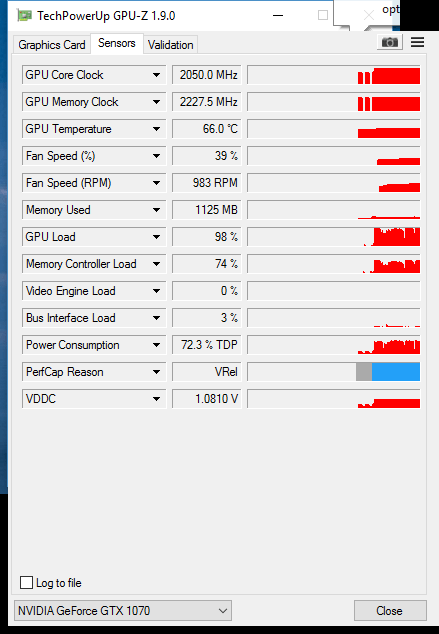
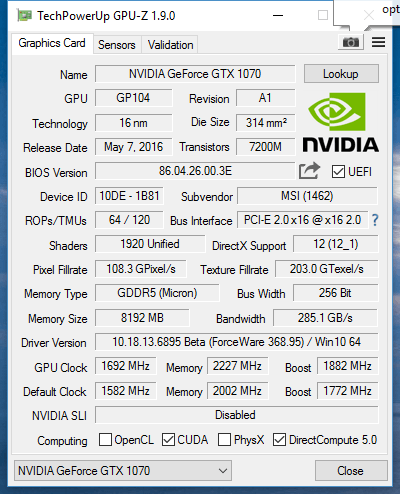
The card over clocks nicely for the most part. Can achieve a total of 2113mhz on the core and 8900mhz on the memory - tested for ages in heaven and Valley plus bf4 no problem. No artifacts or anything.

The problem is when it idles down. Once it drops the voltage off like back to desktop etc - If I open any application it shoots the memory core back up and the voltage isnt quick enough to support it causing instant artifacts followed by a hardlock or reset.

It doesn't end there, if I've saved a memory overclock even as low as 200mhz (8400mhz) from the g1's stock clock it will trip it and cause exactly the same issue. Happens everytime without fail.

It seems to be with eithee MSI afterburner or xtreme gigabyte oc software although I've had better results with xtreme admittedly. I would however much prefer to use afterburner.

My thought is the card's voltage is not pumping to feed the memory clock fast enough from idle causing this issue. I haven't been able to find any other people with similar symptoms.

Could it be a potential faulty card even though it holds a decent oc and doesn't have any issues at stock?

I've been able to get my memory up to +500 while Valley or Witcher 3 are running and not see any artifacts or anything. The problem is that if I try to set it above about +280 on the memory immediately after a cold boot, I get a gnarly checkerboard pattern + hard freeze and either a reboot or a BSOD (video_scheduler_internal_error usually, sometimes dpc watchdog)

This led to a situation where the settings kept being applied at boot, causing one of those two things to happen seconds after seeing the desktop, which required me to boot into safe mode and edit the afterburner .cfg in order to be able to do anything

This is the first time i've ever actually put any effort into overclocking a video card so I could use some advice here. Should I RMA the card or is this maybe a issue with windows or afterburner or something? I haven't tried anything other than afterburner (latest version, 4.3.0 beta 4)
 
Hello guys!

I got the MSI GTX 1070 Gaming X and my folks are bringing it next week from Germany. I'm upgrading from a SAPPHIRE R9 270X Dual-X.

I've got some questions regarding connection to the PSU (hopefully this isn't the wrong place, sorry if that's the case) since I'm a noob in those things.

I currently have a Cooler Master Extreme Power Plus 500W which only has a 6-pin PCIe connector.

My current card (the AMD one) requires two 6-pin PCIe connectors, so the guys that built the computer for me used a Molex to 6-pin connector alongside the one that comes with the PSU.

The new card (the 1070) requires 6-pin and 8-pin connectors, so I was wondering if I could safely use some kind of adapter. I've searched online and I found there are 2 Molex to 8-pin connectors and even 6-pin to 8-pin connectors, so I was wondering what would be the best choice, because I'd rather not change the current PSU.

Lastly, the R9 270X has a TDP of 180W while the 1070 has 150W. Also, I took a few photos of the cables from inside my case if anyone's interested in that information.

Thank you, and again, hope it's not the wrong place. Sorry if that's the case :P.

I had a 7870 that used 2 six pins. I borrowed a friends 7970 which was 2x8 pins. My power suply had a 6+2 connector, but I had to use a molex to 8pin adapter for the other connection and had no problems. Also single 12v rail.
 
I hope the EVGA 1070 FTW fits my Dell XPS 8900 case >.< Should have measured it before I sent it to my friend thats in the USA lol.
 
Recently installed a MSI 1070 Gaming X and I seem to be experiencing the same thing described in this thread:

http://forums.guru3d.com/showthread.php?t=409087


I've been able to get my memory up to +500 while Valley or Witcher 3 are running and not see any artifacts or anything. The problem is that if I try to set it above about +280 on the memory immediately after a cold boot, I get a gnarly checkerboard pattern + hard freeze and either a reboot or a BSOD (video_scheduler_internal_error usually, sometimes dpc watchdog)

This led to a situation where the settings kept being applied at boot, causing one of those two things to happen seconds after seeing the desktop, which required me to boot into safe mode and edit the afterburner .cfg in order to be able to do anything

This is the first time i've ever actually put any effort into overclocking a video card so I could use some advice here. Should I RMA the card or is this maybe a issue with windows or afterburner or something? I haven't tried anything other than afterburner (latest version, 4.3.0 beta 4)

You can try setting the windows power profile to high performance (if it's at balanced or something else) which might keep the card set high. (If it's tied to that system setting)

Worst case, turn the OC down a bit and see if it settles at a certain point, silicon lottery and all that, and if that doesn't help, then ya definitely consider an RMA.

I mean aside from a fresh driver install (make sure to do the option that clears all old settings etc) you can't really help it.

Edit: After some digging it seems like the voltages stick low for some reason, frig I mean it might be software based and fixed with a firmware update or even driver update, but if not you are in a tight spot, I mean if you have some time before RMA expires try a few things out, but if you are out of time try a return, at very least that would give one of two situations, it works the same and is software, or it's fixed and just was bad hardware /shrug

Hello guys!

I got the MSI GTX 1070 Gaming X and my folks are bringing it next week from Germany. I'm upgrading from a SAPPHIRE R9 270X Dual-X.

I've got some questions regarding connection to the PSU (hopefully this isn't the wrong place, sorry if that's the case) since I'm a noob in those things.

I currently have a Cooler Master Extreme Power Plus 500W which only has a 6-pin PCIe connector.

My current card (the AMD one) requires two 6-pin PCIe connectors, so the guys that built the computer for me used a Molex to 6-pin connector alongside the one that comes with the PSU.

The new card (the 1070) requires 6-pin and 8-pin connectors, so I was wondering if I could safely use some kind of adapter. I've searched online and I found there are 2 Molex to 8-pin connectors and even 6-pin to 8-pin connectors, so I was wondering what would be the best choice, because I'd rather not change the current PSU.

Lastly, the R9 270X has a TDP of 180W while the 1070 has 150W. Also, I took a few photos of the cables from inside my case if anyone's interested in that information.

Thank you, and again, hope it's not the wrong place. Sorry if that's the case :P.

You should be fine just using an adapter, the 1070 is very good on power draw, so system wattage would likely be a bit lower overall. If you run into problems, a new 550 or 650 watt power supply would get you back on track.
 
The only thing you can try would be setting the windows power profile to high performance (if it's at balanced or something else) which might keep the card set high.

The other problem might be that they have zero fan at idle support, maybe the OC is causing a quick overheat issue without the fans ramping up.

Worst case, turn the OC down a bit and see if it settles at a certain point, silicon lottery and all that, and if that doesn't help, then ya definitely consider an RMA.

I mean aside from a fresh driver install (make sure to do the option that clears all old settings etc) you can't really help it.

I wish I could help more but I'm still waiting on my card so I can't even tinker with settings etc to give more tips.

Edit: After some digging it seems like the voltages stick low for some reason, frig I mean it might be software based and fixed with a firmware update or even driver update, but if not you are in a tight spot, I mean if you have some time before RMA expires try a few things out, but if you are out of time try a return, at very least that would give one of two situations, it works the same and is software, or it's fixed and just was bad hardware /shrug

power is set to high performance, and i used DDU before removing my 970, installed a driver i had downloaded early last week, and then installed the DPC hotfix driver over that one. so i could try a clean install again

at first i thought i just wasn't able to go over +280 on the memory - if i keep it around there i can boot into windows without it crashing immediately. at +300 it crashes instantly, but this is seemingly only if a 3d application isn't running when i set it. again, i feel a little out of my depth here so i'm not sure how to explain this any better

but if i start up Valley or Witcher 3 in a window and then start messing with the settings, I can set the memory a lot higher and it doesn't crash and i don't see any artifacts

i did just receive the card from newegg last friday, so i do have some time, i just get anxious about stuff like this pretty easily
 
power is set to high performance, and i used DDU before removing my 970, installed a driver i had downloaded early last week, and then installed the DPC hotfix driver over that one. so i could try a clean install again

at first i thought i just wasn't able to go over +280 on the memory - if i keep it around there i can boot into windows without it crashing immediately. at +300 it crashes instantly, but this is seemingly only if a 3d application isn't running when i set it. again, i feel a little out of my depth here so i'm not sure how to explain this any better

but if i start up Valley or Witcher 3 in a window and then start messing with the settings, I can set the memory a lot higher and it doesn't crash and i don't see any artifacts

i did just receive the card from newegg last friday, so i do have some time, i just get anxious about stuff like this pretty easily

Are you changing the gpu clock any or just the memory clock? I know gains seem to be much better on memory vs gpu from what I've seen, also are you doing manual voltage or auto (temp limited).

Edit: I'll keep digging around for some info, some of the stuff I've suggested don't even seem like a solution with it doing this at the point where no boost at all would be applied yet, it's bugging me lol and I'm an anxious person too >_<
 
Are you changing the gpu clock any or just the memory clock? I know gains seem to be much better on memory vs gpu from what I've seen, also are you doing manual voltage or auto (temp limited).

Edit: I'll keep digging around for some info, some of the stuff I've suggested don't even seem like a solution with it doing this at the point where no boost at all would be applied yet, it's bugging me lol and I'm an anxious person too >_<

this is what i was just looking at a few minutes ago:

USMdE02.png
afe.png
m6w.png

was running Valley for a few minutes, then the instant i closed it, checkerboard pattern freeze + bsod
 
this is what i was just looking at a few minutes ago:


was running Valley for a few minutes, then the instant i closed it, checkerboard pattern freeze + bsod

Your numbers are totally normal, I mean it would die during the 3d testing if the OC was too much for it.

The only thing I can see is you are running the new beta drivers right? If you haven't already, try the official ones, 368.81 if that still fails I'd go the RMA route. It shouldn't be crashing out when it clocks down, I saw a few similar cases so far and both ended up returning it and being ok with the replacement one. If it was a widespread problem we'd likely see a ton of this popping up in the forums because everyone has been overclocking a bit to get an easy 8-15% boost without a sweat really.

I mean either that or it's a really bad overclocker and you can't go beyond something like a 50gpu 100mem oc which would suck either way right?

Edit: 368.95 are hotfix not beta sorry. Ya man if it's not doing this at stock settings, but any or a small oc is causing it then you either have to ask yourself if you are OK with just running it stock, or if you'd rather try your luck with a replacement. I don't think you can help it much on your end. It's a weird situation, since it's the exact opposite of what overclocking usually does =(
 
Your numbers are totally normal, I mean it would die during the 3d testing if the OC was too much for it.

The only thing I can see is you are running the new beta drivers right? If you haven't already, try the official ones, 368.81 if that still fails I'd go the RMA route. It shouldn't be crashing out when it clocks down, I saw a few similar cases so far and both ended up returning it and being ok with the replacement one. If it was a widespread problem we'd likely see a ton of this popping up in the forums because everyone has been overclocking a bit to get an easy 8-15% boost without a sweat really.

I mean either that or it's a really bad overclocker and you can't go beyond something like a 50gpu 100mem oc which would suck either way right?

Edit: 368.95 are hotfix not beta sorry. Ya man if it's not doing this at stock settings, but any or a small oc is causing it then you either have to ask yourself if you are OK with just running it stock, or if you'd rather try your luck with a replacement. I don't think you can help it much on your end. It's a weird situation, since it's the exact opposite of what overclocking usually does =(

clean installing the drivers did seem to help at first - i was able to boot at +300 memory without crashing. but then after running Valley for a few minutes and exiting, the same freeze + DPC WATCHDOG VIOLATION happened again

thanks for the suggestions anyway, i'll mess with this some more tomorrow
 
clean installing the drivers did seem to help at first - i was able to boot at +300 memory without crashing. but then after running Valley for a few minutes and exiting, the same freeze + DPC WATCHDOG VIOLATION happened again

thanks for the suggestions anyway, i'll mess with this some more tomorrow

The DPC Error might lead you to a solution, I'd search into that a bit more, it might be a bad driver/conflict with another device.

Edit:

Lol don't know why I didn't put two and two together, high DPC latency would cause the watchdog violation error, the 368.95 hotfix was meant to fix the DPC Latency issue with the pascal chipsets.

So this might entirely be an Nvidia Driver issue when the command to enter the low power state is sent o_O

I'll leave it at that tonight, hopefully something comes up tomorrow and you get that fixed up

Some people are trying "LatencyMon" to monitor the latency, maybe if that shows a spike you would know it's the culprit kinda thing /shrug

You can also analyze the crash dump, using something like "WhoCrashed" or the windows debug tools download. At very least it would give more info to google.
 
Fuck, Amazon, what the hell.

I ordered an EVGA 1070 FTW through Amazon yesterday and was paying with the Amazon store card to take advantage of the special offers it has. It was all set to arrive Friday but I get home tonight from work to see an email about the payment being declined.

How the hell do you decline your own store card? There's no balance on it. I've only ever used the thing once.

Now it says it'll arrive Monday because the page says orders need an extra day or two of processing... and that's assuming the card doesn't get declined again. I took Friday off so that I could install it and play with it all weekend, but now I might not even get it this weekend.

Irritating as hell.

EDIT: Screw it, this is a sign I don't need the thing right now. Back to my 670 FTW I guess.
 
Amazon has lowered the price of the 1070 FTW to $439.99, NewEgg also has a promo code (which I don't remember seeing earlier) to take $20 off making it that price also but that expires apparently in 30 minutes!

EVGA6276DEAL
http://www.newegg.com/Product/Product.aspx?Item=N82E16814487259&ignorebbr=1

https://www.amazon.com/dp/B01I60OGUK/?tag=neogaf0e-20

Though NewEgg will continue to probably match Amazon for as long as it's $439.99 there. NewEgg must have plenty with that "5 per customer" limit.

If you ordered recently you might want to inquire about that. Gives me more confidence that it'll be that or lower by the time the promo bundles show up.
 
Got the EVGA for $430. Feels good. Was planing to get an EVGA FTW for $450-430 so $430 is a great price. Feeels good.
 
My Gigabyte GTX 1070 Mini for my Mini ITX arrived a few minutes ago.

It's so small.....I hope there is still some OC potential ;)
 
Apparently my card is closed due to inactivity. Nice of anyone related to the Amazon store card to tell me about it. The accounts I log in to don't even say that anywhere.

So I had to go through the process of figuring out how to re-apply only to find out I probably can't select any of the promotional options. There's no telling if what I selected before carried over to the new card or what. I had no option of selecting one when changing payment method and Amazon customer support won't help me.

And now it's too late to cancel. Even if I could, the price of the FTW went up to $525 now.
 
Apparently my card is closed due to inactivity. Nice of anyone related to the Amazon store card to tell me about it. The accounts I log in to don't even say that anywhere.

So I had to go through the process of figuring out how to re-apply only to find out I probably can't select any of the promotional options. There's no telling if what I selected before carried over to the new card or what. I had no option of selecting one when changing payment method and Amazon customer support won't help me.

And now it's too late to cancel. Even if I could, the price of the FTW went up to $525 now.

That's because they're apparently out of stock and now it's back to 3rd party bullshit. It's still $430 at NewEgg and I wouldn't be surprised if it stays there before too long.

Cards closing from inactivity is bullshit.
 
Fuck, the more I think about it the more irritated I get. The entire point of the amazon store card is the special offers. If I had known they wouldn't be applied since I had to change payment methods I would have just used a cash back card and gotten money back.
 
So for some reason on my 1070 I can only get about 40FPS on Doom at 1080p on Ultra. Any ideas on what the issue could be?

I have an Intel i5 4690k, so I don't think the CPU is causing the poor performance. Running it on both OpenGL and Vulkan has the same performance.

The benchmarks for the game indicate that I should be able to run it at 100FPS+, but I'm not even hitting half that.
 
So for some reason on my 1070 I can only get about 40FPS on Doom at 1080p on Ultra. Any ideas on what the issue could be?

I have an Intel i5 4690k, so I don't think the CPU is causing the poor performance. Running it on both OpenGL and Vulkan has the same performance.

The benchmarks for the game indicate that I should be able to run it at 100FPS+, but I'm not even hitting half that.

That's odd. It runs flawlessly on mine.
 
I can't say much about the Palit GTX 1070 Dual, but my Palit 1070 Super Jetstream is super quiet and runs very cool, to be fair Palit are one of the best for there quiet and cool cards.

I see, thanks well if Palit have that kind of reputation I am sort of relieved. I mean I could get a GIGABYTE Windforce for 20€ more but I rather save as much as I can here :P
 
I had a 7870 that used 2 six pins. I borrowed a friends 7970 which was 2x8 pins. My power suply had a 6+2 connector, but I had to use a molex to 8pin adapter for the other connection and had no problems. Also single 12v rail.

You can try setting the windows power profile to high performance (if it's at balanced or something else) which might keep the card set high. (If it's tied to that system setting)

Worst case, turn the OC down a bit and see if it settles at a certain point, silicon lottery and all that, and if that doesn't help, then ya definitely consider an RMA.

I mean aside from a fresh driver install (make sure to do the option that clears all old settings etc) you can't really help it.

Edit: After some digging it seems like the voltages stick low for some reason, frig I mean it might be software based and fixed with a firmware update or even driver update, but if not you are in a tight spot, I mean if you have some time before RMA expires try a few things out, but if you are out of time try a return, at very least that would give one of two situations, it works the same and is software, or it's fixed and just was bad hardware /shrug


You should be fine just using an adapter, the 1070 is very good on power draw, so system wattage would likely be a bit lower overall. If you run into problems, a new 550 or 650 watt power supply would get you back on track.

Thanks for your answers, guys! I'll definitely try using an adapter and will let you guys know.
 
I can't make my mind up on which 1070 to buy. I'm thinking of the Gigabyte Xtreme/EVGA FTW at this point. I've probably watched a hundred videos on comparison at this point.
 
After a week of procrastination, I finally threw down a wad on the ASUS GeForce GTX 1070 8GB ROG STRIX OC Edition this evening on Amazon. Should take a week or so to ship from Freedom Land to Spider Island.

Farewell, 780ti. You served me well.
 
Top Bottom