• Hey Guest. Check out your NeoGAF Wrapped 2025 results here!

Nvidia Geforce GTX 1070 Review Thread

asus 1070 owners, any of you having issues with gpu tweak not starting when windows starts? google search results proves that its a known issue. ive tried adding the shortcut manually and it worked once. trying to see if theres a permanent fix.

Mine starts with win 7. But I'm actually thinking about switching back to afterburner. GPUtweak doesn't have an overlay like afterburner and precision x does which makes it nearly worthless for overclocking.
 
Can anyone tell me what the story is with the MSI 1070s and Micron memory? My first Gaming X died and I had to send it back, and I've just got the replacement from Amazon but it also has Micron memory.

I really can't afford to keep sending these things back. I thought buying a card from Amazon would be a great idea because they send you a new one no questions asked if it breaks, but I didn't count on the return postage being horrifically expensive from Western Australia to Lexington, Kentucky.
 
I'm having the same "fan clicking" noise on my 1070 from this video posted earlier in the thread, but my card is the Founders Edition 1070. Has anyone had it on their Nvidia brand 1070 (and was able to fix it by pressing a cord down?) I just found this thread today at work so I will look at my card tonight to see if i find a core that may be catching the fan.
 
I have this on my G1 when the fan is off. Fixed it by making the fan run at 20% even when I'm not playing anything.

Does anyone know if there is a way to do this without downloading Gigabyte software? I like to have as little apps running in the background as possible on my system. [Disregard - realized I can just do it in Afterburner, which I'm already using!]

Edit: Also, for anyone experiencing coil whine, try swapping out the PSU (if this is an option for you). I went from a 5-year old Corsair PSU to an EVGA SuperNOVA 750 G2 this morning, and while the whine is still present, it is significantly reduced (ie. tolerable).
 
Checked my Gigabyte G1 1070 memory - its Samsung. :)

I was also just playing GTA V with everything on ultra/very high and was using 2.8gb Ram on 2560x1440 (avg 80-100fps). It's going to take a while before using up all 8gb.
 
Purchased one of these for myself the other day. Upgraded from an R9 290. Other specs; i7 6700, 16gigs ram. I'm running Deus Ex Man Kind maxed out at 1440p buttery smooth.
 
Checked my Gigabyte G1 1070 memory - its Samsung. :)

I was also just playing GTA V with everything on ultra/very high and was using 2.8gb Ram on 2560x1440 (avg 80-100fps). It's going to take a while before using up all 8gb.

You can run gta5 on ultra everything 4k and still not break 4GB, iirc it was arojund 3800 for me
 
So I setup my Gigabyte 1070 Windforce to run at 20% at idle instead of 0%, and that eliminated the constant grinding noise I was hearing when the fans would come on.

However.

When gaming, I've noticed that the fans get incredibly loud at certain RPMs. I opened my case up while playing Witcher 3 and forced one of the fans to stop, and the sound went away, so that's definitely the source of it. I just don't know if it's worth my time to RMA with Gigabyte over this.

I'm currently running the fans at 100% and will continue to do so for about an hour. Hoping that will maybe cause the problem fan to shake the grinding habit.
 
Just to say I have the same problem with my G1 card, when fan stop is activated they start and stop constantly causing that little farting noise.

I thought one of my HDD's was on the way out at first. Had to do as others have and disable fan stop, put my profile on silent without the 3d active fan thing in the Gigabyte software, which may I add, has now stopped me from changing the LED lights on the side, they are stuck on red.

horrible horrible software so far. One version of it ran fine a couple of updates back but now its gone back to being complete crap.
 
So uhhh, Deus Ex is telling me I need one of these. The 3.5GB of VRAM in my 970 ain't cutting it.

Is there a best/best value for money 1070 the community has settled on? Thinking of going with either the MIS Gaming X or the Gigabyte G1

Whoa. i5-3570K/GTX970 user here, tell me more. I decided to hold off on the 1070 because I hadn't hit that 3.5GB ceiling yet, (Witcher 3 @1080p60/High settings uses only about ~1700MB) but I'm getting DE:MD soon, so this is a bit worrying.

What's your setup like and how hard you are pushing with the in-game settings on 970?
 
Whoa. i5-3570K/GTX970 user here, tell me more. I decided to hold off on the 1070 because I hadn't hit that 3.5GB ceiling yet, (Witcher 3 @1080p60/High settings uses only about ~1700MB) but I'm getting DE:MD soon, so this is a bit worrying.

What's your setup like and how hard you are pushing with the in-game settings on 970?

You'll be fine if you won't push for Ultra or go higher than 1080p. DXMD is very conservative in its VRAM usage.

memory.png
 
Checked my Gigabyte G1 1070 memory - its Samsung. :)

I was also just playing GTA V with everything on ultra/very high and was using 2.8gb Ram on 2560x1440 (avg 80-100fps). It's going to take a while before using up all 8gb.

Maybe it's the updated compression algorithm? Because it routinely goes well over 3GB on my 970 at 1080p with mostly very high settings.
 
I'm considering replacing RMAing my faulty Gigabyte 1070 Windforce and getting an EVGA 1070 instead (I had a 780 SC previously, and I should have just stuck with EVGA because that card was fantastic). Aside from a higher stock overclock, what are the differences between the SC and FTW?

Edit: Newegg currently has the FTW priced $5 cheaper than the SC, so I went with the FTW. Hopefully I have better luck with it than my Gigabyte Windforce.
 
I'm considering replacing RMAing my faulty Gigabyte 1070 Windforce and getting an EVGA 1070 instead (I had a 780 SC previously, and I should have just stuck with EVGA because that card was fantastic). Aside from a higher stock overclock, what are the differences between the SC and FTW?
FTW has a custom pcb and RGB lighting whereas the SC has only white lights.
 
The power management in this new driver is total bullshit. I love losing performance for no reason.

I was noticing flickering with the new driver, even when just sitting at the desktop. Rolled back to the previous driver and the problem went away.
 
Looks like my Gigabyte 1070 has micron memory, and I get weird half second stutters. I feel like nothing can go right for me.
 
I just realized I ordered an EVGA GTX 1070 and didn't get anything bundled in with it. Probably the first time in a long time I've ordered a card and not gotten something else with it. And now I'm sad :(
 
I'm considering replacing RMAing my faulty Gigabyte 1070 Windforce and getting an EVGA 1070 instead (I had a 780 SC previously, and I should have just stuck with EVGA because that card was fantastic). Aside from a higher stock overclock, what are the differences between the SC and FTW?

Edit: Newegg currently has the FTW priced $5 cheaper than the SC, so I went with the FTW. Hopefully I have better luck with it than my Gigabyte Windforce.
Keep us posted about the EVGA 1070 FTW. It's actually the card I'm also considering right now.
 
So I found this very weird behavior on my gigabyte g1 1070 in a very specific game.

In WoW, I had some heavy stuttering just after zoning for the very first time on any character. In the first let's say 20-30 seconds I had 4-5 stutters of around 1-3 seconds.

Last night I decided to try and control the fan curve on MSI afterburner. I didn't really have issues with the fans, I just didn't like them doing 1seconds stop-run behavior when I was hovering around 50celcius.

Well doing that completely removed the stuttering in WoW. I think I'll stay on the safe side and never use the stop state. I cannot hear the fans anyway until they rev up to >60% which is never happening outside of stress tests.
 
So I found this very weird behavior on my gigabyte g1 1070 in a very specific game.

In WoW, I had some heavy stuttering just after zoning for the very first time on any character. In the first let's say 20-30 seconds I had 4-5 stutters of around 1-3 seconds.

Last night I decided to try and control the fan curve on MSI afterburner. I didn't really have issues with the fans, I just didn't like them doing 1seconds stop-run behavior when I was hovering around 50celcius.

Well doing that completely removed the stuttering in WoW. I think I'll stay on the safe side and never use the stop state. I cannot hear the fans anyway until they rev up to >60% which is never happening outside of stress tests.

I have GTX680 with settings for 100+ fps. And game running on SSD, and still getting this problem. I think its not video card related problem, more like a problem linked to the recent patch.
 
Looks like my Zotac 1070 AMP has Samsung memory, which makes me happy. Got the memory OCed tby 800mhz and got a nice 9104 in Fire Strike Extreme.
 
So I found this very weird behavior on my gigabyte g1 1070 in a very specific game.

In WoW, I had some heavy stuttering just after zoning for the very first time on any character. In the first let's say 20-30 seconds I had 4-5 stutters of around 1-3 seconds.

Last night I decided to try and control the fan curve on MSI afterburner. I didn't really have issues with the fans, I just didn't like them doing 1seconds stop-run behavior when I was hovering around 50celcius.

Well doing that completely removed the stuttering in WoW. I think I'll stay on the safe side and never use the stop state. I cannot hear the fans anyway until they rev up to >60% which is never happening outside of stress tests.

There really is no reason to use the fan stop feature, just leave them running 24/7 at low speeds.
 
didn't realise there was an issue with memory. i have the msi gaming x model and have had no issues with it. just checked and it uses Samsung GDDR5. not sure if this particular model even uses Micron?.
 
didn't realise there was an issue with memory. i have the msi gaming x model and have had no issues with it. just checked and it uses Samsung GDDR5. not sure if this particular model even uses Micron?.

It's not that it's really an issue, just the Micron doesn't OC as well as the Samsung, if I'm understanding correct
 
It's not that it's really an issue, just the Micron doesn't OC as well as the Samsung, if I'm understanding correct

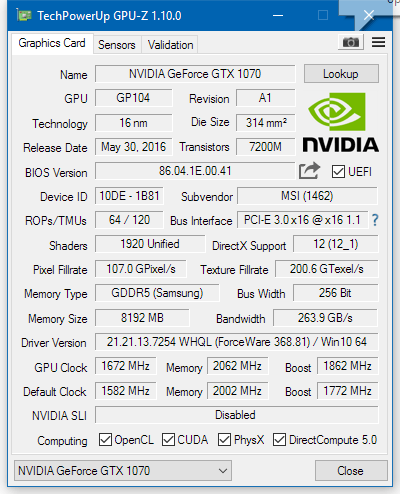
ah ok. really? i feel as though i can't overclock my card as much as others. best i can do is +90 core / +120 memory in afterburner. that's with full power limit and not adjusting voltages. i've seen people get way more than that especially in memory.

here is a screenshot of GPU Z

jbj.png
 
ah ok. really? i feel as though i can't overclock my card as much as others. best i can do is +90 core / +120 memory in afterburner. that's with full power limit and not adjusting voltages. i've seen people get way more than that especially in memory.

here is a screenshot of GPU Z

jbj.png

And that would be the cause of you not getting much of an overclock. I understand the reluctance to do so, but it's what you need to do for this card to get your max OC, both for core and memory. It's really not a huge risk anyway; they only allow an adjustment of 30-40mW. You also need to use the voltage curve to get the most out of your core. If you want to see the best you can do, watch this guide.
 
Hey all,

Thought I'd give a quick report on the Asus Turbo 1070, which I've had for about a month.

It's pretty much the cheapest 1070 you can currently get, but I haven't seen a lot of information or reviews out there.

It's blower-style, but a non-reference board, and uses Samsung memory. Mine is a relatively decent overclocker - +175Mhz on the core and +470 on the memory without artifacting, which gets it to a solid 2075MHz topped out on Boost 3.0.

Using the automatic fan setting in MSI Afterburner, it idles at about 40C (ambient here is about 25C) and runs at about 80C under load, whether at stock clocks or overclocked, which I believe is about the same as the Founder's Edition. Either way, I can't hear it over the pump in my Kraken X61.

If I push the fan up to 100%, it runs at about 62-63C. It's definitely audible at that point.
 
Hey all,

Thought I'd give a quick report on the Asus Turbo 1070, which I've had for about a month.

It's pretty much the cheapest 1070 you can currently get, but I haven't seen a lot of information or reviews out there.

It's blower-style, but a non-reference board, and uses Samsung memory. Mine is a relatively decent overclocker - +175Mhz on the core and +470 on the memory without artifacting, which gets it to a solid 2075MHz topped out on Boost 3.0.

Using the automatic fan setting in MSI Afterburner, it idles at about 40C (ambient here is about 25C) and runs at about 80C under load, whether at stock clocks or overclocked, which I believe is about the same as the Founder's Edition. Either way, I can't hear it over the pump in my Kraken X61.

If I push the fan up to 100%, it runs at about 62-63C. It's definitely audible at that point.

I have that card and LOVE it.
 
Looking for advice on my fan curve. This is for an EVGA GTX 1070 FTW:

9Zhr6CB.png


I didn't like how the fans wouldn't turn on until temps reached 60, because it's quite hot in my apartment right now and I was basically sitting at 60 all the time. Right now with just Chrome open, I'm sitting at 47. I've never done a custom curve on a GPU, so let me know if there's anything I should change. I prefer to keep my system fairly quiet when it's not doing anything taxing, as I own an NZXT S340 and it doesn't have the best sound damping. That said, I want this GPU to last a long time, so I'm hoping keeping the fans running constantly won't shorten their lifespan greatly (vs having them kick in at 60 degrees).
 
Looking for advice on my fan curve. This is for an EVGA GTX 1070 FTW:


I didn't like how the fans wouldn't turn on until temps reached 60, because it's quite hot in my apartment right now and I was basically sitting at 60 all the time. Right now with just Chrome open, I'm sitting at 47. I've never done a custom curve on a GPU, so let me know if there's anything I should change. I prefer to keep my system fairly quiet when it's not doing anything taxing, as I own an NZXT S340 and it doesn't have the best sound damping. That said, I want this GPU to last a long time, so I'm hoping keeping the fans running constantly won't shorten their lifespan greatly (vs having them kick in at 60 degrees).

Switch to the secondary BIOS next time your PC is off, with the secondary BIOS the fans will spin at a low RPM but still enough to keep the card a fair deal cooler.
 
Switch to the secondary BIOS next time your PC is off, with the secondary BIOS the fans will spin at a low RPM but still enough to keep the card a fair deal cooler.

I'm trying to find official info on the secondary bios but I can't seem to find any. Do you happen to have any links? I'm curious!
 
Hey all,

Thought I'd give a quick report on the Asus Turbo 1070, which I've had for about a month.

It's pretty much the cheapest 1070 you can currently get, but I haven't seen a lot of information or reviews out there.

It's blower-style, but a non-reference board, and uses Samsung memory. Mine is a relatively decent overclocker - +175Mhz on the core and +470 on the memory without artifacting, which gets it to a solid 2075MHz topped out on Boost 3.0.

Using the automatic fan setting in MSI Afterburner, it idles at about 40C (ambient here is about 25C) and runs at about 80C under load, whether at stock clocks or overclocked, which I believe is about the same as the Founder's Edition. Either way, I can't hear it over the pump in my Kraken X61.

If I push the fan up to 100%, it runs at about 62-63C. It's definitely audible at that point.

I have that card and LOVE it.
I might get that card(or MSI, it depends).
 
I'm trying to find official info on the secondary bios but I can't seem to find any. Do you happen to have any links? I'm curious!

There's a switch on the card that should be next to the power connectors, along with it changing the fan curve it also increases the OC power limit.
 
Noticed my new EVGA 1070 FTW wasn't downclocking at idle. A hint from the Geforce forums (specifically about today's new driver) lead me to discover that MSI Afterburner was conflicting with the card and preventing it from idling.

I installed EVGA Precision and it seems to have fixed the problem. Anything I should know about this program, other than that it's ridiculous I needed to provide name, email and serial number to use it? Can I expect similar performance to Afterburner?


Edit: Okay, nevermind then! Getting same results with Precision. Something in my system is causing the gpu to stop downclocking about 5 minutes into a fresh boot. The gpu is downclocked until that point.

Edit 2: Uninstalled Precision just to check, and same result. Anyone know what could be forcing the GPU to not idle? Is it because I'm on a 144hz monitor?
 
Noticed my new EVGA 1070 FTW wasn't downclocking at idle. A hint from the Geforce forums (specifically about today's new driver) lead me to discover that MSI Afterburner was conflicting with the card and preventing it from idling.

I installed EVGA Precision and it seems to have fixed the problem. Anything I should know about this program, other than that it's ridiculous I needed to provide name, email and serial number to use it? Can I expect similar performance to Afterburner?


Edit: Okay, nevermind then! Getting same results with Precision. Something in my system is causing the gpu to stop downclocking about 5 minutes into a fresh boot. The gpu is downclocked until that point.

Edit 2: Uninstalled Precision just to check, and same result. Anyone know what could be forcing the GPU to not idle? Is it because I'm on a 144hz monitor?

Check what active 3D processes you have running when you have the issue. You can do with either within the driver (look in the top menu of the CPL for "show 3D processes" or something) or AB (click on the "i" in the main window and scroll down a bit). Try killing them and check if the card downclocks normally after that.

One 144Hz display shouldn't cause this. It's also nearly impossible that a properly setup AB would cause this.
 
Top Bottom