

-
Hey Guest. Check out your NeoGAF Wrapped 2025 results here!
You are using an out of date browser. It may not display this or other websites correctly.
You should upgrade or use an alternative browser.
You should upgrade or use an alternative browser.
Nyko introduces PS4 Data Bank - 3.5" HD bay
- Thread starter RedRooster
- Start date

Not sure if this has been asked but are we able to keep the default 500gb hdd in and have a 3.5 drive as well?
Nope, the PS4 only uses one drive at once. No reason why you couldn't stick the 500GB in your PC for some extra storage though.
I am getting original PS2 HDD adapter vibes from it.
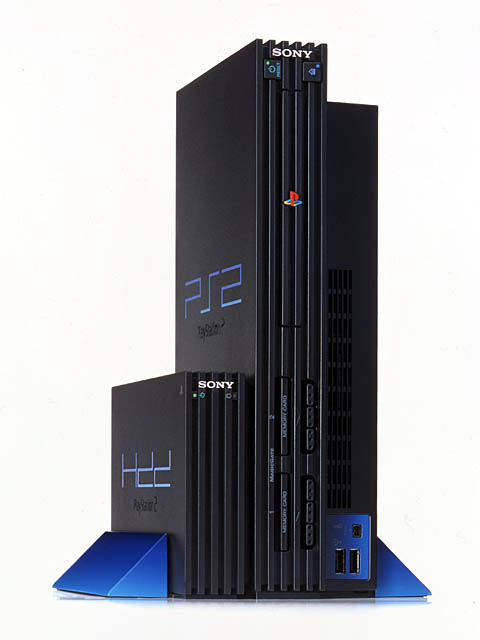
Never knew this existed...holy molly....looks sleek too. Well, PS2 looks better than both PS3 and PS4 so...
I am. I don't need 70 or 80 games installed at once. I'll delete and redownload if I need to.
Data caps am cry.
I'll just buy a bigger internal drive some time.
Or hopefully external HDD support is out soon.
Phat Michael
Banned
If the option is there then take it. I have 4.5TB on my XB1 right now.Agreed. 1tb is easily managed. If you're filling up then you're playing too many games without finishing others. 2tb is enough room to not have to worry. Anymore is just being incredibly lazy.
Neuromancer
Member
You can use any Bluetooth keyboard with the ps4. I'm using a Logitech one meant for iPads.The problem with this is that if the cable becomes disconnected it will effectively format the hard drive.
I could really use that keyboard attachment though. Sony has been surprisingly lacking on official/licensed accessories so far for the PS4.

njean777
Member
Agreed. 1tb is easily managed. If you're filling up then you're playing too many games without finishing others. 2tb is enough room to not have to worry. Anymore is just being incredibly lazy.
Its great that you know everybody's gaming habits for the whole entire world.

kingwingin
Member
So would this nyko adapter keep that hdd spinning at all times? Or would the ps4 tell the hdd to spin down?
I found a molex adapter in my closet and will probably use that tho I don't like the idea of the drive spinning 247
I found a molex adapter in my closet and will probably use that tho I don't like the idea of the drive spinning 247
otaku-asia
Member
Why would anybody buy such piece of crap? God, that looks awful. 

Lashley
Why does he wear the mask!?
Why would anybody buy such piece of crap? God, that looks awful.
Because of its use and not its looks?

adamsapple
Or is it just one of Phil's balls in my throat?
I am getting original PS2 HDD adapter vibes from it.
Oh wow.
I knew about PS2's HDD capabilities, but I always assumed it was PS3/4 like slot and you can stick an actual IDE HDD inside the unit (i've never owned a fat PS2, only slim).
This is fascinating.
Unknown Soldier
Member
Looks to me like that PS4 has a tumor
if the system is on or in standby mode it is spinning anyway, right? and all games are installed and running off the hdd too.So would this nyko adapter keep that hdd spinning at all times? Or would the ps4 tell the hdd to spin down?
I found a molex adapter in my closet and will probably use that tho I don't like the idea of the drive spinning 247
Unknown Soldier
Member
http://www.engadget.com/2014/12/12/seagate-ships-8tb-shingled-hard-drive/
This one uses shingled magnetic technology, whatever the hell that means.
http://en.wikipedia.org/wiki/Shingled_magnetic_recording
http://www.hgst.com/science-of-storage/emerging-technologies/shingled-magnetic-recording
SMR is suitable for use on backup or archival drives. It's not meant for desktop or laptop computer hard drives. Or console hard drives for that matter. Random writes to SMR drives are much slower than on conventional drives and constantly re-writing the shingled tracks reduces expected drive life expectancy due to increased wear on components.
Or maybe spend some more money for a 2.5 drive so you're console doesn't look like shit and works vertically.
You don't have 2.5 inch drives that are larger than 2TB available in the market...at lteast not yet.
Toshiba only just unveiled the first 3TB 2.5 inch drive like less than 24 hours ago.
kingwingin
Member
I don't know, does the hard drive spin constantly while in rest mode? I. Would think it would stop unless it's downloading somethingif the system is on or in standby mode it is spinning anyway, right?
kingwingin
Member
that Toshiba drive is 15mm, won't even fit in the ps4You don't have 2.5 inch drives that are larger than 2TB available in the market...at lteast not yet.
Toshiba only just unveiled the first 3TB 2.5 inch drive like less than 24 hours ago.
I knew this would require some sort of extra power as shown in that video. I think that automatically makes rest mode a no go since it can't manage the power of the drive.
It should not need extra power. SATA is specification for power and bus which the PS4 meets. It will need an extension cable though as the ports for the bus and power are fixed but it should work with any other SATA drive.
A cable like this should do the job, plug the male end into the PS4 and the female end into your new HDD and it should work fine regardless of if it is 3.5", 2.5", SSD, Hybrid, etc. Getting that cable through the holes in the back of the console might be a bit more of a challenge without modifying it though.
This might come in handy but I will wait till I am struggling to juggle games with the stock hard drive as by then SSDs will be cheaper and larger, HDDs will be larger and faster and a new range of hybrids might be launched. For me, the stock drive does fine although I would expect some time this year for that to no longer be the case.

InfiniteUnrest
Member
It should not need extra power. SATA is specification for power and bus which the PS4 meets. It will need an extension cable though as the ports for the bus and power are fixed but it should work with any other SATA drive.
A cable like this should do the job, plug the male end into the PS4 and the female end into your new HDD and it should work fine regardless of if it is 3.5", 2.5", SSD, Hybrid, etc. Getting that cable through the holes in the back of the console might be a bit more of a challenge without modifying it though.
This might come in handy but I will wait till I am struggling to juggle games with the stock hard drive as by then SSDs will be cheaper and larger, HDDs will be larger and faster and a new range of hybrids might be launched. For me, the stock drive does fine although I would expect some time this year for that to no longer be the case.
The problem is that 2.5" drives require only 5V DC power. 3.5" drives however require both 12V and 5V DC power. It's entirely possible that the PS4 only provides 5V DC and therefore does not provide the amount of wattage to drive a 3.5" HDD, hence the necessity of the external power source.
As can be seen in the Nyko demo video linked earlier in this thread, Nyko plans to use a connector that plugs into your PS4's power receptacle (and then your PS4 power cable plugs into the Nyko plug), to provide power to the 3.5" HDD.
The real question here is whether this solution would allow the PS4 to enter rest/sleep mode. Current DIY methods for using a 3.5" HDD do not allow you to enter rest mode. I'm assuming this will be no different for the Nyko solution as it still requires an external power supply, but perhaps they found a way to plug in to the SATA power receptacle using their solution which somehow can provide the PS4 feedback and allow rest mode to work with their 3.5" solution.
I wonder if rest mode would work in a DIY solution if you used the PS4's SATA power to plug into the original 2.5" HDD (or another one lying around if you had one), or if the SATA data cable is also required to be connected to the same drive for rest mode to function.

Lone Wolf
Member
This is what would concern me. A separate power supply would make me feel much better about this.The problem is that 2.5" drives require only 5V DC power. 3.5" drives however require both 12V and 5V DC power. It's entirely possible that the PS4 only provides 5V DC and therefore does not provide the amount of wattage to drive a 3.5" HDD, hence the necessity of the external power source.
As can be seen in the Nyko demo video linked earlier in this thread, Nyko plans to use a connector that plugs into your PS4's power receptacle (and then your PS4 power cable plugs into the Nyko plug), to provide power to the 3.5" HDD.
The real question here is whether this solution would allow the PS4 to enter rest/sleep mode. Current DIY methods for using a 3.5" HDD do not allow you to enter rest mode. I'm assuming this will be no different for the Nyko solution as it still requires an external power supply, but perhaps they found a way to plug in to the SATA power receptacle using their solution which somehow can provide the PS4 feedback and allow rest mode to work with their 3.5" solution.
I wonder if rest mode would work in a DIY solution if you used the PS4's SATA power to plug into the original 2.5" HDD (or another one lying around if you had one), or if the SATA data cable is also required to be connected to the same drive for rest mode to function.

Netherscourge
Banned
I don't know about you guys but I am excited for this.

Xbox One planned external storage support from Day One but was not implemented until June of the following year.
http://news.xbox.com/2014/05/xbox-one-june-features-preview
lol
Now I want to get 6 or 7 PS4s, line them up and make my own custom Excitebike course!
Dr. Black Jack
Member
I just got a PS4 as a surprise early birthday gift, and after setting it up I don't think the power draw will be a problem since the Nyko bay would siphon off the power before it gets to the PS4's PSU. The problems with the Intercooler-like devices were that they took the power in between the brick and the system itself; since the PS4 doesn't have a brick this shouldn't be a problem.
I'm still waiting on early impressions tough, especially if it messes up Rest mode.
I'm still waiting on early impressions tough, especially if it messes up Rest mode.
Wrong.
http://www.engadget.com/2013/05/21/xbox-one-hard-drive/
From the start, MS was behind forward thinking to make internal and external storage the same; everything internal can do, external can do, the way it should be. The fact that you cannot add storage to a PS4, merely replace it is an extremely valid criticism. If I buy a 2TB hard drive for example, I will get better value from it by using it on Wii U or Xbox one because I am ADDING to my storage, not replacing it.
I actually just made a thread on the issue. It's not console warring, it's the truth; at this point in time, the PS4's competition has more forward thinking options when it comes to storage, it's that simple. Now, if so chose to, they could be a lot more consumer-friendly by allowing the choice of external storage with a system update (if it can even be done).
With its competiton, and a product like this (however awesome it may be) coming out, I HOPE Sony feels the pressure; only good can come from giving the consumer the choice of storage expansion. I don't see how wanting choice that can only benefit PS4 owners is "factually incorrect console warring". This product is great, and helps solve a real issue in a decent way, but Sony holds in its hands a proper solution to a problem some of us consider incredibly short-sighted. As a future PS4 owner, I say this whole-heartedly.
USB has recently been confirmed to be completely insecure in a way that can't be fixed.
Sorry future PS4 owner don't expect Sony to allow user data to be written over the USB port anytime soon.
You'll just have to struggle on with 2tb and no extra external power bricks or the Nyko dock.
Oh wow.
I knew about PS2's HDD capabilities, but I always assumed it was PS3/4 like slot and you can stick an actual IDE HDD inside the unit (i've never owned a fat PS2, only slim).
This is fascinating.
This is for the first three Japanese revisions. The phats release worldwide all had the internal expansion slot. The original Japanese versions had a PCMCIA slot like what you find on a laptop.
Here's a video of an boxing, the guy doesn't have a Japanese PS2 to connect the adapter to.
https://www.youtube.com/watch?v=pretf7RTX-M
Here's some information and pictures of the HDD the rest of the world knows about.
http://en.wikipedia.org/wiki/PlayStation_2_Expansion_Bay
AngryNapkin
Banned
I will never buy third party stuff after the 360 Cooler debacle.
I appreciate the idea and want 3.5" drives but I'll wait until SSD goes down (2-3 years) or Sony allows external storage.
I appreciate the idea and want 3.5" drives but I'll wait until SSD goes down (2-3 years) or Sony allows external storage.

MemoryHumanity
Member
I am getting original PS2 HDD adapter vibes from it.
Hot damn, that's sexy. How am I only just discovering this?

OmegaDL50
Member
Wii U owner here. 16 GB is plenty.
Wii U games don't install entirely to the HDD however.
This isn't the case unfortunately for the PS4.
Sure the Bluray drive doesn't get as much wear and due to the minimal usage of it. Only needing to use read access to "greenlight" a game to verify ownership and of course copy during installs.
However I wonder if the reliability of the PS4 HDD is so much that it can deal with copying and deleting GBs of data over the years. I'd think ultimately I'd just get a large enough HDD or SSD once the 2GB units hit a reasonable price point.
Because I know for a fact the 500GB HDD that comes with the PS4 as a default clearly won't be enough when by this time next year I'll have at least a dozen+ PS4 titles that all are easily 35 to 50GB in size in terms of installs.
And it doesn't matter if you go pure digital or not. Even if you stay physical, this does not get around the space issue as ALL PS4 disc games install entirely to the HDD.

Rambone
Member
Wii U games don't install entirely to the HDD however.
This isn't the case unfortunately for the PS4.
Sure the Bluray drive doesn't get as much wear and due to the minimal usage of it. Only needing to use read access to "greenlight" a game to verify ownership and of course copy during installs.
However I wonder if the reliability of the PS4 HDD is so much that it can deal with copying and deleting GBs of data over the years. I'd think ultimately I'd just get a large enough HDD or SSD once the 2GB units hit a reasonable price point.
Because I know for a fact the 500GB HDD that comes with the PS4 as a default clearly won't be enough when by this time next year I'll have at least a dozen+ PS4 titles that all are easily 35 to 50GB in size in terms of installs.
And it doesn't matter if you go pure digital or not. Even if you stay physical, this does not get around the space issue as ALL PS4 disc games install entirely to the HDD.
I've already run out of space on my PS4
. I need to get an upgrade HDD as I dislike having to delete games that I might want to play on a whim. I've already gone through and deleted games that I know I won't be playing anytime soon, have to make room for bloodborne. I really wish the PS4 had an external solution but that USB 2 port just won't cut it for anything meaningful I would think.
joecanada
Member
No matter what anything is designed to look like there will be ten pages on gaf about how ugly it is. There's almost nothing else it could be shaped as. I challenge anyone to photoshop something better. Following the lines of the PS4 was the only way to go. What were they gonna make a square? triangle, pyramid? Lol
I'm not saying it's good but there's not many ways to add to the ps4olygon...
Besides mine is in my entertainment system so I would consider it
I'm not saying it's good but there's not many ways to add to the ps4olygon...
Besides mine is in my entertainment system so I would consider it
Looks horrible.
I don't care how it looks, for an easy way to have an 8TB PS4, this will be a Godsend.
Dr. Black Jack
Member
So apparently this comes out next week...any takers? I'm holding off until I can get concrete data on how the extra heat affects things.
So apparently this comes out next week...any takers? I'm holding off until I can get concrete data on how the extra heat affects things.
This. Im very interested as well but also wondering how you could transfer anything on your current ps4 to it.
Dr. Black Jack
Member
This. Im very interested as well but also wondering how you could transfer anything on your current ps4 to it.
Backup your stuff on an external via the PS4 system settings, install the Data Bank w/drive, restore from the external. Same as switching a 2.5".

Dr. Kitty Muffins
Member
So what is the fastest hybrid drive you can stick in this thing?
Ahh ok cool. Wasn't sure if it would work out identically.Backup your stuff on an external via the PS4 system settings, install the Data Bank w/drive, restore from the external. Same as switching a 2.5".
Dr. Kitty Muffins
Member
If Sony announces external HDD support at E3, this device is DOA.

Journey
Banned
Xbone has external storage and lacks a properly swappable/accessible internal access to make something like this possible. Just use an external and hide it well, will look even better than this if you can squirrel it away well enough.
Wait, what? Not sure what advantage that has over this, or am I missing something?


Journey
Banned
I may be in minority here but thought that looks pretty darn cool.
It doesn't look too bad. I guess it wasn't possible to place on the side instead of on the top because of the size of the HDD. On the side would have been much more iconspicuous like the pic above.
IGN's review has a couple new pics with the cover off and some load time comparisons (that seem unscientific).
I preordered from Amazon, but I'm still waiting for a ship date.
I preordered from Amazon, but I'm still waiting for a ship date.