• Hey Guest. Check out your NeoGAF Wrapped 2025 results here!

PC games that are ONLY in a borderless window need to stop.

RoboFu

One of the green rats
Idk why this became a thing in dx 12, but I've notice games that are ONLY in a borderless window often looks blurry AF compared to full screen. Even making sure the resolutions are the same on desktop and all that jazz. With games that you can choose either cordless or full screen I can see a difference in clarity.

Take FF7 rebirth.. running on much better hardware and full 4k it's still blurry compared to a standard ps5.

I've also notice the same games don't get blurry on my bazzite machine, but I think that forces full screen.

What do you think? Is there a setting in windows I don't know about or is just more windows 11 fuckery?

My windows machine is running a 5070 ti.
 
Never noticed that on my end. You sure it's not your screen going out of game mode or some shit like that? Also is it your 2nd screen or the main one? Windows has some fuckery indeed when it comes to screen switching and how it scales the content on screen.
 
If games look better in fullscreen it is probably because fullscreen is obsolete so developers don't code for it and you don't get all the marvelous passes of blurring they put on the modes they do optimize for.
 
Also not experienced this personally, games look fine in borderless window mode. For me, identical to exclusive fullscreen.
 
Never noticed that on my end. You sure it's not your screen going out of game mode or some shit like that? Also is it your 2nd screen or the main one? Windows has some fuckery indeed when it comes to screen switching and how it scales the content on screen.

Same screen. I'm always in steam big picture mode as well.

It is almost like windows is using some sort of filtering on the window itself.
 
Are you maybe running games in borderless window mode and not matching your monitor's resolution somehow? It should be automatic. Only thing I could think that might make your games blurry, if it's doing some sort of linear scaling. Whereas exclusive fullscreen will change your monitor's resolution to match the game and wouldn't have this problem.

Some part of your setup (video card settings, monitor capabilities, etc.) isn't jiving if you're experiencing this.
 
TBF, i never had scaling issues with borderless. I may had visual hiccups/sync issues maybe in the past when i didn't have a VRR monitor.

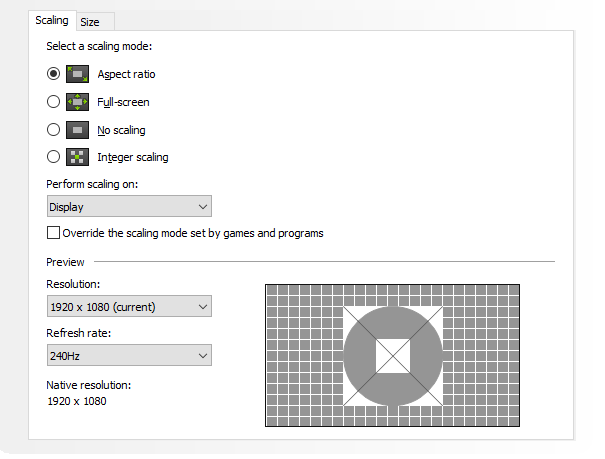
Maybe try fiddling with the "adjust desktop size and position" settings in the Nvidia drivers tab?

xTT0A7doiRfRC869.png
 
Idk why this became a thing in dx 12, but I've notice games that are ONLY in a borderless window often looks blurry AF compared to full screen. Even making sure the resolutions are the same on desktop and all that jazz. With games that you can choose either cordless or full screen I can see a difference in clarity.

Take FF7 rebirth.. running on much better hardware and full 4k it's still blurry compared to a standard ps5.

I've also notice the same games don't get blurry on my bazzite machine, but I think that forces full screen.

What do you think? Is there a setting in windows I don't know about or is just more windows 11 fuckery?

My windows machine is running a 5070 ti.

If you are using the "game mode" (gamescope) on bazzite, it's going to have a very different method of compositing frames before display. That's all I know!
 
Definitely check your Nvidia control panel. Have you ever fiddled with the settings there in the past? Maybe something got toggled by mistake.
 
Definitely check your Nvidia control panel. Have you ever fiddled with the settings there in the past? Maybe something got toggled by mistake.

I've noticed when I run games or emulators on full screen, even if I have V-Sync enabled, it always tears.

Borderless seems to remove tearing.

What should I look at?
 
TIL people still run games in fullscreen.

It messes so much when I alt+tab and borderless feels faster and more fluent to me for some reason.
 
A thread on reddit explained that borderless window full screen is better for Windows 11 especially for tabbing to switch windows
 
I'm not sure if full screen is the full screen we once knew anymore. I think it might actually still go through the desktop compositor.
 
The main problem with borderless is if you have multiple monitors with different pixel resolutions and/or different scaling.

I've found some games will just scale down to my secondary older 1440p monitor. I do love when borderless works because alt-tabbing or when paused I can hover my mouse over to another display to do stuff like pause/play/skip media is seamless vs exclusive fullscreen.
 
External monitor. Connected via HDMI.
60hz display I'm assuming?

Toggle the triple buffering setting on/off, see if that makes a difference.

I had an issue with gsync on my last monitor that would leave a crease in the middle of my screen if I alt tabbed or whatever. It was annoying as fook. The only solution was to disable and re-enable gsync lol.
 
TIL people still run games in fullscreen.

It messes so much when I alt+tab and borderless feels faster and more fluent to me for some reason.
Thats the purpose of the borderless window. Fullscreen put all the resorses on the game running leaving very little resorces for whats running in the backgroud. Borderless window put some more resorces in the background stuff to be more smooth when changing windows, so its a better mode for multitasking. If you care about all them frames during gameplay, should play in fullscreen.
 
Last edited:
60hz display I'm assuming?

Toggle the triple buffering setting on/off, see if that makes a difference.

I had an issue with gsync on my last monitor that would leave a crease in the middle of my screen if I alt tabbed or whatever. It was annoying as fook. The only solution was to disable and re-enable gsync lol.

It's the same 120hz/VRR display I use for console(s), but yes I have my PC set to 60hz via the nvidia panel. I don't think my laptop can do GSync over HDMI so that is kinda out of the order.

Will try the triple buffer on/off, see if that works. Thanks!
 
Last edited:
Idk why this became a thing in dx 12, but I've notice games that are ONLY in a borderless window often looks blurry AF compared to full screen. Even making sure the resolutions are the same on desktop and all that jazz. With games that you can choose either cordless or full screen I can see a difference in clarity.

Take FF7 rebirth.. running on much better hardware and full 4k it's still blurry compared to a standard ps5.

I've also notice the same games don't get blurry on my bazzite machine, but I think that forces full screen.

What do you think? Is there a setting in windows I don't know about or is just more windows 11 fuckery?

My windows machine is running a 5070 ti.

This is not a thing and modern games run just as well in fullscreen windowed most of the time. You can use nvidia frameview to ensure independent flip is running which literally means you get the same latency as fullscreen exclusive. Latency is the only difference btw - blurriness is insanity and in your head.

If you are having borderless fullscreen issues in 2025 on modern games. It's a user error.
 
Last edited:
It's the same 120hz/VRR display I use for console(s), but yes I have my PC set to 60hz via the nvidia panel. I don't think my laptop can do GSync over HDMI so that is kinda out of the order.

Will try the triple buffer on/off, see if that works. Thanks!
Well damn. I don't know. If that doesn't work try setting the max framerate in the control panel slightly higher than your monitor. Like 125 or something.

I'll google around on it. Sounds interesting.
 
I fucking hate Borderless Window, Full Screen Exclusive till I die, but some (many?) games don't even support it anymore because they've only DX12 renderers, I never played Kena on PC because in DX11 I could do FSE, but it had drawcall stuttering and in DX12 that was fixed... but then BW was forced and brought a different kind of stuttering, absolute trash. I'm not sure if a more modern CPU would've brute-force fixed the DX11 issues, I still run a 3770K, but 99% of other games worked fine locking to a perfect 30fps or 60fps, etc on it so I doubt it.

I remember reading an article about how the DWM would make FSE obselete in Win10 because it solved all the framepacing/stuttering issues it had in the past... yeah that was a massive fucking lie ime.

EVERY. SINGLE. TIME I had framepacing issues in games (Dragon Quest XI for example) and I had exhausted all other avenues (like making sure the v-sync implementation wasn't trash and if it was usinag an external one like nvcpl or rtss) it was solved instantly by forcing FSE, Unreal Engine games were terrible for it, a huge proportion of devs fuck(ed) up their v-sync implements somehow. I remember fucking around with Titanfall 2 (Modifed Source engine) for HOURS and then suddenly I realised it was just the v-sync implement was broken and you needed FSE to avoid stuttering. After that it was perfect and I had a superb time with it not having to experience the distraction equivalent of someone pinging my back of my head every few seconds. I think I'll replay T2 after Portal 2 and HL2 actually.

Thinking about this again is why I stopped playing current games on PC lmao. In a way it was really satisfying when you got it working perfectly, but then more and more in the last decade I couldn't even do that or had to lock to 30fps because I couldn't lock to 60fps even if I reduced the settings to minimum and the resolution to 1080p. So I just couldn't be fucked anymore "lollipop_disappointed: I was thinking about finally upgrading the GTX 1080 + 3770K (Obviously should've done the CPU a long time ago, but my display is 60hz at the resolution I prefer so I never really needed to), but the GPU price fuckery since the 20-series and now this VRAM shit, just fuck off.

I'm not as angry as I sound btw, I'm Scottish. Christ I need to sleep now, I'm tired, that was quite cathartic tbf.

This is not a thing and modern games run just as well in fullscreen windowed most of the time. You can use nvidia frameview to ensure independent flip is running which literally means you get the same latency as fullscreen exclusive. Latency is the only difference btw - blurriness is insanity and in your head.

If you are having borderless fullscreen issues in 2025 on modern games. It's a user error.

Since you sound informed, is it a thing that an external sync solution wouldn't work/work properly on BW when it would with FSE, that would explain my stuttering issues. Mostly I was using Nvidai Control Panel to do the v-sync but also sometimes I was using RTSS "scanline sync" or whatever it was called to get sync with much less lag than traditional triple-buffered v-sync. I'm talking about games up until about PS5 came out and nothing to do with OP's issue.

 
Last edited:
Sorry for not even contributing OP, here you go:

I'd say it has something to do with scaling setting in Nvidia CP as well, is the difference visible when you screenshot them both and compare?

For all my complaining above I never noticed any difference in sharpness at the same res/settings etc between FSE and BW.
 
I fucking hate Borderless Window, Full Screen Exclusive till I die, but some (many?) games don't even support it anymore because they've only DX12 renderers, I never played Kena on PC because in DX11 I could do FSE, but it had drawcall stuttering and in DX12 that was fixed... but then BW was forced and brought a different kind of stuttering, absolute trash. I'm not sure if a more modern CPU would've brute-force fixed the DX11 issues, I still run a 3770K, but 99% of other games worked fine locking to a perfect 30fps or 60fps, etc on it so I doubt it.

I remember reading an article about how the DWM would make FSE obselete in Win10 because it solved all the framepacing/stuttering issues it had in the past... yeah that was a massive fucking lie ime.

EVERY. SINGLE. TIME I had framepacing issues in games (Dragon Quest XI for example) and I had exhausted all other avenues (like making sure the v-sync implementation wasn't trash and if it was usinag an external one like nvcpl or rtss) it was solved instantly by forcing FSE, Unreal Engine games were terrible for it, a huge proportion of devs fuck(ed) up their v-sync implements somehow. I remember fucking around with Titanfall 2 (Modifed Source engine) for HOURS and then suddenly I realised it was just the v-sync implement was broken and you needed FSE to avoid stuttering. After that it was perfect and I had a superb time with it not having to experience the distraction equivalent of someone pinging my back of my head every few seconds. I think I'll replay T2 after Portal 2 and HL2 actually.

Thinking about this again is why I stopped playing current games on PC lmao. In a way it was really satisfying when you got it working perfectly, but then more and more in the last decade I couldn't even do that or had to lock to 30fps because I couldn't lock to 60fps even if I reduced the settings to minimum and the resolution to 1080p. So I just couldn't be fucked anymore "lollipop_disappointed: I was thinking about finally upgrading the GTX 1080 + 3770K (Obviously should've done the CPU a long time ago, but my display is 60hz at the resolution I prefer so I never really needed to), but the GPU price fuckery since the 20-series and now this VRAM shit, just fuck off.

I'm not as angry as I sound btw, I'm Scottish. Christ I need to sleep now, I'm tired, that was quite cathartic tbf.


Since you sound informed, is it a thing that an external sync solution wouldn't work/work properly on BW when it would with FSE, that would explain my stuttering issues. Mostly I was using Nvidai Control Panel to do the v-sync but also sometimes I was using RTSS "scanline sync" or whatever it was called to get sync with much less lag than traditional triple-buffered v-sync. I'm talking about games up until about PS5 came out and nothing to do with OP's issue.


It takes a lot to get every bit of stuttering out. Steam deck does a really good job but they had to go to lengths. little light reading.... https://github.com/ValveSoftware/gamescope/blob/master/README.md
 
You weirdo fanboys " oh it's user error ! Dur dur dur ".

Doing some research I have found that it's actually a well known ongoing issue for windows 11 and there are a few ways to deal with it but what worked for me was to turn off the window transparency effects.

It's not a in your face difference but you can tell if you play on multiple PCs and the other one doesn't do it. It's probably happening for a lot of you but you just don't have the reference for it to stand out.
 
Last edited:
You weirdo fanboys " oh it's user error ! Dur dur dur ".

Doing some research I have found that it's actually a well known ongoing issue for windows 11 and there are a few ways to deal with it but what worked for me was to turn off the window transparency effects.

It's not a in your face difference but you can tell if you play on multiple PCs and the other one doesn't do it. It's probably happening for a lot of you but you just don't have the reference for it to stand out.

It can be super subtle difference but yah feels nice when it's all smooth as can be.
 
You weirdo fanboys " oh it's user error ! Dur dur dur ".

Doing some research I have found that it's actually a well known ongoing issue for windows 11 and there are a few ways to deal with it but what worked for me was to turn off the window transparency effects.

It's not a in your face difference but you can tell if you play on multiple PCs and the other one doesn't do it. It's probably happening for a lot of you but you just don't have the reference for it to stand out.

I would love to see a before and after, it should be visible in screenshots taken by pressing Ctrl+Print and pasting it into paint, then export as a PNG. because I can't even begin to come up with an explanation on how this would in any way affect image sharpness if you run the same resolution as your output.
the transparent window effect would basically need to downscale and then re-upscale the image in order to do something like that. and I kinda doubt that is happening.

this smells like one of those "I fixed the stutters by turning off windows energy saver settings" kinda situations


EDIT:
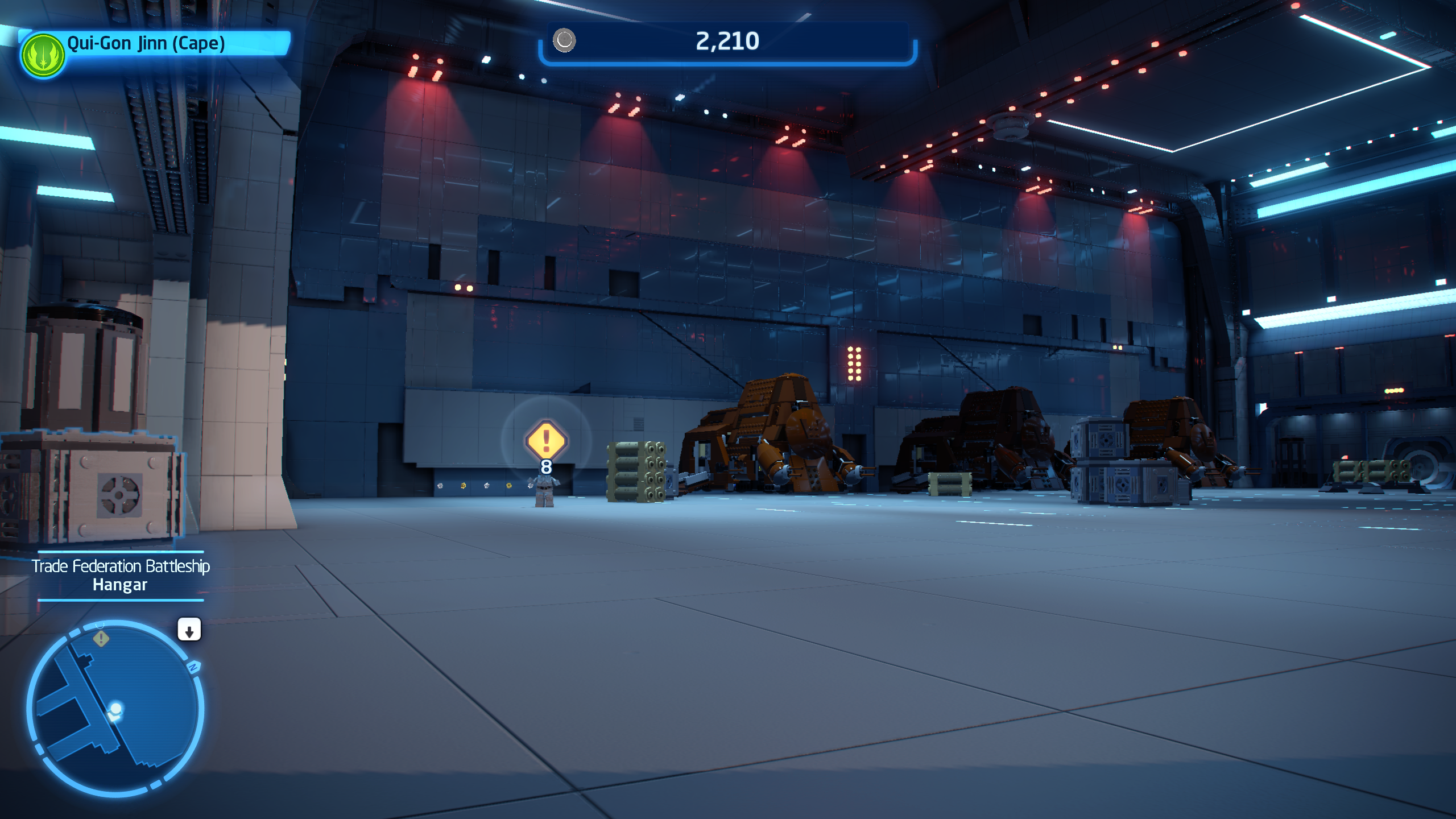
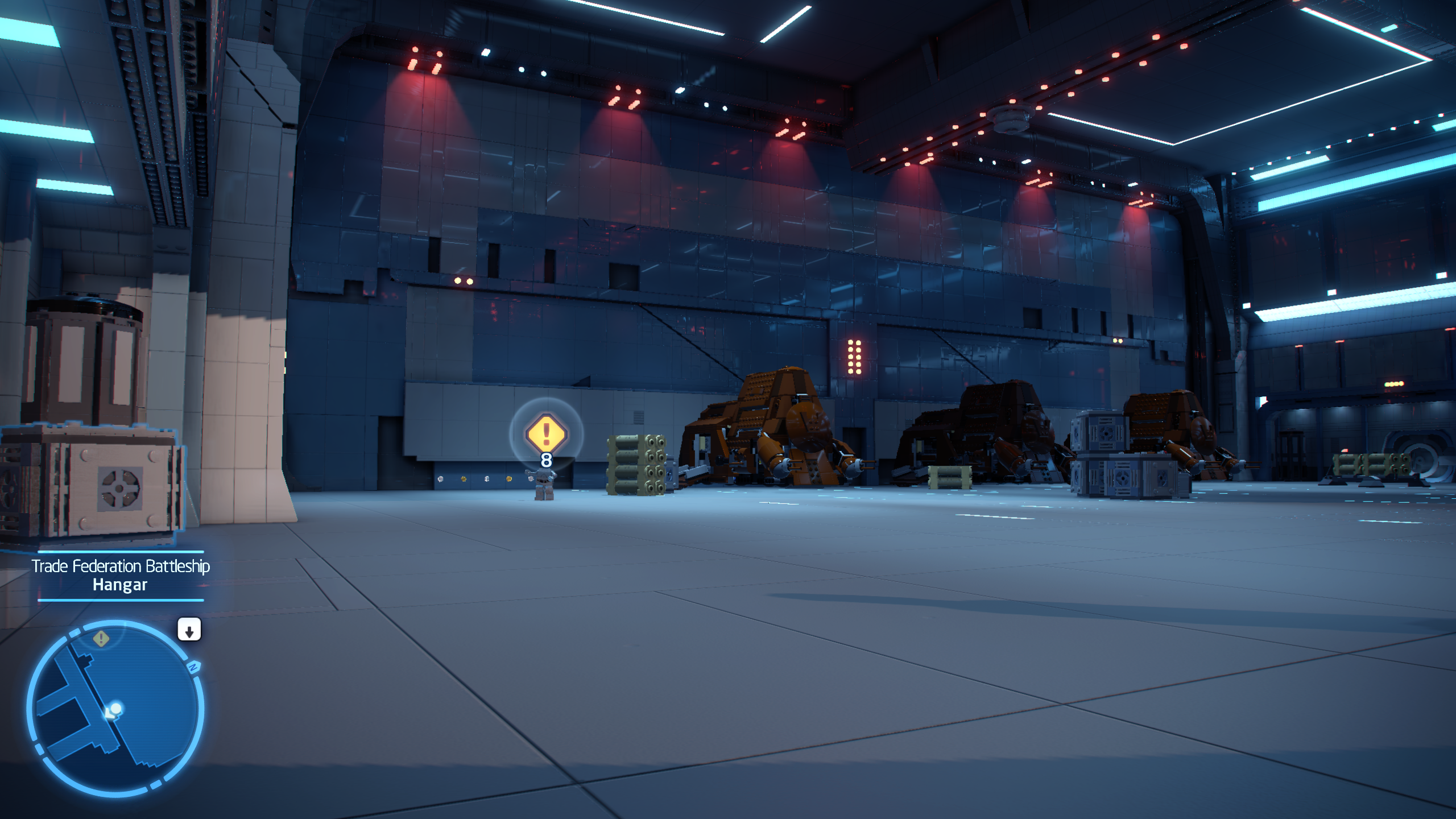
looked for a game I got that is borderless window and has an AA-off option (although it has weird chromatic aberration that is always on). I rebooted the game between taking them and tried to line up everything as good as I could (the mous input in this game is highly filtered and ass)

so one of these is with window transparency effects off, and one is with them on... see if you can detect which one is which (you can't)

Image 1
aTbfVSqPBcodUc7q.png


Image 2
r3bm0dI4j0ve1b1b.png


I literally see no difference on my screen or in the screenshots I took
 
Last edited:
I fucking hate Borderless Window, Full Screen Exclusive till I die, but some (many?) games don't even support it anymore because they've only DX12 renderers, I never played Kena on PC because in DX11 I could do FSE, but it had drawcall stuttering and in DX12 that was fixed... but then BW was forced and brought a different kind of stuttering, absolute trash. I'm not sure if a more modern CPU would've brute-force fixed the DX11 issues, I still run a 3770K, but 99% of other games worked fine locking to a perfect 30fps or 60fps, etc on it so I doubt it.

I remember reading an article about how the DWM would make FSE obselete in Win10 because it solved all the framepacing/stuttering issues it had in the past... yeah that was a massive fucking lie ime.

EVERY. SINGLE. TIME I had framepacing issues in games (Dragon Quest XI for example) and I had exhausted all other avenues (like making sure the v-sync implementation wasn't trash and if it was usinag an external one like nvcpl or rtss) it was solved instantly by forcing FSE, Unreal Engine games were terrible for it, a huge proportion of devs fuck(ed) up their v-sync implements somehow. I remember fucking around with Titanfall 2 (Modifed Source engine) for HOURS and then suddenly I realised it was just the v-sync implement was broken and you needed FSE to avoid stuttering. After that it was perfect and I had a superb time with it not having to experience the distraction equivalent of someone pinging my back of my head every few seconds. I think I'll replay T2 after Portal 2 and HL2 actually.

Thinking about this again is why I stopped playing current games on PC lmao. In a way it was really satisfying when you got it working perfectly, but then more and more in the last decade I couldn't even do that or had to lock to 30fps because I couldn't lock to 60fps even if I reduced the settings to minimum and the resolution to 1080p. So I just couldn't be fucked anymore "lollipop_disappointed: I was thinking about finally upgrading the GTX 1080 + 3770K (Obviously should've done the CPU a long time ago, but my display is 60hz at the resolution I prefer so I never really needed to), but the GPU price fuckery since the 20-series and now this VRAM shit, just fuck off.

I'm not as angry as I sound btw, I'm Scottish. Christ I need to sleep now, I'm tired, that was quite cathartic tbf.


Since you sound informed, is it a thing that an external sync solution wouldn't work/work properly on BW when it would with FSE, that would explain my stuttering issues. Mostly I was using Nvidai Control Panel to do the v-sync but also sometimes I was using RTSS "scanline sync" or whatever it was called to get sync with much less lag than traditional triple-buffered v-sync. I'm talking about games up until about PS5 came out and nothing to do with OP's issue.
Your frame pacing would improve a lot if you weren't using a CPU from 13 years ago......
 
i always go for exclusive fullscreen when available

super rare, but sometimes borderless alleviates a bug/issue with exclusive. maybe twice in the last 10 years.
 
Last edited:
You weirdo fanboys " oh it's user error ! Dur dur dur ".

Doing some research I have found that it's actually a well known ongoing issue for windows 11 and there are a few ways to deal with it but what worked for me was to turn off the window transparency effects.

It's not a in your face difference but you can tell if you play on multiple PCs and the other one doesn't do it. It's probably happening for a lot of you but you just don't have the reference for it to stand out.

So you're going to "dur dur dur" people telling you your PC isn't configured correctly, then "dur dur dur you can't see the difference" them? That's probably why you seemingly never learned how to configure a PC at the most basic level.

There's absolutely no difference in visual clarity between borderless and exclusive full screen at the same resolution.

I'm actually playing Rebirth right now at 5760x2400 and it's incredibly sharp.
 
I would love to see a before and after, it should be visible in screenshots taken by pressing Ctrl+Print and pasting it into paint, then export as a PNG. because I can't even begin to come up with an explanation on how this would in any way affect image sharpness if you run the same resolution as your output.
the transparent window effect would basically need to downscale and then re-upscale the image in order to do something like that. and I kinda doubt that is happening.

this smells like one of those "I fixed the stutters by turning off windows energy saver settings" kinda situations


EDIT:
looked for a game I got that is borderless window and has an AA-off option (although it has weird chromatic aberration that is always on). I rebooted the game between taking them and tried to line up everything as good as I could (the mous input in this game is highly filtered and ass)

so one of these is with window transparency effects off, and one is with them on... see if you can detect which one is which (you can't)

Image 1
aTbfVSqPBcodUc7q.png


Image 2
r3bm0dI4j0ve1b1b.png


I literally see no difference on my screen or in the screenshots I took

You've attempted to reproduce the issue, and you didn't, but that doesn't mean it's not real. Doesn't mean it's real either. But either way it would be something weird and probably hard to reproduce.
 
You also get to enjoy extra input lag with borderless, so that's really exciting.

i always go for exclusive fullscreen when available

super rare, but sometimes borderless alleviates a bug/issue with exclusive. maybe twice in the last 10 years.

with modern games you don't really have a choice between exclusive fullscreen and borderless window fullscreen.
most modern games run in borderless window no matter what.
if you select fullscreen in such a game, they have a new type of fullscreen mode that is borderless window on a software level, but has additional features, like the ability to change the screen resolution.

you can tell if a game is actually exclusive fullscreen if you can NOT overlay anything on top. so if your start menu overlays if you hit the windows key, or if the Xbox Game Bar overlays if you press the Xbox guide button on a controller (or Win+G) it's not exclusive fullscreen
 
Last edited:
I would love to see a before and after, it should be visible in screenshots taken by pressing Ctrl+Print and pasting it into paint, then export as a PNG. because I can't even begin to come up with an explanation on how this would in any way affect image sharpness if you run the same resolution as your output.
the transparent window effect would basically need to downscale and then re-upscale the image in order to do something like that. and I kinda doubt that is happening.

this smells like one of those "I fixed the stutters by turning off windows energy saver settings" kinda situations


EDIT:
looked for a game I got that is borderless window and has an AA-off option (although it has weird chromatic aberration that is always on). I rebooted the game between taking them and tried to line up everything as good as I could (the mous input in this game is highly filtered and ass)

so one of these is with window transparency effects off, and one is with them on... see if you can detect which one is which (you can't)

Image 1
aTbfVSqPBcodUc7q.png


Image 2
r3bm0dI4j0ve1b1b.png


I literally see no difference on my screen or in the screenshots I took

One of those images gave me eye cancer.
 
bazzite machine
There's your problem most likely.

Traditional fullscreen hasn't been a thing since Windows 7 IIRC
There is no "traditional fullscreen".
Different OSes with different APIs have different ways to engage what is known as "exclusive fullscreen" mode.
In modern Win11 all such ways are emulated by the OS to end up essentially the same as a borderless mode would (there are still some exceptions though, with OpenGL apps for example).
So in this sense a legacy fullscreen in modern Win11 works similarly to a "modern fullscreen" which in turn is little more than a borderless window with display mode switching logic attached to it.
Main difference between a "fullscreen" and "bordeless" these days is that a "fullscreen" will allow you to set the output res+hz and then output a borderless window into that mode while "borderless" won't allow the former and will just output the res you set in the app to your desktop resolution.

You also get to enjoy extra input lag with borderless, so that's really exciting.
No you don't. They are exactly similar in input lag if engaged properly in modern Windows.
 
Last edited:
When it was first a thing i remember it broke certain games (like halo infinite) and it was more in the performance side rather than IQ.

But honestly nowadays i cant even tell if it is or not.
 
I fucking hate Borderless Window, Full Screen Exclusive till I die, but some (many?) games don't even support it anymore because they've only DX12 renderers, I never played Kena on PC because in DX11 I could do FSE, but it had drawcall stuttering and in DX12 that was fixed... but then BW was forced and brought a different kind of stuttering, absolute trash. I'm not sure if a more modern CPU would've brute-force fixed the DX11 issues, I still run a 3770K, but 99% of other games worked fine locking to a perfect 30fps or 60fps, etc on it so I doubt it.

I remember reading an article about how the DWM would make FSE obselete in Win10 because it solved all the framepacing/stuttering issues it had in the past... yeah that was a massive fucking lie ime.

EVERY. SINGLE. TIME I had framepacing issues in games (Dragon Quest XI for example) and I had exhausted all other avenues (like making sure the v-sync implementation wasn't trash and if it was usinag an external one like nvcpl or rtss) it was solved instantly by forcing FSE, Unreal Engine games were terrible for it, a huge proportion of devs fuck(ed) up their v-sync implements somehow. I remember fucking around with Titanfall 2 (Modifed Source engine) for HOURS and then suddenly I realised it was just the v-sync implement was broken and you needed FSE to avoid stuttering. After that it was perfect and I had a superb time with it not having to experience the distraction equivalent of someone pinging my back of my head every few seconds. I think I'll replay T2 after Portal 2 and HL2 actually.

Thinking about this again is why I stopped playing current games on PC lmao. In a way it was really satisfying when you got it working perfectly, but then more and more in the last decade I couldn't even do that or had to lock to 30fps because I couldn't lock to 60fps even if I reduced the settings to minimum and the resolution to 1080p. So I just couldn't be fucked anymore "lollipop_disappointed: I was thinking about finally upgrading the GTX 1080 + 3770K (Obviously should've done the CPU a long time ago, but my display is 60hz at the resolution I prefer so I never really needed to), but the GPU price fuckery since the 20-series and now this VRAM shit, just fuck off.

I'm not as angry as I sound btw, I'm Scottish. Christ I need to sleep now, I'm tired, that was quite cathartic tbf.


Since you sound informed, is it a thing that an external sync solution wouldn't work/work properly on BW when it would with FSE, that would explain my stuttering issues. Mostly I was using Nvidai Control Panel to do the v-sync but also sometimes I was using RTSS "scanline sync" or whatever it was called to get sync with much less lag than traditional triple-buffered v-sync. I'm talking about games up until about PS5 came out and nothing to do with OP's issue.
The thing about DWM and FSE is that DX12 made FSE obsolete.
There's no benefits of running on Exclusive Full Screen anymore, unless you have a bug in a X or Y game.
 
If you're using a 4k screen with DPI scaling enabled then you may need to set this to prevent that scaling from applying to certain games. Scaling set to 150% can otherwise make the game render internally at 2560x1440, for example, or 1080p if set to 200%.

9L0dXfR.png
 
If you're using a 4k screen with DPI scaling enabled then you may need to set this to prevent that scaling from applying to certain games. Scaling set to 150% can otherwise make the game render internally at 2560x1440, for example, or 1080p if set to 200%.

9L0dXfR.png

Also useful, in some UE4 games, to disable Fullscreen Optimizations, reduces micro stutters.
 
If games look better in fullscreen it is probably because fullscreen is obsolete so developers don't code for it and you don't get all the marvelous passes of blurring they put on the modes they do optimize for.

Battlefield 6 has obvious and really annoying frame pacing issues in borderless. Fullscreen does away with them.
 
Top Bottom