

-
Hey Guest. Check out your NeoGAF Wrapped 2025 results here!
You are using an out of date browser. It may not display this or other websites correctly.
You should upgrade or use an alternative browser.
You should upgrade or use an alternative browser.
Surround sound on PC? What are you using?
- Thread starter Chrono
- Start date

KyanMehwulfe
Member
Antec Lansing 4spk/sub set-up. Sound card is an older Creative Labs Soundblaster Live.
It's technically a little dated but I see no reason to upgrade since it still sounds great. I upgrade my video card every couple years so if I really felt compelled to upgrade the sound as well, I would. I just don't see a need to.
I place the back two speakers on a high desk behind my chair (desks on 3 of 4 sides as a sort of command center). There's only about 5 feet in between the fronts and the backs so it's a fairly close system. It'd be too tight for a larger room but I keep my gaming PC in a smaller office/den esque room; I wouldn't want it out in a living or entertainment room with my casual PC or laptop.
Impressions... not much else to say other than it sounds great, and no different than any other entertainment, I can't imagine PC gaming without a loud surround sound system all around me. Not only for the immersion but for the gameplay advantages of accurate directional sounds in competitive FPS.
p.s. No pics on hand and my digicam is out on holidays at this very moment. Figured I'd share the text though to get the ball rolling.
It's technically a little dated but I see no reason to upgrade since it still sounds great. I upgrade my video card every couple years so if I really felt compelled to upgrade the sound as well, I would. I just don't see a need to.
I place the back two speakers on a high desk behind my chair (desks on 3 of 4 sides as a sort of command center). There's only about 5 feet in between the fronts and the backs so it's a fairly close system. It'd be too tight for a larger room but I keep my gaming PC in a smaller office/den esque room; I wouldn't want it out in a living or entertainment room with my casual PC or laptop.
Impressions... not much else to say other than it sounds great, and no different than any other entertainment, I can't imagine PC gaming without a loud surround sound system all around me. Not only for the immersion but for the gameplay advantages of accurate directional sounds in competitive FPS.
p.s. No pics on hand and my digicam is out on holidays at this very moment. Figured I'd share the text though to get the ball rolling.
Robert-GCA
Member
Game Theater XP (I know...kinda old)
Pioneer VSX-1016TXV
Jamo 5.1 speakers (center, 4 sattelites, subwoofer)
I have the GTXP connected to the Pioneer via an optical cable. I'm able to have my pc, laptop, dvd/vhs player, tv, snes, and wii all connected to it with only needing to select the input to change.
I'd list the specs for the Pioneer but its pretty lengthy so I just linked it above along with the other stuff. Wiring can get pretty fun sometimes with all the cables going in and out . If this thread is still alive after a few days, I can try to post pics of it all.
Since its all setup on/around my corner desk...my monitor is in the middle on a little raised shelf as usual, receiver above that on the shelf, and center is sitting on top of that. My front speakers are just to the left and right of the monitor on the main desk level. Subwoofer is right under the desk at my feet + being in the corner of the room for best placement. The surround speakers are sitting on 2 drawer sets to the left and right of me just below ear level.
Pioneer VSX-1016TXV
Jamo 5.1 speakers (center, 4 sattelites, subwoofer)
I have the GTXP connected to the Pioneer via an optical cable. I'm able to have my pc, laptop, dvd/vhs player, tv, snes, and wii all connected to it with only needing to select the input to change.
I'd list the specs for the Pioneer but its pretty lengthy so I just linked it above along with the other stuff. Wiring can get pretty fun sometimes with all the cables going in and out
. If this thread is still alive after a few days, I can try to post pics of it all.Since its all setup on/around my corner desk...my monitor is in the middle on a little raised shelf as usual, receiver above that on the shelf, and center is sitting on top of that. My front speakers are just to the left and right of the monitor on the main desk level. Subwoofer is right under the desk at my feet + being in the corner of the room for best placement. The surround speakers are sitting on 2 drawer sets to the left and right of me just below ear level.
Ooooooh. I bought that one seemingly ages ago when it was on sale. Great card/breakout box combo. My only complaint would be that the cable between both is thick and very inflexible. Oh, and no 5.1 encoding. Awesome wealth of I/O and software, though.Robert-GCA said:Game Theater XP (I know...kinda old)
Back on topic: As long as my gaming PC was working (gaphics card died on me a while ago) I was using the onboard nVidia MCP-T and an external Dolby digital receiver. Best soundchip EVER (aside from the occasional bug in the drivers).
5.1 encoding of Stereo signals > everything
(That's the reason why my GTXP isn't in use anymore... I wanted to listen to winamp from all of the boxes, not just left&right.)
I really don't understand why this wassn't a standard feature of later Soundstorm chips.
Nowadays I use the monitors' speakers. Crappy quality, 2.0 Stereo (if that), but whatever. Stupid PC crapping out on me drove me to completely rearrange my AV stuff... it's now in a different room.
SapientWolf
Trucker Sexologist
I am using a Creative Audigy 2 along with a cheap Coby 5.1 system I got from Wherehouse Music (now F.Y.E). I bought two more KLH speakers from a pawn shop and a Yamaha HTR-5630 receiver. I doubled the front channels for a psuedo 7.1 setup. I also added a Bass Shaker transducer to my computer chair. The setup rocks face and I get better sound than the movie theater. It works even better with my XBox 360.
Soundcard: Audigy 2zs
Speakers: Logitech 5.1's z680
Impressions. /shrug they work. I'm not an audio buff so i can't really tell you anything in detail, sounds good, i enjoy it, has worked perfectly well for the past few years. I used to hook up my ps2 via optical cable but i was always too lazy to move the speakers to get the correct 5.1 position. Dont see me upgrading anytime soon maybe when they blow up.
Speakers: Logitech 5.1's z680
Impressions. /shrug they work. I'm not an audio buff so i can't really tell you anything in detail, sounds good, i enjoy it, has worked perfectly well for the past few years. I used to hook up my ps2 via optical cable but i was always too lazy to move the speakers to get the correct 5.1 position. Dont see me upgrading anytime soon maybe when they blow up.
narcosis219
Member
Creative Soundblaster X-Fi XtremeMusic
5.1 Klipsch speakers forgot which model, but it has two subwoofers in the subwoofer unit . I see a power rating of 500W on it.
5.1 Klipsch speakers forgot which model, but it has two subwoofers in the subwoofer unit
. I see a power rating of 500W on it.Patrick Bateman
Member
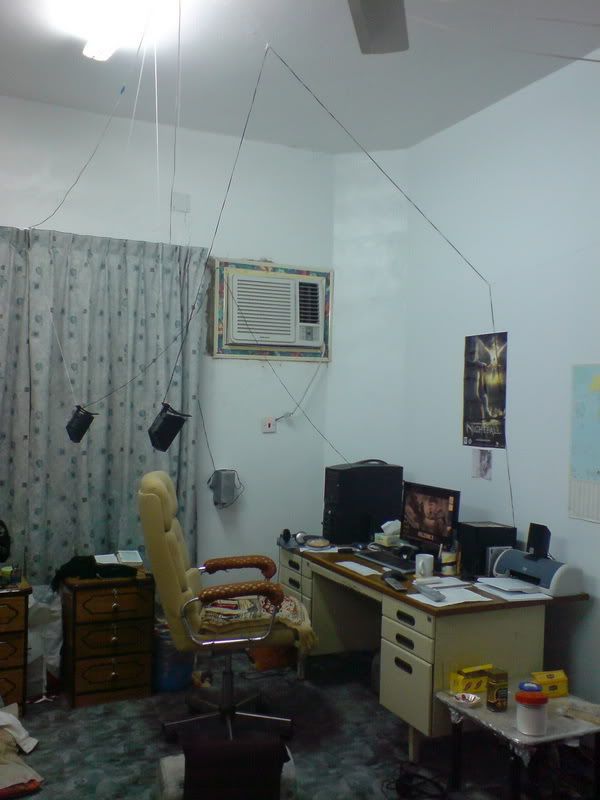
narcosis219 said:Creative Soundblaster X-Fi XtremeMusic
5.1 Klipsch speakers forgot which model, but it has two subwoofers in the subwoofer unit
Mine has 700W

I'm wondering about this myself...
I'd like to use my home theatre receiver via optical to achieve 5.1 dolby digital...but I'm not sure what hardware I will need. My motherboard includes an optical out (Abit IP35 Pro), but it does not output in DD5.1 (I don't believe it supports it at all).
I'd like to use my home theatre receiver via optical to achieve 5.1 dolby digital...but I'm not sure what hardware I will need. My motherboard includes an optical out (Abit IP35 Pro), but it does not output in DD5.1 (I don't believe it supports it at all).
AuzenTech X-Meridian:
|
|--> DTS optical out --> Logitech Z-5500 (powerrating in the 1000W)
|
|--> Dolby Headphone --> Sennheiser PC-150 (gaming-headset) / Grado SR-80 (just listening)
That AuzenTech is the best soundcard I've ever had the pleasure of experiencing. And I've had them all in the non-pro segment. Filled to the brink with options and codecs, along with Dolby Headphone. Converts any surround source (5.1, 6.1, 7.1) to any stereo speaker. Not unlike the Virtual Barbershop.
|
|--> DTS optical out --> Logitech Z-5500 (powerrating in the 1000W)
|
|--> Dolby Headphone --> Sennheiser PC-150 (gaming-headset) / Grado SR-80 (just listening)
That AuzenTech is the best soundcard I've ever had the pleasure of experiencing. And I've had them all in the non-pro segment. Filled to the brink with options and codecs, along with Dolby Headphone. Converts any surround source (5.1, 6.1, 7.1) to any stereo speaker. Not unlike the Virtual Barbershop.
Audigy 2 ZS - Awesome for latency free recording/live Stuff, really nice MIDI too. EAX rules.
Creative T6100 - At the price I paid (£35) these things were a steal.
My monitor doubles as my TV, so I run the headphone jack into my audio card's output. Won't give me 5.1 but beats the hell out of the shitty inbuilt things.
Creative T6100 - At the price I paid (£35) these things were a steal.
My monitor doubles as my TV, so I run the headphone jack into my audio card's output. Won't give me 5.1 but beats the hell out of the shitty inbuilt things.
industrian
will gently cradle you as time slowly ticks away.
I used to use my Audigy 2 Platinum Pro ZS (and later X-Fi Elite Pro) with a set of GigaWorks S750 7.1 speakers. Expensive but awesome. EAX effects were flawless, and in games like Call of Duty you really get immersed in the action as bullets fly down the right/left speakers.
Then the main unit blew up on the speakers and I'm back to a set of cheap 2.1s.
Then the main unit blew up on the speakers and I'm back to a set of cheap 2.1s.
dark10x said:I'm wondering about this myself...
I'd like to use my home theatre receiver via optical to achieve 5.1 dolby digital...but I'm not sure what hardware I will need. My motherboard includes an optical out (Abit IP35 Pro), but it does not output in DD5.1 (I don't believe it supports it at all).
That board does 7.1 channel audio. I'd hook it up and see how you like the sound before grabbing a separate audio card. If it's not up to standard, then you can look at picking up a DD card for your board.
Hooker said:AuzenTech X-Meridian:
|
|--> DTS optical out --> Logitech Z-5500 (powerrating in the 1000W)
|
|--> Dolby Headphone --> Sennheiser PC-150 (gaming-headset) / Grado SR-80 (just listening)
That AuzenTech is the best soundcard I've ever had the pleasure of experiencing. And I've had them all in the non-pro segment. Filled to the brink with options and codecs, along with Dolby Headphone. Converts any surround source (5.1, 6.1, 7.1) to any stereo speaker. Not unlike the Virtual Barbershop.
Can you play games with the Z-5500s or do you only use your headphones? Games use directX or open al sound. Does your soundcard convert it to DTS?
Metalmurphy
Member
Sound Blaster X-fi with one of these:

Cambridge Soundworks Desktop Theater 5.1
Too bad I can't get real 5.1 with the X-Fi on these speakers
Cambridge Soundworks Desktop Theater 5.1
Too bad I can't get real 5.1 with the X-Fi on these speakers
BobsRevenge
I do not avoid women, GAF, but I do deny them my essence.
I have an Audigy 2 and I use the CMMS (or whatever its called) thing on the card for surround sound emulation. Not the best set up, but it sounds better than any speaker system I could buy reasonably for what I listen to on my computer the most by far: music.

Love my K240's.
Love my K240's.

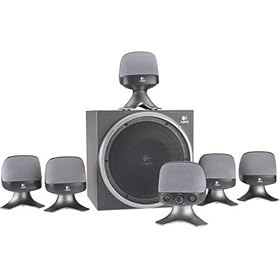
dark10x said:I'm wondering about this myself...
I'd like to use my home theatre receiver via optical to achieve 5.1 dolby digital.
You want something with Dolby Digital Live. The alternative is DTS Connect. Both encode 5.1 over SPDIF or optical.
Turtle Beach has the Montego DDL which does Dolby Digital Live.
Auzentech has cards with Dolby Digital Live and DTS Connect. They also make a board that includes both of these plus EAX support with the blessing of Creative, but I don't know if they still sell it, as it was a limited edition product.
If I didn't need 5.1 optical support, I'd definitely use my onboard sound, Creative doesn't offer me enough to be worth the extra money.
Yes, I only play with headphones when I need the isolation or when I don't want people to hear what everyone's saying in TeamSpeak. And yes, I believe it converts it to DTS. It's fucking AWESOME!!Mugen said:Can you play games with the Z-5500s or do you only use your headphones? Games use directX or open al sound. Does your soundcard convert it to DTS?
EDIT: EAX is rubbish. And it doesn't even work with surround sets. You're better off putting it through 5+ speakers or using Dolby Headphone
Robert-GCA
Member
Ya, I was initially turned to it because of all the I/O (especially the digital), and the USB hub. Unfortunately you have to restart the computer to use the digital out with Power DVD. Then you don't hear any other audio so you have to restart again once you're done with the dvd. The massive cable isn't easy to work with as you said. I'm getting tempted to upgrade it probably early next year that will do on-board 5.1 etc encoding.CTLance said:My only complaint would be that the cable between both is thick and very inflexible. Oh, and no 5.1 encoding. Awesome wealth of I/O and software, though.
I have a 5.1 logitech speaker setup, but my sound card is the generic one that comes with ASUS mobos. That said, it still works great, COD4 and Crysis sound amazing with it. I have a U shaped computer desk so I just place the back to speakers at the ends of the desk behind me and it works out pretty well.
VibratingDonkey
Member
Creative X-treme Gamer Fata1ity or whatever. Was the only "Gamer" card currently available so... Anyway, it doesn't have optical out, but it has some sort of digital output which you can put a Creative dongle with optical outputs into. Why they don't simply have optical out on the soundcard itself I do not know. Then I run an optical cable from that thing to my home theater system (Onkyo 604E+Infinity Primus 5.1). Run the video to my HDTV.
The problem with this setup is that all wireless keyboards and mouses appear to suck. And some games actually look better on my tiny CRT. Better contrast I guess. Then there's the stupid overscan you get for some reason, despite the PC outputting a 16:9 signal. Supposedly can be fixed by setting up a custom resolution, but I haven't bothered, cause like I said, wireless sucks. They're all designed for low battery consumption rather than strong signals apparently.
So yeah, turned out to be a bit of a waste...
The problem with this setup is that all wireless keyboards and mouses appear to suck. And some games actually look better on my tiny CRT. Better contrast I guess. Then there's the stupid overscan you get for some reason, despite the PC outputting a 16:9 signal. Supposedly can be fixed by setting up a custom resolution, but I haven't bothered, cause like I said, wireless sucks. They're all designed for low battery consumption rather than strong signals apparently.
So yeah, turned out to be a bit of a waste...
Takeda Kenshi
blew Staal
boco77 said:I'm using the Creative Gigaworks S750 7.1 setup with the Xtreme Music x-fi card. Had it for like 3 years and its fantastic. Perfect combination for consoles, movies and pc. Tons of inputs for everything. Combined that with the DDTS-100 decoder.
I have this, minus the Xtreme Music and plus a X-fi fatal1ty
Klaxon said:
Wow...just...wow. I think I'm impressed.....sort of........wow.........
Kamakazie!
Member
Onboard Sound -> PCM via Digital Coaxial -> Cambridge Audio 540R v2 -> Mordaunt Short 302s, 304 and one of their subs.
You're a gamer.Klaxon said:http://i199.photobucket.com/albums/aa188/shmookins/DSC00146.jpg
Shorty said:You're a gamer.
Indeed
Killzone 2 wallpaper ✓
Kleenex ✓
Coffee ✓
Comfy Chair ✓
Tv Remote ✓
DVD remote? ✓
Guild Wars poster ✓
Headphones for late night gaming ✓
Mountain Dew........... X
dark10x said:I'm wondering about this myself...
I'd like to use my home theatre receiver via optical to achieve 5.1 dolby digital...but I'm not sure what hardware I will need. My motherboard includes an optical out (Abit IP35 Pro), but it does not output in DD5.1 (I don't believe it supports it at all).
I have the same board, well... IP35-E I think. I think its just a cheaper version. Either way, I use AC3 Filter, which works perfect for getting Dolby Digital out of movies (DVD, WMV, X264, all of that stuff...). Everything else comes across in stereo.
Audigy 2 ZS
Creative Gigaworks S750 7.1 system (Dont buy this)
Overall Im really disappointed with the Gigaworks. My first set died nearly a year into use, and these speakers aren't really worth the amount of cash I paid for them (nearly 500$ at the time). Go with something else, as these definitely aren't worth it. PS> My rear satellite is broken now
The Audigy 2 ZS on the other hand is nice, it suits my needs. It became especially useful when I bought the front faceplate (essentially making it an Audigy 2 ZS Pro) that has SPDIF in/out, so I can route my PS3 to my speakers.
Creative Gigaworks S750 7.1 system (Dont buy this)
Overall Im really disappointed with the Gigaworks. My first set died nearly a year into use, and these speakers aren't really worth the amount of cash I paid for them (nearly 500$ at the time). Go with something else, as these definitely aren't worth it. PS> My rear satellite is broken now
The Audigy 2 ZS on the other hand is nice, it suits my needs. It became especially useful when I bought the front faceplate (essentially making it an Audigy 2 ZS Pro) that has SPDIF in/out, so I can route my PS3 to my speakers.
Sorry to bump the thread but I forgot about it for a while...
I have some questions on PC gaming and surround... I haven't tried many games and I'm new to this stuff so a lot of the answers here are probably obvious...
- What the deal with games not showing up all sound options? do you need a 5.1 system connected to them for example to recognize that and display more options?
- Also there's not enough detail on what formats they use, I just downloaded the Bioshock demo and 5.1 is just 5.1 you move the slider up from stereo to that... should I just assume it's Dolby Digital or what?
- EAX vs. surround... how does this work? In one place I read EAX produces 3D sound effects and in another it says EAX is not just for surround effects. Does it stop working for example when you choose a 5.1 option for example? If yes then how much of an improvement is something like Dolby Digital over EAX? If no then does it improve the experience? I mean EAX isn't on consoles as far as I know and if you can have surround + EAX on PC how much of an improvement would that be?
Thanks a lot in advance for any answers. This stuff really has been driving me crazy.
I have some questions on PC gaming and surround... I haven't tried many games and I'm new to this stuff so a lot of the answers here are probably obvious...
- What the deal with games not showing up all sound options? do you need a 5.1 system connected to them for example to recognize that and display more options?
- Also there's not enough detail on what formats they use, I just downloaded the Bioshock demo and 5.1 is just 5.1 you move the slider up from stereo to that... should I just assume it's Dolby Digital or what?
- EAX vs. surround... how does this work? In one place I read EAX produces 3D sound effects and in another it says EAX is not just for surround effects. Does it stop working for example when you choose a 5.1 option for example? If yes then how much of an improvement is something like Dolby Digital over EAX? If no then does it improve the experience? I mean EAX isn't on consoles as far as I know and if you can have surround + EAX on PC how much of an improvement would that be?
Thanks a lot in advance for any answers. This stuff really has been driving me crazy.
Klaxon said:http://i199.photobucket.com/albums/aa188/shmookins/DSC00146.jpg[IMG][/QUOTE]
Which gaffer does that setup belong to? I remember seeing it in another thread.
dark10x said:I'm wondering about this myself...
I'd like to use my home theatre receiver via optical to achieve 5.1 dolby digital...but I'm not sure what hardware I will need. My motherboard includes an optical out (Abit IP35 Pro), but it does not output in DD5.1 (I don't believe it supports it at all).
urk said:That board does 7.1 channel audio. I'd hook it up and see how you like the sound before grabbing a separate audio card. If it's not up to standard, then you can look at picking up a DD card for your board.
Question, isn't the optical out on those motherboards with on-board audio chips and most sound cards different than 'Toslink optical' or whatever? Digital Coax? Basically they can pass encoded streams of Dolby Digital and such from movies but for games the data isn't encoded like a movie and it can't handle multiple channels so you'd have to use several line outs from the card to the receiver/decoder to get Dolby Digital in games...
Do receivers only do Dolby Digital over optical or can they accept several analog inputs from a sound card/motherboard with on-board audio and output Dolby Digital? I think those mini-receivers/decoders that come with the Logitech surround sets for PC accept 3 analog/3.5mm inputs to get surround for PC games.
Am I getting this right? Countless Google searches, starting threads on message boards - this and other ones, and I'm still completely lost on everything relating to sound. Though I have an idea on what I need to buy and setup but I'd feel better if I had a better/more complete understanding of it all... time to read some guides and maybe get a book that goes into detail. Oh wait, Wikipedia too.
junkster said:You want something with Dolby Digital Live. The alternative is DTS Connect. Both encode 5.1 over SPDIF or optical.
*googles*
http://www.dolby.com/consumer/technology/dolby_live.html
So Dolby Digital Live just eliminates wire clutter and lets you use a single cable from your PC to receiver as opposed to several analog ones, that's it? Does the sound quality benefit from that too - optical vs. 3 analog cables?
I said it all above but I'll make it more clear.
Here's what I know. Since this is GAF I'm sure I'll be corrected if I'm wrong.
Creative is lazy and bloated and have a name for themselves so they do minimal work for maximum profit.
Creative wants to sell Creative soundcards and Creative (Cambridge Soundworks?) speaker systems. There's more money in it this way.
When Creative comes out with a new line, it all but halts all future patches and updates for their older lines. Also, their software is chunky slow and bloated.
Creative doesn't make money on Sony or Onkyo or *insert sound system name* Home Theatre systems. Creative says "We're not going to make our systems work in 5.1 over optical/coax Dolby Digital or DTS even though that is pretty much the defacto, guaranteed close to 100% compatible across the fucking board standard for 5.1 surround, even though soundcard hardware that is capable of doing this has been out there (for over 5 years I might add, nForce2 anyone?) to do it. We like making extra money off our sound systems and will continue to do so, simultaneously ignoring mass market home theatre setups due to this money. Also, we're making a ton of money, why put extra work into something we don't need anyway?"
In any case, yes, using Dolby Digital Live or DTS Connect means you will get sound degradation. Dolby Digital and DTS are DVD era 5.1 solutions and the sound has a specific bitrate to save on disc space. While games these days don't necessarily need to have these limitations, these 2 standards do. However, if you enjoy DVD movies, HDTV content with 5.1, 360 games, or anything else that outputs in DD or DTS, then you won't have any gripes with the sound quality of DD Live or DTS Connect gaming sound quality, it's that simple. It sounds fantastic and you have a much wider range of compatible receiver and speaker configurations.
Auzentech and Turtle Beach put their cards out for cheap, the quality is fan-freaking-tastic (again, compare it to 360 sound output), it uses 1 cable (optical or coax, approximately same quality with either cable), and doesn't rely on cheap effects (EAX) to immerse you into the game. You can use just about any standard home theatre setup out there. If you had any concerns about sound quality, they also include the option for headphone jack analog output, no bitrate degradation, the same as any Creative card!
Most computer speakers systems do not use standard speaker cable. Most home theatre setups require more than the few feet of speaker cable included in these computer speaker setups. Getting 1 long optical cable (monoprice.com) and using a DD Live/DTS Connect card will pretty much free you from any sort of home theatre specific setup issues. You're not bound by the length of the computer speaker cable which means you can have a clean setup with speaker cable running through your walls or ceilings. I'm running a 50 foot optical cable from my computer to my receiver and not running into any noticeable lag issues, plus I get to use my home theatre setup if I choose to do so!
Not only that but you can easily switch between an analog setup and the optical/coax setup with a couple quick clicks. I have two simultaneous setups:
1) My Altec Lansing 4.1 by my monitor is set to the analog outs.
2) My Onkyo Home Theatre 5.1 is connected to the Optical out which lets me game on my 42" HDTV.
I can switch between the 2 at will and can get surround sound on either one at any time.
I got my Montego DDL around the time Half Life 2 / Doom3 came out and I have not run into any multichannel games that aren't encoded in 5.1 surround.
In my eyes there is no question:
Screw Creative. Auzentech or Turtle Beach are the new kings for computer audio -- for quality, price, and convenience.
Here's what I know. Since this is GAF I'm sure I'll be corrected if I'm wrong.
Creative is lazy and bloated and have a name for themselves so they do minimal work for maximum profit.
Creative wants to sell Creative soundcards and Creative (Cambridge Soundworks?) speaker systems. There's more money in it this way.
When Creative comes out with a new line, it all but halts all future patches and updates for their older lines. Also, their software is chunky slow and bloated.
Creative doesn't make money on Sony or Onkyo or *insert sound system name* Home Theatre systems. Creative says "We're not going to make our systems work in 5.1 over optical/coax Dolby Digital or DTS even though that is pretty much the defacto, guaranteed close to 100% compatible across the fucking board standard for 5.1 surround, even though soundcard hardware that is capable of doing this has been out there (for over 5 years I might add, nForce2 anyone?) to do it. We like making extra money off our sound systems and will continue to do so, simultaneously ignoring mass market home theatre setups due to this money. Also, we're making a ton of money, why put extra work into something we don't need anyway?"
In any case, yes, using Dolby Digital Live or DTS Connect means you will get sound degradation. Dolby Digital and DTS are DVD era 5.1 solutions and the sound has a specific bitrate to save on disc space. While games these days don't necessarily need to have these limitations, these 2 standards do. However, if you enjoy DVD movies, HDTV content with 5.1, 360 games, or anything else that outputs in DD or DTS, then you won't have any gripes with the sound quality of DD Live or DTS Connect gaming sound quality, it's that simple. It sounds fantastic and you have a much wider range of compatible receiver and speaker configurations.
Auzentech and Turtle Beach put their cards out for cheap, the quality is fan-freaking-tastic (again, compare it to 360 sound output), it uses 1 cable (optical or coax, approximately same quality with either cable), and doesn't rely on cheap effects (EAX) to immerse you into the game. You can use just about any standard home theatre setup out there. If you had any concerns about sound quality, they also include the option for headphone jack analog output, no bitrate degradation, the same as any Creative card!
Most computer speakers systems do not use standard speaker cable. Most home theatre setups require more than the few feet of speaker cable included in these computer speaker setups. Getting 1 long optical cable (monoprice.com) and using a DD Live/DTS Connect card will pretty much free you from any sort of home theatre specific setup issues. You're not bound by the length of the computer speaker cable which means you can have a clean setup with speaker cable running through your walls or ceilings. I'm running a 50 foot optical cable from my computer to my receiver and not running into any noticeable lag issues, plus I get to use my home theatre setup if I choose to do so!
Not only that but you can easily switch between an analog setup and the optical/coax setup with a couple quick clicks. I have two simultaneous setups:
1) My Altec Lansing 4.1 by my monitor is set to the analog outs.
2) My Onkyo Home Theatre 5.1 is connected to the Optical out which lets me game on my 42" HDTV.
I can switch between the 2 at will and can get surround sound on either one at any time.
I got my Montego DDL around the time Half Life 2 / Doom3 came out and I have not run into any multichannel games that aren't encoded in 5.1 surround.
In my eyes there is no question:
Screw Creative. Auzentech or Turtle Beach are the new kings for computer audio -- for quality, price, and convenience.
Takeda Kenshi
blew Staal
Dot50Cal said:Overall Im really disappointed with the Gigaworks. My first set died nearly a year into use, and these speakers aren't really worth the amount of cash I paid for them (nearly 500$ at the time). Go with something else, as these definitely aren't worth it. PS> My rear satellite is broken now
I bought mine when they first came out and haven't had a single issue with them.
Awesome speakers (provided they work.)
The M.O.B said:Indeed
Killzone 2 wallpaper ✓
Kleenex ✓
Coffee ✓
Comfy Chair ✓
Tv Remote ✓
DVD remote? ✓
Guild Wars poster ✓
Headphones for late night gaming ✓
Mountain Dew........... X
:lol :lol :lol
UncleGuito
Banned

Pioneer HTS-GS1- they're really great.
scissorfight
Banned
hmm...i couldn't get 5.1 to work via optical on my IP35 pro.urk said:That board does 7.1 channel audio. I'd hook it up and see how you like the sound before grabbing a separate audio card. If it's not up to standard, then you can look at picking up a DD card for your board.
i ended up going with the montego DDL that junkster mentioned. works well enough to pass 5.1 to my receiver.
scissorfight said:hmm...i couldn't get 5.1 to work via optical on my IP35 pro.
i ended up going with the montego DDL that junkster mentioned. works well enough to pass 5.1 to my receiver.
That's annoying...I have that board. Does your computer have any other issues with your receiver? I'm using a ghetto wireless setup for my couch PC use but my receiver is coming in soon.
Chrono said:- What the deal with games not showing up all sound options? do you need a 5.1 system connected to them for example to recognize that and display more options?
That's pretty much been my experience. If your Windows setup is 2.0, 2.1, 4.1, 5.1, or 7.1, certain games will be locked in showing that limit (not always). Sort of like how your LCD's maximum resolution is sometimes the maximum resolution selectable in-game.
- Also there's not enough detail on what formats they use, I just downloaded the Bioshock demo and 5.1 is just 5.1 you move the slider up from stereo to that... should I just assume it's Dolby Digital or what?
5.1 is 5.1 sound. Dolby Digital is Dolby Digital 5.1. They're both 5.1 solutions, but the execution is different. 5.1 speakers with analog output means no bitrate degradation at the expense of requiring a 5.1 setup that actually has 5.1 analog inputs (hint: not the majority of home theater systems). Dolby Digital (afaik), is always connected via an optical cable and does have bitrate degradation (not noticeable to most gamers ears)
- EAX vs. surround... how does this work? In one place I read EAX produces 3D sound effects and in another it says EAX is not just for surround effects. Does it stop working for example when you choose a 5.1 option for example? If yes then how much of an improvement is something like Dolby Digital over EAX? If no then does it improve the experience? I mean EAX isn't on consoles as far as I know and if you can have surround + EAX on PC how much of an improvement would that be?
EAX is a Creative software solution for more immersive effects in the game sounds. You really need to hear EAX vs no-EAX to hear the difference, simple text won't do much. Also, the effect varies from game to game. Some swear by it, others don't notice and don't like the mucking of sound. I'm in the latter camp if you didn't notice by now.
Dolby Digital is not an improvement over EAX in a strictly quality of sound sense. And as I've stated in this post and my previous post, the quality of the sound actually goes down.
However, the benefit of using a personal home theatre system and Dolby Digital 5.1(and the ability to use regular analog output and a computer setup should I choose to do so!!), IMO, far outweighs the lack of EAX.
Finally, I don't have a vendetta against Creative. I'm mostly disappointed about the fact that superior solutions for most people is out there, but few know about them and settle for an inferior and more costly solution.
As usual, ym (and experiences) mv.
scissorfight
Banned
nope, everything works great now.Davidion said:Does your computer have any other issues with your receiver? I'm using a ghetto wireless setup for my couch PC use but my receiver is coming in soon.
Whether you go through with getting a DD Live/DTS Connect card or not, I figure it's nice to know what's actually out there so you can make the choice that suits you best.
It's a shame more people aren't aware of the options that they have, but I can't blame it all on Creative, Montego and Auzentech have done a shitty job marketing their advantages. It's a shame you rarely hear about these cards considering the potential size of the audience!
Anyway, no problem Chronos, happy to help!
It's a shame more people aren't aware of the options that they have, but I can't blame it all on Creative, Montego and Auzentech have done a shitty job marketing their advantages. It's a shame you rarely hear about these cards considering the potential size of the audience!
Anyway, no problem Chronos, happy to help!
It sucks that Auzentech went with X-Fi for their latest card, they said features overlap made them drop ones from the previous card(s) and one of the victims was Dolby Headphone, thanks to Creative's CMSS-3D. I don't plan on surround my desk area with speakers so the whole point behind getting surround 5.1 out of the PC for me is to convert it to Dolby Headphone.
I have a JVC adapter that converts 5.1 signals to DH but the manual says it may not perform accurately from a digital input out of a PC. Not sure what that means. it either works and I'll be fine with Dolby Digital Live or I might need DH phone right out of the cards. There's another adapter for DH phone that I just found out about too, I'll look into that.
I have a JVC adapter that converts 5.1 signals to DH but the manual says it may not perform accurately from a digital input out of a PC. Not sure what that means. it either works and I'll be fine with Dolby Digital Live or I might need DH phone right out of the cards. There's another adapter for DH phone that I just found out about too, I'll look into that.