
The Abominable Snowman
Member
Has anyone had any account of putting a T-Mobile SIM into a 3G Vita? I wonder if it works, and what speeds they're getting.

Does the retail version of Uncharted: Golden Abyss REALLY come with no instructions or inserts? Are most of the retail games like this?
Does anybody else have an issue with their USB cable? I can't seem to get it working with Content Manager on my PS3 or my computer at the moment. It's driving me crazy.
 )
)
Create temp account first, update firmware, then link your PSN account to system.5. Can't update firmware at start up with PSN account.
JP:released UK:TBC/TBA US: May 29th11. When does Gravity Rush come out?
12. How do I delete unwanted bubbles and game demos?

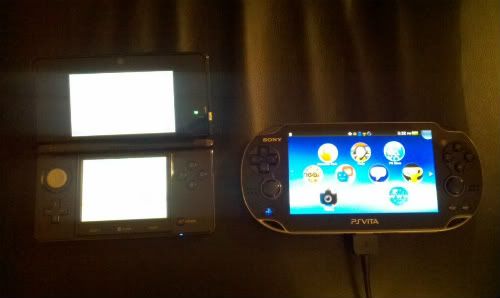
I took a pic last night for compaison. Here ya go.
- Plug cable into Vita and PS3
- Turn on both consoles (Or have them both on when cable is connected, I dunno
- Go to one of the game files on your PS3 that you want to copy over. Press Triangle.
- Select 'Copy'. PS3 should now say 'Connected to PS Vita'
- Select Content Manager on the Vita
- Choose what media you want to copy
- ?????
- Profit

Do not use the cradle when trying to content manager. It didn't work for me.

Dead pixels are pretty much nonexistent. from what I know. but some people have told me their touch screens are defective. Like menu popping up without going there or not responsive.How common are dead pixels and other screen defects?
Do not use the cradle when trying to content manager. It didn't work for me.

Yes, must be something related to the way the original video was encoded. Put on an Uncharted 2 trailer earlier and plays as it's supposed to. (obviously downscaled)2 questions:
2 - can the Vita play 720p MP4 videos? I tried playing a couple and the Vita said they werent compatible so I used a re-encoding program to put them at PSP resolution and they played fine.
Can't help you on that one but an answer would be interesting if someone like digital foundry could do a frame analysis.1 - this has been asked before and I'll be asking again; do PSP games have better framerates on the Vita?
fine.
1. How to take in game screen captures.
2. OLED blotches
3. How do I get my free month of 3G and SSD?
4. Blue PS button but black screen.
5. Can't update firmware at start up with PSN account.
6. Screen protector application.
7. Can near be used without activating a 3G plan?
8. My near is broken, what can I do?
9. How do I get and play another region's game demos?
10. Is VITA an acronym?
11. When does Gravity Rush come out?
12. How do I delete unwanted bubbles and game demos?
13. How big is the Vita? Can it fit in my Club Nintendo DS pouch?
14. Are screen protectors really needed?
15. Transferring files and games between PS3, Vita, and PC?
saved to your memory card. Tied to the system/account.How are saves handled / Where are saves located?
Are they on the app like on the iPhone? in that case, does deleting them to make space erase your save data?
saved to your memory card. Tied to the system/account.
Download Content Manager Assistant.Thanks, but how do I back them up then? do I need to backup the entire app to just backup my save data?
- Plug cable into Vita and PS3
- Turn on both consoles (Or have them both on when cable is connected, I dunno
- Go to one of the game files on your PS3 that you want to copy over. Press Triangle.
- Select 'Copy'. PS3 should now say 'Connected to PS Vita'
- Select Content Manager on the Vita
- Choose what media you want to copy
- ?????
- Profit
Dead pixels are pretty much nonexistent. from what I know. but some people have told me their touch screens are defective. Like menu popping up without going there or not responsive.
Damn, so glad I ordered from Amazon as well. Dat service.My friend had a dead pixel but they are near impossible to see. Amazon is expediting him a replacement, and sending a return code. That way he can get the replacement before having to send the original back.
How do I disable bluetooth permanently? After shutting down and turning back on it always comes back.
1. Is there any way to manually set the system to the start/lock screen? Or do I have to wait to see it?
2. This is a tad OT and it'll make me sound like a noob, but I'm looking to get Wi-Fi going at home. I have wired internet, but as you can imagine, that does me no good. Is something like THIS all I need if I have a wired/ethernet set up at home?
Can someone explain exactly how the whole region free/lack of region free works? Can I play Japanese games on the same card as my US games without getting DLC for the Japanese ones? If I want DLC, does that mean I need another memory card? It's confusing...
What kind of router do you use?
.1. Is there any way to manually set the system to the start/lock screen? Or do I have to wait to see it?
2. This is a tad OT and it'll make me sound like a noob, but I'm looking to get Wi-Fi going at home. I have wired internet, but as you can imagine, that does me no good. Is something like THIS all I need if I have a wired/ethernet set up at home?
Not entirely sure, it's just what the cable company gave me. I'll have to check it out when I get home. I really hope it works since I feel left out being offline only most of the time


Make sure PS3 is turned on and at menu before you plug it in. I had this multiple times but making sure PS3 is on first always works!Does anybody else have an issue with their USB cable? I can't seem to get it working with Content Manager on my PS3 or my computer at the moment. It's driving me crazy.

Q: How Big Is The Vita compared to the Vita?

VanWinkle said:1. I'm not sure what you mean by the first question.
JP:released UK:TBC/TBA US: May 29th
I put some awesome art on the lock screen, and I was just wondering there is a button or a touch gesture that will activate the lock screen, or if the only way to see it is to let the system idle for a certain amount of time. Not really a big deal, just curious.
Some people on my friends list have cool images in their profile bar thingies, how do I add one to mine?
When/how can I use my Macbook to put videos and music on my Vita?
