• Hey Guest. Check out your NeoGAF Wrapped 2025 results here!

WWDC09 Thread of iPhones and Snow Leopards

Yeah, I've got a bit of extra money [cuz I never buy much anyways >>]. Oh yeah, the internet's a lot faster, right? Yeah, I'll probably go for the 16GB. the only part I don't like is having to use iTunes. :| Although I guess I don't have to use it to play music. I can just sync my stuff to it then never use it again :P
 
Apologies if a similar question has already been posed in this monster thread, but:

I was all set to bite on the refreshed mid-range 2.66 15" MBP, but the spec reductions (less cache, less VRAM) don't seem to be worth the new battery and better screen -- especially when the previous 2.66 is available for around the same price now.

Am I missing something? Is there a clear reason why someone would still go for the refreshed model (again, beyond the battery and the better screen)?
 
human5892 said:
Apologies if a similar question has already been posed in this monster thread, but:

I was all set to bite on the refreshed mid-range 2.66 15" MBP, but the spec reductions (less cache, less VRAM) don't seem to be worth the new battery and better screen -- especially when the previous 2.66 is available for around the same price now.

Am I missing something? Is there a clear reason why someone would still go for the refreshed model (again, beyond the battery and the better screen)?
512MB of VRAM is just for marketing purposes iirc. Apparently it won't give you a noticeable performance boost. Don't know if it's true though.

(and a better screen and better battery >>>>>>>>>>> a small performance boost imo)
 
Unlimited4s said:
512MB of VRAM is just for marketing purposes iirc. Apparently it won't give you a noticeable performance boost. Don't know if it's true though.

(and a better screen and better battery >>>>>>>>>>> a small performance boost imo)
Interesting...if the difference truly is negligible, I'd take the better battery and screen. I just didn't want to miss out on potentially significant performance gains for the same price.
 
Question:

If I upgrade from my 3G, is the 3G mine? Can I ebay it?

Ebay prices for 16GB 3Gs, currently, are around $350. If I can upgrade for only $50, then I might consider doing it.
 
So does this mean there would be a price drop on the Itouches?

I already have a phone, just want an itouch but paying $200 for an 8GB music player is too much, is there automatically going to be a price drop since the iphone is now $99?
 
SephCast said:
Question:

If I upgrade from my 3G, is the 3G mine? Can I ebay it?

Ebay prices for 16GB 3Gs, currently, are around $350. If I can upgrade for only $50, then I might consider doing it.

Yeah you can sell it, it will still be locked, but its yours to sell.

So does this mean there would be a price drop on the Itouches?

I already have a phone, just want an itouch but paying $200 for an 8GB music player is too much, is there automatically going to be a price drop since the iphone is now $99?

If there are price drops, it wont be because of that. You can't compare iPhone and iPod Touch prices, one device is subsidized, the other isnt.
 
Rapping Granny said:
So does this mean there would be a price drop on the Itouches?

I already have a phone, just want an itouch but paying $200 for an 8GB music player is too much, is there automatically going to be a price drop since the iphone is now $99?
lol no.

iPods are updated every September.
 
Does somebody have a link that provides a good explanation of how Grand Central works??
If I'm not wrong, it's like a big process dispatcher that using OpenCL can execute a process on multi-core system. But does that include the GPUs?? Because it would be amazing to have my spare gpu (I'm on a macbook pro with the dual GPUs) help with some tasks.
 
onesvenus said:
Does somebody have a link that provides a good explanation of how Grand Central works??
If I'm not wrong, it's like a big process dispatcher that using OpenCL can execute a process on multi-core system. But does that include the GPUs?? Because it would be amazing to have my spare gpu (I'm on a macbook pro with the dual GPUs) help with some tasks.
It can't access your spare GPU. You're either using one or the other. But if the one that's on isn't being used for something, it'll get used for processing rather than sitting there doing nothing.
 
Liu Kang Baking A Pie said:
It can't access your spare GPU. You're either using one or the other. But if the one that's on isn't being used for something, it'll get used for processing rather than sitting there doing nothing.

And why is that?? Isn't the spare GPU being powered or something like that?
 
onesvenus said:
Does somebody have a link that provides a good explanation of how Grand Central works??
If I'm not wrong, it's like a big process dispatcher that using OpenCL can execute a process on multi-core system. But does that include the GPUs?? Because it would be amazing to have my spare gpu (I'm on a macbook pro with the dual GPUs) help with some tasks.
http://images.apple.com/macosx/technology/docs/GrandCentral_TB_brief_20090608.pdf

http://images.apple.com/macosx/technology/docs/OpenCL_TB_brief_20090608.pdf
 
How far can I go at ATT's site while setting up and pre ordering before I'm committed? I wanna pre order and get the credit check out of the way, but I don't want my current number turned off or anything, or even for it to be set in stone. :|
 
I wish they would update the Eject manager to be smarter.

Basically what I want is to be able to just unplug a device (That I know for a fact is not being used) without having to drag it to the trash. Make it so if the drive is not in use when I unplug it, it will eject gracefully and not bug me with a message saying "You might have broke something by doing that, Dave." When I know it didn't break anything.

The OS knows when it's using a file on the drive. So why not make it so when something is open on the device, an icon badge will appear over the disk icon on the desktop. And when it's not in use, unplugging just removes it from the desktop and foregoes a message scolding you. And if it just so happened to be in use when you did it, THEN it can tell you your mistake. As well as the app that was currently using a file on the drive so you can check to make sure the app is still working.

That's how I would design it.
 
Jasoco said:
I wish they would update the Eject manager to be smarter.

Basically what I want is to be able to just unplug a device (That I know for a fact is not being used) without having to drag it to the trash. Make it so if the drive is not in use when I unplug it, it will eject gracefully and not bug me with a message saying "You might have broke something by doing that, Dave." When I know it didn't break anything.

The OS knows when it's using a file on the drive. So why not make it so when something is open on the device, an icon badge will appear over the disk icon on the desktop. And when it's not in use, unplugging just removes it from the desktop and foregoes a message scolding you. And if it just so happened to be in use when you did it, THEN it can tell you your mistake. As well as the app that was currently using a file on the drive so you can check to make sure the app is still working.

That's how I would design it.
That, or allow me to hold down the eject button and select the item I want to eject. At least that way I don't have to go to the desktop every time.
 
Anyone have an idea of when the new Macbooks are supposed to arrive at the official Apple Stores? I heard that they shipped on Monday, and they should arrive tomorrow or the day after. Any truth to that?
 
Jasoco said:
I wish they would update the Eject manager to be smarter.

Basically what I want is to be able to just unplug a device (That I know for a fact is not being used) without having to drag it to the trash. Make it so if the drive is not in use when I unplug it, it will eject gracefully and not bug me with a message saying "You might have broke something by doing that, Dave." When I know it didn't break anything.

The OS knows when it's using a file on the drive. So why not make it so when something is open on the device, an icon badge will appear over the disk icon on the desktop. And when it's not in use, unplugging just removes it from the desktop and foregoes a message scolding you. And if it just so happened to be in use when you did it, THEN it can tell you your mistake. As well as the app that was currently using a file on the drive so you can check to make sure the app is still working.

That's how I would design it.

Holding trash KIND of makes sense, but it's not really an eject when it's just trash.

Thing is, Mac OS X is designed to be intuitive. I don't think it's intuitive or wise to encourage just ripping things out. MAc OS X does all sorts of profiling and stuff in the background, which is why I think leaving things mounted and requiring an eject before physically removing is a good move.
 
Jasoco said:
I wish they would update the Eject manager to be smarter.

Basically what I want is to be able to just unplug a device (That I know for a fact is not being used) without having to drag it to the trash. Make it so if the drive is not in use when I unplug it, it will eject gracefully and not bug me with a message saying "You might have broke something by doing that, Dave." When I know it didn't break anything.

The OS knows when it's using a file on the drive. So why not make it so when something is open on the device, an icon badge will appear over the disk icon on the desktop. And when it's not in use, unplugging just removes it from the desktop and foregoes a message scolding you. And if it just so happened to be in use when you did it, THEN it can tell you your mistake. As well as the app that was currently using a file on the drive so you can check to make sure the app is still working.

That's how I would design it.

Just click on the device in the left side of any Finder window and hit cmd + e. Ejected.
 
Why won't Apple fix animated GIF's in Safari ? Is there some spec they are following as opposed to actually having them animate ?

I wonder if the "Worlds Fastest Browser" still chokes on animated GIF threads. I guess I'll go download Safari 4 and find out.

*ps, Snow Leopard looks like hot shit.
 
goodcow said:
Just click on the device in the left side of any Finder window and hit cmd + e. Ejected.

If you're going to finder to click, you may as well just click the little eject symbol.

Burger: Safari 4 still chokes.
 
mrkgoo said:
If you're going to finder to click, you may as well just click the little eject symbol.

Burger: Safari 4 still chokes.

Well then when in Finder, CMD-Shift-C, drive you wanna eject, CMD-E. ;)
 
Jasoco said:
Basically what I want is to be able to just unplug a device (That I know for a fact is not being used) without having to drag it to the trash. Make it so if the drive is not in use when I unplug it, it will eject gracefully and not bug me with a message saying "You might have broke something by doing that, Dave." When I know it didn't break anything.

Agreed 100%! Especially when it freaks out and doesn't let you eject things because they're "In use" - I love just pulling a USB stick out when it says that, just to remind it who's boss.

It seems that some Apps can let you eject things even when they're open (InDesign, Photoshop etc.) whereas some can't (Acrobat etc.).
 
Burger said:
Why won't Apple fix animated GIF's in Safari ? Is there some spec they are following as opposed to actually having them animate ?

I wonder if the "Worlds Fastest Browser" still chokes on animated GIF threads. I guess I'll go download Safari 4 and find out.

Are there any other sites that really use gifs in the way GAF does? The only time I ever have a problem is when I unexpectedly run into one in a thread, and even then, it's never been that horrible. I always stay out of NPD or Wacky Funny Animated GIF threads, because, well, they're rarely wacky or funny. And the NPD threads just scare me.

I guess if we're talking about a tiny segment of the Internet where this is a problem, I could see why Apple either wouldn't notice, or fall over themselves to try and fix it. It honestly never comes up except for when I'm here.
 
Battlezone said:
Are there any other sites that really use gifs in the way GAF does? The only time I ever have a problem is when I unexpectedly run into one in a thread, and even then, it's never been that horrible. I always stay out of NPD or Wacky Funny Animated GIF threads, because, well, they're rarely wacky or funny. And the NPD threads just scare me.

I guess if we're talking about a tiny segment of the Internet where this is a problem, I could see why Apple either wouldn't notice, or fall over themselves to try and fix it. It honestly never comes up except for when I'm here.

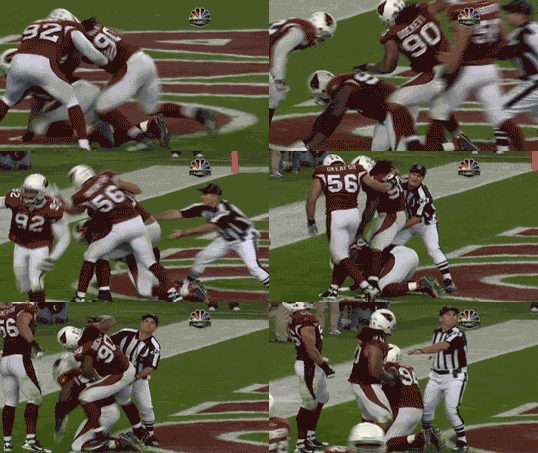
You are obviously not part of GAF Sports-Age. GIFs are the lifeblood of Sports...where else can you witness something like this?

cardsbroncobuck.gif
 
cann3dheat said:
That, or allow me to hold down the eject button and select the item I want to eject. At least that way I don't have to go to the desktop every time.
There's a free program called Ejector I think that installs in the menu bar near the clock. You can click it and it gives you a drop down of what drives you have connected. You can just click them to eject
 
Burger said:
Why won't Apple fix animated GIF's in Safari ? Is there some spec they are following as opposed to actually having them animate ?

I wonder if the "Worlds Fastest Browser" still chokes on animated GIF threads. I guess I'll go download Safari 4 and find out.

*ps, Snow Leopard looks like hot shit.
The GIF problem is apparently a common issue with Webkit-based browsers. Chrome performs the same as Safari with large GIFs.

EDIT: I see some argument on that point- Safari may be using a different implementation via CoreGraphics, unlike other Webkit browsers. Still sucks.
 
I'm on 10.6.

Wow. It's blazing fast.

Finder is so much more appreciable now since it's Cocoa (and multi-threaded)--lots of nice little animations. And so zippy!
 
Evlar said:
The GIF problem is apparently a common issue with Webkit-based browsers. Chrome performs the same as Safari with large GIFs.

Isn't Webkit open source? You'd think after all this time SOMEONE would fucking realize the issue and make it a priority.
 
Rapping Granny said:
So does this mean there would be a price drop on the Itouches?

I already have a phone, just want an itouch but paying $200 for an 8GB music player is too much, is there automatically going to be a price drop since the iphone is now $99?

The iPod Touch is not a music player, it's a mobile platform, I bought it for music and now that is the last thing I use it for.
 
Bowser said:
You are obviously not part of GAF Sports-Age. GIFs are the lifeblood of Sports...where else can you witness something like this?


But see, that gif by itself isn't a problem. I lurk in the NFL and NBA threads all the time, and the only time it slows down for me is if somebody quotes the gif five posts in a row. Maybe I'm just lucky. And maybe I should thank Karakand for not cluttering up College Football-Age with a bunch of gifs!
 
Burger said:
Why won't Apple fix animated GIF's in Safari ? Is there some spec they are following as opposed to actually having them animate ?


yeah. i've been wondering that as well. its been screwed up for a while.. why dont they just fix it?
 
quadriplegicjon said:
Will Snow Leopard work in the First Gen Macbooks? The ones that were Core Duos, not the Core 2 Duos...

I'm pretty sure the official line is all Intel Macs. You should be fine.
 
quadriplegicjon said:
yeah. i've been wondering that as well. its been screwed up for a while.. why dont they just fix it?
It's a Webkit problem, not Safari. Chrome has problems with gifs too.

Webkit is open source, so if someone hasn't gone in to make that fix, it either means 1) GAF is fucking weird and the rest of the Internet doesn't care about animated GIFs, or 2) it's probably harder to fix than it appears.
 
Battlezone said:
But see, that gif by itself isn't a problem. I lurk in the NFL and NBA threads all the time, and the only time it slows down for me is if somebody quotes the gif five posts in a row. Maybe I'm just lucky. And maybe I should thank Karakand for not cluttering up College Football-Age with a bunch of gifs!

i think the final release of 4 is better than the beta (and 3.0) with single large gifs. still slower than camino/ firefox but it won't crash. and i find that the final release doesn't pause as much as the old one when scrolling down to reveal said gif.

but, take three large gifs in a row (i mean really large, like 4 MB each) and you have to force quit safari almost every time.

that usually only happens on gaf. most web pages will stop at one huge gif.
 
i think the reason its not fixed is as mentioned above its only if the .gifs are HUGE (like 2MB or more and there are 2/3 of them) and i've only ever noticed it on neogaf.

i tried reporting it on the apple forums and some fool just replied saying 'looks like that site isn't designed for safari' :lol

but for normal avatar gifs etc its fine.
 
giga said:
What do you think I'm running? :)

2zyan80.png


interesting that you get speed increases on the 32 bit core duo. you could expect even further "snappiness" on a 64 bit chip since all the apps have been rewritten in 64 bit.

example given at the keynote was javascript in safari running 50% faster on 64 bit hardware compared to 10.5
 
giga said:
What do you think I'm running? :)

[]http://i40.tinypic.com/2zyan80.png[/IMG]
Dammit Apple! If my CoreDuo MBP keeps getting faster with each new OS why would I ever want to buy one of your new, sexier, and more affordable laptops?
 
Top Bottom