• Hey Guest. Check out your NeoGAF Wrapped 2025 results here!

Xbox Chatpad + Controller Companion = seamless comfy-couch PC gaming

So this is for anyone who's looking for the best way to control their living room PC from the couch.

I've had a wireless keyboard for ages but i've always wanted to have everything in my hands in one device so I can control the desktop easily as well as play games seamlessly.

So after reading a few things this week in one of the Elite controller threads, I picked up a chatpad

Y26NGic.jpg


and finally started digging into Controller Companion. I've had this for a while but only used it in it's most basic sense.

But wow, in combination with the chatpad it's amazing. I can use custom profiles for different programs, make simple custom commands on each button (on desktop I've mapped alt+tab to Lshoulder, alt+F10 to Rshoulder, and the start menu to....the start button!). The chatpad is great but misses being able to perform some of those functions so adding CC into the mix completes the whole thing.

Also if anyone has a chatpad already but can't use the X1 and X2 buttons on PC, you can use sharpkeys to identify and remap them. They're actually something like F23 and F26 so I've remapped them to F1 and F3 for easy quick saves and quick loads when I'm gaming.

So now everything is working from one device. No back and forth to a keyboard. Very easy, totally seamless. Controller companion is only 2 bucks in the steam sale so it's totally worth it. Hope someone finds this bit of throwaway info useful.

Happy couch gaming!!
 
I just use wireless keyboard and mouse, it's great. Though the way my current pc is set up I can have a corded mouse and keyboard and relax in the bed. 2 TVs, I get to pick which one I want the game displayed on, controller or kb/m, and headphones or tv speakers. PC is flexible like that.

I used to just use analog way back in the day hah. Now we have PS4 touch pad, and slower than physical, virtual keyboards.
 
Was pleased with the fit of the chatpad as well. Thought it'd add a lot of bulk but honestly don't notice any added weight when I'm playing.

I wasn't aware of the "controller companion" application. Thanks for the info!

Even if you just use CC by itself its incredibly powerful. Loads of customization and versatility. Well worth the couple of quid.
 
So this is for anyone who's looking for the best way to control their living room PC from the couch.
Mm, I'd still give that to the Steam Controller, with its trackpads, on-screen keyboard, and action sets. Not really reading anything here that it can't do, aside from Controller Companion allowing you to make custom binds for programs without having to boot them through Steam. Still, good to see you can make it work with a traditional controller for those that don't want to spend too much.
 
Pinnacle Games Profiler lets me do this, although that sucks resources. I don't personally have much use however. I do too many things that require a mouse/trackpad/touch anyway that I'm never away from them for too long.

That being said, being able to Alt-Tab and open Calculator (which has controller support) and Sticky Note with the controller makes playing Zero Time Dilemma beautiful.

The Chat Pad is just great. I can claw with it and it adds good weight.
 
Hmm, I do like the idea of mapping quicksave/load to buttons on the chatpad. That'd be handy. Still think it's a little bulky though, and I think it's still a little too unwieldy for normal computing tasks outside of games. I use a Logitech K400 for my HTPC and I love it.
 
Mm, I'd still give that to the Steam Controller, with its trackpads, on-screen keyboard, and action sets. Not really reading anything here that it can't do, aside from Controller Companion allowing you to make custom binds for programs without having to boot them through Steam. Still, good to see you can make it work with a traditional controller for those that don't want to spend too much.

I've got a Steam Controller as well, I use it for playing some mouse games on the TV. But the xbone controller is still my go-to input method. It's probably the console gamer in me that just can't let go of my old ways but I've never found the SC to be good for me in 3rd and 1st person games. And that's after trying literally every config imaginable and gyro as well.

Yes it's good in desktop mode, but I actually prefer the feel and utility of controller companion and the chatpad. I'm able to work quicker with those two versus the steam controller.

Hmm, I do like the idea of mapping quicksave/load to buttons on the chatpad. That'd be handy. Still think it's a little bulky though, and I think it's still a little too unwieldy for normal computing tasks outside of games. I use a Logitech K400 for my HTPC and I love it.

I thought it would add bulk too but it's surprisingly good and really doesn't get in the way. Don't get me wrong, I'm not editing photoshop files with this combo but it's great for the smalller tasks that you sometimes find yourself doing with an HTPC.
 
Hmm, I do like the idea of mapping quicksave/load to buttons on the chatpad. That'd be handy. Still think it's a little bulky though, and I think it's still a little too unwieldy for normal computing tasks outside of games. I use a Logitech K400 for my HTPC and I love it.

Similarly, if you play DooM (or especially MMORPGS), you can use the numbers as Hotkeys for weapon switching. =P
 
I've never found the SC to be good for me in 3rd and 1st person games. And that's after trying literally every config imaginable and gyro as well.
If you're struggling with the trackpad, try disabling all the acceleration/smoothing Steam and Windows apply to mouse movement by default. I was struggling with general mouse tasks and shooters until I finally did that a couple of months back, and now I personally can't look back at an analog stick for anything that requires precise movement, haha. It's so good, I don't even turn the gyro on. Kind of a shame Valve shipped it with default settings that mud up your thumb movement, it's left everyone with a bad impression.
 
Just done the same thing myself. Using a lunar edition so it's really comfy.

The Forza edition I have is probably the best controller I've ever used. At least until I finally buckle and buy an elite!

If you're struggling with the trackpad, try disabling all the acceleration/smoothing Steam and Windows apply to mouse movement by default. I was struggling with general mouse tasks and shooters until I finally did that a couple of months back, and now I personally can't look back at an analog stick for anything that requires precise movement, haha. It's so good, I don't even turn the gyro on. Kind of a shame Valve shipped it with default settings that mud up your thumb movement, it's left everyone with a bad impression.

I'll try that, thanks. And I still think the SC is a very good controller, it's just very "marmite". Love it for some stuff, hate it for others. But you're right, Valve just didn't launch it particularly well. Just leaving it to the community was a lazy idea and left a lot of people behind. I got it on launch, used it solidly for the first month then got too frustrated and put it away. Came back after 6 months and things had gotten a lot better, but I'll bet a lot of people quit on it and never went back.
 
I second this thread.
Controller companion is AMAZING. The UI is really good looking, there's a shitload of options and the application is smart enough to recognize profile depending on the game you launched. It also disable itself when in fullscreen and has options to reactivate during fullscreen.

Basically, if you're playing on your couch, you NEED it. I don't have a chatpad, but I ordered one to try it.
 
I disagree purely because it fails to be a useable experience on the desktop while on the couch. Inevitably I find myself having to use the desktop for some reason or using Chrome / other software, and the controller just isn't good enough. Would love to try out the ds4 and see if the trackpad could be useful there, but I pretty much stuck with the Steam Controller for the lounge. The flexibility and trackball mechanics are as good as I've seen for the controller form factor, desktop use and all the mouse driven games I play
 
the only downside to this setup is in VR, since most of the games run windowed on the PC. so as you are playing games you are actually moving around the mouse and clicking stuff on your desktop, i sometimes end up opening files and such by accident
 
But you're right, Valve just didn't launch it particularly well. Just leaving it to the community was a lazy idea and left a lot of people behind.
100% agree. Kind of feels like they conceptualized it, then just threw it out in the water for the community to figure out. Which sucks, because it's pretty good when you go in and figure everything out yourself! Anyways, I know it's easier to just stick to what you know, so if a traditional pad is your jam, don't let me stop you. Still, I think you'll at least have a better time with it once you disable smoothing in particular. I thought my thumb just wasn't as responsive as my wrist for mouse-like movement, until I finally turned that setting all the way down. The difference is like night and day.

I will admit the mini-keyboard is an advantage. You can work with the on-screen keyboard on the Steam Controller, but having physical keys will probably always be better. I hope the revision has a slot for extensions like that, and even an audio jack. Would make the device so much better.
 
I also have Controller Companion, but there are a few things about it that irk me, like being unable to set up every button combination I would want: for example, I can set up combinations with the d-pad, but not the analog stick.
 
If you're struggling with the trackpad, try disabling all the acceleration/smoothing Steam and Windows apply to mouse movement by default. I was struggling with general mouse tasks and shooters until I finally did that a couple of months back, and now I personally can't look back at an analog stick for anything that requires precise movement, haha. It's so good, I don't even turn the gyro on. Kind of a shame Valve shipped it with default settings that mud up your thumb movement, it's left everyone with a bad impression.

I'm not sure about how you've had this experience, since the windows settings are independent to the game settings for the vast majority of games, whether using a Steam Controller or Mouse. For example CSGO disregards the ehlnhanced precision settings and mouse speed settings when actually playing the game, or at least it does for me. This is true with pretty much every fps I've played.
 
100% agree. Kind of feels like they conceptualized it, then just threw it out in the water for the community to figure out. Which sucks, because it's pretty good when you go in and figure everything out yourself! Anyways, I know it's easier to just stick to what you know, so if a traditional pad is your jam, don't let me stop you. Still, I think you'll at least have a better time with it once you disable smoothing in particular. I thought my thumb just wasn't as responsive as my wrist for mouse-like movement, until I finally turned that setting all the way down. The difference is like night and day.

I will admit the mini-keyboard is an advantage. You can work with the on-screen keyboard on the Steam Controller, but having physical keys will probably always be better. I hope the revision has a slot for extensions like that, and even an audio jack. Would make the device so much better.

An audio jack is a must-have for v2.0. Which is probably what I'm waiting for before trying again. The SC just has some quirks which put me off, the clickiness of the shoulder buttons, the feel of the plastic. Hopefully the revision will take care of some of these. But I will buy it, because I have a small problem when it comes to collecting controllers.....

qzHtZHn.jpg
 
I'm not sure about how you've had this experience, since the windows settings are independent to the game settings for the vast majority of games, whether using a Steam Controller or Mouse. For example CSGO disregards the ehlnhanced precision settings and mouse speed settings when actually playing the game, or at least it does for me. This is true with pretty much every fps I've played.
Oh, most games do ignore Windows mouse filtering, but on desktop in particular, it applies them, which I'm not a fan of. And I've played a couple of games that still use Windows acceleration (Plants vs Zombies: Garden Warfare 1 and 2, Killing Floor 2, older games like Quake 1 and 2). I might've just been imagining things, but I noticed improvement once I disabled the mouse precision option in a couple of games. My bad if that's not the case, eheh.

Which is probably what I'm waiting for before trying again.
Probably for the best. The controller's practically still in beta, so hopefully we'll have more of a standard and native support by then. Nice collection, by the way!
 
I havent been paying attention to Xbox controllers lately.. I still have my wired 360 pad. Does the new controller Dpad good? the one in OPs picture looks great compared to what I have currrently. Have I missed something? have they finally made a good dpad? or does it still suck?
 
If you're running through Steam Link you don't need controller companion. It automatically maps mouse movement to the sticks and R/L click to the triggers, which can be remapped if you're using the Elite.
 
I havent been paying attention to Xbox controllers lately.. I still have my wired 360 pad. Does the new controller Dpad good? the one in OPs picture looks great compared to what I have currrently. Have I missed something? have they finally made a good dpad? or does it still suck?

It's the GOAT

Bumpers feel weird to everyone at first, but I would never go back to a 360 controller.

Bumpers feel weird, because on the 360 you are used to hitting them on the inner part, whereas on the Xbone that inner part is hardened and the lighter part is where you should hit it.

It's like getting used to holding a big phone and not wanting to go back.
 
That chatpad looks nice.

There are more ways than ever to skin this cat.

Do you play mouse-driven games with this?
 
It's the GOAT

Bumpers feel weird to everyone at first, but I would never go back to a 360 controller.

Bumpers feel weird, because on the 360 you are used to hitting them on the inner part, whereas on the Xbone that inner part is hardened and the lighter part is where you should hit it.

It's like getting used to holding a big phone and not wanting to go back.


Xbox One bumpers are bad. That's why they fixed it on new controllers with Jack 3.5mm. The only XB1 controllers with these bumpers are the old ones.
 
While this works, it does nothing different for non-console games. I feel like the Steam Controller is a better bet, although there is a 10-15 hour period of unlearning muscle memory.
 
That chatpad looks nice.

There are more ways than ever to skin this cat.

Do you play mouse-driven games with this?

I've never tried. Could be ok though, you can mess with mouse sensitivity etc in CCs settings so I'm sure you could come up with a comfortable configuration.
 
I havent been paying attention to Xbox controllers lately.. I still have my wired 360 pad. Does the new controller Dpad good? the one in OPs picture looks great compared to what I have currrently. Have I missed something? have they finally made a good dpad? or does it still suck?

Xbox One d-pads are clicky and the force needed to press a direction is a little bit high, but otherwise there's nothing wrong at all. It's nothing like 360 d-pads where you could consistently be hitting the wrong direction.
 
If you're running through Steam Link you don't need controller companion. It automatically maps mouse movement to the sticks and R/L click to the triggers, which can be remapped if you're using the Elite.

Does this mean that the Xbone controller works wirelessly on the steam link now?
 
Doesn't the PS4 controller have a similar add-on? Does anybody know if it works via DS4Windwos or InputMapper?
 
Doesn't the PS4 controller have a similar add-on? Does anybody know if it works via DS4Windwos or InputMapper?

There doesn't seem to be an official one, but there's a few third party ones floating around. Quality seems to hit and miss on them at best.
 
I've never tried. Could be ok though, you can mess with mouse sensitivity etc in CCs settings so I'm sure you could come up with a comfortable configuration.

I have played many very slow or turn-based games with emulated mouse via thumbstick over the years and I didn't mind it usually. But I'm pretty patient.
 
If you buy this via Steam, does that mean you have to launch it via Steam every time?

Wouldn't that be an issue when starting the computer and getting going prior to loading Steam?
 
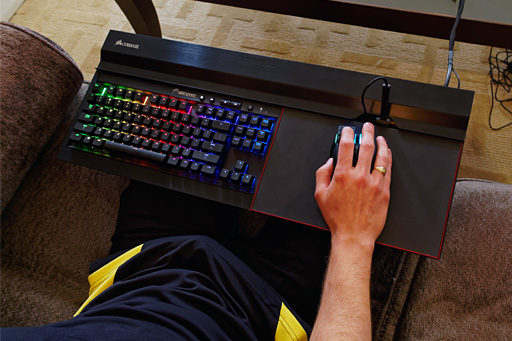
I just got the Corsair Lapdog and I love it. It's huge, but you don't sacrifice anything using KBM on the couch and it's got really comfortable memory foam on the underside. I has extra USB and headphone jack on the unit as well. It's not cheap at $150, but I highly recommend it, particularly if you have a Corsair keyboard already or intend to buy one.

004.jpg
 
the only downside to this setup is in VR, since most of the games run windowed on the PC. so as you are playing games you are actually moving around the mouse and clicking stuff on your desktop, i sometimes end up opening files and such by accident

Just press and hold the back button then hit the start button that will turn off the controller program so it will work just like a joystick. Then click the same pattern and it will turn back on.
 
If you buy this via Steam, does that mean you have to launch it via Steam every time?

Wouldn't that be an issue when starting the computer and getting going prior to loading Steam?

There is an option to have it run outside of steam so it comes up when the PC starts.
 
If you buy this via Steam, does that mean you have to launch it via Steam every time?

Wouldn't that be an issue when starting the computer and getting going prior to loading Steam?

If it was you could just have steam set to auto login/load at start up.
 
I just got the Corsair Lapdog and I love it. It's huge, but you don't sacrifice anything using KBM on the couch and it's got really comfortable memory foam on the underside. I has extra USB and headphone jack on the unit as well. It's not cheap at $150, but I highly recommend it, particularly if you have a Corsair keyboard already or intend to buy one.

004.jpg

I tried this recently at a friend's house. Not exactly the same model but very similar.

It was a garbage experience, imo. No lapboard can ever replace a desk with proper wrist support.

Sticking with the DS4 for now. the trackpad functioning as a mousepad is a damn lifesaver.
 
Oh, most games do ignore Windows mouse filtering, but on desktop in particular, it applies them, which I'm not a fan of. And I've played a couple of games that still use Windows acceleration (Plants vs Zombies: Garden Warfare 1 and 2, Killing Floor 2, older games like Quake 1 and 2). I might've just been imagining things, but I noticed improvement once I disabled the mouse precision option in a couple of games. My bad if that's not the case, eheh.

Probably for the best. The controller's practically still in beta, so hopefully we'll have more of a standard and native support by then. Nice collection, by the way!

Yeah, I've managed to just get used to the desktop way of using the trackball mode with the windows acceleration, but I haven't had issue with filtering on everything I've tried - but I haven't tried Quake / Dosbox stuff, so that probably makes more sense.

Personally I think all Valve products are beta products, and the beta client is more of an alpha. The speed at which Valve iterates and adds features, especially for the controller, is amazing, but also has all the issues that come with that and poor QA / reliance on the beta client to swat the bugs they create along the way. The refinement to features they add is always beyond a beta and successive updates. Kind of a weird positive and negative experience simultaneously
 
Top Bottom