• Hey Guest. Check out your NeoGAF Wrapped 2025 results here!

Xbox Chatpad + Controller Companion = seamless comfy-couch PC gaming

So this is for anyone who's looking for the best way to control their living room PC from the couch.

I've had a wireless keyboard for ages but i've always wanted to have everything in my hands in one device so I can control the desktop easily as well as play games seamlessly.

So after reading a few things this week in one of the Elite controller threads, I picked up a chatpad

Y26NGic.jpg


and finally started digging into Controller Companion. I've had this for a while but only used it in it's most basic sense.

But wow, in combination with the chatpad it's amazing. I can use custom profiles for different programs, make simple custom commands on each button (on desktop I've mapped alt+tab to Lshoulder, alt+F10 to Rshoulder, and the start menu to....the start button!). The chatpad is great but misses being able to perform some of those functions so adding CC into the mix completes the whole thing.

Also if anyone has a chatpad already but can't use the X1 and X2 buttons on PC, you can use sharpkeys to identify and remap them. They're actually something like F23 and F26 so I've remapped them to F1 and F3 for easy quick saves and quick loads when I'm gaming.

So now everything is working from one device. No back and forth to a keyboard. Very easy, totally seamless. Controller companion is only 2 bucks in the steam sale so it's totally worth it. Hope someone finds this bit of throwaway info useful.

Happy couch gaming!!

Hmm but can you control the mouse pointer with a controller + chatpad?
 
Kind of a long shot, but did anyone here also come up with a fool-proof way to start up comfy gaming with the push of a button?

I've been using an AutoHotKey script that a GAFer made that opens Steam Big Picture Mode, changes my audio input from my PC to my TV, and turns off the display on my PC so it only displays on my TV.

It works about half the time, so I was wondering if there was a much better method.
 
Kind of a long shot, but did anyone here also come up with a fool-proof way to start up comfy gaming with the push of a button?

I've been using an AutoHotKey script that a GAFer made that opens Steam Big Picture Mode, changes my audio input from my PC to my TV, and turns off the display on my PC so it only displays on my TV.

It works about half the time, so I was wondering if there was a much better method.

Is the audio issue a thing that varies by TV/receiver or something? Whenever I change my display Windows automatically changes the default audio output device depending on if it's outputting to the receiver or not.

If you only have 2 displays then changing the primary display on Windows 10 is just a matter of Win + P, hitting either arrow up or down depending on which display you're current on, enter, and then esc. This can be done a number of ways, like with an autohotkey script or macro software. It won't power off the other display though, it just stops sending a signal to it. I just programmed it into my logitech harmony so it sets everything up for me with a button press.
 
Just press and hold the back button then hit the start button that will turn off the controller program so it will work just like a joystick. Then click the same pattern and it will turn back on.

While this works it still is more annoying to turn it off every single time you play a vr game. I stopped using it because of this. I want them to add the ability to start disabled and only enable if I turn it on.
 
I wish chat pads were a bigger thing. If somehow Sony and MS could make it an OS feature itd be so awesome.

Like, you could chat to your whole lobby with an interface that overlays the screen. I dont even think Dualshock 4 has a chatpad
 
Does this work with the Xbox One controller + chatpad + wireless adapter or does it have to be connected via USB?
 
Would be that little bit better if you could use the chat pad surface as a mouse like the old DS3 chat pad for desktop mouse control
 
Checking this out immediately. Never heard of controller companion before, thanks OP.

I currently have the K400 and the trackpad is trash.
 
My current set up is this: Slate Mobile LapDesk + Logitech G 400 (MX 518) + KB 400.

Works perfectly for Mouse/KB gaming.

When I'm playing with a controller, I just use my PS4 controllers with the PS4windows application. This works flawlessly because I use the touchpad as a track pad which is a nice extra.
 
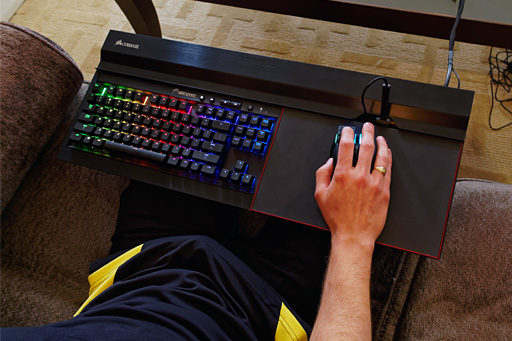
I just got the Corsair Lapdog and I love it. It's huge, but you don't sacrifice anything using KBM on the couch and it's got really comfortable memory foam on the underside. I has extra USB and headphone jack on the unit as well. It's not cheap at $150, but I highly recommend it, particularly if you have a Corsair keyboard already or intend to buy one.

004.jpg

My friend who works at Corsair has one and kept telling me to come over and try it, never got a chance. It just looks so uncomfortable and restricted though, and those wires....
Concept seems cool though.
 

I have one of those wireless keyboards, which are handy, but just picking up a controller and being able to navigate is often more desirable for me.

I'm about to pick this up on Steam, but one more dumb question. With the enable outside of Steam option, can you just set up a taskbar shortcut to only run when you want, or is the only option outside of Steam to have it auto-load every time you boot?
 
Does this work with the Xbox One controller + chatpad + wireless adapter or does it have to be connected via USB?

I use it with the wireless adapter. Works perfectly.


I have a full ms wireless keyboard. It's just annoying having to use it when I want to be on the couch. The chatpad is a great halfway house.

Was playing MGS2 on PCSX2 earlier and its really great to be able to play using my Xbone controller then just easily quicksave or load from the chatpad. Achieves that seamless feeling I'm looking for.

Abd yes, Steam Controller is great. It's just not what I want when I'm playing console designed games.
 
I have one of those wireless keyboards, which are handy, but just picking up a controller and being able to navigate is often more desirable for me.

I'm about to pick this up on Steam, but one more dumb question. With the enable outside of Steam option, can you just set up a taskbar shortcut to only run when you want, or is the only option outside of Steam to have it auto-load every time you boot?

You press back+start to enable or disable it at will. You can also set it to run certain profiles with certain games.

You buy it on steam but it's basically a system-level app.
 
Similarly, if you play DooM (or especially MMORPGS), you can use the numbers as Hotkeys for weapon switching. =P
BUt the keys are so small you' ll have to look at the keyboard to press the correct numbered key.

i idn't know the chatpad was available for the X1 controller. i always wanted one for the 360 controller but at the time there wasn't away to use it for general PC gaming. (the keyboard i mean)
 
BUt the keys are so small you' ll have to look at the keyboard to press the correct numbered key.

i idn't know the chatpad was available for the X1 controller. i always wanted one for the 360 controller but at the time there wasn't away to use it for general PC gaming. (the keyboard i mean)

It's fine in reality. Some of the buttons are embossed to identify areas of the keyboard and if you know a qwerty layout you'll be find it perfectly natural anyway.
 
I bought that companion app immediately after your recommendation. I wish this was a default Windows 10 feature. I'm loving it so far.
 
I wonder how good this works with keyboard and mouse games, both the likes of witcher 1 and completely pointer based like a rts...
 
Might have to look into this since it's pretty useless on Bone and I have a spare controller and chatpad to use on my rig.
 
Thanks for this, OP. I don't have a gaming PC right now but when I do get one, I'll be considering this as a couch control option. Of course, the Steam Controller will be a contender as well. We'll see. I do have a K400 for the HTPC, though. Works just fine. Yeah, the touchpad doesn't hold a candle to a good laptop touchpad, but I don't mind.
 
Never knew about the Controller Companion. This is amazing stuff, thanks for the heads up! Does anyone know if the old X360 chatpad would work the same way?
 
Never knew about the Controller Companion. This is amazing stuff, thanks for the heads up! Does anyone know if the old X360 chatpad would work the same way?

Not quite. They have a custom driver for it but it replaces the default driver and requires switching back and forth between drivers if I recall correctly.
 
Holy shit, Controller Companion also works for the 360 pad with the chatpad. Not in-game but for browsing and such, it looks pretty solid.
 
Thanks, OP. I was thinking of doing this. Right now I have a DS4 and a Lenovo mini keyboard:

$_57.JPG


Would be nice to codense into one unit. Not really a fan of the XB1 controller tho. I play a lot of 2d fighters and the DS4 dpad is preferable.
 
Top Bottom