• Hey Guest. Check out your NeoGAF Wrapped 2025 results here!

Android Software Thread - Tasty Desserts, Tastier Apps

Status
Not open for further replies.
Recent problem with the Music app and actually other music apps on my Nexus One.

For some reason, only some songs and no playlists are showing up on on my phone. They used to before, but now the vast majority of them are not. They are saved in formats that the N1 can understand, I tried re-syncing my library with DoubleTwist on my desktop, and nothing has changed in general in relation to my music including folder location on the SD card.

The music files show up fine in apps like ES File Explorer and will actually play on the device if I select them through that app and select them individually. This is a weird issue and I was hoping someone could offer guidance. I'm on stock Android 2.2.
 
GoldenEye 007 said:
Recent problem with the Music app and actually other music apps on my Nexus One.

For some reason, only some songs and no playlists are showing up on on my phone. They used to before, but now the vast majority of them are not. They are saved in formats that the N1 can understand, I tried re-syncing my library with DoubleTwist on my desktop, and nothing has changed in general in relation to my music including folder location on the SD card.

The music files show up fine in apps like ES File Explorer and will actually play on the device if I select them through that app and select them individually. This is a weird issue and I was hoping someone could offer guidance. I'm on stock Android 2.2.
I use isyncr and I've never had any problem.
 
alternade said:
I use isyncr and I've never had any problem.
I don't think it's a problem with DoubleTwist. Because even manually deleting the songs and placing them back in my Music folder yields the same issue - I've tried that at least once in the past. The songs are actually in the folder on the card and file explorer apps see and play them just fine.

Edit: I would try manually doing it again, but I lost my original N1 USB cable in the past and the random one I got later on seems to cause the phone to transfer at USB 1.1 speeds. Don't feel like waiting 2+ hours for the transfer to complete again lol.

Or maybe that slow speed is caused by the Android SDK being present on my computer with it's own USB drivers... I dunno. I lost the original cable and installed the SDK at around the same time.
 
belvedere said:
Android n00b here. How do I get the new Youtube mobile site to work without defaulting to the HTC flash player?

I haven't figured this out either. On my droid it just opens the youtube app when i press play.
 
GoldenEye 007 said:
I don't think it's a problem with DoubleTwist. Because even manually deleting the songs and placing them back in my Music folder yields the same issue - I've tried that at least once in the past. The songs are actually in the folder on the card and file explorer apps see and play them just fine.

Edit: I would try manually doing it again, but I lost my original N1 USB cable in the past and the random one I got later on seems to cause the phone to transfer at USB 1.1 speeds. Don't feel like waiting 2+ hours for the transfer to complete again lol.

Or maybe that slow speed is caused by the Android SDK being present on my computer with it's own USB drivers... I dunno. I lost the original cable and installed the SDK at around the same time.
Well, I had a similar issue but mine was more of all the album art got screwed up and wouldn't show up no matter what I did.

How I fixed it may not work for you so I'm only putting it out there, I'd hate to be the one to screw up your phone.

I went to Settings->Applications->Media Storage, and then "clear data". I believe I rebooted and it rescanned the SD card and rebuilt the database. From what I understand some info is kept in a database on the phone itself (not on SD card) and can get hosed. I had searched on google for my particular issue and found that fix.

Anyway, good luck.
 
negreenfield said:
Well, I had a similar issue but mine was more of all the album art got screwed up and wouldn't show up no matter what I did.

How I fixed it may not work for you so I'm only putting it out there, I'd hate to be the one to screw up your phone.

I went to Settings->Applications->Media Storage, and then "clear data". I believe I rebooted and it rescanned the SD card and rebuilt the database. From what I understand some info is kept in a database on the phone itself (not on SD card) and can get hosed. I had searched on google for my particular issue and found that fix.

Anyway, good luck.
It's worth a shot. I'll do it now. No worries!
 
BTW, I think you lose playlists doing this but it sounds like you already have that issue so it may not matter.

For me personally I now use .m3u playlists created in Media Monkey because I got tired of dealing with playlists back when i was flashing ROMs too often.

Edit: Oh, and Titanium Backup I think backs up playlists now but it doesn't always work I've found.

Edit2: I had also tried "SDRescan" from the Market, and while it works for other things when I add new music so I don't have to reboot, it did not fix the issue I had.
 
Alex Dee said:
New to android as of last night, what's a good thing to get apps straight from my mac to my phone? I'm not too keen on eating up my download limit on my phone getting things from the market.
1. Download app brain app.
2. Download app brain fast install app.
3. Pick the apps you want on appbrain.com, they push to your device and auto install just like gingerbread will do in the future.
4. For your purposes, do it over wifi.

It is amazing.
 
zoku88 said:
I even tried clearing the defaults in the Android app :-/

If you're viewing mobile Youtube, it'll launch the Youtube app no matter what you do. You need to be viewing the full site.

You have to change your UAString from Android to Desktop

1. Open a new window in Browser
2. Type "about:debug" into the search bar
3. Open up Brower's settings
4. Scroll all the way to the bottom and select UAString
5. Switch from Android to Desktop


For a short while, this let me watch Hulu but then those fuckers figured it out.
 
Any recommendations for an RSS app? I use Google Reader for online viewing, so something that syncs with that would be best.
 
BigAT said:
Any recommendations for an RSS app? I use Google Reader for online viewing, so something that syncs with that would be best.
NewsRob
 
Just got my Incredible. Charging it so it will be a bit before I play with it. What are some essential apps to get? The ones I want to get on top of my head are:

Pandora Radio
GBA emulator
SNES emulator
Yahoo mail app
Rockplayer
Dolphin HD
Shazam
Facebook
Engadget

Also if I were to buy paid apps, do I have to pay for them again if I ever switch to another android phone?
 
BigAT said:
Any recommendations for an RSS app? I use Google Reader for online viewing, so something that syncs with that would be best.

FeedR. Awesome UI. Don't think there's a widget though.

Jazzy Network said:
Also if I were to buy paid apps, do I have to pay for them again if I ever switch to another android phone?

No. It gets even better. Any Android handset with Froyo onwards will automatically download your apps to your new handset. So If a year down the line you want a new handset you just sign in with your Google account and it's done for you. I can't tell you how great that is for someone like me who's flashed 4 different froyo roms in the last 2 months.

Adding to your list;

Twitter (I didn't use it prior to the apps release, but the Android version is awesome and it's a very useful source of info)
Movies (Great way to keep an eye on releases, find local cinema times, get rotten tomato ratings etc)
Shopsavvy or Google Shopper
Quickdesk
Launcher Pro (won't work with Sense Widgets tho)
Soccer Livescores (if you like soccer it's a great app for keeping up to date with, y'know scores!)
Album Art Grabber (useful for finding cover art for stuff which isn't ID3 tagged)
Epicurious (If you like to cook)
Layar
Kindle (for eBooks)
Picsay Pro (great quick photo editing tool)
Ringdroid (for personalising your errr ringtone!)
and plenty more...
 
Anyone have ideas on how to make launcher pro less laggy when switching back from other apps? The screen stays blank for a while before apps eventually pop back in. It only seems to happen after being in another app for a while.

I turned on the droid option and changed from low memory usage to medium, turned the dock to just one, but the issue still remains.
 
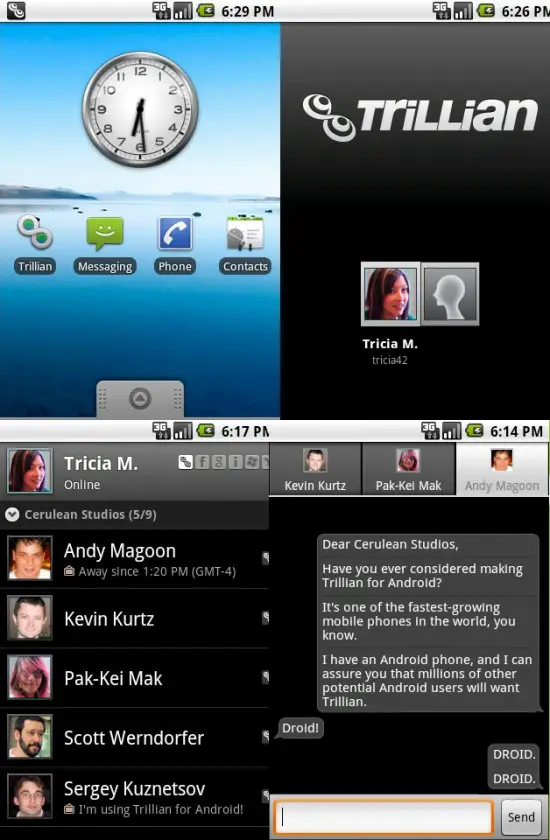
Cannot believe Trillian will be out before Beejives!

phandroid-trillian-550x840.jpg


http://phandroid.com/2010/07/08/trillian-for-android-beta-only-a-few-weeks-away/

And a list of features:

* Connect to Facebook Chat, Windows Live, Yahoo!, AIM, ICQ, Google Talk, Jabber/XMPP and MySpaceIM
* Synchronize your contacts, avatars, status, accounts and more with your Trillian-enabled desktop or mobile apps
* Get notified easily with Android notification system integration
* Contact list sorting, grouping, metacontacts support, privacy settings and various ways to organize
* Set status, avatar and display name quickly in one simple screen
* Tabbed chat windows with bubble view, photo transfer, buzz and emoticon support
* Support for Android phones as far back as version 1.6 – works with your good old T-Mobile G1 or the newest HTC Evo 4G or Motorola Droid!
* We took special care and respect to design and build the user interface to smoothly integrate with Android – this is not just a clone from the iPhone!​

Beta will be out in a few weeks.
 
SimleuqiR said:
* We took special care and respect to design and build the user interface to smoothly integrate with Android – this is not just a clone from the iPhone!
Ugh. This is like breaking both your legs just to fit in with the cripples.
 
bathala said:
yup.
FeedR-widgets.png

this will be my RSS app wen DX comes out

Hmmmm. What seems to happen is that when you move the app to sd, you lose the option to add a widget. Or maybe it's a bug in the app? Especially because when I moved it back to my phone, it caused it to reboot. ?

sableholic said:
Anyone have ideas on how to make launcher pro less laggy when switching back from other apps? The screen stays blank for a while before apps eventually pop back in. It only seems to happen after being in another app for a while.

I turned on the droid option and changed from low memory usage to medium, turned the dock to just one, but the issue still remains.

Are you using dock notifications? If so switch them off. According to the devs last blog, in some cases it can add lag to the launcher.
 
Just found this HIIT Interval Training Timer thing on the market on a random search. This will make my sessions *so* much easier. God damn. This made my evening.
 
Jayge said:
Just found this HIIT Interval Training Timer thing on the market on a random search. This will make my sessions *so* much easier. God damn. This made my evening.
which one?
 
PDAnet is awesome. Using it right now actually. Love my new Incredible. Still gotta play with it more, but it's so much more fun to use than my iPhone.
 
OriginalThinking said:
Hmmmm. What seems to happen is that when you move the app to sd, you lose the option to add a widget. Or maybe it's a bug in the app? Especially because when I moved it back to my phone, it caused it to reboot. ?
Moving to SD card isn't recommended for widget apps, since mounting the SD Card via USB would disable the widget, but it shouldn't be removing it from the widget list, AFAIK.
 
I'm looking for a clock widget that's like the DS's alarm clock, where after you set the alarm t shows a blown up digital display of the time.
 
Halycon said:
I'm looking for a clock widget that's like the DS's alarm clock, where after you set the alarm t shows a blown up digital display of the time.
it sounds like you want a widget that kinda looks like the motorola droid dock. Someone made such a thing, but I can't remember the name of it off the to of my head.
 
I'll try a search for droid clock then. Thanks.

First day with phone, is so shiny.
 
sableholic said:
Anyone have ideas on how to make launcher pro less laggy when switching back from other apps? The screen stays blank for a while before apps eventually pop back in. It only seems to happen after being in another app for a while.

I turned on the droid option and changed from low memory usage to medium, turned the dock to just one, but the issue still remains.
Grab the latest version from the market, he updated it due to Droid bugs, and just like him I didn't have any problems with my milestone. Dock notifications used to slow it down but he's fixed that before.

About trillian I hope it manages to stay connected because every IM app I try keeps getting disconnected. Just log back on in e background stupid apps!
 
So, here is a question:

I have a Hero lying around that I updated the software to 2.1 on. I never saved the old 1.5 image or whatever that was on it. Is there a way to restore it to factory settings. Now when I do it on the phone itself, it just deletes everything but stays at 2.1. If I can get it back to how it originally came, I can make some money off of it.

I have another Hero currently working that is only 1.5, by the way. Perhaps I can use this one to make the other one 1.5 somehow? Any help would be appreciated, I am not good with computer.
 
Pet Peeve time...why the F does it seem like just about every ToDo/Task app have the most rudimentary widget support ever? Usually just 2x2 or 1x2 widgets that do nothing to properly wrap the items within the display area, no clear delineation of each item...I find it hard to believe these guys even tested these widgets. WHY??
 
BigAT said:
Any recommendations for an RSS app? I use Google Reader for online viewing, so something that syncs with that would be best.

another vote for NewRob here. syncs with google reader perfectly.
 
demon said:
which one?
Well, it's called HIIT Interval Timer :lol


SimleuqiR said:
Cannot believe Trillian will be out before Beejives!

phandroid-trillian-550x840.jpg


http://phandroid.com/2010/07/08/trillian-for-android-beta-only-a-few-weeks-away/

And a list of features:

* Connect to Facebook Chat, Windows Live, Yahoo!, AIM, ICQ, Google Talk, Jabber/XMPP and MySpaceIM
* Synchronize your contacts, avatars, status, accounts and more with your Trillian-enabled desktop or mobile apps
* Get notified easily with Android notification system integration
* Contact list sorting, grouping, metacontacts support, privacy settings and various ways to organize
* Set status, avatar and display name quickly in one simple screen
* Tabbed chat windows with bubble view, photo transfer, buzz and emoticon support
* Support for Android phones as far back as version 1.6 – works with your good old T-Mobile G1 or the newest HTC Evo 4G or Motorola Droid!
* We took special care and respect to design and build the user interface to smoothly integrate with Android – this is not just a clone from the iPhone!​

Beta will be out in a few weeks.
This would be great if it didn't pull a Meebo and keep my phone awake and up 1:1. Although due to the nature of messaging programs I doubt it will, which is disappointing. A man can still hope.
 
skybaby said:
Grab the latest version from the market, he updated it due to Droid bugs, and just like him I didn't have any problems with my milestone. Dock notifications used to slow it down but he's fixed that before.

About trillian I hope it manages to stay connected because every IM app I try keeps getting disconnected. Just log back on in e background stupid apps!
What memory usage preset are you using? Do you have the motorola droid hack enabled? I have all dock notifications off and updated this morning, but still having issues so just trying to narrow it down. Its generally very good and speedy, just instances where ill press the home button and it'll be blank (aside from the dock buttons) for a bit (I assume while its building the cache?)
 
Status
Not open for further replies.
Top Bottom

