• Hey Guest. Check out your NeoGAF Wrapped 2025 results here!

Android Software Thread - Tasty Desserts, Tastier Apps

Status
Not open for further replies.
Zombie James said:
Reflash from recovery, or restore the backup.

so pull the battery out? And by reflash from recovery, do you mean follow these steps?

4. Now, turn the phone off and turn it back on by holding down Volume Down and Power until the Bootloader mode comes up.

5. Using the volume buttons and power to select, navigate and choose Recovery.

6. Push Volume Up and Power to get the recovery menu to appear.

7. Select Apply sdcard:update.zip (This should launch the recovery package).

8. In the new recovery menu on your phone, navigate using the trackpad to Wipe and click it. Then click Wipe data/factory reset.

9. Once it is done wiping, click Volume Down to go back to the main menu and now select Flash zip from sdcard and choose the .zip file you downloaded and saved to your sd card just now.

10. Once it is done flashing, select Reboot and your all set! You are now running your custom ROM. Enjoy!

On a different tut, I saw something about RADIO.zip?
 
Cool... wiped it clean and attempted to reflash it. For clarification, I'm selecting "r3.1-bravo-desire-modacocustomrom-withadditions-a2sd+-signed.zip"

Kinda frustrating that I got stuck on the last step, haha
 
apocalidiot said:
Cool... wiped it clean and attempted to reflash it. For clarification, I'm selecting "r3.1-bravo-desire-modacocustomrom-withadditions-a2sd+-signed.zip"

Kinda frustrating that I got stuck on the last step, haha

What ROM is that?
 
From here http://android.modaco.com/content/htc-desire-desire-modaco-com/307881/27-may-r3-1-modaco-custom-rom-for-htc-desire-with-online-kitchen-2-1-eclair/

"- r3.1 ROM with default MoDaCo additions and A2SD+ - DOWNLOAD (MediaFire) / MIRROR (ROMraid / CoBlitz) - MD5: a8cea0b85e8c94081c8688784e913651"


I'm really hoping I'm downloading the wrong thing, that would make it so much easier :lol

Basically I go under "Apply sdcard:update.zip" then select that .zip file on my SD card. again, hopefully I'm just doing it wrong and someone can shed some light on my problems :lol


I really appreciate all your help!
 
apocalidiot said:
From here http://android.modaco.com/content/htc-desire-desire-modaco-com/307881/27-may-r3-1-modaco-custom-rom-for-htc-desire-with-online-kitchen-2-1-eclair/

"- r3.1 ROM with default MoDaCo additions and A2SD+ - DOWNLOAD (MediaFire) / MIRROR (ROMraid / CoBlitz) - MD5: a8cea0b85e8c94081c8688784e913651"


I'm really hoping I'm downloading the wrong thing, that would make it so much easier :lol

It doesn't look "wrong" but I would try something a bit more established and known to work, like OpenDesire or CyanogenMod. Unless having Sense is important to you.
 
apocalidiot said:
From here http://android.modaco.com/content/htc-desire-desire-modaco-com/307881/27-may-r3-1-modaco-custom-rom-for-htc-desire-with-online-kitchen-2-1-eclair/

"- r3.1 ROM with default MoDaCo additions and A2SD+ - DOWNLOAD (MediaFire) / MIRROR (ROMraid / CoBlitz) - MD5: a8cea0b85e8c94081c8688784e913651"


I'm really hoping I'm downloading the wrong thing, that would make it so much easier :lol

Basically I go under "Apply sdcard:update.zip" then select that .zip file on my SD card. again, hopefully I'm just doing it wrong and someone can shed some light on my problems :lol


I really appreciate all your help!

Actually, yeah, I think so. You need to have repartitioned your SD card to have an ext2/ext3 partition before being able to use A2SD. Try the version without it first.

Apologies, that was a mistake from my end. All I can tell you is that seriously, don't freak out, if you can get to recovery you're in absolutely no trouble ;)

Btw, why are you getting the Eclair Rom? Get one from here?

http://android.modaco.com/content/h...for-htc-desire-with-online-kitchen-2-2-froyo/

r9 with default MoDaCo additions - DOWNLOAD


Edit: Dude, sorry gotta get to sleep cause its 1:30. Hopefully you'll be okay soon. If all else fails just pop into recovery, wipe, and then restore your backup.
 
I appreciate all the help, seriously. I restored it and going to take a break because I have a big ass paper due in two days. Thank you guys so much, I'll check back tomorrow haha
 
Hey, I know I could search and it's probably in the thread, but I'll ask anyway:

-How can I speed up my Droid Eris?
-Worth it to flash Eris with a rom (which?) considering it will probably not be getting Froyo?
-How?
-The keyboard sucks because the phone is so small. And Hancent was okay, but the layout didn't stun me. And it made the phone reaaaally slow, even with task killing. How's Better Keyboard fare on the Eris?
 
MasterAJ22 said:
Hey, I know I could search and it's probably in the thread, but I'll ask anyway:

-How can I speed up my Droid Eris?
-Worth it to flash Eris with a rom (which?) considering it will probably not be getting Froyo?
-How?
-The keyboard sucks because the phone is so small. And Hancent was okay, but the layout didn't stun me. And it made the phone reaaaally slow, even with task killing. How's Better Keyboard fare on the Eris?
I have an Eris. Rooting, installing a custom ROM & Kernel, and subsequently overclocking the phone has made it usable bordering on fast.

There are quite a few good roms out there - do you want something with Sense or a pure android ROM?

EDIT: for a keyboard, the HTC_IME modded keyboard on XDA developers (google it) works just fine for me. I also had a pretty good experience with Smart Keyboard Pro
 
TheEastonator said:
I have an Eris. Rooting, installing a custom ROM & Kernel, and subsequently overclocking the phone has made it usable bordering on fast.

There are quite a few good roms out there - do you want something with Sense or a pure android ROM?

EDIT: for a keyboard, the HTC_IME modded keyboard on XDA developers (google it) works just fine for me. I also had a pretty good experience with Smart Keyboard Pro

I do like me the Sense UI, so if possible I'd love to stick with it. But most of all, I want anything I do to my phone to be safe and stable. What you have going on sounds pretty great. Any tutorial for your particular mod you could point me in the direction of?
 
MasterAJ22 said:
I do like me the Sense UI, so if possible I'd love to stick with it. But most of all, I want anything I do to my phone to be safe and stable. What you have going on sounds pretty great. Any tutorial for your particular mod you could point me in the direction of?
This seems to be the most straight forward rooting guide I could find. Though you can always browse around / post on XDA for more info

Here are some solid Sense ROMS: they're all 2.1 for now - 2.2 Sense ROMS are forthcoming and aren't stable yet.
xtrSENSE (said to be the fastest, stock-ish experience)
xtrRCMix (good mix of speed & features, what I'm using currently)
ZenEXP (really slick, but no longer under active development)

Additionally, I'd reccomend you flash a custom kernel and overclock your phone. Download SetCPU for $2 from the market and set profiles so that your phone underclocks itself when the screen is turned off (saves TONS of battery life)

A lot of this varies from phone to phone. You need to try out all the ROMs and find for yourself which one runs the best on your hardware. Same with overclocking - though most all Eris should be able to run stable at 710Mhz, which will give you great performance without destroying battery life.

And then there are smaller, software-level tweaks to do...such as installing AutoKiller from the Market and setting it to "strict" and monitoring Running Processes to make sure nothing is bogging down your phone.

If you want an even faster experience, switch from Sense to LauncherPro - if you buy the Plus version, it comes with a plethora of Sense-like widgets, and is unbelievably speedy.

Most important: read up a lot! Browse around XDA and that site I linked - and ask any more questions if you have them.
 
Zombie James said:
Are there any apps that'll let me use my Desire as a webcam? So it could be used with IM apps?

Have you tried this?

DroidCam Wireless Webcam

Use your phone as a webcam on your PC over WiFi!
Version 2.0 (Beta) is finally ready. Default settings may not work on all phones-possible Force Closes. PC Client required. Follow in-app messages.

Tested only on 32-bit: XP, Vista, Win7 & Linux.

market://details?id=com.dev47apps.droidcam

KB2wf.png
 
kharma45 said:
Giving Froyo another go on my Hero seeing as there is a CyanogenMod 6.1 RC out for it now.

Try Floyo over at XDA-Dev. That's what I'm using, it's CM based of course and I found it to be pretty smooth overall.
 
Zombie James said:
Are there any apps that'll let me use my Desire as a webcam? So it could be used with IM apps?

the new Yahoo app pulled from the MyTouchHD leaked and it does video calling to yahoo users using iphone, android, and PC. I tried it out on EVO and it worked over 3G.
 
Does anyone know of a good app that lets you sync an Android phone with iTunes? I love Android but it's pretty terrible (for me) as a media player. Any way to alleviate these woes?
 
Pyrokai said:
Does anyone know of a good app that lets you sync an Android phone with iTunes? I love Android but it's pretty terrible (for me) as a media player. Any way to alleviate these woes?

iSyncr has gotten pretty good reviews. It is like 3 dollars on the Android Market, there is a wifi add-on for wireless syncing as well.
 
Pyrokai said:
Does anyone know of a good app that lets you sync an Android phone with iTunes? I love Android but it's pretty terrible (for me) as a media player. Any way to alleviate these woes?

iSyncr. Look for it in the market. You can sync to iTunes wirelessly too. Not that I use it.

EDIT: Beaten!
 
Pyrokai said:
Does anyone know of a good app that lets you sync an Android phone with iTunes? I love Android but it's pretty terrible (for me) as a media player. Any way to alleviate these woes?
I've been using DoubleTwist. Imports all my playlists from iTunes and syncs them to my Evo.

Takes forever to boot on my PC, but other than that, it's not bad at all. But I'm also not a HUGE media guy, and I probably only sync new music to my phone every 3-4 weeks.
 
TheEastonator said:
This seems to be the most straight forward rooting guide I could find. Though you can always browse around / post on XDA for more info
Here are some solid Sense ROMS: they're all 2.1 for now - 2.2 Sense ROMS are forthcoming and aren't stable yet.
xtrSENSE (said to be the fastest, stock-ish experience)
xtrRCMix (good mix of speed & features, what I'm using currently)
ZenEXP (really slick, but no longer under active development)
Additionally, I'd reccomend you flash a custom kernel and overclock your phone. Download SetCPU for $2 from the market and set profiles so that your phone underclocks itself when the screen is turned off (saves TONS of battery life)
A lot of this varies from phone to phone. You need to try out all the ROMs and find for yourself which one runs the best on your hardware. Same with overclocking - though most all Eris should be able to run stable at 710Mhz, which will give you great performance without destroying battery life.
And then there are smaller, software-level tweaks to do...such as installing AutoKiller from the Market and setting it to "strict" and monitoring Running Processes to make sure nothing is bogging down your phone.
If you want an even faster experience, switch from Sense to LauncherPro - if you buy the Plus version, it comes with a plethora of Sense-like widgets, and is unbelievably speedy.
Most important: read up a lot! Browse around XDA and that site I linked - and ask any more questions if you have them.

I have an Eris too and I'm running Floyo, which is a Froyo, Cyanogen-based ROM. It is about as smooth and fast as an Eris will get. It's totally up to you but honestly, I think getting rid of Sense completely has made the biggest difference to me. Speed improvements and the contacts/people/phone app is less buggy. No more dialer lag, too.

Also, it has "collin's batt tweak" built-in. For those who don't know, it is a mod to the CPU governor that over/underclocks to improve performance and battery power.
 
josephdebono said:
Try Floyo over at XDA-Dev. That's what I'm using, it's CM based of course and I found it to be pretty smooth overall.

Cheers, I'll have to give it a go later, I'm back in VillainROM 12 already :lol Chances are I'll just stick with it full-time until VR13 comes out.
 
hermit7 said:
iSyncr has gotten pretty good reviews. It is like 3 dollars on the Android Market, there is a wifi add-on for wireless syncing as well.

OriginalThinking said:
iSyncr. Look for it in the market. You can sync to iTunes wirelessly too. Not that I use it.

EDIT: Beaten!


Sweet! Thanks a lot! Does it by chance synchronize videos from iTunes, too?
 
kharma45 said:
Cheers, I'll have to give it a go later, I'm back in VillainROM 12 already :lol Chances are I'll just stick with it full-time until VR13 comes out.

I was using Froydvillain for some time. It excellent actually but tended to turn sluggish after a while. I say give Floyo a chance, and then revert if you don't like it. But up to you, I just love seeing Heros still living so well :D
 
Oozer3993 said:
Found a new music player via Droid-Life: PowerAMP. It's just in beta right now, but it's looking great. It even EQ and can play FLAC. According to the dev on XDA, scrobbling and a lock screen widget are coming in the next beta.

Looks like this guy is really staying on top of development and features. Here is the site for PowerAMP, since it seems a little difficult to find at first. Also, the latest trial version in on the Market.

http://power-amp.info/
 
josephdebono said:
Actually, yeah, I think so. You need to have repartitioned your SD card to have an ext2/ext3 partition before being able to use A2SD. Try the version without it first.

Apologies, that was a mistake from my end. All I can tell you is that seriously, don't freak out, if you can get to recovery you're in absolutely no trouble ;)

Btw, why are you getting the Eclair Rom? Get one from here?

http://android.modaco.com/content/h...for-htc-desire-with-online-kitchen-2-2-froyo/

r9 with default MoDaCo additions - DOWNLOAD


Edit: Dude, sorry gotta get to sleep cause its 1:30. Hopefully you'll be okay soon. If all else fails just pop into recovery, wipe, and then restore your backup.

I believe the problem is that I need to update my radio.zip. Not sure what it means but I'm looking around haha
 
tfur said:
Looks like this guy is really staying on top of development and features. Here is the site for PowerAMP, since it seems a little difficult to find at first. Also, the latest trial version in on the Market.

http://power-amp.info/

Holy crap, this player is just top notch, soooo mannyyyyyy featuressss (that's what/how my roommate said :lol)

Sucks that I've been using mspot all this time so its a bit harder to sync my stuff...sigh

Anyway, can't wait to see which features will be added/expanded upon! :D
 
Similar programs to Retro Camera?

First app to run buggy/inconsistent on my Droid X. Camera roll screen refreshes it self without me touching the screen. No software button to get back to viewfinder from camera roll? Viewfinder is WAYYYYY too small. Anyone else have similar experience with Retro Cam?
 
Oh yea. Anyone have any alternate icons for a music app? DoubleTwist is ugly.

Well not so much ugly, just that it doesn't scream music to me.
 
FUCK FUCK FUCK FUCK FUCK

Basically I partitioned my SD card (backed it up yesterday) and then put everything back on the phone.

I guess I backed it up before my nandroid backup. Now I have no fucking backup... and the ROM I was installing isn't working. I'm guessing I didn't loose too much (contacts are stored via Google right?) I did a factory wipe and rebooting now... it better fucking start up. I don't know why it wouldn't start up like it was out of the box?

fuck goddammit
 
I can't find musymix on the market place (its an unofficial 8tracks app that I believe they themselves endorse until their own releases, I think). Can anyone check themselves, I'm wondering if its specific to my Hero.
 
I hate Verizon, got my phone through Amazon. Went to activate it and it wouldn't go through. So then I went to the Verizon store, and they weren't able to activate it because they didn't see it ordered or some shit. Now they want me to go back tomorrow so I can show them the receipt.

Honestly I am not quite sure why it will not activate, I called the designated number and it should go through considering I am just changing phones. Now I am stuck once again for tomorrow with a shitty Blackberry Storm.

Anyone have any ideas?
 
viakado said:
i tried this earlier with my ip address.
i get this message when i try to connect to my computer.
droid X froyo on win7.
help?
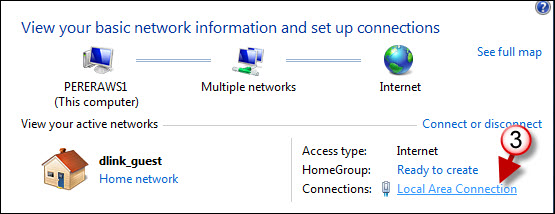
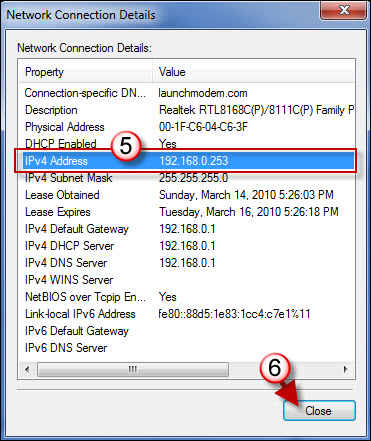
Make sure you're not using the global IP of your router (ie. what would show if you went to whatsmyip.org). You need to use the local IP of the computer... which is 192.168.1.???, 192.168.2.??? or something similar usually. You can find it by opening a command prompt and typing "ipconfig /all" or by checking the appropriate dialog via Network and Sharing Centre:

how-to-find-your-ip-address-in-windows-7-a.jpg


how-to-find-your-ip-address-in-windows-7-b.jpg


how-to-find-your-ip-address-in-windows-7-c.jpg


If this program operates on a particular port you may need to configure your router to forward that port. I would imagine that might not be the case though.
 
So, fellow G2ers, looks like there's an OTA rolling out soon that should fix issues like the reboot problems so many of us are having. Also hoping that it gives us some insight on how to root...
 
apocalidiot said:
FUCK FUCK FUCK FUCK FUCK

Basically I partitioned my SD card (backed it up yesterday) and then put everything back on the phone.

I guess I backed it up before my nandroid backup. Now I have no fucking backup... and the ROM I was installing isn't working. I'm guessing I didn't loose too much (contacts are stored via Google right?) I did a factory wipe and rebooting now... it better fucking start up. I don't know why it wouldn't start up like it was out of the box?

fuck goddammit

Goddammit it's an adventure with you :P

Okay, first things first. Radio updates (or Radio.zip) is basically an upgrade to the antennae firmware. Most roms do not require any radio updates but sometimes they are necessary. In such cases instructions would be quite clear and/or the radio would be included in the rom itself.

Now, well, if you don't have a nandroid backup there's nothing much you can do. However a factory wipe will simply revert you back to the rom you currently have installed so if it *does* start up it basically means you've managed to upgrade your rom :D

Now, let's assume it didn't, how did you partition your SD card? From within the recovery image itself I would assume, right? If i'm not mistaken it should've asked you to partition into three separate sections, one for swap, one for your apps and the last partition which is the normal storage. Sizes by default are (i think) 32, 256 and the rest respectively. Whatever, just leave the defaults. This is only necessary if you're using an A2SD (Apps2SD) Rom.

Then look around the recovery menu and see if there is an option to upgrade ext2 to ext3. Do that. Then just mount the SD to your PC and copy only the update.zip (i.e. the rom itself) and install it.

Once it's done and it boots copy the rest of the files back to the SD card. When copying back if it asks you to replace anything which you don't know what it is (like folders starting with '.') just skip them.

Good luck!
 
Trying out this weird shit keyboard:
http://www.the8pen.com/index.html

Sucks that there isn't some sort of demo. They can't expect me to learn to use it in 24hr and decide whether I want to keep the it.

Bleh, i set a calendar event for tomorrow to refund it. I'm sure I'll need at least a week to decide whether it's just bonkers but this should give me a slight idea.
 
OriginalThinking said:
That keyboard will bomb - Too great a learning curve, especially when I reckon we'll see blindtype incorporated into Gingerbread.

Also quick look at this...

Gingerbread UI hints? - Android Police

I don't know how the expect people to fork out money for a keyboard which is scary just to look at. Having sent a couple of messages with it since then, though, i can see it being fast when you get used to it and the character placements.
 
josephdebono said:
I don't know how the expect people to fork out money for a keyboard which is scary just to look at. Having sent a couple of messages with it since then, though, i can see it being fast when you get used to it and the character placements.

Yeah, absolutely. They really need word of mouth - was there even a public beta? That's what got Swype groundswell before they went ahead and sold to oem's only.
 
At the very least have a lite version with the pro version having user dictionary, settings, predictions and whatever. It's really a shame. I try to give everything a fair chance because I know a lot of research tends to go into this stuff.

The only reason I didn't use swype was because I have the added obstacle of english not really being my native language and therefore not what I usually write messages in and Swype is really dictionary dependent.

This on the other hand only does completion which doesn't really require a complete dictionary.

HTC_IME_mod FTW!!!
 
Status
Not open for further replies.
Top Bottom