
Please explain Astrolad's lack of sarcasm.Tobor said:

-
Hey Guest. Check out your NeoGAF Wrapped 2025 results here!
You are using an out of date browser. It may not display this or other websites correctly.
You should upgrade or use an alternative browser.
You should upgrade or use an alternative browser.
Apple iPad revealed
- Thread starter ClovingWestbrook
- Start date
- Status
- Not open for further replies.

Astro is rarely--if ever at all--sarcastic.numble said:Please explain Astrolad's lack of sarcasm.

blu
Wants the largest console games publisher to avoid Nintendo's platforms.
so, erm, can we shoot the messenger now?

SuperPac
Member
Yeah! GAF Gold baby! Woo!
Looking forward to preorders opening. And it'd be nice to hear/see more about all the apps (including the rumored widgets or the iPad implementations of weather, stocks, etc.). Apple should be doing another event fairly soon for iPhone 4.0/software roadmap, right?
Looking forward to preorders opening. And it'd be nice to hear/see more about all the apps (including the rumored widgets or the iPad implementations of weather, stocks, etc.). Apple should be doing another event fairly soon for iPhone 4.0/software roadmap, right?
Nazgul_Hunter
Member
Tobor said:I'm curious to see how many games get updated to take advantage of the real estate. CivRev with a larger viewable area would be godly, for example.
I'm wondering if there'll be enhanced real life board games that use the iPad as a board. For example, a version of Settlers of Catan that uses the iPad; while still using some sort of physical pieces. I think something like that could be a fun way to merge physical and video board games
If a game required a small number of pieces, it could work by creating pieces with capacitive contacts on the bottoms, like the iPhone styli. Catan has too many pieces, though.Nazgul_Hunter said:I'm wondering if there'll be enhanced real life board games that use the iPad as a board. For example, a version of Settlers of Catan that uses the iPad; while still using some sort of physical pieces. I think something like that could be a fun way to merge physical and video board games
I know the limit for simultaneous contacts on the iPhone is 4, and that the iPad allows more, but I don't know exactly how many.
Kung Fu Jedi
Member
Nazgul_Hunter said:I'm wondering if there'll be enhanced real life board games that use the iPad as a board. For example, a version of Settlers of Catan that uses the iPad; while still using some sort of physical pieces. I think something like that could be a fun way to merge physical and video board games
We talked about this a bit in the past too. There are some great options for using the iPad for multiplayer games. We even talked about how cool it would be to use iPhones to make moves or roll dice and have the results show up on the iPad. Tons of potential here.
Safari is looking so awesome on this device. I'm getting more excited for the iPad the more I see of it. I think it's going to be one of those things this is going to blow you away when you finally get your hands on one, and the new interface options are going to rock in a lot of different apps.
Come on Apple! Let me pre-order! I'll at least feel like I'm a bit closer to getting my iPad!
Nazgul_Hunter
Member
Tobor said:If a game required a small number of pieces, it could work by creating pieces with capacitive contacts on the bottoms, like the iPhone styli. Catan has too many pieces, though.
Well; they don't all need to be capacitive. But you're right; something like Monopoly or Clue could be really fun if you had capacitive-enabled tokens that you moved around. I think enhanced games like that would be a huge hit (at least in my experience, I don't really like to play traditional board games on a computer as much as i like the real deal; but something like this could be cool)
Another way to do it would be to have a virtual marker showing you where to place your actual piece, and the ability to turn it off or play with completely virtual pieces as options.Nazgul_Hunter said:Well; they don't all need to be capacitive. But you're right; something like Monopoly or Clue could be really fun if you had capacitive-enabled tokens that you moved around. I think enhanced games like that would be a huge hit (at least in my experience, I don't really like to play traditional board games on a computer as much as i like the real deal; but something like this could be cool)
I wish I had the patience to code.

VanMardigan said:I think complaining about either of those is completely valid. It's not like it came out of nowhere, there was new info about the fact that a camera should've been in there.
It's one thing to whine when every other post is talking about flash, but if it comes out of the context of something fresh, your defensiveness is unwarranted.
I'm not being defensive. The iPad is a known commodity since it was announced. Complaining about "missing" features at this point is useless and shows an inability to get over what is isn't, instead of focusing on what it is.
This should grind some gears:
Why can't PC's work more like iPhones?
http://bits.blogs.nytimes.com/2010/02/25/why-cant-pcs-work-more-like-iphones/?ref=technology
I'm telling you guys, like it or not, the iPad is a sneak peak at OS XI.
Why can't PC's work more like iPhones?
http://bits.blogs.nytimes.com/2010/02/25/why-cant-pcs-work-more-like-iphones/?ref=technology
I'm telling you guys, like it or not, the iPad is a sneak peak at OS XI.
My take is that "iPhone OS" isn't the future of OS X, but rather the future of general computing for the masses.Tobor said:This should grind some gears:
Why can't PC's work more like iPhones?
http://bits.blogs.nytimes.com/2010/02/25/why-cant-pcs-work-more-like-iphones/?ref=technology
I'm telling you guys, like it or not, the iPad is a sneak peak at OS XI.
OS X, Windows, and general file system type operating systems will stick around for specialized tasks and geeks, but New World Computing (as Steven Frank from Panic puts its) is the future.
Quote me on that in 10 years.
Nazgul_Hunter
Member
giga said:My take is that "iPhone OS" isn't the future of OS X, but rather the future of general computing for the masses.
OS X, Windows, and general file system type operating systems will stick around for specialized tasks and geeks, but New World Computing (as Steven Frank from Panic puts its) is the future.
Quote me on that in 10 years.
I like the idea that's been thrown around of a Front Row-esque layer to Mac OS X that looks like the iPhone OS.
giga said:My take is that "iPhone OS" isn't the future of OS X, but rather the future of general computing for the masses.
OS X, Windows, and general file system type operating systems will stick around for specialized tasks and geeks, but New World Computing (as Steven Frank from Panic puts its) is the future.
Quote me on that in 10 years.
Apple will most likely keep OS X around as a "Pro" OS, but add controlled multitasking and a few things here and there and iPhone OS will be more than capable as a consumer OS.
lunarworks
Member
Tobor said:This should grind some gears:
Why can't PC's work more like iPhones?
http://bits.blogs.nytimes.com/2010/02/25/why-cant-pcs-work-more-like-iphones/?ref=technology
I'm telling you guys, like it or not, the iPad is a sneak peak at OS XI.
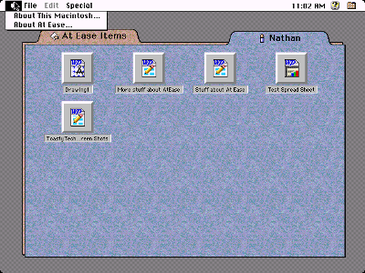
http://en.wikipedia.org/wiki/At_Ease

Schrade
Member

SuperPac
Member
lunarworks said:
My god, I forgot about At Ease. My high school used that on all its Macs and that was kind of a pain when you needed to get into preferences or a different documents folder on the network. They had it locked up so tight using At Ease that it was almost worthless to try and use those Macs period.
SuperPac
Member
numble said:Should be 29-30 days or less before launch!
Yep. I'm gonna guess we'll hear more details and the pre-orders will go up next week. If not... we're starting to cut it kinda close, right? Really looking forward to hearing more news.
Kung Fu Jedi
Member
Right there with you guys. I've got my credit card ready to go! They just need to let me place my order. I even have someone ready to buy my netbook today, so everything is falling into place.
Perhaps the pre-orders will open on March 1st, which is next Monday. That would give them 3+ weeks before the start shipping. Surprised we haven't heard more from Apple yet, but I'm sure the marketing campaign and iPad news assault will begin soon.
Perhaps the pre-orders will open on March 1st, which is next Monday. That would give them 3+ weeks before the start shipping. Surprised we haven't heard more from Apple yet, but I'm sure the marketing campaign and iPad news assault will begin soon.
Marty Chinn
Member
Do you think they'll ever open up the iPad/iPhone so that you can manage your memory easier without being tied to iTunes as much? For example, a friend recommended a game to me while I was at work but it was free for a limited time so I should jump on it right away. However, my iPhone didn't have enough space to download the 130 meg game and it told me to delete some stuff first. So the problems here were:
1) I couldn't buy the content because I didn't have enough space which means I could miss out. I wish there was a way to buy now but download later.
2) I couldn't delete podcasts, music, or videos till I got home to my ONE computer that is allowed to manage my content on my iPhone.
These two factors seemed to be a terrible combination of keeping the iPad relatively independent and can put you in a bind sometimes. It's not the first time that it has happened and has been pretty annoying.
For something that people are promoting as a computer for the masses, they still need a normal computer to manage it which I think in some ways defeats the purpose.
1) I couldn't buy the content because I didn't have enough space which means I could miss out. I wish there was a way to buy now but download later.
2) I couldn't delete podcasts, music, or videos till I got home to my ONE computer that is allowed to manage my content on my iPhone.
These two factors seemed to be a terrible combination of keeping the iPad relatively independent and can put you in a bind sometimes. It's not the first time that it has happened and has been pretty annoying.
For something that people are promoting as a computer for the masses, they still need a normal computer to manage it which I think in some ways defeats the purpose.
SuperPac
Member
Marty Chinn said:Do you think they'll ever open up the iPad/iPhone so that you can manage your memory easier without being tied to iTunes as much? For example, a friend recommended a game to me while I was at work but it was free for a limited time so I should jump on it right away. However, my iPhone didn't have enough space to download the 130 meg game and it told me to delete some stuff first. So the problems here were:
1) I couldn't buy the content because I didn't have enough space which means I could miss out. I wish there was a way to buy now but download later.
2) I couldn't delete podcasts, music, or videos till I got home to my ONE computer that is allowed to manage my content on my iPhone.
These two factors seemed to be a terrible combination of keeping the iPad relatively independent and can put you in a bind sometimes. It's not the first time that it has happened and has been pretty annoying.
For something that people are promoting as a computer for the masses, they still need a normal computer to manage it which I think in some ways defeats the purpose.
I can definitely delete podcasts, music, and videos right on my iPhone and have done it at least a half dozen times to accommodate something else. It's just like deleting an email (swipe left to right). Or I've deleted apps to make room (and re-downloaded or re-installed later).
I'd imagine the iPad will be similar. I don't expect it to be a problem.

Liu Kang Baking A Pie
Member
Evidence that the iPhone OS still isn't simple enough.Marty Chinn said:Do you think they'll ever open up the iPad/iPhone so that you can manage your memory easier without being tied to iTunes as much? For example, a friend recommended a game to me while I was at work but it was free for a limited time so I should jump on it right away. However, my iPhone didn't have enough space to download the 130 meg game and it told me to delete some stuff first. So the problems here were:
1) I couldn't buy the content because I didn't have enough space which means I could miss out. I wish there was a way to buy now but download later.
2) I couldn't delete podcasts, music, or videos till I got home to my ONE computer that is allowed to manage my content on my iPhone.
These two factors seemed to be a terrible combination of keeping the iPad relatively independent and can put you in a bind sometimes. It's not the first time that it has happened and has been pretty annoying.
For something that people are promoting as a computer for the masses, they still need a normal computer to manage it which I think in some ways defeats the purpose.
:lolLiu Kang Baking A Pie said:Evidence that the iPhone OS still isn't simple enough.
Marty Chinn
Member
Wow I had no idea about swiping on podcasts and videos. It's pretty unintuitive though unlike deleting emails and other stuff because there isn't any indicator that you can do that. Plus you can't do it with audiobooks or music so the interface is inconsistent.SuperPac said:I can definitely delete podcasts, music, and videos right on my iPhone and have done it at least a half dozen times to accommodate something else. It's just like deleting an email (swipe left to right). Or I've deleted apps to make room (and re-downloaded or re-installed later).
I'd imagine the iPad will be similar. I don't expect it to be a problem.
Liu Kang Baking A Pie said:Evidence that the iPhone OS still isn't simple enough.
It needs a desktop with trash can into which I drag items.
Marty Chinn said:Wow I had no idea about swiping on podcasts and videos. It's pretty unintuitive though unlike deleting emails and other stuff because there isn't any indicator that you can do that. Plus you can't do it with audiobooks or music so the interface is inconsistent.
It's exactly the same as deleting emails. I'll agree on the inconsistent part, but I imagine they don't want you to be able to delete music before it's been backed up. If you bought a song and deleted it before it was synced, it would be gone. Not good.
Marty Chinn
Member
I've always have hit the edit button to delete multiple emails or used the trash button. Had no idea about the swiping there either. What would indicate I could? Like I said it's not intuitive since after two years I didn't know it was possible.Tobor said:It's exactly the same as deleting emails. I'll agree on the inconsistent part, but I imagine they don't want you to be able to delete music before it's been backed up. If you bought a song and deleted it before it was synced, it would be gone. Not good.
Edit:
You could flag music if it hasn't been backed up to avoid your problem.
Marty Chinn said:I've always have hit the edit button to delete multiple emails or used the trash button. Had no idea about the swiping there either. What would indicate I could? Like I said it's not intuitive since after two years I didn't know it was possible.
I'm not sure how you didn't know that. I've known to do it for so long I don't remember how I figured it out. /shrugs
Anyway, your problem is solved, and what's the free game?
Marty Chinn
Member
Hysteria Project but I think the deal is over.Tobor said:I'm not sure how you didn't know that. I've known to do it for so long I don't remember how I figured it out. /shrugs
Anyway, your problem is solved, and what's the free game?
Kung Fu Jedi
Member
Marty Chinn said:I've always have hit the edit button to delete multiple emails or used the trash button. Had no idea about the swiping there either. What would indicate I could? Like I said it's not intuitive since after two years I didn't know it was possible.
Edit:
You could flag music if it hasn't been backed up to avoid your problem.
After two years, you would be the only one.
Marty Chinn
Member
Explain how I would know that when music and audiobooks don't let you do that.Kung Fu Jedi said:After two years, you would be the only one.
SuperPac
Member
Marty Chinn said:Wow I had no idea about swiping on podcasts and videos. It's pretty unintuitive though unlike deleting emails and other stuff because there isn't any indicator that you can do that. Plus you can't do it with audiobooks or music so the interface is inconsistent.
To be fair, audiobooks and music are generally pretty low-MB in the grand scheme of things that you're not gonna free up space quickly by deleting those. Apps, movies and podcasts (esp. video) could be larger so that's likely why you can for those. But in each case it's not so easy that you'd do it by accident. A lot of apps also use swipe to delete but may not explain it because it's kind of a staple function of the iPhone OS at this point.

It's not necessarily unintuitive when you know it's there, and most users won't need to delete videos and podcasts every day. In the apps where you are deleting stuff often (mail, for instance), you get the edit button.
WordAssassin
Member
Here's something interesting my dad just brought up.
He's talking on the phone to a client who has a document on her iPhone, and she needs to print it out. As far as I know, you can't just DO that with the iPhone (unless there's an app for that?) either by plugging it in to a printer or just having the iPhone and the printer on the same wireless network.
With the focus on the iPad being used as a general "take anywhere" computer, so much so that they're making word processors, spreadsheets, and other office apps for it and even giving it a nice little dock to use with an actual keyboard, do we know if the iPad will have wired/wireless printing capabilities? It sure would be nice to be working on a document on the iPad and just wirelessly send it to a printer instead of having to sync or email it to yourself to print from a normal computer.
He's talking on the phone to a client who has a document on her iPhone, and she needs to print it out. As far as I know, you can't just DO that with the iPhone (unless there's an app for that?) either by plugging it in to a printer or just having the iPhone and the printer on the same wireless network.
With the focus on the iPad being used as a general "take anywhere" computer, so much so that they're making word processors, spreadsheets, and other office apps for it and even giving it a nice little dock to use with an actual keyboard, do we know if the iPad will have wired/wireless printing capabilities? It sure would be nice to be working on a document on the iPad and just wirelessly send it to a printer instead of having to sync or email it to yourself to print from a normal computer.
Marty Chinn
Member
SuperPac said:To be fair, audiobooks and music are generally pretty low-MB in the grand scheme of things that you're not gonna free up space quickly by deleting those. Apps, movies and podcasts (esp. video) could be larger so that's likely why you can for those. But in each case it's not so easy that you'd do it by accident. A lot of apps also use swipe to delete but may not explain it because it's kind of a staple function of the iPhone OS at this point.
It's not necessarily unintuitive when you know it's there, and most users won't need to delete videos and podcasts every day. In the apps where you are deleting stuff often (mail, for instance), you get the edit button.
Well in the case of say text messages or e-mail, there was always another method to delete. That's not the case here. So because of the other method to delete which was extremely more obvious because there is an on screen indicator, I never had to learn that there was a swipe. Music albums can be 60 to 80 MB per album. Deleting a couple albums is instantly a couple hundred meg so I wouldn't say it's not substantial. Plus the fact that you can delete some and not others makes it less intuitive. Needing to know its there and how to do it to begin with goes against the concept in some ways of being intuitive. All I'm saying is the iPhone because of its inconsistant design put me in a working frame that I don't think is my fault for not realizing I can swipe in some cases to delete when that's not always the case.

Keylime
ÏÎ¯Î»Ï á¼Î¾ÎµÏÎγλοÏÏον καί ÏεÏδολÏγον οá½Îº εἰÏÏν
People who print things out are dinosaurs.WordAssassin said:Here's something interesting my dad just brought up.
He's talking on the phone to a client who has a document on her iPhone, and she needs to print it out. As far as I know, you can't just DO that with the iPhone (unless there's an app for that?) either by plugging it in to a printer or just having the iPhone and the printer on the same wireless network.
With the focus on the iPad being used as a general "take anywhere" computer, so much so that they're making word processors, spreadsheets, and other office apps for it and even giving it a nice little dock to use with an actual keyboard, do we know if the iPad will have wired/wireless printing capabilities? It sure would be nice to be working on a document on the iPad and just wirelessly send it to a printer instead of having to sync or email it to yourself to print from a normal computer.
Liu Kang Baking A Pie
Member
Your problem is assuming everything in every application needs an obvious and familiar method for every function available. Edit/Delete toggles and options exist in other applications because deleting is something you do frequently or with importance in those applications, as SuperPac pointed out. Deleting is not such a common or necessary function in the iPod application which is why the method to delete items is a bit harder to find.Marty Chinn said:Well in the case of say text messages or e-mail, there was always another method to delete. That's not the case here. So because of the other method to delete which was extremely more obvious because there is an on screen indicator, I never had to learn that there was a swipe. Music albums can be 60 to 80 MB per album. Deleting a couple albums is instantly a couple hundred meg so I wouldn't say it's not substantial. Plus the fact that you can delete some and not others makes it less intuitive. Needing to know its there and how to do it to begin with goes against the concept in some ways of being intuitive. All I'm saying is the iPhone because of its inconsistant design put me in a working frame that I don't think is my fault for not realizing I can swipe in some cases to delete when that's not always the case.
You're acting like you've never seen a computer application that hid preferences or actions in the UI.
Also, when you use the word "intuitive," you're meaning to use "familiar" or "obvious." Intuition is a rare scenario in graphic UI design.
Marty Chinn
Member
Liu Kang Baking A Pie said:Your problem is assuming everything in every application needs an obvious and familiar method for every function available. Edit/Delete toggles and options exist in other applications because deleting is something you do frequently or with importance in those applications, as SuperPac pointed out. Deleting is not such a common or necessary function in the iPod application which is why the method to delete items is a bit harder to find.
You're acting like you've never seen a computer application that hid preferences or actions in the UI.
Also, when you use the word "intuitive," you're meaning to use "familiar" or "obvious." Intuition is a rare scenario in graphic UI design.
I'm just saying that it's reasonable for me not to have stumbled upon it because of the way they hid it and offered other means of doing it in other core applications that Apple supplies. Add on the fact that it is inconsistent between different aspects of Apple's core applications, it's also reasonable how I would have not stumbled upon it. Why is it reasonable for me to assume that if I can't delete music and audiobooks that I would somehow know that podcasts are an exception?
Liu Kang Baking A Pie
Member
Again, you're assuming everything has to have an obvious way to do something that's similar to how everything else does it. By design, the function exists in an obvious way in some applications and it exists in a less obvious way in others. It does not make it inconsistent. It makes it context sensitive.Marty Chinn said:Add on the fact that it is inconsistent between different aspects of Apple's core applications, it's also reasonable how I would have not stumbled upon it.
Marty Chinn
Member
Liu Kang Baking A Pie said:Again, you're assuming everything has to have an obvious way to do something that's similar to how everything else does it. By design, the function exists in an obvious way in some applications and it exists in a less obvious way in others. It does not make it inconsistent. It makes it context sensitive.
So to flip it, are you saying I should have known or figured it out? I'm just saying it is reasonable that I didn't because of that. Having different interfaces or rules for similar functionality goes against typical UI flow and design. Sure there are reasonable valid reasons for doing so but that doesn't mean it was unreasonable for me to not know.
Liu Kang Baking A Pie
Member
It wasn't an obvious interaction compared to the usual Edit button toggle. Are you getting it?Marty Chinn said:So to flip it, are you saying I should have known or figured it out?
No it doesn't.Marty Chinn said:Having different interfaces or rules for similar functionality goes against typical UI flow and design.
Kung Fu Jedi
Member
Marty Chinn said:Explain how I would know that when music and audiobooks don't let you do that.
Considering you're the only person that I've heard of that has owned an iPhone for any length of time that didn't know this, I'm not really sure how you missed it. It was demonstrated multiple times, including on commercials I believe, and it was really a standard part of the OS from Day 1. In fact, I'm pretty sure I know about this before the phone was even released.
- Status
- Not open for further replies.