

-
Hey Guest. Check out your NeoGAF Wrapped 2025 results here!
You are using an out of date browser. It may not display this or other websites correctly.
You should upgrade or use an alternative browser.
You should upgrade or use an alternative browser.
Best FREE Desktop Software
- Thread starter Drek
- Start date
- Status
- Not open for further replies.

Schrade
Member
That may be true but there's also another solution: DivX h.264 Decoder. It's free and multicore capable. Its speed is right around the same speed as CoreAVC without being commercial.Minsc said:CoreAVC is not free though right? I've never tried MPCHC, but VLC > MPC (vanilla).
You can download it in DivX 7.0 or just go here to get the non bloated version:
http://finalbuilds.edskes.net/divx.htm
Click on the DivX H.264 decoder link.
By the way, there's lots of awesome software available on that site. You'll see the links at the top of that page.
Quicktime Alternative, MOV Downloader Tool, Real Alternative, etc.

Leatherface
Member
This thread is great. thanks for all the goodies! 
Here's one that I forgot to mention, since I use it so often I forgot about it.
TeraCopy http://www.codesector.com/teracopy.php
Free version of course. It's a bit buggy sometimes, when it needs Vista Admin privileges, but aside form that it's really good especially if your computer/vista is sluggish calculating the size of files before it moves/copies them. Plus it also transfers things faster in my case, than the normal windows
TeraCopy http://www.codesector.com/teracopy.php
Free version of course. It's a bit buggy sometimes, when it needs Vista Admin privileges, but aside form that it's really good especially if your computer/vista is sluggish calculating the size of files before it moves/copies them. Plus it also transfers things faster in my case, than the normal windows
scorcho said:I think once it has drag-n-drop file copying between the host/guest OS it'll move up in the ranks.
But you can share a folder between the host/guest, that should be more than enough!
Seriously, I don't see the drag-n-drop feauture like a huge thing having the share-a-folder one.
probably the same case as teracopy, i use it so much i forget about itbounchfx said:did a /find on each page and didn't see any mention of Daemon tools. WTF is wrong with you people! awesome program.
I also use IETester, though it has some bugs in actual rendering them to the original.
Avidemux or VirtualDubMod for video editing.
tsMuxeR and AVCHDme for MKV to AVCHD to play on a PS3 w/external HDD.
NotePad++, but this has already been mentioned, it's code highlighting w/brackets and closing tags make it better than dreamweaver I think :]
Unknown One
Member
Anybody uses KMPlayer?
It's very good and highly configurable.
It's very good and highly configurable.
Schrade
Member
I prefer ImDisk.bounchfx said:did a /find on each page and didn't see any mention of Daemon tools. WTF is wrong with you people! awesome program.
275k installer.
http://www.ltr-data.se/opencode.html#ImDisk
Mounts HD, Floppy and CD/DVD images.
super metroid
Member
on every reformat, I install:
google chrome
google earth
xbmc
vlc
itunes (switchless with QT-lite)
irfan viewer
gimp
winRAR
DVD flick
imgburn
foxit reader
open office
pidgin
overdisk
revo uninstaller
defraggler
ccleaner
rocketdock
winflip
taskbar shuffle
cleanmem
utorrent
launchy
google gmail notifier
google chrome
google earth
xbmc
vlc
itunes (switchless with QT-lite)
irfan viewer
gimp
winRAR
DVD flick
imgburn
foxit reader
open office
pidgin
overdisk
revo uninstaller
defraggler
ccleaner
rocketdock
winflip
taskbar shuffle
cleanmem
utorrent
launchy
google gmail notifier
Scanner. I love this little delphi app. It's getting a bit old, though.
http://steffengerlach.de/freeware/index.html

Source code included too, for those who wish to learn.
http://steffengerlach.de/freeware/index.html
Source code included too, for those who wish to learn.

eso76
Member
Inkscape - is a decent Adobe Illustrator/like basic software.
Fences - from the same guys who did rocketdock (or was it objectdock ?) is a great tool for organizing desktop icons in...well, fences. Windows you can arrange or hide.
Can't think of anything else that hasn't been mentioned already right now
Fences - from the same guys who did rocketdock (or was it objectdock ?) is a great tool for organizing desktop icons in...well, fences. Windows you can arrange or hide.
Can't think of anything else that hasn't been mentioned already right now
Gaf I need you on this:
I'm looking for a program which i can't seem to remember the name of anymore. I used it to resize and rename a batch of pictures, and I also used it to add a border. And there were a lot of options for renaming, like automatically naming it Photo_## or th_Original_name etc.
Help would be appreciated!
I'm looking for a program which i can't seem to remember the name of anymore. I used it to resize and rename a batch of pictures, and I also used it to add a border. And there were a lot of options for renaming, like automatically naming it Photo_## or th_Original_name etc.
Help would be appreciated!
Anton Sugar
Member
Any good free DVD maker software? The software listed in the OP is limited and the menus are kinda sloppy looking. Thanks!

CaptainABAB
Member
Souldriver said:How the hell is this possible? This thing is blazing fast, super lightweight and doesn't need any indexing at all. That's like...impossible.
How come a freeware app like this does what "professional" desktop search engines like Copernic and Google Desktop can't?
From http://www.voidtools.com/faq.php#What_is__Everything
1.3 Does Everything search file contents?
No, "Everything" does not search file contents, only file and folder names.
No, "Everything" does not search file contents, only file and folder names.
Thus explaining why it is so fast - it does filename indexing, not content indexing...
Souldriver
Member
Yeah, realized that just after I posted my question. Still, awesome little program.CaptainABAB said:From http://www.voidtools.com/faq.php#What_is__Everything
1.3 Does Everything search file contents?
No, "Everything" does not search file contents, only file and folder names.
Thus explaining why it is so fast - it does filename indexing, not content indexing...
Schrade
Member
What exactly are you wanting? A full fledged DVD making program or one you can just select avi files to be made into an MPEG2 DVD with menus?Mr. Snrub said:Any good free DVD maker software? The software listed in the OP is limited and the menus are kinda sloppy looking. Thanks!
super metroid
Member
Mr. Snrub said:Any good free DVD maker software? The software listed in the OP is limited and the menus are kinda sloppy looking. Thanks!
http://www.dvdflick.net/download.php
works for me.
I don't think its that great for everyday use (frankly quite the opposite), but the different tools it comes with are pretty useful. Reminds me of QCD (Quintessential Player)vertopci said:Get AIMP for listening to music. Shits all over Winamp
Speaking of QCD I haven't used that program in ages. I am pretty sure it has developed to be an excellent program (it was pretty good a while ago), just overlooked.
http://www.quinnware.com/
Souldriver
Member
I <3 "Everything"
Seriously. This app is constantly running now and is slowly starting to take over the task of browsing through folders to search a file.
Seriously. This app is constantly running now and is slowly starting to take over the task of browsing through folders to search a file.
SpeedingUptoStop
will totally Facebook friend you! *giggle* *LOL*
Good to hear. It truly is wild how quick it is.Souldriver said:I <3 "Everything"
Seriously. This app is constantly running now and is slowly starting to take over the task of browsing through folders to search a file.
Also, I'd like to throw Picasa 3.0 into the ring here. Photo cataloging and uploading has never been so quick and easy and good looking. just uploaded all of the pics on my comp in less than 20 minutes today. Unfortunately, gif animations don't seem to transfer well, but that's the dice I gotta roll, knowwhatI'msayin'
Anton Sugar
Member
Schrade said:What exactly are you wanting? A full fledged DVD making program or one you can just select avi files to be made into an MPEG2 DVD with menus?
I mean, just a basic DVD making program, that looks slick. The menus in DVD Flick are pretty ghastly.
I guess that's my main beef with it :lol
Kawaii said:Gaf I need you on this:
I'm looking for a program which i can't seem to remember the name of anymore. I used it to resize and rename a batch of pictures, and I also used it to add a border. And there were a lot of options for renaming, like automatically naming it Photo_## or th_Original_name etc.
Help would be appreciated!
Irfanview does this with Batch Conversion under the File menu.
VLCTube for greasemonkey.... basically a wrapper that makes VLC the default player for youtube.
What version of VLC are you using? That use to be true but old versions. I love MPC-HC but VLC has the same softsubbing capacities.Firestorm said:VLC's biggest problem is when you try and view something that is softsubbed. Lines intersect and you can't tell who the hell is talking. Ugh.
Here is a website with EVERYTHING YOU WANT AND NEED!
http://majorgeeks.com/
has just about every program all of you mentioned and more.
http://majorgeeks.com/
has just about every program all of you mentioned and more.
itxaka said:But you can share a folder between the host/guest, that should be more than enough!
Seriously, I don't see the drag-n-drop feauture like a huge thing having the share-a-folder one.
Share a folder is cool but it doesn't have the ultimate convenience of copy/paste. My other really big problem with VBox is its lack of SMP support. It's not a big deal right now but as quad+ cores become more and more common I'm going to want to be able to assign two procs to a VM. Hopefully they're working on that.
RubxQub said:For what it's worth, VLC is the worst media player going...it just plays almost everything. It just looks awful and the UI is janky.
I'd throw Synergy into the fold for anyone who is running two systems next to each other or has a desktop/laptop combo.
It allows you to control both systems using one keyboard/mouse. It's not a KVM switch, as it uses the software and your network to send your commands to the other system.
Really great software, and is cross platform.
holy shit, this is so cool.
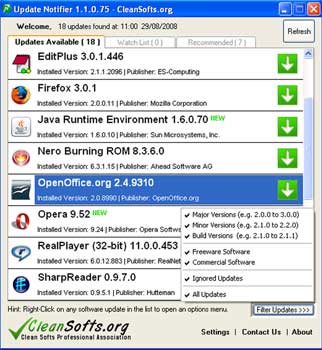
Update Notifier is really handy to quickly check for updates on installed programs. http://cleansofts.org/
Grabit is my favorite. But that's more for pron binaries than actually reading newsgroup posts.mephesta said:anyone have any good suggestions on a good free newzbin reader? After that my freeware desktop is complete! I didn't like using thunderbird as one, I'd prefer a stand alone app.

wolfmat
Confirmed Asshole
Holy shit, I always wanted to write that app. Oh well.yoopoo said:Update Notifier is really handy to quickly check for updates on installed programs. http://cleansofts.org/
http://cleansofts.org/media/notifier/screen.jpg
WHY IS THIS NOT A BUILT IN FEATURE IN WINDOWS?yoopoo said:Update Notifier is really handy to quickly check for updates on installed programs. http://cleansofts.org/
seriously it buggs me that Ubuntu can do this and windows can't without a 3rd party app

then again most windows apps check for updates at startup so maybe it isn't really that necessary...
That's pretty cool, but is there a way to make it go to the program's site instead of cleansofts.org's pages?yoopoo said:Update Notifier is really handy to quickly check for updates on installed programs. http://cleansofts.org/

Rewrite said:I believe you can make GIFs with GIMP.
So if I have a short clip from Youtube I can open in GIMP and create a gif?
Mr. Spinnington
Banned

automagnus
Member
personally I use the combined community codec pack (CCCP) for all my codec needs
http://www.cccp-project.net/
http://www.cccp-project.net/
Okay this is nowhere near anything 'best' but it is free, and I have made it myself and I would really, appreciate feedback since it's my current miniproject I'm working on in my free time.
EpGuides Organizer
It's is alpha stage at most, tons of unimplemented shit but it should be sufficient for simple stuff. Obviously there is lots more to implement. It's pretty self explanatory, input series url from epguides, and two days before a new episode comes out you get a little popup. If you aren't lucky enough to be able to watch these on TV and download them it allows you to rename and move to folder etc etc etc...


EpGuides Organizer
It's is alpha stage at most, tons of unimplemented shit but it should be sufficient for simple stuff. Obviously there is lots more to implement. It's pretty self explanatory, input series url from epguides, and two days before a new episode comes out you get a little popup. If you aren't lucky enough to be able to watch these on TV and download them it allows you to rename and move to folder etc etc etc...
apologies for the shameless plug but I would really appreciate input and it's better than creating a new thread
Schrade
Member
Media Player Classic Home Cinema has no codecs that it installs. They're all built in and also it will be able to use any other DirectShow filters you have installed already.pestul said:Question about MPC-HC.. does it overwrite all your codecs again or are they built in like VLC?
I've got a codec pack already installed and I don't want to jank up the computer.
Personally, I recommend never installing codec packs. Just use MPC-HC and if you need anything more (very very rare if you use MPC-HC) just use ffdshow. For more powerful AVC playback I also recommend CoreAVC or DivX h.264 Decoder.
DefectiveReject
Banned
I have F-secure installed, but always like to have other apps in the background doing similar jobs.
Have Malwarebytes does the job,
I HAD Super Anti Spyware but it seems to give me the blue screen of death in Windows 7100 whenever i run the installer.... anyone know anything similar?
Have Malwarebytes does the job,
I HAD Super Anti Spyware but it seems to give me the blue screen of death in Windows 7100 whenever i run the installer.... anyone know anything similar?
GetGo Download Manager
If you download a lot of flash videos, this helps A LOT. Acts to speed the download considerably. Some issues I've noticed, though, are that it sometimes downloads to your Download folder, even after you've set a different path, and that it will stop the download at 99% and take a few minutes to complete the download (however, these could be an isolated incident, so results may vary). This is essential if you have a weak signal.
However, it downloads the files as .flv, so you will need and FLV Converter or Player to view them.
If you download a lot of flash videos, this helps A LOT. Acts to speed the download considerably. Some issues I've noticed, though, are that it sometimes downloads to your Download folder, even after you've set a different path, and that it will stop the download at 99% and take a few minutes to complete the download (however, these could be an isolated incident, so results may vary). This is essential if you have a weak signal.
However, it downloads the files as .flv, so you will need and FLV Converter or Player to view them.
wolfmat
Confirmed Asshole
Recently installed LMMS - pretty fucking awesome! If you're on Ubuntu and are into making digital music, check it out! It's in your package management.
URL: http://lmms.sourceforge.net/
Other distros / operating systems - not sure. 0.4.4 is also available for Windows, but I haven't tried it yet.
URL: http://lmms.sourceforge.net/
Other distros / operating systems - not sure. 0.4.4 is also available for Windows, but I haven't tried it yet.
- Status
- Not open for further replies.