

-
Hey Guest. Check out your NeoGAF Wrapped 2025 results here!
You are using an out of date browser. It may not display this or other websites correctly.
You should upgrade or use an alternative browser.
You should upgrade or use an alternative browser.
Dying Light PC Performance Thread
- Thread starter batman2million
- Start date
CyberPunked
Member
Anybody with SLI 980s and any of Intel's hexacores? Curious about the performance I'll get.
I'm curious about this too. SLI 980s /w 3930k
Oh look another Nvidia Gameworks title that runs like hot garbage and doesn't even look good.
I'm really worried about Witcher 3 now.
I think it looks really great. Not that great, but still. You can't seriously say that it looks bad. It doesn't look good enough to run like this though.
icecold1983
Member
I think it looks really great. Not that great, but still. You can't seriously say that it looks bad. It doesn't look good enough to run like this though.
runs worse than unity while looking a LOT worse. its pretty horribly optimized.
runs worse than unity while looking a LOT worse. its pretty horribly optimized.
Using which settings? Took a long time for Unity to get to a stable 60 fps on ultra with a 970 (Using FXAA @ 1080p). Unity in the beginning would drop to what? 30fps with those settings.
Robobandit
Member
Anybody with SLI 980s and any of Intel's hexacores? Curious about the performance I'll get.
I have two 980s in SLI, but a 3770k overclocked to 4.4Ghz
I get between 40(usually closer to 50 on the low end) and 70 fps outdoors with the view distance slider set to about 60-65 and everything else maxed out at 2560x1440.
icecold1983
Member
Using which settings? Took a long time for Unity to get to a stable 60 fps on ultra with a 970 (Using FXAA @ 1080p). Unity in the beginning would drop to what? 30fps with those settings.
unity has ran mostly at 60+ fps maxed day 1 if you dont use hardware aa on my system @ 1080p. theres a few rare spots where it might drop to 45 fps in worst case scenarios. performance for me is unchanged by any of the patches. they just fixed bugs and graphical glitches.
unity has ran mostly at 60+ fps maxed day 1 if you dont use hardware aa on my system @ 1080p. theres a few rare spots where it might drop to 45 fps in worst case scenarios. performance for me is unchanged by any of the patches. they just fixed bugs and graphical glitches.
And what kind of system is that?

cripterion
Member
I have two 980s in SLI, but a 3770k overclocked to 4.4Ghz
I get between 40(usually closer to 50 on the low end) and 70 fps outdoors with the view distance slider set to about 60-65 and everything else maxed out at 2560x1440.
What's your framerate running at 1080P?
Downloading the game now, quite refreshing to get a 12GB release instead of the usual 45+GB.
Homunculus
Banned
So, I'm guessing that I shouldn't bother with the PC version then?
i7 950
6GB RAM
GTX 970 4GB (got it for Christmas and now I learn it's not what was advertised.)
Considering many of you appear to have much better rigs than mine, it appears that my PC just won't be able to keep up with this current generation.
i7 950
6GB RAM
GTX 970 4GB (got it for Christmas and now I learn it's not what was advertised.)
Considering many of you appear to have much better rigs than mine, it appears that my PC just won't be able to keep up with this current generation.
icecold1983
Member
And what kind of system is that?
980. cpu is irrelevant because the game is entirely gpu limited
So, I'm guessing that I shouldn't bother with the PC version then?
i7 950
6GB RAM
GTX 970 4GB (got it for Christmas and now I learn it's not what was advertised.)
Considering many of you appear to have much better rigs than mine, it appears that my PC just won't be able to keep up with this current generation.
It has more to do with optimization and the game will still run and look better on your PC than on any console.

Dusktildawn48
Member
Agreed. You'll have better visuals at around the same fpsIt has more to do with optimization and the game will still run and look better on your PC than on any console.
I'm progressing further, now I have arm some car traps and the framerate is definitely nowhere near 60fps locked even with reduced shadows and 75% LOD.
It runs worse than any other games I've played for a very long time. If you want 60fps locked avoid Dying Light on PC. Locking it at 30fps could be an option though, but I'm fine with wildly varying framerate as long as it does not drop below 30.
My average fps is 47 in outdoor areas. I think the game also exhibits a fair amount of stuttering on occasion.
It runs worse than any other games I've played for a very long time. If you want 60fps locked avoid Dying Light on PC. Locking it at 30fps could be an option though, but I'm fine with wildly varying framerate as long as it does not drop below 30.
My average fps is 47 in outdoor areas. I think the game also exhibits a fair amount of stuttering on occasion.
I'm progressing further, now I have arm some car traps and the framerate is definitely nowhere near 60fps locked even with reduced shadows and 75% LOD.
It runs worse than any other games I've played for a very long time. If you want 60fps locked avoid Dying Light on PC. Locking it at 30fps could be an option though, but I'm fine with wildly varying framerate as long as it does not drop below 30.
My average fps is 47 in outdoor areas. I think the game also exhibits a fair amount of stuttering on occasion.
I'm downloading the game. Maybe you could iron a bit the framerate using a 50 hz resolution and RTSS@50 fps.
I'm progressing further, now I have arm some car traps and the framerate is definitely nowhere near 60fps locked even with reduced shadows and 75% LOD.
It runs worse than any other games I've played for a very long time. If you want 60fps locked avoid Dying Light on PC. Locking it at 30fps could be an option though, but I'm fine with wildly varying framerate as long as it does not drop below 30.
My average fps is 47 in outdoor areas. I think the game also exhibits a fair amount of stuttering on occasion.
turn down the draw distance.
5930K@4.4GHz and SLI Titans
I am getting ~40-50 fps while running 4K with everything max except disable AA and Motion Blur. Gsync makes thing smooth with the variable framerate. The game uses ~4.8GB of VRAM and ~5GB of system RAM. SLI profile seems to work well, but for the terrible lighting flickering.
I am getting ~40-50 fps while running 4K with everything max except disable AA and Motion Blur. Gsync makes thing smooth with the variable framerate. The game uses ~4.8GB of VRAM and ~5GB of system RAM. SLI profile seems to work well, but for the terrible lighting flickering.
turn down the draw distance.
Yeah no. 75% is bad enough, I won't go down any lower.
I'll accept 30-60fps instead of something closer to the latter.
Funnily enough Dying Light demonstrates the strengths of the PC platform : you chose your own compromises.
No crashes thus far. Game is stable but optimization has not been a focus that's for sure. I dread to think how it must run the minimum specs.
It's really strange because the beta version supposedly ran much better than this. And while the game still looks good it does not justify such hardware demands.
I could try that but frankly I can deal with how the game runs. It's far from ideal but that will do.I'm downloading the game. Maybe you could iron a bit the framerate using a 50 hz resolution and RTSS@50 fps.
I would certainly not say no to a performance patch.
Dusktildawn48
Member
Seems my vram is maxing at 3561. Guess that's the 970 vram problem everyone is talking about?
Eh, someone posted this on the steam forums:
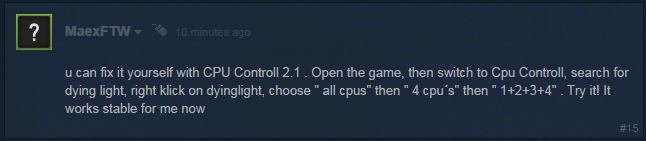
Giving it a shot now, will report back later...
EDIT: Can't get the program to work for me =\ Hope it helps someone here...
Worth reposting for the lulz:
I actually got the program to run with Dying Light by turning off hyperthreading (the program apparently doesn't like it) in Dying Light before it starts by creating a shortcut with the proper hexadecimal set to turn off the extra threads before running the game. The results? Loss of performance by quite a bit. Lessons learned? Stop listening into shit posted on the steam forums T_T
Hope I made someone laugh for the day at my foolishness

Yeah no. 75% is bad enough, I won't go down any lower.
I'll accept 30-60fps instead of something closer to the latter.
Funnily enough Dying Light demonstrates the strengths of the PC platform : you chose your own compromises.
No crashes thus far. Game is stable but optimization has not been a focus that's for sure. I dread to think how it must run the minimum specs.
It's really strange because the beta version supposedly ran much better than this. And while the game still looks good it does not justify such hardware demands.
I could try that but frankly I can deal with how the game runs. It's far from ideal but that will do.
I would certainly not say no to a performance patch.
"bad enough"?
You realize all it does is some LOD right? At the speed you move at in the game, it barely makes a difference. But hey, suit yourself *shrug*
Btw something I noticed is that when I first start the game, it will sometimes run worse, dropping to like 30fps or so. I then just Alt+Tab once and the game goes back up to 50-60.
No idea if that's just me, but might work for some people.
Poor from what people are saying. Up to 100% on Core 1 while the rest range between 20-30%.What is CPU utilization between cores in this game?
So I have my game running pretty stable now. I turned my view distance down to about 35% and turned shadows to medium and depth of field and motion blur are both turned off. Game is consistently staying above 60 now, lowest i have seen is 50 but nothing below that.
I am running a i7 4770k and a 970.
I am running a i7 4770k and a 970.
So, I'm guessing that I shouldn't bother with the PC version then?
i7 950
6GB RAM
GTX 970 4GB (got it for Christmas and now I learn it's not what was advertised.)
Considering many of you appear to have much better rigs than mine, it appears that my PC just won't be able to keep up with this current generation.
j/k?
A PS4 won't touch the graphics/performance of what even this poorly optimized game can do on your system. So if your rig "can't kepe up with current gen" what's a lowly PS4 gonna do?
Conkerkid11
Member
GTX 970 and an i7 4770k, both at stock, game runs at an average of 60fps with everything maxed at 1080p. V-sync's off, so it occasionally jumps up, and drops.
So many people are eating up what Gaffers are posting in that thread that it's ridiculous. The Vram difference doesn't noticeably impact performance at all.So, I'm guessing that I shouldn't bother with the PC version then?
i7 950
6GB RAM
GTX 970 4GB (got it for Christmas and now I learn it's not what was advertised.)
Considering many of you appear to have much better rigs than mine, it appears that my PC just won't be able to keep up with this current generation.

RadioSupreme
Neo Member
I'm guessing a GTX 770 2GB won't cut it going forward eh!
Yeah, cpu core 1 gets major usage, the rest not so much. 4770k
Decided to limit framerate to 45 with RTSS and use 2560x1440 (though it looked decent at 1080p but my GPU wasn't getting much of a workout - 780ti), just had to take the draw distance slider down quite a bit (like 30-40%), don't really notice too much tbh.
Plays smooth enough now, occasionally when a special zombie drops down on you or something loads quick it will freeze for a second or so, might be going over vram, otherwise it's okay now.
Been having a lot of fun last 3-4hours.
Decided to limit framerate to 45 with RTSS and use 2560x1440 (though it looked decent at 1080p but my GPU wasn't getting much of a workout - 780ti), just had to take the draw distance slider down quite a bit (like 30-40%), don't really notice too much tbh.
Plays smooth enough now, occasionally when a special zombie drops down on you or something loads quick it will freeze for a second or so, might be going over vram, otherwise it's okay now.
Been having a lot of fun last 3-4hours.
Just imgur links and taken with FRAPS but I don't really want to spend too much time on this:
So,yeah that's draw distance and it's effects on FPS on my i5 2500k @ 4.6ghz.
Again, all other graphics options do nothing to my FPS cause my 970 is only used 70% anyway.
I'm playing with 0% draw distance and notice nothing eventhough I am usually quite sensitive to draw distance but the game keeps you focused on things much closer to you anyway.
Game at 0% draw distance and 60fps

50% draw distance and 50-60fps

100% draw distance and 35-46 fps

So,yeah that's draw distance and it's effects on FPS on my i5 2500k @ 4.6ghz.
Again, all other graphics options do nothing to my FPS cause my 970 is only used 70% anyway.
I'm playing with 0% draw distance and notice nothing eventhough I am usually quite sensitive to draw distance but the game keeps you focused on things much closer to you anyway.
Super poor. 1 core overloaded, the rest 5-10%. I assume this is the cause of the sometimes very nasty stuttering experienced. Far Cry 4 hammers one of my core but it does not stutter like this.What is CPU utilization between cores in this game?
LOD has a very noticeable impact on the visuals, and pop-in rears its ugly head even when set to 100. I know I could probably get more frames by dialing down this setting but to me it's not worth it. Actually I even set it higher (80) just because."bad enough"?
You realize all it does is some LOD right? At the speed you move at in the game, it barely makes a difference. But hey, suit yourself *shrug*
Btw something I noticed is that when I first start the game, it will sometimes run worse, dropping to like 30fps or so. I then just Alt+Tab once and the game goes back up to 50-60.
No idea if that's just me, but might work for some people.
On my system every other cores aside from the first one are barely fed jobs at all.Poor from what people are saying. Up to 100% on Core 1 while the rest range between 20-30%.
Yeah, we know DirectX 11 is not the most multithreading-friendly API on the market but I've seen other complex games scaling superbly (AC Unity comes to mind).
Will Techland ever adress those problems ? I can only hope.
As it stands the game is totally playable (at least by my definition of playable) but it's not a well optimized game by any stretch.
Just imgur links and taken with FRAPS but I don't really want to spend too much time on this:
So,yeah that's draw distance and it's effects on FPS on my i5 2500k @ 4.6ghz.
Again, all other graphics options do nothing to my FPS cause my 970 is only used 70% anyway.
I'm playing with 0% draw distance and notice nothing eventhough I am usually quite sensitive to draw distance but the game keeps you focused on things much closer to you anyway.
Are you getting a locked 60 at all times with 0% draw distance?
Are you getting a locked 60 at all times with 0% draw distance?
i'd say 2/3rd of the time I get 60 or maybe 57 and in the rest it goes down to 53

5930K@4.4GHz
What...What magic is this ? All your cores are used even though the core 1 is maxed.
Unfortunately it's not as rosy on my end.
Snoogans2you
Neo Member
I'm running an i7 4790k @ 4.0GHz, 16GB RAM, GTX 980, @ 1080p.
The fact that I have to turn down shadows to Medium, put the draw distance to almost 0%, disable Anti Aliasing and STILL get fps drops from 75-80 down to 30 when looking at certain objects is pretty disappointing.
The fact that I have to turn down shadows to Medium, put the draw distance to almost 0%, disable Anti Aliasing and STILL get fps drops from 75-80 down to 30 when looking at certain objects is pretty disappointing.
5930K@4.4GHz
That fucking chromatic aberration..
Is it possible to disable via options or ini tweaks?

deeptech
Member
I'm running an i7 4790k @ 4.0GHz, 16GB RAM, GTX 980, @ 1080p.
The fact that I have to turn down shadows to Medium, put the draw distance to almost 0%, disable Anti Aliasing and STILL get fps drops from 75-80 down to 30 when looking at certain objects is pretty disappointing.
with that system , it's pretty sad... i'm glad i didn't bothered with it

Peterthumpa
Member
Dude, I'm not sure if you realize it or not, but you have a freaking GTX 970 and an i7 processor. Your rig is considered high end. Very high end.So, I'm guessing that I shouldn't bother with the PC version then?
i7 950
6GB RAM
GTX 970 4GB (got it for Christmas and now I learn it's not what was advertised.)
Considering many of you appear to have much better rigs than mine, it appears that my PC just won't be able to keep up with this current generation.
has anyone tried locking this to 30 fps? i know that should be easy enough for most of the set ups in here but I'm more worried about frame timing/stutter. Does the game stutter?
yeah, i'm also curious if the game feels smooth when locked at 30.
5930K@4.4GHz
Except for 100% CPU on first core this doesnt seems bad. Seems like something they can fix, thanks
Dat CA though lol
Can you turn the CA off? Please tell me that's optional.
I was just about to ask this. The abomination known as CA returns again...
I have an AMD card but I read the Nvidia performance guide for this game and goddamn @ that view distance performance hit....

Didn't even notice it yet due to bright light flickering issue. But, yeah, I also hate chromatic aberration. No option to turn it off in the via game options. Don't know where the ini file is located.That fucking chromatic aberration..
Is it possible to disable via options or ini tweaks?
ToastyBanana
Member
Dude, I'm not sure if you realize it or not, but you have a freaking GTX 970 and an i7 processor. Your rig is considered high end. Very high end.
To be fair that's an older Nehalem i7 from 2009-ish.
Dusktildawn48
Member
Thought that was Just me.the environment shakes and sort of, vibrates when using sli for me.
doniewhalberg
Member
Just to add to the pile, specs are GTX 770 2gb, i5-4670 (no K), 8gb RAM, windows 8. To get 1080p/60 fps outside in the streets I've got the draw distance turned right down, medium shadow and world textures with high foliage. Both Nvidia options turned off, SSAO, motion blur and AA is on. FOV is whatever default is. My GPU sounds like it's under big load to get 60 out of these settings though, so I wouldn't be surprised if I come back saying I encountered drops in busy encounters. Game is fine looking, probably not impressive enough to meet the workout it's giving my PC, but it's techland, I didn't expect much else.
On the game, it seems cool, pretty much a game that is what it is. It's dead island with parkour, to give you options and verticality to combat the night time aggresion. Would like an option to get rid of CA and grain.
On the game, it seems cool, pretty much a game that is what it is. It's dead island with parkour, to give you options and verticality to combat the night time aggresion. Would like an option to get rid of CA and grain.