• Hey Guest. Check out your NeoGAF Wrapped 2025 results here!

Dying Light PC Performance Thread

Just to add to the pile, specs are GTX 770 2gb, i5-4670 (no K), 8gb RAM, windows 8. To get 1080p/60 fps outside in the streets I've got the draw distance turned right down, medium shadow and world textures with high foliage. Both Nvidia options turned off, SSAO, motion blur and AA is on. FOV is whatever default is. My GPU sounds like it's under big load to get 60 out of these settings though, so I wouldn't be surprised if I come back saying I encountered drops in busy encounters. Game is fine looking, probably not impressive enough to meet the workout it's giving my PC, but it's techland, I didn't expect much else.

On the game, it seems cool, pretty much a game that is what it is. It's dead island with parkour, to give you options and verticality to combat the night time aggresion. Would like an option to get rid of CA and grain.

oh god yes, someone figure out how to disable grain. dont mind it in movies, hate it in games.
 
i5 4670
8gb
win 7 sp1
GTX 970

All maxed out @ 1080P:

60 fps indoors, 40-45 fps outdoors.

Tuning down Depth of Field = 50-60 fps outdoors.
 
anyone try this?

"Open task manager and change dyinglight.exe priority to high, that gave me a stable 60 on max".

some dudes on the Steam forums confirmed it helped them.
 
i5 2500K, 8GB RAM, NVidia 970, playing at 1440p maxed out with the NVidia enhancements turned off, default draw distance, I also did the CPU control thing FWIW.

Not a great port, framerate is smooth but there is microstuttering which is annoying. there's also pop-in in the strangest places

Not dealbreakers for me as I'm still having fun though.

edit: Just came across knitoe's screenshot, lol is that what chromatic aberration is? First time I saw it in the game I thought I was just REALLY tired and my eyesight was spazzing out (it's midnight here)
 
Never buying PC games day 1 post 2014. Sucks to do that but I was burned so bad in 2014 by gaming that I've dramatically altered my purchasing habits.

Has anybody tried this game with a Gsync monitor? Curious how it performs.
 
Never buying PC games day 1 anymore. Sucks to do that but I was burned so bad in 2014 by gaming that I've dramatically altered my purchasing habits.

Has anybody tried this game with a Gsync monitor? Curious how it performs.

It is funny that you mentioned 2014. I have to agree 2014 was year of the horrible port and hours of adjustments to get day one games to play decently... I am still part of the PC for life crowd but last year was rough.
 
gtx 970
i7 870 @ 3,3 ghz
8 GB ram

Everything on high, 1080p, view distance around 40 %

Game doesn't run great. Mostly around 30-40 fps with frequent drops to 26. Lack of effective AA makes the game kinda ugly too :(
Also, afterburner says that CPU 1 is constantly being used 100 %, but cpu 2-4 are around 50 %? is this normal?
 
Also, afterburner says that CPU 1 is constantly being used 100 %, but cpu 2-4 are around 50 %? is this normal?

Yes, even on high end cpu's this game is almost totally cpu bottlenecked unfortunately. The draw distance setting is the main thing that effects framerate.
 
680 here, after the tutorial (when you leave the main HQ building) my FPS went down to around 40fps. Performance is all over the place even though I have a few things toned down.

Trying this new driver though, it's supposed to be for Dying Light.
 
Never buying PC games day 1 anymore. Sucks to do that but I was burned so bad in 2014 by gaming that I've dramatically altered my purchasing habits.

Has anybody tried this game with a Gsync monitor? Curious how it performs.

I'm with you bro. i was always a day one guy. not anymore.
 
Windows 7
i7-4770k @4.2GHz (HT enabled)
GTX 770 4GB
8GB RAM
Samsung 850 PRO SSD

I just finished the tutorial and arrived outside. I took a screenshot with the Afterburner overlay enabled, along with my in-game and Nvidia Inspector settings (can't be seen, but "Shadercache" is off).

I'm not sure if the game becomes more demanding further in, but it's basically what I expected performance-wise; frames between 40-60, depending on the scene, and around 40-45 average.

One thing I did notice is this game has double-buffer vsync. Hitting Windows + L key while the game is running, and then going back in seems to enable triple-buffering. Before that, I was getting a 30 fps lock with vsync enabled.

Screens below:

EDIT: bumping down "Shadow Map Size" from "High" to "Medium" brings my average frames to 55-60 in the same area, with 20-25% less GPU usage and very little visual trade-off in my opinion.

ReOjqBG.jpg


GEj3SOY.jpg


lgR9fu8.jpg


ZxVFwTF.png
 
The FOV impacts performance pretty severely. Went from using a modifier of +16 to the default +0. Using three steps in the draw distance slider and everything else at max @ 1080P I now get 58fps as a min running around just outside the tower instead of 48 with the higher FOV. Sucks while being in front of a monitor, but playing on a television this would be ideal.
 
Morning all,

Contrary to reports there is SLI support, and to get it you need to update to driver 347.25, then in GeForce Experience 'Check For Updates' to download the new profile.

If you're using GeForce Experience 2.2.2 you don't have to tick any of the boxes on the Preferences tab. If you're on an older version you need to click the SLI profiles checkbox first.

If you wish to manually verify that the update has occurred, the profile bits will be 0x080000F5 after the update.

In other news, I've published my Dying Light Graphics & Performance Guide. All the usual goodies are included, and in this piece we delve into CPU bottlenecking. An update to the article will happen later today with performance recommendations for a variety of GPUs.

Many thanks, and best regards,

Andy
Also i remebered that HBAO+ supposed to be faster than traditional SSAO, but not in this game strangely
 
I've got an i7 and a gtx970 and I'm experiencing the same drop in frames after the tutorial as a lot of other people.

It has to be a bad patch, since plenty of people playing with less powerful rigs pre-release weren't experiencing this.
 
Looking through the thread, I'm assuming I'm not going to get great performance with an AMD card. I've got an i5-4690k@4.5 ghz and 7950 @1000/1400. If anyone has a similar setup and can let me know what the performance is like that would be great. Mostly want to avoid any dips below 30, I'd be ok if I can hit 40-50 fps avg.
 
This game really eats system RAM. Several times Windows warns about the amount of free RAM getting low. I have 8GB which is the recommended amount. Memory leaks?
 
This game really eats system RAM. Several times Windows warns about the amount of free RAM getting low. I have 8GB which is the recommended amount. Memory leaks?

Have you checked task manager to see if its the dying light process using all that ram? If the dying light process isn't using all the ram another thing to check is the 'non paged pool' memory usage, if npp is using all the memory that can indicate a driver level mem leak.
 
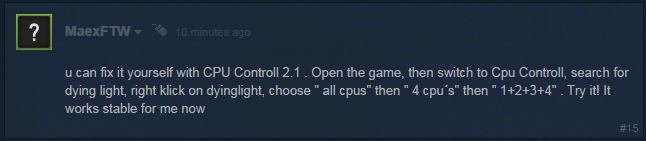
Eh, someone posted this on the steam forums:

f3dca219b4013c606c02cf625fd5ff09.png


Giving it a shot now, will report back later...

EDIT: Can't get the program to work for me =\ Hope it helps someone here...

Damn, this worked for me. Fps is way more stable now and stopped dropping out of nowhere on some areas or during a conversation with a npc outdoor.
 
Originally Posted by AndyBNV

Morning all,

Contrary to reports there is SLI support, and to get it you need to update to driver 347.25, then in GeForce Experience 'Check For Updates' to download the new profile.

If you're using GeForce Experience 2.2.2 you don't have to tick any of the boxes on the Preferences tab. If you're on an older version you need to click the SLI profiles checkbox first.

If you wish to manually verify that the update has occurred, the profile bits will be 0x080000F5 after the update.

In other news, I've published my Dying Light Graphics & Performance Guide. All the usual goodies are included, and in this piece we delve into CPU bottlenecking. An update to the article will happen later today with performance recommendations for a variety of GPUs.

Many thanks, and best regards,

Andy
Weird. My GeForce Experience is 2.2.3 and the 'Check For Updates' didn't update my profile SLI bits. I had to manually change it to 0x080000F5. Now, the light flickering has been fixed.
 
Have you checked task manager to see if its the dying light process using all that ram? If the dying light process isn't using all the ram another thing to check is the 'non paged pool' memory usage, if npp is using all the memory that can indicate a driver level mem leak.

Yeah it's using most of it. ~4.3-4.5GB
 
Core i5 4440 with 3GB 7950 overclocked to 1GHz getting 30fps on the ground with Nvidia options and AA turned off, shadows to medium and draw distance down a few notches.
 
This cpu behavior override fixes are really cool and all but can we get a permanent solution that we don't have to apply everytime we open the game?

One could thing Techland would have learnt from their mistakes, how naive...
 
Man, this game really blasts through ram. 8gb system, windows gave me a warning when it hit 4.5gig, had to close muh super memory efficient chrome :(

Was running at a steady 60 at 1080p on a 3570k + 970, draw distance 50, fov +3, rest maxed. Started chugging at the end in a way that suggested insufficient ram.
 
i7 3770k with MSI GTX 970 4G and 8GB RAM.
Currently running +60 fps indoors and drops to 30-50 outdoors with everything maxed out, AA off.
 
Never a good sign when people with vastly more powerful cards than me complain about poor performance. :lol

its weird, im down at street level where people say is the worst performance, i run around there for a while and im sitting bt 80-100 fps, then out of nowhere it just drops to below 60.

4790k@ 4.5
SLI 970s.

i just dont get it
 
This game really eats system RAM. Several times Windows warns about the amount of free RAM getting low. I have 8GB which is the recommended amount. Memory leaks?

Use RAM Map to kill any RAM that Windows has sitting in standby (Empty -> Empty standby list, then File -> Refresh to confirm [you should see that your "Unused" figure is significantly higher). The OS is supposed to free it up when programs demand it, but in my experience this is exceedingly unreliable.

Edit: I should note that Win7 is my OS of choice. Win8(.1) may be better about RAM allocation.
 
In what universe do people think Chromatic Aberration looks good? Bizzarro universe, right?

I mean. it's right there in the name Aberration....
 
Never buying PC games day 1 post 2014. Sucks to do that but I was burned so bad in 2014 by gaming that I've dramatically altered my purchasing habits.

Has anybody tried this game with a Gsync monitor? Curious how it performs.

Works great with Gsync. I am not having any issues with this game at all. I have everything ON(Except Vsync obviously) and on HIGH settings @ 1080p/144hz. View distance was left at default setting(middle).

I'm having a lot of fun with the game so far. I just completed the prologue.

PC Specs -

i7 3770k @ 4.2ghz
8 gig o' memory @ 1866mhz
GTX 970 G1 Gaming 1418 Boost
Game is installed on a Samsung 840 Pro SSD
Asus modded Gsync monitor - 1920x1080 @ 144hz
 
4770K @4GHz
GTX970 SLI @1350Mhz

I get around 30fps outdoors maxed out in 2560x1080 with massive stuttering. Any fix for that?

Edit: Might have to do with the VRAM? High textures results in 3.5-4GB VRAM usage.
 
Top Bottom