• Hey Guest. Check out your NeoGAF Wrapped 2025 results here!

Eee Pad Transformer - Tablet/Netbook super device

Status
Not open for further replies.
BertramCooper said:
I'm seriously considering picking one of these up.

Any compelling reasons to go with this over an iPad? Help me decide, GAF.
Well I don't think anyone here owns both, so any opinions will be offered devoid of the other perspective.

I can speak for the iPad. It's apps are what that device is all about. The OS "gets out of the way" if you will. No tons of tweaking available actually allows less attention to be placed there. As such it is fortunate that it has easily the best selection of free and paid apps on any device, anywhere. Show me a good application on the Android market and I'll show you 3 just like it on the iOS market with better features and designed with your specific device in mind. It's the tailored suit experience. And any man here who has an Android device and an iOS device knows that iOS seems to have a 100:1 advantage in game selection.

As for power and performance, it is well known to perform as good as or better than its competitors as released to date. You'll not be left waiting for applications to load. Crashing of applications is exceedingly rare (iPad 2). Crashing of the OS just about never happens. Compare that with the testimonies of 3.0 and 3.1 in this very thread. Android has some ways to go yet with regard to stability.

As far as peripherals go, the iPad doesn't have the nice keyboard attachment, but you can use virtually any bluetooth keyboard with it. I bought a regular Apple BT Keyboard (sans the number pad) for $40 on eBay. Does the job just fine. You may be disappointed to find that you need to buy adapters to support your HDTV and SD cards. I picked up an adapter for my television and it works well. I didn't pick up the SD adapter, as I did not have need of one.

Lastly, accessories. Nobody here would dispute the fact that the iPad has enough 3rd party accessories to boggle the mind. Want cases? There are hundreds to choose from. Skins? dozens. Specialized messenger bags, satchels and such? hundreds.

A potential con is that you'll need to use iTunes to add any music, photos or videos on your computers. Or, that's the path of least resistance. This isn't a problem for me, as I find iTunes easy to use quickly. If you haven't been using it, you may find it takes time to adapt to. But such is true with any software that you are just starting to use. Also, there is no flash support...though I find that rarely to be an issue since most websites have reduced their use of flash or have H.264-encoded videos. Sites like ESPN will always work for you.

The choice is yours. If you want the best selection of applications to take advantage of your hardware, peripherals and accessories, the iPad is a very safe choice...and one already proven to be solid. I'm sure the Transformer will be an excellent choice too, should you go that route. Built-in HDMI and USB support as well as mouse support are great things to have if you need them.
 
Dreams-Visions said:
Well I don't think anyone here owns both, so any opinions will be offered devoid of the other perspective.

I can speak for the iPad. It's apps are what that device is all about. The OS "gets out of the way" if you will. No tons of tweaking available actually allows less attention to be placed there. As such it is fortunate that it has easily the best selection of free and paid apps on any device, anywhere. Show me a good application on the Android market and I'll show you 3 just like it on the iOS market with better features and designed with your specific device in mind. It's the tailored suit experience. And any man here who has an Android device and an iOS device knows that iOS seems to have a 100:1 advantage in game selection.

As for power and performance, it is well known to perform as good as or better than its competitors as released to date. You'll not be left waiting for applications to load. Crashing of applications is exceedingly rare (iPad 2). Crashing of the OS just about never happens. Compare that with the testimonies of 3.0 and 3.1 in this very thread. Android has some ways to go yet with regard to stability.

As far as peripherals go, the iPad doesn't have the nice keyboard attachment, but you can use virtually any bluetooth keyboard with it. I bought a regular Apple BT Keyboard (sans the number pad) for $40 on eBay. Does the job just fine. You may be disappointed to find that you need to buy adapters to support your HDTV and SD cards. I picked up an adapter for my television and it works well. I didn't pick up the SD adapter, as I did not have need of one.

Lastly, accessories. Nobody here would dispute the fact that the iPad has enough 3rd party accessories to boggle the mind. Want cases? There are hundreds to choose from. Skins? dozens. Specialized messenger bags, satchels and such? hundreds.

A potential con is that you'll need to use iTunes to add any music, photos or videos on your computers. Or, that's the path of least resistance. This isn't a problem for me, as I find iTunes easy to use quickly. If you haven't been using it, you may find it takes time to adapt to. But such is true with any software that you are just starting to use. Also, there is no flash support...though I find that rarely to be an issue since most websites have reduced their use of flash or have H.264-encoded videos. Sites like ESPN will always work for you.

The choice is yours. If you want the best selection of applications to take advantage of your hardware, peripherals and accessories, the iPad is a very safe choice...and one already proven to be solid. I'm sure the Transformer will be an excellent choice too, should you go that route. Built-in HDMI and USB support as well as mouse support are great things to have if you need them.


Pretty damn spot on. However I'd like to add that being all about the apps, can be both a blessing and a curse. As a xoom owner, for the vast majority of what I use my tablet for, I dont remember the last time I even NEEDED an app opened. The strength of Android is sorta the opposite of ios; the operating system itself. The xoom is turned on, I see my latest facebook feed, android and engadget news, gmail inbox, corporate inbox and calendar. I also have the persistant notification system letting me know if any of those things are updated in any way while browse on a superior platform (sorry, but even the ipad 2 lags behind in web browsing speed and content delivery).

Of course, those ipad 2 apps more than make up for the shortcoming on that side. I would say that even though you have focus on one app at a time (rather than a screen of widgets), that singular session is usually superior to what you get on honeycomb (save for a few google specific applications).
 
I can't get my battery charger to work, I connect the outlet piece, plug in the USB piece and then the USB wire and no charging signal from the pad.

Is there some specific trick between the outlet connector and the USB connector?

Edit: NVM, had to apply pressume to snap the two pieces into place, charging now.
 
Dreams-Visions said:
Well I don't think anyone here owns both, so any opinions will be offered devoid of the other perspective.

I can speak for the iPad. It's apps are what that device is all about. The OS "gets out of the way" if you will. No tons of tweaking available actually allows less attention to be placed there. As such it is fortunate that it has easily the best selection of free and paid apps on any device, anywhere. Show me a good application on the Android market and I'll show you 3 just like it on the iOS market with better features and designed with your specific device in mind. It's the tailored suit experience. And any man here who has an Android device and an iOS device knows that iOS seems to have a 100:1 advantage in game selection.

As for power and performance, it is well known to perform as good as or better than its competitors as released to date. You'll not be left waiting for applications to load. Crashing of applications is exceedingly rare (iPad 2). Crashing of the OS just about never happens. Compare that with the testimonies of 3.0 and 3.1 in this very thread. Android has some ways to go yet with regard to stability.

As far as peripherals go, the iPad doesn't have the nice keyboard attachment, but you can use virtually any bluetooth keyboard with it. I bought a regular Apple BT Keyboard (sans the number pad) for $40 on eBay. Does the job just fine. You may be disappointed to find that you need to buy adapters to support your HDTV and SD cards. I picked up an adapter for my television and it works well. I didn't pick up the SD adapter, as I did not have need of one.

Lastly, accessories. Nobody here would dispute the fact that the iPad has enough 3rd party accessories to boggle the mind. Want cases? There are hundreds to choose from. Skins? dozens. Specialized messenger bags, satchels and such? hundreds.

A potential con is that you'll need to use iTunes to add any music, photos or videos on your computers. Or, that's the path of least resistance. This isn't a problem for me, as I find iTunes easy to use quickly. If you haven't been using it, you may find it takes time to adapt to. But such is true with any software that you are just starting to use. Also, there is no flash support...though I find that rarely to be an issue since most websites have reduced their use of flash or have H.264-encoded videos. Sites like ESPN will always work for you.

The choice is yours. If you want the best selection of applications to take advantage of your hardware, peripherals and accessories, the iPad is a very safe choice...and one already proven to be solid. I'm sure the Transformer will be an excellent choice too, should you go that route. Built-in HDMI and USB support as well as mouse support are great things to have if you need them.
Thanks for the response.

Honestly, I'm pretty sure I'm going to end up using it more like a netbook than an app machine. It appears that Android tablets are much better at web browsing than the iPad, so in that respect, I'm leaning toward the Eee Pad.

I'll be honest - the plethora of accessories for the iPad is a major plus. A few of my coworkers just got the iPad 2. They got the smart covers with them, and those things are super nifty.

But still, I like the versatility that Android tablets seem to offer. It just seems like the Android tablets are ever-so-slightly closer to a laptop than the iPad.
 
If anyone is in the Bay Area and wants to just look/try it out, Sunnyvale Fry's has it on display. Got to play with it for a few minutes and I'm pretty pleased with how it felt so far. It felt surprisingly a lot lighter than the Xoom even though specs say it's not.
 
I have been meaning to ask...

How is video playback on this? Codecs? Does it support Divx? AVI etc?

I think it supports flash so Megavideo would work I guess?
 
Marty Chinn said:
If anyone is in the Bay Area and wants to just look/try it out, Sunnyvale Fry's has it on display. Got to play with it for a few minutes and I'm pretty pleased with how it felt so far. It felt surprisingly a lot lighter than the Xoom even though specs say it's not.


I'm not sure what it is about the xoom, but on paper it really isn't much heavier than even the ipad 2. Holding both in my hands (laid flat, open palm), there's almost no perceivable difference.

Then when I actually start to use the xoom for a few minutes, it's like, "holy shit is thing uncomfortable". I then lay it on something, or myself.
 
Unfortunately my dock does not work.

The mouse pad works fine (and charging), but the keys don't do anything. I spoke with ASUS and they recommended an RMA.


What sucks is we tried a wipe to see if that helped. No go. All it did was force me to re-setup everything again :p
 
Having to re-install everything did teach me one benefit of the Amazon Appstore versus the Android Market ...

While Google may track all of your purchases, it does not track free downloads. I had to manually find them all. The Amazon Appsore on the other hand did track everything. Guess I'll be using that more.
 
Google does keep track, there's a little delay when you do a wipe and reactivation though. You could have also done to the website and installed from there, they should all he listed there.
 
Interesting ... you're right ... my stuff is listed on the site.


I wonder what the rationale is for paid apps instantly showing up yet free ones not (on the device itself). That's not very intuitive, and I can't really wrap my head around why there would be a difference?
 
I don't think it's intentional, I've run into it randomly when reinstalling roms on my phone, it doesn't always happen. Something something lack of polish. =/
 
I see.

One thing I will say about ASUS, their customer service is quite good. 24/7 ... they actually have a 0 pixel issue guarantee for 30 days ... etc.
 
Anyone know if there is officially a 3G one of this coming out? If it is soon enough I will wait for that, otherwise...I may bite the bullet and order one of these this weekend (gift to myself for my B-Day)
 
Just got mine I also own a ipad 1 and ipad 2 so I can give you a comparison which maybe of interest.

iPad has better apps, add ons (cases etc) and the ipad 2 (not ipad 1) feels a bit faster.

Asus Transformer has a better screen, has flash, is much more customizable (I just changed out the virtual keyboard because the one it came with sucks, it was easy, thanks for the heads up on thumbs earlier in the thread, MUCH better).

My dock comes Friday so we will see how that feels, my hunch is the transformer will become my goto business tablet and my ipad 2 will become my entertainment tablet. Not sure yet though.

Oh, no netflix sucks, hope that comes soon.

edit: no fucking iTunes or bullshit required, yay!

edit2: I really want to figure out how to program on this thing.
 
rodvik said:
Just got mine I also own a ipad 1 and ipad 2 so I can give you a comparison which maybe of interest.

iPad has better apps, add ons (cases etc) and the ipad 2 (not ipad 1) feels a bit faster.

Asus Transformer has a better screen, has flash, is much more customizable (I just changed out the virtual keyboard because the one it came with sucks, it was easy, thanks for the heads up on thumbs earlier in the thread, MUCH better).

My dock comes Friday so we will see how that feels, my hunch is the transformer will become my goto business tablet and my ipad 2 will become my entertainment tablet. Not sure yet though.

Oh, no netflix sucks, hope that comes soon.

edit: no fucking iTunes or bullshit required, yay!

edit2: I really want to figure out how to program on this thing.

Can't you use the Netflix app that came out if you spoof the ID of the device or something like that?
 
Marty Chinn said:
Can't you use the Netflix app that came out if you spoof the ID of the device or something like that?

on XDAdev it seems unclear whether folks can do it or not. Not sure I am willing to hack the thing yet either, I dont want to mess it up at least until I have owned it for a while.

also, this charger looks very sketchy. It seems to get hot, means I wont be leaving this thing overnight charging like I do with an ipad. Thats a bummer.
 
You don't need to root to run the hacked Netflix app - just sideload it. That said, it doesn't run on the transformer as yet.

Netflix is working on getting it up for tegra 2 systems though, so even if a hacked method doesn't show itself an official release shouldn't be far off
 
Man, it's getting hard to waiting to buy this thing. I see it all the time Fry's readily available and I keep holding back on pulling the trigger. Stupid WWDC is taking forever to come.
 
Raistlin said:
You don't need to root to run the hacked Netflix app - just sideload it. That said, it doesn't run on the transformer as yet.

Netflix is working on getting it up for tegra 2 systems though, so even if a hacked method doesn't show itself an official release shouldn't be far off

Thanks. Hey you had any issues with the charger? How do you charge? Leave it plugged in? The thing just feels so flimsy, then again so did my EEE PC one and thats still going strong after a few years so maybe I shouldnt worry...
 
rodvik said:
Thanks. Hey you had any issues with the charger? How do you charge? Leave it plugged in? The thing just feels so flimsy, then again so did my EEE PC one and thats still going strong after a few years so maybe I shouldnt worry...
Charger seems fine though I do wish it clicked in more securely. Does seem a little shifty but works without issue

Once it's running low I plug it in for a few hours to hit 100% ... and that's all there is to it for me
 
Raistlin said:
Charger seems fine though I do wish it clicked in more securely. Does seem a little shifty but works without issue

Once it's running low I plug it in for a few hours to hit 100% ... and that's all there is to it for me

Cool thanks. This really is a nice device. I am now enjoying all the apps. Feels good, a lot more indie/hack stuff than the app store. I like that.
 
Marty Chinn said:
Hehe, how are you enjoying it so far? Any regrets? Quirks that annoy you?
Other than the occasional instability, I'm loving it thus far. I'm under the impression 3.1 should improve that a lot so I'm not too worried. Obviously my fail dock sucks but that's just a manufacturing error that doesn't appear to be the norm


There are some concerns I have regarding high end Android apps but that isn't a criticism on the transformer. As a product I'm actually quite ecstatic with it. For the money I'm actually amazed.


Probably the only real quirk is that the default browser doesn't recognize spoiler tags. You can't easily read the text lol
 
Raistlin said:
Other than the occasional instability, I'm loving it thus far. I'm under the impression 3.1 should improve that a lot so I'm not too worried. Obviously my fail dock sucks but that's just a manufacturing error that doesn't appear to be the norm


There are some concerns I have regarding high end Android apps but that isn't a criticism on the transformer. As a product I'm actually quite ecstatic with it. For the money I'm actually amazed.


Probably the only real quirk is that the default browser doesn't recognize spoiler tags. You can't easily read the text lol

Sounds good. I've been hesitant on Android since I've never really ownd an Android device so still a bit worried about what I just don't know about the OS. It's probably one of the main reasons I'm still holding out that Apple may actually try to do something interesting with the iPad 2 in iOS5. I at least know the ins and outs of that OS.

As for the spoiler tags, can't you use:

http://www.secondapps.com/neogaf

?
 
Actually yeah you can if you keep the browser user agent as mobile or tablet. It looks okay, I just have it set to console normally for stuff like HBO go, etc. Second apps automatically sendsbyou to the normal gaf site if your configured to console.
 
Raistlin said:
Actually yeah you can if you keep the browser user agent as mobile or tablet. It looks okay, I just have it set to console normally for stuff like HBO go, etc. Second apps automatically sendsbyou to the normal gaf site if your configured to console.

Ah, I used it all the time when I had an iPad at my disposal. Surprisingly it works well at that screen size. Didn't realize it would route you to the main site nor that you had control over the browser mode like that.
 
Yeah I love the customizability of it.

Honestly in console mode I haven't found a large disparity between this and a PC. The browsing capabilities are quite impressive, and only get better with 3.1
 
Mr Pockets said:
I have been meaning to ask...

How is video playback on this? Codecs? Does it support Divx? AVI etc?

I think it supports flash so Megavideo would work I guess?

Megavideo works relatively impressively on my OG Motorola Droid with 2.2, so I don't think you have to be concerned in the Flash arena.

that is.I mean, I don't use megavideo. What were we talking about.
 
cartoon_soldier said:
On keyboard dock now.
Typing using the dock right now.Will take some getting used to, but awesome netbook device it is now.

wooho.


Me too! I really like the feel of the keyboard, very nice indeed. Only negative was I read the lock switch icon wrong so it kept falling out on me 8)

Very nice indeed.
 
Can anyone take a picture of the packaging for the keyboard? Everytime I go to Fry's that supposedly has it, I'm just not sure what I'm looking for and can't find it.
 
Marty Chinn said:
Can anyone take a picture of the packaging for the keyboard? Everytime I go to Fry's that supposedly has it, I'm just not sure what I'm looking for and can't find it.
The box is identical to the tablet's box other than the picture. It's pretty classy looking IMO.
 
Raistlin said:
Yeah I love the customizability of it.

Honestly in console mode I haven't found a large disparity between this and a PC. The browsing capabilities are quite impressive, and only get better with 3.1
Good to hear. Will have to check one of these out.

Do they have any display models set up in the typical big box stores?
 
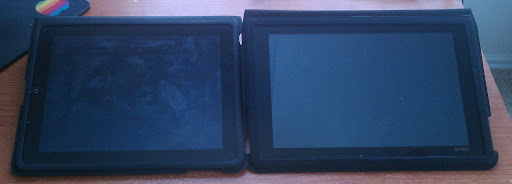
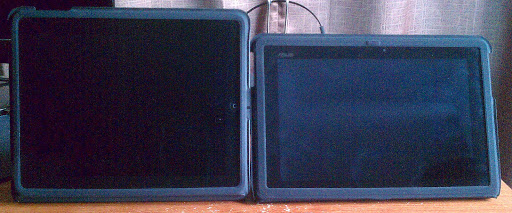
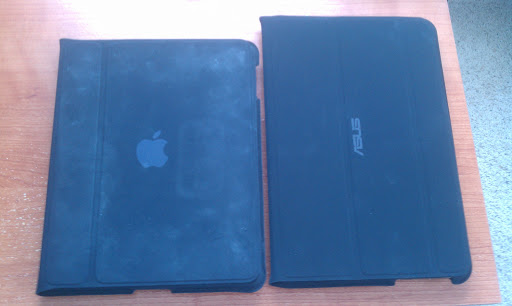
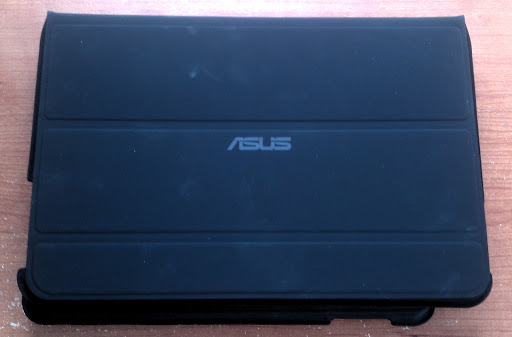
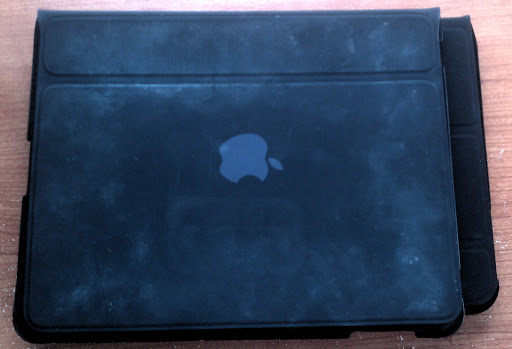
For those interested in the sleeve who might be familiar with the iPad 1 sleeve, here are some pics (click for full size). Sorry about the camera not being all that great.

It's very similar to the iPad 1 case: same texture, same dust collection, same functionality. The material does feel a bit flimsier, but that may be because it's segmented twice on the flap where the iPad case is only once. The typing angle when flat is bigger, which makes for easier typing. When standing, the screen is angled a bit more, which I imagine would be better for watching videos on the plane, as well as much more stable (iPad case falls down if you breathe on it wrong). I always had to rest my iPad at a weird angle to see the screen. Also, it goes without saying that it's much easier to type with this thing than without it. Finally, the only 'large' difference between the two is that the Asus case has velcro both for when it's closed and for when it's acting as a stand. I'm not sure if the velcro will stand the test of time, but so far I like it.

Cons are that there's no opening for the Micro SD card, but if you need quick access, I'm sure an exacto knife would do the job. Also I can tell it's going to grab as much dust as you can see on the cover of my iPad case. There are ways to clean the material, but I haven't cared enough to do it. Oh, and when in keyboard 'mode', the volume buttons are upside down. It'd be nice if Asus or Google would add functionality in the software to flip those physical buttons to match the display depending on how you're holding it.

Overall, it's a bit pricey, but I'm incredibly happy to finally have this after two weeks of waiting.

 
Schlep said:
For those interested in the sleeve who might be familiar with the iPad 1 sleeve, here are some pics (click for full size). Sorry about the camera not being all that great.

It's very similar to the iPad 1 case: same texture, same dust collection, same functionality. The material does feel a bit flimsier, but that may be because it's segmented twice on the flap where the iPad case is only once. The typing angle when flat is bigger, which makes for easier typing. When standing, the screen is angled a bit more, which I imagine would be better for watching videos on the plane, as well as much more stable (iPad case falls down if you breathe on it wrong). I always had to rest my iPad at a weird angle to see the screen. Also, it goes without saying that it's much easier to type with this thing than without it. Finally, the only 'large' difference between the two is that the Asus case has velcro both for when it's closed and for when it's acting as a stand. I'm not sure if the velcro will stand the test of time, but so far I like it.

Cons are that there's no opening for the Micro SD card, but if you need quick access, I'm sure an exacto knife would do the job. Also I can tell it's going to grab as much dust as you can see on the cover of my iPad case. There are ways to clean the material, but I haven't cared enough to do it. Oh, and when in keyboard 'mode', the volume buttons are upside down. It'd be nice if Asus or Google would add functionality in the software to flip those physical buttons to match the display depending on how you're holding it.

Overall, it's a bit pricey, but I'm incredibly happy to finally have this after two weeks of waiting.


That's kinda sucky that it's "upside down" especially since it has a logo. I want something like that buy out of leather.
 
Amazon finally ahs the case instock but I am skeptic about ordering. All the reviews I have read talk about how flimy and cheap it feels for $40. Wish a 3rd party would make a good, solid one for it.
 
Dreams-Visions said:
Well I don't think anyone here owns both, so any opinions will be offered devoid of the other perspective.

I can speak for the iPad. It's apps are what that device is all about. The OS "gets out of the way" if you will. No tons of tweaking available actually allows less attention to be placed there. As such it is fortunate that it has easily the best selection of free and paid apps on any device, anywhere. Show me a good application on the Android market and I'll show you 3 just like it on the iOS market with better features and designed with your specific device in mind. It's the tailored suit experience. And any man here who has an Android device and an iOS device knows that iOS seems to have a 100:1 advantage in game selection.

As for power and performance, it is well known to perform as good as or better than its competitors as released to date. You'll not be left waiting for applications to load. Crashing of applications is exceedingly rare (iPad 2). Crashing of the OS just about never happens. Compare that with the testimonies of 3.0 and 3.1 in this very thread. Android has some ways to go yet with regard to stability.

As far as peripherals go, the iPad doesn't have the nice keyboard attachment, but you can use virtually any bluetooth keyboard with it. I bought a regular Apple BT Keyboard (sans the number pad) for $40 on eBay. Does the job just fine. You may be disappointed to find that you need to buy adapters to support your HDTV and SD cards. I picked up an adapter for my television and it works well. I didn't pick up the SD adapter, as I did not have need of one.

Lastly, accessories. Nobody here would dispute the fact that the iPad has enough 3rd party accessories to boggle the mind. Want cases? There are hundreds to choose from. Skins? dozens. Specialized messenger bags, satchels and such? hundreds.

A potential con is that you'll need to use iTunes to add any music, photos or videos on your computers. Or, that's the path of least resistance. This isn't a problem for me, as I find iTunes easy to use quickly. If you haven't been using it, you may find it takes time to adapt to. But such is true with any software that you are just starting to use. Also, there is no flash support...though I find that rarely to be an issue since most websites have reduced their use of flash or have H.264-encoded videos. Sites like ESPN will always work for you.

The choice is yours. If you want the best selection of applications to take advantage of your hardware, peripherals and accessories, the iPad is a very safe choice...and one already proven to be solid. I'm sure the Transformer will be an excellent choice too, should you go that route. Built-in HDMI and USB support as well as mouse support are great things to have if you need them.
I'd agree with this. The only thing I can think to add is how you use each device. If you're looking for something that bridges the gap between desktop and laptop, a honeycomb tablet might fit the bill better. I said this in another thread, but ios in its current form is very good....for phones and other small screen device. But honestly it holds the Ipad back, the way information is presented and how you acquire it is nno different than on the iPhone. Sure thats great for familiarity but as for usability it can be drastically improved. As a main examples, notifications are ridiculously horrible, if you get one, you have to stop what you're doing and dismiss it. If you get multiple notifications only the latest one is shown, you have to exit out your app and open the app in question to see what's going on. In that respect Google was every smart to use their phone os but create a UI that's clearly made for tablets in mind. If you get an email on your I pad, you just see a badge number on the email app icon, no context. On honeycomb you get enough information that doesn't intrude on what you're doing. Another thing some don't see as a big deal but it really is, snapshots of your multitasking. With the increased real estate Apple really needs go include snapshots to go along with the app icon, an icon is arbitrary, it gives tthe user no visual information.

My last issue is the rows upon rows of icons, but that's far less of an issue than the aforementioned in my opinion. Sorry for any spelling /grammar mistakes, auto correct is auto
 
Status
Not open for further replies.
Top Bottom