• Hey Guest. Check out your NeoGAF Wrapped 2025 results here!

I'm designing a controller

The printers I can use for this only print in one color at a time, so my buttons will probably be blank and featureless unless I wanted their letters to be sunken into the surface or something.
i have a thread with a tons of ideas i have for controllers, you could look at to chuckle a bit. But it is too complex for what you are trying to do now.

But here are some suggestinons:

1) Face buttons. Seems you'll be opting for the stadard 4 diamond shape pattern. Here's somethig that would make a ton more sense for intuitiveness. Label them with triangles: I.E.: Right triangles, up triangle, etc. At one time i was thinking about lable them with body part icons like right hand, left hand. Like visualizing a human figure formed by the face buttons but the triangle aproach is better i think.

2) If you have L and R bumpers. Put a trackpad or mini stick a bit further form one of the bumpers for use with the index finger. This would be great for camera control or item selection while having the thumb free to operate the face buttons or use the right thumbstick in more original ways than camera control, like for example controlling a sword in an action game.

3)Use low prifle thumbsticks. Don't know why this hasn't caught on.
 
I don't care what anyone else says.

You use triggers ergonomically molded like the GameCube, bumpers like the 360, and nothing else matters.
 
1751494-free_shipping_classic_sega_saturn_game_pad_controller_for_sony_ps3_computer_video_game_controller_usb.jpg
 
You should try making something similar to SEGA's wiimote like controller prototype for the Dreamcast.
(I'll try to find more images of this online)

earlywiimote_qjgenth.jpg


wii_dreamcontroller1_qjgenth.jpg


Something that has a lot of buttons but can still be held both straight and sideways, depending on what's best for each game.

Optional support for an extension connected by a cable could also come in handy.
 
While we're on the topic of timeless controller designs, there's always the classics to depend on:

Yes, your eyes don't deceive you, this bad boy for the Commodore 64 doesn't sport one, but two buttons, along with some hot long joystick action, fuck those analogue stick nubs! The kicker of course being that both buttons are both doing the same exact thing (second button was initially introduced for lefties). :lol
 
If you are using ABS to 3D print with, try using acetone vapor to smooth your parts. I've done it and the results are comparable to injection moulding.
 
If you are using ABS to 3D print with, try using acetone vapor to smooth your parts. I've done it and the results are comparable to injection moulding.

Thanks for the suggestion, I was thinking about my options for surface finishes earlier in the day. Sandblasting was the other technique I considered, but I guess the resulting surface finish might be a little too rough.

And yes, I will be using ABS. Probably black since the "white" color we have available is really more of an ugly cream/off-white shade.
 
I don't care what anyone else says.

You use triggers ergonomically molded like the GameCube, bumpers like the 360, and nothing else matters.

The 360 bumpers are probably the worst I've ever used...just awful buttons.

The 360 triggers with Dualshock bumpers though? Now that's a combination
(called the DS4)
 
I know, I know, I am a design genius and an MS Paint god.

inhLbWGusfaHX.png

Haha, when I built my arcade stick, I designed its base around a 'Stable Table':

5272285337_b5345563c8_z.jpg


The top is normal plastic, and the bottom is a small beanbag, of sorts. Makes for super comfortable lap-based hadoukening.

Orayn, I'm super excited to follow along with this thread as your build log and see what you come up with.
 
I would like a combination of the steam and Wii controller; that is two seperat part where one has a track pad and one has an analog stick (with respective buttons).

Even we southpaw would not be left out in the cold :)

Edit: Maybe did not read topic to closely :\
 
If you want something easy, take a good controller like the saturn or the wiiu pro controller and .... break it in 2, Wiimote+nunchuck style
 
If you're making a traditional controller, for the love of God, please put a button on the back of the grips, like Valve`s Steam Controller.

If you want to make something different, try a version of the Wii Mote + Nunchuck but in a way that allow for more buttons. WM+N are super comfortable, but they lack buttons, which means they can't be used for most games.
 
You know what'd be interesting? A hybrid Microsoft/Nintendo 6 button layout.

XYX
ABA

Modern PC games? Use the lower Microsoft buttons. Nintendo emulation? Use the upper Nintendo buttons. And of course, 6 buttons if you need them all.
 
What's cool is, since you are making the controller for yourself, you can mold the controller to fit your hands perfectly. Like the Gamecube controller on steroids.
 
the greatest controller that never happened:

Right hand:

B002I0K6X6.01.lg.jpg


Left hand:

B002I0K6X6.01.lg.jpg


(but remove the d-pad on one of them and replace with more face buttons)
 
I know there's no mention of triggers in your goals, but man would I love to see a design that emphasizes full-hand grip, including your index and middle fingers always in resting positions on triggers. I used to love this controller back in the PS2 days:

Afterglow.jpg


In any case, you can't go wrong with focusing on ergonomics.

Oh shit, I had one of these. I loved the trigger placement!
 
If you're making a traditional controller, for the love of God, please put a button on the back of the grips, like Valve`s Steam Controller.


If you want to make something different, try a version of the Wii Mote + Nunchuck but in a way that allow for more buttons. WM+N are super comfortable, but they lack buttons, which means they can't be used for most games.

Crap, beaten to the punch. Yes, for the love of God, we need an ambidextrous controller with grip buttons.
 
You want parts like that will last or at least are easily replaceable, for buttons you might want to use micro switches if possible, modern membrane buttons tend to wear super fast compared to 8/16bit era when things were built to last. I could button mash Megadrive pads for 1-2 years compared to modern pads that in the case of PC pads wear out in weeks if button mashed.

Considering it's probably how much metal is applied to the button membrane which is to blame it seems like it's built-in obsolescence on the part of mfrs to sell more pads :(

Imo the perfect pad would be this. 360 ergomonics and analog positions, better quality parts (I like the clicky 360 shoulder buttons), smaller deadspace on analogs and triggers, 6 buttons (if it'll fit) and/or extra mini buttons if possible, saturn/MD D-pad.

EDIT Button placement for the face buttons is important, as both 360 and Wii diamond 4 button pattern allow for the thumb to cover 2 buttons, I prefer 360 style myself, even if you go for 6 face buttons try to place them so A and X can be covered with the thumb
 
Biggest thing I can't believe hasn't been changed yet is put triggers and buttons on the back so your fingers have a clean, ergonomic grip.

The first grip is bad, the second seems so much better:
 
I'd do one of two things:

1. Design a controller for your favourite game (unless current controllers do the job perfectly).

2. Take the Wii Remote and Nunchuk and make a next-gen version of those.
 
If you ask me, ignoring the costs of implementing it, my ideal controller would be this:

- Controller split in two, ala Wiimote+Numchuck, Move, or Razer Hydra. Ambidextrous design.
- Sixsense STEM-like motion functionality. (Optional, due to cost.)
- Steam controller trackpads. You get the accuracy and functionality of trackballs with the added bonus of more functionality with clicking - in theory, you could basically turn a trackpad into an additional 9 buttons (middle, and the eight outer ring segments), or a functional D-Pad.
- For each side: 6 face buttons, 2 triggers, 1 grip button. Yes, 12 face buttons. A little excessive, perhaps, but the buttons on the movement side are probably gonna be 'shortcut' buttons that won't see regular use.

While I do understand there is a need to not overdo it with the number of buttons for the sake of intuitive play, there should also be ample room for functionality. Existing controllers are being stretched thin as it is.
 
Think analog. Remember, the greatest revelation in 3D gaming's control scheme has been the analog sticks. So try to apply similar principles like triggers. In fact try something like a radio controller for RC cars. You can see how very well it controls. Game avatars are simply an extension of that principle.
 
Think analog. Remember, the greatest revelation in 3D gaming's control scheme has been the analog sticks. So try to apply similar principles like triggers. In fact try something like a radio controller for RC cars. You can see how very well it controls. Game avatars are simply an extension of that principle.

I know analog sticks and triggers are tried and true (though the proper use of the 'analog' part of sticks are sorely underused these days), but I'm curious as to how to apply it to anything else, especially buttons. I know analog buttons are a thing, but how would one apply that? They're designed for immediate press and feedback, not quite ideal for utilizing the analog bit, though I could see possibly applying a 'pressure' functionality of sorts, thought it would probably be somewhat binary.
 
I know analog sticks and triggers are tried and true (though the proper use of the 'analog' part of sticks are sorely underused these days), but I'm curious as to how to apply it to anything else, especially buttons. I know analog buttons are a thing, but how would one apply that? They're designed for immediate press and feedback, not quite ideal for utilizing the analog bit, though I could see possibly applying a 'pressure' functionality of sorts, thought it would probably be somewhat binary.

You know what? fuck buttons. They've been abused to the point of context driven mechanics and QTE's. Try switches. You know? Like the type where you twist a flash light that determines it on or off or varying degrees of brightness. Or dials? Imagine that being used for item management.
 
Use concave buttons. I've always wanted a controller with concave buttons.

Concave is fine in arcade sticks but that's because the fingers are hovering over them, but on a pad the thumb is swapping between all face buttons or hovering over 2 buttons (eg jump and shoot) which would be uncomfortable imo.
 
Now this is a GAF thread. Or what one should be. I'll come back to you with some critiques of controllers I've used and some of my ideas. From your description in the OP (just a dpad, face buttons and shoulder buttons) I'd say go for an extremely comfortable retro controller. Like an ergonomic SNES pad.

Something like the Belkin n52, Razer Nostromo/Tartarus/Orbweaver, or the Logitech G13?

XEhvkhe.jpg


jDTLAY6.png


A bit different from what I had in mind for this project, but very doable.

I would advise against going with a flat-on-a-table standard keyboard design like this. I have not used one extensively (tried one at a friends house) but I think this shape is more born from convenience to design/manufacture/market than being a properly ergonomic control option. The thumb position is straining/awkward to control and twisting the wrist to lay flat while pushing/holding buttons is not comfortable.

This is probably best-in-class right now for gaming keypad design:


https://www.behance.net/gallery/17010305/Crotalus-Ergonomic-Gaming-Keypad-(2014)
http://www.jamesdysonaward.org/projects/crotalus-ergonomic-gaming-keypad/

There are pictures at the links that illustrate why this design and hand position are more comfortable. Basically he applied ergonomic mouse design principles to a gaming keypad. Pretty simple really, but if you take a look at popular PC gaming mice, keyboards, and keypads it doesn't look like manufacturers have moved beyond the standard mouse and keyboard shape yet.

I don't know what the status of Thomas Ting's Cortalus project is but I hope he can sell it. I was considering making my own "slanted keypad" to ease my hand pain before I saw someone was already on it.

Anyway, I'll be back with some ideas.
 
If you're looking for inspiration just look at what Nintendo has been doing for the past 20 years. Ergonomics and functionality is key to a great controller. Also, the build quality must be top notch.
 
This already exists actually:

Razer Nostromo on the left and Logitech G13 on the right.

They're not perfect though (for one, their sticks are pretty crap) and if he can come up with a better solution that would be awesome.
A better version already exists when Belkin owned the Nostromo. N52 4LYFE!
 
Much better accuracy in aiming

It's a good start and one I think I would like better than the Steam controller that was shown before. Perhaps they'll go back to that design, but time will tell. The thing about this controller is that it's for 360 and was using the trackball in place of the right analog stick to emulate a mouse. This is a big difference than if something similar were made for PC because the games are made specifically for a mouse. In this case, you're just moving the mouse to the controller so it should perform significantly better than on 360.

What interesting was a comment about Valve doing this for the Steambox. The trackballs got bigger and bigger to the point that it went through the controller and could be moved by the thumb as well as fingers underneath. Apparently this allowed for much better control and precision. It's a shame no one has done this b/c on paper it makes so much sense. I'd really like to try it out.
 
Face button surfaces will probably wind up being flat. The printer's resolution in X/Y is very high, but any kind of curvature in the Z-direction will wind up showing visible lines and not being very smooth. I'd sand down the buttons' edges to make sure they didn't scratch/cut your thumb, but that's about it.
 
You know what? fuck buttons. They've been abused to the point of context driven mechanics and QTE's. Try switches. You know? Like the type where you twist a flash light that determines it on or off or varying degrees of brightness. Or dials? Imagine that being used for item management.

... Okay, you might be onto something here, though I'm having trouble figuring out how to get either working properly in the place of regular buttons, you don't normally use those kinds of switches/dials with just your thumb.
 
Face button surfaces will probably wind up being flat. The printer's resolution in X/Y is very high, but any kind of curvature in the Z-direction will wind up showing visible lines and not being very smooth. I'd sand down the buttons' edges to make sure they didn't scratch/cut your thumb, but that's about it.

Do you have a design document on what you want it to do?

Out of curiosity, I'd like to know whether controllers have become like cars now, with most of the design fixed to the point of no return.

How forward thinking are you? Do you just want to build your own version of a control pad. Simple, and it just plain works. Or try something a little more adventurous.
 
... Okay, you might be onto something here, though I'm having trouble figuring out how to get either working properly in the place of regular buttons, you don't normally use those kinds of switches/dials with just your thumb.


ctrp-1201-3-o%2Btraxxas-kyle-busch-rc-truck%2Bremote-control.jpg


Imagine using that as base. But on the side there are extra dials. The trigger has a dual-feature a-la GameCube where it functions as both analog and clickable context button. Or you can have some sort of loose analog lever in front of it where you use your nub-hand Fore finger to tap or pressure to achieve similar results.
 
Do you have a design document on what you want it to do?

Out of curiosity, I'd like to know whether controllers have become like cars now, with most of the design fixed to the point of no return.

How forward thinking are you? Do you just want to build your own version of a control pad. Simple, and it just plain works. Or try something a little more adventurous.

The full contents of the OP are the closest thing I have to one, I describe most of the planned parts/features in as much detail as I currently have figured out.

My overall plan right now is to make something like a modernized version of the original Playstation controller, or the Wii Classic Controller Pro minus analog sticks: A d-pad, four maybe six face buttons, four shoulder buttons, start/select, and ergonomic handles. I would do something more ambitious, but I'm trying to limit most of the parts to stuff I could make for this class project without expending unrealistic amounts of time/effort/money.
 
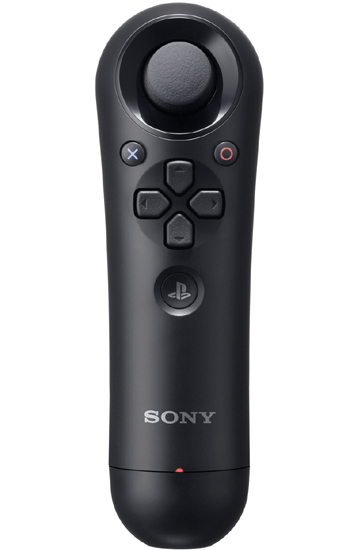
What about a good one handed PC controller. The thread yesterday about the gaffer only having one hand available during dialysis sparks the idea. Could you possibly make a one handed controller with two joysticks on it? One for the thumb and one where a normal shoulder button would be. Think the nunchuck for Wii but replace the Z button with another joystick.

The button mapping would have to be interesting but you could potentially make some button waggle or rely more on the joysticks as press buttons as well. It'd be both a challenging project and something and you'd actually end up with something marketable as opposed to just a near clone of every other controller designed.
 
Imagine using that as base. But on the side there are extra dials. The trigger has a dual-feature a-la GameCube where it functions as both analog and clickable context button. Or you can have some sort of loose analog lever in front of it where you use your nub-hand Fore finger to tap or pressure to achieve similar results.

Interesting, but I'd probably need a more gaming-specific visualization before I can really consider it a practical concept, because I'm not quite sure I can really wrap my head around it right now.
 
The full contents of the OP are the closest thing I have to one, I describe most of the planned parts/features in as much detail as I currently have figured out.

My overall plan right now is to make something like a modernized version of the original Playstation controller, or the Wii Classic Controller Pro minus analog sticks: A d-pad, four maybe six face buttons, four shoulder buttons, start/select, and ergonomic handles. I would do something more ambitious, but I'm trying to limit most of the parts to stuff I could make for this class project without expending unrealistic amounts of time/effort/money.

Keeping things simple is a good idea. A back to basics and reimagined controller could work pretty well. Those designs are for a different era though. They solve different problems.
PS. What platform are you aiming for? Android? PC? IOS?
I know current android game controllers suck. Maybe look into why they suck?
 
Top Bottom