• Hey Guest. Check out your NeoGAF Wrapped 2025 results here!

Mass Effect: Andromeda PC Performance Thread

Simply saying how they had drivers out for both Nvidia sponsored games before the green team.

NV game ready drivers for games which are going through their game ready program rarely change anything as whatever optimizations are done for such games tend to be included in drivers months prior to such games release (the program itself starts ~18 months prior to release). So there's little reason for them to even release these game ready drivers - I don't know why they even bother.
 
NV game ready drivers for games which are going through their game ready program rarely change anything as whatever optimizations are done for such games tend to be included in drivers months prior to such games release (the program itself starts ~18 months prior to release). So there's little reason for them to even release these game ready drivers - I don't know why they even bother.

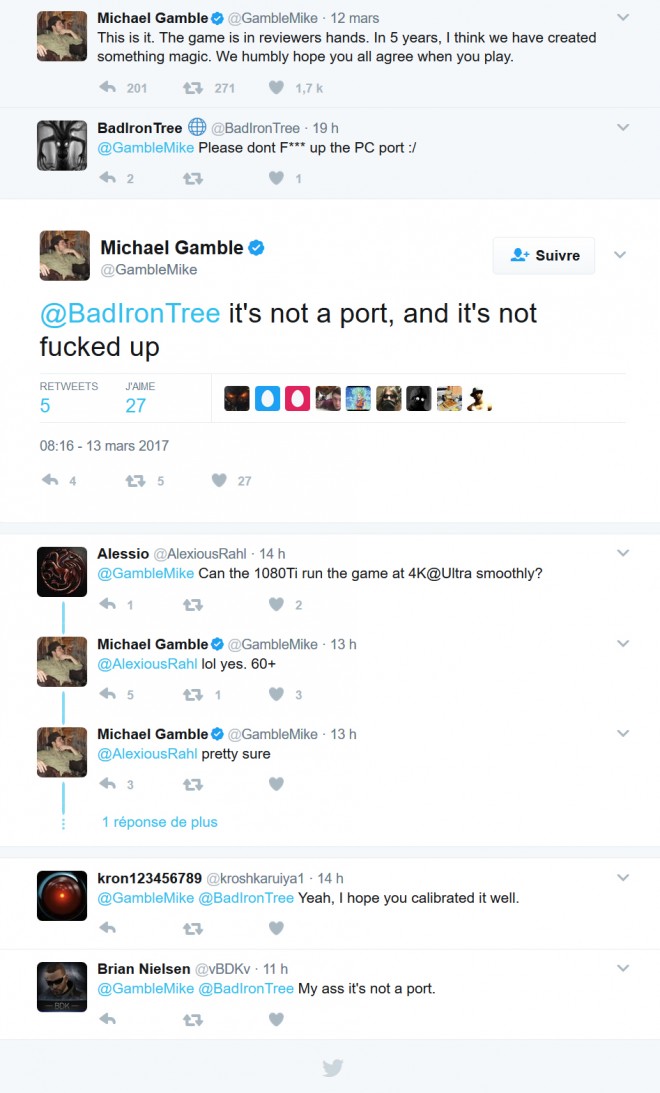
So you're saying Andromeda on Ultra @4K 60fps+ is not happening on 1080Ti even with new drivers?

mass-effect-andromeda-gtx-1080-ti-4k-ultra-60-fps.jpg
 
So apparently the multiplayer crashes the game for whoever is host if the other player is using the human soldier.

I tried to play with a friend yesterday and we spent about an hour instantly crashing because of that.

Whatever game I joined, I made the host crash without fail every game. Then it transfered the host to me and if there was another human soldier it would crash the second the game came back.
 
Playing with HDR ON ks8000
Win 10 64 bit
i7-3770k
GTX 1070
16GB Ram
running off SSHD
4k at resolution scaling of .7

Mix of ultra/high, runs around 50-60 using nvidia panel to enable Fast Vsync and prefer maximum performance.

Issue though, same thing happened with resident evil. Why doesn't the screen fill up with even with gpu scaling on and clicking the option to fill the screen?
wVphShQ.jpg

Exact same setup as you but running a 1080 and have res scaling at 0.65 and mixture of medium - high settings. Game sits around 60-80 fps, anything below 60 increases input lag and judder significantly. I also decided to play with HDR turned off, looked super washed out, even at 4:2:2 10bit.
 
i'm pretty happy with performance

I7 3770k
16GB DDR3 RAM
GTX 1080
HDD

getting between 50-60fps on 1440p at everything maxed on most scenes with solid 60 in less demanding ones. That's good enough for me.
 
Yeah, it's​ not even close. I can't maintain 60 at 1440p with a 1080 on ultra.

Do you get a solid 60 @ 1440 if you turn down HBAO from full to normal with everything else set to ultra?

I have a 1080 as well and that's what I'm planning to do when I get my hands on the game.
 
How's the HDR on PC?
Really good actually, some of the prerendered cutscenes are washed out with banding but the actual game doesn't suffer from this and looks really nice environmental wise.
 
Hopefully someone in here has had the same problem but I've yet to see anyone else post about it. I cannot try out the SP because it freezes (to the point I have to use task manager) or crashes out to Origin during the very beginning when the doctor is checking out Ryder. I can play MP fine (well until the host drops) to the point I played at least an hour of it with no issues other than network/matchmaking bugs. Is there anything I can run or check to see what is causing this problem? Maybe a memory issue since my rig only has 8 gigs of RAM?

3570K@4.4
Gigabyte G1 970
8 GB Samsung RAM
Win10
Game is installed on a HD
1440p 144hz
 
Question: does having your graphics cards set up with SLI screw with this game in its current build?

I have a pretty powerful pc - dual GTX 1080s, i7-6700K - and I landed on the 2nd planet last night only to "discover" unplayable framerate drops at Ultra settings at 1080p. Shouldn't my computer be able to run it easily at that resolution? My knowledge of this stuff is pretty imperfect.
 
i5 4670k @4.7
Asus 1070 Strix (overclocked)
16 GB DDR3
SSD

1080p@120Hz, mostly Ultra settings and I'm getting 70-85FPS. Hardly drops under 70 let alone 60.
 
not possible with everything maxed out.

pJTz928.png

There has to be some settings that when cranked up to ultra destroy the frame rate. This isn't uncommon, especially in recent games. Just using a mix of high/ultra settings usually fixes this and the game will probably look mostly the same.
 
There has to be some settings that when cranked up to ultra destroy the frame rate. This isn't uncommon, especially in recent games. Just using a mix of high/ultra settings usually fixes this and the game will probably look mostly the same.

Does this game have that Nvidia hbao that kills framerates?
 
Ugh.
i7 2700k OC
16GB Ram
GTX 1080 OC

Monitor 2560x1600

Definitely not getting 60 FPS min on Ultra(Custom Ultra). Fluctuates like crazy. Dips into the 45 but seems to hover around 55.
 
Do you get a solid 60 @ 1440 if you turn down HBAO from full to normal with everything else set to ultra?

I have a 1080 as well and that's what I'm planning to do when I get my hands on the game.

i5 6600k and GTX 1080 here, even with normal HBAO the game dips a lot under 60fps at 1440.
 
1080ti, i7-7700k 4.5, 32gb DDR4 3200

45-55 fps on 4K ultra preset, with 30 fps dips during cutscenes and hectic scenes. 5 and change vram usage.

1440p steady 60fps with v sync, higher if disabled

GPU utilization and temps at full tilt most of the time maxed out at 4K. Max settings at 2k 70% utilization

Using msi afterburner for stats. New card and I'm not sure if I have the latest version of AB fwiw but it recognizes the card and let me set a custom fan profile because the nvidia stock fan curve is beyond stupid.

Damn that's nice!!
 
Ugh.
i7 2700k OC
16GB Ram
GTX 1080 OC

Monitor 2560x1600

Definitely not getting 60 FPS min on Ultra(Custom Ultra). Fluctuates like crazy. Dips into the 45 but seems to hover around 55.

Interesting. I have a 2600k and I'm getting low framerates too. Seems like it's very CPU reliant.
 
Question: does having your graphics cards set up with SLI screw with this game in its current build?

I have a pretty powerful pc - dual GTX 1080s, i7-6700K - and I landed on the 2nd planet last night only to "discover" unplayable framerate drops at Ultra settings at 1080p. Shouldn't my computer be able to run it easily at that resolution? My knowledge of this stuff is pretty imperfect.

There currently isn't a dedicated SLI profile for the game. That *may* or may not come with Nvidias official driver release for the game.

I'm assuming you're 6700k isn't OC'd . The game appears to rely heavily on the CPU, so that could be a hang up as well of its stock.

There's also a chance you're CPU bottlenecked at 1080p with those cards i.e. you've so much GPU power they are waiting for the CPU to "catch up".

Finally SLI is literally a crapshoot.
 
No SLI profile? Will there be? I'm struggling to get 60+ on a single 980ti at 1440p with compromised settings and I have another 980ti sitting there doing nothing.
 
Not really.

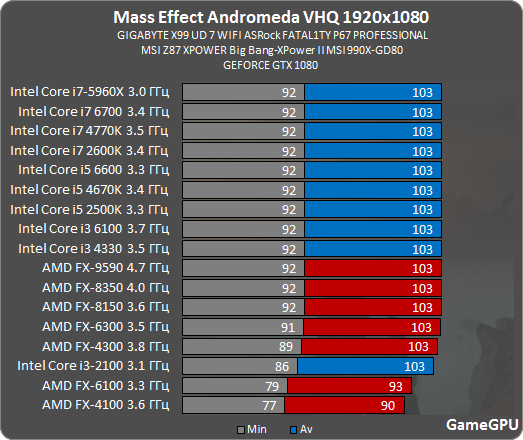
That doesn't really mean anything though. It just shows you that the location they tested is not CPU dependent. It doesn't mean that the entire game behaves like this.

We don't even know where they tested. It's very much possible that certain locations/planets have way more draw calls than others.

I've seen tons of screenshots where people have sub 99% GPU usage with a pretty high end CPU so that seems to support the idea that certain places are indeed heavy on the CPU.
 
That doesn't really mean anything though. It just shows you that the location they tested is not CPU dependent. It doesn't mean that the entire game behaves like this.

We don't even know where they tested. It's very much possible that certain locations/planets have way more draw calls than others.

I've seen tons of screenshots where people have sub 99% GPU usage with pretty high end CPU so that seems to support the idea that certain places are indeed heavy on the CPU.

If it's the same scene as their GPU benchmarks, then it's the very beginning of Habitat 7, which is entirely linear. Eos may indeed be more CPU dependant, given its open nature.
 
Yeah in this thread there are several people who hit CPU bottlenecks (with 3570K, 4570, and 2600K).

Hopefully more benchmarks show up, especially Digital Foundry.
 
If it's the same scene as their GPU benchmarks, then it's the very beginning of Habitat 7, which is entirely linear. Eos may indeed be more CPU dependant, given its open nature.

Yeah Eos is way more power hungry than the opening sections. Oddly enough, the Nexus causes a ton of framerate dips for me too, and not even when they're loads of NPC's on screen.
 
Just bit the bullet and ordered a MSI Gaming 1080, so hoping for Ultra/60fps locked @ 1080p.

I have an MSI Gaming X 1080. At the Ultra preset, should be fine. With every individual setting totally maxed out, maybe not. On the Ultra preset (which is what the game recommended to me), the Ambient Occlusion, Effects, and Lighting options each have one level higher they can go if you use a custom mix of settings. That implies those settings are especially demanding, I guess. It would be nice to know what "Effects" actually covers.

I was fine even totally maxed on Effects and Lighting, until getting to the Tempest, actually – oddly enough, the cargo bay of the ship seems like the most demanding area I've seen so far. I dropped below 60 at 1080p there (but was fine when I dropped down to the Ultra preset).
 
Game looks pretty, maxed out at 1440p (no AA), but I may wait for a few patches as there is still small amounts of jank. The scanner shows artifacts sometimes. Getting 99% usage on both gpus with ~75% CPU load (no hyperthreading). Getting around 75-90fps.

6900k @ 4.5
32GB 2800 ddr4
1080sli
 
I have an MSI Gaming X 1080. At the Ultra preset, should be fine. With every individual setting totally maxed out, maybe not. On the Ultra preset (which is what the game recommended to me), the Ambient Occlusion, Effects, and Lighting options each have one level higher they can go if you use a custom mix of settings. That implies those settings are especially demanding, I guess. It would be nice to know what "Effects" actually covers.

I was fine even totally maxed on Effects and Lighting, until getting to the Tempest, actually – oddly enough, the cargo bay of the ship seems like the most demanding area I've seen so far. I dropped below 60 at 1080p there (but was fine when I dropped down to the Ultra preset).

I'll see how I do. Crazy how people were calling the GTX1080 a 4K card just one year ago.
 
Yeah Eos is way more power hungry than the opening sections. Oddly enough, the Nexus causes a ton of framerate dips for me too, and not even when they're loads of NPC's on screen.

You can use MSI afterburner to check if it's your CPU that's causing the dips. See if your GPU usage also drops when the framerate drops.
 
I feel like I should return my incoming 1080ti and just get this for PS4 pro..

I know it'll look better but I don't know if it's worth the price.
 
For those interested, I'm running smoothly at Ultra settings on a 1060 MSI laptop, can confirm fps later, but it feels like 50 or more consistently(1080p)
 
I'll see how I do. Crazy how people were calling the GTX1080 a 4K card just one year ago.

That always seemed like a stretch to me – with the most demanding games, at least – unless you were willing to compromise on other effects or image quality settings, or lock at 30. Which I'm not. 1440p–3440x1440 seems more like its sweet spot. (I downsample most games from that resolution. I may be able to do that with this game too; I just haven't tested that much.)
 
Top Bottom