

-
Hey Guest. Check out your NeoGAF Wrapped 2025 results here!
You are using an out of date browser. It may not display this or other websites correctly.
You should upgrade or use an alternative browser.
You should upgrade or use an alternative browser.
Wii U update live. Nintendo loves us again.
- Thread starter ClovingWestbrook
- Start date
They really need to focus on actually loading times when browsing through Miiverse, Nintendo TVii, and (especially) the eShop. All three still take too much time in intial load up times, but that is more bearable then the constant loading in-between screens. Do we have details on what the Summer update will do?
But yeah definite improvement.
Miiverse is pretty isntant for me. eshop is fine as well imo, though I agree that there could be some improvements made there.
DragonSworne
Banned
So I downloaded the update but I feel that the load times are still ridiculously long. It's still really bad at 7-10 seconds.
Is there suppose to be another update soon? This was suppose to be a two part deal right?
Is there suppose to be another update soon? This was suppose to be a two part deal right?
So I downloaded the update but I feel that the load times are still ridiculously long. It's still really bad at 7-10 seconds.
Is there suppose to be another update soon? This was suppose to be a two part deal right?
Summer.
Why does Miiverse still take 10 years to load even after this update?
You have to load an entire universe bro.
Skiesofwonder
Walruses, camels, bears, rabbits, tigers and badgers.
Miiverse is pretty isntant for me. eshop is fine as well imo, though I agree that there could be some improvements made there.
Well I should say that I have a 10mbps satellite Internet connection with a horrible ping rate, so that could be slowing down things a bit. But, for me, eShop is quicker now but even starting a download for Rayman Challenge App (for example) takes... Forever. Part of that is eShop's layout that requires you to click through several screens, but each of them take at least 8 seconds to load. 3DS eShop is sooooo much better (on my connection) in that regard.
AgentOtaku
Member
Hows lego city load times now?
the same
iamaustrian
Member
Well I should say that I have a 10mbps satellite Internet connection with a horrible ping rate, so that could be slowing down things a bit. But, for me, eShop is quicker now but even starting a download for Rayman Challenge App (for example) takes... Forever. Part of that is eShop's layout that requires you to click through several screens, but each of them take at least 8 seconds to load. 3DS eShop is sooooo much better (on my connection) in that regard.
8sec?
I guess it's your connection then. eshop is blazing fast for me now
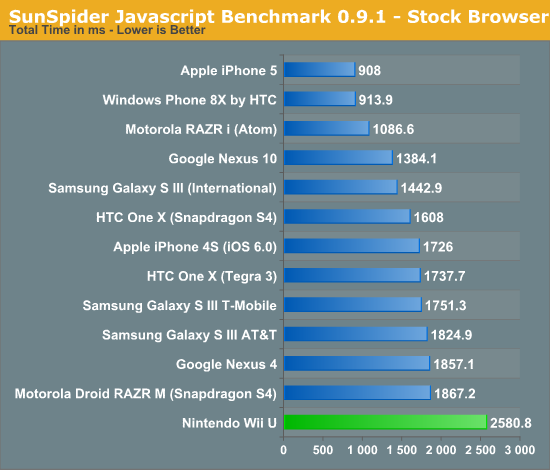
Can someone run Sunspider on the browser please? Takes just a few minutes. The Wii U browser was originally using an older Webkit version which meant its Javascript performance was below even smartphones (I know if feels faster in general terms compared to smartphones, javascript is just one aspect).
andthebeatgoeson
Junior Member
auto-installing downloaded software is the secret best feature of the update
Doesn't the 360 do that? Autoinstall? I can't remember. I think this is an improvement. It sounds like it downloads and installs, even while it's off. I spent plenty of time with my gamepad plugged in and kept the wii u on while d/l games before this. Now, I'll just buy at night, let it d/l and install overnight. Next update? Buy and schedule games to d/l before release. Wake up on release day and it should be done. Would help with demand on launch day.
frankie_baby
Member
Can someone run Sunspider on the browser please? Takes just a few minutes. The Wii U browser was originally using an older Webkit version which meant its Javascript performance was below even smartphones (I know if feels faster in general terms compared to smartphones, javascript is just one aspect).
never used it before but think it got 3038.6 that dont sound good though my internet is slow as arse would that effect it?
frankie_baby
Member
I got 2685.1ms, so I guess nothing has changed.
Well pages definitely render a lot quicker
Hows lego city load times now?
I'm probably imagining things, but I swear the first loading sceen before the main menu was quicker than usual after the update.
I guess they still use a pure interpreter, not a compiler - which makes this an apples to oranges comparison.I got 2685.1ms, so I guess nothing has changed.
frankie_baby
Member
I guess they still use a pure interpreter, not a compiler - which makes this an apples to oranges comparison.
Pretend I'm dumb for a minute, what does that mean?

Revolutionary
Member
You're imagining things. No in game performance has been improved.I'm probably imagining things, but I swear the first loading sceen before the main menu was quicker than usual after the update.
Anyway, my system just froze trying to start Netflix. Disappointed that these random freezes are still a thing in the new firmware.
Edit: whoa, I was able to force it off by holding the power button! :O
You're imagining things. No in game performance has been improved.
Anyway, my system just froze trying to start Netflix. Disappointed that these random freezes are still a thing in the new firmware.
Edit: whoa, I was able to force it off by holding the power button! :O
Yeah, that's a new feature. Ironically, lol
Pretend I'm dumb for a minute, what does that mean?
Javascript interpreters just read programming code line by line and execute them "on the fly" transforming each line to machine code the CPU can swallow one at a time.
In the other hand, Javascript compilers just transform all the code in bulk to machine code or some sort of "intermediate" half-compiled code when the page loads. This means the load might be slower (neglible with current machines unless we're talking about really complex code) but the code execution itself is much much faster and efficient.
Trying to measure the performance of these different methods with an unified test may yield skewed results.
TheGreatMightyPoo
Banned
Edit: whoa, I was able to force it off by holding the power button! :O
As sad as this is, this makes me happy.
Is this because of the update???
I saw someone mention something about it earlier(blu I think) but I wasn't sure if this is now possible because of the update or if it ever worked before it when games, etc... froze(I always had to unplug).
Forget it, I think it was answered a few posts above.
Outtrigger888
Member
Hows lego city load times now?
launching the game im sure is quicker, but loading the city should be just as long as ever.
frankie_baby
Member
Javascript interpreters just read programming code line by line and execute them "on the fly" transforming each line to machine code the CPU can swallow one at a time.
In the other hand, Javascript compilers just transform all the code in bulk to machine code or some sort of "intermediate" half-compiled code when the page loads. This means the load might be slower (neglible with current machines unless we're talking about really complex code) but the code execution itself is much much faster and efficient.
So the Wii u should be comparatively better with complex sites than simple ones?
frankie_baby
Member
launching the game im sure is quicker, but loading the city should be just as long as ever.
Couple of seconds off the splash screen is all I've noticed
So the Wii u should be comparatively better with complex sites than simple ones?
They're just different methods of doing stuff and one can perform better than the other and vice-versa in different scenarios so there's not a definitive answer to that.
frankie_baby
Member
So has any body noticed if their is any improvement in game performance, not saying I'd expect it (certainly haven't noticed any myself) and its technically unlikely but just wondered
DashReindeer
Lead Community Manager, Outpost Games
Has anyone else encountered more issues since the update? Now when I boot up a game, it hangs on wars wars plaza for a good 10 seconds before even displaying the loading screen. I've actually seen no positive improvement in most areas besides loading into certain apps (options, mii maker, tvii). In all other areas it either seems the same or worse...
So has any body noticed if their is any improvement in game performance, not saying I'd expect it (certainly haven't noticed any myself) and its technically unlikely but just wondered
I really doubt they managed to free CPU resources from the OS so soon in the console lifetime to do the same as the 3DS, which took two years.
TheGreatMightyPoo
Banned
Miiverse still takes forever to load, was that not part of this update? I'm sorry Nintendo, still not good enough imo
http://www.youtube.com/watch?v=OgvYUhHutDU
9 second difference for them, halved the time.
Not sure why or if it varies from Wii U to Wii U but either it has to do with internet connections, it botched some Wii U's or people aren't being serious.
Unless the servers are having issues...
http://www.youtube.com/watch?v=OgvYUhHutDU
9 second difference for them, halved the time.
Not sure why or if it varies from Wii U to Wii U but either it has to do with internet connections, it botched some Wii U's or people aren't being serious.
Unless the servers are having issues...
Yeah I'm wondering this too. Might be server issues or something else. Maybe I just need to give it another go tomorrow.
Bulbagarden
Member
Hows lego city load times now?
They seemed quicker to me. Used to be that I could make a hot chocolate in the amount of time it took to load the city. Now, it seems barely enough to pour a cold drink from the fridge.
FreedomFighter
Member
Removed screen size setting. This option can now be adjusted from System Settings
What does this mean? Does it mean I can fix the overscan?
ShockingAlberto
Member
What does this mean? Does it mean I can fix the overscan?
yes
Carpe Libertatem
Member
I'm probably imagining things, but I swear the first loading sceen before the main menu was quicker than usual after the update.
Onyxia deep breaths more since the patch
For those who don't get the reference, I'm basically saying that it's your imagination
Flightmare
Member
ok so if you have already bought the game in VC wii then you get a discount on the wii u?
yes, nes are 1$ to upgrade, snes are 1,5$
FreedomFighter
Member
Yay.
Dead Man Typing
Member
Update failed. Great. I just want it to be fast :-(
[edit] second time it worked. But fuck it's still so slow. 12 seconds from menu to system settings? What a joke.
System settings is still bad but the improvements when launching software are significant. Roll on summer.
never used it before but think it got 3038.6 that dont sound good though my internet is slow as arse would that effect it?
No, sunspider is independant of internet connection speed. It just measures how long your browser takes to perform calculations after they're loaded. And the amount of data it loads is minimal anyways.
They're just different methods of doing stuff and one can perform better than the other and vice-versa in different scenarios so there's not a definitive answer to that.
But PCs, smartphones, tablets, everything seem to fall within the right range when scaling performance, why is the Wii U the odd man out? Are you sure it's interpreters vs compilers? Anandtech said the Wii U just uses an old version of Webkit which was why, not that they went completely in the other direction from others, why would they do that?
I don't know if this relates to the update or not, but my plaza screen is behaving oddly.

Notice the lack of Miis below the Monster Hunter panel. There are Miis from the MH3U community on the screen, but they're scattered all around among the other panels, in the center area, and even straggling around the edges of the screen.
Anyone else noticed this happening on their plaza?
Notice the lack of Miis below the Monster Hunter panel. There are Miis from the MH3U community on the screen, but they're scattered all around among the other panels, in the center area, and even straggling around the edges of the screen.
Anyone else noticed this happening on their plaza?
Flightmare
Member
I don't know if this relates to the update or not, but my plaza screen is behaving oddly.
Notice the lack of Miis below the Monster Hunter panel. There are Miis from the MH3U community on the screen, but they're scattered all around among the other panels, in the center area, and even straggling around the edges of the screen.
Anyone else noticed this happening on their plaza?
Lego City undercover has only one mii here

The system settings are a discrete app, not part of the system menu, so don't expect that to improve drastically. And really, it's not like you open the settings five times a day, so who gives a fuck?Update failed. Great. I just want it to be fast :-(
[edit] second time it worked. But fuck it's still so slow. 12 seconds from menu to system settings? What a joke.
Lego City undercover has only one mii here
Is it by any chance the game listed under your own Mii's "Been playing:"?