

D3RANG3D
Member
Devs are still programming for XP and DX9 so there you have your answer.
When the new consoles come out that will go right out the window DX11 spec ahoy!

Devs are still programming for XP and DX9 so there you have your answer.
If you're into app-store style games then that is reason. I imagine the app store will be pretty popular with indy game developers as well. If you only want to play your traditional PC game then there isn't much of a difference
What do you actually use the start menu for? In my case, I really only ever bring it up to get to a "run" prompt for certain tasks. The programs list is useless and most of the other functions are replicated on the task bar. In Windows 8 if you right click in the lower left portion you get a quick menu providing all of the things that you could possibly need.Only thing that could make me jump is a way to get a start menu of some acceptable form back and the spreading of DX11.1/DX12 compatible games that would be better with win8...
Worst future.
Jesus, how many programs do you use?The taskbar is not close to big enough to pin the number of programs I deal with professionally and for leisure.
It goes to the start screen and all of your searching is done in full screen. And you have to choose from three sections in your search. Apps, Settings and something else. For some reason there isn't an "All" section.Regarding this whole lack of a start button....what happens when you push the Windows key now?
I rarely use the start menu but when I do, Its usually to run a quick search for something. Hit the Windows key and just start typing...its great. This feature still there?
Yes, now it brings up the start screen to immediately search, although you're going to have to click once more because search is separated in into three categories.Regarding this whole lack of a start button....what happens when you push the Windows key now?
I rarely use the start menu but when I do, Its usually to run a quick search for something. Hit the Windows key and just start typing...its great. This feature still there?
It's fucking hilarious, especially when people say it's so stupid, I'm not wasting my time, then come in anyway.I love whenever a Windows 8 thread pops up in the Gaming section, then the Off-topic Windows 8 thread blows up with a bunch of people crying, "Oh no they are stupid, they are talking FUD, glad we can pat each others back".
It goes to the start screen and all of your searching is done in full screen. And you have to choose from three sections in your search. Apps, Settings and something else. For some reason there isn't an "All" section.
Yes, now it brings up the start screen to immediately search, although you're going to have to click once more because search is separated in into three categories.
What do you actually use the start menu for? In my case, I really only ever bring it up to get to a "run" prompt for certain tasks. The programs list is useless and most of the other functions are replicated on the task bar. In Windows 8 if you right click in the lower left portion you get a quick menu providing all of the things that you could possibly need.
The start menu, as it is in Windows 7, just isn't that useful. Same deal with the desktop itself. 90% of my desktop is empty space so if they can figure out how to make better use of this empty space I'm OK with it.
Just so we're absolutely clear on this, pressing an arrow key in the start menu will go from one pane to the next, correct?
Works for me.
It sounds stupid but its probably the one Windows 7 feature that I use the most.
Another question. I tend to avoid desktop/taskbar clutter and only throw icons on there that I need. Chrome, Steam, Origin, Dropbox, etc. In addition to these, I also have icons on the taskbar that take me directly to my Downloads folder. This still possible?
Can I also still have the OS on C: but still set the default photos/videos/music to D:?
I guess what Im really asking is: Is there anything notable that was removed or Windows 8 basically Windows 7 + Metro?
I plan on getting it for my laptop to see if I like it enough for my desktop but, in the meantime, I have a lot of questions...
Depending on what hotkey you press, you can immediately filter between apps, settings, and files when searching. Instead of pressing the Windows key and typing to search among apps by default, you can press Win + Q for a global search, Win + F to search for files only, or Win + W to search for system settings only. I linked it in another post, but there are some handy lists out there of the new hotkey functionality:
http://www.addictivetips.com/windows-tips/30-new-hotkeys-for-windows-8/
There are a ton of useful shortcuts that make navigating the new UI a breeze, and that list doesn't even include all of them (or the ones carried over from Windows 7). I find it really fluid to slide back and forth between the start screen and the desktop for file searches, apps, etc. - I don't even have to have the folder icon on my task bar anymore, since I can just hit Win + E to open explorer. It's a pretty seamless experience.
I would argue just the opposite.
Bringing up a launch environment tells my brain "you are to be focused on launching something".
Having all the other clutter of the workflow on-screen just confuses the process. "Was I launching... or....?" And the other elements on the screen don't necessarily inform as to what you should be launching. "Was I launching... or was I going to keep browsing that GAF chrome tab out of the corner of my eye?"
But of course, perhaps not everyone is the same. Maybe a start menu is more conducive to fast work for some.
When the new consoles come out that will go right out the window DX11 spec ahoy!
Windows 8 is an upgraded, faster performing Windows 7 with a replacement of start menu as a full screen thing that your grandmother will love.
I think for the more tech savvy crowd like your typical GAF poster, the difference from 7 to 8 will be minimal. Most will simply get rid of Metro where possible. I prefer 7 personally and I'd rather wait for Win9 for MS to fine tune, but different strokes for different folks.
Where I think MS is in huge trouble is going to be the "grandparent" crowd who simply wants to get on, check their email accounts, and do a little web surfing. The vast majority of that crowd don't even know your absolute basic shortcuts. Win key, Ctrl+C/Ctrl+V, Alt+Tab, Alt+F4, etc.......and now MS expects people to memorize a bunch of hotkey combinations with the Windows key? It has the potential to be an absolute disaster.
And within 6 months of that new console coming out, we'll have DirectX 12.
I think for the more tech savvy crowd like your typical GAF poster, the difference from 7 to 8 will be minimal. Most will simply get rid of Metro where possible. I prefer 7 personally and I'd rather wait for Win9 for MS to fine tune, but different strokes for different folks.
Where I think MS is in huge trouble is going to be the "grandparent" crowd who simply wants to get on, check their email accounts, and do a little web surfing. The vast majority of that crowd don't even know your absolute basic shortcuts. Win key, Ctrl+C/Ctrl+V, Alt+Tab, Alt+F4, etc.......and now MS expects people to memorize a bunch of hotkey combinations with the Windows key? It has the potential to be an absolute disaster.
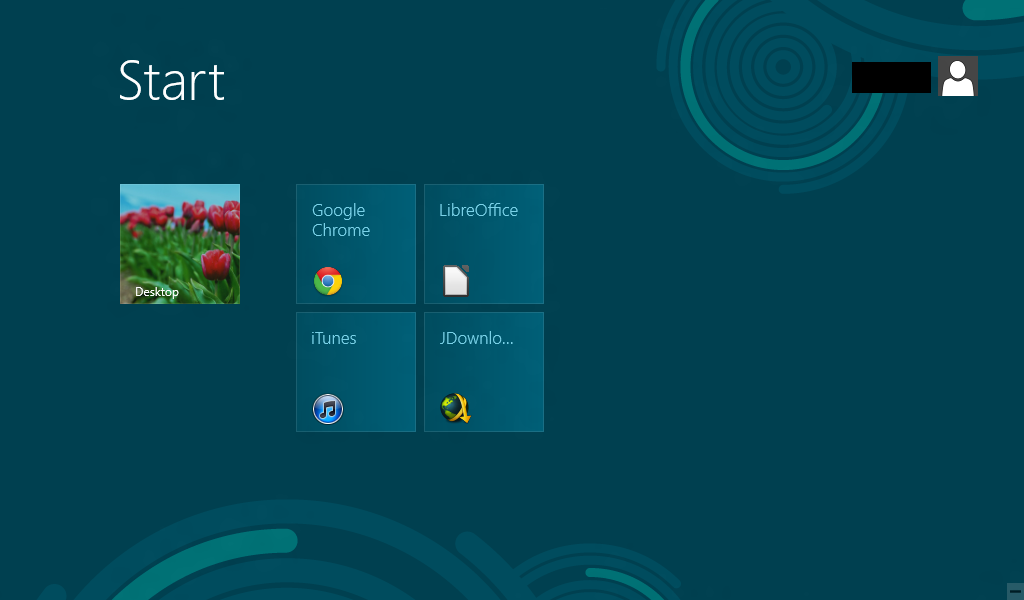
And if his son told him he could use the win key problem solved.
Same would probably happen to my mom and dad if i put them behind a linux/OSX/Win 8 machine.
He actually did really well with osx, it's a very easy to use os.And if his son told him he could use the win key problem solved.
Same would probably happen to my mom and dad if i put them behind a linux/OSX/Win 8 machine.
And if his son told him he could use the win key problem solved.
Same would probably happen to my mom and dad if i put them behind a linux/OSX/Win 8 machine.
I don't think so. If all they need to do is open up Chrome or something, then whoever sets up the PC for them can just customise the start menu to look something like this.
Then all they need to do is click the icon, and they're browsing.
Seriously.
Putting someone infront of something news without any explanation is not a fair assessment of it's usability.
So what would be the appeal of W8 for a PC gamer? Why would I upgrade?, because at the moment I am seeing very little reason to part with my money for a new OS.
I just read the article. It's harsh from beginning to end.

Basically.I already know what my family members that typically ask for help will ask me to do.
"Can you make it work like it used to?"
*Reinstalls Windows 7*
its optional because you don't have to use the extras, the new start menu (metro screen) is functionally the same as the start menu in previous iterations of windows, but if the apps, store and other new things annoy you you can remove them.
you do have the start menu it just looks different
And the first time you use it, you will struggle to find the send email button. Pro-tip - its the (+) in the top right.
wtf...
I would not want to recommend something to my friends and family if I have to train them how to use it first. "Stick with the older windows 'ma and leave me alone!"
I already know what my family members that typically ask for help will ask me to do.
"Can you make it work like it used to?"
*Reinstalls Windows 7*
Computing newbies probably won't upgrade but it's gonna be awful when they buy a new computer.
There's no doubt that it's fairly tough to pick up and if savvy people find it difficult newbies have no chance.
wtf...

Seriously.
Putting someone infront of something news without any explanation is not a fair assessment of it's usability.
(+) doesn't make sense to me for creating a new email, and though I'm assuming the left button on the top right is send mail, even that doesn't seem super clear to me.The (+) is the button to create a new email, seems pretty obvious to me. To send an email is also obvious. This is what it looks like on my screen right now.
I'm sure you can figure out what button you select to send the email.
All his issues seem to be with the easily ignorable Metro start screen. I skimmed the article and didn't see anything about performance issues so whatever.
Actually, it is.
I learned every version of windows without ever consulting a manual
Actually, I never read manuals for the express purpose of gauging its usability and intuitiveness
Even dos was more intuitive. If you ran into a problem, you could just type "help" which is how I learned how to use DOS as a 4 year old.
In windows 8, you make one wrong move and you can become absolutely lost and some peoples only avenue will be to reboot their PC because it will be the only way they will know it will get them to the start screen.
If you design an interface that has to be explained, detailed, taught and you have to convince people it's good... Then it's likely terrible (see: windows 8)
This is basic Ux principles here. You fail on UI, you fail on Ux. windows 8 shouldn't have the assumption that people use the windows key... Or people know shortcuts... Or if something is hidden, someone can find it.
The idea with UI and UX is that it makes things easy on the person. If I know what I have to do, it should be somewhat obvious as how to perform that task, where I need to go to perform that task. Nothing should be buried left for someone to find- EVER. Microsoft has obsufacted windows in their attempt to simplify its use. Is it intuitive? No.
In every version up to including windows 7, stuff wasn't hidden. It was just segmented. Everything accessible depending on how deep you wanted to go- it was your choice. All program critical commands were available on the window, multiple times. Now in metro? It's a confusing mash of a thoughtless approach to achieve a lofty (and unattainable) goal.
I bought a playbook, and kept forgetting about the application pane because it was hidden. The keyboard and status bar swipes? Average user won't remember this stuff. They need stimulus in order to acknowledge actions that are available to them. People see - react - see - react. One tutorial is going to do... What? It doesn't solve anything. I can tell you after 20 years of experience in helping people understand their computers that if there wasn't something there that they could reference as a next step... They will eventually forget about the next step unless they use their computers every single day of their life and utilize that specific task frequently. Most people don't learn after the first lesson. It's a fact of life.
You want people to type out programs in metro to run them? A lot of people write down their passwords because they can't remember them. You assume people will remember how to close a metro app? How to back out of it? How to switch apps? There is two entire layers to the operating system that conform to two entirely different philosophies that have different actions and different results. People who struggle on PC now are going to struggle far more now.
Windows 8 should have been a streamline of core functions, fixed things to operate easier and assisted people to not make common mistakes... Refined approachability... Condensed redundancies and define lines inbetween configurable and operating environments.
Right now it performs "ok" as a tablet OS for accessibility and approachability. not great because of hidden interfaces which is something that plagues playbook too (and to a very minor extent iPad - hidden app bar which isn't exactly priority operation due to app exclusivity)
As a desktop OS, Windows 8 is such a disaster on so many levels.