

UncleSporky
Member
I've seen some people around the net wondering about Nintendo's "3D Classics" line that will be coming to the 3DS, or dreaming of seeing various games in 3D...imagine Mega Man! Imagine Super Metroid! Imagine Mario RPG!
So I put these nerdy examples together to try to illustrate how they might be doing it, how it might look, the limitations and roadblocks. Altogether, I want to get across that converting an old game to 3D is a fairly difficult/time-consuming process. Generally there isn't an easy or automated way to do it, so don't expect VC-level support for this service. I don't mean to be a big downer, but I want to help people understand the way the games are set up and perhaps cut down on unrealistic expectations.
I imagine a lot of this stuff will be very obvious to many of you, I just find it an interesting subject and wanted to explain it somewhat to those who don't understand what's involved.
First of all, old games aren't typically broken up into convenient layers that you can just shift apart for a 3D effect. The NES really only has two layers: the background and the sprites. In other words, a game that looks like this:
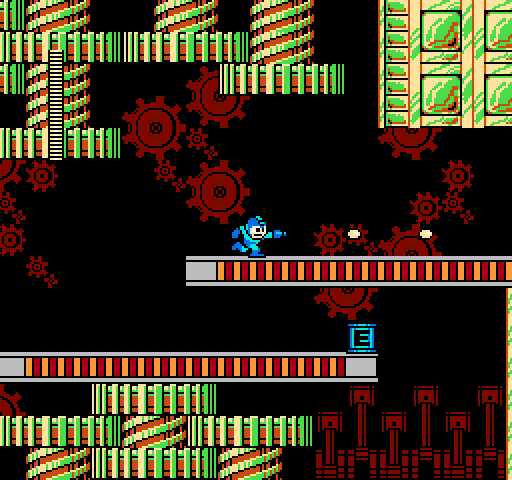
only has these two "layers" natively:


As a side note, I want to mention that it's really easy to produce a simple cross-eye/parallel image in Paint or Photoshop - you just need a background layer and a transparent layer with some "floating" graphics like the two above. On the left image, drag the transparent layer left a few pixels, and on the right image, drag the transparent layer right a few pixels. This will make the floating graphics appear to pop out toward you. You can also drag the layers in the opposite directions to make things appear to recede into the screen.
Anyway, so with the two "layers" built into the NES, it would be trivial to create a 3D effect that looks like this:

But you'll notice that's extremely simple and not very convincing. In fact, in many cases it would look downright bad:


Yes, those windows and ledges are sprites...in the intro, they scroll them independently from the building as a visual trick to make the building look like it's in the foreground!
In fact, sprites were used as small embellishments everywhere, so if you run a simple 3D conversion on a NES game you end up with a lot of screwy graphics.
What they need to do is also isolate the background from the foreground:

Which requires careful graphic/data editing all throughout the game, and probably some actual reprogramming of the display engine. In the end, you can separate the layers to make a game that looks something like this:

Notice that the health meter was moved to the closest foreground - another aspect to the conversion is sorting sprites individually, depending on whether they're HUD elements, scenery, or characters.
Also notice the odd-looking black section here:

In the original game, that red gear was mostly obscured, so if you just cut the background graphics out like I did and move it left or right, you end up with an incomplete section. If you want to do it right, you essentially need to have a complete background layer with all the graphics where they need to be, and a complete foreground layer.
This is also the bare minimum of effort. If they really want to do a nice convincing job, they'll need to make the foreground scroll independently from the background too (parallax). I'm not sure if they'll be putting that much effort into it or not.
Now with all the complications for a simple NES game shown above, imagine trying to convert this:

It'd definitely be awesome, but it'd also be a nightmare to modify these graphics by hand to make a quality 3D image.
Quick and dirty, here are the layers to this image that the SNES works with:


So let's just slap those together and shift them sideways for a 3D effect:
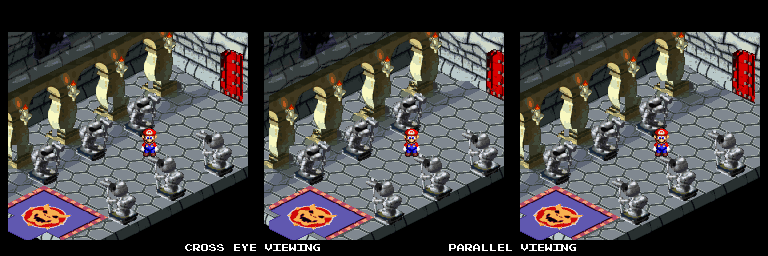
Yuck.
Really to do Mario RPG justice, you'd want the original polygonal models from before rendering and you'd probably have to redo the game from the ground up.
However, get into the N64 era of gaming, and suddenly 3D becomes trivial. The world is already being rendered in real time, so you just need to set up a second camera a little to the left or right of the first. In fact, I'm pretty sure there's an emulator out there somewhere that supports this.

So in summary, NES classics in 3D might not be as easy to create as you'd think, but their simplicity probably makes them more convenient to work with than SNES games. Side scrollers and puzzlers will be the easiest genres to convert to 3D, and most N64 games should be ripe for the picking, if they choose to include them.
So I put these nerdy examples together to try to illustrate how they might be doing it, how it might look, the limitations and roadblocks. Altogether, I want to get across that converting an old game to 3D is a fairly difficult/time-consuming process. Generally there isn't an easy or automated way to do it, so don't expect VC-level support for this service. I don't mean to be a big downer, but I want to help people understand the way the games are set up and perhaps cut down on unrealistic expectations.
I imagine a lot of this stuff will be very obvious to many of you, I just find it an interesting subject and wanted to explain it somewhat to those who don't understand what's involved.
First of all, old games aren't typically broken up into convenient layers that you can just shift apart for a 3D effect. The NES really only has two layers: the background and the sprites. In other words, a game that looks like this:
only has these two "layers" natively:
As a side note, I want to mention that it's really easy to produce a simple cross-eye/parallel image in Paint or Photoshop - you just need a background layer and a transparent layer with some "floating" graphics like the two above. On the left image, drag the transparent layer left a few pixels, and on the right image, drag the transparent layer right a few pixels. This will make the floating graphics appear to pop out toward you. You can also drag the layers in the opposite directions to make things appear to recede into the screen.
Anyway, so with the two "layers" built into the NES, it would be trivial to create a 3D effect that looks like this:
But you'll notice that's extremely simple and not very convincing. In fact, in many cases it would look downright bad:
Yes, those windows and ledges are sprites...in the intro, they scroll them independently from the building as a visual trick to make the building look like it's in the foreground!
In fact, sprites were used as small embellishments everywhere, so if you run a simple 3D conversion on a NES game you end up with a lot of screwy graphics.
What they need to do is also isolate the background from the foreground:
Which requires careful graphic/data editing all throughout the game, and probably some actual reprogramming of the display engine. In the end, you can separate the layers to make a game that looks something like this:
Notice that the health meter was moved to the closest foreground - another aspect to the conversion is sorting sprites individually, depending on whether they're HUD elements, scenery, or characters.
Also notice the odd-looking black section here:
In the original game, that red gear was mostly obscured, so if you just cut the background graphics out like I did and move it left or right, you end up with an incomplete section. If you want to do it right, you essentially need to have a complete background layer with all the graphics where they need to be, and a complete foreground layer.
This is also the bare minimum of effort. If they really want to do a nice convincing job, they'll need to make the foreground scroll independently from the background too (parallax). I'm not sure if they'll be putting that much effort into it or not.
Now with all the complications for a simple NES game shown above, imagine trying to convert this:
It'd definitely be awesome, but it'd also be a nightmare to modify these graphics by hand to make a quality 3D image.
Quick and dirty, here are the layers to this image that the SNES works with:
So let's just slap those together and shift them sideways for a 3D effect:
Yuck.
Really to do Mario RPG justice, you'd want the original polygonal models from before rendering and you'd probably have to redo the game from the ground up.
However, get into the N64 era of gaming, and suddenly 3D becomes trivial. The world is already being rendered in real time, so you just need to set up a second camera a little to the left or right of the first. In fact, I'm pretty sure there's an emulator out there somewhere that supports this.
So in summary, NES classics in 3D might not be as easy to create as you'd think, but their simplicity probably makes them more convenient to work with than SNES games. Side scrollers and puzzlers will be the easiest genres to convert to 3D, and most N64 games should be ripe for the picking, if they choose to include them.


