

• Hey Guest. Check out your NeoGAF Wrapped 2025 results here!

3D Classics on 3DS: the basics of converting an old game to 3D

I've seen some people around the net wondering about Nintendo's "3D Classics" line that will be coming to the 3DS, or dreaming of seeing various games in 3D...imagine Mega Man! Imagine Super Metroid! Imagine Mario RPG!

So I put these nerdy examples together to try to illustrate how they might be doing it, how it might look, the limitations and roadblocks. Altogether, I want to get across that converting an old game to 3D is a fairly difficult/time-consuming process. Generally there isn't an easy or automated way to do it, so don't expect VC-level support for this service. I don't mean to be a big downer, but I want to help people understand the way the games are set up and perhaps cut down on unrealistic expectations.

I imagine a lot of this stuff will be very obvious to many of you, I just find it an interesting subject and wanted to explain it somewhat to those who don't understand what's involved.

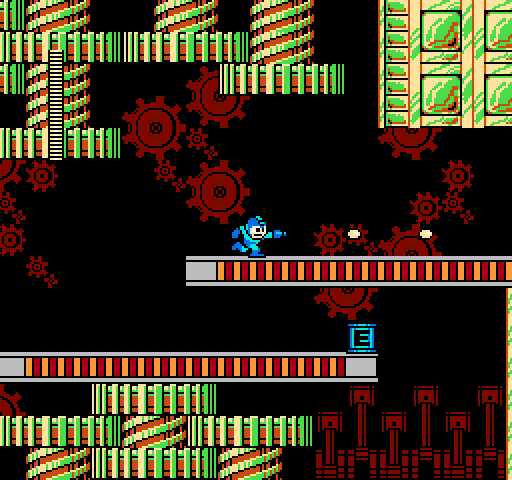
First of all, old games aren't typically broken up into convenient layers that you can just shift apart for a 3D effect. The NES really only has two layers: the background and the sprites. In other words, a game that looks like this:

MM2.png


only has these two "layers" natively:


MM2_BG.png


MM2_sprite.png


As a side note, I want to mention that it's really easy to produce a simple cross-eye/parallel image in Paint or Photoshop - you just need a background layer and a transparent layer with some "floating" graphics like the two above. On the left image, drag the transparent layer left a few pixels, and on the right image, drag the transparent layer right a few pixels. This will make the floating graphics appear to pop out toward you. You can also drag the layers in the opposite directions to make things appear to recede into the screen.

Anyway, so with the two "layers" built into the NES, it would be trivial to create a 3D effect that looks like this:


MM2_3D_1.png


But you'll notice that's extremely simple and not very convincing. In fact, in many cases it would look downright bad:


MM2_3D_bad1.png


MM2_3D_bad2.png


Yes, those windows and ledges are sprites...in the intro, they scroll them independently from the building as a visual trick to make the building look like it's in the foreground!

In fact, sprites were used as small embellishments everywhere, so if you run a simple 3D conversion on a NES game you end up with a lot of screwy graphics.

What they need to do is also isolate the background from the foreground:


MM2_BG_far.png


Which requires careful graphic/data editing all throughout the game, and probably some actual reprogramming of the display engine. In the end, you can separate the layers to make a game that looks something like this:


MM2_3D_2.png


Notice that the health meter was moved to the closest foreground - another aspect to the conversion is sorting sprites individually, depending on whether they're HUD elements, scenery, or characters.

Also notice the odd-looking black section here:


MM2_3D_2_circle.png


In the original game, that red gear was mostly obscured, so if you just cut the background graphics out like I did and move it left or right, you end up with an incomplete section. If you want to do it right, you essentially need to have a complete background layer with all the graphics where they need to be, and a complete foreground layer.

This is also the bare minimum of effort. If they really want to do a nice convincing job, they'll need to make the foreground scroll independently from the background too (parallax). I'm not sure if they'll be putting that much effort into it or not.

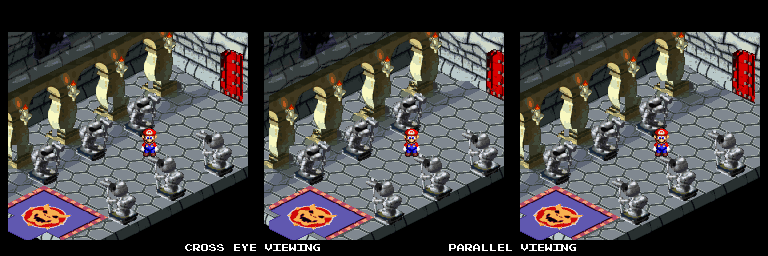
Now with all the complications for a simple NES game shown above, imagine trying to convert this:


MarioRPG.png


It'd definitely be awesome, but it'd also be a nightmare to modify these graphics by hand to make a quality 3D image.

Quick and dirty, here are the layers to this image that the SNES works with:


MarioRPG_BG1.png


MarioRPG_BG2.png


MarioRPG_sprite.png


So let's just slap those together and shift them sideways for a 3D effect:

MarioRPG_3D.png


Yuck.

Really to do Mario RPG justice, you'd want the original polygonal models from before rendering and you'd probably have to redo the game from the ground up.


However, get into the N64 era of gaming, and suddenly 3D becomes trivial. The world is already being rendered in real time, so you just need to set up a second camera a little to the left or right of the first. In fact, I'm pretty sure there's an emulator out there somewhere that supports this.


Mario64.png


So in summary, NES classics in 3D might not be as easy to create as you'd think, but their simplicity probably makes them more convenient to work with than SNES games. Side scrollers and puzzlers will be the easiest genres to convert to 3D, and most N64 games should be ripe for the picking, if they choose to include them.
 
RockmanWhore said:
Isn't it a little stupid to add a gimmicky 3D on a 2D game?
I don't think so, it was one of the things that drew the most attention at the 3DS's earliest showings. Even if they were lukewarm to some of the other demos, the press said the classic games were gorgeous and they wanted to see more examples of them.
 
How hard would it be to render the DKC trilogy in 3D? I'd imagine that'd be more difficult because many of the background "layers" are in fact a single painting?

I want DKC2 in the palm of my hand. (Real DKC2!)
 
I see the pain in converting a game like Mario RPG and Earthbound.

3D Classics are not just going to be ROM dumps with a 3D emulator. They will have to be remade all over again.
 
I wonder if 3D remakes of the original Legend of Zelda and Adventure of Link... maybe even A Link to the Past... are in the cards for Zelda's 25th anniversary.
 
Obviously Yoshi's Island is the best game to do this to. Every layer is pretty well distinct already due to significant parallax use, and can you imagine the final boss battle in 3D? Baby Bowser coming closer and closer, your eggs sailing back into the distance?

YEP
 
It's not necessarily quite that bad. It's been a long time, so my memory may be off, but I remember there being some sort of priority setting on Gameboy Color that you could set for each tile in the background and each sprite. The priority was basically meant for choosing what background tiles which parts of a sprite would appear behind and which in front, but the system could be co-opted to choose true depth of each tile and sprite. And as the GBC was basically a handheld NES, I wouldn't be surprised if that ability came from the NES.

So in theory, if a game were setup correctly, and the background priorities were setup as part of the maps (as they were in the GBC games I worked on), you could just change that data and have your emulator set the depth of each tile based on the priority value.

The trick is, if anything requires any actual code changes, it'd probably be a lot easier to remake the game from scratch as a fake 8-bit game than to try and find someone skilled at Z-80 or 6502 assembly programming and your 25 year old source code.
 
Tathanen said:
Obviously Yoshi's Island is the best game to do this to. Every layer is pretty well distinct already due to significant parallax use, and can you imagine the final boss battle in 3D? Baby Bowser coming closer and closer, your eggs sailing back into the distance?

YEP
I believe they were demoing a 3D Yoshi's Island at E3 2010, weren't they? Also explains the game's absence on the Virtual Console.
 
RockmanWhore said:
Isn't it a little stupid to add a gimmicky 3D on a 2D game?
You would think that, then I got to try out a 2D game in 3D at E3 as well as see a visual montage....its pretty damn sweet (Megaman 2 looked great)
 
wwm0nkey said:
You would think that, then I got to try out a 2D game in 3D at E3 as well as see a visual montage....its pretty damn sweet (Megaman 2 looked great)
Yeah, I've only heard good impressions of what 3D adds to the 2D games... Many compare it to a pop-up storybook, with real depth and density. Like you feel like you can reach in and touch them.
 
Neiteio said:
How hard would it be to render the DKC trilogy in 3D? I'd imagine that'd be more difficult because many of the background "layers" are in fact a single painting?

I want DKC2 in the palm of my hand. (Real DKC2!)
If you don't mind the "flat sheets of paper" effect from the Mega Man pics above, it wouldn't be too difficult:

UPRv5.png


Pretty straightforward back-to-front. But the foliage wouldn't pop out at you or look rounded at all.
 
You have to remember that these classics will not only be in 3D like this, but their resolution shall be changed to fit the 3DS' like a real port. It seems to be the case with that Xevious pic shown a while back, at least. It should be interesting to see how well game's end up looking to see something like Super Mario World in widescreen. There's already hints of it with Super Mario Bros. for NES in the very first 3D video released for the 3DS.
 
Tathanen said:
Obviously Yoshi's Island is the best game to do this to. Every layer is pretty well distinct already due to significant parallax use, and can you imagine the final boss battle in 3D? Baby Bowser coming closer and closer, your eggs sailing back into the distance?

YEP
I will buy 10 3DSs when this happens.

Ball is in your court Nintendo.
 
AceBandage said:
Honestly, I think 3D can add a lot to the visual appeal of 2D games. ESPECIALLY Side scrollers.
I don't know, at last year's E3 out of all the classics in 3D i was most impressed with a Nes game with a top-down view(i don't remember the name), which looked like one of those beautiful children's book with layers of paper and stuff. After seeing that, i hope nintendo will either port or make a new top down Zelda, be it single or multiplayer. Of course I did not have much time to play with the 3D slider, but from what little experimentation i managed to squeeze out of my time with Yoshi's Island and Mario Bros, I was not terribly impressed. And Xevious just had terrible 3D, i kept getting double images.
 
Cool.

That Mario 64 example really works.

What I notice with that or the red/blue 3d on youtube is it feels like you are acceding. They should of just pushed out Mario 64 as it is much more clean and about moving around in a large environment.
 
UncleSporky said:
If you don't mind the "flat sheets of paper" effect from the Mega Man pics above, it wouldn't be too difficult:

UPRv5.png


Pretty straightforward back-to-front. But the foliage wouldn't pop out at you or look rounded at all.
Very interesting -- thanks for doing the example. :)
 
Dreamwriter said:
It's not necessarily quite that bad. It's been a long time, so my memory may be off, but I remember there being some sort of priority setting on Gameboy Color that you could set for each tile in the background and each sprite. The priority was basically meant for choosing what background tiles which parts of a sprite would appear behind and which in front, but the system could be co-opted to choose true depth of each tile and sprite. And as the GBC was basically a handheld NES, I wouldn't be surprised if that ability came from the NES.

So in theory, if a game were setup correctly, and the background priorities were setup as part of the maps (as they were in the GBC games I worked on), you could just change that data and have your emulator set the depth of each tile based on the priority value.

The trick is, if anything requires any actual code changes, it'd probably be a lot easier to remake the game from scratch as a fake 8-bit game than to try and find someone skilled at Z-80 or 6502 assembly programming and your 25 year old source code.
This is kind of technical. The NES has a memory location that you write sprites to, up to 64 in order from first-drawn to last-drawn per frame. Only the first 8 sprites per horizontal scanline can be drawn though; any more, and they are simply not drawn. Put Mario and 4 goombas in a row and the last goomba would still be there but invisible. And generally you don't have an easy way to prevent more than 8 sprites in the same horizontal row, in fact you need to be able to exceed that.

To get around this problem, you write the sprites in a different order each time. On one frame you say, draw a goomba, then Mario, then his fireball, then three goombas. On the next frame you say, draw two goombas, then Mario's fireball, then Mario then the last two goombas. This is the cause of the flickering you always see in NES games, it's to make sure that nothing is invisible for too long.

As you can imagine, this means the "sprite priority" list is generally in a huge jumble at all times and not really useful for sorting objects in 3D. :) And every developer did it in a slightly different way. Some devs always put the main character first so he'd never flicker, but the enemies would flicker more often. Some devs put the health bar first and let the main character flicker all he needed to, etc.
 
maeda said:
I don't know, at last year's E3 out of all the classics in 3D i was most impressed with a Nes game with a top-down view(i don't remember the name), which looked like one of those beautiful children's book with layers of paper and stuff. After seeing that, i hope nintendo will either port or make a new top down Zelda, be it single or multiplayer. Of course I did not have much time to play with the 3D slider, but from what little experimentation i managed to squeeze out of my time with Yoshi's Island and Mario Bros, I was not terribly impressed. And Xevious just had terrible 3D, i kept getting double images.

if I remember correctly, Zelda was also one of the demos.
 
GBC could have up to 10 sprite-chars in a line, so was superior to NES's 8 :) We never flickered our sprites, we just tried to write our games to never have more than that on a line, so it'd be fairly safe with our games. Of course, what I worked on was RPG's with minigames, so it wasn't as hard as, say, a shooter would be (you had to be careful how you scripted characters to walk around, though, especially once we used 2-layer sprites to double our colors).
 
Dreamwriter said:
GBC could have up to 10 sprite-chars in a line, so was superior to NES's 8 :) We never flickered our sprites, we just tried to write our games to never have more than that on a line, so it'd be fairly safe with our games. Of course, what I worked on was RPG's with minigames, so it wasn't as hard as, say, a shooter would be (you had to be careful how you scripted characters to walk around, though, especially once we used 2-layer sprites to double our colors).

What did you work on, if I might ask?
 
Dreamwriter said:
GBC could have up to 10 sprite-chars in a line, so was superior to NES's 8 :) We never flickered our sprites, we just tried to write our games to never have more than that on a line, so it'd be fairly safe with our games. Of course, what I worked on was RPG's with minigames, so it wasn't as hard as, say, a shooter would be (you had to be careful how you scripted characters to walk around, though, especially once we used 2-layer sprites to double our colors).
That's exactly what they did in Super Mario Bros too, they did their best to prevent five characters on the same horizontal.

I re-read what you were saying, and yeah, NES doesn't have a complex priority system like that. It's basically how I presented it above, although you can choose whether sprites are drawn in front of the background or behind it - this is how they do the white blocks in Mario 3 that let you run behind the bushes and such. But this ability wasn't used often, to my knowledge.

I guess you could say there are technically four NES layers: a flat color of your choice, sprites set to be behind the background, the background graphics, and sprites set to be in front of the background. This doesn't necessarily make 3D conversion any easier though.
 
While these things aren't going to be simple to make, I'm really looking forward to as many as Nintendo (or others - let's hope they recruit 3rd parties to make some) can crank out. I played Xevious at E3, and I loved it - the ground was way, way deep into the machine, while the flying vehicles were near screen level, with the HUD on top. And since you had to bomb things on the ground, the effect worked great, it was like the game was made for 3D.

DavidDayton said:
What did you work on, if I might ask?
The GBC Harry Potter games based on the first two books.
 
From The Dust said:
Mario Bros.
Tennis
Super Mario Bros.
The Legend of Zelda
Metroid
Musasame
Punch-Out!!
Excitebike
NES Open Golf
Twin Bee
Super Mario World
Kirby's Adventure
Mega Man 2
Castlevania
Urban Champ
Kid Icarus
Yoshi's Island
Smash Ping Pong

were showcased. there are conflicting reports of what was playable and what wasn't

http://ds.ign.com/articles/109/1098405p1.html
I don't remember seeing over half of those! I must have run to MGS and Kid Ikarus station too soon, because of the stupid time limit :)
 
Thank you, this really needed to be spelled out for some people. It's the main reason I'm not really excited for the "Classics in 3D" line, unless they have some extremely clever technique planned.

The windows example is the best one, there's so many NES games where they cheated, using the background and just animating small parts of a big sprite, because there was no way to tell them apart in the final image. There's no simple way to account for all that, the games pretty much have to be remade in a Wii-native format to change how the graphics are handled, or the emulator has to constantly watch for what chunk of graphical data is being pulled, and assign it a depth level from there. And as the Mega Man 2 gears example shows, even that's going to probably show some flaws off.
 
I'm sure someone has thought of additional ways to add 3D to 2D without having to dissect the entire game. Like adding a depth map for instance.
 
So it's likely they'll sell the originals of each 3D classic game as well, in the virtual console?

I hope they make it clear that there's a 3D version available before you purchase certain games.
 
I wholeheartedly support the idea. I would buy the shit out of certain 8-bit and 16-bit games with the 3D treatment.

I kind of have a feeling '3D' games like Super Mario 64 won't ever be a part of the program but it'd be nice to be surprised.
 
Neuromancer said:
I wholeheartedly support the idea. I would buy the shit out of certain 8-bit and 16-bit games with the 3D treatment.

I kind of have a feeling '3D' games like Super Mario 64 won't ever be a part of the program but it'd be nice to be surprised.


I believe only NES/SNES games are going to be on the service, at least for a while.
 
140.85 said:
I'm sure someone has thought of additional ways to add 3D to 2D without having to dissect the entire game. Like adding a depth map for instance.
I don't know if it would work perfectly but you might be onto something with that. This is the entirety of Mario's graphical data:

GA3Ht.png


They could apply a depth map to every tile, basically saying that whenever you draw a question mark block, it appears at this layer, whenever you draw a pipe it appears at this layer, etc.

The problem that remains is the glitch you get like I showed above, when a piece of the background is half-completed behind a piece of foreground.
 
I've thought about this too. I frankly don't see the point in converting a 2D game into 3D. And like you said, to do it properly the games would have to be remade entirely from the ground up.
 
UncleSporky said:
I don't know if it would work perfectly but you might be onto something with that. This is the entirety of Mario's graphical data:

GA3Ht.png

Wow, skipped right over. "or the emulator has to constantly watch for what chunk of graphical data is being pulled, and assign it a depth level from there."

SMB1's about as basic as it's going to get. It's going to be trickier mapping out the tiles for some of the later NES games, and depending how they do it, it may end up being a lot of processing overhead for the 3DS, increasingly so for SNES titles. And once you get into the 16-bit generation, that's a lot of tedious work, and...

UncleSporky said:
The problem that remains is the glitch you get like I showed above, when a piece of the background is half-completed behind a piece of foreground.

"And as the Mega Man 2 gears example shows, even that's going to probably show some flaws off."

In retrospect, the 3DS could probably handle it if it was reduced to simple masking, if that would work in the games. I guess the flaws would be too minor and far between to really worry about.
 
Nintendo has mentioned that Xevious is a remake. I wonder what their fascination is for the game. it's practically the face of 3D classics
 
UncleSporky said:
So in summary, NES classics in 3D might not be as easy to create as you'd think, but their simplicity probably makes them more convenient to work with than SNES games. Side scrollers and puzzlers will be the easiest genres to convert to 3D, and most N64 games should be ripe for the picking, if they choose to include them.

*ctrl+F : Mode 7*

I expected more of you guys =/

I REALLY want to see some mode 7 games on this beauty .... specialy Mario Kart and F-Zero
 
I'm surprised so many folks seem to think there will be a giant pile of 3D converted classic games. I really see this as being far more limited... just a few remakes, with most of the focus on the new downloadable games.
 
Top Bottom