• Hey Guest. Check out your NeoGAF Wrapped 2025 results here!

Amazon Basics - another reason to shun Monster Cable and other price-gougers

Status
Not open for further replies.
My girlfriend has been shopping around for an HDMI cable online; I recommended monoprice but she also found this:

http://www.amazon.com/dp/B001TH8UUA/?tag=neogaf0e-20

Amazon Basics! I had no idea this existed but it's pretty cool. Price is comparable with monoprice ($7.59 for a 10' cable) and, like monoprice, it ships in "frustration-free" (no Larry David blister pack meltdowns) packaging.

Anyway... I'm sure this is not a revelation to many and monoprice already offers much the same deal but I'm always glad to see another cheap rival to the bullshit consumer-duping price-gouging "premium" products offered by Monster Cable, so wanted to share.
 
What is the deal with Monster HDMI cables anyway? Do they offer any tangible benefit or are they just overpriced to fool AV nerds into paying them too much money?
 
www.firefold.com

Thank me later. Best of all, this site has a store just 15 mins from my work. Love running there at lunch to save off of shipping. I picked up 2 30 ft HDMI cables for $12 each two weeks ago.
 
I knew this thread would quickly devolve into a dick-measuring thread about who knew of the cheapest online HDMI deals, but dropping to ONE PENNY A CABLE within one post exceeded even my expectations. :lol
 
Zabka said:
What a ripoff

Get some of these: http://www.amazon.com/dp/B0002L5R78/?tag=neogaf0e-20

I bought 10, they all work fine.
Shit they went down a cent..........I demand a refund!

Gary Whitta said:
I knew this thread would quickly devolve into a dick-measuring thread about who knew of the cheapest online HDMI deals, but dropping to ONE PENNY A CABLE within one post exceeded even my expectations. :lol
Good enough for my PS3 and 360.
 
140.85 said:
What is the deal with Monster HDMI cables anyway? Do they offer any tangible benefit or are they just overpriced to fool AV newbs into paying them too much money?

Fixed. AV nerds already know Monster is over priced snake oil and that Bose is paper driven shite. It's the AV newbs that get tricked into paying for Monster and Bose's next marketing push.
 
Gary Whitta said:
I knew this thread would quickly devolve into a dick-measuring thread about who knew of the cheapest online HDMI deals, but dropping to ONE PENNY A CABLE within one post exceeded even my expectations. :lol

the price just raised up to $.04, too expensive imo
 
140.85 said:
What is the deal with Monster HDMI cables anyway? Do they offer any tangible benefit or are they just overpriced to fool AV nerds into paying them too much money?

Eh, close, it's just that A/V nerds know they're shit too.
 
Zabka said:
What a ripoff

Get some of these: http://www.amazon.com/dp/B0002L5R78/?tag=neogaf0e-20

I bought 10, they all work fine.


Note on those 4 cent cables they charge you 2.95 shipping per cable and do not group them!!!!!!!!! When i first saw them i was like damn i was gonna buy like 50 of these just because but the cables actually cost 3 dollars a piece if you include 2.95 shipping per cable.

That 4 cent price is misleading
 
140.85 said:
What is the deal with Monster HDMI cables anyway? Do they offer any tangible benefit or are they just overpriced to fool AV nerds into paying them too much money?
The thing is, for 99% of the people who use HDMI cables - those $5 cords are perfectly adequate. However, if you're building a home theater and running a 30' cord through your walls to hook up that 1080p projector hanging from your ceiling you're probably going to want to get something a little thicker, stronger, and with enough bandwidth to handle future signals (like 1440p) so you don't have to gut your house in 5 years.

Monster cables aren't the answer, they're exorbitantly overpriced because of name brand, but those 1 cent cables (or the 30' versions of them at least) won't work for shit themselves. A nice mid-priced cable on Monoprice would work fine for that. If you're just running a few feet though, there's no drawback to cheap cords.
 
Just curious. I bought a DVI to HDMI adapter and then a 15 foot HDMI cord to connect my PC to my TV. Works like a charm (extended desktop) but the sound still comes out of my desktop speakers. This isn't that big of a deal but it might be nice to have it come out of the TV. Any suggestions?
 
Meier said:
Just curious. I bought a DVI to HDMI adapter and then a 15 foot HDMI cord to connect my PC to my TV. Works like a charm (extended desktop) but the sound still comes out of my desktop speakers. This isn't that big of a deal but it might be nice to have it come out of the TV. Any suggestions?

Run a cable from audio out on your computer to your tv. DVI doesnt carry audio.
 
Meier said:
Just curious. I bought a DVI to HDMI adapter and then a 15 foot HDMI cord to connect my PC to my TV. Works like a charm (extended desktop) but the sound still comes out of my desktop speakers. This isn't that big of a deal but it might be nice to have it come out of the TV. Any suggestions?

DVI was never designed to carry audio, so simply using an adapter doesn't make the connection true HDMI.

You would need to run an RCA/mini-jack cable from the PC to the TV to get audio from the TV.
 
Meier said:
Just curious. I bought a DVI to HDMI adapter and then a 15 foot HDMI cord to connect my PC to my TV. Works like a charm (extended desktop) but the sound still comes out of my desktop speakers. This isn't that big of a deal but it might be nice to have it come out of the TV. Any suggestions?

DVI does not carry audio, so when you convert HDMI to DVI you are dumping the audio signal that is in HDMI. You have to run the audio signal going to your speakers to your audio-in jack of your TV (if it has one).
 
Yeah, it dawned on me when I got no sound out of the TV that the DVI adapter was causing me to lose that ability to output sound as well with the HDMI. What I am curious about is whether or not there is a similar cheap type of alternative available for my audio output? I know less about audio output than video output... I've really just used the standard little green cable that connects from my speakers and haven't ventured into other types of plugs.

What sort of outlet on the back of my soundcard and what input on my TV should I be looking for to use this?

27431.jpg


Or this?
33961.jpg
 
Meier said:
Yeah, it dawned on me when I got no sound out of the TV that the DVI adapter was causing me to lose that ability to output sound as well with the HDMI. What I am curious about is whether or not there is a similar cheap type of alternative available for my audio output? I know less about audio output than video output... I've really just used the standard little green cable that connects from my speakers and haven't ventured into other types of plugs.

What sort of outlet on the back of my soundcard and what input on my TV should I be looking for to use this?


Or this?
33961.jpg

Look for one that has a 1/8 adapter or buy one from monoprice.
 
Meier said:
Yeah, it dawned on me when I got no sound out of the TV that the DVI adapter was causing me to lose that ability to output sound as well with the HDMI. What I am curious about is whether or not there is a similar cheap type of alternative available for my audio output? I know less about audio output than video output... I've really just used the standard little green cable that connects from my speakers and haven't ventured into other types of plugs.

What sort of outlet on the back of my soundcard and what input on my TV should I be looking for to use this?

http://images.monoprice.com/productlargeimages/27431.jpg[/img]

Or this?
http://images.monoprice.com/productlargeimages/33961.jpg[/IMG]

depends on the outputs on your sound card.
 
Yeah, it dawned on me when I got no sound out of the TV that the DVI adapter was causing me to lose that ability to output sound as well with the HDMI. What I am curious about is whether or not there is a similar cheap type of alternative available for my audio output? I know less about audio output than video output... I've really just used the standard little green cable that connects from my speakers and haven't ventured into other types of plugs.
OK, I did just this.

I actually use a 75ft HDMI cable, so my run is pretty lengthy. I ended up using three individual RCA cables with a RCA to 1/8 minijack converter on one end of each cable. I ran the front, rear, and center/sub outs to the multichannel input on my receiver and get true 5.1 from my PC to the living room. USB was the trickier thing, as they have a limitation in distance they can be run. I basically chained a couple powered USB hubs together to provide power to the final hub hidden in the living room. I ran most of this into the wall with a bit around the base board in the computer room (not in the living room) and the results are amazing. I also have a 360 wireless adapter connected directly to the PC in the back room and get perfect signal to the controller with a controller I leave sync'd up with the PC. I have video, sound, and input in my living room AND in the back room (on an LCD and PC speakers). So I basically have both active at the same time and can use the PC in both rooms. Beautiful!

The downside? Larger USB peripherals require too much power to run from the hub in the living room. They either do not work at all or only partially power up. This has presented issue for some devices, but not all. Some arcade sticks work fine, for instance, while others struggle. Other than that, it's about as good a setup as I could ask for as it prevents and clutter in the living room and allows for easy PC usage. The PC works well as a gaming platform when connected in this fashion.
 
MThanded said:
depends on the outputs on your sound card.
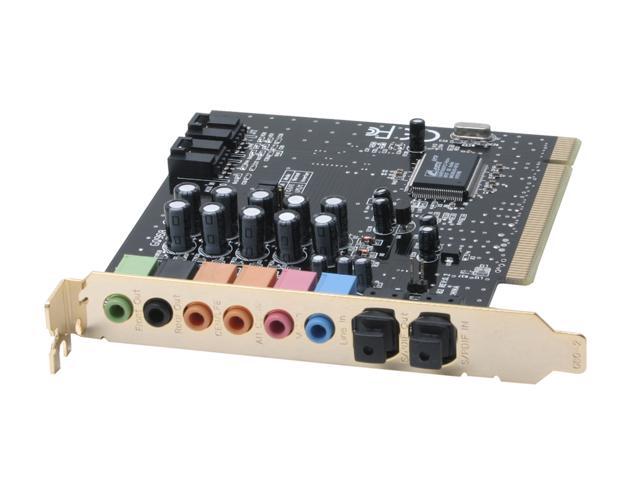
I'll try and snap a pic when I get home. It's pretty full featured so it has quite a number of outputs. It has two of those black nubs as seen below:

29-118-109-01.jpg

(not necessarily the exact same card but essentially the same look)

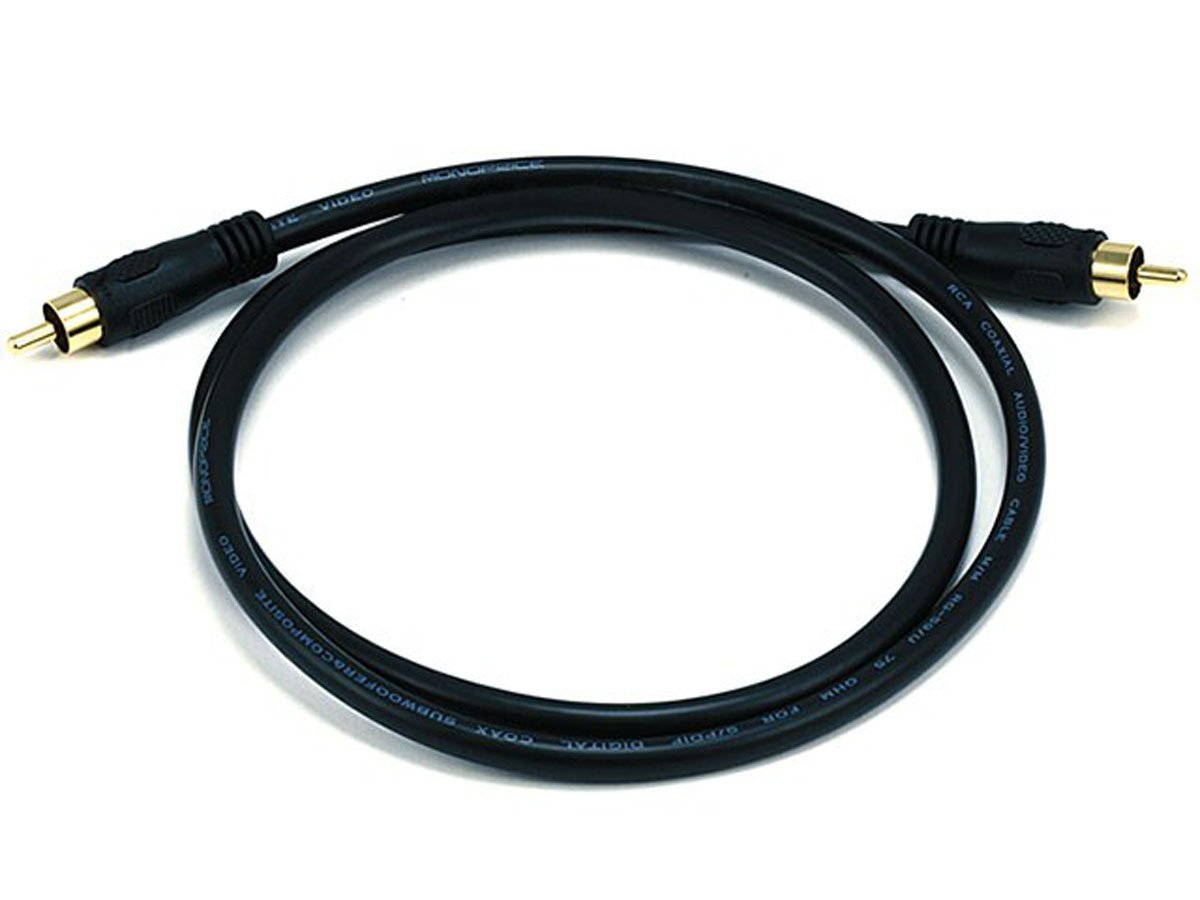
As far as i can tell, one of the black cables (http://images.monoprice.com/productlargeimages/6201.jpg) would go into the S/PDIF jack. Where would I input it into my TV? Would I look for an S/PDIF Digital In jack in turn?
 
dark10x said:
OK, I did just this.

I actually use a 75ft HDMI cable, so my run is pretty lengthy. I ended up using three individual RCA cables with a RCA to 1/8 minijack converter on one end of each cable. I ran the front, rear, and center/sub outs to the multichannel input on my receiver and get true 5.1 from my PC to the living room. USB was the trickier thing, as they have a limitation in distance they can be run. I basically chained a couple powered USB hubs together to provide power to the final hub hidden in the living room. I ran most of this into the wall with a bit around the base board in the computer room (not in the living room) and the results are amazing. I also have a 360 wireless adapter connected directly to the PC in the back room and get perfect signal to the controller with a controller I leave sync'd up with the PC. I have video, sound, and input in my living room AND in the back room (on an LCD and PC speakers). So I basically have both active at the same time and can use the PC in both rooms. Beautiful!

The downside? Larger USB peripherals require too much power to run from the hub in the living room. They either do not work at all or only partially power up. This has presented issue for some devices, but not all. Some arcade sticks work fine, for instance, while others struggle. Other than that, it's about as good a setup as I could ask for as it prevents and clutter in the living room and allows for easy PC usage. The PC works well as a gaming platform when connected in this fashion.

What are you powering from the USB connection? Would it not be more practical to just build a mini PC?
 
Meier said:
I'll try and snap a pic when I get home. It's pretty full featured so it has quite a number of outputs. It has two of those black nubs as seen below:

29-118-109-01.jpg

(not necessarily the exact same card but essentially the same look)

As far as i can tell, one of the black cables (http://images.monoprice.com/productlargeimages/6201.jpg) would go into the S/PDIF jack. Where would I input it into my TV? Would I look for an S/PDIF Digital In jack in turn?


No, not the black type of cable - this type of cable - Optical:

33961.jpg


Most HDTVs have this kind of input. Caveat: If you're plugging the PC straight into the TV for sound, don't expect miracles. Your TV will try its best to do digital surround sound, but basically it will be doing it with stereo speakers. So it will sound better in terms of discrete placement than non-digital sound, but other wise unremarkable compared to stereo. in fact I find digital surround through my TV somewhat irritating, as it often makes me thing doorbells or telephones ringing are IRL, rather than on the programming I'm watching.

But if your TV has decent speakers, you will get nice fidelity, and a one-cable solution.
 
140.85 said:
What is the deal with Monster HDMI cables anyway? Do they offer any tangible benefit or are they just overpriced to fool AV nerds into paying them too much money?

Saw the Larry David reference and then couldn't help but read this in a Seinfeld voice.

Carry on.
 
That Amazon cable is a good deal. And I know its the in thing to recommend these dirt cheap $1-$3 plus shipping cables sellers have on Amazon but I wouldn't be so quick to buy them as there often times total shit. After getting my last HDMI to DVI cable which wouldn't even fit my TV flushly I decided to never by any of those cheap craps anymore. Sometimes its worth spending a few more dollars to get somewhat quality parts.
 
OuterWorldVoice said:
No, not the black type of cable - this type of cable - Optical:

Most HDTVs have this kind of input. Caveat: If you're plugging the PC straight into the TV for sound, don't expect miracles. Your TV will try its best to do digital surround sound, but basically it will be doing it with stereo speakers. So it will sound better in terms of discrete placement than non-digital sound, but other wise unremarkable compared to stereo. in fact I find digital surround through my TV somewhat irritating, as it often makes me thing doorbells or telephones ringing are IRL, rather than on the programming I'm watching.

But if your TV has decent speakers, you will get nice fidelity, and a one-cable solution.

Do you (or anyone) know if you can get 5.1 sound from games hooking up your sound card from the PC to a receiver to a TV? Unfortunately, my sound card doesn't have Optical out so I've been trying to use the analog RCA cables with no success. I can get Optical out from my Motherboard but it won't output 5.1 and I have to put it on Dolby PL II gaming which sucks for 5.1 as it's not really surround sound
 
OuterWorldVoice said:
No, not the black type of cable - this type of cable - Optical:

http://images.monoprice.com/productlargeimages/33961.jpg[IMG]

Most HDTVs have this kind of input. Caveat: If you're plugging the PC straight into the TV for sound, don't expect miracles. Your TV will try its best to do digital surround sound, but basically it will be doing it with stereo speakers. So it will sound better in terms of discrete placement than non-digital sound, but other wise unremarkable compared to stereo. in fact I find digital surround through my TV somewhat irritating, as it often makes me thing doorbells or telephones ringing are IRL, rather than on the programming I'm watching.

But if your TV has decent speakers, you will get nice fidelity, and a one-cable solution.[/QUOTE]

Okay thanks, I'll check it out when I get home -- shame they don't have somewhere in between 12 and 25... I hate to have a lot of slack but oh well. In all honesty, I may just stick with my PC speakers since they're probably fine comparitively speaking as they at least have a subwoofer while my TV does not. That being said, my TV is a fairly new model 42" Samsung so I assume the speakers are decent enough for built in ones.
 
vehn said:
Do you (or anyone) know if you can get 5.1 sound from games hooking up your sound card from the PC to a receiver to a TV? Unfortunately, my sound card doesn't have Optical out so I've been trying to use the analog RCA cables with no success. I can get Optical out from my Motherboard but it won't output 5.1 and I have to put it on Dolby PL II gaming which sucks for 5.1 as it's not really surround sound

If it has optical out at least (preferably HDMI), then yes. Your best bet if you want true 5.1 (of which many people can't pick out over PLII, but I digress) is to invest in a soundcard with optical out and route to the TV.
 
DeaconKnowledge said:
If it has optical out at least (preferably HDMI), then yes. Your best bet if you want true 5.1 (of which many people can't pick out over PLII, but I digress) is to invest in a soundcard with optical out and route to the TV.

Well the PLII doesn't have sound coming out of my rear speakers when people are firing behind me. Guess I'll have to get a new sound card then :/
 
vehn said:
Well the PLII doesn't have sound coming out of my rear speakers when people are firing behind me. Guess I'll have to get a new sound card then :/


Yeah, you sure your card supports PLII? Becuse what PLII does is approximates 3D sound via an analog signal, so you should be hearing from the rears.

I have my Wii hooked up to my surround system with PL2 and I hear the full range. Ditto my Blu-Ray player which is full 5.1 Dolby Digital. Not saying they sound the same, but it's close enough that it shouldn't matter too much.
 
Status
Not open for further replies.
Top Bottom