• Hey Guest. Check out your NeoGAF Wrapped 2025 results here!

Android Software Thread - Tasty Desserts, Tastier Apps

Status
Not open for further replies.
hello Droid Gaf!

I recently got a droid 2 and I had a few questions...

1) is there a way to eliminate vibrate when I unlock the phone and when I move shortcuts/widgets & home buttons? I have turned off vibrate from the settings, but those still function.

2) Is there a way to set custom ringtones for diffrent notificatons? IE Email, text, gchat, voicemail? Currently I just have the one for 'notifications'

3) My co worker has a droid 1, and there is no t9 by default while the screen is in horizontal mode, is there a way to turn that on? Or just a program? He wants it to have the t9 similar to the droid 2.
 
HixxSAFC said:
Why's having an app killer so bad?

Got my wildfire 2 days ago and it was so fucking nice to be able to close then-redundant apps in one press.

When does an application "stop"?

A common misunderstanding about Android multitasking is the difference between a process and an application. In Android these are not tightly coupled entities: applications may seem present to the user without an actual process currently running the app; multiple applications may share processes, or one application may make use of multiple processes depending on its needs; the process(es) of an application may be kept around by Android even when that application is not actively doing something.

The fact that you can see an application's process "running" does not mean the application is running or doing anything. It may simply be there because Android needed it at some point, and has decided that it would be best to keep it around in case it needs it again. Likewise, you may leave an application for a little bit and return to it from where you left off, and during that time Android may have needed to get rid of the process for other things.

A key to how Android handles applications in this way is that processes don't shut down cleanly. When the user leaves an application, its process is kept around in the background, allowing it to continue working (for example downloading web pages) if needed, and come immediately to the foreground if the user returns to it. If a device never runs out of memory, then Android will keep all of these processes around, truly leaving all applications "running" all of the time.

from http://android-developers.blogspot.com/2010/04/multitasking-android-way.html
 
problem is, even in froyo, when I don't use autokiller, after my phone has been on for a while and ive ran a lot of apps, my memory gets so low to the point where my phone is unusable.
 
DemiMatt said:
hello Droid Gaf!

I recently got a droid 2 and I had a few questions...

1) is there a way to eliminate vibrate when I unlock the phone and when I move shortcuts/widgets & home buttons? I have turned off vibrate from the settings, but those still function.

2) Is there a way to set custom ringtones for diffrent notificatons? IE Email, text, gchat, voicemail? Currently I just have the one for 'notifications'

3) My co worker has a droid 1, and there is no t9 by default while the screen is in horizontal mode, is there a way to turn that on? Or just a program? He wants it to have the t9 similar to the droid 2.

2) Yes, go into the options for each app. Open email and hit the option button. I asked the same question :D
 
reaver18 said:
problem is, even in froyo, when I don't use autokiller, after my phone has been on for a while and ive ran a lot of apps, my memory gets so low to the point where my phone is unusable.
Sounds like you might have a poorly written app that is leaking memory or something.
 
reaver18 said:
problem is, even in froyo, when I don't use autokiller, after my phone has been on for a while and ive ran a lot of apps, my memory gets so low to the point where my phone is unusable.

that's weird.. i think you might have a dodgy app among your apps, because that shouldn't be happening

you should install Watchdog, it'll let you know which app is taking up a large % of your processor (ie. not acting the way it is supposed to)

HixxSAFC said:
Why's having an app killer so bad?

Got my wildfire 2 days ago and it was so fucking nice to be able to close then-redundant apps in one press.

unless you have a bad app like I assume reaver does, the only thing a task killer does is slow down the speed of relaunching applications.

They won't use the cpu unless they've been set to look for updates at various time intervals (eg. facebook notifications), in which case you'd want it to stay on so that you can get those notifications.

So yeh, you are basically just wasting your time reloading applications (as well as the time lost by manually managing an already automated process)
 
Ok, so I have Froyo on my droid 2 and I don't need an app killer.

My girlfriend has an LG ally with android 2.1. Does she need to keep using her app killer until she gets froyo?
 
j-wood said:
Ok, so I have Froyo on my droid 2 and I don't need an app killer.

My girlfriend has an LG ally with android 2.1. Does she need to keep using her app killer until she gets froyo?
No she should be fine. Most modern Android phones are powerful enough and have enough RAM to smartly manage apps for you. The older generation of phones (like the Hero, G1, etc) had fairly weak specs so users found success in using task killers, but I don't see a need for them with newer phones.
 
XMonkey said:
No she should be fine. Most modern Android phones are powerful enough and have enough RAM to smartly manage apps for you. The older generation of phones (like the Hero, G1, etc) had fairly weak specs so users found success in using task killers, but I don't see a need for them with newer phones.

I agree. I also have an LG Ally. I had a task killer on it for the first week or so, but I got rid of it and haven't had any problems for the last month or so.
 
So stoked for froyo on my Dinc. I've had it since the leaked rom has been out but it is a bit buggy. Gonna unroot as soon as I get the update message. Flash player has been awesome.
 
OKay guys, tested Shelves some more and this sh*t ROCKS!

If you have import games, pick the shelve, go into settings, change your region to the game region, scan or manually enter - BAM!

Unfortunately it isn't grabbing some Saturn games; but so far so good.
 
Denizens of the Droid army, I released a new version of Custom Car Home about 20 min ago that finally has the Home button overridden. It's probably way more useful now, lol. You can also set custom icons as well.

And that Android Customizations thread rocks. I never knew that Beautiful Widgets had gotten so awesome.
 
I just realized that I can't download any of the paid apps on the app store. I can see the item, but when I select it, it said the requested item couldn't be found.

so far the only paid app that I can get is launcher pro, and that's because I get it as free ap at first and use paypal to get the unlock code.

any ideas how can I get those paid apps? the show off your android thread really make me want some of those paid apps

I'm using Galaxy S, bought in Singapore btw. I hope that helps.
 
The Take Out Bandit said:
OKay guys, tested Shelves some more and this sh*t ROCKS!

If you have import games, pick the shelve, go into settings, change your region to the game region, scan or manually enter - BAM!

Unfortunately it isn't grabbing some Saturn games; but so far so good.
Neat. I could really use this.
 
I've got an issue with the default Froyo browser on my HTC Desire. Whenever I go to a page on the BBC site with any embedded video content, it crashes back to the desktop. I'm guessing it's something to do with Flash, any ideas?
 
Callibretto said:
I just realized that I can't download any of the paid apps on the app store. I can see the item, but when I select it, it said the requested item couldn't be found.

so far the only paid app that I can get is launcher pro, and that's because I get it as free ap at first and use paypal to get the unlock code.

any ideas how can I get those paid apps? the show off your android thread really make me want some of those paid apps

I'm using Galaxy S, bought in Singapore btw. I hope that helps.


http://market.android.com/support/bin/answer.py?hl=en&answer=143779 said:
Paid App Availability Print
Priced applications are currently only available to users in the following countries:
Australia
Austria
Canada
France
Germany
Italy
Japan
Netherlands
New Zealand
Spain
Switzerland
United Kingdom
United States
We're working hard to add more countries, so please stay tuned!

You can install Market Enabler to bypass this and fake being form one of those countries. Requires root though.
 
josephdebono said:
You can install Market Enabler to bypass this and fake being form one of those countries. Requires root though.

if I root my galaxy s, will that complicate the process when updating to froyo? also, does it matter what my firmware is? I'm trying to update the fw to the latest official fw provided by Samsung, which is JG4. but I've been having problem installing Kies on my pc.
 
Callibretto said:
if I root my galaxy s, will that complicate the process when updating to froyo? also, does it matter what my firmware is? I'm trying to update the fw to the latest official fw provided by Samsung, which is JG4. but I've been having problem installing Kies on my pc.

I honestly couldn't tell you since I don't know the Samsung community at all. I just dabble around the HTC area. Check out XDA-Developers and see what they have to say regarding the issue.

Odds are very high that you would have to wait after the OTA update is released to install a modded/rooted version of the FroYo rom which usually takes about 27 minutes knowing the speed of the community.

But seriously, don't take my word for it. Check Xda-devs, they're the best.
 
gcubed said:
well, time for one button root on my n1!

It feels good man!
I've been rooted for a week now. Will try this app.

I don't understand why more apps are not supporting this feature.
I have a few apps that I don't want to uninstall but I don't get to use them that often. Will move those to the SDcard.

Edit:

Weird. Not all apps can be moved. For example the NYTimes app the option to move is grayed out.
Still helpfull, cleared like 20 megs already.
 
Epix said:
Where's my Angry Birds love?

I'm with you. I actually recently ordered a Droid X, but I've got an iPod Touch that I've been using to do iPhone app development at work. I got sucked into the free version of Angry Birds and loved it so much that I bought the full version (only $0.99)! I'm loving it. I'll probably buy the Android version for my Droid X as well.

My only complaints are that you don't seem to be able to skip ahead to future levels, so if you can't pass a given stage, you're stuck there. Also, I have a hard time figuring out exactly how each bird is supposed to impact the various architectures of the levels.
 
Callibretto said:
if I root my galaxy s, will that complicate the process when updating to froyo? also, does it matter what my firmware is? I'm trying to update the fw to the latest official fw provided by Samsung, which is JG4. but I've been having problem installing Kies on my pc.

Go to XDA developers.

There are one click root, unroot methods available, they go through using ODIN with custom ROMs or going 100% back to stock. There are easy ways "one click - but not really" to root, lag fix, remove bloatware (model specific), install tethering, etc

I have a Captivate and have put on a couple different ROMs, and can easily revert back to stock and take an OTA update when available.

http://www.xda-developers.com/

http://forum.xda-developers.com/forumdisplay.php?f=656 standard galaxy s area
 
SimleuqiR said:
It feels good man!
I've been rooted for a week now. Will try this app.

I don't understand why more apps are not supporting this feature.
I have a few apps that I don't want to uninstall but I don't get to use them that often. Will move those to the SDcard.

Edit:

Weird. Not all apps can be moved. For example the NYTimes app the option to move is grayed out.
Still helpfull, cleared like 20 megs already.

yeah i'm not going to put a new rom on it, but i'll root and run this. I'f i could clear 20meg i'd be happy!! There are a handful of apps that i want to keep but i deleted to clear some room... i can get this stuff back!

this and the new radio... did you notice a difference when you loaded it up? (did you? i forget)


edit... is there any way to have the LP Calendar Widget not show a certain calendar?
 
gcubed said:
yeah i'm not going to put a new rom on it, but i'll root and run this. I'f i could clear 20meg i'd be happy!! There are a handful of apps that i want to keep but i deleted to clear some room... i can get this stuff back!

this and the new radio... did you notice a difference when you loaded it up? (did you? i forget)

Yup! 20 megs!
Maybe I can finally start playing around with Fennec!!! Those builds were like 20 megs (at least the last one I installed).

They released an Alpha build:

http://www.youtube.com/watch?v=usL0gwXQPWo

http://blog.mozilla.com/blog/2010/08/27/fennec-alpha-released-for-android-and-nokia-n900/

The main focus of this release is to increase performance and responsiveness to user actions. This is being implemented using two major technologies, “Electrolysis” and “Layers.” This Alpha release includes Electrolysis, which allows the browser interface to run in a separate process from the one rendering Web content. By doing this, Fennec is able to react much faster to user input while pages are loading or CPU intensive JavaScript is running. The upcoming beta release will start taking advantage of Layers to greatly improve performance in graphic intensive actions like scrolling, zooming, animations and video. We’re also working to optimize these actions using the hardware-accelerated graphics rendering capabilities showing up in today’s mobile devices.

This will eventually become my default mobile browser, unless Google really improves the UI on the stock Android Browser.
 
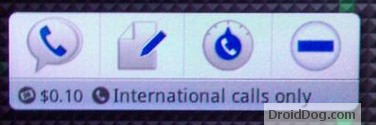
Google Voice is getting a Widget with the next GAPPS update to Android!

google-voice-widget.jpg


New GAPPS for T-Mobile G2 Has New Google Voice Widget, More Launcher Customization
 
Hello!

I just bought a Desire yesterday. I'm loving it so far but I have 2 questions.

1. How are people customizing the lock screen? I can't figure out how to do it!

2. I have an iPod and was using iTunes to sync Podcast. What is a good podcast app to handle all this straight from my phone?

Thanks!
 
Blergmeister said:
Hello!

I just bought a Desire yesterday. I'm loving it so far but I have 2 questions.

1. How are people customizing the lock screen? I can't figure out how to do it!

2. I have an iPod and was using iTunes to sync Podcast. What is a good podcast app to handle all this straight from my phone?

Thanks!

2. You can use Isyncr AFAIK. I don't use iTunes but have heard that people do that. Or you can use Google Listen for podcasts, works really well.
 
WasteLand Soldier said:
hey guys. what the best free if possible media player? the movie player in the gallery is really hit and miss and voice is almost always out of sync.

I like Music Mod a lot. Has great widgets.
 
andycapps said:
2. You can use Isyncr AFAIK. I don't use iTunes but have heard that people do that. Or you can use Google Listen for podcasts, works really well.

I've downloaded Listen and have subscribed to a few podcast RSS's. Since I'm not in wifi I see my stuff on the queue and I assume that they'll go just fine when I'm back home. I see that I can manually download one now but it ask me if I'm sure since I'm not on wifi. So far so good. My next question is... it looks like I can play the podcasts through here which is fine but I don't see a widget. I was wondering if there is a widget for Listen or can I listen to the downloaded items through any other measure?

State Flow - I've found Widget Locker in the app store. Since it cost money I'm going to wait until I have a chance to redeem my $20 in free android app store money before I check it out. Thanks!

Oh, and any good text message widget recomendations is appreciated! I am currently using the HTC one and, while I can live with it... it is enough that I wonder if there is anything better out there...

Thanks everyone!
 
Ok here are my questions regarding the Marketplace.

Right now I have a Droid X with a few dead pixels, Best Buy will be replacing it when they get more in, but I would like to buy some Apps.

First of all, does buying apps on Android just charge it to your phone bill? Second, how easy is it to transfer paid apps to new phones?

Thanks
 
Blergmeister said:
I've downloaded Listen and have subscribed to a few podcast RSS's. Since I'm not in wifi I see my stuff on the queue and I assume that they'll go just fine when I'm back home. I see that I can manually download one now but it ask me if I'm sure since I'm not on wifi. So far so good. My next question is... it looks like I can play the podcasts through here which is fine but I don't see a widget. I was wondering if there is a widget for Listen or can I listen to the downloaded items through any other measure?

State Flow - I've found Widget Locker in the app store. Since it cost money I'm going to wait until I have a chance to redeem my $20 in free android app store money before I check it out. Thanks!

Oh, and any good text message widget recomendations is appreciated! I am currently using the HTC one and, while I can live with it... it is enough that I wonder if there is anything better out there...

Thanks everyone!

There is no widget for Listen, yet. Which is surprising, but I would imagine that at some point Google will integrate Listen with their default music player. When you listen to the podcasts, however, and you're in another program, it'll show up in your notification tab so you can drag that down and then click back into Listen.

As far as text message widgets, I think Handcent and ChompSMS are the big ones for most people, though I stick with stock messaging and use the Launcher Pro Plus widget if I really want it. I try to limit how many widgets I use as they tend to affect my battery negatively.
 
Deadly Cyclone said:
First of all, does buying apps on Android just charge it to your phone bill? Second, how easy is it to transfer paid apps to new phones?

1) The apps are purchased through a Google Checkout account.

2) Very easy. Since everything is linked to your Google account and not your phone, you will have lifetime access to them even as you change phones.
 
zesty said:
1) The apps are purchased through a Google Checkout account.

2) Very easy. Since everything is linked to your Google account and not your phone, you will have lifetime access to them even as you change phones.

Awesome, thanks.

One thing I hated on my iPod Touch was that it never told you if you had bought an app before, you actually had to click download and risk it, where if you had bought it a message would pop up saying it was free, and if you hadn't it would charge you. When I switch phones will it tell me what paid apps I had bought already on my google account?
 
zesty said:
1) The apps are purchased through a Google Checkout account.

2) Very easy. Since everything is linked to your Google account and not your phone, you will have lifetime access to them even as you change phones.
Yup. And through Google Checkout, you can specify a regular credit/debit charge and also billing through your cell provider.
 
Deadly Cyclone said:
Awesome, thanks.

One thing I hated on my iPod Touch was that it never told you if you had bought an app before, you actually had to click download and risk it, where if you had bought it a message would pop up saying it was free, and if you hadn't it would charge you. When I switch phones will it tell me what paid apps I had bought already on my google account?

You go to the market, select downloads, and everything which you purchased will be already there waiting for you to download and install.
 
andycapps said:
There is no widget for Listen, yet. Which is surprising, but I would imagine that at some point Google will integrate Listen with their default music player. When you listen to the podcasts, however, and you're in another program, it'll show up in your notification tab so you can drag that down and then click back into Listen.

As far as text message widgets, I think Handcent and ChompSMS are the big ones for most people, though I stick with stock messaging and use the Launcher Pro Plus widget if I really want it. I try to limit how many widgets I use as they tend to affect my battery negatively.

Thanks! I've downloaded these. I'll try them out through the day. Thanks for your help again!

Actually, one last request... Anyone know of a Chuck Norris joke widget? I've found apps but I'd like a widget... it would tickle my dads sense of humor just so to show him it updating on a home page.
 
Status
Not open for further replies.
Top Bottom