
Jamesfrom818
Banned
2.1 to 2.2 is probably a much bigger change than 2.2 to 2.3.Bboy AJ said:Only a month for CM7? CM6 took longer than that, iirc.

2.1 to 2.2 is probably a much bigger change than 2.2 to 2.3.Bboy AJ said:Only a month for CM7? CM6 took longer than that, iirc.
sableholic said:i'm sure this has been talked about, but is there an app that makes your contact photos less blurry/low resolution?
sableholic said:i'm sure this has been talked about, but is there an app that makes your contact photos less blurry/low resolution?

sableholic said:i'm sure this has been talked about, but is there an app that makes your contact photos less blurry/low resolution?
teiresias said:If you're syncing with your Google Contacts (and who isn't really?) you're sort of out of luck (except for 3rd party solutions for syncing different pics), because it's the Google Contacts back end that's resizing contacts to the horribly low resolution so you can't do much about it.
radioheadrule83 said:Is the Facebook update only available for a certain version of Android or something?
The market isn't offering me the update atm... (2.1, UK)

Zozz said:New Google maps update is out!!
Zozz said:New Google maps update is out!!
I can tilt but I can't seem to rotate the map ugh.Kinitari said:Yeah I was literally going through the grind of updating all my apps and I even downloaded the new market and it pops up. It rocks. Hopefully caching means subway usability!
Also, there was an update for the voice recognition software, said something about turning on personalization to increase accuracy, anyone know how to do that?
I agree. I believe the AppStore works the same way. You have to open the app, then it scans your installed apps for any updates. Would be nice to have real push notifications of available updates.LM4sure said:Yeah, this Google Maps is pretty cool.
Question though. I have automatic updates on, but it only automatically updates when I open the Market. It kind of defeats the point of automatic updates.
Xenon said:I have a few security questions.
1. I went to Install Ninja jump and it said it will read my personal information. Do people feel comfortable sharing this with some random app dev?
Zozz said:I can tilt but I can't seem to rotate the map ugh.
You need to use it after you download the Voice update first and a screen comes up asking if you want personalized recognition.
. Canadian English is the same thing!Zozz said:I can tilt but I can't seem to rotate the map ugh.
You need to use it after you download the Voice update first and a screen comes up asking if you want personalized recognition.
GoldenEye 007 said:Does this new map caching go to the internal memory or SD card? Please say SD card!
Weird. I don't have to open the Market app for my apps to automatically update.Epix said:I agree. I believe the AppStore works the same way. You have to open the app, then it scans your installed apps for any updates. Would be nice to have real push notifications of available updates.
Zozz said:Yea I can't rotate it, lame. I been doing the motion that they show on this video from the start. Tilting works but rotating doesn't. I thought the Droid Incredible was supported.
The AppStore app gets badges ever so often indicating the number of updates available. It's by push but I've never been able to determine the checking schedule (or how to turn it off).Epix said:I agree. I believe the AppStore works the same way. You have to open the app, then it scans your installed apps for any updates. Would be nice to have real push notifications of available updates.
LM4sure said:Yeah, this Google Maps is pretty cool.
Question though. I have automatic updates on, but it only automatically updates when I open the Market. It kind of defeats the point of automatic updates.
SimleuqiR said:Google, you lie!
So rotation only works when your location is under a 3D map zone? I'm not in a 3D map zone right now but I at least thought I could rotate when I was checking out the downtown map.Jim said:Uhh.. it works... it only works on YOUR location. Hit the "My Location" in the upper right, then hit the compass, then hit the compass again (the icon changes). I'm using an Incredible also. I'm using it right now.
Zozz said:So rotation only works when your location is under a 3D map zone? I'm not in a 3D map zone right now but I at least thought I could rotate when I was checking out the downtown map.
Zozz said:Yea I can't rotate it, lame. I been doing the motion that they show on this video from the start. Tilting works but rotating doesn't. I thought the Droid Incredible was supported.
I don't think it's by push at all. They only time I've ever seen it update on my wife's iPhone is when you actually open the App Store.Charred Greyface said:The AppStore app gets badges ever so often indicating the number of updates available. It's by push but I've never been able to determine the checking schedule (or how to turn it off).
Load this on your device - secondapps.com/neogafnastynate409 said:Has anyone made a Neogaf app or Neogaf mobile?

nastynate409 said:Has anyone made a Neogaf app or Neogaf mobile?

Zozz said:Compass rotation works but finger doesn't.
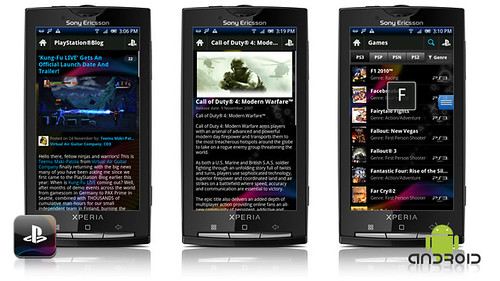
In version 1.0 youll be able to:
--Check out your PlayStation Network trophies and keep up to date with your friends games and online status.
--Discover all the latest games, news and hardware for your PlayStation 3, PSP and PlayStation 2.
--Read all the announcements on the European PlayStation.Blog.
--Share your favourite products or news with your friends on Facebook, Twitter or via e-mail.
Crazyorloco said:I went to sleep at 2 a.m. last night because I couldn't stop playing Game Dev Story. Is there anything like this on the computer? I think I have a new favorite game genre.
Epix said:I agree. I believe the AppStore works the same way. You have to open the app, then it scans your installed apps for any updates. Would be nice to have real push notifications of available updates.
kinggroin said:But it does?
I know every so often my notification bar will show a little icon of an android robot indicating new update for my apps
