• Hey Guest. Check out your NeoGAF Wrapped 2025 results here!

Android Software Thread - Tasty Desserts, Tastier Apps

Status
Not open for further replies.
Not sure what stock apps most phones come with, but Sense UI on the Desire and its amazing Microsoft Exchange integration and Quickoffice built in too, there's not much from the app store you need to be honest with the phone work-wise.

I'm using Remember the Milk, but need something better for tasks for me and a colleague to sync tasks between ourselves (Any recommendations?).

I got a better Video player of course as it actually doesn't have a video player at all (Went with Act 1 Video Player). And for some reason the phone doesn't play .gifs(is this android all round?).

The stock HTC music app is nice enough although the listing of songs by artist is annoying (See Blueprint 3, where multiple artists are listed it counts each as a new album).

One issue i have is with Facebook. I turned off the Syncing of Facebook contacts yet the numbers still keep showing up, and with some contacts but not all their Facebook phone numbers override the numbers i have typed in......Whats that all about??

The news/RSS HTC widget means i don't need any other which is cool, the people widget is awesome aside from the facebook issue too, i love the email widget and messages and i use the SMS pop up app but i since learnt that it cant be used if you use the following app and it pops up the SMS before the SPC app gets chance to hide it!


I use SPC which is cool for not accepting unknown numbers, seems to run well too
 
Chairman85 said:
I had been alternating between Touiteur and Twicca, both very good options. Currently, I prefer Twicca. TweetsRide is a lighterweight client, so it's a notch faster than Twicca.
Touiter is really nice, but it's super shotty with notificating you on new tweets. Just installed Twicca and set the updates to every 3 minutes. Hopefully this works better.
 
I use Twitter as a 'cliffnotes' version of a newsreader for quick news blurbs and hardly ever post (Tweeting is uh...not for me...thanks) but Twicca is hands down my favorite and has actually enticed me to get more involved. It's fast, lightweight and not all clunky and overblown with a bunch of bloated Fisher Price looking buttons and cute character mascots and shit taking over my UI.

Good stuff!
 
Yeah, I just started using Twicca, my fav Twitter client so far. I really liked Tweetcaster, but there's some things holding it back. Anyone looking for a Twitter app, try Twicca.
 
my contribution to the thread:
not sure what's already been discussed, but also not caring that much because as soon as i bring it up it's hot news again anyway.

slidescreen pro
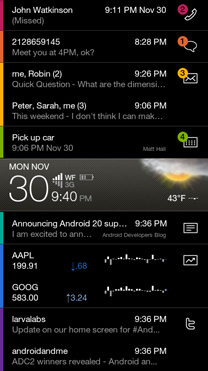
fantastic home replacement. great aesthetics. facebook, twitter, email, stocks, google reader; basically everything you could want on your homescreen.
slide1.jpg
slide3.jpg
slide2.jpg


Vignette
damn awesome photo app with a feature-list including picture editing with the likes of old toy cameras or holgas, etc.
couple of the options (i used the lowest resolution available):
6098d17c.jpg

2ptw30w.jpg

fbzzq0.jpg


xScope
a wickedly fast browser with great options. also serves as a file browser and task manager, downloader, lets you navigate through tabs by swiping. just a real good browser; i'd say the best out there.

andddd my favorite:

APKtor
you'll just have to download this one yourself if you want to find out what it is/does.
 
slidescreen looks good but i got really pissed off with android asking me which homescreen i wanted to go to every time i pressed home...
 
panda21 said:
slidescreen looks good but i got really pissed off with android asking me which homescreen i wanted to go to every time i pressed home...
Why wouldn't you select 'Use by default for this action'?
 
Blu_LED said:
Well, thanks for the super high-five, I guess, but I found the app.
It was an April fool's gag... did they actually put a gag app up for it?? If so, I was totally unaware, and you should tell me how to find it.
 
poweld said:
It was an April fool's gag... did they actually put a gag app up for it?? If so, I was totally unaware, and you should tell me how to find it.
Search it on Google, go to its offical page, and scan the barcode. Searching on the market won't find it for some reason. Scanning was the only way I found it.
 
How many people use the emulators available on the Market? I bought a couple SNES/GB games recently but dont want to go through the trouble of ripping them if the emulators available are worthwhile.
 
Hopefully someone can help me. I have a Droid Eris and my only major complaint is that I don't ever want my phone to wake up on its own. If a calendar reminder goes off or someone calls me, my phone will wake up and I end up accidentally pressing buttons (on the touchscreen) in my pocket if I don't want to / can't get to the phone right away. Is there some way to stop this? Maybe a calendar app on the market that doesn't do this? I've tried finding one but haven't had any luck.

I've taken my phone out of my pocket several times to find myself writing jibberish in a text message or having a work contact pulled up (not called, thankfully) who I really don't want to call. I have it synched with Exchange so there are a lot of people on there I would be embarrassed to accidentally call. Or one time, I was busy talking to someone face-to-face so I didn't answer my phone. 30 seconds later I could hear the person on the phone talking. Somehow I answered the call without trying to. :/

Maybe it would help to turn my phone around in my pocket so it is not facing my leg, although that would be a bit awkward since that's the way I hold the phone.

Does anyone else have this problem or have any ideas?
 
CrayzeeCarl said:
Hopefully someone can help me. I have a Droid Eris and my only major complaint is that I don't ever want my phone to wake up on its own. If a calendar reminder goes off or someone calls me, my phone will wake up and I end up accidentally pressing buttons (on the touchscreen) in my pocket if I don't want to / can't get to the phone right away. Is there some way to stop this? Maybe a calendar app on the market that doesn't do this? I've tried finding one but haven't had any luck.

I've taken my phone out of my pocket several times to find myself writing jibberish in a text message or having a work contact pulled up (not called, thankfully) who I really don't want to call. I have it synched with Exchange so there are a lot of people on there I would be embarrassed to accidentally call. Or one time, I was busy talking to someone face-to-face so I didn't answer my phone. 30 seconds later I could hear the person on the phone talking. Somehow I answered the call without trying to. :/

Maybe it would help to turn my phone around in my pocket so it is not facing my leg, although that would be a bit awkward since that's the way I hold the phone.

Does anyone else have this problem or have any ideas?
That makes no sense to me. It's a capacitive screen, so your pockets should not conduct any signals to the touch screen.

Also, I'm not sure how Sense UI phones work, but all other Android phones I've used require you to unlock the screen for things like text messages and other non-urgent actions. And that involves pressing a hardware key :/

You're doing something magical.
 
Not really magical, if I rub the screen against my tshirt on my HTC hero it selects stuff etc so it probably does the same in a pocket
 
Battersea Power Station said:
That makes no sense to me. It's a capacitive screen, so your pockets should not conduct any signals to the touch screen.

Also, I'm not sure how Sense UI phones work, but all other Android phones I've used require you to unlock the screen for things like text messages and other non-urgent actions. And that involves pressing a hardware key :/

You're doing something magical.
Yes, you have to unlock the screen for most things, but that can either be done by sliding or pressing "Menu." Menu is a hardware key, but it's still a touch key. I don't know how this happens, but it does. I have a feeling that my pockets are thin enough that my leg can press the Menu key. I wish there was a way to disable the Menu key from unlocking the phone.

Anyway, I tried turning on the lock screen gesture thing so we'll see how well that works over the next week or two. It's annoying having to do the gesture, but I can at least turn it off when I want.

The only thing the lock screen doesn't come up on is a phone call. So I can still imagine accidentally answering a call when my phone is in my pocket, on silent. I'm considering just putting my phone in airplane mode when I don't want to be disturbed (in a meeting or something), but what if the security company calls because my home was broken into? With the Settings Profile app (love this, btw), I can automatically put my phone on silent when I have a work meeting scheduled, but allow only the security company to trigger switching to non-silent mode. I can't do that if I put it in airplane mode because I won't even get the call. I'm probably just making too big a deal about this. :lol
 
UN-FUCKING-BELIEVABLE! My wife goes to use my phone (she uses the Calorie Counter app, doesn't have her own) and she doesn't know the lock gesture. It locks her out for too many attempts and asks for the Gmail address and password to unlock the phone and it DOESN'T FUCKING WORK!!!

I am so pissed right now. Yes, I am 100% sure the email address and password are correct. I've used it every single day for the last three years.

Luckily, I can get the stuff off my SD card by calling my phone, then using the Notification Bar to mount the SD card as a USB device. This is still bullshit.
 
This happened to me about two nights ago. I just wiped the phone because everything is backed up either way.
Maybe there's something wrong with their servers?
 
CrayzeeCarl said:
UN-FUCKING-BELIEVABLE! My wife goes to use my phone (she uses the Calorie Counter app, doesn't have her own) and she doesn't know the lock gesture. It locks her out for too many attempts and asks for the Gmail address and password to unlock the phone and it DOESN'T FUCKING WORK!!!

I am so pissed right now. Yes, I am 100% sure the email address and password are correct. I've used it every single day for the last three years.

Luckily, I can get the stuff off my SD card by calling my phone, then using the Notification Bar to mount the SD card as a USB device. This is still bullshit.

Yeah, this is still a bug in android that's been around since the G1 release...
http://code.google.com/p/android/issues/detail?id=3006
http://code.google.com/p/android/issues/detail?id=4784

Solution in the latter link:
1: Rebooting the phone
2: calling the mobile from another phone (phone 2)
3: hanging up phone 2
4: repeatedly hitting the home button while hanging up
5: disabling the security lock via settings

Not sure if it works though.
 
CrayzeeCarl said:
Thanks. I saw this workaround, but I could not get it to work. I did a factory reset. Unbelievable how bugs like this can hang around.

yeah, its not exactly a small bug
 
jee said:
hi, i made an android app "ExtremeTypist" and would be great if you could test it. i tested it on hero and nexus and it seems to work ok, but i would like to hear comments especially from people with physical keyboards.


http://www.cyrket.com/p/android/com.exty.extremetypist/

Wow, that's a neat app. I just tried it on the Droid, no issues at all, got a score of 213 characters. I would prefer to see it in WPM though. Nice work, and happy to report no issues in regular or extreme.

edit: Just tried again, finished much faster than before but now a score of 200. Confused.
 
jonnybryce said:
Wow, that's a neat app. I just tried it on the Droid, no issues at all, got a score of 213 characters. I would prefer to see it in WPM though. Nice work, and happy to report no issues in regular or extreme.

edit: Just tried again, finished much faster than before but now a score of 200. Confused.
thanks for the reply :) by finishing, do you actually mean you managed to type all the words? i must have really underestimated how fast people are :)

i'll update it to calculate the real speed if you manage to finish early and display wpm too (even though its just characters / 5)
 
Yep, I managed to finished all the words both times, the second time faster than the first. Then I just wait for it to end and tell me my score since all the words are gone.
 
Chairman85 said:
I don't think the API exists for MT in any OS < 2.0.

Well the 1.6 Cyanogen firmware for MT3G has multi-touch in the browser and photo gallery, so wouldn't it be possible to make it work for the keyboard too?
 
So I finally took the plunge and rooted my Eris and installed the Sense-able 2.1 ROM. Hopefully I'm allowed to talk about that, I'm not sure. :lol

I just love this thing. Believe it or not, if the only difference was that it allowed me to choose "View Contact" as the default action for the People widget, it would be completely worth it. One less annoyance out of the way. :D

I'll be installing SetCPU soon so we'll see how well that helps my battery/performance.
 
jayb said:
Well the 1.6 Cyanogen firmware for MT3G has multi-touch in the browser and photo gallery, so wouldn't it be possible to make it work for the keyboard too?
If that's the case, I'd suggest Smart Keyboard (Pro) and see if it behaves the way you like. Better Keyboard also supports MultiTouch but I have no experience with it.
 
Does anyone else have problems with Better Keyboard? Sometimes ill hit a key and it will recognize as me hitting the home key(Nexus one btw) or some other random key in the vicinity. Other times it will just freeze for a second, disappear then reappear only to delete the last word upon hitting the next key. The only "fix" i have is to lock the screen, unlock it and then start typing again.

Also, what is the best music player out there? All I really want it the option to sort my music either by recently added or recently played in chronological order. I hate the way the stock player handles music. I hope Froyo bring s some better media functionality.
 
Wow, I'm loving App Brain. Browsed around and discovered 1Cast, a cool news video app with awesome quality. Clicked install on Appbrain, and it was waiting to be installed on my Droid, no searching or scanning needed. Google, buy them now!
 
Is there an app that could turn my Moto Cliq into a Bluetooth wireless keyboard for my PS3? I have one of those chat pads but its such a pain. Typing on my Cliq is a dream.
 
not sure if this was posted, but i can't believe its not at the top of everyones list for one of the best games on Android...

Space Physics

http://www.thisandroidlife.com/2009/10/android-game-review-space-physics.html

Drawing on the screen creates an object in the shape of the pattern you have made, with a couple of exceptions- drawing a free floating circle creates a wheel and drawing a circle anchored to one of the level’s solid objects creates a cog. You can join two wheels together to set them rolling from left to right like a little car, or you can add lines to a cog to make the cog turn. Clever use of the cogs can create a slingshot for firing your ball, or other loose objects, around the level.

For a video of the game...
http://www.youtube.com/watch?v=S8F9yKIe3hE

i love it
 
KoruptData said:
Is there an app that could turn my Moto Cliq into a Bluetooth wireless keyboard for my PS3? I have one of those chat pads but its such a pain. Typing on my Cliq is a dream.

I don't think anything exists for android phones. I'd love to have an app for this on my MT3G!
 
If you buy a phone with 2.1 that comes preloaded with Sense (ex. Incredible), is there an option to use the vanilla Google 2.1 UI?

I'm thinking about purchasing the Incredible over the N1 so I can get the in-store VZW support, but I hate the look of Sense.
 
Dynamic3 said:
If you buy a phone with 2.1 that comes preloaded with Sense (ex. Incredible), is there an option to use the vanilla Google 2.1 UI?

I'm thinking about purchasing the Incredible over the N1 so I can get the in-store VZW support, but I hate the look of Sense.
Yes, you can do that in the settings. And you're gonna get people asking you why you would want to do that, but I happen to agree with you. To me, the simpler look of Android is better.
 
I know a lot of people think Live Wallpapers are overrated, but I like them and don't notice a hit on battery or performance. The issue with me is there aren't many I like, out of the stock, there are only 2 nice/ok ones (magic smoke and polar clock are cool, rest suck ex: maps isn't accurate, neural network background is too busy and ugly, etc), and in the market, a lot are messy or hit battery or performance too hard.

I just stumbled upon the Pong Clock Live Wallpaper and think it's pretty cool.


Lnxnv.png
25a66vr.png


The cool thing about it, besides having a pong game as your walllpaper, is that it's really customizable. I have a dark gray background with yellow-green icons, and I moved the scoreboard/clock to the middle-bottom. It looks really cool and doesn't seem to hurt performance. You can also use a wallpaper you already have for a background and it plays over it.

I really like it.
 
Battersea Power Station said:
Yes, you can do that in the settings. And you're gonna get people asking you why you would want to do that, but I happen to agree with you. To me, the simpler look of Android is better.

When you do that though, you're only getting rid of the homescreen UI, right? Sense itself still leaves some processes behind and you won't have the vanilla Google apps for contacts, calendar, email, and that sort of thing on the phone, still just the HTC versions. Can you get the regular Google version of those apps via the Market?
 
jonnybryce said:
I know a lot of people think Live Wallpapers are overrated, but I like them and don't notice a hit on battery or performance. The issue with me is there aren't many I like, out of the stock, there are only 2 nice/ok ones (magic smoke and polar clock are cool, rest suck ex: maps isn't accurate, neural network background is too busy and ugly, etc), and in the market, a lot are messy or hit battery or performance too hard.

Water > all other live wallpapers.
 
teiresias said:
When you do that though, you're only getting rid of the homescreen UI, right? Sense itself still leaves some processes behind and you won't have the vanilla Google apps for contacts, calendar, email, and that sort of thing on the phone, still just the HTC versions. Can you get the regular Google version of those apps via the Market?
Correct, only the home UI is disabled. I don't think the Google version of the basic apps are on the Market, but I do believe Google is looking into doing that in the future as part of their goal to prevent fragmentation.

Easiest way to make an HTC phone stock is to have root access and start fresh.
 
Anyone know of an app that syncs your photos in the background to the cloud, so that my images are basically always synced to my computer? I'm going to start looking now, but if anyone knows of one, I feel like it's a pretty obvious idea yet I've never come across an app like this.
 
jonnybryce said:
Anyone know of an app that syncs your photos in the background to the cloud, so that my images are basically always synced to my computer? I'm going to start looking now, but if anyone knows of one, I feel like it's a pretty obvious idea yet I've never come across an app like this.
Use Picasa.
 
Status
Not open for further replies.
Top Bottom