• Hey Guest. Check out your NeoGAF Wrapped 2025 results here!

Dishonored 2 PC performance thread

I haven't had a gaming PC in years, just built one last month so sorry if this is a stupid question.

What is the command to show frames per second? I remember on WoW it was control + r, but can't find anything for Dishonored 2.

Not all games have an FPS counter included. A lot of PC games now make an effort to add one, and when they do its in the settings menu.

Steam has an FPS counter included.

ximg_54dd908b435c4.png.pagespeed.gp+jp+jw+pj+js+rj+rp+rw+ri+cp+md.ic.exYGG9XrQx.png


I tend to use MSI afterburner.
 
EVGA 1080 SC
i7-6700k stock
16 GB RAM
All settings on ultra @ 1080p.
Latest Nvidia drivers + Windows 10 update.

The game ran pretty smoothly until I reached the main square of
Karnaca
. Then it started chugging a bit. I might either have to turn down a few settings or see if the game gets patched soon.
 
It is easier with third party software like MSi afterburner or the steam overlay version. Not many games will give you a direct option.

Most games don't have a frame counter built in. Most of us are using third party programs to do it. I use Fraps but it's not free.


Oh right, I forgot about the Steam option!

Not all games have an FPS counter included. A lot of PC games now make an effort to add one, and when they do its in the settings menu.

Steam has an FPS counter included.

ximg_54dd908b435c4.png.pagespeed.gp+jp+jw+pj+js+rj+rp+rw+ri+cp+md.ic.exYGG9XrQx.png


I tend to use MSI afterburner.

Wow...thanks a bunch. I will check that out when I wrap up today.

I love this community. :)
 
4790k
GTX 970
16GB RAM

Kept to medium settings following the doom and gloom from this thread, played up to chapter 3 so far but it seems to be working ok here.
 
When alt tabbed into Windows games CPU priority is lowered to Low, but when game is main focus aka playing then CPU priority is Normal, doesn't drop below that. At least not for me.
 
Okay so during the first map I couldn't tell why I was uncomfortable playing but as soon as I got outside it got easier to figure:
It look like mouse sensibility is tied to fps. With the game going from 60 to 200+ depending of the direction you are looking to... it's like instant motion sickness.

Edit: A friend got the same issue with sensibility: https://www.youtube.com/watch?v=DuyVwXH0WRk (He is moving the mouse at constant speed)
 
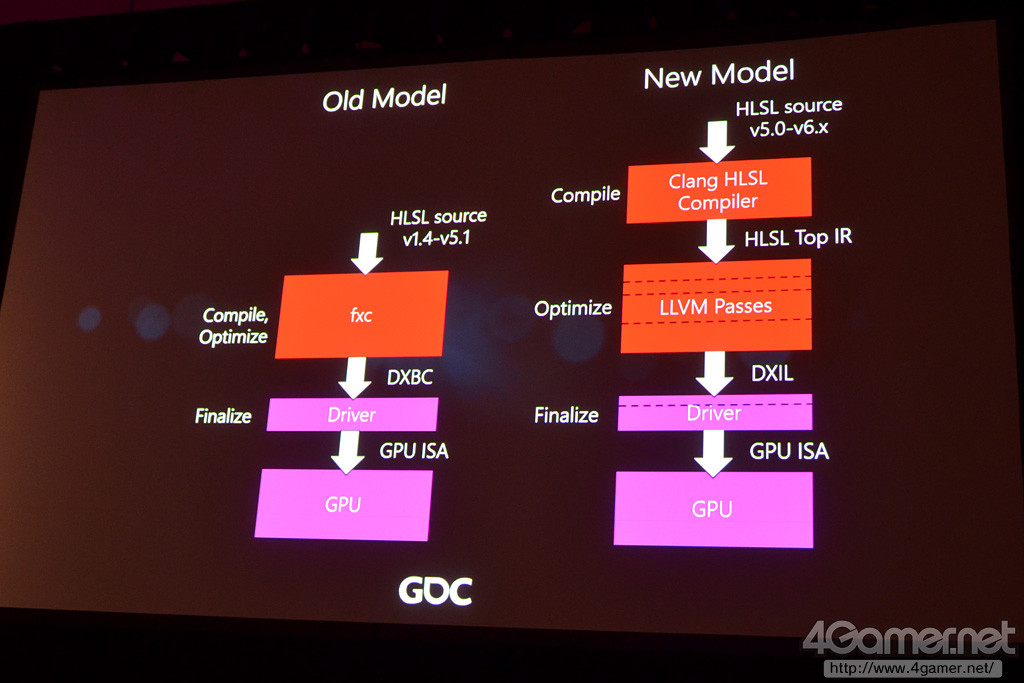
One part of this example will be sorted (related to wave intrinsics), although it is highly dependent upon the quality of the underlying compiler to produce appropriate microcode--which is still difficult to inspect/trust on PC.

Shouldn't MS switching to DXIL in SM6 make this easier as well?

79a.jpg
 
Well I finally got it to run at "tolerable" levels by downloading something called process hacker and permanently setting dishonored 2's priority to high

Everything is set to ultra excent shadows which are on high and view distance which is on very high. minimum fps I've gotten is 58, but it still doesnt really feel "good" even when i'm at 90-100fps in certain area.

my rig is a MSI GTX1070 gaming x OC'd +140 clock
i5 6600k 4.5hz
16gb ram
 
The game isn't officially released yet, only pre-orders could start playing 24h early... which doesn't make a lot of sense since anyone could buy the game and start playing now... which doesn't make ANY sense at all since all it does is ending up with poor reviews from an broken game. And why does the steam page says "Storage: 60gb" and on my disk all it take is 40gb? Cut content? Iam confused why they let this dog out...
 
Weird, i7-4770k/980 Ti at 1440p here, and I'm only getting a 5 frame difference between FXAA High and TXAA:

Tutorial area and even Dunwald are very poor indicators of how game performs on your system. You need to get into first actual mission of the game.
 
It's always like that. I think MGSV said 30gb required and it ended up being like 16? Same with Deus EX. Requires like 50gb, but takes up 26gb afaik, or that could just be compressed
 
I've been using process hacker for years for software development and had no idea it had this functionality. Thanks!

disclaimer, it's still not gonna feel great. Even when you;re nowhere close to dipping below 60fps on 144hz monitor. This game is really weird. I've done all the mouse smoothing stuff, including the cfg file.

It just doesnt make me wanna puke after 10 minutes of exploring areas

it sorta reminds me of playing crysis 1 on my 8800
 
disclaimer, it's still not gonna feel great. Even when you;re nowhere close to dipping below 60fps on 144hz monitor. This game is really weird. I've done all the mouse smoothing stuff, including the cfg file.

It just doesnt make me wanna puke after 10 minutes of exploring areas

Oh, I know it doesn't help with performance (at least not for me), I tried it already with another tool. I'm just happy to know that it's available in process hacker next time so I can get rid of another unnecessary tool :)
 
Tutorial area and even Dunwald are very poor indicators of how game performs on your system. You need to get into first actual mission of the game.

Fully aware, but the performance difference between those two settings should stay the same throughout, unless something is broken.
 
Fully aware, but the performance difference between those two settings should stay the same throughout, unless something is broken.

pretty sure something is broken. I love the game, but there is no way the graphics in it should require such demanding hardware at 1080p.
 
Woo boy, this game is causing me problems. BSOD twice so far, few CTDs, and just overall veeeeery choppy with major dips. I hope they patch it soon.
 
Exclusive fullscreen support also seems to be broken, or at the very least, bugged. I switched from fullscreen in-game to borderless, and then back again, and even though it "applies," the setting is stuck at borderless.

Something ain't right with this game.
 
Weird, i7-4770k/980 Ti at 1440p here, and I'm only getting a 5 frame difference between FXAA High and TXAA:
CPU1 usage is pretty high in that scene (73%). Maybe the game is not GPU limited in this particular spot? Test again in a place with lots of buildings, objects and foliage.
 
Exclusive fullscreen support also seems to be broken, or at the very least, bugged. I switched from fullscreen in-game to borderless, and then back again, and even though it "applies," the setting is stuck at borderless.

Something ain't right with this game.

The only thing you can do is open the config file under your user folder/saved games and change the value for fullscreen to "1"
 
Weird, i7-4770k/980 Ti at 1440p here, and I'm only getting a 5 frame difference between FXAA High and TXAA:

Depends on how much stuff needs to be antialiased. In that scene (the very beginning of the game) there is almost nothing around. You should try again once you reach the big city.
 
The only thing you can do is open the config file under your user folder/saved games and change the value for fullscreen to "1"

Yup, "r_fullscreen" was set to "2," even though I tried setting fullscreen in-game. I'll give "1" a shot and see what happens.

CPU1 usage is pretty high in that scene (73%). Maybe the game is not GPU limited in this particular spot? Test again in a place with lots of buildings, objects and foliage.

Depends on how much stuff needs to be antialiased. In that scene (the very beginning of the game) there is almost nothing around. You should try again once you reach the big city.

Past experience and my current knowledge tells me scene complexity doesn't do a thing to make AA more demanding, but I'll report back with another comparison when I get to a more demanding section of the game.
 
Is anybody else getting weird audio artifacting / mix issues? Every now and then it sounds like half of the sound is coming out of a cement mixer, and audible dialog from characters a fair distance away sound like they're right next to my head.
 
disclaimer, it's still not gonna feel great. Even when you;re nowhere close to dipping below 60fps on 144hz monitor. This game is really weird. I've done all the mouse smoothing stuff, including the cfg file.

It just doesnt make me wanna puke after 10 minutes of exploring areas

it sorta reminds me of playing crysis 1 on my 8800

Yeah, unfortunately the extreme judder is still present even with the priority set to high.
 
Well it still drops like crazy in places on the 2nd mission, so I'm gonna wait for a patch on this one because I can't play with that. Not too mention the frame rate doesn't feel like a smooth normal 60 either, there is some jittering going on as well.
Also some of the audio mixing is completely fucked, I've had guards talking and whistling a fair distance away whereas in reality it sounds like they are right next to me.

This port is pretty bad at the moment.
At least I got a significant discount on GMG I guess.
 
I'm using Performance Lasso to keep my game locked at high prority. (I said last night that I wouldn't buy this port, but... it's Dishonored ffff) When the game is actually running at high priority, it runs significantly better - I'm holding 60fps almost all the time now on an oc'd 970 and 4790k at a mix of high and medium settings at native 1080p. I just approached Karnaca on the Wale, which was a segment that I read a user or two having frame drops during, and my game held at 60 throughout.

However, I did run into the issue that the game would revert back to low priority after a few minutes of gameplay. I think I've fixed that, though - I'll let y'all know in an hour or so if it really works, but here's what I did -

right click the Dishonored2.exe process in Process Lasso and set a new watchdog rule. Customize the rule so that when the watchdog detects that Dishonored 2 is using more than 10 or 15 percent of the CPU for more than five seconds at a time, the watchdog will automatically set Dishonored 2's priority to High if it isn't already. I've had the game idling for 45 minutes now and it's still set to high - I'm going to play for a little while now and see if it continues to work. And like I said, this tweak offers up a pretty huge performance boost as far as I can tell, or good enough at least that users running mid end or slightly better hardware can enjoy the game. (I'm also using the 1 frame rendered tweak as well.) I'm playing at 1080p on a 60hz monitor and aside from the aliasing I'm relatively satisfied with the performance I'm pulling now.

I've been using Rivatuner to lock my game to 60fps and I've been using the mouse smoothing tweak as well. Before I implemented all these tweaks, playing through the tutorial, I definitely noticed the judder that you guys were describing. Since I've implemented all the tweaks I described in this post, I haven't had any problems with it outside of brief loading screens. Hopefully this mess is patched up soon and users will no longer have to resort to heavy tweaking in order to run this game well. And for what it's worth, the game is really, really good, it just runs like shit :L

 
Don't you just hate it when they make a casual tweet and say "Some PC players"...

http://www.polygon.com/2016/11/10/13586990/dishonored-2-pc-performance-issues

"Some" as in, the majority.

That's just standard communication.
You'll never see a company say that they delivered a faulty product from the get go without looking into it first (not saying that Dishonored 2 on PC is faulty though, don't have the game)
Saying that the majority of PC players have problems would be stupid from them and wouldn't look good at all
 
Is this a "do not even buy at 30€" pc port? Is this really such a disaster?

I have a 1060 GTX 6GB, 24GB Ram and I5 4590. Should I wait?

Didn't read through the whole thread, sorry
 
Shouldn't MS switching to DXIL in SM6 make this easier as well?

Not necessarily. You could have a better toolchain independent of the language specification (similar to Vulkan/SPIR-V, you could technically write a compiler that takes some DSL and emits DXBC into blobs, although there's always the problem of ensuring sufficient expressiveness in the IR representation). But the bigger issues is that you're always going to have a vendor compiler that changes from the IR representation into the backend microcode, and that's still going to be a pain to discover. Luckily you have guys like Josh Barczak doing Pyramid and related bits. And of course some vendors are more open about ISA specifications and if that continues we may see a flowering of toolchain options, which would be awesome.

If you're curious about this stuff you might also find things like Ryan Gordon's Mojoshader project interesting--it takes DXBC blobs and turns them into GLSL for feeding into GL runtimes.
 
Top Bottom