• Hey Guest. Check out your NeoGAF Wrapped 2025 results here!

Indie Game Development Thread 3: Indie Jones and the Template of Doom

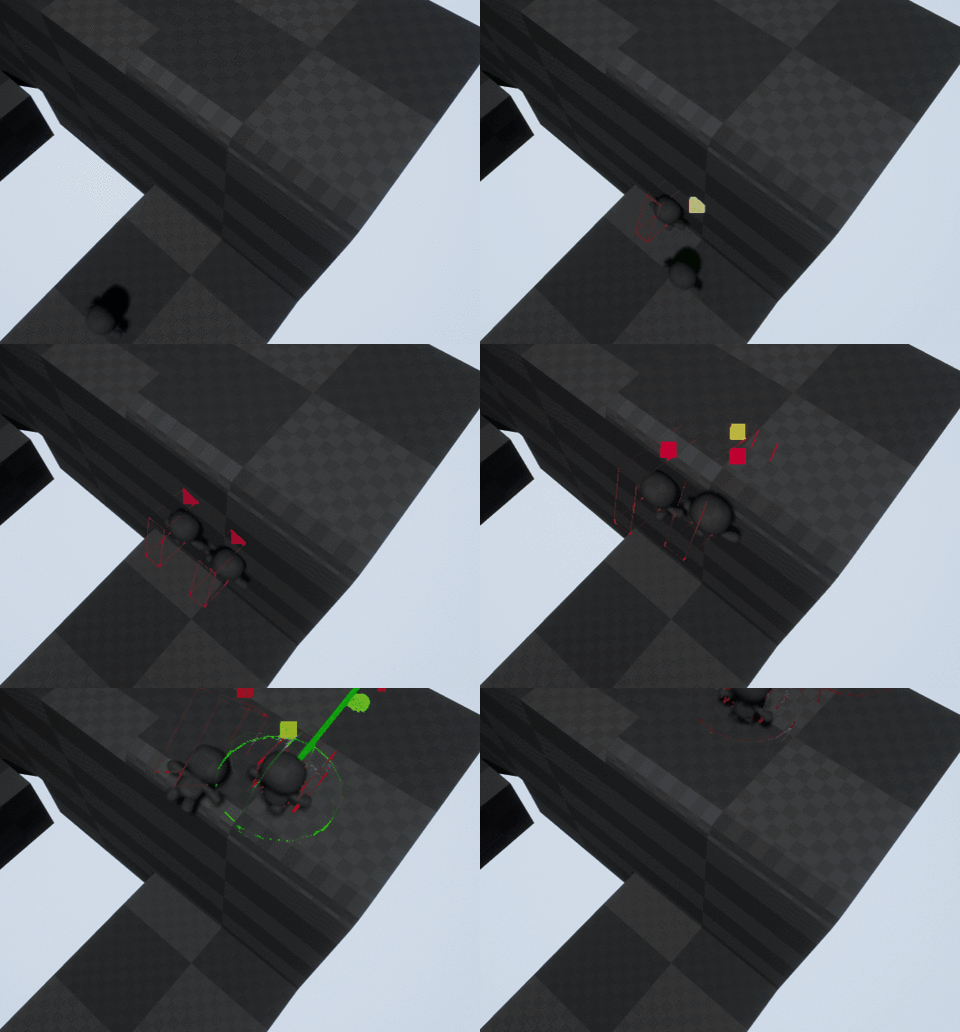
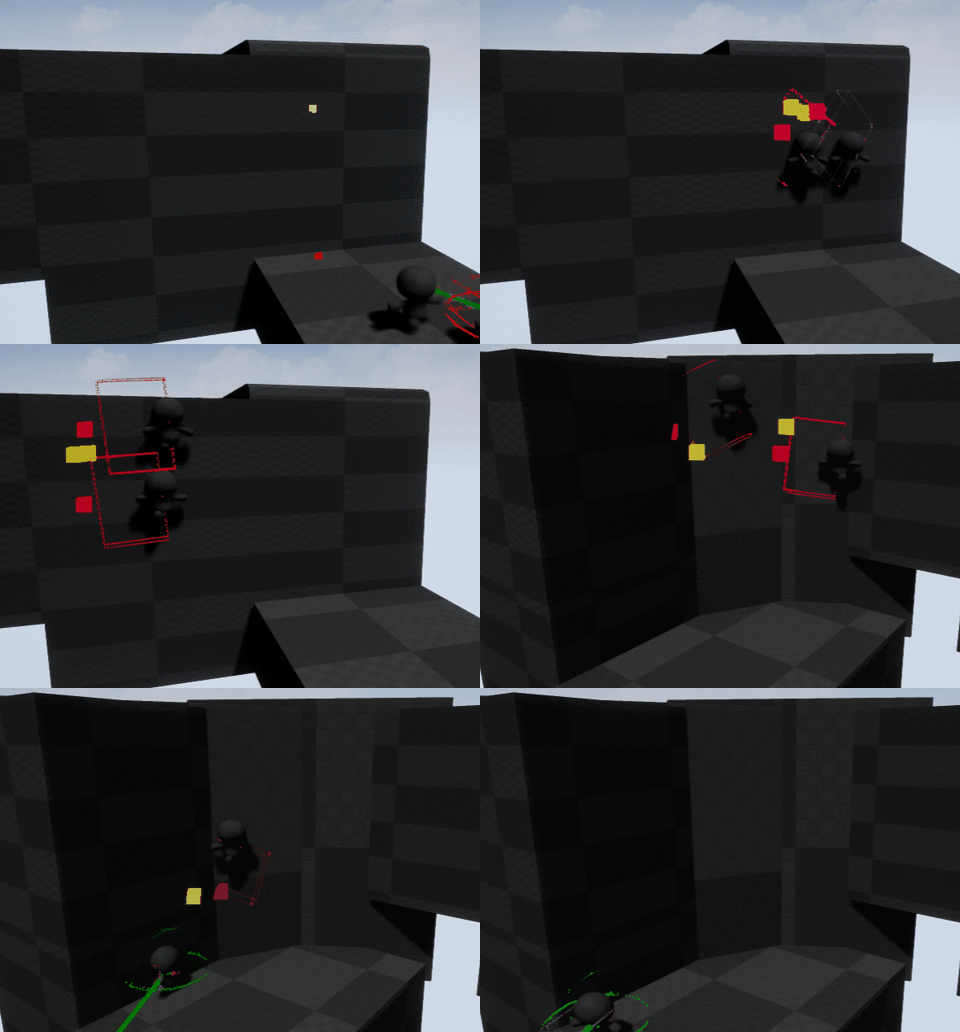
Working on a character controller / physics right now in Unity and I have a problem that is driving me insane:

5sDd0rZ.png


While going up slopes, I perform a second boxcast from an elevated position (how much the character will ascend the slope, red line) to check if anything else will be in the way of the player before I move them there. This boxcast is not giving me an accurate distance (green line from the bottom right of the box) from the same slope which causes the movement to be reduced (blue line)!

I can't seem to find any issues with how I'm doing this so I might just chalk it up to boxcast being inaccurate and add a check for the colliding object's instanceID to ensure its not just the same slope or something.

Edit: I just tried raycasting from the corner of the box instead and found that the distance reported was exactly right. What a crying shame, I really prefer to Boxcast. Guess I'll switch over to a multi-ray based system instead.

I made a new level up event/fanfare to replace the placeholder I'd had standing in since the very beginning.

I wanted to do something that was unmistakable while not being too intrusive or in the way.

https://www.youtube.com/watch?v=SiqZcH513JI&feature=youtu.be

I think I'm more or less happy with it, but I'm still not sure where I want the side readout to go. Stay in the middle or tuck it away up top near the hud?

I kind of like where the readout is situated already! Why is the deadsuit cap'd in one spot but not the other though?
 
So, the guy I'm doing freelance work for got us a plug-in that does CRT effects in Unity from the Asset Store, and so far the code has been a buggy mess.

Like, the Save function was constantly crashing until I tweaked some code myself on top of being an unoptimized mess with things such as string allocations that were done to use the variable a single time. The Load button, however, is the one that takes the cake: the code that was meant to be executed when you pressed the "Load" button in the inspector was completely commented out, and it didn't even work when I un-commented it!

...I'm kind of scared now, but at the same time I have some hope that I might be able to delve into the actual plug-in code and tweak some stuff so that it doesn't outright murder the game's framerate on integrated graphics cards.
 
I finished climbing, I think I'm starting to get the hang of this.
giphy.gif

You can go up, down, sideways, around corners and over ledges :3
giphy.gif

they also path around eachother just like on foot.
 
Love this thread, keep up the great work y'all!
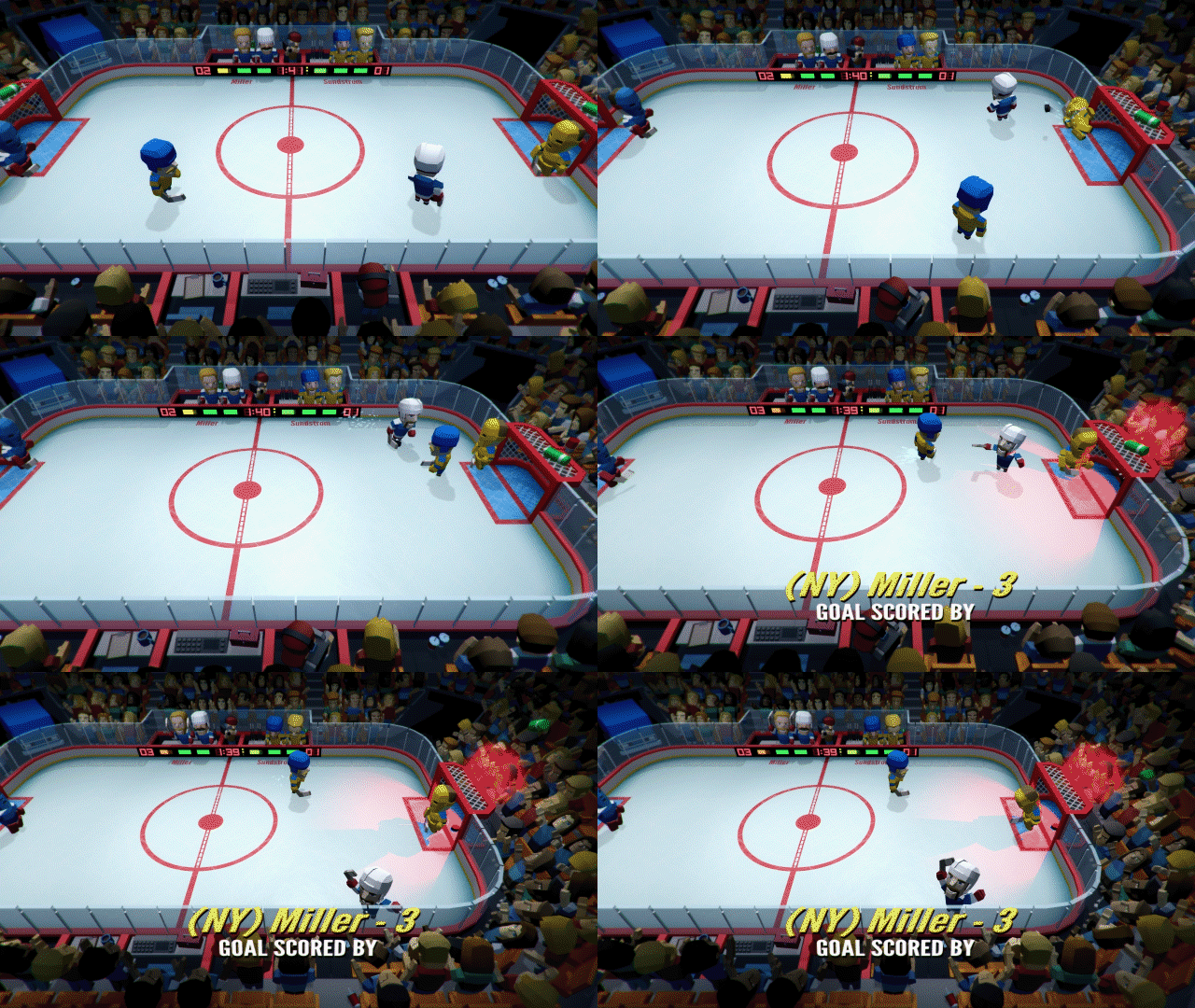
Been a bit since I last posted, thought I'd share a few gifs from the last couple months of Mini Hockey Champ! dev:
mhc_061717_640.gif


mhc_072917_640.gif


Spending a lot of time on sound lately, trying to get that all squared away so I can jump back into my remaining animation polish and gameplay balancing. Still hopeful I can ship this before the end of the year!
 
Love this thread, keep up the great work y'all!
Been a bit since I last posted, thought I'd share a few gifs from the last couple months of Mini Hockey Champ! dev:

Spending a lot of time on sound lately, trying to get that all squared away so I can jump back into my remaining animation polish and gameplay balancing. Still hopeful I can ship this before the end of the year!
This is truly amazing :D I hate sports games though hockey is kinda alright, but this looks incredible! Tell us more :)
 
Love this thread, keep up the great work y'all!
Been a bit since I last posted, thought I'd share a few gifs from the last couple months...

Looks great man.

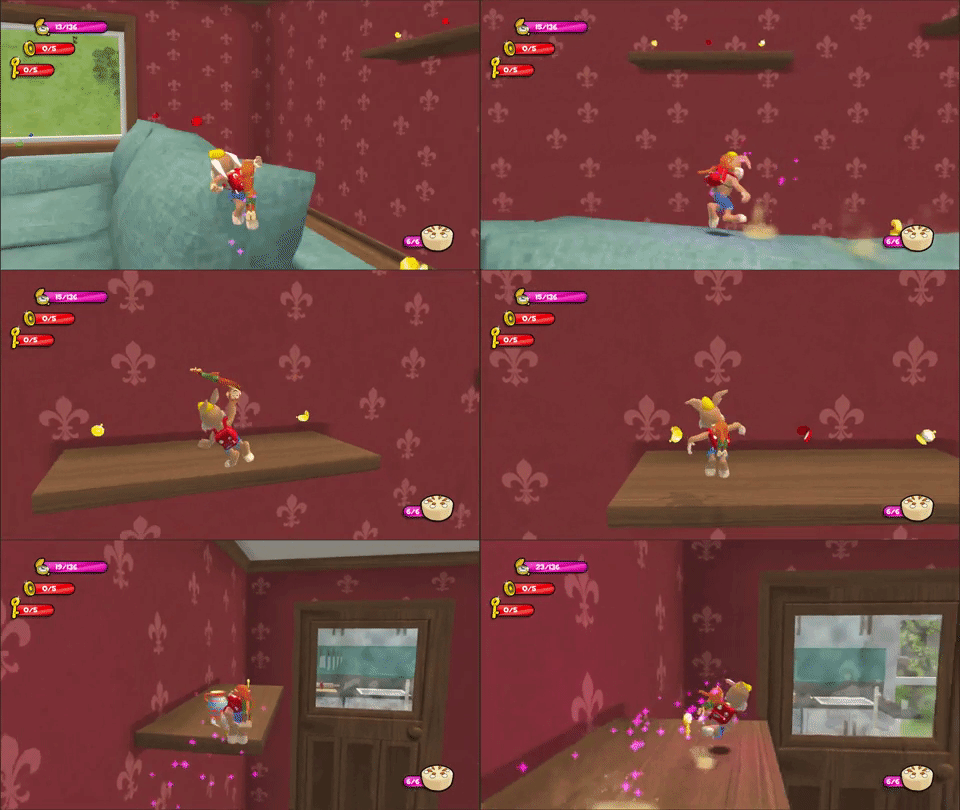
Setting a level in a giant house lends itself to some interesting level interactivity!

I made an RC car game in a normal sized kitchen Ludum Dare before last. It is indeed a lot of fun working in an "oversized" environment. The simplest things become obstacles to overcome. Footage looks nice as per usual.
 
So this is a weird feeling. 2 years ago when I started working at my college on VR, the very first project I worked on just had a commercial last night. We didn't own the IP and it was for Cincinnati Children's Hospital so they didn't tell anyone on the team. Now I only worked on it for a month before being tasked to lead some other projects, but it was so surreal to see it being shown during a football game. Kinda got me super pumped to work more on my personal projects :)

video
 
I made an RC car game in a normal sized kitchen Ludum Dare before last. It is indeed a lot of fun working in an "oversized" environment. The simplest things become obstacles to overcome. Footage looks nice as per usual.

Oh cool, kinda like Re-Volt? I'd be interested to see it if you're able to share? And thanks!

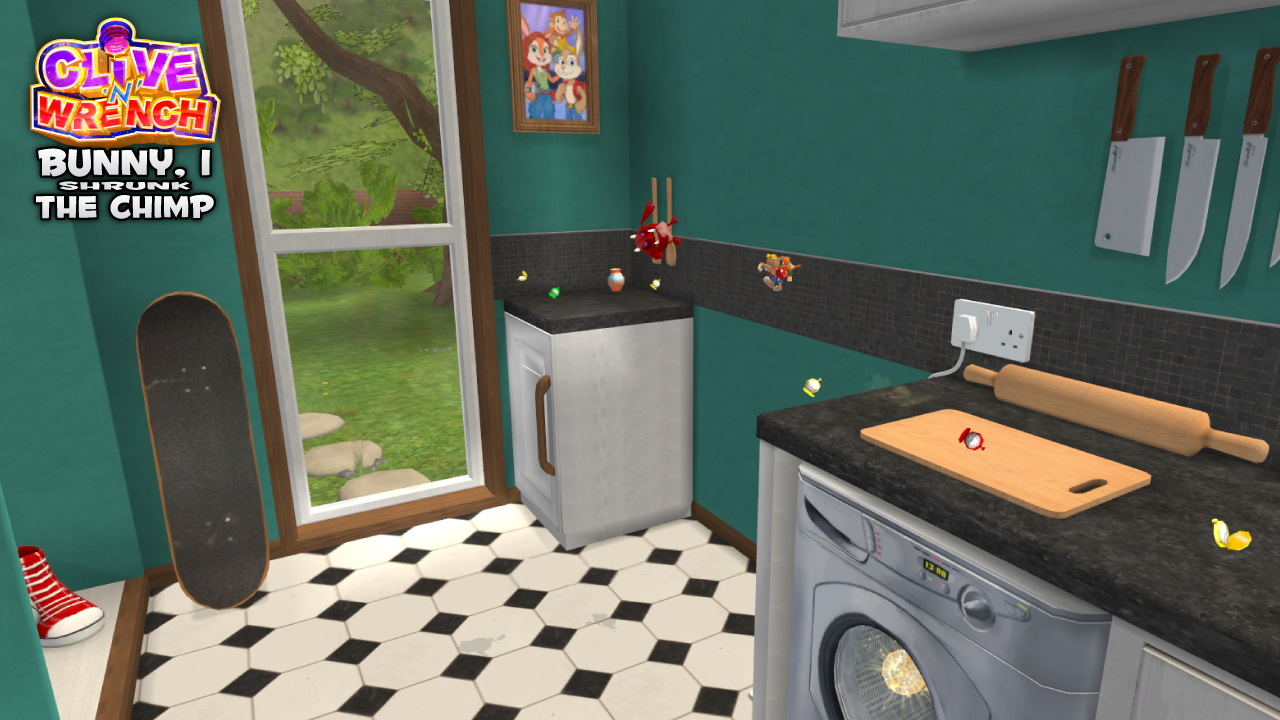
Started to add some more detail, props, fake shadows, exterior etc:

BunnyIShrunkScreenshot2.png
 
for screenshot Saturday, we cooked up some concept art of the Temple of the First Settlers, one of the Zelda-esque temples in our VR game:

Chiaro and the Elixir of Life VR

if you've got a Vive and want to try this, drop me a line! would be happy to send a Steam Key in exchange for some feedback in a week or two.
 
For anyone who's been waiting for the Color Theme Editor for Visual Studio 2017, it looks like it's finally been released.

I've been using the workaround/hack to make the Color Theme Editor for VS 2015 work, so this is a welcome change. I can't deal with the default IDE themes, so this helps quite a bit.
 
Setting a level in a giant house lends itself to some interesting level interactivity!

giphy.gif

This reminds of the old Quake/Unreal/Half Life maps set in bedrooms and houses where the player is mouse-sized. A game around that concept would be hilarious fun. This looks to be that
 
*Teleports behind you*
Nothing personal, kid

ThZuNYP.gif


Modified Beastmancer's targeting system to include empty tiles so I'm having fun adding new moves like this ninja teleport.
 
Oh cool, kinda like Re-Volt? I'd be interested to see it if you're able to share? And thanks!

Started to add some more detail, props, fake shadows, exterior etc:

BunnyIShrunkScreenshot2.png

What you have there looks a ton better than my LD compo entry. Comparing it to Re-Volt is far too generous, haha. I had actually never heard of that game until just now but watching a few youtube vids of it makes me wish that I had. RC Kitchen Throwdown was created in my first ever gamejam so let's just say there's room for improvement, lol.
 
Working on Wildfire's snowfall effects!

We start with a heavy snowfall...

m67yN60.gif


...and then adjust the layering so that it almost all subsides when inside a cave...

ipWluDF.gif


...and then go one step further with a (eventually invisible) trigger volume that disabled the front snowfall layer when entering a cave, and re-enables it when exiting!

iv7iHPJ.gif
 
Working on Wildfire's snowfall effects!
...and then go one step further with a (eventually invisible) trigger volume that disabled the front snowfall layer when entering a cave, and re-enables it when exiting!
iv7iHPJ.gif

Wow this is beautiful, seems like a pretty elegant solution too!

This reminds of the old Quake/Unreal/Half Life maps set in bedrooms and houses where the player is mouse-sized. A game around that concept would be hilarious fun. This looks to be that

Oh you're right, I'd forgotten about that. I remember many an hour spent on DM_House in UT99! For CnW it's only this one level set at this scale, but it certainly gives me all sorts of ideas for the future!

What you have there looks a ton better than my LD compo entry. Comparing it to Re-Volt is far too generous, haha. I had actually never heard of that game until just now but watching a few youtube vids of it makes me wish that I had. RC Kitchen Throwdown was created in my first ever gamejam so let's just say there's room for improvement, lol.

Unfortunately, I couldn't get it to run. But I checked out a few screenshots and read your synopsis; seems like an interesting idea, did you ever consider taking it further?

For the record, Re-Volt is fantastic fun, very unique physics too. Still got a pretty strong community keeping the game patched and modded to this very day!

Oh, and one last gif before I wind up ready for another boring week...
giphy.gif
 
Guys, I've become a father for the first time! Everything is fine.
Her name ist Ella -- Vienna's new pride! :)


Birth was hardcore for my wife. Respect to all women's giving birth! Jesus!!

came by to see if it happened. congratulations!
Enjoy your time!


Didn't work on my project the last months as I rather spent the time with my son. Consultant work (2 times a week) is already enough distraction from family life :D
 
I have a dilema.

I'm working on releasing my game on Android but I'm indecise if I should implement achievements and cloud savings.

Cloud savings (using Unity) seem a bit weird to implement (I only skimmed the documentation) and I'm wondering if the bother of having to deal with login in with Google and dealing with no internet use cases and such is worth it since I doubt most people will use my game in more than one device.

On the other hand it's always a good exercise to work with that stuff but ugh, I'm not sure.

Anyone has any hot takes on this?
 
I kind of like where the readout is situated already! Why is the deadsuit cap'd in one spot but not the other though?

Thanks, I think I'm just going to leave it there, yeah.

As for why.. I mean.. do I need a reason for everything? I mean like cmon
 
I have a dilema.

I'm working on releasing my game on Android but I'm indecise if I should implement achievements and cloud savings.

Cloud savings (using Unity) seem a bit weird to implement (I only skimmed the documentation) and I'm wondering if the bother of having to deal with login in with Google and dealing with no internet use cases and such is worth it since I doubt most people will use my game in more than one device.

On the other hand it's always a good exercise to work with that stuff but ugh, I'm not sure.

Anyone has any hot takes on this?
Unless you have in app purchases then I wouldn't bother. To be honest any mobile game that has a login process is a turn off for me unless I can clearly see the need for it.
 
Thanks, I think I'm just going to leave it there, yeah.

As for why.. I mean.. do I need a reason for everything? I mean like cmon
This sounds a bit overly aggressive man. I agree with him, it's better to be consistent of course. He asked a simple question.
 
Unless you have in app purchases then I wouldn't bother. To be honest any mobile game that has a login process is a turn off for me unless I can clearly see the need for it.

Yeah, that's what I fear too.

Apple does it automatically, at least in the games I've played, I wonder how easy it is to implement that on iOS.

Anyone here with experience on cloud saves and Unity?
 
Love it, reminds me so much of Andy's house in the Toy Story 2 game: https://www.youtube.com/watch?v=n-5jnJoNjVk :D

Thanks! I may have had that games soundtrack on loop in the background over the weekend...

I'm really enjoying the animations in this. Are you using stretching bones in the rig?

Thanks! Yeah, mostly in Wrench (the chimp), but also in Clive's jump and landing animation. Stretch and squash/animation quality is a focus for me on this project for sure!
 
I have a dilema.

I'm working on releasing my game on Android but I'm indecise if I should implement achievements and cloud savings.

Cloud savings (using Unity) seem a bit weird to implement (I only skimmed the documentation) and I'm wondering if the bother of having to deal with login in with Google and dealing with no internet use cases and such is worth it since I doubt most people will use my game in more than one device.

On the other hand it's always a good exercise to work with that stuff but ugh, I'm not sure.

Anyone has any hot takes on this?

I haven't tried cloud saves, but implementing most of the Google Play stuff (I used leaderboards and achievements) to my android game was really easy - they provided a downloadable unity package with examples, and the documentation was all very clear and easy to follow

e: I mean, skimming the docs quickly, you shouldn't need to use Unitys built in cloud stuff at all, you just need to create a savegame binary and then point to it, and setup if you want google play to overwrite / merge / ignore if theres a conflict on sign in
 
I haven't tried cloud saves, but implementing most of the Google Play stuff (I used leaderboards and achievements) to my android game was really easy - they provided a downloadable unity package with examples, and the documentation was all very clear and easy to follow

e: I mean, skimming the docs quickly, you shouldn't need to use Unitys built in cloud stuff at all, you just need to create a savegame binary and then point to it, and setup if you want google play to overwrite / merge / ignore if theres a conflict on sign in

I've used that for leaderboards and stuff (on my last game, not this one) and reading that left me confused on how to backup PlayerPrefs using that system.

I tried to search for tutorials and it was all in vain. I'm releasing the game without that on Android for now. Requiring login and the hassle of it all might not be worth it too.

Apple seems better with that but I'm also not sure how to handle it. It seems that documentation for that is a bit lacking (or I just didn't find it) altought there are some Asset Store plugins that seem to solve that.

Maybe I shouldn't be using PlayerPrefs for saving the game state but honestly my searches for a clean way to use cloud saves didn't lead to a straight solution.
 
I finished my RPG prototype and sent it out to my old partner. He loved it and we'll be working on making it a full game.

I've really wanted to share my work, but since I'm using temporary art it doesn't make much sense. So I'm going to repost my task list. Right now the game works and adding dialog, items, and monsters is pretty easy. Making an entire game is going to be a lot of fun.

While we pick an art direction I'll be programming Consumable Items and Spell Mechanics.

RPG Prototype Goals:
-----------------
Game Management
X-Start new game
X-Save game (party, xp, items, and all)
X-Load game
X-In Scene warp
X-Across Scene stat management & Spawns
X-State Machine for game modes(overworld, battle, pause, main menu)

UI
X-Pause Menu
X-Main Menu
X-Dialogs
X-Toast Message
X-Inventory (holy crap there is a lot going on here)
X-Character Sheet
X-Party Formation
X-Save & Quit from Game


In Game Dialogs
X-Character Creation Dialog
X-Spell Tutorial
X-Combat Tutorial
X-Story Fluff
X-Add character to party
X-NPC recruitment
X-Trait check teacher

Level Maps
X-Mercenary Camp
X-Demo Dungeon
X-Silver Scale Forest
X-Long Bridge (empty)

Combat
X-Load Enemies from Seed
X-Set Initiative Order
X-Monster AI

X-Select Action
X-Select Target
X-Perform Action
X-HP/Mana Bars
X-Monster Death
X-Char Death
X-Status Effects
X-Victory and Rewards
X-Defeat

Overworld
X-Scene Transitions

Character
X-Experience
X-Level Up
X-Death
X-Status Effects
X-HP Management
X-MP Management

Rift Checkpoint
X-Full Heal
X-Restart Level
X-Load Point
 
Just released my game on Android!

Since it's a payed app here are some codes if anyone is interested:

(quote to reveal)


I hope you enjoy! If codes don't work and you want one just shoot me a message!
 
I've used that for leaderboards and stuff (on my last game, not this one) and reading that left me confused on how to backup PlayerPrefs using that system.

I tried to search for tutorials and it was all in vain. I'm releasing the game without that on Android for now. Requiring login and the hassle of it all might not be worth it too.

Aaaaaah okay, you're talking about using playerprefs - I mean, an easy way of handling that without explicitly using "Cloud saves" is something like making an achievement for every level completed, because you can then read that profiles achievements and unlock levels locally when they do that after signing in (and I know a bunch of apps auto sign in, but I believe its best practice to get players to manually sign in at least once with an auto sign in toggle if they want to auto sign in).

For 'proper game saves', most people use serialisation rather than player prefs - I'm pretty sure you can find some examples / tuts on doing this, but its basically a class that holds whatever you want to save, something like:
Code:
using UnityEngine;
using System.Collections;

[System.Serializable] 
public class GameSave
{
     Public Vector3 playerPos;
     Public Int currentLevel;
     Public Float currentHealth;
     Public Int currentScore;
}

(basically anything that can be serialised you can use, even other classes or monobehaviours)

which you can then write to a binary file using BinaryFormatter named whatever you want - eg GameState.sav, and read from - it would be that single file that you specify for cloud saving rather than a range of variables (as PlayerPrefs uses).

I'm 100% sure there are various tutorials out there on how to do this, because I know how to do this, lol
 
Aaaaaah okay, you're talking about using playerprefs - I mean, an easy way of handling that without explicitly using "Cloud saves" is something like making an achievement for every level completed, because you can then read that profiles achievements and unlock levels locally when they do that after signing in (and I know a bunch of apps auto sign in, but I believe its best practice to get players to manually sign in at least once with an auto sign in toggle if they want to auto sign in).

For 'proper game saves', most people use serialisation rather than player prefs - I'm pretty sure you can find some examples / tuts on doing this, but its basically a class that holds whatever you want to save, something like:
Code:
using UnityEngine;
using System.Collections;

[System.Serializable] 
public class GameSave
{
     Public Vector3 playerPos;
     Public Int currentLevel;
     Public Float currentHealth;
     Public Int currentScore;
}

(basically anything that can be serialised you can use, even other classes or monobehaviours)

which you can then write to a binary file using BinaryFormatter named whatever you want - eg GameState.sav, and read from - it would be that single file that you specify for cloud saving rather than a range of variables (as PlayerPrefs uses).

I'm 100% sure there are various tutorials out there on how to do this, because I know how to do this, lol

Thanks! I should probably use something like that in the future. I always use PlayerPrefs but that is obviously a better way (and it is compatible with cloud stuff).

So every time you change something that you want to save you use that class and then serialize it? And when you load the game you read the file and update whatever fields you want? I need to read on it and start doing that. For this game might be too late but it’s a good think to keep in mind.

For iCloud apparently there’s a Unity Asset that backs up player prefs and syncs it so I might get that when I publish this on iOS.
 
This sounds a bit overly aggressive man. I agree with him, it's better to be consistent of course. He asked a simple question.

oh I was being silly and self deprecating referring to my own chaotic development.. Sorry if that wasn't properly indicated :)
 
Love this thread, keep up the great work y'all!
Been a bit since I last posted, thought I'd share a few gifs from the last couple months of Mini Hockey Champ! dev:
mhc_061717_640.gif


mhc_072917_640.gif


Spending a lot of time on sound lately, trying to get that all squared away so I can jump back into my remaining animation polish and gameplay balancing. Still hopeful I can ship this before the end of the year!

How have I not seen this before? Looks like a lot of fun. Is it local co-op only?
 
Anyone use blender for video editing? I have gameplay footage I need to upload to youtube but the quality keeps being sub par.

The video is 7 minutes long at 60 fps so it's taking a frustratingly long time to render each time I try new settings, and sometimes artifacts only show up towards the end.
 
Anyone use blender for video editing? I have gameplay footage I need to upload to youtube but the quality keeps being sub par.

The video is 7 minutes long at 60 fps so it's taking a frustratingly long time to render each time I try new settings, and sometimes artifacts only show up towards the end.

Have you tried the Video Sequencer? .
 
Question for those who've worked on their own 2D platforming physics before: how overzealous did you get with maintaining proper travel distance and speed over slopes? Since it's been a while since I implemented this kind of stuff I was following this awesome video series on character controllers and noticed a couple of shortcuts that were being taken for certain edge cases (slope angle changes in one step). Now I'm here with a couple extra raycasts and significantly more math and wondering if its really worth it (although I'm almost done, so hey)!

Thanks, I think I'm just going to leave it there, yeah.

As for why.. I mean.. do I need a reason for everything? I mean like cmon

This sounds a bit overly aggressive man. I agree with him, it's better to be consistent of course. He asked a simple question.

oh I was being silly and self deprecating referring to my own chaotic development.. Sorry if that wasn't properly indicated :)

Haha, it came through, no worries! ;)
 
How have I not seen this before? Looks like a lot of fun. Is it local co-op only?

Thanks! Ya, local only, online multiplayer is way out of scope for this game to ever ship but something I want to tackle in my next game. Working on making the cpu fun/challenging to play against right now, trying to find a mixture that feels competitive but still welcoming to folks who aren't super into hockey or sports games in general.
 
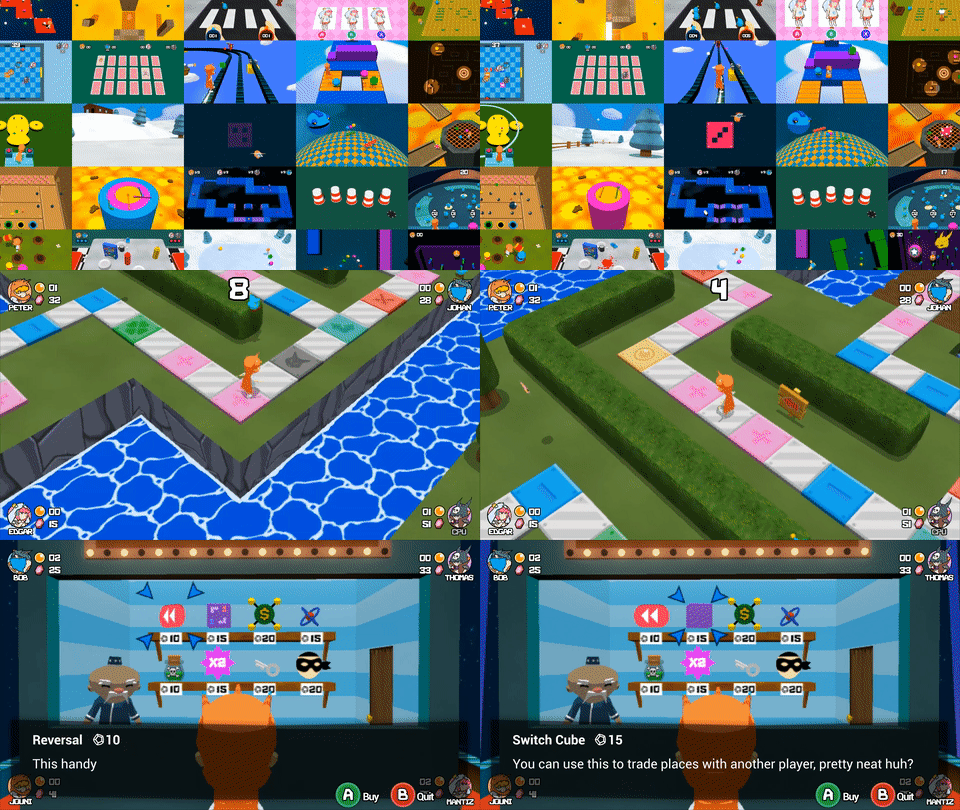
Hey! I've mostly been lurking here, but thought I'd show some stuff from Board Blitz, an online party game similar to the earlier Mario Party games that we're working on and will attempt to Kickstart soon.
giphy.gif
 
Peter Sjöstrand;246171946 said:
Hey! I've mostly been lurking here, but thought I'd show some stuff from Board Blitz, an online party game similar to the earlier Mario Party games that we're working on and will attempt to Kickstart soon.
giphy.gif

I like the Wind Waker kinda style it has going on!
 
Oh no: localization! Having to localize a game that was never designed for it, and which has text that is mostly spritefont bitmaps... this is gonna be tough.
 
Well after I got flying working the whole thing just started falling apart at the seams, with more bugs than it had working features. So I think i'll just start over and try to keep it clean from the beginning this time. Shouldn't take too long to get back where I was.
 
I've been noodling around a bit trying to make a star fox type VR thing in Unreal. The concept works nicely so far, but my particle editor is crashing in 4.16 and rift roomscale is completely broken in 4.17.

Epic, please...
 
Why not do what programmers and the like did back in the NES/SNES days and remove your real name from the equation by using a pseudo-name?

Or are you dead-set on having this on your resume? 'Cuz if that's the case, I don't think you can have your cake and eat it too.

Yeah, i want it on my resume. I've thought alot and gonna have to change up the story.

Been creating some in game advertising artwork for signage/posters etc.

raKyOdD.jpg


Gk2jWFm.jpg


9g0IHoO.jpg


YXrD0QP.jpg


Also started shooting the 3D video for the holograms, making good progress!

9tOhSvb.png
 
Top Bottom