• Hey Guest. Check out your NeoGAF Wrapped 2025 results here!

To OLED, or not to OLED

What type of TV is your main TV?

  • OLED

    Votes: 578 71.7%
  • LCD

    Votes: 138 17.1%
  • Something else

    Votes: 55 6.8%
  • I don't own a TV, just a computer monitor

    Votes: 35 4.3%

  • Total voters
    806
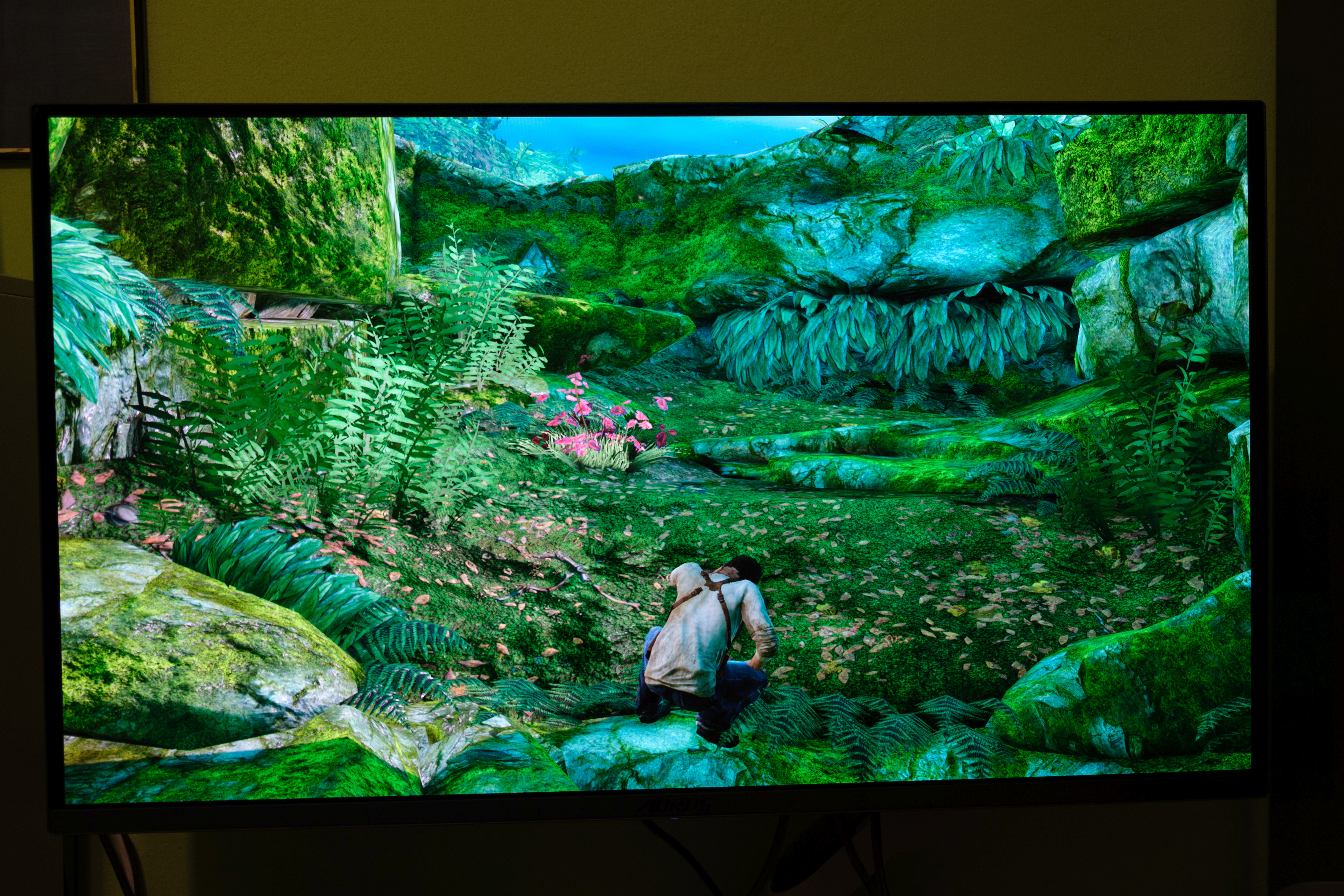
My screenshots show both HDR and SDR content (the photo in the forest). Both show IPS glow, although the HDR definitely increased it.

When implemented correctly, HDR can make a huge difference. For example, Doom Eternal looks simply amazing on my current OLED monitor with HDR enabled. Despite the low-poly models and low-resolution textures, this game looks much more pleasing to look at with HDR.

On my previous LCD I had foggy picture with HDR in this game, which was caused by an edge-lit panel. In my opinion, HDR400 on LCD with an edge-lit backlight looks worse than SDR. On my previous HDR400 monitor I preferred playing in SDR than HDR.


The edge lit LCD is essentially a display designed for SDR content, but the sad fact is that it can't even display SDR with good results. My CRTs, plasma TVs and OLED monitor have much higher contrast and perfect blacks, making my previous LCD display look way inferior in comparison.

I don't believe in your 'golden sample' argument, because if LCD still uses an edge-lit backlight and has just 1000:1 contrast, it's impossible to eliminate backlight leaks and achieve good blacks and contrast. At best, the clouding on your panel could be more uniform.

With my previous LCD IPS monitor, I could reduce the panel glow by decreasing the brightness, as you did. However, I could still see the glow in a dark room, and the picture ended up looking too flat to my liking. With the default panel brightness settings at 50%, my monitor had around 250 nits, which was my preferred setting because bright objects and highlights caused my eyes to adapt, enabling me to perceive reasonably good blacks. The IPS glow only bothered me when there was nothing bright on the screen.

Well, you know, I'm not that adamant on insisting that there's something special about the monitor I have. It might easily be just my brain misinterpreting my own perception of it as 'really good'.
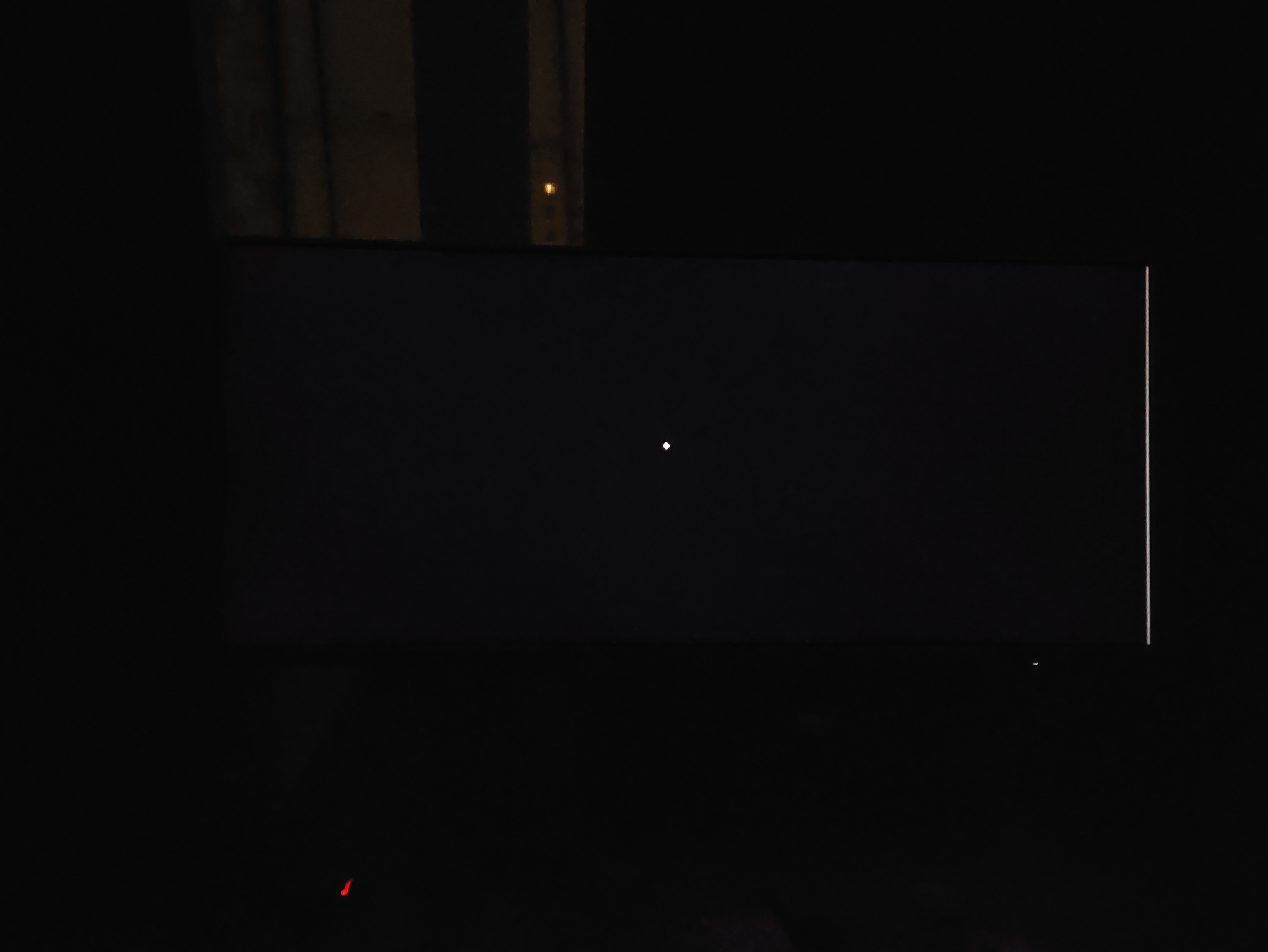
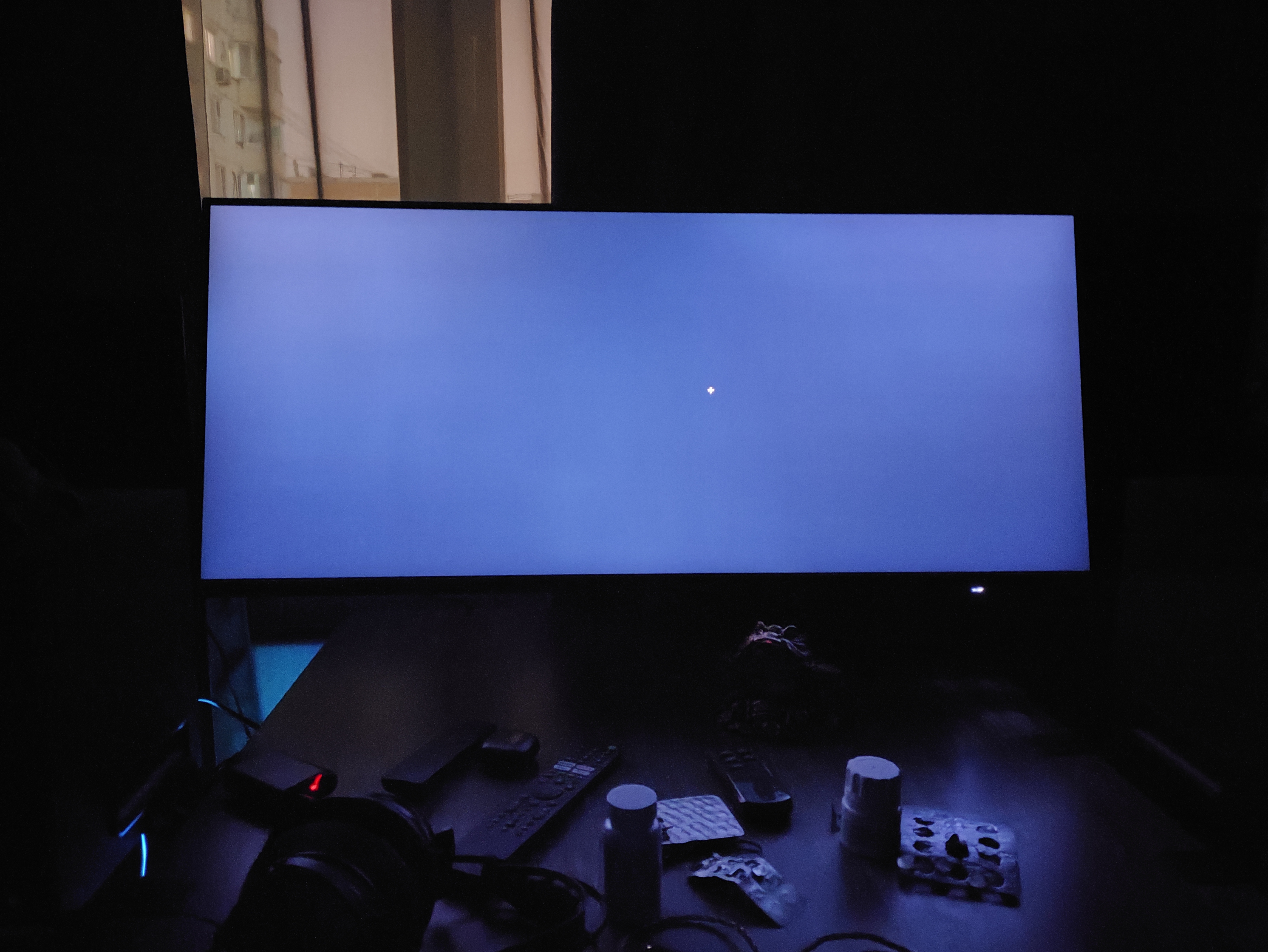
Nonetheless, this is how it looks at night (almost fully black screen, not counting the scroll bar / cursor) - and by no means this is close to what the people usually show in terms of 'IPS glow' (it tends to look disgusting, with blobs of light near the edges).

nrdkAo4yq9a1t3M6.jpg
 
Last edited:
I'm considering going for an LG C5 … either a 55in, or if I'm feeling cute, a 65in.

How much of an upgrade would it be over my current 55in Hisense U7K?
 
I'm considering going for an LG C5 … either a 55in, or if I'm feeling cute, a 65in.

How much of an upgrade would it be over my current 55in Hisense U7K?
Go for 65" if you can. Also, The quality of the upgrade will depend on your viewing environment though. How old is the Hisense?
 
I'm getting one of the new true black glossy displays from ASUS, i wasn't keen a few years ago on OLED's due to the issues with them, but they have improved so much, i am now really impressed and will buy one soon.
Top-tier Mini-LED LCDs now rival or beat OLED in most areas except perfect blacks and off-angle viewing. Mini-LED QLED offers better brightness and no burn in.

There are a lot more options on the market nowadays.
 
Well, you know, I'm not that adamant on insisting that there's something special about the monitor I have. It might easily be just my brain misinterpreting my own perception of it as 'really good'.
Nonetheless, this is how it looks at night (almost fully black screen, not counting the scroll bar / cursor) - and by no means this is close to what the people usually show in terms of 'IPS glow' (it tends to look disgusting, with blobs of light near the edges).

nrdkAo4yq9a1t3M6.jpg
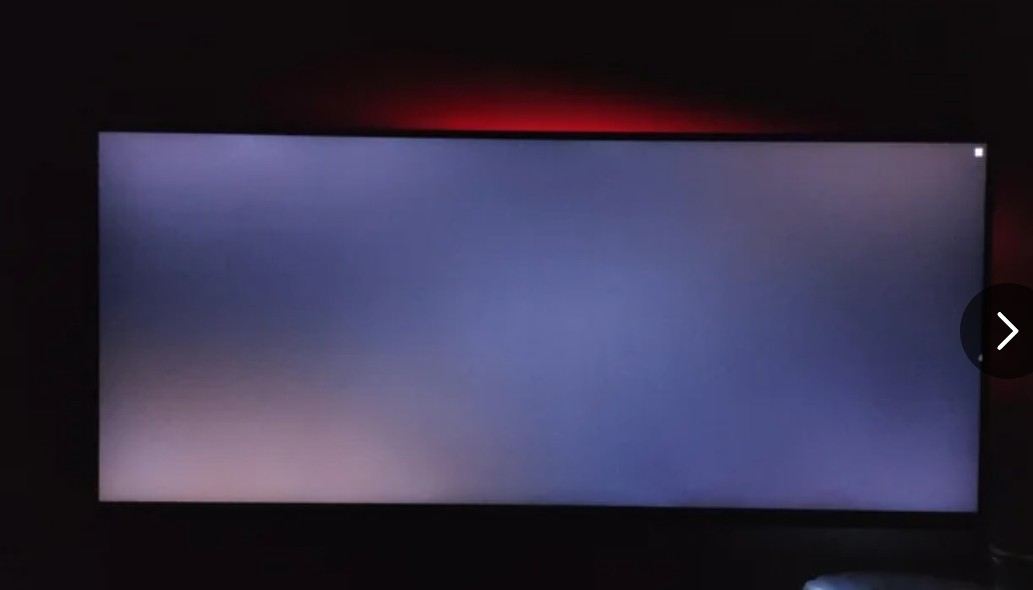
Blacks look very good in your photo (comparable to my plasma GT60), but that's either because you turned on the panel brightness all way down, or auto dimming feature did it for you. I saw similar photos of the same monitor but with normal brightness settings and panel glow was clearly visible.

N5aQsoGhjOjg52EQ.jpg


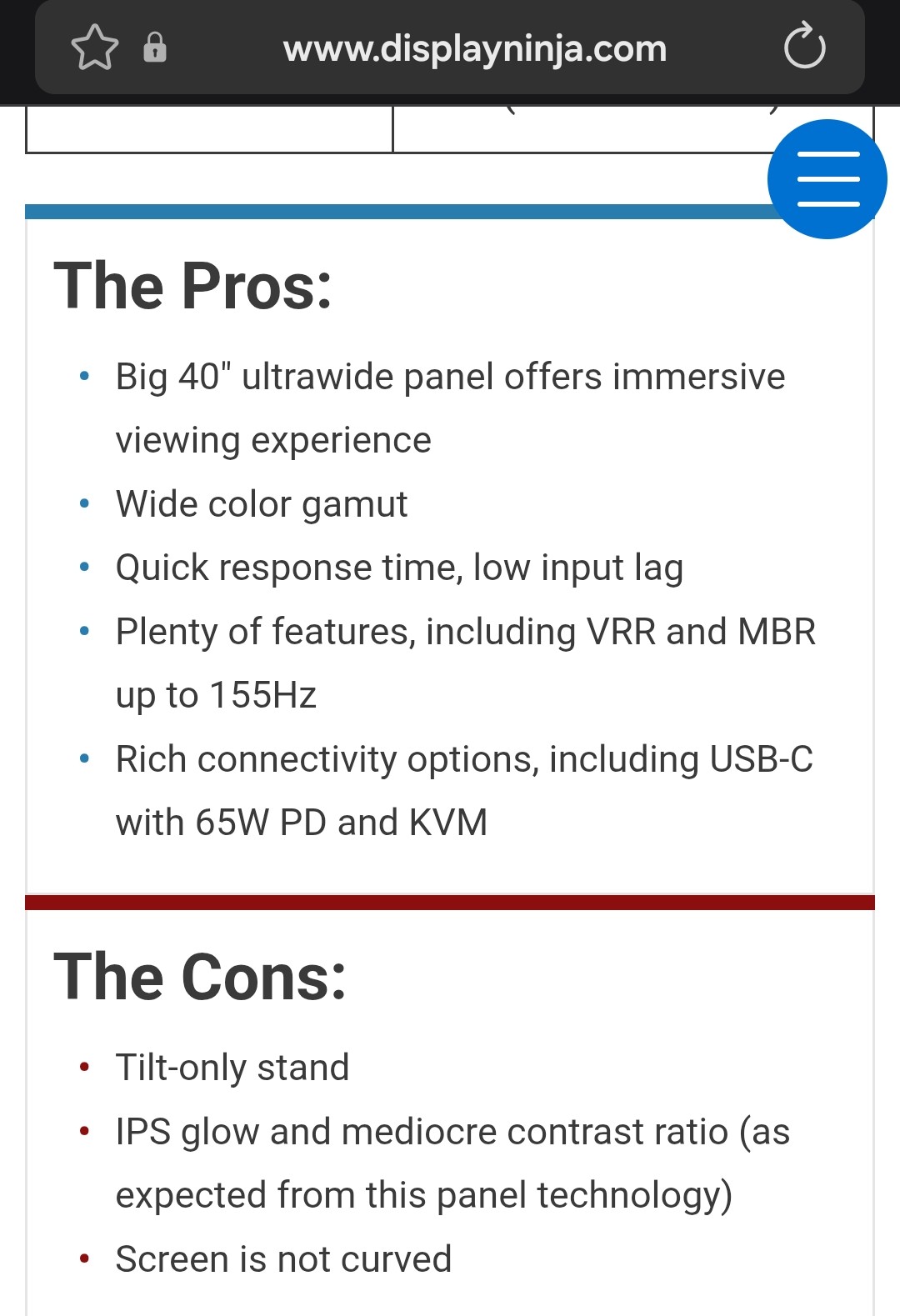
This problem is even highlighted in the cons section.

2kl6r7aiotK6OIEO.jpg


My IPS monitor had an auto-dimming feature as well and it reduced the panel's brightness to an extremely low level. In theory, this meant that my monitor could rival my plasma TV, but during typical scenes, when backlight had to be turned up to show shadow details, the IPS glow became clearly visible and that always ruined the picture (unless I placed a small light next to my monitor). While you can simulate good black levels on edge-lit LCDs with an auto-dimming feature or by setting the panel brightness to its lowest setting, you cannot replicate the immersive, punchy contrast and vivid colours from OLED or Plasma TV. To get good contrast on an IPS panel, you need a mini-LED backlight.
 
Last edited:
Top-tier Mini-LED LCDs now rival or beat OLED in most areas except perfect blacks and off-angle viewing. Mini-LED QLED offers better brightness and no burn in.

There are a lot more options on the market nowadays.
Yeah, true but ive just looked at rtings best mini led monitors of 2025 and the top one you cant even buy on Amazon and doesn't match the features of the OLED i want, its a monitor not a TV im buying, they both look good though.
 
Last edited:
Blacks look very good in your photo (comparable to my plasma GT60), but that's either because you turned on the panel brightness all way down, or auto dimming feature did it for you. I saw similar photos of the same monitor but with normal brightness settings and panel glow was clearly visible.

N5aQsoGhjOjg52EQ.jpg


This problem is even highlighted in the cons section.

2kl6r7aiotK6OIEO.jpg


My IPS monitor had an auto-dimming feature as well and it reduced the panel's brightness to an extremely low level. In theory, this meant that my monitor could rival my plasma TV, but during typical scenes, when backlight had to be turned up to show shadow details, the IPS glow became clearly visible and that always ruined the picture (unless I placed a small light next to my monitor). While you can simulate good black levels on edge-lit LCDs with an auto-dimming feature or by setting the panel brightness to its lowest setting, you cannot replicate the immersive, punchy contrast and vivid colours from OLED or Plasma TV. To get good contrast on an IPS panel, you need a mini-LED backlight.

IPS even with with local dimming will always suck in contrast. Most LCD tvs use VA panels for a reason.
 
treated myself to 65" LG G5 with a total of $300 back in best buy rewards if you get their credit card. That 165hz pc mode is :pie_smiling_hearts:
 
Last edited:
Go for 65" if you can. Also, The quality of the upgrade will depend on your viewing environment though. How old is the Hisense?

2-3 years old I think. Bought it on sale after my TCL back screen started flickering. It's a good bang for your buck TV but it's no OLED.
 
treated myself to 65" LG G5 with a total of $300 back in rewards if you get their credit card. That 165hz pc mode is :pie_smiling_hearts:

That's why I'm considering upgrading from my C1. I hear the G5 range is brighter, has a better color gamut and the PC mode is excellent.
 
Blacks look very good in your photo (comparable to my plasma GT60), but that's either because you turned on the panel brightness all way down, or auto dimming feature did it for you. I saw similar photos of the same monitor but with normal brightness settings and panel glow was clearly visible.

N5aQsoGhjOjg52EQ.jpg


This problem is even highlighted in the cons section.

2kl6r7aiotK6OIEO.jpg


My IPS monitor had an auto-dimming feature as well and it reduced the panel's brightness to an extremely low level. In theory, this meant that my monitor could rival my plasma TV, but during typical scenes, when backlight had to be turned up to show shadow details, the IPS glow became clearly visible and that always ruined the picture (unless I placed a small light next to my monitor). While you can simulate good black levels on edge-lit LCDs with an auto-dimming feature or by setting the panel brightness to its lowest setting, you cannot replicate the immersive, punchy contrast and vivid colours from OLED or Plasma TV. To get good contrast on an IPS panel, you need a mini-LED backlight.

Nah, I don't have auto-dimming or any other gimmicks enabled. I would suggest not to pay attention to these reviews either, given that they have MBR listed in pros (while in reality it works horrible with this model) and 'screen is not curved' in cons (I know it's a matter of preference, but I used my curved 3440x1440 VA for about 7 years, after which I found myself unable to perceive flat surfaces correctly - even the walls appeared bulging out - it took 2 months for my brain to rewire back). There's also the contrast fall-off after 67/100 (specific test patterns reveal disappearing colours, lmao), so the chances are the reviewer got their monitor messed up without even knowing it. Personally, I keep it at 25/100 brightness and 65/100 contrast, with "User" mode enabled (sRGB mode produces utterly despicable image with reds appearing as oranges - multiple posts on the internet claim it's 'how colours are supposed to look in sRGB' but that's not true due to a huge discrepancy between on-screen / printed images).

Regrettably, I've never had the chance to see a plasma screen in person. Is it actually still good in terms of black/contrast?

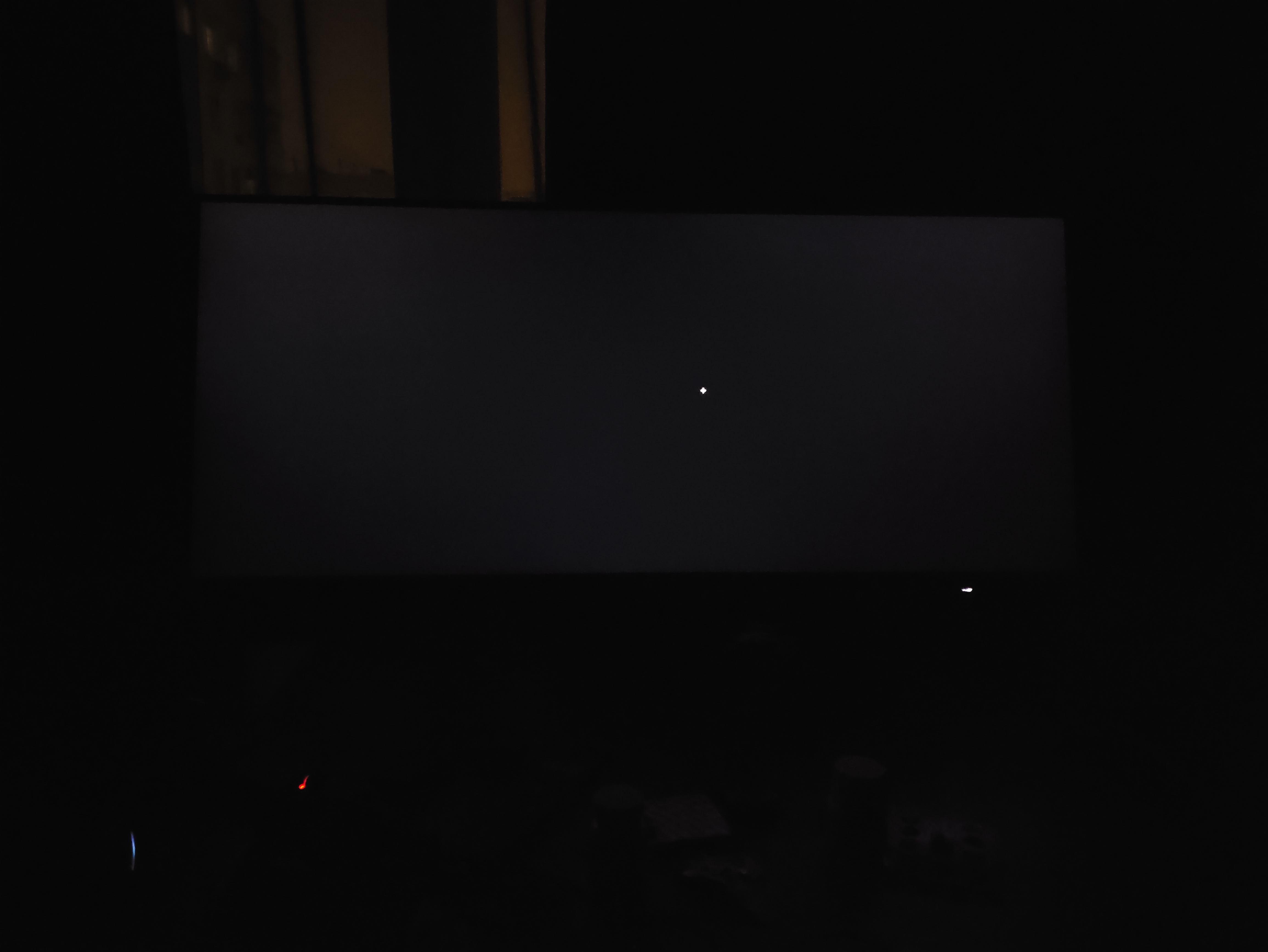
Anyway, about the photos. That's ALWAYS a matter of exposure, ISO and shutter speed! Two new images below: FIRST photo taken with the camera configured to mimic what I see with my eyes. SECOND photo is just "auto".
Going from 25/100 brightness to 35/100, it looks like this - a more pronounced glow, but it just doesn't make sense to keep it at 35/100 or higher when there's no direct sunlight:

z6vDFm3cAFNXR8oB.jpg


And here's "auto" photo at 35/100 brightness (yes, same as above). Even the night-time outside now seems like an overcast day, and a purely black screen now suddenly illuminates all the clutter resting there on my table. It's nonsensical. Taking such pictures is convenient when you need to test for uneven backlight, sure. But does it show what the eyes see? No, our eyes aren't camera sensors. Why does OLED win, when people take such photos? Because the camera sensor continuously picks up everything emitted (all photons emitted over time converging into a singular, static image), and in the meantime, it captures nothing from OLED pixels that are switched off.


hPoUbEQIf2wMtqew.jpg


As for the contrast... That's something I really don't want to argue about. People tend to chase the numbers and contrast ratios, while the thing I chase is to have "black" and "white" to look exactly like what I see on paper under appropriate lighting conditions. There might be a whole world of HDR-addicts trying to emulate the sunlight burning their eyes off, and it's fine. The argument about having the biggest possible range between "black" and "white" becomes nonsensical after a certain point.
 
Last edited:
Yeah, true but ive just looked at rtings best mini led monitors of 2025 at the top one you cant even buy on Amazon and doesn't match the features of the OLED i want, its a monitor not a TV im buying, they both look good though.
Ah yeah, monitor market is different. I was just trying to highlight that you have (thankfully) a lot more options today than 3-4 years ago.

Even crazier is that we could have reasonably priced micro-LED panels on the market in the next 3-4 years that will blow anything on the market today, out of the water without any compromises!
 
Ah yeah, monitor market is different. I was just trying to highlight that you have (thankfully) a lot more options today than 3-4 years ago.

Even crazier is that we could have reasonably priced micro-LED panels on the market in the next 3-4 years that will blow anything on the market today, out of the water without any compromises!
Yeah they are evolving fast, and there is a lot to choose from now but i was really impressed with ASUS 2 new glossy OLED monitors and decided to get one, i would prefer1440p but they are 4k only at present, so many new ones released in even a year that in 3 or 4 tears time it will be a completely different landscape.
 
Last edited:
Think it's time for a monitor upgrade. I've been using my old workhorse Dell S2716DGR (1440p 144hz TN) and it's done me well for nearly a decade.

Snagged a backorder deal on the MSI MAG MAG 271QPX QD-OLED E2 (1440p 240hz QD-OLED gen3) for $380, waiting for it to get here. Recently been reading about QD-OLED vs WOLED panels, unsure if I made the right move.

Also debating on how to configure my WFH/gaming monitor configuration so that I will only use the OLED while gaming and keeping it straight ahead, while also allowing a monitor in the same position to be used for work. I have 3 of them, the main one centered that currently switches between work and gaming based on input, and the others to either side are secondary ones dedicated to one function.

It looks like this:

[work only] [work/gaming] [gaming only]

Any good ideas how to interchange a dedicated OLED monitor in place of the work/gaming one? Some kind of monitor arm or special stand that can rotate in/flip them accordingly?
 
I'm considering going for an LG C5 … either a 55in, or if I'm feeling cute, a 65in.

How much of an upgrade would it be over my current 55in Hisense U7K?

Are you in the UK or US?

U7K is a nice MiniLED LCD but any OLED will a big upgrade over it in terms of intra-frame contrast because its "only" got 240 zones (in 55"), what distance do you sit from the TV?
 
Finally pulled the trigger on a OLED monitor. I mostly like it. The perfect black and nice color really stands out. I was worried about text but it's honestly not that bad. It's a tad less sharp and has a little fraying, but your eyes get used to it. It's still very readable and close enough to an IPS. I will say, all of the little stuff to prevent burn-in is a little annoying though. I hide my Task Bar and I kinda hate having to do that. It doesn't always pop up and having to hit the Windows key is annoying. I also don't like the screen dimming and uniformity issues. You can turn off a lot of it but then you risk burn-in. I guess the trade offs are worth it but it's definitely something to get used to.

Do you all turn off the burn-in protection settings like screen dimming, outer dimming and global dimming or just leave them on? I turned on screen uniformity but the dimming ones are ones that bug me the most.
 
Just a PSA Best Buy has a glossy 32" 4k 165Hz true black WOLED LG monitor on sale for $799

Currently testing it and it's the best looking OLED monitor I have tried, likely keeping it
 
Finally pulled the trigger on a OLED monitor. I mostly like it. The perfect black and nice color really stands out. I was worried about text but it's honestly not that bad. It's a tad less sharp and has a little fraying, but your eyes get used to it. It's still very readable and close enough to an IPS. I will say, all of the little stuff to prevent burn-in is a little annoying though. I hide my Task Bar and I kinda hate having to do that. It doesn't always pop up and having to hit the Windows key is annoying. I also don't like the screen dimming and uniformity issues. You can turn off a lot of it but then you risk burn-in. I guess the trade offs are worth it but it's definitely something to get used to.

Do you all turn off the burn-in protection settings like screen dimming, outer dimming and global dimming or just leave them on? I turned on screen uniformity but the dimming ones are ones that bug me the most.

Do you mean turn those things off in the engineer menu? I don't think its recommended unless you're going to babysit it to prevent image retention.

Its hard to go back to LCD after OLED monitor due to how sharp they look with such high ppi + per-pixel dimming, but the screen dimming is just a reality of the technology, LCD doesn't have it as much but then you lose OLED benefits, I use a big MiniLED display for console and PC for this reason, I just love the brightness of bright HDR scenes. Dark scenes don't look as good though ofc, and some challenging HDR content just doesn't look right outside OLED. Skate Story for example, on my flatmate 42" C4 its so much more defined than my 65" LCD. Animation looks so good on both but the colour really pops on the OLED.

I think you made the right choice, LCD has far less benefits than downsides vs OLED.
 
Regrettably, I've never had the chance to see a plasma screen in person. Is it actually still good in terms of black/contrast?
It depends on the model. Many older or cheaper plasma TVs have comparable, or slightly better blacks than an edge-lit IPS LCD panel, so my eyes can see shade of dark grey instead of pure black. However even cheap plasma TVs have uniform brightness (no clouding whatsoever), so that dark shade of grey isnt as distracting like on LCD. Also, pixel-level light control makes a huge difference because small highlights can be so bright that can trick the eye into thinking it is seeing perfect black. You can get similar effect on your LCD if you place a small lamp next to it. Your eyes will perceive good blacks.

My Panasonic 42GT60 is however one of the best plasma TVs (and the last plasma ever produced), so it has very good blacks even without any highlights on the screen, comparable to the best CRTs. Even with the lowest panel brightness, my LCD IPS monitor had worse blacks. My OLED monitor has slightly better blacks compared to my GT60 plasma, but only when the display is blank. In a dark room I can't even tell where the edge of my OLED panel is. With my GT60 Plasma, I can see some faint light, but it's not bright enough to illuminate objects in front of the display as LCD on your photo (not even with an extremely high ISO). During normal scenes (even dark scenes) the blacks look the same on my GT60 plasma and OLED. My QD-OLED has a much darker panel though, so the blacks look better during the day.

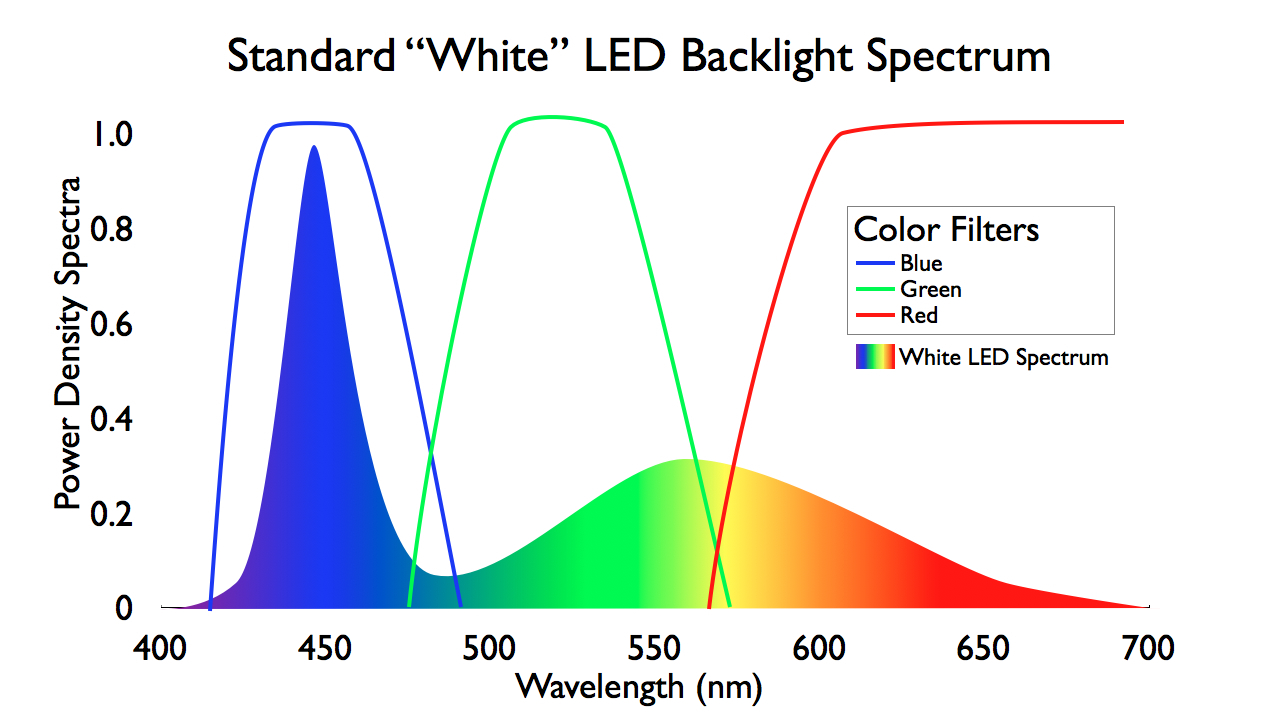
However, plasma TVs are better than OLEDs in two aspects, motion clarity and colours. My plasma delivers razor sharp motion clarity even in 60fps content because it has internal refreshrate of 600Hz. My 240Hz OLED has comparable motion clarity (4 blurred pixels during fast motion 1000 pixels per second) but I need to run games at 240 fps. Plasma is also the only light source that can mimic our sun, providing all the necessary wavelengths. Even in SDR content I have this impression that my eyes can see more hues compared to QD-OLED, and not to mention LCD. Typical LCD has extreme dominance of blue light wavelength. You can calibrate the white balance on LCD, but colours will still look either too cold or too warm.
q85MQP2y6AgZXV7Z.jpg


Watching Blu-ray or Ultra HD movies on my plasma TV tricks me into thinking I'm looking outside my window. My QD-OLED is close, but not quite there. However, OLED has a brighter picture and supports HDR, so you could say that it outweighs the advantages of my plasma TV.

I replaced my Gigabyte M27QP LCD monitor fairly soon after buying it. I had only used it for maybe two years. Although Hardware Unboxed recommended it as the best IPS edge-lit 1440p monitor I just wasnt satisfied with it's picture quality and I found it very difficult to go back to my LCD monitor every time I watched something on my plasma TV and that made me want to upgrade it after only two years of use. I'm finally satisfied with my monitor's picture quality, thanks to the QD-OLED. I don't care if it burns in a few years' time. Life is too short, and at least with an OLED monitor I get more enjoyement for the next few years and if it burns I will replace it with newer model.
 
Last edited:
Finally pulled the trigger on a OLED monitor. I mostly like it. The perfect black and nice color really stands out. I was worried about text but it's honestly not that bad. It's a tad less sharp and has a little fraying, but your eyes get used to it. It's still very readable and close enough to an IPS. I will say, all of the little stuff to prevent burn-in is a little annoying though. I hide my Task Bar and I kinda hate having to do that. It doesn't always pop up and having to hit the Windows key is annoying. I also don't like the screen dimming and uniformity issues. You can turn off a lot of it but then you risk burn-in. I guess the trade offs are worth it but it's definitely something to get used to.

Do you all turn off the burn-in protection settings like screen dimming, outer dimming and global dimming or just leave them on? I turned on screen uniformity but the dimming ones are ones that bug me the most.

I hide my taskbar as well. I also have to have a completely solid black desktop 'background' and no desktop icons. Not ideal, but I'm used to it now and at least I know there's going to be zero burn-in because of it.

I still do a pixel refresh every couple of weeks, and have the screen move option turned on. I've also turned off auto-dimming in the service menu using a dodgy remote control. That was the one thing that consistently pissed me off and I just couldn't tolerate after a while.
 
Last edited:
Bought the LG C5 cause of these prices during black friday at $1250 for the 65 inch. Man it sure is really nice to finally move into this for TV viewing. I have had one for gaming for some time on my PC but always wanted to make this transition and it really is a game changer. Considered going for a mid tier pricing mini led qd tv that had great reviews but ultimately decided against it after seeing them in store side by side. I get the appeal cause that image looks great but OLED just was visibly better.


Anyone here have settings they recommend? I have seen some stuff online but it seems like everyone just says "put on filmmaker mode" Also for gaming too
 
Bought the LG C5 cause of these prices during black friday at $1250 for the 65 inch. Man it sure is really nice to finally move into this for TV viewing. I have had one for gaming for some time on my PC but always wanted to make this transition and it really is a game changer. Considered going for a mid tier pricing mini led qd tv that had great reviews but ultimately decided against it after seeing them in store side by side. I get the appeal cause that image looks great but OLED just was visibly better.


Anyone here have settings they recommend? I have seen some stuff online but it seems like everyone just says "put on filmmaker mode" Also for gaming too
I have the B5; first thing is to turn of the low power modes that they have on by default. After that, It's pretty much your preference. I think Filmmaker is a too dim and dingy for a lot of content because of it's yellowish white-point. I just use Standard or Game Optimizer and turn off most of the "clarity" options. I probably need to look up a good guide on all these options.
 
Last edited:
It depends on the model. Many older or cheaper plasma TVs have slightly better blacks than an edge-lit IPS LCD panel, so my eyes can see shade of dark grey instead of pure black. However even cheap plasma TVs have uniform brightness (no clouding whatsoever), so that dark shade of grey isnt distracting and dont ruin the image. Also, pixel-level light control makes a huge difference because small highlights can be so bright that can trick the eye into thinking it is seeing perfect black. You can get similar effect on your LCD if you place a small lamp next to it. Your eyes will perceive good blacks.

My Panasonic 42GT60 is however one of the best plasma TVs (and the last plasma ever produced), so it has very good blacks even without any highlights on the screen, comparable to the best CRTs. Even with the lowest panel brightness, my LCD IPS monitor had worse blacks. My OLED monitor only has slightly better blacks compared to my GT60 plasma, but only when the display is blank. In a dark room I can't even tell where the edge of my OLED panel is. With my GT60 Plasma, I can see some faint light, but it's not bright enough to illuminate objects in front of the display as LCD on your photo (not even with an extremely high ISO). During normal scenes (even with dark shadows) the blacks look the same on my GT60 plasma and OLED. However, my QD-OLED has a much darker panel, so the blacks look better during the day.

However, plasma TVs are better than OLEDs in two aspects. My plasma delivers razor sharp motion clarity even in 60fps content because it has internal refreshrate of 600Hz. My 240Hz OLED has comparable motion clarity (4 blurred pixels during extremely fast motion 1000 pixels per second) but I need to run games at 240 fps. Colours also look better on plasma TVs. Plasma it is the only light source that can mimic our sun, providing all the necessary wavelengths. Even in SDR content I have this impression that my eyes can see more hues compared to QD-OLED, and not to mention LCD. Typical LCD has extreme dominance of blue light wavelength. You can calibrate the white balance on LCD, but colours will still look either too cold or too warm.

q85MQP2y6AgZXV7Z.jpg


Watching Blu-ray or Ultra HD movies on my plasma TV tricks me into thinking I'm looking outside my window. My QD-OLED is close, but not quite there. However, OLED has a brighter picture and supports HDR, so you could say that outweighs the advantages of my plasma TV.

I replaced my Gigabyte M27QP LCD monitor fairly soon after buying it. I had only used it for maybe two years and I gave it to my niece for free. Although Hardware Unboxed recommended it as the best IPS edge-lit 1440p monitor I just wasnt satisfied with it's picture quality. Some Neogafers were making fun of me because I still preferred to play on 1080p SDR plasma, but they simply didn't realise that resolution is just one aspect of picture quality. I got a much better picture on plasma despite the lower pixel density and lack of HDR support and I found it very difficult to go back to my LCD monitor every time I watched something on my plasma TV and that made me want to upgrade it so quickly. Only now with QD-OLED I really feel I dont need to cry every time I need to do something on my PC monitor. I dont care if my OLED will burn-in few years from now. Life is too short and at least on OLED I can use my monitor with true smile on my face for the next few years. My old Samsung S8 OLED smartphone had some burn-in, but even with that burn-in I found the picture much less annoying than LCD screens.

If I had to choose between expensive 4K LCD TV and cheap 1024x768 plasma TV, I would choose the latter without hesitation. My father has an old 1024x768 plasma TV, and even now, people who watch something on his TV sometimes comment that the picture quality is very good despite the fact that they have modern LCD TVs. Thanks to the insanely high contrast, even a low-resolution plasma TV creates a sharp image that looks extremely pleasing to the eye, because pixel level light control creates high contrast and our eyes perceive sharpness as contrast.

Funny enough the day I bought my first LCD TV was the day I started complaining about the picture quality. Initially, I was impressed by pixel density and HD games, but I quickly realised that I had lost something compared to CRTs. The motion clarity, contrast, colours and blacks were nowhere near as good. Plasma TVs were the only good alternative to CRTs.


Thank you, that was a pretty enlightening information. I generally knew about LED downsides, often thinking about what's the actual Colour Rendering Index of LED backlights in those TVs/monitors we buy (of course, measuring CRI isn't exactly right in this case, since the monitors and TVs aren't used to illuminate other objects, but still it's a general 'quality' measurement of LEDs), and wondering whether it's better or worse compared to the other LEDs arounds us. For example, the difference between 95+ CRI bulbs and a cheap ceiling lamp (claiming to have 85+ CRI) is extreme - I quite literally feel sick if the latter is the only thing illuminating the room. After all, display manufacturers never really mention anything about this. When you get a LED display, you're going in completely blind in that regard.
 
It depends on the model. Many older or cheaper plasma TVs have comparable, or slightly better blacks than an edge-lit IPS LCD panel, so my eyes can see shade of dark grey instead of pure black. However even cheap plasma TVs have uniform brightness (no clouding whatsoever), so that dark shade of grey isnt distracting and dont ruin the image. Also, pixel-level light control makes a huge difference because small highlights can be so bright that can trick the eye into thinking it is seeing perfect black. You can get similar effect on your LCD if you place a small lamp next to it. Your eyes will perceive good blacks.

My Panasonic 42GT60 is however one of the best plasma TVs (and the last plasma ever produced), so it has very good blacks even without any highlights on the screen, comparable to the best CRTs. Even with the lowest panel brightness, my LCD IPS monitor had worse blacks. My OLED monitor has slightly better blacks compared to my GT60 plasma, but only when the display is blank. In a dark room I can't even tell where the edge of my OLED panel is. With my GT60 Plasma, I can see some faint light, but it's not bright enough to illuminate objects in front of the display as LCD on your photo (not even with an extremely high ISO). During normal scenes (even dark scenes) the blacks look the same on my GT60 plasma and OLED. My QD-OLED has a much darker panel though, so the blacks look better during the day.

However, plasma TVs are better than OLEDs in two aspects, motion clarity and colours. My plasma delivers razor sharp motion clarity even in 60fps content because it has internal refreshrate of 600Hz. My 240Hz OLED has comparable motion clarity (4 blurred pixels during fast motion 1000 pixels per second) but I need to run games at 240 fps. Plasma is also the only light source that can mimic our sun, providing all the necessary wavelengths. Even in SDR content I have this impression that my eyes can see more hues compared to QD-OLED, and not to mention LCD. Typical LCD has extreme dominance of blue light wavelength. You can calibrate the white balance on LCD, but colours will still look either too cold or too warm.

q85MQP2y6AgZXV7Z.jpg


Watching Blu-ray or Ultra HD movies on my plasma TV tricks me into thinking I'm looking outside my window. My QD-OLED is close, but not quite there. However, OLED has a brighter picture and supports HDR, so you could say that it outweighs the advantages of my plasma TV.

I replaced my Gigabyte M27QP LCD monitor fairly soon after buying it. I had only used it for maybe two years. Although Hardware Unboxed recommended it as the best IPS edge-lit 1440p monitor I just wasnt satisfied with it's picture quality and I found it very difficult to go back to my LCD monitor every time I watched something on my plasma TV and that made me want to upgrade it after only two years of use. I'm finally satisfied with my monitor's picture quality, thanks to the QD-OLED. I don't care if it burns in a few years' time. Life is too short, and at least with an OLED monitor I get more enjoyement for the next few years and if it burns I will replace it with newer model.

While that may all be true, amazing colour and motion clarity, especially the former, the dynamic range is not up there with modern displays, purely by virtue of it being within SDR, so it just doesn't have the same overally contrast impact, even when compare to the best MiniLEDs, let alone OLEDs.

I've seen the best Panasonics and Pioneers Kuros in person, the motion is stellar, unsurpassed even, but still the dynamic range lets it down because it just can't go as bright as modern OLED.

Average joes can't even notice the worst motion artifacts let alone 300 line sample and hold trash, so that faded away. I had this poor woman about 6 months ago saying "But why do all these TVs have this stutter/blur, no matter what I buy or do I can't get past how bad this is compared to our oled Plasma" and I had to take her away from away (from the dullard-eyed husbando, who did not understand) and say "I'm sorry darling, this is how it is with modern displays" I said you can get an older LG OLED and do 120hz BFI and sit in pitch black but you ain't getting close to that. She was so dejected...

I've always been a fiend happy with well paced 30hz on and LCD, disgusting I know, but for me the dynamic range/contrast benefit far outweighs the loss of motion resolution. The loss of colour I can't speak to since I'm happy with the result even when the colours are diluted by local dimming on LCD. I'm aware OLED doesn't do this but I don't care because I love my fullscreen brightness unhampered by OLEDs limitations.

Literally a couple of days ago I read unbiased words from a guy coming from some old LCD monitor to an OLED that was annoyed by the brightness limiting effect of the technology.

I yearn for MicroLED so badly *hannibal mouth noise*

edit: I know most 4Ks aren't a huge upgrade over the 1080p but surely some 4K's sharpness increase must make you discount plasma's colour and motion advantage when combined with the increased dynamic range, like Bad Lieutentant for example:


At a certain point the resolution is so much higher that the preceived motion resolutiuon is higher than even plasma on an my old (beautiful ZD9) LCD, let alone modern LCD

edit2: Wait, what size is your plasma? 42"? Biggest ZT60 manufacturered is what, 65"? The main issue here is probably screen size, sample & hold motion just hurts so bad when you go above 50" and you're <2m away. I sit <2m from my 65" ZD9.
 
Last edited:
The huge improvements in mini-LED tech over the last couple of years make it the superior option now for me.

I understand, if you don't want to spend over £1200 for a 65" its definitely best, but waiting for LG G-series or better still, whatever is the current best-in-class to Sony OLED to be under £1500 is your best buy.

Hisense U8 is best bang for your buck imo selling to everybody and anybody for 7 years now, they can't tell or simply don't care about the difference... mostly because they don't watch in a dark room or notice the difference per-pixel dimming provides even when they do turn out the lights. The difference they do notice is how the OLED is blinding them in the dark, which they love for reason 🤷‍♂️ I find Vivid/Dynamic sort of look unpleasant, shit or unwatchable in the day, let alone the night, but cunts love that shit, I can attest to that.
 
While that may all be true, amazing colour and motion clarity, especially the former, the dynamic range is not up there with modern displays, purely by virtue of it being within SDR, so it just doesn't have the same overally contrast impact, even when compare to the best MiniLEDs, let alone OLEDs.

I've seen the best Panasonics and Pioneers Kuros in person, the motion is stellar, unsurpassed even, but still the dynamic range lets it down because it just can't go as bright as modern OLED.

Average joes can't even notice the worst motion artifacts let alone 300 line sample and hold trash, so that faded away. I had this poor woman about 6 months ago saying "But why do all these TVs have this stutter/blur, no matter what I buy or do I can't get past how bad this is compared to our oled Plasma" and I had to take her away from away (from the dullard-eyed husbando, who did not understand) and say "I'm sorry darling, this is how it is with modern displays" I said you can get an older LG OLED and do 120hz BFI and sit in pitch black but you ain't getting close to that. She was so dejected...

I've always been a fiend happy with well paced 30hz on and LCD, disgusting I know, but for me the dynamic range/contrast benefit far outweighs the loss of motion resolution. The loss of colour I can't speak to since I'm happy with the result even when the colours are diluted by local dimming on LCD. I'm aware OLED doesn't do this but I don't care because I love my fullscreen brightness unhampered by OLEDs limitations.

Literally a couple of days ago I read unbiased words from a guy coming from some old LCD monitor to an OLED that was annoyed by the brightness limiting effect of the technology.

I yearn for MicroLED so badly *hannibal mouth noise*

edit: I know most 4Ks aren't a huge upgrade over the 1080p but surely some 4K's sharpness increase must make you discount plasma's colour and motion advantage when combined with the increased dynamic range, like Bad Lieutentant for example:


At a certain point the resolution is so much higher that the preceived motion resolutiuon is higher than even plasma on an my old (beautiful ZD9) LCD, let alone modern LCD

edit2: Wait, what size is your plasma? 42"? Biggest ZT60 manufacturered is what, 65"? The main issue here is probably screen size, sample & hold motion just hurts so bad when you go above 50" and you're <2m away. I sit <2m from my 65" ZD9.
I have now twice upgraded my console TV from plasma to OLED and I've regretted it both times. It's not that 4k HDR doesn't look great but 60hz motion on OLED is borderline unusable in my opinion. And it's not a small difference.

OLEDs are still great at 120hz+ and I'll never buy an LCD based monitor again. But I think they're completely dreadful for 60hz console gaming and I ended up putting my plasma back for the second time.
 
I have now twice upgraded my console TV from plasma to OLED and I've regretted it both times. It's not that 4k HDR doesn't look great but 60hz motion on OLED is borderline unusable in my opinion. And it's not a small difference.

OLEDs are still great at 120hz+ and I'll never buy an LCD based monitor again. But I think they're completely dreadful for 60hz console gaming and I ended up putting my plasma back for the second time.

I think they're dreadful vs. even 120hz TN/IPS LCD, let alone Plasma. Sample-and-hold just sucks the big one, big time. I pour one out for my you and my homie unnamed lady wife plasma lover:

40Oz Pour One Out GIF


I felt such a connection with that woman I could've fucked her in the presence of the plasma and that would've been enough for her to betray her husband
 
I grabbed the s95f for 1,7k. My first oled, can't wait for it to arrive.

Nice, only 11mm thick, will you put it on the wall? You can get it <15mm from the wall to front if you use wire like a picture frame (in the (most of) the USA make sure you find the studs, your rickety houses scare me), it looks mad, like a mirror.

You can play a good fire video on it and try grandmas, MiLs even.

They're like, how do you clean out the fire when its that high?! Gotta let her down slowly. To avoid embarrassment.

Protec yo self.
 
I understand, if you don't want to spend over £1200 for a 65" its definitely best, but waiting for LG G-series or better still, whatever is the current best-in-class to Sony OLED to be under £1500 is your best buy.

Hisense U8 is best bang for your buck imo selling to everybody and anybody for 7 years now, they can't tell or simply don't care about the difference... mostly because they don't watch in a dark room or notice the difference per-pixel dimming provides even when they do turn out the lights. The difference they do notice is how the OLED is blinding them in the dark, which they love for reason 🤷‍♂️ I find Vivid/Dynamic sort of look unpleasant, shit or unwatchable in the day, let alone the night, but cunts love that shit, I can attest to that.
My dad has an LG OLED, been a couple of years since he bought it, and I'm sure the latest ones are a bit better but I see plenty of flaws with it. Lucky for him, his den is dim so the lack of brightness isn't that noticeable. He also has screen uniformity issues already, you can't really notice it during regular use but on a gray screen you can.

OLED just wouldn't work for me because my living room gets tons of natural light and the OLED simply wouldn't be bright enough during the day. I also game a lot, and play games with static UIs. I don't want to worry about burn in. And you can tell me that modern OLEDs don't burn in but all burn in tests say otherwise, they all get it eventually, not to mention the screen dimming over time time. I don't wanna worry about any of that when I use my TV.

MiniLED has seen tremendous year over year improvements in the last few years. The blacks are now close to perfect and blooming is almost non-existent. Look at this comparison of TCL miniLED backlights from 2023, 2024 and 2025:


The fact that Sony ditched OLED for their top of the line TV this year in favor of miniLED says a lot.

If you go look at the reviews for TCL's 2025 miniLED TVs, you'll see that they're very good, and not just "for the price", but very good, period. The reduced price versus OLED is just gravy on top and even if you want to spend extra money, you might as well get a larger screen size (if you can accommodate it)

I'm not dissing OLED, it's great, but what I'm saying is that it's no longer the only option available for those who want a great TV (they're also starting to make miniLED computer monitors).

Since the thread is titled "to OLED or not to OLED" I was expecting a bit more nuance in the posts, especially the more recent ones, but it seems like a bit of an OLED circle jerk so I thought I would chime in with my "not to OLED" opinion, for my specific situation anyway.
 
Last edited:
My dad has an LG OLED, been a couple of years since he bought it, and I'm sure the latest ones are a bit better but I see plenty of flaws with it. Lucky for him, his den is dim so the lack of brightness isn't that noticeable. He also has screen uniformity issues already, you can't really notice it during regular use but on a gray screen you can.

OLED just wouldn't work for me because my living room gets tons of natural light and the OLED simply wouldn't be bright enough during the day. I also game a lot, and play games with static UIs. I don't want to worry about burn in. And you can tell me that modern OLEDs don't burn in but all burn in tests say otherwise, they all get it eventually, not to mention the screen dimming over time time. I don't wanna worry about any of that when I use my TV.

MiniLED has seen tremendous year over year improvements in the last few years. The blacks are now close to perfect and blooming is almost non-existent. Look at this comparison of TCL miniLED backlights from 2023, 2024 and 2025:


The fact that Sony ditched OLED for their top of the line TV this year in favor of miniLED says a lot.

If you go look at the reviews for TCL's 2025 miniLED TVs, you'll see that they're very good, and not just "for the price", but very good, period. The reduced price versus OLED is just gravy on top and even if you want to spend extra money, you might as well get a larger screen size (if you can accommodate it)

I'm not dissing OLED, it's great, but what I'm saying is that it's no longer the only option available for those who want a great TV (they're also starting to make miniLED computer monitors).

Since the thread is titled "to OLED or not to OLED" I was expecting a bit more nuance in the posts, especially the more recent ones, but it seems like a bit of an OLED circle jerk so I thought I would chime in with my "not to OLED" opinion, for my specific situation anyway.

I'd agree with you previously, but QD-OLEDs and LG version of the technology have made huge strides in brightness, both peak and sustained. Samsung has also started putting really good anti-glare coatings. Although I do agree that a top of the line miniLED is probably preferred in a very bright room, I think OLED still has a lot of appeal for gaming (as long as you are not playing 30 FPS games).
 
The fact that Sony ditched OLED for their top of the line TV this year in favor of miniLED says a lot.

They ditched it because they don't make their own OLED panels which cost $$$ and they still have nice PR clout to sell their inferior technology at premium price. Just because they add color to their backlight it doesn't mean it won't have the same issues, the only difference now is that in addition to for example subtitles blooming you will also have color blooming.

If Sony didn't set standard for shitty D65 white point their tv's would be long buried years ago along with sony tv branch. That's why they have some clout and can ask premium price. Because RTINGs and other reviewers will constantly onanize to D65 mastering and even use sony masternig monitors to set "Default" and claim something is color accurate or not despite the fact that D65 is not even white to begin with and it is completely subjective white point.
 
Nothing beats OLED. My first OLED was a 55" C7 that I bought in 2017 and still works like great. Every device with a screen in my home has an OLED screen.

LG CX 65"
LG G4 77"
MSI 32" Monitor

And this week I purchased the LG G5 65" for my media/games room.
 
Just upgraded from a 2017 55" Sony XE9305 (LCD) to a 77" LG C5. Honestly the most immediate upgrade is simply the size, 55" was always too small for my living room (I bought it when I lived in a smaller place). I was debating 65" vs 77", but I'm very glad I went with the larger size, it feels perfect at around 3 meters away.

In terms of overall image quality, it's better of course, but not dramatically so. Of course, the improved (perfect) black levels are very nice, although my previous TV was one of the better LCDs of its time with pretty good local dimming, so the blacks were often very decent on it too. But of course there was still blooming in many cases, especially around subtitles and such. I'm looking forward to checking out some really high quality content with deep space backgrounds and such.

Haven't gamed on it yet, but the obvious upgrades vs my old TV will be support for VRR and 120hz (well, it goes up to 144hz, but I don't have a gaming PC so that's not really relevant for me). And lower input lag, but that was also already decent on my old TV (around 25 ms).

In terms of brightness it's by far bright enough. For SDR content I had to turn the brightness way down, the default was blinding. With HDR/DV content the stuff that is supposed to be bright feels really bright, while everything else just feels natural. My living room is never very bright, so I don't think the additional brightness of a G5 would really have done much for me.

So yeah, overall a nice upgrade, but not really mind-blowing compared to what I had before. But I also haven't really gotten into very high quality content on it yet, maybe the differences will be more pronounced there.
 
I think they're dreadful vs. even 120hz TN/IPS LCD, let alone Plasma. Sample-and-hold just sucks the big one, big time. I pour one out for my you and my homie unnamed lady wife plasma lover:

40Oz Pour One Out GIF


I felt such a connection with that woman I could've fucked her in the presence of the plasma and that would've been enough for her to betray her husband

I spent some time recently with Bravia 8 II before returning it due to bad vertical banding. With how bright these newest OLED TVs can be, motion interpolation is pretty much necessary for movies. Without interpolation it's just constant awful strobing effect during motion in brighter scenes like daylight scenes from Midsommar for example. Even in darker scenes with bright highlights you will notice awful judder on all light sources.
Native motion in movies didn't bother me as much on older OLEDs few years ago, now it's really bad in HDR. And 40 fps is bare minimum for HDR games to be playable.
 
Last edited:
My beloved LG C2 was broken the weekend of Black Friday by a child losing grip on a switch controller. It was heartbreaking, to say the least. But at least every tv was on sale -except the LG OLEDS.

So I decided to go with a 65" TLC QM7k because I couldn't drop another $1500+ on a tv. I'll tell you this, not only am I incredibly impressed with this tv, I like it better than the OLED I had. The blacks are just about perfect and the brightness is on an entirely different level. I'm sure the newer high end OLEDs are great but for literally half the price, don't look down on these mini led tvs.
 
Last edited:
While that may all be true, amazing colour and motion clarity, especially the former, the dynamic range is not up there with modern displays, purely by virtue of it being within SDR, so it just doesn't have the same overally contrast impact, even when compare to the best MiniLEDs, let alone OLEDs.

I've seen the best Panasonics and Pioneers Kuros in person, the motion is stellar, unsurpassed even, but still the dynamic range lets it down because it just can't go as bright as modern OLED.

Average joes can't even notice the worst motion artifacts let alone 300 line sample and hold trash, so that faded away. I had this poor woman about 6 months ago saying "But why do all these TVs have this stutter/blur, no matter what I buy or do I can't get past how bad this is compared to our oled Plasma" and I had to take her away from away (from the dullard-eyed husbando, who did not understand) and say "I'm sorry darling, this is how it is with modern displays" I said you can get an older LG OLED and do 120hz BFI and sit in pitch black but you ain't getting close to that. She was so dejected...

I've always been a fiend happy with well paced 30hz on and LCD, disgusting I know, but for me the dynamic range/contrast benefit far outweighs the loss of motion resolution. The loss of colour I can't speak to since I'm happy with the result even when the colours are diluted by local dimming on LCD. I'm aware OLED doesn't do this but I don't care because I love my fullscreen brightness unhampered by OLEDs limitations.

Literally a couple of days ago I read unbiased words from a guy coming from some old LCD monitor to an OLED that was annoyed by the brightness limiting effect of the technology.

I yearn for MicroLED so badly *hannibal mouth noise*

edit: I know most 4Ks aren't a huge upgrade over the 1080p but surely some 4K's sharpness increase must make you discount plasma's colour and motion advantage when combined with the increased dynamic range, like Bad Lieutentant for example:


At a certain point the resolution is so much higher that the preceived motion resolutiuon is higher than even plasma on an my old (beautiful ZD9) LCD, let alone modern LCD

edit2: Wait, what size is your plasma? 42"? Biggest ZT60 manufacturered is what, 65"? The main issue here is probably screen size, sample & hold motion just hurts so bad when you go above 50" and you're <2m away. I sit <2m from my 65" ZD9.
A plasma TV doesn't need to be as bright as an OLED TV given the limitations of the SDR container. My GT60 is bright enough for SDR content, even during a sunny day, the picture remains bright despite big window next to it. At night bright scenes with snow can even make my eyes squint, that's how bright my plasma is. My previous VT30 plasma wasn't nearly as bright, so I know that my GT60 model is special in that respect. The bigger VT60 and ZT60 also aren't as bright as my GT60 because they use an additional filter to reduce reflections and make the colour of the panel darker, but this reduces brightness.

As far as colours are concerned, I have already mentioned that only a plasma light source can mimic the light quality of the sun. There's one youtuber "plasma tv for gaming" who compared his OLEDs (QD-OLED TVs and WOLEDs) to his Kuro plasma and he also noticed that colours on plasma are level above even QD-OLED.

Here's my own comparison. Of course, people will see these photos on LCD screens, so I cant show what my eyes can see, but the difference in quality is still apparent.

GT60 1080p plasma calibrated for sRGB color gamut and 2.4 gamma (BD movies and console games)

DSCF0626.jpg


Gigabyte M27QP 1440p Nano-IPS LCD using adobe RGB cal mode (standard color gamut was even more saturated)

DSCF0635.jpg


Gigabyte 32FO2U 4K QD-OLED using adobe RGB cal mode

oled-adobe.jpg


Built-in sRGB cal mode.

oled-srgb.jpg


I couldn't replicate the colors of my plasma TV on either an LCD or QD-OLED monitor. Only a plasma TV provides lifelike color balance and colors that remain saturated and pleasing to my eye. My OLED has vivid colors in adobe RGB cal mode, but they look a little bit oversaturated to my eyes. With the sRGB mode (1.26 color delta errors) colours are no longer oversaturated on my OLED, but they look washed out compared to my plasma. My photos also shows that picture on my plasma TV is sharper and that's because the 1080p image wasn't upscaled, unlike my 1440p LCD and 4K OLED, which did upscaled the image.

No matter what content I display on my plasma TV, the colours look realistic to my eyes. With razor sharp motion clarity there's no better display for SDR content, especially Blu-ray movies and PlayStation 4 games.

GT6 PS3

DSCF0692.jpg


DSCF0696.jpg


GT7 PS4

DSCF0673-Enhanced-RD.jpg


DSCF0672.jpg
 
Last edited:
huh?
sun plasma is very, very different from the gas used in a plasma display
There are differences, but still no other artificial light can beat plasma light source.

full.spectrum.jpg

I would like to share an amazing post from AVS Forum here.


Plasma pixelss are celestial embers, glowing with the energy of electric sparks that kindle a cosmic inferno within their glass chambers. Each burst of power ignites a symphony of gases, awash in a sea of ultraviolet light that paints the screen with a palette of vibrant hues.

But what sets plasma pixels apart is the unique character of their light. Unlike other displays, which often feel artificial and sterile, plasma pixels are incandescent, imbued with a warmth and richness that feels organic and alive. It's as if each pixel were a tiny sun, radiating a continuous spectrum of light that closely mimics the natural world.

Plasma creates a luminous warmth that is impossible to replicate with colder, more clinical technologies. With plasma pixels, this incandescence is brought to life by ionizing the gases within the cells, kindling a luminous dance of colors that captivates our senses and fills our hearts with awe.

So let us revel in the beauty and complexity of plasma pixels and the unique character of their incandescent light. Let us embrace the warmth and richness that they bring to our screens and the spark of inspiration that they kindle within us. For in these tiny celestial embers, we find the power of technology and the beauty of the natural world, united in a grand display of light and wonder.
 
Just upgraded from a 2017 55" Sony XE9305 (LCD) to a 77" LG C5. Honestly the most immediate upgrade is simply the size, 55" was always too small for my living room (I bought it when I lived in a smaller place). I was debating 65" vs 77", but I'm very glad I went with the larger size, it feels perfect at around 3 meters away.

In terms of overall image quality, it's better of course, but not dramatically so. Of course, the improved (perfect) black levels are very nice, although my previous TV was one of the better LCDs of its time with pretty good local dimming, so the blacks were often very decent on it too. But of course there was still blooming in many cases, especially around subtitles and such. I'm looking forward to checking out some really high quality content with deep space backgrounds and such.

Haven't gamed on it yet, but the obvious upgrades vs my old TV will be support for VRR and 120hz (well, it goes up to 144hz, but I don't have a gaming PC so that's not really relevant for me). And lower input lag, but that was also already decent on my old TV (around 25 ms).

In terms of brightness it's by far bright enough. For SDR content I had to turn the brightness way down, the default was blinding. With HDR/DV content the stuff that is supposed to be bright feels really bright, while everything else just feels natural. My living room is never very bright, so I don't think the additional brightness of a G5 would really have done much for me.

So yeah, overall a nice upgrade, but not really mind-blowing compared to what I had before. But I also haven't really gotten into very high quality content on it yet, maybe the differences will be more pronounced there.

This has been my experience too. I went from a Sony Z9F to an A95L. A95L looks great, but even so it's not as big of an upgrade as I thought it would be. Z9F was very good in SDR. A95L pulls ahead in HDR but Z9F was no slouch there either. In terms of picture flaws/quirks Z9F had blooming while I notice A95L dimming sometimes to protect the panel. I like the OLED but sometimes I wish I would have gone with a larger Bravia 9 (or waited on Sony's upcoming RGB LED).
 
I waited for so long for a proper successor to my ZD9, Bravia 9 seems to have been it finally, I have some niggles but the pros outweigh the cons overall. The price is the issue though, even now the 65" is over £2000.

The 65" ZD9 was £2600 on clearance years after introduction though tbf and I got my (1 month on display) open box for £1260 so double the price feels like a sting. I bet the difference in real world content isn't worth it, because all the talk of the Backlight Master Drive vs. conventional backlights and the comparison are a bit moot when my TV already has the calibrated beam design BMD, just the original inception.

So in ZD9 probably does similar things, just with less granularity in the light output, I'm sure its a big deal vs. everything else out there though. Heres hoping my ZD9 survives another 5 years or so til I have a job with the disposable income to get back into TVs and PC gaming.

I'm really interested to see what Sony do with the RGB backlight technology, as expected Hisense's offering has issues even at trade shows/events with curated demos. I've seen the 110" UXN in person (in the Peninsula suite of the Peninsula hotel, not seen such oppulence much in my life...) and it was impressive with its 40k dimming zones but you could still see blooming if you were off angle (in the lit room), a refining of backlight tech/the controllers like Sony is doing is more important than just cramming thousands of zones in, though that does help too.

I left my current job before I could see the 116UX, I think you can see it in some Currys around the country. The 136MX MicroLED was supposed to go in to a very select number of shops too, but I think they just went with Harrods and places like that in the end. The latter is stupid money though, the UXs are at least considerable price for the average person.
 
There are differences, but still no other artificial light can beat plasma light source.

full.spectrum.jpg

I would like to share an amazing post from AVS Forum here.


Plasma pixelss are celestial embers, glowing with the energy of electric sparks that kindle a cosmic inferno within their glass chambers. Each burst of power ignites a symphony of gases, awash in a sea of ultraviolet light that paints the screen with a palette of vibrant hues.

But what sets plasma pixels apart is the unique character of their light. Unlike other displays, which often feel artificial and sterile, plasma pixels are incandescent, imbued with a warmth and richness that feels organic and alive. It's as if each pixel were a tiny sun, radiating a continuous spectrum of light that closely mimics the natural world.

Plasma creates a luminous warmth that is impossible to replicate with colder, more clinical technologies. With plasma pixels, this incandescence is brought to life by ionizing the gases within the cells, kindling a luminous dance of colors that captivates our senses and fills our hearts with awe.


So let us revel in the beauty and complexity of plasma pixels and the unique character of their incandescent light. Let us embrace the warmth and richness that they bring to our screens and the spark of inspiration that they kindle within us. For in these tiny celestial embers, we find the power of technology and the beauty of the natural world, united in a grand display of light and wonder.
drugs-are-bad-excited.gif


your plasma light chart is about old lamps, not displays

with lamps/bulbs, CRI is "a measure of how accurately a light source renders actual colors when compared to how daylight (the light from our sun) renders those same colors. The sun scores a perfect 100 in CRI."

plasma/sulfide doesnt have a high CRI by modern standards.

i love plasma displays (still have a kuro) but youre romanticizing it too much.
 
Gigabyte M27QP

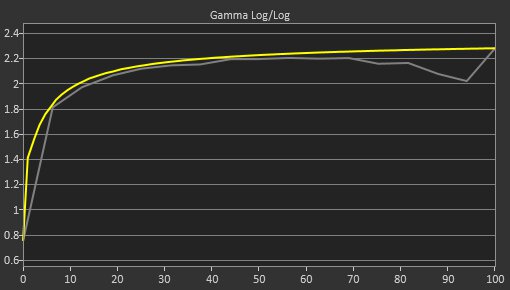
It could be a difference in gamma curve between your plasma and your monitor in sRGB mode. sRGB gamma looks very different compared to 2.4. And on top of that, according to rtings default calibration drops to 2.0 gamma in brighter scenes which will result in some brightest colors looking slightly washed out, but this behaviour could vary between units.

pre-gamma-small.jpg
 
Last edited:
It could be a difference in gamma curve between your plasma and your monitor in sRGB mode. sRGB gamma looks very different compared to 2.4. And on top of that, according to rtings default calibration drops to 2.0 gamma in brighter scenes which will result in some brightest colors looking slightly washed out, but this behaviour could vary between units.

pre-gamma-small.jpg
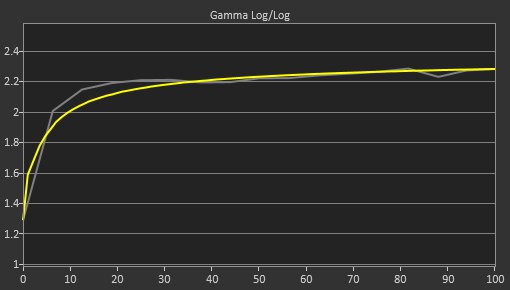
Here's gamma curve from my QD-OLED.

H8s3VxOAvgofUKun.jpg


The built-in sRGB clamp on my monitor is limited to a gamma of 2.2, but I can still get 2.4 gamma in other modes and clamp the gamut to sRGB with software (novideosrgb). The picture still doesnt look the same on OLED. My eyes can see a warmer and more vibrant hues on my plasma TV. The same thing has been noticed by other plasma TV users in this AVForums thread.

 
Last edited:
Just picked up a Lenovo Legion 7i 16" yesterday on sale, dont have much to say other than that screen is fucking glorious. Not really happy with the 5060 cards only having 8gb RAM but 90% of my gaming now is Indies, AA and emulation, so overall I'm happy. But dat OLED....
 
Had my LG B6 OLED TV or 10 years and still no burn in. I really want a PC OLED display but the burn in risk is just too big as I sit on it for 8-10 hours a day programming (on dark mode). I'm hoping Tandem OLED displays come soon so burn in is much less of a worry.
 
Top Bottom