• Hey Guest. Check out your NeoGAF Wrapped 2025 results here!

Android Software Thread - Tasty Desserts, Tastier Apps

Status
Not open for further replies.
So I'm new to this Android thing. I just purchased a Samsung Moment with my new Sprint plan, and I'm trying out the waters of the app store.

Am I going to be limited by the OS on what I can get? I seem to have a phone that is running the oldest version of the Android OS (1.5) and I haven't read anything about any updates that bring it to the latest version (2.1).

Did I buy a decent phone? It makes decent calls, though my Nokia N95 was clearer. I'm able to sync my google contacts and outlook calendar and jump on the internet to search for stuff, so its doing most of the stuff I need it to do. What am I missing out on? When the impressive games start rolling out, will I be able to play them? When Google releases its next version of google chat, will I be able to run it? Will I never be able to use Google Earth on my phone?

Help a brotha out...
 
mr jones said:
So I'm new to this Android thing. I just purchased a Samsung Moment with my new Sprint plan, and I'm trying out the waters of the app store.

Am I going to be limited by the OS on what I can get? I seem to have a phone that is running the oldest version of the Android OS (1.5) and I haven't read anything about any updates that bring it to the latest version (2.1).

Did I buy a decent phone? It makes decent calls, though my Nokia N95 was clearer. I'm able to sync my google contacts and outlook calendar and jump on the internet to search for stuff, so its doing most of the stuff I need it to do. What am I missing out on? When the impressive games start rolling out, will I be able to play them? When Google releases its next version of google chat, will I be able to run it? Will I never be able to use Google Earth on my phone?

Help a brotha out...

The OS will narrow down your app choices to those that are specifically coded to 1.5, yes. There were two separate rumors recently about the Moment getting 2.1, but nobody official has said anything as of yet.

The handset itself is really good. It's not "next gen" like the Nexus One and Droid are but it has it's own niche as a solid (figuratively and literally) stock Android experience (much better than Samsung's Behold II's TouchWiz UI, to be sure.)

If you have a later version of Android (which as I said the Moment is rumored to be getting) then Google's apps will run fine. However, in the specific case of Google Earth, it's hard to tell as that app requires a new version of OpenGL (presumably, going from offhand Google comments about it.) It'll probably run, just not silky smooth. This factors into your games question, however since the Moment has a keyboard it may be worth it to you to take a framerate downgrade for solid controls.
 
What are people's recommendations for a twitter app for the Hero? I'm trying Touiteur again (uninstalled last time as it was too slow), and Twicca is 1.6 and above. Any others worth giving a go?
 
SFA_AOK said:
What are people's recommendations for a twitter app for the Hero? I'm trying Touiteur again (uninstalled last time as it was too slow), and Twicca is 1.6 and above. Any others worth giving a go?

I've found Seesmic to be one of the best and it's free too!
 
mr jones said:
So I'm new to this Android thing. I just purchased a Samsung Moment with my new Sprint plan, and I'm trying out the waters of the app store.

Am I going to be limited by the OS on what I can get? I seem to have a phone that is running the oldest version of the Android OS (1.5) and I haven't read anything about any updates that bring it to the latest version (2.1).

Did I buy a decent phone? It makes decent calls, though my Nokia N95 was clearer. I'm able to sync my google contacts and outlook calendar and jump on the internet to search for stuff, so its doing most of the stuff I need it to do. What am I missing out on? When the impressive games start rolling out, will I be able to play them? When Google releases its next version of google chat, will I be able to run it? Will I never be able to use Google Earth on my phone?

Help a brotha out...


Fellow Moment owner here. Make sure you've got the firmware update to CL14 and sit tight for 2.1, it's coming Q2 (hopefully end of this month). I think the phone itself is pretty awesome, the only gripe I have is the slight wiggle in the slide mechanism after a while -- I wish they'd have taken a page from the Droid book on that one. You do miss out on some cool apps with 1.5 (nav, goggles, layar to name a few), but that's temporary. I'm looking forward more to the performance improvements and added OS features in 2.1 because right now I have pretty much everything I need in the market. There are some helpful forums out there to get you started too:

http://androidforums.com/samsung-moment/

http://www.samsungmomentforum.com/
 
I've been using the Swype beta on my Droid for a couple days now and have been amazed at how well it works and how much more quickly I can write with it.
 
zesty said:
I've been using the Swype beta on my Droid for a couple days now and have been amazed at how well it works and how much more quickly I can write with it.
Same here! Writing this now, actually. It's fantastic, you don't even have to be that precise!

Loving Drop 7, too. Omg, love double letters with Swype...
 
mr jones said:
So I'm new to this Android thing. I just purchased a Samsung Moment with my new Sprint plan, and I'm trying out the waters of the app store.

Am I going to be limited by the OS on what I can get? I seem to have a phone that is running the oldest version of the Android OS (1.5) and I haven't read anything about any updates that bring it to the latest version (2.1).

Did I buy a decent phone? It makes decent calls, though my Nokia N95 was clearer. I'm able to sync my google contacts and outlook calendar and jump on the internet to search for stuff, so its doing most of the stuff I need it to do. What am I missing out on? When the impressive games start rolling out, will I be able to play them? When Google releases its next version of google chat, will I be able to run it? Will I never be able to use Google Earth on my phone?

Help a brotha out...


Same boat man, just got a Moment :)

We're supposed to get an update to 2.1 by the end of the quarter... it was supposed to be by now but from what I've heard it will be in April/May now.

I love the phone so far though!
 
is there any way to vpn on android? i read you need to root it which sounds ridiculous?!

at work the only shitty wifi i can get on needs vpn
 
I've downloaded a couple pretty cool apps the passed few days.

3banana - best note app on any smartphone, imo. Murders Evernote. It's notes that sync to a website (snaptic), organized by tags, stored locally (unlike Evernote) and handles more than just text, such as pictures.

NewsRob- Best RSS reader since it syncs two way with Google. I like the presentation of Feedr more but Feedr doesn't tell Google Reader what I've read, so it's useless. NewsRob has a paid version, but it only removes ads and opens 3 settings, like starred posts...not worth $6, imo. Needs a nicer presentation and favicons, but functionally, pretty great.

Mybookmarks - sync desktop bookmarks with Android, awesome.

Mobile Defense - locate and control your phone from the computer. Amazing and free.
 
panda21 said:
is there any way to vpn on android? i read you need to root it which sounds ridiculous?!

at work the only shitty wifi i can get on needs vpn
It should be under Settings > Wireless & networks > VPN settings. From there, it's naming the connection and configuring it correctly.
 
Heya guys, I've got the Eris and I love the phone but two things:

1) The accelerometer(right thing?) is incredibly slow when I want to text horizontal. Anyway to fix this? I can't stand flicking the phone up and down until it realizes what I want done with it.

2) A buddy of mine has the Hero and told me to install 2.1, he said it was leaked. Should I do this or wait until Verizon has an OTA update? If ever?
 
Square Triangle said:
Heya guys, I've got the Eris and I love the phone but two things:

1) The accelerometer(right thing?) is incredibly slow when I want to text horizontal. Anyway to fix this? I can't stand flicking the phone up and down until it realizes what I want done with it.

2) A buddy of mine has the Hero and told me to install 2.1, he said it was leaked. Should I do this or wait until Verizon has an OTA update? If ever?

The 2.1 update that has been leaked is pretty final apparently so I'd just wait for the real thing if you're squeamish about rooting and ROMing.
 
Ken Masters said:
so for droid, are we getting live wallpapers and the 3d cart?

Live Wallpapers: Yes
3D Launcher: Probably not. The reason I've seen is that it doesn't work in landscape, and since the Droid has a keyboard that's required.
 
i'm looking for an app that's basically like a to-do list, or a task list or something. does anybody have any insight?

Edit: I should mention that I've tried astrid, just looking to see what else is out there.
 
cabot said:
i'm looking for an app that's basically like a to-do list, or a task list or something. does anybody have any insight?

Edit: I should mention that I've tried astrid, just looking to see what else is out there.

Are you a heaving Google Calendar user? Gtask works rather well. Not sure about any other ones.
 
OK...how the hell do I take the FB contacts off my phone list? That is super-annoying. Everything else about this latest ROM is nice, but that pisses me off. I also wish we got live wallpaper. That's one of the coolest things about 2.1. PEACE.
 
One of the things I missed from my Blackberry was the Notes application. On that front, I'd like to give a shout-out to AK Notepad. It's very simple and feature-light, but that is exactly what I wanted...if I need to take a note on something, I want to pop in, note it, and pop out. This lets me do that with ease, it's free, and no obnoxious ads.

I also want to give a thumbs-up to the official Ebay application. Good interface, and while it doesn't have everything I want (for example, I'd like a number of watchers stat under the selling tab) it handles the basics great.
 
Agree on AK Notepad. That for my quick jots, gtask for a list widget and Evernote for my bulkier detail-laden notes. Of course...keeping those straight can be tricky.
 
I used to use Sticky Memo Widget for quick notes, which was awesome because I could put stickys on my home screen. Too bad the apparently Creator had to pull it for some reason. This has happened to a few usefully apps I liked.

Anyway, I'm trying out Sticky right now and it's pretty cool for quick reminders and it lets you set notifications. I think the interface is neat too once you get the hang of it.

RemindMe is cool to, lets you set timed reminders in the notification bar.
 
eznark said:
Agree on AK Notepad. That for my quick jots, gtask for a list widget and Evernote for my bulkier detail-laden notes. Of course...keeping those straight can be tricky.

I've found 3banana to be 100x better than Evernote. It's much faster and neater/simpler to use, I just don't think it does voice memos.
 
Pimpwerx said:
OK...how the hell do I take the FB contacts off my phone list? That is super-annoying. Everything else about this latest ROM is nice, but that pisses me off. I also wish we got live wallpaper. That's one of the coolest things about 2.1. PEACE.

Settings > Accounts and Sync > Facebook > Uncheck Sync Contacts
 
Has anyone tried the Opera browser on their Android phone yet? I think it's only in Beta, but I've always been a fan of the Opera mobile browser on BlackBerry. Blazing fast.
 
Fatalah said:
Has anyone tried the Opera browser on their Android phone yet? I think it's only in Beta, but I've always been a fan of the Opera mobile browser on BlackBerry. Blazing fast.
its ok, but at the moment it doesn't use javascript so I cant use the neogaf app with it, or maybe im doing something wrong?
 
I tried it on my Magic.. to be honest it seems the same as the stock browser. The look killed it for me though.

Lose-Lose
For now?
 
So... Still no DLNA applications?
 
Bboy AJ said:
So... Still no DLNA applications?

You might wanna try Andromote (remote spelt romote... there's an andremote app out there, but the one you wanna try is andromote)... interface is nothing pretty and its primarily intended as a remote control for UPnP devices, but its supposed to work with Tversity...

you can specify the media server and the destination player (choosing local player to open the media player on the phone)

Catch is that the full version is €2.98 and I think there'd be trouble getting video to work right.
 
Hi! New Free awesome app:

icon.png
Android Wallpaper Rotator

Android Wallpaper Rotator is an android application that changes your wallpaper at a configurable time frequency. You can choose your images from flickr and phone and soon you will be able to get images from picasaweb, facebook and so on.

Download using this qr

160yhsi.jpg


configuration.png
configuration2.png


Official Website
 
cabot said:
i'm looking for an app that's basically like a to-do list, or a task list or something. does anybody have any insight?

Edit: I should mention that I've tried astrid, just looking to see what else is out there.

I use OI Shopping List. It lets you create multiple Shopping Lists (that work very well as To Do Lists) and lets you switch between them easily. The classic theme is nice with a smaller font size, and if you tap a selection it strikes it out but doesn't delete unless you want to so you can see what you finished and what you didn't finish.

It's cleaner and simpler and faster than most other To Do Lists for my purposes, plus the classic theme is easy on the eyes.
 
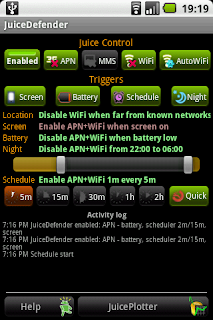
Would recommend Juice Defender to anyone having battery issues with their android handset. Been using it on my Nexus One for a few days and has saved me from having it constantly attached to a usb cable.

ss-defender.png


qr_juicedefender_117.png

Latedroid said:
JuiceDefender saves battery power (lots of it!) by controlling the device data connection and/or WiFi.


You can schedule regular APN/WiFi activation to let background data sync occur and have APN/WiFi enabled while the screen is on. It also helps in minimizing distractions ;)


The Easy Mode is a no-fuss one-click way to let your battery last longer - much longer. Just enable JuiceDefender by clicking on the big button and you're ready to go!

If you want more fine-grained control, try Advanced Mode, where you can configure all JuiceDefender features to your liking.


There are 5 triggers for the enable/disable behaviour:
Battery - when battery level gets low (less than 15%), disable APN/WiFi, and re-enable them when battery level is restored. APN/WiFi will also be enabled while the device is being recharged.
Schedule - regularly enable APN/WiFi for a short period of time, to let background data sync occur (email, Twitter, Facebook, stock quotes...). If Quick is disabled APN/WiFi stays enabled for a longer period, useful if your data connection is very slow or you need to sync lots of data.
Night schedule (requires UltimateJuice) - disable APN/WiFi during night time; you can also optionally put the phone in Silent Mode.
Screen - enable APN/WiFi while the screen is on to allow browsing, tweeting, procrastination and general internet-powered enjoyment, regardless of scheduled events and battery level.
Location (requires UltimateJuice) - this trigger controlled by the 'AutoWiFi' button. It disables WiFi when the device is not in range of any known WiFi network. The location is determined via the cellular network, so it's usually quite coarse. It's a fully automatic set-it-and-forget-it WiFi manager!

The priority order of the triggers is 1) location (WiFi only), 2) screen, 3) battery, 4) night schedule, 5) schedule - this means, for example, that when the screen is on APN/WiFi will be enabled even when the battery is low, or that the regular schedule won't occur during the night period.


Note that triggers will only enable WiFi if you have explicitly turned it on - if you turn it off manually, your decision will be remembered and no trigger will turn it on again (until you re-enable it).

Having data enabled 2 minutes every 15 minutes is sufficient in most situations. A longer schedule interval is useful to minimize distractions when you need to get something done ;)


There's a Home screen widget that shows how much battery life was improved by JuiceDefender over the last 48 hours - what's the best multiplier you can get?
It also lets you enable/disable JuiceDefender super-quickly (just tap on the glass of juice in the bottom left).
 
Do people get memory issues? I have the Hero and even though I only have the Facebook integration turned on (not the app), the built in message widget on 1 screen, and the People widget on another, yet I only seem to have between 20 and 30mb left with a slightly sluggish phone and a battery that lasts around 1.5 days.

Using OS Monitor, I can't turn off the duplicate of Google Search (27m) even though I don't use that widget anyway, Peep, PC synchronisation is listed at least 12 times, Android System is running twice, Market, Calendar etc.
 
MarkMclovin said:
Do people get memory issues? I have the Hero and even though I only have the Facebook integration turned on (not the app), the built in message widget on 1 screen, and the People widget on another, yet I only seem to have between 20 and 30mb left with a slightly sluggish phone and a battery that lasts around 1.5 days.

Using OS Monitor, I can't turn off the duplicate of Google Search (27m) even though I don't use that widget anyway, Peep, PC synchronisation is listed at least 12 times, Android System is running twice, Market, Calendar etc.

The google search thing you're seeing probably isn't the widget, its what the system pulls up when you press the magnifying glass / search button on your phone.

Right at this moment on my Hero - I have Linda File Manager, SyncMyPix, AndWobble, News and Weather, Flip Clock, Apps Organiser, Calculator, Google Voice, Settings, My Uploads, MP3 Store and K9 Mail, I have 35MB or so free and my phone is running fine. Its slick. A lot of those are on my TaskPanel auto-kill list.

I also have Clock, Voice Search, Calendar, MixZing Lite, Google Mail, Voice Dialer, Messaging and Beautiful Widgets running -- I've set TaskPanel to not kill these tasks.

You shouldn't really be getting a sluggish phone, but there again, you shouldn't have umpteen instances of PC Sync and stuff. Are you sure thats accurate?
 
SimleuqiR said:
New google maps is out on the market.
Can't say I like the way it handles search results now, it minimizes info listed on a location page. Rather than show a phone number for a location, it just gives you a button to launch it in the dialer. :/
 
kaching said:
Can't say I like the way it handles search results now, it minimizes info listed on a location page. Rather than show a phone number for a location, it just gives you a button to launch it in the dialer. :/

I thought this one just a Labs feature you can turn on/off.
How does it look when you have the Bubble Buttons Labs feature not selected?

Let's see...

Yup, does not display the #, I guess you can always just use the Places Directory app.
 
radioheadrule83 said:
You shouldn't really be getting a sluggish phone, but there again, you shouldn't have umpteen instances of PC Sync and stuff. Are you sure thats accurate?

I turned off/on the phone and now the memory has jumped from 28 to 89.3 according to OSMonitor, which is great and performance so far is better. But I still have apps and processes loading up in the list which I've not touched. Google Maps, Market, Download manager, com.android.providers.userdictionary, Calendar, PC synchronisation, Footprints.

They are not taking up much. Around 1.5mb each but I just can't see why these are running when I don't use them. I'll go through all the settings to make sure I have them turned off.

Sorry, don't mean to derail the thread!
 
Status
Not open for further replies.
Top Bottom