• Hey Guest. Check out your NeoGAF Wrapped 2025 results here!

Android Software Thread - Tasty Desserts, Tastier Apps

Status
Not open for further replies.
ICallItFutile said:
Is there an app that can measure distance travel via GPS? I would like to track the distance I bike.

there is an app called buddy runner. its actually for running, but it tracks your route and time. it also is able to upload statistics and graphs to the internet. i use it quite frequently, its allright
 
ICallItFutile said:
Is there an app that can measure distance travel via GPS? I would like to track the distance I bike.

I'm sure there are plenty. I use cardio trainer for running. However MyTracks is free, made by Google, has a 4.6 ish rating on the marketplace and does exactly what you want. :D
 
Cardiotrainer allows you to set it as cycling. Tis what I use. It's great with the voice telling you current distance and speed. Automatically pausing and continuing is useful too.
 
To the many Mini Info widget fans in here - AVOID the latest update like the plague.

Earlier I updated it (Was always one of my favorite apps) and it now has power controls such as GPS, WiFi and Brightness toggles built into it. I raised my brightness to MAX and game over. My Droid X screen completely died. The phone was on and working but the screen refused to turn on. So I did a battery pull and whew, the logo and Droid eye boot came on but then the screen shut off again making my phone unusable. At the bare minimum I was figuring a factory reset would fix it however to hell with that, I got my rooted Froyo on here....I won't be beaten that easily.

As I sat here USB connected looking for a fix I noticed that the screen was flickering on and off every few minutes. In a moment of panic and sheer luck I managed to tap on the brightness toggle of my SwitchPro widget I have on the main home screen which then lowered the brightness value and toggling off the damage Mini Info caused.

This took me about a half hour of crazed chaos before I managed to fix. Imagine my horror in those moments when I thought the screen had fried on my best new friend.

Needless to say, that app is no more and will never again be installed on my baby. Just a heads up guys because who knows what other damage it could cause and I am not risking it.

 
JonathanEx said:
Cardiotrainer allows you to set it as cycling. Tis what I use. It's great with the voice telling you current distance and speed. Automatically pausing and continuing is useful too.
I really like Cardio Trainer. My wife and I use it when we go for walks a few times a week. Unfortunately, the auto-pause thing doesn't work for me. I guess the gps signal is a little spotty so it thinks we've paused every couple hundred feet. That's alright though, I just turn it off because we really don't stop walking until we're done.
 
bathala said:
droid comic viewer does the job, and its free.

One thing missing is double tap to zoom

Wrong. It has double tap to zoom. ;)

BTW, in the marketplace it is called Android Comic Viewer (ACV).
 
womp said:
Wrong. It has double tap to zoom. ;)

BTW, in the marketplace it is called droid Comic Viewer (ACV).
(its been changed). but yes u can still search it as acv

ur right there r options for controls
damn I didn't knew there's so much option
 
Thanks for the suggestions. :)

Is there a way to keep the screen on while using navigation? I tried Keep Screen and Screen On, but neither have it as an application to select. What would it fall under?
 
bathala said:
(its been changed). but yes u can still search it as acv

ur right there r options for controls
damn I didn't knew there's so much option

And yet it still shows as ACV in the app tray. No wonder I didn't notice the name change. :lol

Yeah the options are getting better...I love the 'fade out' effect when I turn pages. heh.
 
ICallItFutile said:
Thanks for the suggestions. :)

Is there a way to keep the screen on while using navigation? I tried Keep Screen and Screen On, but neither have it as an application to select. What would it fall under?
Hmm...it's always stayed on for me without me having to do anything. Maybe it's a setting in Navigation?

If you can't figure it out that way, maybe just change the screen timeout before and after using it? If you don't want to do that, you could buy Tasker and automatically change the screen timeout while Navigation is open.
 
CrayzeeCarl said:
Hmm...it's always stayed on for me without me having to do anything. Maybe it's a setting in Navigation?

If you can't figure it out that way, maybe just change the screen timeout before and after using it? If you don't want to do that, you could buy Tasker and automatically change the screen timeout while Navigation is open.

Multiple times while driving navigation has closed if I don't keep the screen on. Luckily it saves recent destinations selected. I'd rather only keep the screen on for navigation and maybe another app or two to save battery.
 
Is your phone plugged into the car charger? On my trip from Denver to Texas, Google navigation stayed on so long as it was plugged in.
 
womp said:
To the many Mini Info widget fans in here - AVOID the latest update like the plague.

Earlier I updated it (Was always one of my favorite apps) and it now has power controls such as GPS, WiFi and Brightness toggles built into it. I raised my brightness to MAX and game over. My Droid X screen completely died. The phone was on and working but the screen refused to turn on. So I did a battery pull and whew, the logo and Droid eye boot came on but then the screen shut off again making my phone unusable. At the bare minimum I was figuring a factory reset would fix it however to hell with that, I got my rooted Froyo on here....I won't be beaten that easily.

As I sat here USB connected looking for a fix I noticed that the screen was flickering on and off every few minutes. In a moment of panic and sheer luck I managed to tap on the brightness toggle of my SwitchPro widget I have on the main home screen which then lowered the brightness value and toggling off the damage Mini Info caused.

This took me about a half hour of crazed chaos before I managed to fix. Imagine my horror in those moments when I thought the screen had fried on my best new friend.

Needless to say, that app is no more and will never again be installed on my baby. Just a heads up guys because who knows what other damage it could cause and I am not risking it.


I have already gotten the update - and then there was another update that referred to a brightness bug.. perhaps it is fixed? I don't actually use the widget though - not sure why I've even got it installed
 
DrForester said:
Is your phone plugged into the car charger? On my trip from Denver to Texas, Google navigation stayed on so long as it was plugged in.

Yep and it still turns navigation off.

EDIT: The problem might be it turns off when I lose a signal, even for a short period of time, but I'm not certain.
 
ICallItFutile said:
Thanks for the suggestions. :)

Is there a way to keep the screen on while using navigation? I tried Keep Screen and Screen On, but neither have it as an application to select. What would it fall under?

a quick way (if you have it plugged in while you are using it) is to disable the screen timeout while plugged in, its under the development section of the settings menu... but i've never had my screen turn off while in navigation
 
ICallItFutile said:
Yep and it still turns navigation off.

EDIT: The problem might be it turns off when I lose a signal, even for a short period of time, but I'm not certain.

have you tried settings::applications::development::stay awake?
 
gcubed said:
a quick way (if you have it plugged in while you are using it) is to disable the screen timeout while plugged in, its under the development section of the settings menu... but i've never had my screen turn off while in navigation

thespot84 said:
have you tried settings::applications::development::stay awake?

I suppose that'll work. I just wonder if it will turn off Cardiotrainer while biking. Guess I'll find out if I go on a bike ride today.
 
ICallItFutile said:
Yep and it still turns navigation off.

EDIT: The problem might be it turns off when I lose a signal, even for a short period of time, but I'm not certain.
The same thing happens to me on my X in just the standard car-dock... While navigating, it just backs out to turn by turn seemingly at random. Drives me nuts.
 
The Take Out Bandit said:
Holy shit, have you guys seen Shelves?! HAVE YOU SEEN SHELVES?!

Unfortunately it scans and finds my import games, but they don't show up in the library. D:

Much more refined than Packrat, although to be fair I stopped using Packrat a while back. :(


nice, where is it's database coming from? a few of the books (some of the more obscure ones) i've tried have been missing, but for the most part it works great
 
anyone have experience with wireless tether?
some of my coworkers can detect, others cant.
all the ones that can connect have been laptops and iphones,
android phones?...no luck whatsoever.

on droid x 2.1 root.
 
Apparently the Advanced Task Killer Developer made over $10k last month on sales, with the majority being from ads. But I wanted to point this out as I've been harping on it forever, devs need to make their products cheaper and they will sell more copies and there will be less pirating.

First as his numbers clearly show Android can serve as a viable revenue stream even if it may not make you independently wealthy overnight. La believes that he would have seen greater profits had he priced his app at something more than 99 cents, but as he was both satisfied with his earnings and had competitors spring up he elected not to do so.
 
andycapps said:
Apparently the Advanced Task Killer Developer made over $10k last month on sales, with the majority being from ads. But I wanted to point this out as I've been harping on it forever, devs need to make their products cheaper and they will sell more copies and there will be less pirating.


Yup, I read this a few days ago. He also stated that the latest version of Android (Froyo) pretty much nullifies the need for his app (ATK).

He also acknowledges that improvements in the Android OS have removed much of the need for his app, but notes an overhauled new version is in the works that will add significant new features, such as backup capabilities and more app management tools.
 
SimleuqiR said:
Celebi, you just gone and made my day!!!

EDit:

Downloading!

Warning about the "beta" build. It's a bit rough around the edges but, seems pretty usable. Here are the release notes (open up the BeejiveIM.apk file & find notes.txt):
build 0.6
Fixed most of the selection issues on the list views.
Added "All accounts row" on the account list screen and login all/change status for all accounts.
changed the theme/colors/layout on the chat view.

Working on the following for the next build (0.7)

Support for adding links/intents for text in the chat (phone numbers,urls,etc..) (using Android linkify api)
Activity indicators
Adding Buddy Info,block buddy screens
Adding buddy icons and bubble view for the chat.
bug fixing
 
celebi23 said:
Warning about the "beta" build. It's a bit rough around the edges but, seems pretty usable. Here are the release notes (open up the BeejiveIM.apk file & find notes.txt):

Thanks!
I will probably use it for the remainder of the week to test it out.
Once it hits the Market in some sort of Open Beta I will keep it installed.
 
celebi23 said:
Warning about the "beta" build. It's a bit rough around the edges but, seems pretty usable. Here are the release notes (open up the BeejiveIM.apk file & find notes.txt):
Thanks, I'm also using the beta, but I can't get my physical keyboard to work on it. And I have to type a random character just to bring the window to type in. hopefully gets fixed soon!
 
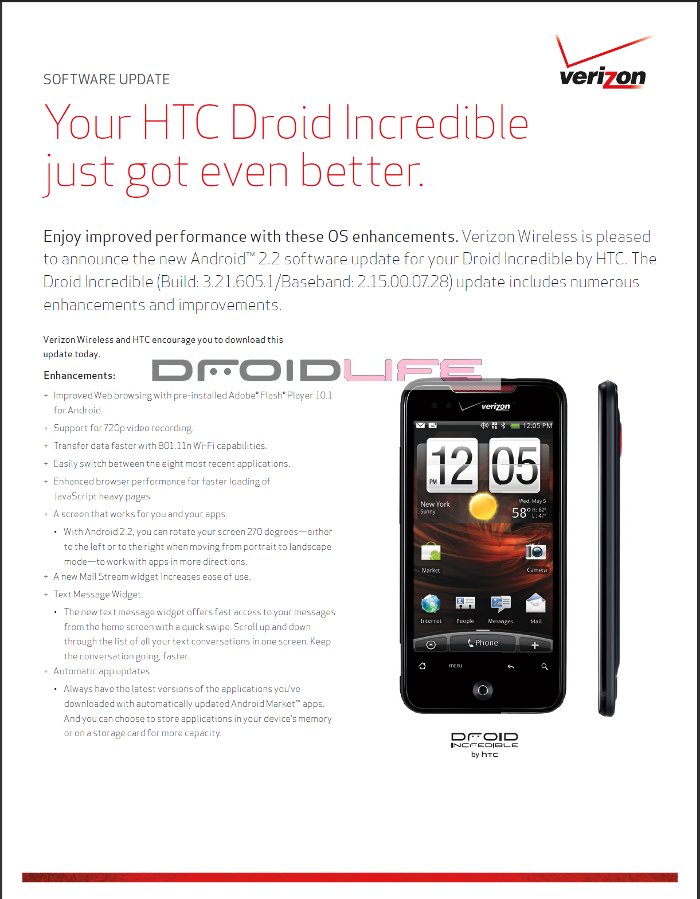
Froyo for the DInc is finally officially coming... starting tomorrow.

http://support.vzw.com/pdf/system_update/incredible.pdf
http://www.droid-life.com/2010/08/26/breaking-droid-incredible-froyo-update-starts-tomorrow/

incredible-froyo-update-600x450.jpg

di-update1.jpg
 
Samsung Galaxy S Captivate is suppose to update to 2.2 in August right? Or did I read that wrong and it was for GPS fix only?
 
beejive seems alright, but when you type of the hardware keyboard you can't preview your text. :lol
 
mrkapawutzis said:
Can anyone recommend a good mail app? Something that's good at grouping and displaying threaded emails?

uuuummmmm....


gmail?

sorry to sound like a dick, but the gmail app does a fine job of grouping and displaying threaded conversations. What other features are you looking for?
 
thespot84 said:
uuuummmmm....


gmail?

sorry to sound like a dick, but the gmail app does a fine job of grouping and displaying threaded conversations. What other features are you looking for?
Better support for non-gmail accounts, I take it.

I suggest k-9 mail. Or maybe its just K-Mail.
 
So even with the hardware keyboard glitch, beejive is the most stable and well built I'M app I've tried yet.
Not surprising, since I was a huge fan of the iphone version before I switched to android. Its only been a coupld hours so obviously my experience is pretty limited, but its very nice so far.
 
I recently got a motorola droid 2. I was looking at installing the launcherpro app, but could someone explain what exactly that does and if it's worth it?

I also am a little confused on which task killer app to get. I downloaded one called "advanced task killer" but it was a free app, and I keep seeing people say this app costs money...whats the deal?
 
j-wood said:
I also am a little confused on which task killer app to get. I downloaded one called "advanced task killer" but it was a free app, and I keep seeing people say this app costs money...whats the deal?
Don't get a task killer.

I'll let someone else who uses Launcher Pro fill you in on that.
 
j-wood said:
I recently got a motorola droid 2. I was looking at installing the launcherpro app, but could someone explain what exactly that does and if it's worth it?

I also am a little confused on which task killer app to get. I downloaded one called "advanced task killer" but it was a free app, and I keep seeing people say this app costs money...whats the deal?

I'm honestly not sure at what droid 2's stock launcher is like, but Launcher Pro (the free version) is very customizable in terms of icons, screens, etc. It's also pretty fast.

The deal with task killers is don't get one. The improvements in froyo (are you running froyo?) totally negate the need for task killers is what i understand.

An app like watchdog (http://www.appbrain.com/app/com.zomut.watchdoglite) will monitor for run-away apps in terms of cpu, but memory management is handled internally by the OS.
 
j-wood said:
I recently got a motorola droid 2. I was looking at installing the launcherpro app, but could someone explain what exactly that does and if it's worth it?

I also am a little confused on which task killer app to get. I downloaded one called "advanced task killer" but it was a free app, and I keep seeing people say this app costs money...whats the deal?
To add, an alternative launcher is ADW Launcher. I like both, but I like that you can scroll the dock at the bottom on Launcher Pro. ADW Launcher's kind of got a similar dock feature, but I think its implemented better in LP.

-----------------------

Has anyone tried the Trillian Beta and can compare it to BeeJive? Its kinda slow on mine, and typing blindly on my physical keyboard kind of sucks. Also, it seems like you can't take it out of the notification bar, even if you're offline :-/
 
Why's having an app killer so bad?

Got my wildfire 2 days ago and it was so fucking nice to be able to close then-redundant apps in one press.
 
I have a droid x and a lot of people at work have droids, Xs and Incredibles and I have come to the conclusion that Android is a really buggy OS. It needs a lot of work.

For example:

Boss's Droid X was not syncing email, contacts o calendars. The checkboxes for this sync option had disappeared. Had to wipe out the account on it.

Another lady's phone(Droid) will not download anything from the market, when you select something it says "instalation failed" but it doesn't even begin the download. It cannot do the 2.2 update either, even the manual update fails.

Other lady has to take her battery out of her Incredible all the time. She wasn't getting emails at one point. She gets random ringtones.


Mine has worked great so far :)


Edit: Hopefully froyo fixes a lot of the problems.
 
Status
Not open for further replies.
Top Bottom