• Hey Guest. Check out your NeoGAF Wrapped 2025 results here!

Dying Light PC Performance Thread

No I always play without Vsync.

Well then you're definitely not experiencing a double-buffer vsync issue.

The game is known to be CPU limited/dependent. I'd say overclock your CPU, which can help immensely with performance in this specific game, but as far as I know, yours can't be.

The draw distance setting effects CPU usage most, so I'd bring that down a few notches and see if you get less drops. The "Very High" Shadow setting is also demanding, so if you don't already have it set to "High," I'd do that too.

Good luck ;)
 
Well then you're definitely not experiencing a double-buffer vsync issue.

The game is known to be CPU limited/dependent. I'd say overclock your CPU, which can help immensely with performance in this specific game, but as far as I know, yours can't be.

The draw distance setting effects CPU usage most, so I'd bring that down a few notches and see if you get less drops. The "Very High" Shadow setting is also demanding, so if you don't already have it set to "High," I'd do that too.

Good luck ;)
Actually most state to set shadow to medium even on high rigs
 
Decided to get this today on PC. My rig is old by today's standards, but it still manages to slightly edge out the current consoles.

Radeon Saphire AMD 7850 OC
Intel i2500k
8GB DDR3 ram

I'm using Radeon Pro to force 30FPS, otherwise it fluctuates all over the place (between 30 and 60).

Resolution 1920x1080
Textures: Medium
Shadow Maps: High
Foiliage: Medium
View Distance: just a bit lower than 50%
Ambient Occlusion: Off
V-sync: On
Motion Blur: On
Anti-aliasing: Off
NVIDIA HBAO+: Off
NVIDIA Depth of Field: Off

Didn't think my rig would be up for the task, but ultimately I'm glad that I didn't go for the PS4 version.
 
I mean the fps are acceptable for me. What's not acceptable is the random stutters I get where the game practically stands still for several seconds.

EDIT: Maybe that's my 970 going over 3.5 GB VRAM? I guess I could try turning down textures to Medium.
 
EDIT: Maybe that's my 970 going over 3.5 GB VRAM? I guess I could try turning down textures to Medium.

Yeah I think that's why you're getting these stutters.

I don't think there is much difference between medium and high, I heard it just helps lessen the pop-ins even though I haven't noticed any even on medium.
 
What I wonder is, when did it become automatically expected to play every major new release at a constant 60 fps+ at "max" settings, and on mid-tier (and yes, even high-end hardware) no less?

I remember the community (knowing more as a whole on a technical level than nowadays it seems), would look forward to maxing new releases out in a couple years time (what, not NOW you say?), and keeping a few graphical notches down in the meantime.

Not to say recent releases haven't had legitimate technical issue, but since when did 30 fps, let alone 40 fps become "unplayable?" Some of these same people call the games "unoptimized," (usually because they can't max them out at a constant 60) and then to "show the developers," they'll turn around and buy the inferior PS4/Xbox One versions instead, which sometimes run at sub 1080p resolutions and at or under 30 fps, when they could have a superior experience with a locked 30 fps on their PCs.

I myself am happy to either lock newer games at 30 fps on my 770 4GB and max them out, or lock them to 60 and compromise a few settings to reach it. And no, I don't expect a constant 60 on a single mid/high-end card with the visual quality of recent games, it's downright unrealistic. People keep asking for more advanced graphical effects to push their PCs, and then when that real-time particle or lighting effect is delivered, they whine about frame drops.

We claim PC gaming is so far ahead of the consoles, but in reality, a single shadow, draw-distance, AA, or AO setting can instantly fill the performance gap between a PS4 and a GTX 970.

Good post. If I may ask, having switched semi-recently, what settings would you say the PS4/Xbone are comparable to? I assume that as time goes on, they'll fall closer to the low settings with each new release.
 
Yeah I think that's why you're getting these stutters.

I don't think there is much difference between medium and high, I heard it just helps lessen the pop-ins even though I haven't noticed any even on medium.

No that's probably CPU related. I had this issue before. Opened up the task manager and set processor priority to high and it was gone. That was before the patch and when I had 8GB RAM. With the patch and now 16GB RAM it never stutters. Worth noting is that before the patch I played with 50% draw distance which is now max. Also. I just found out that the 347.25 drivers are weird. From nowhere my game started to tear like hell. With V-sync enabled. In the drivers or in the game. Couldn't iron it out. Rolled back to 347.09 and not only doesn't it tear anymore. It also runs with ~5fps higher framerate.
 
Good post. If I may ask, having switched semi-recently, what settings would you say the PS4/Xbone are comparable to? I assume that as time goes on, they'll fall closer to the low settings with each new release.

Just from recently released games, it looks like the PS4 versions are falling somewhere around medium to high in comparison to PC settings.

I believe Dragon Age Inquisition was mostly equivalent to the Medium preset on PC.

Far Cry 4 is basically identical to the High preset on PC (there is Very High and Ultra above that)

Mordor I believe is equivalent to High on PC


Also keep in mind they are both locked to 30fps on consoles at1080p. I get a good amount better performance on my GTX 670 which released in 2012.

One thing the consoles have consistently been doing is having very high or ultra textures, mainly because of he large unified pools of RAM. My 2GB 670 struggles to do the same just because of vram limitations.
 
I mean the fps are acceptable for me. What's not acceptable is the random stutters I get where the game practically stands still for several seconds.

EDIT: Maybe that's my 970 going over 3.5 GB VRAM? I guess I could try turning down textures to Medium.

I have a 970 and I don't get the stutters. Actually the only real problem I have with the game now is random crashes during multiplayer. The patch seems to have helped out a lot with them but I still get them from time to time. Perfectly fine in single player though.
 
Good post. If I may ask, having switched semi-recently, what settings would you say the PS4/Xbone are comparable to? I assume that as time goes on, they'll fall closer to the low settings with each new release.

To add to what Lockjaw333 already stated, according to Digital Foundry's recent Dying Light face-off, the PS4/Xbox One draw-distance is slightly lower than the PC's lowest draw-distance setting. The consoles' shadow map resolution appears to be equivalent to the PC's (I believe 2046 x 2046 resolution) "Medium" (now "High" post patch) setting, and both the Foliage and Texture settings on consoles match the "High" PC settings.

Lastly, at nighttime, the console versions lack the PC's dynamic light sources, instead opting for a post-process bloom to simulate the effect, Xbox One suffers from screen-tearing and a sub-1080p resolution, and both console versions run at 30 fps. Oh, and if you have an Nvidia GPU you have access to HBAO+ (superior to the game's default SSAO) and enhanced DoF (granted, it is arguably "stronger," not "better" than the game's default DoF effect).

The original article is here with all the details: http://www.eurogamer.net/articles/digitalfoundry-2015-dying-light-face-off
 
Bought game today, getting weird stutter.

Windows 8.1
I7 4770k stock
GTX670 2gb
16gb ram
Samsung 840 Pro SSD

Medium Settings
Vsync off in game, forced via nvidia display options.

Game will run at near 60fps but I get weird drops / stutter of about 20fps at seemingly random times. Happened both indoor and when I first got outside. Common / known issue?
 
I did notice that the game is very playable at lower framerates. 20-25 is fine for running around smashing zombies. It's one of those games that can be played like that without it bothering me much.
 
Does the game tank to like 1fps for a couple of seconds when zombies lunge and grab you for anyone else?

Doesn't happen 100% of the time for me but enough that it's annoying since the game becomes unplayable whilst zombies are on top of you.

I'm playing on 2 x GTX 780s.
 
We claim PC gaming is so far ahead of the consoles, but in reality, a single shadow, draw-distance, AA, or AO setting can instantly fill the performance gap between a PS4 and a GTX 970.

I don't agree at all with the way you presented this. IQ never was and never will be a "just". It's one of the most important things to cater for, especially if you have a high end rig built.."just"..for that. Better "shadow, draw-distance, AA, or AO" (and all the other things that that you can tweak to your liking in PC games, like f.ex. resolution.....) are some of the basic reasons why we buy a PC instead of a console in the first place (I can't stomach the generally poor AF in PS4 games f.ex.).
 
I don't agree at all with the way you presented this. IQ never was and never will be a "just". It's one of the most important things to cater for, especially if you have a high end rig built.."just"..for that. Better "shadow, draw-distance, AA, or AO" (and all the other things that that you can tweak to your liking in PC games, like f.ex. resolution.....) are some of the basic reasons why we buy a PC instead of a console in the first place (I can't stomach the generally poor AF in PS4 games f.ex.).

Good artstyle and very good image quality make every good looking game to an amazing looking one.
 
R9 290 Directcu ii
16GB ddr3
i7 2600k @ 4.5

Get an average of 45 fps in the more "crowded" areas.

Rather off topic but i notice this game (along with others) tend to be choppier than a 30fps game on a console. Would me switching from 60hz to 144hz make PC gaming at 30-60fps smoother
 
Sure: http://www.neogaf.com/forum/showthread.php?t=885444

Basically, PC gamers these days are dumb and think that something is wrong with a game if they can't play it at "max settings". When conversely, something is wrong with a game if they can play it at "max settings".

Yeah, even between maxed out graphics and medium to high settings isn't THAT much of a difference like some people make it seem.

I always start the game at the native Resolution and the at the lowest settings possbile. Then I try to improve the image quality to an acceptable level and then I play around with the rest of the settings to get the most out of the graphics and still keep it at 60fps with that image quality. Demanding perfect IQ/60fps and maxed out settings is unrealistic almost every time.
 
Just from recently released games, it looks like the PS4 versions are falling somewhere around medium to high in comparison to PC...

I saw a thread on Reddit a few days ago where the PS4 was compared to PC on minimum. The thread was about how the PC looked better.
 
Why do all nvidia optimized games have performance issues? Unity, FC4, this game and the list goes on and on.
AMD games run fine on launch, like DA I or Alien.
 
Does the game tank to like 1fps for a couple of seconds when zombies lunge and grab you for anyone else?

Doesn't happen 100% of the time for me but enough that it's annoying since the game becomes unplayable whilst zombies are on top of you.

I'm playing on 2 x GTX 780s.

This happens to me (780 ti) would like to know if there is a fix for it, can be really frustrating as it makes the window to grapple damned near impossible to pull off.
 
Okay fixed my stuttering issue I was having a few posts back.

Went into task manager and changed priority to Realtime. No more stutter.

I was even able to boost to high foilage and turn all the nvidia centric stuff on and I am definitely getting above a constant 30fps. I dont know exactly what its running but its definitely above 30fps consistently, maybe 40-45fps.

Shadow maps Medium
Foilage High
40% view
Everything On
AA
V-sync

Only issue left is when I am grabbed by a zombie like another poster pointed out where his tanks, mine does too. When a zombie grabs you it just goes to a brief slideshow until the QTE. Considering everything else is now running really smoothly for me I am happy with that.
 
Sure: http://www.neogaf.com/forum/showthread.php?t=885444

Basically, PC gamers these days are dumb and think that something is wrong with a game if they can't play it at "max settings". When conversely, something is wrong with a game if they can play it at "max settings".
I get the feeling that those people don't want to mess with settings at all and they've been able to get away with maxing and forgetting for awhile now. If that's not feasible with good performance then the onus for adjusting the settings falls back on them.
 
Why do all nvidia optimized games have performance issues? Unity, FC4, this game and the list goes on and on.
AMD games run fine on launch, like DA I or Alien.
Dragon Age was worse than Dying Light for me thanks to that framerate stuttering issue that some of us had, but fixable when the right commandline arguments had been found. I've not played it in a while so it might have been patched in the meantime.
 
I get the feeling that those people don't want to mess with settings at all and they've been able to get away with maxing and forgetting for awhile now. If that's not feasible with good performance then the onus for adjusting the settings falls back on them.
If they don't want to bother with settings, they could just leave them at default (or let something like Geforce Experience set them up, it's made for people like that).
 
This happens to me (780 ti) would like to know if there is a fix for it, can be really frustrating as it makes the window to grapple damned near impossible to pull off.

I have a feeling it's maybe a VRAM related thing since this game can use up to 4GB which makes me think that the GTX 780's 3GB is causing the problem.

I'm going to try medium textures tonight.
 
I have a feeling it's maybe a VRAM related thing since this game can use up to 4GB which makes me think that the GTX 780's 3GB is causing the problem.

I'm going to try medium textures tonight.

I've been playing the game with the two settings over the past week. As I theorised previously, it's a texture cache setting. Medium goes up to 2GB, High will use all available over a session.

With High you're far less likely to see fade-in, and textures will almost always be max quality the instant you see them.
 
I've been playing the game with the two settings over the past week. As I theorised previously, it's a texture cache setting. Medium goes up to 2GB, High will use all available over a session.

With High you're far less likely to see fade-in, and textures will almost always be max quality the instant you see them.

Yeah I thought as much having read your guide.

I'm just gunning for the most stable frame rate I can atm.

The way I see it is this is really not a pretty game no matter how you set it up so I just want to get decent performance if possible.
 
I did some testing over the weekend and discovered the exact changes to View Distance. Also found improved performance in Patch 1.2.1: http://www.geforce.com/whats-new/gu...formance-guide#dying-light-patch-1-2-1-update

Love your breakdown of the performance changes between the two AND including the full VisRange settings in the comparison for people who want to restore them via ini edits! Great work as usual Andy!

Oh and this part is particularly heartbreaking for me to read....

Once optimization is complete we'd love to see the full range of View Distance settings reinstated, perhaps placing them in presets marked Extra High and Ultra, ensuring everyone is aware of their taxing nature. Their removal is regrettable but understandable, as word of mouth and YouTube videos are the main driver of videogame sales. As such, if the vocal minority convinces the mass market majority that a game is unoptimized or otherwise broken, when it isn't, the developer's sales will suffer and jobs are put at risk. The message for developers is clear then: make your 'High' in-game settings suitable for the mass market, add 'Ultra' presets for enthusiasts, and if that's a no go at least allow the top-end graphical treats to be enabled with ease through your config file.

I sure love me some PC gaming, but it's starting to be hard to find myself anything but pissed off at PC gamers more and more lately...
 
R9 290 Directcu ii
16GB ddr3
i7 2600k @ 4.5

Get an average of 45 fps in the more "crowded" areas.

Rather off topic but i notice this game (along with others) tend to be choppier than a 30fps game on a console. Would me switching from 60hz to 144hz make PC gaming at 30-60fps smoother

It definitely feels more responsive. I've capped Dying Light at 45fps which is the lowest value I get (Nvidia's 347.09 drivers gives me 5fps more than the 347.25. It also removed the screen tearing that appeared out of nowhere just yesterday and that was when I used V-Sync.)

On my VG248QE using 144Hz it feels noticeably more responsive than on my 60Hz HDTV. For 30-60fps gaming though I wouldn't bother getting a monitor like this. Around 60fps it is a difference worth considering compared to playing on a 60Hz screen. But I would only buy one if I could reach a target of at least 120fps in something you know you'll spend time with. If the source can match the refresh rate it's so much sharper while in motion. Especially while using strobe lighting.
 
The same (non-refresh) framerate will always feel smoother on higher refresh rates than lower ones.

With 60 Hz, a new frame is presented every 16.6 ms, so your maximum judder is also 16.6 ms. At 144 Hz, a new frame is presented every 6.9 ms, so the maximum judder is 6.9 ms. With something like a 250Hz+ display I think we wouldn't even need g-sync/adaptive sync anymore.
 
I get the feeling that those people don't want to mess with settings at all and they've been able to get away with maxing and forgetting for awhile now. If that's not feasible with good performance then the onus for adjusting the settings falls back on them.

If they don't want to bother with settings there are other platforms to play on.
 
Love your breakdown of the performance changes between the two AND including the full VisRange settings in the comparison for people who want to restore them via ini edits! Great work as usual Andy!

I tried pretty much everything, but I can't get the old values to work in 1.2.1. If someone truly can, please provide the repro steps.

Oh and this part is particularly heartbreaking for me to read....

I sure love me some PC gaming, but it's starting to be hard to find myself anything but pissed off at PC gamers more and more lately...

Yea, it's pretty depressing. But I totally understand developer reactions - if a big YouTuber posts a video slamming a game that'll be a game's reputation sunk. The YouTuber might post an annotation saying performance is fixed at a later date, or tweet something out, but the majority of the video's viewers will never see those updates. Furthermore, those popular videos with titles like "Dying Light Performance Sucks" will go straight to the top of the YouTube and Google search engines, further compounding the problem.

I think the many years of previous-gen cross-platform games that performed flawlessly on years-old PC hardware has skewed expectations of many. They want new, better, more graphically advanced games, but when they don't run at 60FPS with max settings they complain, so the devs scale back the graphics, and then they get complaints about downgrading.

Hard for them to win at the moment, so I honestly believe they should shove a load of advanced settings to a sub-menu, forcing you to manually enable them, or at worst put them in a config file and publicize their availability to enthusiasts.
 
I tried pretty much everything, but I can't get the old values to work in 1.2.1. If someone truly can, please provide the repro steps.

The only value I've tested was the highest (prepatch 100%) and simply changed the VisRange values in Video.scr in the Dying Light folder in My Documents. My performance tanked in game a good amount, but went back to normal later when I reset the configuration via going back to the in game configuration screen and simply hitting "accept" (enter key) again. The change instantly resulted in a framerate boost (monitored via fraps), and my video.scr file went back to 2.60, 2.60. Whenever I tried to apply an arbitrary amount over 2.60, 2.60 I was met with a black screen when starting the game tho =\

Can post pics if needed!

Yea, it's pretty depressing. But I totally understand developer reactions - if a big YouTuber posts a video slamming a game that'll be a game's reputation sunk. The YouTuber might post an annotation saying performance is fixed at a later date, or tweet something out, but the majority of the video's viewers will never see those updates. Furthermore, those popular videos with titles like "Dying Light Performance Sucks" will go straight to the top of the YouTube and Google search engines, further compounding the problem.

I think the many years of previous-gen cross-platform games that performed flawlessly on years-old PC hardware has skewed expectations of many. They want new, better, more graphically advanced games, but when they don't run at 60FPS with max settings they complain, so the devs scale back the graphics, and then they get complaints about downgrading.

Hard for them to win at the moment, so I honestly believe they should shove a load of advanced settings to a sub-menu, forcing you to manually enable them, or at worst put them in a config file and publicize their availability to enthusiasts

Pubs/devs still get shit when hiding them in config files, though. Just look at Dead Rising 3, a game that when compared 1:1 vs specs on the 'Bone performed pretty much exactly the same, but people lost their minds when they couldn't run it maxed at 1080p (double the rendering res of the 'Bone version) and 60fps (close to 3x the avg FPS of the 'bone version), which could only be enabled to run at framerates that high in the first place with a autoexec file placed in the game's directory =\
 
The only value I've tested was the highest (prepatch 100%) and simply changed the VisRange values in Video.scr in the Dying Light folder in My Documents. My performance tanked in game a good amount, but went back to normal later when I reset the configuration via going back to the in game configuration screen and simply hitting "accept" (enter key) again. The change instantly resulted in a framerate boost (monitored via fraps), and my video.scr file went back to 2.60, 2.60. Whenever I tried to apply an arbitrary amount over 2.60, 2.60 I was met with a black screen when starting the game tho =\

Can post pics if needed!

I tried that, but it immediately reset itself to 2.60 the second the game was launched (have notepad++ open on a second monitor, and the 'file has changed. reload?' prompt would popup even before I hit the main menu).
 
I tried that, but it immediately reset itself to 2.60 the second the game was launched (have notepad++ open on a second monitor, and the 'file has changed. reload?' prompt would popup even before I hit the main menu).

Oh, also worth noting that I'm booting using the 3rd party tool Dying Light Manager and setting my video.scr file to read only.

And yeah, just tested it again and after alt tabbing out of the game and copy/pasting my video.scr file to desktop and checking the copied files contents, my setting is still at 8.26, 8.26.

I'll try with the notepad++ thing and report back just to be safe though!

Here's some pics that I took of post patch manual setting of 8.26, 8.26 vs the std post patch max of 2.60, 2.60:

BCE9689AEE66A050A8C564BC45BA3894CBD40A26


3107BA4805BB9CD05992FEBBE372451305D2BCD1


As you can see, there's an obvious jump in LOD quality.

EDIT: accidentally DP'd while trying to edit... my bad x_o
 
Oh, also worth noting that I'm booting using the 3rd party tool Dying Light Manager and setting my video.scr file to read only.

And yeah, just tested it again and after alt tabbing out of the game and copy/pasting my video.scr file to desktop and checking the copied files contents, my setting is still at 8.26, 8.26.

I'll try with the notepad++ thing and report back just to be safe though!

Here's some pics that I took of post patch manual setting of 8.26, 8.26 vs the std post patch max of 2.60, 2.60:

BCE9689AEE66A050A8C564BC45BA3894CBD40A26


3107BA4805BB9CD05992FEBBE372451305D2BCD1


As you can see, there's an obvious jump in LOD quality.

If I set my config file to Read Only, even when using DLM, the game reverts to default settings, which include default FOV. Don't know how it's working for you, but I tested on a friend's system via RDP, too, and it didn't work there either.

For my sanity, you're doing this?

  • Open C:\Users\USERNAME\Documents\DyingLight\out\settings\video.scr
  • Edit VisRange to VisRange(8.26, 8.26)
  • Save, set Read Only
  • Launch game via DLM
 
Love your breakdown of the performance changes between the two AND including the full VisRange settings in the comparison for people who want to restore them via ini edits! Great work as usual Andy!

Oh and this part is particularly heartbreaking for me to read....


I sure love me some PC gaming, but it's starting to be hard to find myself anything but pissed off at PC gamers more and more lately...

Could not agree more with all you said and great work Andy as usual.
 
If I set my config file to Read Only, even when using DLM, the game reverts to default settings, which include default FOV. Don't know how it's working for you, but I tested on a friend's system via RDP, too, and it didn't work there either.

For my sanity, you're doing this?

  • Open C:\Users\USERNAME\Documents\DyingLight\out\settings\video.scr
  • Edit VisRange to VisRange(8.26, 8.26)
  • Save, set Read Only
  • Launch game via DLM

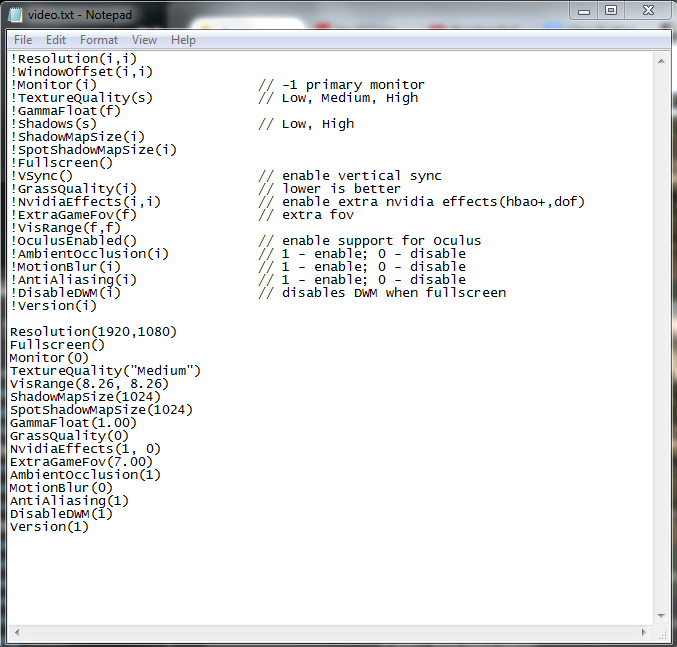
How weird! But yeah, that's exactly what I'm doing. Here's the exact look of my Video.scr file, changed to .txt and opened in notepad:

f06e4f9c086de3dc02f6445a888a46c7.png
 
I mean the fps are acceptable for me. What's not acceptable is the random stutters I get where the game practically stands still for several seconds.

EDIT: Maybe that's my 970 going over 3.5 GB VRAM? I guess I could try turning down textures to Medium.

I experience this since the patch :'(
 
You get a locked 60fps with a single 680? Locked...60fps...single...680? Not attacking you personally or accusing you of lying, but I find that extremely hard to believe considering how many reports I've read from guys even with SLI 970's reporting drops. Not to mention actual benchmarks:

Fzd0W8a.jpg


Even with the latest patch and everything on low I just can't see you holding 60fps for more than a few seconds unless a worker on the production line blessed your card with holy water when nobody was looking.

Two random examples from gaffers:

2GB GTX680 here, playing at a consistent 60+fps (not using vsync) at High Textures, Medium Shadows and Foliage, HBAO+ on, Nvidia DOF off, Motion Blur and AA on.
 
They reduced the in-game setting maximums. Because of people like you.

Can't even blame them really, now people will be staggered at their "optimization" skills. They should have something like a --iamnotanidiot command line parameter which unlocks the full settings though.

Did they really reduce the maximum graphics?

That is straight criminal.

You never reduce the graphics.
 
Top Bottom