

-
Hey Guest. Check out your NeoGAF Wrapped 2025 results here!
You are using an out of date browser. It may not display this or other websites correctly.
You should upgrade or use an alternative browser.
You should upgrade or use an alternative browser.
Metal Gear Solid V PC Performance Thread
- Thread starter VisceralBowl
- Start date
whats the command to show fps? or is everyone using a third party program?
I use Fraps.
plagiarize
Banned
Yep - it's because of G-Sync + SLI (check the post by the NVIDIA guy). It's because it still detects the G-Sync monitor that it won't show, if you unplug it and then restart, it'll show with SLI enabled.
Thanks. I didn't have to unplug it, just disable it in windows. Fortunately I have a nice secondary IPS 1920x1200 panel. DSR x 4 ran at a locked 60 with everything up full and looked super pretty. So thanks for the heads up.
Hopefully they get G-Sync + SLI + DSR working soon... but since I'm locked at 60 on either monitor no matter what I do, I'm not losing out on anything to use my other monitor with DSR.

i'm blown away with metal gear slid ground zeroes opening credit on pc.. 60 FPS. can't believe this cutscene is running in real time. blows away any other "next gen" games graphics. wow , i'm so impressed with the rain effects on these guys... hats off kojima
Really? Maybe I'm spoiled coming from alien and evil within but I thought it looked just ok.
Dictator93
Member
Explain yourself man.Really? Maybe I'm spoiled coming from alien and evil within but I thought it looked just ok.
Explain yourself man.
What am I supposed to explain? Evil Within at 1080p/60FPS with everything on max has amazing looking moments.
What am I supposed to explain? Evil Within at 1080p/60FPS with everything on max has amazing looking moments.
only indoors.
p.s. there are no bokeh effects on AMD, this is not what this scene looks like on my PC
I noticed the sane thing on my setup, in fact DOF in select places actually looks very low resolution and pixelated where I didn't notice it as such on the PS4. Going to have to look into it further but hope it gets adressed in a driver update along with the performance.
Explain yourself man.
What's there to explain? The Evil Within is an outstanding looking game.


Ground Zeroes and MGSV in general just look okay, its cross gen roots shine through. Which is why I'm disappointed a 280X doesn't easily run it at 60fps without any hitches.
What's there to explain? The Evil Within is an outstanding looking game.
That just looks okay to me. The game has some nice design, but technically it isn't anything special. I think it would've looked better if it was on something else than Id tech 5.

What's there to explain? The Evil Within is an outstanding looking game.
Ground Zeroes and MGSV in general just look okay, its cross gen roots shine through. Which is why I'm disappointed a 280X doesn't easily run it at 60fps without any hitches.
That doesn't look much better than GZ technically speaking. How does Evil Within look in outdoor environments?
That just looks okay to me. The game has some nice design, but technically it isn't anything special. I think it would've looked better if it was on something else than Id tech 5.
That doesn't look much better than GZ technically speaking. How does Evil Within look in outdoor environments?
If you two say so. TEW looks good all around.
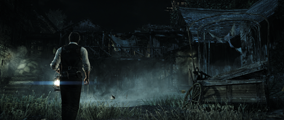
I was pretty impressed with the game considering it's IT5. It looks nothing like an IT5 game.
The store page says the minimum video driver is GTX 650, but I guess GTX 570 works too? If I'm not mistaken that's a better card. All my other specs are up and above (don't have them available to list as I'm away from home, sadly); it's just the video that could be an issue.
Then again, I'm thinking of getting a GTX 970 in the near future.
Then again, I'm thinking of getting a GTX 970 in the near future.

deeptech
Member
The store page says the minimum video driver is GTX 650, but I guess GTX 570 works too? If I'm not mistaken that's a better card. All my other specs are up and above (don't have them available to list as I'm away from home, sadly); it's just the video that could be an issue.
Then again, I'm thinking of getting a GTX 970 in the near future.
570 is better than 650 , you would be more than fine
Crimsonclaw111
Member
If you two say so. TEW looks good all around.
I was pretty impressed with the game considering it's IT5. It looks nothing like an IT5 game.
Runs nothing like an ID Tech 5 game either. Heh.
And yea, TEW looks better to me if only because the PC version actually has some AA.


TAJ
Darkness cannot drive out darkness; only light can do that. Hate cannot drive out hate; only love can do that.
whats the command to show fps? or is everyone using a third party program?
My numbers in this thread were from Riva Tuner.
CyberPunked
Member
What's there to explain? The Evil Within is an outstanding looking game.
Ground Zeroes and MGSV in general just look okay, its cross gen roots shine through. Which is why I'm disappointed a 280X doesn't easily run it at 60fps without any hitches.
Pity TEW suffers from IT5s megatexture pop-in issues, and no multi GPU support. God I hate that engine
The store page says the minimum video driver is GTX 650, but I guess GTX 570 works too? If I'm not mistaken that's a better card. All my other specs are up and above (don't have them available to list as I'm away from home, sadly); it's just the video that could be an issue.
Then again, I'm thinking of getting a GTX 970 in the near future.
Will be fine I think, downloaded the beta drivers and it sorted everything out for me and I'm running a 560ti. Not 1 noticeable drop in performance in the hour I've just played.
wanderingprostheyltite
Member
Runs nothing like an ID Tech 5 game either. Heh.
And yea, TEW looks better to me if only because the PC version actually has some AA.
Yeah personally I think TEW has some of the best art design/graphics for the year. Lighting and atmosphere is just top notch. Ground Zeroes opening looks slick as hell but a lot of that is great camera angles, once you get past all the slick and shiny surfaces there's nothing that crazy going on. Gameplay doesn't look nearly as impressive to me as well.
Snacks the sober sea lion
Member
Game runs really well when standing still, feels like 60 fps, but as soon as I start running around, binoculars, or aiming, I get huge drops/ stuttering.
GTX 560 Ti and i5 3570k
GTX 560 Ti and i5 3570k
R9 290x, and i7-4790k user here.
With everything turned to extra high I am getting a variable framerate from 40-60. It mostly hovers in the 50's, and drops to low 40's during intense action. There is a lot of stuttering.
One thing that I really dislike is that when crouching Snake's character model looks blurry. It's very distracting.
Performance should be a locked 60, imo...
With everything turned to extra high I am getting a variable framerate from 40-60. It mostly hovers in the 50's, and drops to low 40's during intense action. There is a lot of stuttering.
One thing that I really dislike is that when crouching Snake's character model looks blurry. It's very distracting.

Performance should be a locked 60, imo...
4770 and 290 and afaik it didn't drop below 55.R9 290x, and i7-4790k user here.
With everything turned to high I am getting a variable framerate from 40-60. It mostly hovers in the 50's, and drops to low 40's during intense action. There is a lot of stuttering.
One thing that I really dislike is that when crouching Snake's character model looks blurry. It's very distracting.
Performance should be a locked 60, imo...
Everything max at 1080p.
4770 and 290 and afaik it didn't drop below 55.
Everything max at 1080p.
I have everything set to to extra high. It also looks like Crossfire isn't working yet. AMD better release new drivers, lol.
Finally tested out the first mission on my rig and I am pleased with the performance.
Running the game at 1080p is not too demanding and on low settings the game gets a constant 60 fps with a few small dips. High settings makes the framerate go in pretty much every direction. Mostly staying around low 50s but with a lot of drops, some even in the low 30s in some areas.
FX-4130
7790 1 GB
8 GB RAM
Running the game at 1080p is not too demanding and on low settings the game gets a constant 60 fps with a few small dips. High settings makes the framerate go in pretty much every direction. Mostly staying around low 50s but with a lot of drops, some even in the low 30s in some areas.
FX-4130
7790 1 GB
8 GB RAM
Snacks the sober sea lion
Member
I get 60 and was occasionally dropping to 45 with SSAO and Screen Filtering on high. Turned them off and never dropped below 55, but the game still feels sort of stuttery. Like just very momentary freezes or something. It definitely doesn't feel like 45 fps.
SuperEpicGuy
Banned
Refreshing to see people get solid framerates on a new, high budget game. This is more like it.
MillionStabs
Banned
Eurf, for some reason that final cutscene after
has absolutely terrible performance. I'm talking 1-2 frames every 30 seconds so I can't even watch it, even trying to pause and skip the cutscene has massive lag.
Rest of the game runs fine, it's just that one part for some reason
Mother Base explodes and Boss is in his hospital bed thing
Rest of the game runs fine, it's just that one part for some reason
Eurf, for some reason that final cutscene afterhas absolutely terrible performance. I'm talking 1-2 frames every 30 seconds so I can't even watch it, even trying to pause and skip the cutscene has massive lag.Mother Base explodes and Boss is in his hospital bed thing
Rest of the game runs fine, it's just that one part for some reason
Same thing here. You running AMD? Hoping for a driver update, gonna have to lower some stuff.
Are there compatibility bits required to get AA forced using inspector? I've cranked it to 8x MSAA and 8xSGSSAA and there's still a lot of jaggies, so I'm not sure it's even taking effect. Framerate locked at 60 so it's hard to tell.
Before you ask, no I can't downsample because I'm on a G-SYNC monitor w/ SLI 980's.
Before you ask, no I can't downsample because I'm on a G-SYNC monitor w/ SLI 980's.
CheesecakeRecipe
Stormy Grey
Eurf, for some reason that final cutscene afterhas absolutely terrible performance. I'm talking 1-2 frames every 30 seconds so I can't even watch it, even trying to pause and skip the cutscene has massive lag.Mother Base explodes and Boss is in his hospital bed thing
Rest of the game runs fine, it's just that one part for some reason
Wasn't that part pre-rendered video? I could have sworn everything after the
Helicopter impact after Paz throws herself from the helicopter
Wasn't that part pre-rendered video? I could have sworn everything after thewas. I was super tired last night though so maybe I'm just misremembering things.Helicopter impact after Paz throws herself from the helicopter
Pretty sure it was pre-rendered.
Rwinterhalter
Neo Member
Seems only way I can get 60fps locked is by setting Lighting, Screen Filtering and SSAO on high. So yeaaa I'm playing the PS4 version, except with random drops here and there and some weird-ass momentary freezing I got in the opening cut-scene. This is a disappointing result for what is essentially a souped up PS3 game.
Even the lowest settings on the PC beat the PS4.
Snacks the sober sea lion
Member
Are there new video drivers that everyone is using or something? The game is stuttering like crazy for me. Seeing GPU usage dropping to 45-55% at various points.
Are there compatibility bits required to get AA forced using inspector? I've cranked it to 8x MSAA and 8xSGSSAA and there's still a lot of jaggies, so I'm not sure it's even taking effect. Framerate locked at 60 so it's hard to tell.
Before you ask, no I can't downsample because I'm on a G-SYNC monitor w/ SLI 980's.
DX11 game so no forcing AA is possible. Stuck with crappy in game FXAA that's activated with "Screening Filtering" at High.
Eurf, for some reason that final cutscene afterhas absolutely terrible performance. I'm talking 1-2 frames every 30 seconds so I can't even watch it, even trying to pause and skip the cutscene has massive lag.Mother Base explodes and Boss is in his hospital bed thing
Rest of the game runs fine, it's just that one part for some reason
That's a pre-rendered cut scene, and although I haven't seen it on PC yet the compression isn't great even on PS4 which is puzzling considering the massive amount of space on the disc and I would even wager it was 720p. No big deal though, it's simply the same footage put out over a year ago of
the aftermath of Mother Bases' destruction and the moments setting up PP.
DX11 game so no forcing AA is possible. Stuck with crappy in game FXAA that's activated with "Screening Filtering" at High.
Not true, post AA such as SMAA can be injected with a program like Radeon Pro for the AMD side. I use it for TR since the in game only has FXAA and SSAA which is too much for 60 fps at 1440p on my system.
EDIT: Sorry for the DP, and also I haven't tested Radeon Pro SMAA in GZ yet but as it works for TR I would think it would here too, although not being able to turn off the FXAA in game at this point kind of mutes the benefits of using SMAA as an alternative to the FXAA blurring.
MillionStabs
Banned
Same thing here. You running AMD? Hoping for a driver update, gonna have to lower some stuff.
Yeah, AMD core and GPU
Ok, finally got to try the game out, played about an hour. Maxed out, my framerate is hovering between the 48-56fps. Not bad. The perfect title for G-sync to do it's magic.
For those playing at home, my specs are:
Core i7-3770k @ 3.90GHz
32GB DDR3-1333MHz
GTX 670 2GB
Playing at 1080p.
For those playing at home, my specs are:
Core i7-3770k @ 3.90GHz
32GB DDR3-1333MHz
GTX 670 2GB
Playing at 1080p.
One thing that I really dislike is that when crouching Snake's character model looks blurry. It's very distracting.
Would highly suggest turning off Screen Filtering entirely. You lose the DOF completely but the whole image becomes much sharper and you can then apply AA via injector or drivers pretty easily. If you're scraping at 60 FPS, it will also probably allow you to get solid 60 without further compromises. The depth of field could be nice but its just not implemented in the best way so I personally prefer to leave it off entirely in exchange for a squeaky clean image quality.
Would highly suggest turning off Screen Filtering entirely. You lose the DOF entirely but the entire image becomes immensely sharper and you can apply AA via injector or drivers easily. If you're scraping at 60 FPS, it will also give probably allow you to get solid 60. The DOF could be nice but its just not implemented in the best way so I personally prefer to leave it off entirely in exchange for a squeaky clean image quality.
Don't you lose DOF in cutscenes that way? That's a big loss for a game with well-directed clips.
Konami should either tone down the DOF in gameplay or they should provide an option to disable DOF, but only during gameplay.

Don't you lose DOF in cutscenes that way? That's a big loss for a game with well-directed clips.
Konami should either tone down the DOF in gameplay or they should provide an option to disable DOF, but only during gameplay.
Unfortunately you do but the game actually has really well directed cutscenes and camera effects in terms of subtle fog and desaturation when things are far apart from each other. The characters stand out quite naturally from the backgrounds. I did not find the lack of DOF to be much of a problem in the last cutscene, for example, and in return I got crystal clear IQ. Still, personal choice, but if the blurring bothers you like it did with me, it's not so bad to just turn off entirely (until they implement a seperate AA / DOF option).
i5-4670k 3.4GHz
2GB 760
8GB RAM
128GB SSD
I initially had everything set to max and the beginning of the Ground Zeroes mission was stuck in the 50's and high 40's in 1080p. Also, high and extra high textures soak up 1.8GB of VRAM. I turned the textures and screen filtering down to high and it pretty much stayed in the high 50's.
Anyone else got similar performance on these specs?
2GB 760
8GB RAM
128GB SSD
I initially had everything set to max and the beginning of the Ground Zeroes mission was stuck in the 50's and high 40's in 1080p. Also, high and extra high textures soak up 1.8GB of VRAM. I turned the textures and screen filtering down to high and it pretty much stayed in the high 50's.
Anyone else got similar performance on these specs?
Recorded with Nvidia Shadow Play at 1920x1080 Max Settings with my new GTX 980.
http://youtu.be/iBfL8LL2QLk
Specs:
COOLER MASTER HAF X Blue Edition
COOLER MASTER Silent Pro Gold Series RS800-80GAD3-US 800W
COOLER MASTER Hyper 212 EVO
Intel Core i7-3770 Ivy Bridge 3.4GHz (3.9GHz Turbo)
EVGA 04G-2983-KR GeForce GTX 980 Superclocked 4GB 256-Bit GDDR5 ACX 2.0 PCI Express 3.0
ASRock Z77 Extreme4 LGA 1155 Intel Z77
G.SKILL Sniper Gaming Series 16GB (2 x 8GB) 240-Pin DDR3 SDRAM DDR3 1866 (PC3 14900)
Western Digital WD Black WD1002FAEX 1TB 7200 RPM SATA 6.0Gb/s 3.5" ASUS Black Blu-ray Drive SATA Model BC-12B1ST/BLK/B/AS
SAMSUNG 840 EVO MZ-7TE120BW 2.5" 120GB SATA III TLC Internal Solid State Drive (SSD)
http://youtu.be/iBfL8LL2QLk
Specs:
COOLER MASTER HAF X Blue Edition
COOLER MASTER Silent Pro Gold Series RS800-80GAD3-US 800W
COOLER MASTER Hyper 212 EVO
Intel Core i7-3770 Ivy Bridge 3.4GHz (3.9GHz Turbo)
EVGA 04G-2983-KR GeForce GTX 980 Superclocked 4GB 256-Bit GDDR5 ACX 2.0 PCI Express 3.0
ASRock Z77 Extreme4 LGA 1155 Intel Z77
G.SKILL Sniper Gaming Series 16GB (2 x 8GB) 240-Pin DDR3 SDRAM DDR3 1866 (PC3 14900)
Western Digital WD Black WD1002FAEX 1TB 7200 RPM SATA 6.0Gb/s 3.5" ASUS Black Blu-ray Drive SATA Model BC-12B1ST/BLK/B/AS
SAMSUNG 840 EVO MZ-7TE120BW 2.5" 120GB SATA III TLC Internal Solid State Drive (SSD)