
Marty Chinn
Member
With the release of PS3 Firmware 2.0, custom themes have now been added. Similar to the PSP, Sony has released a tool that will allow users to create their own themes. Basic knowledge of XML and some art skill is all that is needed.
SPECS FOR IMAGES
Wallpapers:
HD - 1920x1080 JPEG
SD - 640x480 JPEG
Theme Preview Img:
480x270 24bit PNG
Author Icon:
64x64 32bit PNG
Icon (for the theme):
64x64 32bit PNG
Icon (for xmb):
128x128 32bit PNG
exceptions: icon_photo_default, icon_photo_album_default (170x128 32bit PNG)
exceptions: icon_video_default, icon_video_album_default (228x128 32bit PNG)
Pointers:
48x48 32bit PNG
Notification Pop-up Img:
64x64 32bit PNG
TOOLS
PS3 Theme Compiler Tool
English
http://au.playstation.com/support/ps3/faqs/PS3_Custom_Theme_v101-E.zip
Japanese
http://www.jp.playstation.com/ps3/dl/tool/ps3_customtheme_tool_eula.html
To compile the sample, type the following from a command prompt:
p3tcompiler.exe sample\01\sample.xml
METHODS OF INSTALL
A) Download directly from the PS3 Web Browser
B) Download on your PC and place it on a flash card or USB device under the directory /PS3/THEME/
DOWNLOAD THEMES
Original

Air Paint

NeoGAF (m0dus)
http://www.filecrunch.com/file/~5yum47

MGS4 Theme (m0dus)
http://www.filecrunch.com/file/~h2edff

Okami (m0dus)(Fixed Ver)
http://www.filecrunch.com/file/~3qxv9u

Devil May Cry 4 (m0dus)
http://www.filecrunch.com/file/~86rdfc

Final Fantasy VII Theme (m0dus)
http://www.filecrunch.com/file/~nq4mvh

Classy Pink
http://cdn.jp.playstation.com/ps3update/dl/sampletheme/classypink.p3t

Nature
http://cdn.jp.playstation.com/ps3update/dl/sampletheme/nature.p3t

Pixels
http://cdn.jp.playstation.com/ps3update/dl/sampletheme/pixels.p3t

Sample
http://www.borgh.us/sample.p3t

Sfre (Not a direct D/L link to the PS3)
http://-kol.deviantart.com/art/Sfere-PlayStation-3-Themes-69323778

Sfre Black (Not a direct D/L link to the PS3)
http://-kol.deviantart.com/art/Sfere-PlayStation-3-Themes-69323778

Orange Skin
http://download75.mediafire.com/ht5wzhjgeidg/7nb0mj49vtg/OrangeSkin.p3t

Playstation Storm
http://vid.poocore.com/download/thumbnails/playstation storm.p3t

Apple Theme
http://www.sendspace.com/file/okcnc4

Shadow of the Collosus
http://www.filecrunch.com/file/~h2edf8

Portal Theme
http://www.filecrunch.com/file/~wlrmu8

Heavenly Live Play 3
http://jfblak.free.fr/FW2.0/theme p3t/theme/Liveplay3HS.p3t

Kingdom Hearts Theme (Septimus)
http://www.filecrunch.com/file/~1j13zx

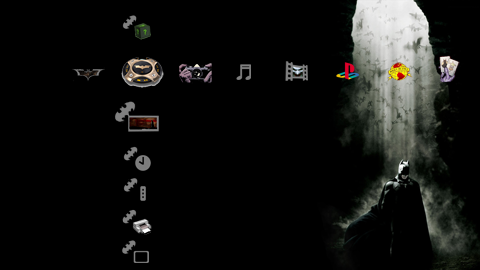
Batman (shagg_187)
http://www.filecrunch.com/file/~jab4qd
Wii Theme
http://jfblak.free.fr/FW2.0/theme p3t/theme/Wii.p3t

Half Life 2 Theme
http://www.mediafire.com/?4nj3mmmddqc

ADDITIONAL LINKS
Sony's Japanese Page of Themes (Already linked above)
http://www.jp.playstation.com/ps3/update/exp_ver200.html#theme_setting
SPECIAL THANKS
m0dus - awesome art skills and theme making
Dot50Cal - Hosting images, and screen grabs
So let's get cracking and start sharing themes here!
SPECS FOR IMAGES
Wallpapers:
HD - 1920x1080 JPEG
SD - 640x480 JPEG
Theme Preview Img:
480x270 24bit PNG
Author Icon:
64x64 32bit PNG
Icon (for the theme):
64x64 32bit PNG
Icon (for xmb):
128x128 32bit PNG
exceptions: icon_photo_default, icon_photo_album_default (170x128 32bit PNG)
exceptions: icon_video_default, icon_video_album_default (228x128 32bit PNG)
Pointers:
48x48 32bit PNG
Notification Pop-up Img:
64x64 32bit PNG
TOOLS
PS3 Theme Compiler Tool
English
http://au.playstation.com/support/ps3/faqs/PS3_Custom_Theme_v101-E.zip
Japanese
http://www.jp.playstation.com/ps3/dl/tool/ps3_customtheme_tool_eula.html
To compile the sample, type the following from a command prompt:
p3tcompiler.exe sample\01\sample.xml
METHODS OF INSTALL
A) Download directly from the PS3 Web Browser
B) Download on your PC and place it on a flash card or USB device under the directory /PS3/THEME/
DOWNLOAD THEMES
Original
Air Paint
NeoGAF (m0dus)
http://www.filecrunch.com/file/~5yum47
MGS4 Theme (m0dus)
http://www.filecrunch.com/file/~h2edff
Okami (m0dus)(Fixed Ver)
http://www.filecrunch.com/file/~3qxv9u
Devil May Cry 4 (m0dus)
http://www.filecrunch.com/file/~86rdfc
Final Fantasy VII Theme (m0dus)
http://www.filecrunch.com/file/~nq4mvh
Classy Pink
http://cdn.jp.playstation.com/ps3update/dl/sampletheme/classypink.p3t
Nature
http://cdn.jp.playstation.com/ps3update/dl/sampletheme/nature.p3t
Pixels
http://cdn.jp.playstation.com/ps3update/dl/sampletheme/pixels.p3t
Sample
http://www.borgh.us/sample.p3t
Sfre (Not a direct D/L link to the PS3)
http://-kol.deviantart.com/art/Sfere-PlayStation-3-Themes-69323778
Sfre Black (Not a direct D/L link to the PS3)
http://-kol.deviantart.com/art/Sfere-PlayStation-3-Themes-69323778
Orange Skin
http://download75.mediafire.com/ht5wzhjgeidg/7nb0mj49vtg/OrangeSkin.p3t
Playstation Storm
http://vid.poocore.com/download/thumbnails/playstation storm.p3t
Apple Theme
http://www.sendspace.com/file/okcnc4
Shadow of the Collosus
http://www.filecrunch.com/file/~h2edf8
Portal Theme
http://www.filecrunch.com/file/~wlrmu8
Heavenly Live Play 3
http://jfblak.free.fr/FW2.0/theme p3t/theme/Liveplay3HS.p3t
Kingdom Hearts Theme (Septimus)
http://www.filecrunch.com/file/~1j13zx
Batman (shagg_187)
http://www.filecrunch.com/file/~jab4qd
Wii Theme
http://jfblak.free.fr/FW2.0/theme p3t/theme/Wii.p3t
Half Life 2 Theme
http://www.mediafire.com/?4nj3mmmddqc
ADDITIONAL LINKS
Sony's Japanese Page of Themes (Already linked above)
http://www.jp.playstation.com/ps3/update/exp_ver200.html#theme_setting
SPECIAL THANKS
m0dus - awesome art skills and theme making
Dot50Cal - Hosting images, and screen grabs
So let's get cracking and start sharing themes here!


